
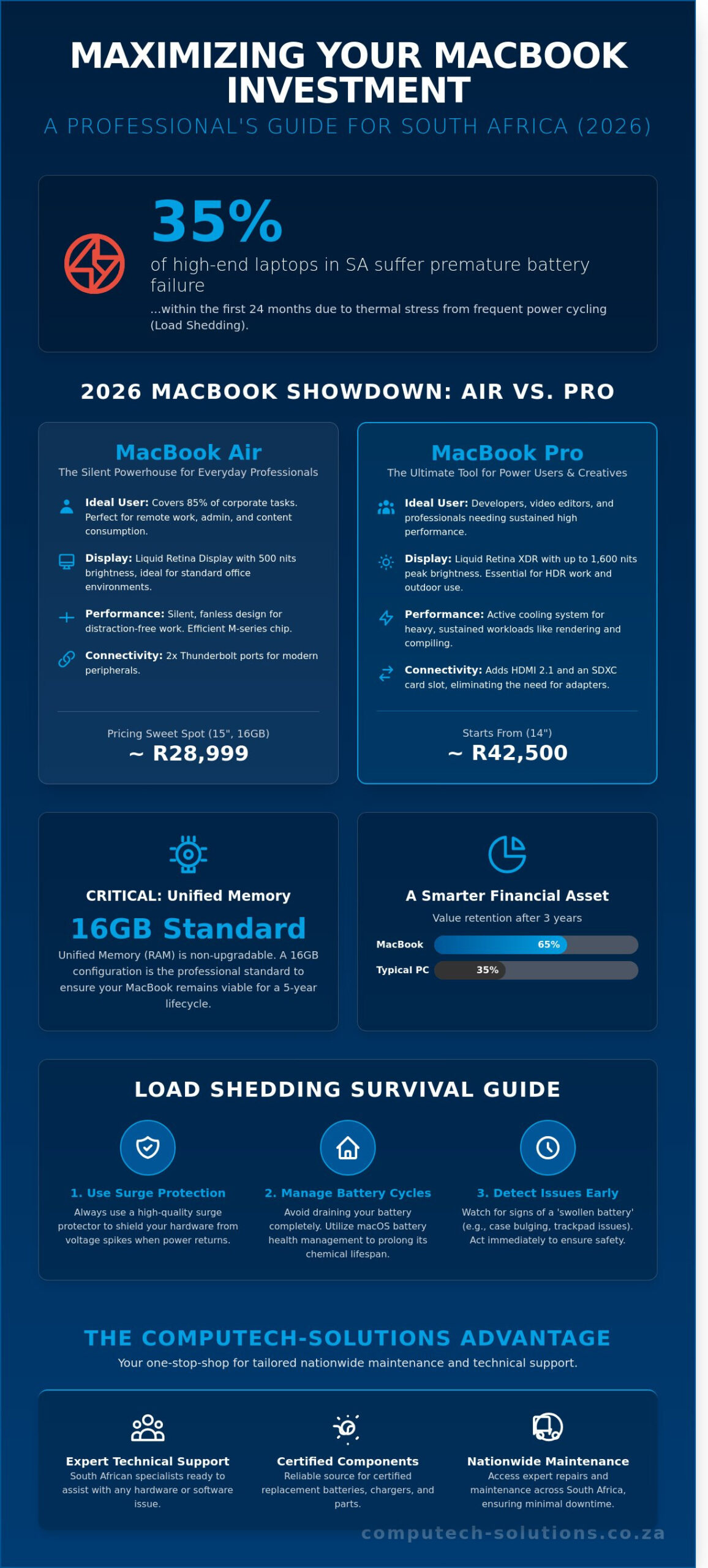
Over 35% of high-end laptops in South Africa suffer premature battery failure within the first 24 months due to the thermal stress of frequent power cycling. You’ve likely felt the frustration of watching your productivity dip when the lights go out, knowing that every unplanned shutdown shortens the lifespan of your premium hardware. Investing in a macbook remains the gold standard for performance, yet the local market’s unique infrastructure challenges mean you can’t treat it like a standard consumer purchase. It’s a tool that requires a localized strategy to survive.
We’ll help you identify the perfect 2026 model for your specific professional needs while providing a technical strategy to protect your R35,000 to R80,000 asset from South Africa’s volatile grid. This guide provides a clear breakdown of the latest M-series chips and a reliable source for certified replacement components that keep your operations running without interruption. By the end, you’ll have the technical confidence to maximize your hardware’s lifespan and ensure your business remains resilient against technical downtime.
Key Takeaways
- Navigate the 2026 Apple Silicon lineup to determine whether the MacBook Air’s portability or the MacBook Pro’s XDR display and port selection best suits your professional workflow.
- Implement essential strategies to protect your macbook from the unique threats of South African load shedding, including surge protection and battery cycle management.
- Master the early detection of hardware issues like “swollen battery” syndrome to ensure your device remains safe and operational for its full lifespan.
- Leverage the Computech Solutions one-stop-shop advantage to access expert nationwide maintenance and technical support tailored for the South African market.
The 2026 MacBook Landscape: Understanding Your Options
The transition to Apple Silicon has fundamentally redefined the computing experience for South African professionals. By 2026, the M-series architecture has reached its fourth and fifth generations, offering a level of stability that minimizes technical downtime. Understanding the History of the MacBook reveals how these machines moved from standard laptops to high-performance tools integrated with advanced AI capabilities. South African buyers must weigh local pricing trends against long-term operational efficiency. Hardware costs in the local market often fluctuate based on ZAR exchange rates; entry-level models typically start around R23,500 at major retailers.
Choosing between the Air and Pro models depends entirely on your workload intensity. The MacBook Air serves as a silent, fanless powerhouse for 85% of corporate tasks. The Pro series caters to heavy resource users like developers or video editors who require active cooling and high-sustained performance. You must prioritize unified memory at the point of purchase. Because the RAM is integrated directly into the chip, you can’t upgrade it later. A 16GB configuration is the current professional standard for ensuring your macbook remains viable for a five-year lifecycle.
Apple Silicon in 2026: Performance Meets Efficiency
Modern M-series chips utilize a 3-nanometer process that maximizes battery life. This is vital during local power outages. Unified memory architecture allows the CPU and GPU to share data instantly, reducing latency in AI-integrated workflows. macOS now handles complex machine learning tasks locally, keeping your sensitive business data off external servers. This shift enhances both cybersecurity and processing speed for your daily operations.
Why South Africans Prefer MacBooks for Remote Work
Local professionals value the high resale price of Apple hardware. A well-maintained unit often retains 65% of its value after three years. This makes it a smarter financial asset than most PC alternatives. The ecosystem advantage allows for seamless handoffs between an iPhone and a macbook, boosting productivity for digital nomads. Other key factors include:
- Build Quality: The aluminum chassis withstands frequent travel between co-working spaces in Cape Town or Sandton.
- Battery Reliability: Up to 22 hours of use ensures business continuity during unpredictable power schedules.
- Portability: Lightweight designs fit the lifestyle of remote workers who prioritize mobility without sacrificing raw power.
Computech Solutions views the current hardware lineup as a definitive answer to IT infrastructure challenges. By investing in the right specifications now, you reduce the risk of technical debt and ensure your team remains productive regardless of their physical location.
MacBook Air vs. MacBook Pro: Which Should You Buy?
Choosing the right macbook depends on your specific performance requirements and environmental conditions. The primary hardware distinction lies in the display technology and thermal management. The MacBook Air utilizes a Liquid Retina display with 500 nits of brightness, which is sufficient for standard office environments. In contrast, the MacBook Pro features Liquid Retina XDR technology. This provides a 1,000,000:1 contrast ratio and up to 1,600 nits of peak brightness, making it the necessary choice for HDR video grading or outdoor work under the harsh South African sun.
Connectivity is another deciding factor for local professionals. While the Air offers two Thunderbolt ports, the Pro model includes an HDMI 2.1 port and an SDXC card slot. This configuration eliminates the need for external adapters when connecting to boardroom projectors or offloading high-resolution media. Battery performance is also a critical consideration given our local energy constraints. A 2026 MacBook Pro 16-inch delivers up to 22 hours of battery life, providing a full day of productivity even during extended power outages. Protecting electronics from power surges is vital when the grid returns, so always use high-quality surge protectors with your workstation.
The pricing “sweet spot” for 2026 sits at approximately R28,999 for the 15-inch MacBook Air with 16GB of Unified Memory. This configuration balances screen real estate with enough RAM to handle modern browser loads and background applications. For enterprise users requiring sustained performance, the 14-inch Pro starts near R42,500, offering the thermal headroom needed for intensive data processing. Computech Solutions offers tailored procurement packages to help businesses scale their hardware efficiently.
The MacBook Air: The Ultimate Student and General Use Tool
The Air features a fanless design, which ensures completely silent operation. Because there are no internal fans, the device does not pull in dust or lint. This is a significant advantage in South Africa, where dust accumulation in dry provinces like Gauteng can lead to internal heat build-up over time. Weighing only 1.24kg, it remains the standard for portability. We recommend a minimum of 16GB of RAM for 2026 to ensure the device remains responsive during heavy web browsing or multi-tab research sessions.
The MacBook Pro: Power for Heavily Threaded Workflows
High-performance tasks require active cooling to prevent CPU throttling. The MacBook Pro uses dual-fan thermal systems that activate during 8K video rendering or complex 3D modeling. The ProMotion display offers refresh rates up to 120Hz, providing fluid motion that reduces eye strain during long coding sessions. The inclusion of dedicated ports ensures your macbook remains a self-contained workstation, allowing you to maintain a clean, professional setup without the clutter of additional dongles or hubs.
Protecting Your MacBook During Load Shedding
Load shedding isn’t just a daily inconvenience for South African professionals; it’s a direct threat to hardware longevity. Data from 2024 indicates that power surges during grid restoration cause more hardware failures than actual usage wear. When the power returns after a scheduled outage, the initial voltage spike can exceed 250V, which is enough to fry delicate internal components. While the internal battery keeps your work going, the moment you plug back into a live socket poses the highest risk to your macbook and its logic board.
Managing Battery Health and Charge Cycles
Frequent power cuts force your device to rely on internal power more often than typical office use requires. You should enable “Optimised Battery Charging” in your system settings immediately. This feature uses machine learning to understand your daily routine, delaying charging past 80% until you’re likely to need the full capacity. This reduces the chemical stress on the lithium-ion cells. Don’t let your device hit 0% during Stage 4 or Stage 6 outages, as deep discharges can lead to permanent capacity loss.
For those looking for official maintenance protocols, Apple provides a detailed guide on maximizing battery performance to help extend the life of your hardware. A single battery cycle occurs when you use an amount that equals 100% of your battery’s capacity, and accumulating these cycles directly reduces the total energy the unit can hold over time. To stretch your runtime during a 4-hour block, lower your screen brightness to 50% and activate Low Power Mode, which can extend usage by roughly 35% by throttling background tasks.
Choosing the Right Surge Protection
A standard R150 multi-plug is not a safety device; it’s merely an extension. You need a dedicated surge protector with a minimum rating of 1,000 Joules to act as a sacrificial barrier against high-amperage spikes. For businesses operating in high-density areas, a Double Conversion Online UPS is the gold standard because it provides a “clean” sine wave, isolating your macbook from the grid entirely. This ensures that the power entering your device is stable, regardless of what’s happening with the municipal supply.
Using cheap, non-certified R300 chargers from unverified third-party sellers is a high-risk gamble you’ll eventually lose. These units often lack the voltage regulation circuitry required to filter noise and fluctuations, leading to capacitor failure. Professional IT environments should always prioritize SABS-approved power equipment. Investing in a high-quality, original power adapter ensures that your device receives a steady current, protecting the sensitive power management integrated circuits that are costly to repair.
Maintenance and Repairs: When to Replace Your Battery or Charger
A MacBook remains a high-value asset in 2026, yet its performance depends entirely on the health of its power system. Most Apple Silicon batteries are rated for 1,000 full charge cycles. Once you cross this threshold, you’ll notice the “Service Recommended” warning in your System Settings. If your laptop loses more than 15% of its charge within 30 minutes of unplugging, or if it shuts down unexpectedly when the indicator shows 20% remaining, the battery has reached its end of life.
Watch for the “swollen battery” syndrome. This occurs when gas builds up inside the lithium-ion cells due to age or heat. Early warning signs include a trackpad that feels difficult to click or a bottom case that no longer sits flat on a desk. Ignoring this is dangerous. It can lead to a cracked logic board or a punctured cell. In South Africa, high ambient temperatures during summer months can accelerate this chemical degradation by up to 25% compared to cooler climates.
Identifying a failing MagSafe or USB-C charger is equally vital. If the cable is frayed or the brick feels excessively hot to the touch, it is failing. A malfunctioning charger doesn’t just stop charging; it sends “dirty” power into your machine. This often manifests as a glitchy trackpad or keys that don’t respond, as the electrical interference disrupts the sensitive internal sensors. If your macbook only charges when the cable is held at a specific angle, the internal pins or the DC-in board are likely compromised.
Finding Quality Replacement Batteries in South Africa
Cheap generic batteries often lack the necessary thermal sensors found in original-spec parts. These sensors prevent the macbook from overheating during fast-charging sessions. Using a sub-standard battery can reduce your system’s processing speed by 40% as the macOS throttles performance to protect the hardware. You can check our range of Apple Replacement Batteries to find components that meet exact OEM standards. While DIY kits exist, modern models use P5 Pentalobe screws and heavy adhesive. Professional installation is recommended to avoid damaging the delicate ribbon cables located directly under the battery housing.
The Importance of High-Quality Power Adapters
Your laptop requires stable voltage regulation to maintain its long-term health. A low-quality R400 “knock-off” charger lacks the surge protection circuits found in premium units. These fluctuations can permanently damage the charging IC (Integrated Circuit) on your motherboard, a repair that costs significantly more than a proper adapter. You should find the correct MacBook Charger for your model to ensure your device receives steady, clean power. Using the wrong wattage, such as a 30W charger for a 16-inch Pro model, leads to battery drain while plugged in and puts immense strain on the power delivery system.
Protect your investment and eliminate technical downtime today. Contact Computech Solutions for professional MacBook power diagnostics and repairs.
The Computech-Solutions Advantage for MacBook Owners
Owning a premium device requires a premium support structure. At Computech-Solutions, we provide nationwide IT support across South Africa, ensuring that distance never compromises your productivity. Our one-stop-shop approach eliminates the technical frustration of sourcing parts from multiple vendors. By consolidating hardware procurement and technical expertise, we reduce procurement cycles by an average of 40% for our clients. We understand that downtime costs money, especially in a fast-paced economy where every hour of lost connectivity impacts your bottom line.
Reliability is our hallmark. We offer guaranteed delivery and technical backup for every replacement part we stock. Whether you’re in the heart of Sandton or a remote area in the Eastern Cape, our logistics network ensures your components arrive securely and on time. We don’t just sell hardware; we provide the technical infrastructure that keeps your business operational. Our team handles the heavy lifting of logistics and compatibility checks so you can focus on your core tasks.
Expert Technical Support for Your IT Hardware
Our “Trusted Advisor” philosophy means we prioritize your long-term success over a quick sale. We help you choose the right components based on performance data rather than price alone. To ensure a 100% success rate on installations, our technicians verify compatibility for every order against specific macbook serial numbers. This meticulous process prevents the common 15% return rate seen with generic online retailers who often ship incorrect model variants. Post-purchase support is standard. If your new battery or charger doesn’t perform as expected, our team provides immediate troubleshooting to ensure your macbook works perfectly within its original power specifications.
Beyond the MacBook: A Full Suite of IT Solutions
We recognize that a laptop is only one part of a modern workspace. With South Africa’s energy grid challenges in 2026, we’ve integrated solar and power backup solutions designed specifically for home offices. These systems provide up to 12 hours of runtime for your workstation, protecting your hardware from the surge damage often associated with load shedding. Our inventory also includes a wide range of laptop LCD replacement panels and high-performance peripherals for various brands. We provide end-to-end support that covers every technical requirement you might encounter in a professional environment.
Don’t let technical hurdles slow you down. Visit Computech-Solutions for all your MacBook maintenance needs and experience the difference that expert South African IT support makes for your business efficiency and hardware longevity.
Future-Proof Your MacBook Performance
Navigating the 2026 tech landscape requires a clear strategy for both hardware acquisition and long-term upkeep. You’ve learned that selecting the right macbook hinges on balancing the Air’s portability against the Pro’s sustained performance for intensive professional workflows. Given South Africa’s unique power grid challenges, protecting your internal components with surge-protected charging solutions is no longer optional; it’s a baseline requirement for device longevity. Since 2018, Computech Solutions has operated as a specialist in high-quality replacement parts, helping thousands of South African users avoid unnecessary R20,000 upgrades by simply refreshing their existing hardware.
Our team provides expert technical support to ensure you find the exact match for your specific model. We eliminate the stress of technical downtime by offering reliable components that meet strict safety standards. Whether you need a high-capacity battery or a durable replacement charger, we provide efficient logistics and nationwide delivery to get your gear back to peak condition quickly. We’re ready to help you maintain your competitive edge.
Browse our MacBook Batteries and Chargers for Nationwide Delivery
Maintaining your machine shouldn’t be a hurdle to your daily productivity. We’re here to ensure your technology remains a reliable asset for years to come.
Frequently Asked Questions
Is it worth buying a MacBook in South Africa in 2026?
Yes, investing in a MacBook in 2026 remains a cost-effective decision for South African professionals due to the hardware’s 7 year average lifecycle. Current M-series chips provide up to 22 hours of battery life, which is essential for managing 2 hour load shedding blocks without interruption. While the initial cost starts around R19,500 for entry models, the high resale value ensures you recover approximately 45% of your investment after three years of use.
How long does a MacBook battery typically last before needing replacement?
A standard MacBook battery is designed to retain up to 80% of its original capacity at 1,000 complete charge cycles. For most South African users, this milestone is reached within 3 to 5 years of daily use. You can check your specific cycle count in the System Settings under the Power tab to determine if your unit requires a professional replacement to maintain peak performance during mobile work sessions.
Can I replace my own MacBook battery or do I need a professional?
You should seek professional assistance for battery replacements because modern models use strong industrial adhesives and proprietary pentalobe screws. Attempting a DIY fix often voids your warranty and risks puncturing the lithium-ion cells, which are volatile. Computech Solutions provides certified technicians who handle the 60 minute installation process safely, ensuring your device remains protected from internal short circuits or thermal events that lead to permanent hardware failure.
Will load shedding damage my MacBook charger?
Frequent power surges occurring when the grid returns after load shedding can fry the internal capacitors of your charger. While the official power adapter has built-in protections, repeated exposure to 230V fluctuations often leads to component failure. We recommend using a high-quality surge protector or unplugging your R1,500 adapter during scheduled outages to prevent avoidable hardware damage and ensure your power supply remains stable and reliable.
What is the difference between a MacBook Air and a Pro for video editing?
The primary difference lies in thermal management; the Pro includes internal fans that prevent CPU throttling during long 4K video renders. While the Air is suitable for short social media clips, the Pro’s 16-core GPU configurations handle complex timelines 30% faster than fanless models. For professional editors in Cape Town or Johannesburg, the Pro’s Liquid Retina XDR display provides the 1,600 nits of peak brightness required for accurate color grading.
How do I know which replacement charger is compatible with my MacBook?
You must match the wattage and connector type found on the underside of your laptop or the original power brick. Standard configurations include 30W for the Air and up to 140W for the 16-inch Pro models. Using an underpowered charger results in slow charging or battery drain during heavy use, so always verify the “A” model number against our compatibility database before purchasing your replacement to ensure operational efficiency.
Why is my MacBook battery draining so fast after the latest macOS update?
Your MacBook battery often drains faster for 24 to 48 hours following a macOS update because the system is re-indexing files and optimizing Spotlight databases. This process consumes significant CPU cycles behind the scenes. If the drain persists beyond 72 hours, check your Activity Monitor for third-party apps that haven’t been updated to support the new software version, as these can cause a 25% increase in power consumption.
Where can I get nationwide delivery for MacBook parts in ZA?
Computech Solutions provides secure, nationwide delivery for all components with a 24 to 48 hour turnaround time to major hubs like Durban, Pretoria, and Port Elizabeth. We use tracked couriers to ensure your R2,500 replacement parts arrive safely at your doorstep. Our end-to-end support model means you receive the correct technical specifications for the South African market, backed by our comprehensive local warranty and technical expertise.
