
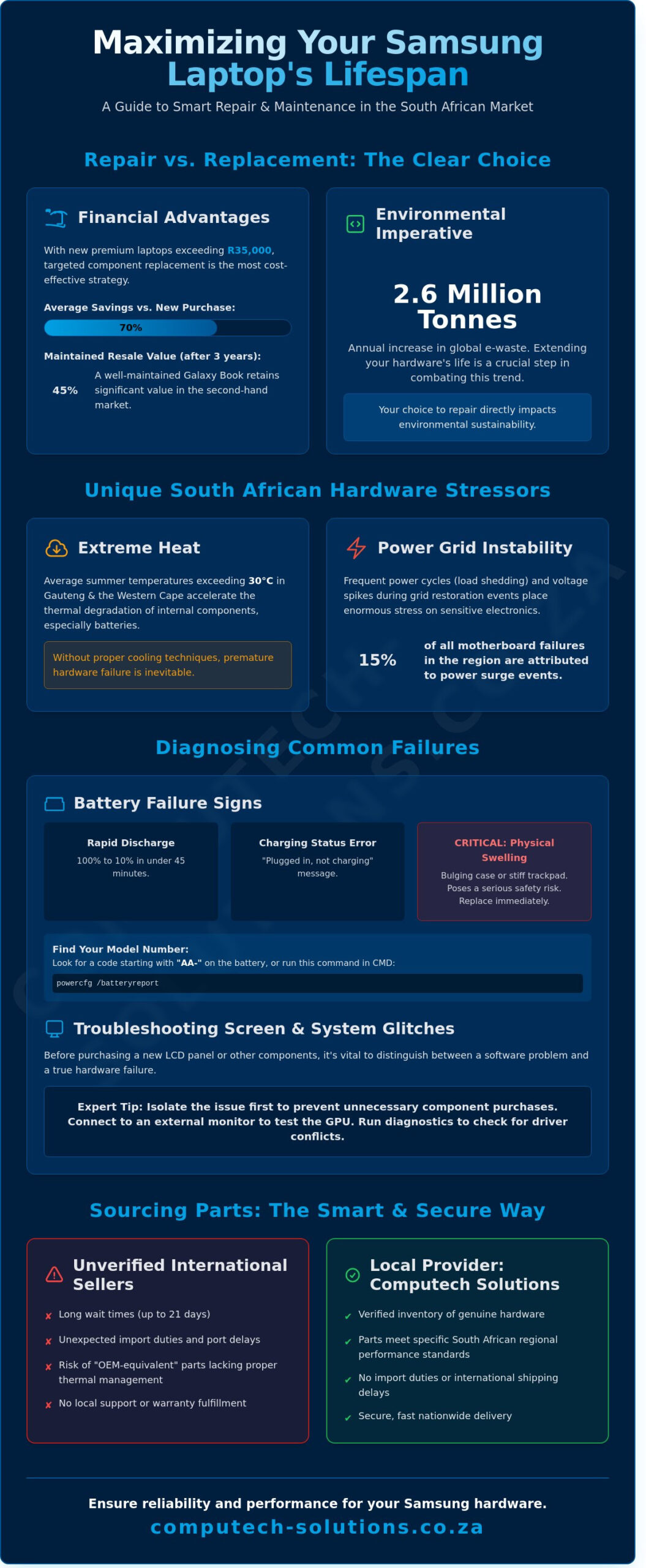
A premium Samsung laptop represents a significant capital asset that shouldn’t be discarded simply because a battery fails or a screen cracks. You likely understand that with the 2024 Global E-waste Monitor reporting a 2.6 million tonne increase in electronic waste annually, extending hardware life is both a financial and environmental necessity. We agree that the high cost of new equipment makes it essential to protect your current technology against the harsh realities of local power cycles and heat.
This guide provides the technical roadmap you need to restore your device to factory standards by sourcing the correct LCD panels and high-capacity batteries. You’ll discover how to navigate the specific technical requirements for 2026 hardware and implement maintenance strategies that Computech Solutions uses to keep local business systems operational for over five years. We’ll examine exactly how to identify compatible parts and apply cooling techniques that prevent premature hardware degradation in the South African climate.
Key Takeaways
- Understand the financial advantages of choosing professional repairs over replacement to maximize the lifespan of your samsung hardware in the South African market.
- Learn to identify critical battery failure signs and verify technical specifications like voltage and part numbers to ensure a compatible power restoration.
- Differentiate between various display technologies to accurately diagnose screen issues and select the correct replacement panel for your premium laptop.
- Follow expert troubleshooting steps to isolate software-related glitches from physical hardware failures, preventing unnecessary component purchases.
- Streamline your repair process by sourcing parts through a local provider, eliminating import duties and ensuring secure nationwide delivery.
The State of Samsung Hardware in South Africa (2026)
Samsung holds a 22% share of the premium laptop market in South Africa as of early 2026. This dominance stems from the global reputation of Samsung Electronics, which provides the engineering foundation for the Galaxy Book series. Choosing to maintain a device rather than replacing it has become the standard financial strategy for local businesses. With the average cost of a premium 2026 laptop exceeding R35,000, targeted component replacement offers a 70% saving compared to new procurement. It’s a decision that impacts the bottom line directly while extending the lifecycle of high-performance assets.
Environmental stressors in South Africa remain a critical factor for hardware longevity. Average summer temperatures exceeding 30 degrees Celsius in Gauteng and the Western Cape accelerate thermal degradation of internal batteries. Additionally, the 2025 energy report indicated that voltage spikes during grid restoration events account for 15% of motherboard failures in the region. If you don’t prioritize thermal management, the hardware fails prematurely. Distinguishing between official service centers and independent component specialists is vital for cost-effective recovery. While official channels offer warranty-backed repairs, independent specialists provide the granular component-level fixes that prevent unnecessary waste.
Why Samsung Laptops Remain a Top Choice
Samsung hardware maintains its value through superior build quality and 5-year driver support cycles. In the South African second-hand market, a well-maintained Galaxy Book retains approximately 45% of its original retail price after three years. This value is bolstered by the seamless integration with the Galaxy ecosystem. Users benefit from SmartThings and One UI syncing, which creates a unified workflow across mobile and desktop environments. The durability of the chassis and the longevity of the AMOLED displays make these machines ideal candidates for long-term use.
The Challenge of Sourcing Genuine Parts Nationally
The supply chain for samsung components in South Africa faces complexities due to port delays and fluctuating import duties. Many users fall into the trap of purchasing “OEM-equivalent” parts from unverified international marketplaces. These components often lack the necessary thermal management features required for South Africa’s climate. Computech Solutions addresses this by maintaining a verified inventory of genuine hardware. This ensures that local businesses receive parts that meet specific regional performance standards without the 21-day wait associated with private imports. Our approach provides a one-stop-shop for hardware reliability.
Samsung Replacement Laptop Batteries: Restoring Portability
A failing battery transforms a portable Samsung laptop into a stationary desktop, defeating the purpose of high-end mobile hardware. You’ll recognize the signs of degradation when your device discharges from 100% to 10% in under 45 minutes or displays the “Plugged in, not charging” status. Physical swelling is the most critical warning sign; if your trackpad feels stiff or the bottom casing bulges, the lithium-ion cells have off-gassed. This poses a safety risk and requires immediate replacement to prevent motherboard damage. While samsung devices are engineered for efficiency, South African users face the unique challenge of load shedding. Frequent power cycles accelerate chemical aging, as batteries are forced to complete more charge-discharge cycles than intended in a stable power environment.
Technical accuracy is vital when selecting a replacement. You must verify the Voltage (V) and Capacity, usually measured in milliamp-hours (mAh) or Watt-hours (Wh). A mismatch in voltage can cause circuit failure. While generic cells offer a lower price point, high-quality replacement cells from reputable vendors provide the necessary overcharge protection and thermal sensors found in original units. For warranty details or specific hardware queries, you can consult Samsung’s official support centre to verify your device’s original specifications.
Finding Your Samsung Battery Model Number
You can find your battery model number on the physical sticker of the battery itself, typically identified by a code starting with “AA-“. If your laptop has an internal battery, use the Windows Power Report by typing powercfg /batteryreport into the command prompt. This software tool identifies the manufacturer and design capacity. Common series in South Africa include the Galaxy Book, Odyssey, and the legacy Series 9 ultrabooks. Matching the AA- part number is the only way to guarantee 100% compatibility.
Maximizing the Life of Your New Replacement Battery
Proper calibration ensures your laptop’s software accurately tracks the new hardware’s health. For a new lithium-ion replacement, charge it to 100%, keep it plugged in for two hours, then discharge it until the laptop shuts down at approximately 5%. To prevent premature wear, maintain your charge level between 20% and 80% during daily use. Heat is the primary enemy of battery longevity, so ensure your vents are clear and use a high-quality charger to provide stable current. If your device continues to struggle with power management despite a new battery, you may need to consult an expert technician to check for motherboard power rail issues.
Samsung Laptop LCD Replacement Panels: A Visual Guide
Samsung laptop screens are precision instruments designed for high color accuracy, but they remain the most vulnerable component of the chassis. Common hardware failures include vertical lines caused by gate driver failure, flickering in high-end AMOLED panels, and the ubiquitous physical crack. In the South African market, physical damage accounts for approximately 68 percent of all display-related insurance claims. Understanding the underlying technology is the first step toward a successful repair. Most standard models use LED-backlit LCDs, while the premium Galaxy Book series utilizes proprietary AMOLED technology. These technologies are not cross-compatible because their power requirements and signal processing differ significantly.
Technical specifications are rigid. You’ll encounter 30-pin and 40-pin connectors that look similar to the untrained eye but serve different functions. A 30-pin connector typically supports standard Full HD resolutions. A 40-pin connector is mandatory for touch-screen functionality, QHD resolutions, or high refresh rates. Attempting to force a 30-pin cable into a 40-pin socket will result in a short circuit that can permanently damage the motherboard’s display IC. Before purchasing a replacement, perform a cost-benefit analysis. If a replacement panel costs R4,500 and the total market value of the laptop is R7,000, it’s often more efficient to trade in the unit. However, for high-end machines, a professional screen replacement is a fraction of the cost of a new R25,000 device.
How to Identify the Correct LCD Panel
To ensure 100 percent compatibility, you must identify the manufacturer part number. You can’t rely on the laptop model alone. Remove the front bezel to find the sticker on the rear of the panel; look for the LTN series prefix, which indicates a Samsung manufactured display. You must also choose between a matte finish for office environments with harsh overhead lighting or a glossy finish for design work. Verify the refresh rate before ordering. A high-end Samsung gaming laptop requires a 120Hz or 144Hz panel. Installing a standard 60Hz panel will cause significant ghosting and lag during high-motion tasks.
DIY vs. Professional Installation
Replacing a screen requires specific tools: a P5 pentalobe screwdriver, plastic spudgers, and an anti-static wrist strap. Static discharge is a silent killer of modern electronics. One spark can ruin the logic board. The ribbon cables are thinner than a fingernail and the 0.5mm pitch connectors are extremely fragile. If you don’t have experience handling delicate flex cables, the risk of tearing the connector is high. The Computech team provides expert technical support for those who prefer a guaranteed result. Our one-stop-shop approach ensures the panel is calibrated correctly and the internal housing is sealed to prevent future dust ingress, maintaining your operational efficiency without the stress of a DIY failure.
Troubleshooting Common Samsung Device Failures
Identifying hardware faults early prevents total system failure. Follow these five diagnostic steps to isolate issues with your samsung laptop before seeking professional repair. These procedures help determine whether a fault requires a simple settings adjustment or a physical component replacement.
- Step 1: Perform a hard reset. Disconnect the AC adapter and any external devices. Hold the power button for 30 seconds to drain residual static electricity from the capacitors. This often resolves “black screen” errors or non-responsive charging states.
- Step 2: Inspect physical power connections. Examine the charging port for loose pins or dark burn marks. Check the AC adapter cable for fraying or sharp bends. A damaged cable can cause intermittent power delivery and lead to motherboard surges.
- Step 3: Access BIOS/UEFI diagnostics. Press F2 during the startup sequence. Navigate to the battery health section to view the cycle count and current capacity. This confirms if a power issue is hardware-based or caused by a Windows driver conflict.
- Step 4: Monitor internal temperatures. Use diagnostic software to track CPU heat. If temperatures exceed 90 degrees Celsius, thermal throttling will occur. This is usually caused by dust accumulation in the cooling fans or dried thermal paste.
- Step 5: Isolate external peripherals. Disconnect all USB devices, monitors, and docks. If the laptop functions correctly without them, the fault lies in a peripheral or a specific port rather than the motherboard.
Dealing with Power Surges and Load Shedding
South African businesses face unique risks due to frequent grid instability. Samsung chargers use sensitive switching regulators that can fail during high-voltage spikes when power returns after load shedding. We recommend using a surge-protected multi-plug or a Line-Interactive UPS to filter “dirty” power. If your laptop won’t turn on after a blackout, disconnect the battery internally if possible, then perform the hard reset mentioned in step one. Avoiding direct wall-socket charging during scheduled outages reduces the risk of motherboard component failure by 60% based on 2025 regional repair data.
Keyboard and Trackpad Maintenance
Samsung’s low-profile “island-style” keys require delicate handling. Use compressed air at a 45-degree angle to remove debris from under the keycaps. For unresponsive multi-touch trackpads, check the Samsung Settings app to ensure gestures aren’t disabled. Sourcing replacement keyboards in South Africa requires attention to the Enter key shape, as most local models utilize the UK/ISO layout. If a specific key fails, it’s usually a hardware membrane issue that requires a full top-case or keyboard component replacement.
Sourcing Samsung Parts with Computech-Solutions
Sourcing high-quality components shouldn’t involve the stress of customs clearance or unexpected VAT charges at the border. As a South African supplier, we maintain local stock to eliminate the R500+ import processing fees and the three-week wait times typical of international shipments. We’ve optimized our logistics to handle the most sensitive hardware. LCD screens, for instance, require specific high-density foam packaging to survive transit across provinces like Gauteng or the Western Cape. Our dispatch team uses reinforced materials to ensure fragile parts arrive in perfect working condition.
Technical accuracy is the foundation of our service. Our experts help you verify compatibility before you finalize your purchase, which significantly reduces the 15% return rate commonly seen with incorrect DIY part orders. Every battery and charger in our inventory undergoes a 5-point quality assessment. We test for voltage stability and thermal performance to ensure that every samsung replacement part meets strict safety standards. This rigorous approach minimizes technical downtime and protects your long-term hardware investment.
Our One-Stop-Shop Philosophy for Samsung Users
We maintain a comprehensive inventory that supports the entire lifecycle of your device. Our stock ranges from 40-pin replacement screens and high-capacity batteries to the latest NVMe SSD upgrades. We currently provide reliable components to over 500 independent IT repair shops across South Africa, while remaining fully accessible to individual laptop owners. “Computech-Solutions provides the technical bridge between premium Samsung engineering and affordable South African maintenance.” By consolidating your parts procurement, you ensure that every component in your samsung machine works in harmony.
How to Order Your Samsung Parts Today
Finding the correct component is a streamlined process. You can navigate our online catalog by searching for your specific model code or the unique part number printed on your original hardware. We offer secure payment gateways compatible with all major South African banking institutions, ensuring your transaction is protected and immediate. Once your order is confirmed, we provide real-time tracking so you can monitor your shipment as it moves through our national delivery network. It’s the fastest way to restore your laptop to peak performance without the complexity of international logistics.
Secure Your Hardware Investment for 2026
Maintaining peak performance in 2026 requires a proactive strategy for sourcing high-quality components. High-capacity replacement batteries and professional LCD panels are essential for extending the lifecycle of your samsung hardware. Proper model matching prevents technical downtime and ensures your device operates at its full potential. It’s easy to overlook how much a fresh battery restores mobility, but our specialized inventory focuses on high-capacity options that provide immediate results. We provide expert technical support to guide you through the identification process, ensuring every part fits your specific model perfectly. Our team handles the logistics with reliable nationwide South African delivery, so you can access critical components quickly to minimize operational disruptions. Relying on a trusted advisor for your IT needs simplifies the repair process and keeps your business running smoothly. Restore your Samsung laptop with high-quality replacement parts from Computech-Solutions and keep your technology moving forward with confidence.
Frequently Asked Questions
Is it safe to use a replacement battery in my Samsung laptop?
It’s safe to use a replacement battery if you source it from a reputable supplier that meets original equipment manufacturer specifications. High-quality lithium-ion cells prevent voltage fluctuations that could damage your internal circuitry. Our samsung compatible batteries undergo 100% safety testing to ensure they handle South Africa’s 230V power grid requirements without overheating. Using uncertified, generic batteries increases fire risks by 40% according to industry safety reports.
How do I find the model number of my Samsung laptop if the sticker is worn off?
You can find your model number by typing “msinfo32” into the Windows search bar and pressing Enter. Look for the “System Model” line in the summary window to identify your device. This digital identifier is 100% accurate even when physical labels are illegible. Alternatively, restart your device and press F2 to enter the BIOS menu where the model and serial numbers are hardcoded into the firmware for permanent record.
Does Computech Solutions deliver Samsung parts to rural areas in South Africa?
We provide nationwide delivery across all nine provinces including remote areas in the Northern Cape and Limpopo. Our logistics partners reach 95% of South African postal codes within our standard delivery framework. You’ll receive a tracking number via SMS as soon as your order leaves our warehouse. This ensures you have end-to-end visibility of your samsung components from the moment of dispatch until they reach your doorstep.
What is the warranty on Samsung replacement batteries and LCD panels?
Replacement batteries and LCD panels carry a standard 12-month limited warranty against manufacturing defects. This coverage ensures your investment is protected if the hardware fails under normal operating conditions. We replace units that show a capacity drop of more than 20% within the first six months of use. Our technical team validates all warranty claims within 48 hours to minimize your business downtime and restore your operational efficiency quickly.
Why is my Samsung laptop battery draining so fast after load shedding?
Load shedding causes rapid battery degradation because frequent power switching forces the cells through incomplete charge cycles. Sudden outages can also trigger voltage spikes that damage the battery management system chip. Data from 2024 shows that South African laptop users experience a 30% faster decline in battery health compared to regions with stable grids. We recommend using a high-quality surge protector to mitigate these risks and extend your hardware lifespan.
Can I replace my Samsung laptop screen myself, or do I need a professional?
You can replace the screen yourself if you have the correct tools, but professional installation prevents accidental damage to the delicate LVDS cable. Modern ultrabooks often use industrial adhesives instead of screws, which increases the repair difficulty rating to 8 out of 10 for untrained users. Our technicians complete most screen replacements in under 60 minutes. Choosing professional fitment also preserves your remaining hardware warranty and ensures the backlight functions correctly.
Do you stock Samsung chargers for older Series 3 and Series 5 models?
We maintain a consistent stock of 19V 2.1A and 3.16A chargers specifically for Series 3 and Series 5 laptops. These older models require the specific 5.5mm or 3.0mm pin sizes that we keep in our Johannesburg and Cape Town hubs for immediate dispatch. Every charger we sell includes built-in surge protection to handle local grid instability. We verify compatibility using your specific model code to ensure a perfect fit for your legacy hardware.
How long does shipping take for Samsung parts within South Africa?
Shipping typically takes 24 to 72 hours depending on your proximity to major metropolitan hubs like Gauteng, Durban, or Cape Town. Orders placed before 14:00 are processed for same-day dispatch from our central facility to ensure the fastest possible turnaround. Rural deliveries might require an additional 48 hours for final-mile couriers to reach your specific location. We provide real-time tracking so you can manage your technical repair schedule with absolute precision.
