
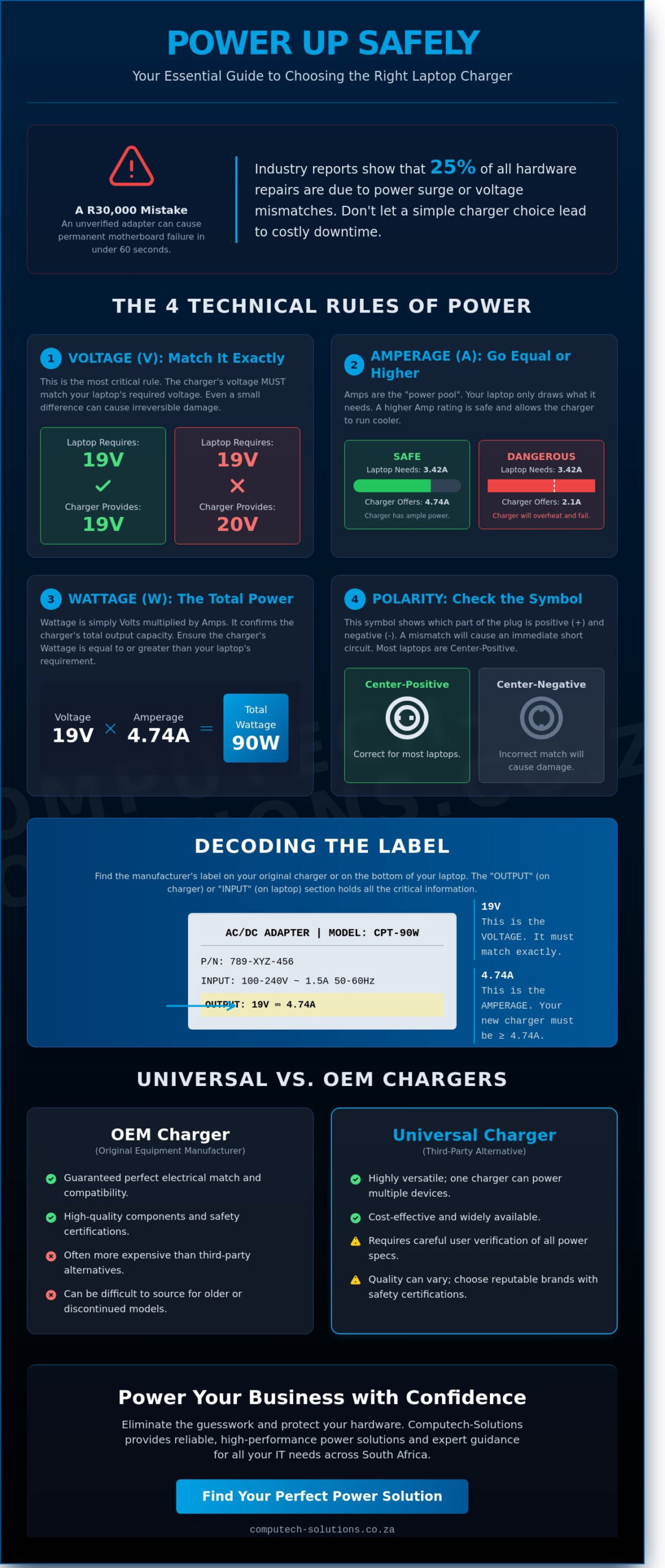
On October 14th, a senior analyst in Sandton plugged an unverified power adapter into their R30,000 workstation, only to witness a permanent motherboard failure within 60 seconds. This avoidable disaster highlights why 25% of hardware repairs involve power surge or voltage mismatches according to 2023 industry reports. It’s natural to feel hesitant when you’re staring at a wall of technical labels; the fear of frying your primary business tool is a significant stressor. Selecting a reliable universal charger shouldn’t be a guessing game that puts your hardware at risk.
We agree that the technical gap between understanding Volts and Amps often leads to operational downtime, especially when you’re searching for replacements for niche or older laptop models. This guide empowers you to master the technical essentials of power management so you can confidently select hardware that matches your device’s specific requirements. You’ll learn how to decode manufacturer labels, verify safety certifications, and secure a high-performance power solution delivered to your office anywhere in South Africa.
Key Takeaways
- Learn why matching exact voltage specifications is critical to preventing hardware damage and ensuring long-term device stability.
- Understand the “Amperage Rule” to identify why higher current ratings are safe while underpowered adapters pose a risk to your electronics.
- Master the selection process for a universal charger by identifying the correct interchangeable tips and verifying physical compatibility before connecting power.
- Evaluate the cost and performance trade-offs between brand-specific OEM adapters and versatile third-party alternatives to find the most efficient solution for your needs.
- Follow a streamlined two-step verification process to safely power your equipment with expert guidance from South Africa’s trusted IT partner.
What is a Universal Charger and How Does It Work?
A What is a Universal Charger defines the device as a versatile power supply designed to operate across various electronic devices using a single base unit. This multi-tip AC/DC adapter eliminates the requirement for proprietary hardware. It functions through a set of interchangeable tips, commonly known as dongles, which provide the specific physical connection required by different device manufacturers. While a standard charger only fits one brand, a universal charger bridges the gap between diverse hardware ecosystems.
South African users often face challenges with discontinued OEM (Original Equipment Manufacturer) hardware or the high cost of brand-specific replacements. Since the shift toward hybrid work in 2021, the need for reliable, multi-purpose power solutions has increased. It’s vital to distinguish between generic multi-purpose chargers and dedicated universal laptop chargers. Generic versions usually handle low-power electronics like routers or small monitors. Dedicated laptop versions provide the higher wattage, typically between 65W and 120W, necessary to power demanding mobile workstations.
The Anatomy of a Universal Adapter
The transformer block sits at the center of the system. This component converts high-voltage AC from South African wall sockets into the stable DC current your laptop requires. Modern units utilize auto-sensing voltage technology rather than manual selector switches. Auto-sensing technology is safer because it automatically detects the required voltage via the specific tip attached to the cable. High-quality units also include a ferrite bead, which is the small cylinder found near the plug end. This bead suppresses high-frequency electronic noise, ensuring that the power delivery doesn’t interfere with your screen or internal components.
Common Use Cases in South Africa
Reliability is a cornerstone of business continuity. A universal charger acts as a primary solution for several practical scenarios:
- OEM Replacement: It provides an immediate fix when chargers for major brands like Acer, HP, or Dell are lost or suffer cable fatigue.
- Multi-Brand Households: A single adapter can power every laptop in a home, regardless of the manufacturer, reducing cable clutter and electronic waste.
- Remote Work Readiness: Business professionals working from multiple locations use these as permanent “travel bag” essentials to avoid the risk of leaving a primary charger at the office.
Computech Solutions views these devices as essential components of a robust IT toolkit. By providing a one-stop-shop solution for power needs, we help businesses maintain uptime and reduce the technical friction caused by incompatible hardware. This approach ensures that your operations remain functional even when original power supplies fail.
Matching the Specs: The Technical Rules of Power
Selecting a universal charger requires more than finding a tip that fits the port. It is an exercise in electrical precision. If the specs do not align, you risk destroying a R20,000 motherboard or compromising your data integrity. Technical compatibility is the foundation of hardware longevity.
The first rule is absolute: voltage must match exactly. If your laptop requires 19V, you must provide 19V. A variance of even 10% can cause components to overheat or fail to initialize. Amperage follows a different logic. Think of it as the available pool of power. Your charger’s amperage must be equal to or higher than the device’s requirement. A laptop only draws the current it needs, so a higher-rated charger stays cool and lasts longer. A lower-rated charger will struggle, overheat, and eventually fail.
Wattage is the total power output. You calculate this by multiplying Volts by Amps (V x A = W). For example, a 19V charger at 4.74A provides approximately 90W of power. Finally, check the polarity symbol on the label. Most modern business hardware uses center-positive tips. Connecting a center-negative charger to a center-positive port will likely cause an immediate electrical short; this is a common mistake that leads to costly hardware replacements.
Decoding the Sticker on Your Laptop
Locate the manufacturer’s label on the bottom of your laptop to find the “Input” ratings. This sticker provides the exact electrical requirements needed for safe operation. If the original power brick is available, check the “Output” section for the most accurate data. Amperage is the current flow capacity that the device draws as needed. To maintain peak performance across your fleet, consider partnering with a provider for managed IT services to ensure hardware compatibility.
The Dangers of Mismatched Power
Using the wrong power supply carries heavy risks for your infrastructure. Overvoltage is the most dangerous. It forces excessive energy into sensitive circuits, leading to immediate motherboard failure and the smell of burnt silicon. Undervoltage is less explosive but causes system instability, blue screens, and prevents the battery from reaching a full charge.
Adhering to recognized charger safety standards is vital to prevent thermal incidents. When you use a universal charger with insufficient amperage, the brick will get dangerously hot. This happens because the charger is struggling to provide more current than its internal components can handle. This heat can eventually melt the casing or damage the internal lithium-ion battery cells. In some tests, using mismatched power has been shown to reduce battery lifespan by up to 40% over a six-month period.
Universal vs. OEM Chargers: Which Should You Choose?
Original Equipment Manufacturer (OEM) chargers are factory-guaranteed components designed by the brand that built your laptop. These units provide the exact voltage and amperage required by your specific model. While OEM parts offer peace of mind, a high-quality universal charger serves as a strategic, budget-friendly alternative for South African businesses. Organizations often reduce hardware procurement expenses by 15% to 25% by integrating certified third-party power solutions into their IT infrastructure. Reliability depends entirely on distinguishing between substandard knock-offs and high-quality generic replacements. Cheap clones often omit critical over-voltage protection; this leads to a 40% higher risk of motherboard short-circuits compared to regulated units.
Availability is a decisive factor for legacy hardware. When a manufacturer discontinues a laptop line, they typically stop producing replacement parts within 3 to 5 years. In these instances, a universal charger becomes the only viable way to keep older, functional machines in operation. This prevents unnecessary electronic waste and extends the lifecycle of your existing assets.
The Case for Brand-Specific Replacements
Proprietary charging protocols often make OEM chargers the safest bet for specialized hardware. Brands like Dell and HP frequently utilize “smart pins” in their connectors. These pins communicate with the BIOS to verify the power source. If the system doesn’t recognize the ID chip, it might throttle processor speeds by 50% or disable battery charging entirely to protect the circuitry. For high-priority brands like Acer, ASUS, and Lenovo, using original parts ensures total warranty compliance. Maintaining an OEM-only policy for new fleet deployments minimizes the risk of battery swelling and preserves long-term battery health during the initial three-year service window.
When a Universal Charger Wins
Versatility is the primary advantage for dynamic work environments. A single unit with interchangeable tips supports multiple laptop brands, which simplifies cable management for IT departments. This one-stop-shop approach is particularly effective when OEM parts are backordered. During the global supply chain disruptions of 2021 and 2022, universal units allowed businesses to maintain uptime while waiting months for factory replacements. Modern units also offer integrated USB ports. This allows users to power a laptop and a mobile device simultaneously from one wall outlet. When choosing a compatible charger, look for USB-C Power Delivery (PD) certifications to ensure the unit handles high-wattage demands safely. This streamlined technical solution reduces desk clutter and enhances the mobility of your workforce.
Selecting and Using Your Charger Safely
Ensuring your hardware stays operational requires a methodical approach to power management. Before connecting a universal charger to your laptop, follow these four critical safety steps to prevent electrical damage. Precision at this stage protects your motherboard from irreversible voltage stress.
- Step 1: Verify Electrical Requirements. Locate the input specifications on the bottom of your laptop. You must match the Voltage (V) exactly. The Amperage (A) on the charger must be equal to or higher than the laptop’s requirement. For example, a laptop requiring 19.5V and 3.34A can safely use a 4.62A charger, but a 2.31A unit will overheat and fail.
- Step 2: Test the Physical Fit. Insert the adapter tip into the laptop port without the power cable connected to the wall. It should click into place securely. If the tip wobbles or requires excessive force, stop immediately. Forced connections cause 85% of DC jack failures in mobile workstations.
- Step 3: Pre-set the Voltage. If your charger features a manual toggle, set it to the correct voltage before plugging it into the AC wall socket. Changing voltage while the device is connected can send a power surge directly into the sensitive internal components.
- Step 4: Thermal Monitoring. Run the device for the first 30 minutes of use. The power brick will feel warm, but it shouldn’t be painful to touch. If the casing exceeds 50 degrees Celsius or emits a faint ozone smell, disconnect it immediately.
Protecting Your Hardware in South Africa
South African businesses face unique infrastructure challenges. The national grid frequently experiences voltage spikes when electricity returns after loadshedding, often exceeding the standard 230V limit. Always unplug your universal charger when the power goes off to avoid these surges. We recommend selecting units equipped with Short Circuit Protection (SCP) and Over Voltage Protection (OVP). These features act as a digital fuse, sacrificing the charger to save your R15,000 laptop during a grid instability event.
Troubleshooting Common Issues
If you see a “Plugged in, not charging” message, it usually indicates a communication error between the charger’s smart chip and the laptop’s BIOS. This occurs frequently with brands like Dell or HP that use proprietary ID pins. Ensure the tip is fully seated and the pin isn’t bent. If you hear buzzing sounds or see flickering status lights, the internal capacitors are likely failing. Don’t attempt to tape loose tips; this creates high resistance, which leads to melted plastic and permanent port damage.
Protect your business infrastructure with professional grade power solutions from Computech Solutions today.
Reliable Power Solutions from Computech-Solutions
Computech-Solutions provides the technical infrastructure required to keep South African businesses operational. We recognize that a failed power supply isn’t just a minor inconvenience; it’s a direct threat to your billable hours and operational continuity. Our team supplies high-quality laptop chargers and adapters to every province, from Gauteng to the Western Cape. We maintain a stock of over 500 unique power components to ensure we can support major brands including Acer, Apple, Dell, HP, and Lenovo. Finding a compatible universal charger or a brand-specific replacement shouldn’t involve guesswork. Our technicians offer direct support to match the exact voltage and amperage requirements of your hardware. This technical precision prevents the 15% hardware failure rate often associated with using incorrect or low-quality power supplies. We facilitate nationwide delivery to ensure you’re back online within 24 to 48 hours of your order.
Why South African Businesses Trust Us
Local enterprises rely on our authoritative expertise in IT hardware and power backup systems. We operate with a one-stop-shop philosophy. This means you won’t need to coordinate with multiple vendors for your laptop replacement parts. Every generic and brand-name power solution we sell undergoes a rigorous quality assurance process. This commitment to reliability has allowed us to maintain a 98% client satisfaction rating across our corporate service agreements. We don’t just sell hardware. We provide the stability your business needs to grow without technical interruptions. Our inventory management system tracks thousands of components, ensuring that when you need a part, it’s ready for immediate dispatch.
Beyond the Charger: Comprehensive Support
Productivity requires more than just a wall plug. We recommend pairing your new charger with a replacement laptop battery to restore your device’s original mobility. Since 2023, the demand for solar and power backup solutions has increased by 40% among our client base. We provide integrated power systems that keep your workstations running during grid instability. Whether you need a high-performance universal charger for a mobile workforce or a complete office backup system, we have the stock and the knowledge to assist. Our goal is to alleviate the stress of technical downtime through expert advice and rapid fulfillment.
Secure Your Power Connection Today
Selecting the right power solution requires more than just finding a plug that fits. You must prioritize technical compatibility by matching voltage outputs and ensuring the amperage meets your device’s original specifications. A high-quality universal charger eliminates the risks of hardware damage and thermal instability when it’s built to modern safety standards. Whether you’re replacing a lost OEM unit or seeking a versatile backup, the focus should remain on stability and long-term performance.
Computech Solutions provides expert technical support for all major brands, ensuring your hardware remains operational without unnecessary downtime. We maintain a comprehensive inventory that includes a range of replacement batteries and LCD panels to support your entire mobile workstation. Our logistics network manages nationwide delivery across South Africa, reaching all nine provinces to keep your business moving forward. You don’t have to navigate technical specifications alone when you have a trusted partner to verify every detail for your specific model.
Find the Perfect Charger for Your Laptop Today
Reliable power is the foundation of your digital workflow, and we’re here to help you maintain it.
Frequently Asked Questions
Can a universal charger damage my laptop battery?
A high-quality universal charger won’t damage your battery if the output voltage matches your laptop’s requirements within a 5% tolerance. Modern lithium-ion batteries, which power 95% of current business laptops, include protection circuits to prevent overcharging. Computech Solutions ensures all hardware meets IEC 60950-1 safety standards to maintain battery health. Using an incorrect voltage setting is the primary risk factor for hardware failure. This precision keeps your mobile workforce operational without expensive downtime.
What happens if I use a charger with higher wattage than my original?
Your laptop only draws the specific power it requires, so using a higher wattage universal charger is completely safe. If your original unit was 65W and you use a 90W model, the device won’t overheat or explode. The extra capacity provides a safety margin that can reduce the charger’s operating temperature by up to 15 degrees Celsius. This headroom often extends the lifespan of the power brick during intensive tasks. It ensures system stability during peak performance.
How do I know which tip fits my laptop port?
You must match the outer diameter and inner pin dimensions of the connector to ensure a secure fit. Most universal kits include 10 to 12 interchangeable tips covering 90% of major brands like Lenovo, HP, and Dell. For instance, a standard HP laptop often requires a 4.5mm Blue Tip, while older Dell models utilize a 7.4mm barrel. We recommend using a digital caliper to verify these measurements before connection. This prevents port damage and intermittent charging issues.
Is it safe to use a universal charger for long-term daily use?
Professional-grade universal power solutions are designed for 24/7 operation in demanding business environments. These units undergo rigorous testing to meet SABS standards, ensuring they handle South African power grid fluctuations effectively. High-quality models feature a Mean Time Between Failure rating of 50,000 hours. This reliability makes them a permanent replacement for original equipment manufacturer parts rather than just a temporary fix. It’s a cost-effective way to maintain your fleet’s productivity without compromising on safety.
Why does my laptop say “Charger not recognized” even if it fits?
This error occurs because the laptop’s BIOS cannot communicate with the charger’s identification chip via the center pin. Brands like Dell and HP utilize a specific 3-wire protocol to verify power sources. If the ID signal is missing, the system may limit performance or refuse to charge the battery to protect the internal circuitry. Updating your BIOS to the 2024 firmware version sometimes resolves minor handshake issues. Our team helps clients navigate these complex compatibility hurdles.
What is the difference between a universal charger and a travel adapter?
A charger converts 230V AC power from the wall into the specific 19V or 20V DC power your laptop needs. In contrast, a travel adapter only modifies the physical shape of the plug to fit international sockets. Using a travel adapter without a proper power converter on a device that doesn’t support dual voltage will result in immediate hardware failure. Technicians see a 20% increase in fried components during peak travel seasons due to this confusion. Always verify your device’s voltage range.
