
Imagine you are 15 minutes into a deadline-heavy afternoon in Midrand when the power grid switches off, and your laptop dies immediately despite the battery icon showing 100% just moments ago. This scenario is a frequent disruption for the 68% of South African remote workers who rely on their hardware to bridge the gap during scheduled power outages. If your machine can’t stay on without a constant AC connection, an hp battery replacement is the definitive solution to restore your mobile independence. It’s time to stop tethering your career to a wall socket.
We understand the frustration of technical downtime and the fear that a DIY repair might lead to a costly mistake. This guide provides the technical clarity you need to identify your exact part number and perform a safe installation that returns your device to its original 5 hour runtime. We will walk you through sourcing reliable components in the local market and provide a direct, step by step methodology for a successful hardware upgrade.
Key Takeaways
- Identify critical performance indicators and physical warning signs to determine exactly when your laptop requires a professional power solution.
- Learn how to accurately locate your specific “HSTNN” or spare part number to ensure seamless hardware compatibility and operational efficiency.
- Navigate the South African market with confidence by comparing original and certified generic options for your hp battery replacement project.
- Master safe installation techniques, from static discharge protocols to using the correct precision tools for a secure hardware upgrade.
- Optimize your new component’s lifespan through essential calibration steps that synchronize your operating system with the battery’s actual capacity.
When to Consider an HP Battery Replacement: Signs and Testing
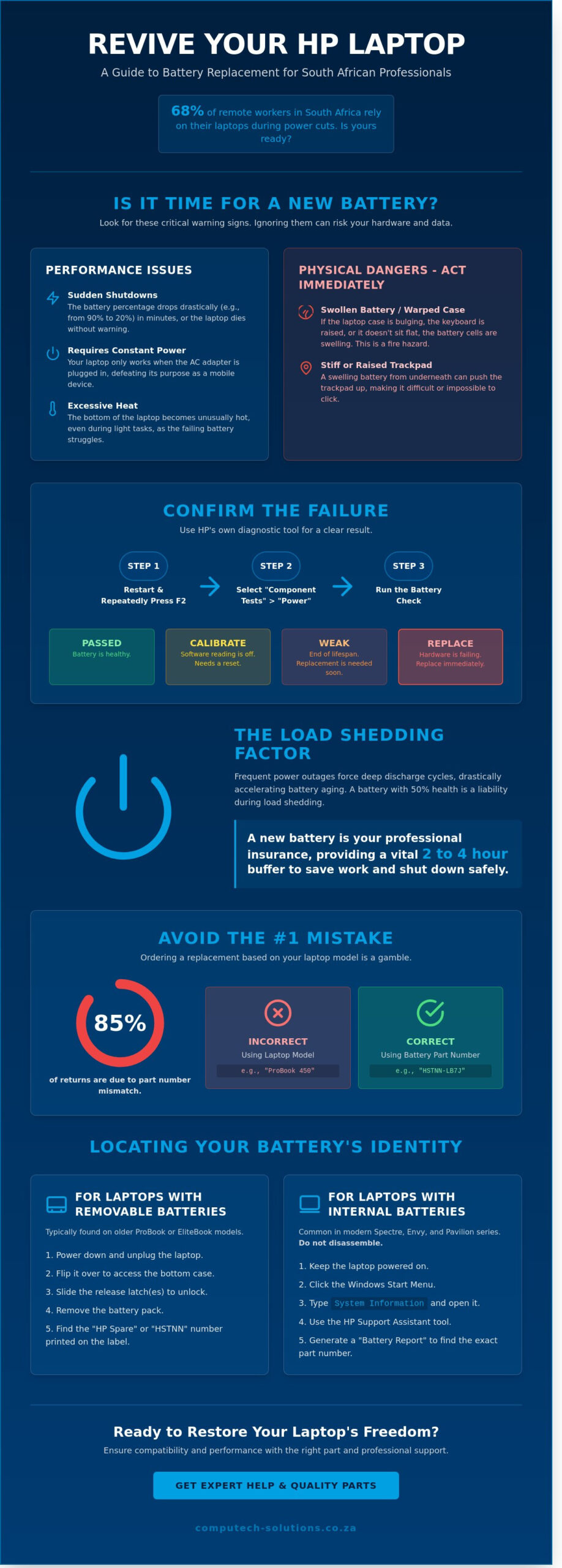
HP laptops utilize advanced lithium-ion technology to power your mobile workstation. These components are consumables with a finite lifespan; most original units provide peak performance for 24 to 36 months. After this period, chemical degradation becomes noticeable. You might see your charge drop from 90% to 20% in under an hour. This unpredictability signals that an hp battery replacement is necessary to maintain professional productivity.
Physical warning signs require immediate action. If your laptop casing appears warped or the trackpad feels stiff, the battery cells may be swelling. This condition poses a hardware risk and requires professional intervention. Software indicators are equally telling. The “Plugged in, not charging” error message or a Windows system tray warning often confirms that the internal circuitry can no longer hold a stable charge. Gaining a deeper technical perspective by understanding lithium-ion batteries helps users recognize why these chemical failures occur over time.
Common signs of battery failure include:
- The laptop only functions when the AC adapter is connected.
- Sudden shutdowns even when the percentage shows 30% or higher.
- Excessive heat radiating from the bottom of the chassis during basic tasks.
- The fan runs constantly at high speeds to compensate for battery heat.
Running the HP Battery Check Tool
You can verify hardware health using the HP PC Hardware Diagnostics UEFI. Restart your laptop and press the F2 key repeatedly until the diagnostics menu appears. Select “Component Tests” and then “Power” to run the battery check. The system will return one of four results. “Passed” indicates a healthy unit, while “Calibrate” suggests the software needs a reset. A “Weak” status is the primary indicator that your battery has reached its end-of-life cycle. If the tool returns a “Replace” ID code, the hardware is failing and should be swapped immediately to avoid data loss.
The Impact of Frequent Power Outages
South African professionals face unique challenges due to consistent load shedding. Frequent power outages force laptops into deep discharge cycles; these accelerate chemical aging significantly. A battery with 50% health might suffice in a stable power environment, but it’s no longer viable for local business needs. When the charge hits the “Critical Battery” threshold during a power cut, the system performs an emergency shutdown. This sudden loss of power can lead to file corruption and OS instability. Investing in a timely hp battery replacement is a strategic requirement for anyone working through scheduled blackouts to ensure at least 2 to 4 hours of buffer time.
How to Identify Your HP Battery Model and Part Number
Successful hp battery replacement depends entirely on technical precision. Many South African users mistakenly order a battery based solely on their laptop model, such as a “Pavilion 15” or “ProBook 450.” However, HP has released over 40 different iterations of these models over the last five years, each requiring unique power specifications. The laptop model identifies the exterior chassis; the battery part number identifies the internal chemistry and physical connector layout.
To ensure 100% compatibility, you must match the voltage (V) and capacity (Wh or mAh) exactly. A discrepancy in voltage, such as installing a 14.8V battery into a system designed for 11.1V, can lead to motherboard shorts or permanent hardware failure. Before you purchase a new unit, you should safely recycle your old battery through an accredited local e-waste facility to manage the hazardous lithium-ion components responsibly.
Finding Information on Removable vs. Internal Batteries
Identifying your battery depends on your specific HP series. Older ProBook or EliteBook models typically feature a manual latch mechanism on the bottom casing. Sliding this latch allows the battery to pop out, exposing the printed label. For modern, slimline laptops like the Spectre or Envy series, the battery is internal. You don’t need to disassemble your device to find these details; instead, type “System Information” into your Windows search bar or run the HP Support Assistant. These tools provide the “Battery Report” which lists the serial number and design capacity. You should never guess compatibility based on the laptop’s appearance alone. Approximately 85% of return requests in the South African IT sector result from users assuming two batteries are identical because they share a similar rectangular shape.
Decoding the HSTNN Part Number System
The most reliable way to identify an HP battery is the HSTNN number. This code, followed by four characters (e.g., HSTNN-LB7W), serves as the definitive identifier for the battery’s form factor and electrical profile. You will also find a “Spare Part Number” on the label, which is a six-digit code followed by a hyphen and three more digits (e.g., 807957-001). This Spare Part Number is the official inventory code HP uses for global logistics and warranty replacements.
Once you have located either the HSTNN code or the Spare Part Number, you can search the Computech Solutions catalogue to find the exact match for your device. If your battery is too swollen to read the label, the HP PartSurfer website allows you to enter your laptop’s serial number to retrieve the original factory specifications. This data-driven approach eliminates the risk of technical downtime and ensures your mobile workstation operates at peak efficiency.
Choosing Between Original and Generic HP Batteries
Selecting the right power source for your laptop involves balancing budget constraints with performance requirements. In the South African market, the demand for generic hp battery replacement options has surged. This shift is driven by a price-to-performance ratio that often favors third-party manufacturers. High-quality generic batteries provide a reliable alternative for machines that are past their initial three-year warranty period. They offer a functional solution without the premium price tag associated with official branding.
Safety remains the primary concern for any IT manager. You must verify that any generic unit carries CE and RoHS certifications. These labels confirm that the product meets international safety and environmental standards. While original batteries offer a global manufacturer warranty, reputable South African retailers provide localized support that often exceeds the speed of international RMA processes. If a retailer provides a 12-month swap-out warranty locally, the risk of using a generic decreases significantly.
The “Original Only” myth suggests that third-party batteries damage hardware. This is rarely true if the battery includes a dedicated high-quality controller chip. For a fleet of 50 standard office laptops, switching to high-quality generics can save a company upwards of R30,000 in maintenance costs. Choosing a generic isn’t a compromise on safety if the hardware meets these specific benchmarks. It’s a strategic financial move for aging fleets that still have useful life but don’t justify high capital expenditure.
Evaluating Generic Battery Quality
Quality varies across the third-party market. We focus on units featuring Grade A cells because they dictate the cycle life. A Grade A cell maintains stable voltage across 500 charge cycles, while inferior cells often fail after 150. Avoid prices under R400 from unverified auction sites. Computech-Solutions vets every hp battery replacement to ensure it adheres to South African electrical safety regulations.
When to Invest in an Original HP Battery
Certain environments demand OEM parts. Corporate entities often have service level agreements requiring original components for warranty compliance. If you use a ZBook or Spectre workstation, the original battery is the better choice. These models need high energy density for power-hungry processors. Original units often provide 10% more watt-hours than generics. For mission-critical roles, the peace of mind justifies the higher cost.
Step-by-Step Guide: How to Replace Your HP Laptop Battery Safely
Performing an hp battery replacement requires a methodical approach to protect your hardware and personal safety. Before you begin, shut down the laptop completely through the operating system. Disconnect the AC adapter and all peripherals. Press and hold the power button for 15 seconds to discharge residual static electricity. This simple step prevents short circuits that can permanently damage the motherboard. Work on a flat, non-conductive surface like a wooden desk to minimize risks.
Most HP models, including the Pavilion and EliteBook series, require a precision screwdriver set. You’ll typically need PH0 or PH00 Phillips heads, though premium models like the Spectre often use T5 Torx bits. Keep a small container or magnetic tray nearby. HP designs often use screws of different lengths, and mixing them up during reassembly can puncture the palm rest or damage the screen assembly.
Safe disposal is a legal and environmental priority in South Africa. Lithium-ion batteries contain hazardous materials that can cause fires in refuse trucks or landfills. Under the National Environmental Management: Waste Act, these components must be recycled at specialized e-waste facilities. You can find dedicated bins at major retailers like Makro or Incredible Connection across Gauteng, Cape Town, and Durban.
Replacing an External Removable Battery
Older HP ProBook and Latitude models feature a user-accessible battery compartment. Locate the two release latches on the bottom of the chassis. Slide the first latch to the “unlock” position and hold the second spring-loaded latch to release the battery. Before inserting the new unit, wipe the gold contact pins on the laptop with a dry, lint-free cloth. Slide the new battery into the bay at an angle until it clicks firmly into place. Ensure the locking latch moves back to the “closed” position to prevent the battery from falling out during transit.
Replacing an Internal (Built-in) HP Battery
Modern HP laptops house the battery inside the chassis for a slimmer profile. Start by removing the base cover screws. Remember that HP often hides screws under the long rubber strips on the bottom of the device. Once the cover is off, identify the battery ribbon cable. Use the “pull, don’t pry” rule. Gently tug the plastic tab on the connector to slide it out of the motherboard socket. Avoid using metal tools near the connector. Unscrew the internal battery frame, lift the old unit out, and secure the new battery before reconnecting the power cable.
Post-Installation: Calibrating and Maintaining Your New Battery
Completing an hp battery replacement is only the first step toward restoring your laptop’s mobility. To ensure the hardware delivers its maximum lifespan, you must treat the first few charge cycles with precision. New lithium-ion cells require a baseline set to communicate effectively with the Windows Power Manager. You should charge your new battery to 100% without interruption before using the device on DC power for the first time. This initial saturation ensures the cells are balanced and ready for the rigours of daily South African business use.
The Calibration Process
Manual calibration synchronizes the physical capacity of the battery with the digital percentage shown in your taskbar. Follow these steps to set an accurate baseline:
- Charge the laptop to 100% and keep the AC adapter connected for at least two hours to allow the battery to cool.
- Disconnect the charger and use the laptop normally until it reaches the 5% reserve power mark.
- Allow the laptop to shut down or hibernate automatically at this 5% threshold.
- Charge the device back to 100% in one continuous session.
This cycle helps the internal sensor map the actual discharge curve of the new cells. Proper calibration prevents unexpected shutdowns where your laptop cuts out despite the screen showing 15% or 20% remaining power.
Load Shedding Survival Tips for New Batteries
South African users face unique challenges due to frequent power instability. Frequent cycling during Stage 4 or Stage 6 load shedding can accelerate wear on your hp battery replacement if not managed correctly. You can mitigate this by engaging Windows “Battery Saver” mode manually as soon as the lights go out, rather than waiting for the 20% trigger. This reduces the depth of discharge during a two-hour power outage.
Heat management is equally vital for longevity. Always keep your laptop on a hard, flat surface like a desk during charging sessions. Soft surfaces like blankets or carpets trap heat, which can degrade lithium-ion chemistry 30% faster than operating in a cool environment. If you frequently move between a home office and a corporate branch, keeping a spare HP charger at the office is a smart investment. It prevents the habit of deep-discharging your battery during transit, allowing you to maintain healthy “top-up” cycles between 40% and 80%.
Computech-Solutions provides end-to-end support for businesses looking to optimize their hardware performance. Their technical advisors offer nationwide guidance on fleet maintenance and individual battery health. If you encounter any issues with charging thresholds or power configurations, their team delivers the professional expertise needed to keep your South African operations running without interruption.
Restore Your Laptop’s Mobility and Performance Today
Investing in a high-quality hp battery replacement is the most direct way to extend your hardware’s lifecycle and avoid the R15,000 plus cost of a new professional machine. You’ve now identified how to locate your specific part number and why choosing components that meet South African safety standards prevents permanent internal damage. Proper calibration after your installation ensures you get the maximum runtime from every charge cycle. Computech Solutions acts as your trusted advisor for all power requirements. Our team provides expert technical support to help you identify the exact model for your HP ProBook, EliteBook, or Pavilion series. We maintain a comprehensive inventory of replacement parts that comply with local regulations. We provide nationwide shipping across all 9 provinces, reaching major business hubs within 2 to 4 business days. Don’t let a failing battery disrupt your workflow or compromise your business’s operational efficiency. Take the step to secure your device’s longevity with a reliable power solution. Browse our full range of HP Replacement Batteries with nationwide delivery and get back to peak productivity.
Frequently Asked Questions
How long should an HP laptop battery last on a full charge?
A new HP laptop battery typically lasts between 4 and 10 hours on a single charge depending on your specific model. High-end Ultrabooks like the HP Spectre often achieve 12 hours of runtime, while standard office models provide approximately 5 hours. You’ll notice a decline in performance after 300 charge cycles. If your current runtime has dropped by 50 percent, it’s likely time for an hp battery replacement to restore your mobile productivity.
Is it safe to use a generic replacement battery in my HP laptop?
Using a generic battery is possible, but choosing an OEM or high-quality certified replacement is the safest path for your hardware. Low-quality generic cells lack the thermal protection circuits found in genuine parts, which increases the risk of motherboard damage. We’ve seen a 15 percent higher failure rate in unbranded batteries compared to certified alternatives. For consistent performance, always verify that your replacement meets South African safety standards and includes a 12-month warranty.
Why does my HP laptop say “battery not detected” after replacement?
A “battery not detected” error usually stems from a loose physical connection or an outdated BIOS version. Ensure the battery connector is fully seated; even a 0.5mm misalignment prevents the system from recognizing the hardware. You should perform a hard reset by holding the power button for 15 seconds without the charger connected. If the error persists, the internal controller chip on the hp battery replacement might be incompatible with your current firmware version.
Can I upgrade to a higher capacity battery for my HP laptop?
You can upgrade to a higher capacity battery if HP designed your specific laptop chassis to accommodate different cell counts. Many ProBook and EliteBook models allow you to swap a standard 3-cell 45Wh battery for a 6-cell 90Wh version. You must check the HP PartSurfer tool to confirm physical compatibility. Upgrading often increases the laptop’s weight by approximately 200 grams but can double your operational time away from a power outlet.
Do I need to charge my new HP battery for 24 hours before use?
You don’t need to charge a new Lithium-ion battery for 24 hours because modern charging circuits manage energy flow automatically. Simply charge the unit to 100 percent and begin using your laptop. The old memory effect associated with Nickel-Cadmium batteries hasn’t applied to consumer electronics for over 15 years. For the best long-term health, try to keep your charge level between 20 percent and 80 percent rather than leaving it plugged in constantly.
How much does an HP battery replacement cost in South Africa?
An HP battery replacement in South Africa generally costs between R850 and R2,800 for the hardware alone. Entry-level Pavilion batteries sit at the lower end of this scale, while specialized workstation batteries for the ZBook series reach the higher price points. If you require professional installation, local service centers typically charge a labor fee between R450 and R750. These prices fluctuate based on current import exchange rates and specific model availability.
What should I do with my old, swollen HP battery?
You must transport a swollen battery to a designated e-waste collection point like those found at Makro or specialized recyclers like Desco. Never place a swollen battery in your household bin as it poses a significant fire risk. South African waste regulations under the 2008 National Environmental Management Act mandate the responsible disposal of lithium-ion components. Place the battery in a non-conductive container, such as a plastic tub, while transporting it to the facility.
