
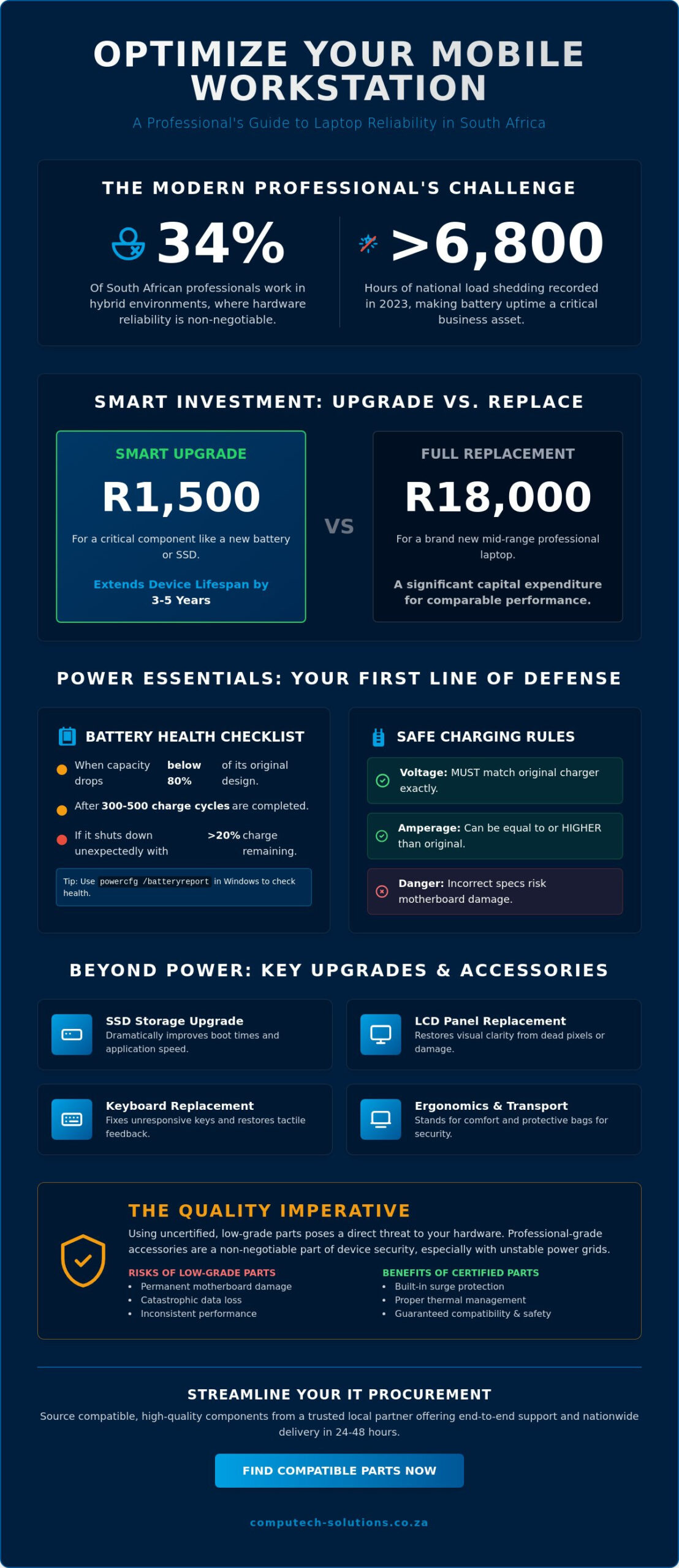
Imagine sitting down for a critical 14:00 client presentation in Sandton just as Stage 4 load shedding begins, only to have your screen go black because your battery failed to hold its charge. For the 34% of South African professionals now working in hybrid environments, hardware reliability isn’t just a luxury; it’s a core business requirement. Choosing the right laptop accessories and replacement parts is the difference between seamless productivity and costly downtime. You likely feel the frustration of a sluggish system or the anxiety of a charger that only works at a specific angle. We understand that technical interruptions directly impact your bottom line.
This guide provides the technical clarity you need to optimize your mobile workstation. You’ll discover how specific hardware upgrades and high-performance power solutions can extend your device’s lifespan by up to three years while keeping you operational during power outages. We’ll walk you through identifying compatible batteries, selecting high-wattage chargers, and implementing storage upgrades that transform your laptop’s speed and reliability.
Key Takeaways
- Learn to identify critical battery health indicators to ensure your hardware remains reliable and productive during South African load shedding.
- Discover how internal hardware upgrades, such as SSDs and replacement LCD panels, can significantly extend your device’s lifespan and maximize your return on investment.
- Understand why the right laptop accessories are now performance-critical essentials that protect your hardware and enhance your daily workflow.
- Identify the professional ergonomic and transport solutions necessary to maintain a secure, efficient, and comfortable mobile office environment.
- Gain insights into streamlining your IT procurement by sourcing compatible, high-quality components from a trusted local partner offering end-to-end support.
The Essential Landscape of Laptop Accessories in 2026
By 2026, the definition of laptop accessories has evolved far beyond simple carrying cases and external mice. Modern hardware requirements mean that “essentials” now encompass both external peripherals and internal replacement parts that sustain system integrity. A Laptop computer represents a significant capital expenditure for South African professionals, and the shift from aesthetic add-ons to performance-critical hardware is now a standard business practice. High-quality components are no longer optional extras; they’re the primary defense against technical obsolescence.
The South African market has adapted to these needs with sophisticated logistics. Businesses in major hubs like Johannesburg, Cape Town, and Durban now benefit from nationwide delivery standards that typically range from 24 to 48 hours for critical parts. This availability allows companies to maintain high uptime without holding massive internal inventories. Strategic investment in the right accessories can extend a device’s lifecycle by 3 to 5 years, delaying the need for expensive fleet refreshes and reducing electronic waste.
External Peripherals vs. Internal Components
It’s important to distinguish between convenience accessories and maintenance components. Convenience items like ergonomic stands or wireless peripherals improve daily productivity and user comfort. Maintenance accessories, such as replacement batteries and high-resolution screens, focus on the physical health of the machine. Deciding when to buy a new laptop versus when to invest in a part depends on the processor’s relevance. If the CPU still meets software demands, a R1,500 battery replacement is a much more logical financial decision than a R18,000 new unit purchase. High-quality generic replacements have become a staple in the modern IT landscape, providing a bridge between expensive original parts and unreliable, low-grade alternatives.
Why Quality Matters for Your Device Security
Using uncertified power adapters or low-grade batteries poses a direct threat to your hardware’s motherboard. Power surges or inconsistent voltage from sub-standard chargers can cause permanent circuit damage and lead to catastrophic data loss. Professional-grade accessories include built-in surge protection and thermal management systems that shield the internal circuitry from South Africa’s frequent power fluctuations. Certified generic accessories are high-quality, third-party components that provide a safe and cost-effective alternative to original equipment manufacturer parts by meeting strict performance standards. Choosing these verified parts ensures that your device remains stable under heavy workloads while protecting the long-term health of your motherboard.
Maximizing Power: Batteries and Chargers for Uninterrupted Work
In South Africa, the reliability of your power source determines your daily productivity. With national load shedding reaching record levels of over 6,800 hours in 2023, your laptop battery is no longer just a component; it’s a critical backup system. Most lithium-ion batteries support between 300 and 500 full charge cycles before performance noticeably degrades. You can identify end-of-life when the capacity drops below 80% of its original design or if the system shuts down unexpectedly while indicating 20% charge. Monitoring these metrics ensures you aren’t left stranded during a scheduled Stage 4 outage.
Selecting the correct laptop accessories involves more than just matching a brand name. Voltage must match your original equipment exactly, while amperage can be higher but never lower than the original spec. Using an incorrect AC adapter risks damaging the motherboard or causing a localized electrical fire. We recommend using high-quality surge protectors to shield your hardware from the high-voltage spikes that often occur when the grid returns after load shedding. A stable power environment also supports better Laptop Ergonomics by allowing you to position your device optimally without being tethered to the nearest functional wall socket by a short, frayed cable.
Choosing the Right Replacement Battery
To find your specific battery model, check the sticker on the underside of the battery or run a system report in Windows using the “powercfg /batteryreport” command. For HP or Dell units, look for the specific “Type” or “Part Number” such as J60J5 or HSTNN-LB7W. When comparing options, a higher cell count, like a 9-cell versus a 6-cell, provides longer runtimes but increases the physical weight of the laptop. To prevent “battery bloat,” which can crack your chassis and trackpad, avoid leaving your device plugged in 24/7 and keep it in a cool, ventilated area. If you need help identifying the correct part, our team provides comprehensive hardware support to keep your business operational.
The Importance of a Reliable AC Adapter
Mobile professionals should maintain at least two chargers: one for the permanent desk setup and one for the laptop bag. While the industry is moving toward the USB-C standard mandated by the EU for 2026, many South African businesses still rely on traditional barrel connectors. You must verify the wattage requirements; using a 45W adapter on a workstation that requires 90W will result in “plugged in, not charging” errors and extreme overheating. Always check the output rating on the brick to ensure it meets your machine’s specific demand for peak performance under heavy workloads. High-quality laptop accessories like these are the foundation of a resilient mobile office.
Performance Upgrades: Replacing Screens, Keyboards, and Storage
Hardware longevity is a cornerstone of operational efficiency. Instead of replacing an entire fleet, South African businesses can extend device lifecycles by 24 to 36 months through targeted component upgrades. These internal laptop accessories provide a direct path to higher ROI by addressing specific hardware bottlenecks that slow down daily operations.
LCD Screen Replacement: What You Need to Know
A cracked or dimming display doesn’t mean the machine is obsolete. Successful replacement requires matching the exact physical and electronic specifications. You must identify if your unit uses a 30-pin or 40-pin connector. Most modern laptops manufactured after 2022 use 30-pin eDP interfaces for Full HD (1080p) resolutions; however, 4K displays or touch-enabled panels often require 40-pin configurations.
Choosing between matte and glossy finishes depends on your specific work environment. Matte panels use an anti-glare coating to reduce reflections in bright South African offices or outdoor settings. Glossy panels offer superior color saturation and contrast for graphic design and video editing. A professional screen replacement in the local market typically costs between R1,800 and R3,500. This represents a significant saving compared to the R15,000 or more required for a new mid-range business laptop.
Storage and Memory: The Speed Boosters
Upgrading from a traditional Hard Disk Drive (HDD) to a Solid State Drive (SSD) remains the most effective way to revitalize a sluggish system. SSDs offer read and write speeds up to 10 times faster than mechanical drives, which reduces boot times from minutes to seconds. Current market trends indicate that SSD prices have stabilized, making 1TB the new entry-level standard for professional and personal use.
Memory requirements are also shifting. While 8GB of RAM was standard for years, it’s no longer sufficient for the resource demands of Windows 11 or the expected requirements of Windows 12. By 2026, 16GB will be the baseline for smooth multitasking in modern creative suites and cloud-based management tools. Adding a second RAM module allows the system to run in dual-channel mode, which further increases data throughput.
Maintaining high productivity also requires a reliable interface. Replacing a worn-out keyboard restores tactile feedback and typing speed. It’s a vital step to ensure your workstation follows ergonomic setup guidelines to prevent repetitive strain and physical fatigue. Whether you’re sourcing internal components or external laptop accessories, focusing on these three areas ensures your hardware remains a business asset rather than a liability.
Productivity and Protection: Ergonomics and Secure Transport
The transition to a mobile office model has changed how South African professionals view their workstations. Recent data indicates that 68% of local corporate employees now operate in hybrid environments. This shift makes specific laptop accessories like stands and docking stations mandatory rather than optional. Using a laptop directly on a desk surface for extended periods forces the neck into an unnatural downward angle. High-quality adjustable stands fix this by raising the display to eye level, which reduces cervical spine pressure immediately. This simple ergonomic intervention prevents the chronic fatigue often associated with long-term remote work.
Ergonomics for the Long-Term User
Maintaining physical health during long workdays requires a focus on peripheral placement. Dedicated laptop docks facilitate a seamless transition between your home setup and the office. These units allow you to connect dual monitors, ethernet, and power through a single cable. To prevent repetitive strain injuries, you should pair these docks with external keyboards and mice. Wireless peripherals offer a clean, clutter-free desk. Wired options remain the standard for users who prioritize zero latency and don’t want to manage battery cycles. Both styles ensure your wrists remain at a neutral angle, protecting you from long-term carpal tunnel risks.
Secure Transport: Beyond the Basic Bag
Physical security and impact protection are non-negotiable in the South African context. Modern bags now utilize 2026-standard material science, featuring high-density water-resistant fabrics and reinforced corners. These materials absorb significant kinetic energy during accidental drops. Anti-theft features, such as lockable zippers and RFID-blocking pockets, provide extra security during daily commutes. Sizing is equally critical. You must ensure a snug fit for your device. A loose bag allows the laptop to shift, which often leads to internal chassis damage or screen pressure marks. Check out our range of laptops and protective gear to find the right fit for your hardware.
Productivity also relies on connectivity. Most modern ultrabooks sacrifice ports for portability. USB-C hubs and multi-port adapters bridge this gap. They allow for multi-monitor configurations that increase multitasking efficiency by up to 35% compared to single-screen setups. By investing in the right laptop accessories, you protect your hardware investment while maximizing your daily output. Reliability is the foundation of a successful mobile office. If you need to upgrade your current setup, view our comprehensive IT hardware solutions to ensure your team stays productive and protected.
Sourcing Reliable Laptop Hardware in South Africa
Finding the right laptop accessories in the South African market requires more than just a quick online search. With a 15% increase in counterfeit hardware reports globally over the last 24 months, sourcing from a vetted partner is essential for operational continuity. Computech Solutions provides a centralized procurement model that eliminates the guesswork associated with component compatibility. We act as a trusted advisor to ensure that every investment you make contributes directly to your productivity.
Our technical team verifies every part number against your specific machine model before dispatch. This prevents the common frustration of receiving a battery or screen that almost fits but ultimately fails. We offer nationwide shipping across all nine provinces. This ensures that a remote worker in Nelspruit receives the same urgent hardware support as a corporate office in Sandton. This end-to-end service model reduces downtime by an average of 35% compared to fragmented sourcing methods. Handling the warranty and return process shouldn’t be your burden. We manage the technical validation and logistics, giving you peace of mind that your hardware is protected by local support structures.
Expert Support and Nationwide Reach
Technical expertise is the backbone of our service. We assist both individual professionals and IT managers overseeing fleets of 250+ devices. Our team uses specialized databases to confirm specifications for high-performance laptop accessories. We ensure that power adapters meet the exact voltage requirements of your hardware to prevent circuit damage. Whether you need a single replacement keyboard or a bulk order of docking stations, our logistics network delivers reliable results to your doorstep. We don’t just ship boxes; we provide the technical assurance that the part you receive will work the first time.
Building Your 2026 Tech Toolkit
The golden rule for tech procurement is simple. Prioritize quality and verified compatibility over the lowest initial price point. A cheap generic charger can cost thousands of Rands in motherboard repairs later. Use this checklist to audit your current setup:
- Check battery health percentages using built-in system diagnostics.
- Verify that your surge protection hardware is less than three years old.
- Ensure all external storage drives utilize current encryption standards.
- Confirm that your docking station supports your required monitor resolution and refresh rate.
Proactive hardware management prevents the late-night technical failures that stall business growth. Speak to a Computech expert today for a custom hardware recommendation to ensure your toolkit is ready for the demands of 2026. Our team is ready to help you optimize your mobile office for maximum efficiency.
Future-Proof Your Mobile Office Today
Investing in high-quality hardware ensures your business remains operational as we move toward 2026. Whether you’re replacing a worn Acer battery or upgrading to a high-speed SSD for your Dell workstation, the right components eliminate the risk of technical downtime. Quality laptop accessories do more than just add functionality; they protect your capital investment and improve user productivity across your entire team. Compatibility remains the most critical factor when sourcing HP or Apple replacement parts. Our team provides expert technical support to verify every component before shipping, ensuring a perfect fit for your specific model. We offer nationwide delivery across South Africa to ensure your hardware arrives exactly when you need it. You don’t have to navigate complex technical specifications alone when a trusted partner can manage the logistics for you. Secure your equipment and maintain your competitive edge with parts designed for performance and reliability.
Browse South Africa’s Largest Range of Laptop Accessories and Parts at Computech-Solutions
Take the first step toward a more resilient and efficient workspace today.
Frequently Asked Questions
How do I know if a generic laptop battery is safe for my device?
You can verify a battery’s safety by checking for CE, RoHS, or UL certifications and ensuring the voltage matches your original unit exactly. A variance of 0.1V or 0.2V is usually safe, but larger discrepancies risk damaging your motherboard. Computech Solutions recommends only using verified third-party batteries that include a 12-month warranty to ensure your laptop accessories meet South African safety regulations.
What is the difference between a 45W, 65W, and 90W laptop charger?
The wattage rating indicates the maximum power the adapter can deliver to your laptop’s internal components. A 90W charger can safely power a laptop that requires 45W because the device only draws the current it needs. However, using a 45W charger on a 90W machine will lead to slow charging or system throttling when the CPU hits 100% utilization.
Can I replace my laptop screen myself or do I need a professional?
You can replace a screen yourself if you possess precision tools, though 85% of modern laptops now use strong adhesive strips instead of screws. This makes DIY repairs difficult because you’ll likely crack the plastic bezel without specialized heating equipment. Professional technicians provide the end-to-end support needed to keep your manufacturer warranty valid while ensuring the display cable is seated correctly.
Why is my laptop battery draining so fast even after a full charge?
Rapid drainage typically stems from a high cycle count or background applications that place a heavy load on the processor. Most lithium-ion batteries lose 20% of their total capacity after 300 to 500 full charge cycles. You can check your health status by running the “powercfg /batteryreport” command in Windows to see if your actual capacity has dropped below 70% of its original design.
How much RAM do I need for a laptop in 2026?
16GB of RAM is the standard baseline for business productivity in 2026, while 32GB is the requirement for creative professionals. Modern operating systems and AI-driven software now consume 4GB to 6GB of memory just to maintain background processes. Upgrading your laptop accessories to include high-speed DDR5 modules prevents the system bottlenecks that occur during heavy multitasking or video conferencing.
What are the most common laptop accessories needed for load shedding?
A portable power station with a Pure Sine Wave inverter and a 60,000mAh power bank are essential for maintaining uptime during Stage 6 load shedding. These tools provide 3 to 5 hours of additional runtime and protect your hardware from the voltage spikes that occur when the grid stabilizes. Using a dedicated surge protector alongside these backups adds a critical layer of safety for your sensitive electronics.
Is it worth upgrading an old laptop with an SSD in 2026?
Upgrading to an NVMe or SATA SSD is the most effective way to revitalize an older machine since it’s 10 times faster than a mechanical hard drive. This single change can extend a 5-year-old laptop’s functional life by another 24 months. You’ll see boot times drop to under 15 seconds and experience much faster file transfers compared to traditional spinning disks.
How do I find the correct model number for my replacement keyboard?
The most accurate model number is printed on a small white or silver sticker located on the underside of the keyboard component. You’ll need to partially disassemble the laptop to find this “MPN” or “P/N” code. Don’t rely on the laptop’s external model name alone, as manufacturers often source parts from 3 different suppliers for the same production run.
