
What if your productivity wasn’t held hostage by the next scheduled power outage? You’ve likely felt the frustration of your asus laptop battery failing just as the lights go out, leaving you with a dead screen and unfinished work. It’s stressful to manage the confusion of part numbers or the very real risk of a low-quality generic component damaging your hardware. We understand that in 2026, a reliable laptop isn’t just a luxury; it’s a critical tool for maintaining business continuity during Stage 6 energy disruptions.
This guide ensures you select a high-performance replacement that withstands unique grid instability while providing the longevity your professional life demands. You’ll learn exactly how to identify your specific model and secure expert-backed components with nationwide delivery. We’ll walk through the technical specifications and maintenance steps needed to keep your device running at peak efficiency for years to come.
Key Takeaways
- Learn to distinguish between temporary software-related power drain and the physical hardware degradation that signals your device needs a professional replacement.
- Discover the precise steps to identify your specific asus laptop battery part number and model name to ensure total technical compatibility with your hardware.
- Master strategic charging techniques to safeguard your lithium-ion cells against the damaging effects of deep discharge during South Africa’s frequent load shedding cycles.
- Understand the critical relationship between voltage and capacity specifications to select a high-performance unit that guarantees long-term operational efficiency.
- Gain expert insights into maximizing the 300-500 cycle lifespan of your replacement components to ensure reliable uptime for your business or home office.
Signs Your ASUS Laptop Battery Needs Immediate Replacement
Your asus laptop battery acts as the critical power reservoir for your mobile workstation. Understanding what a lithium-ion battery is helps clarify why performance naturally declines after 300 to 500 charge cycles. In South Africa, where frequent power fluctuations and load shedding cycles can accelerate chemical exhaustion, recognizing early failure signs prevents total hardware loss. Most users notice a 15% to 20% drop in runtime within the first 24 months of ownership. When your device struggles to hold a charge for more than 45 minutes, it’s a clear signal that the internal cells are reaching their end-of-life.
Performance Indicators and System Warnings
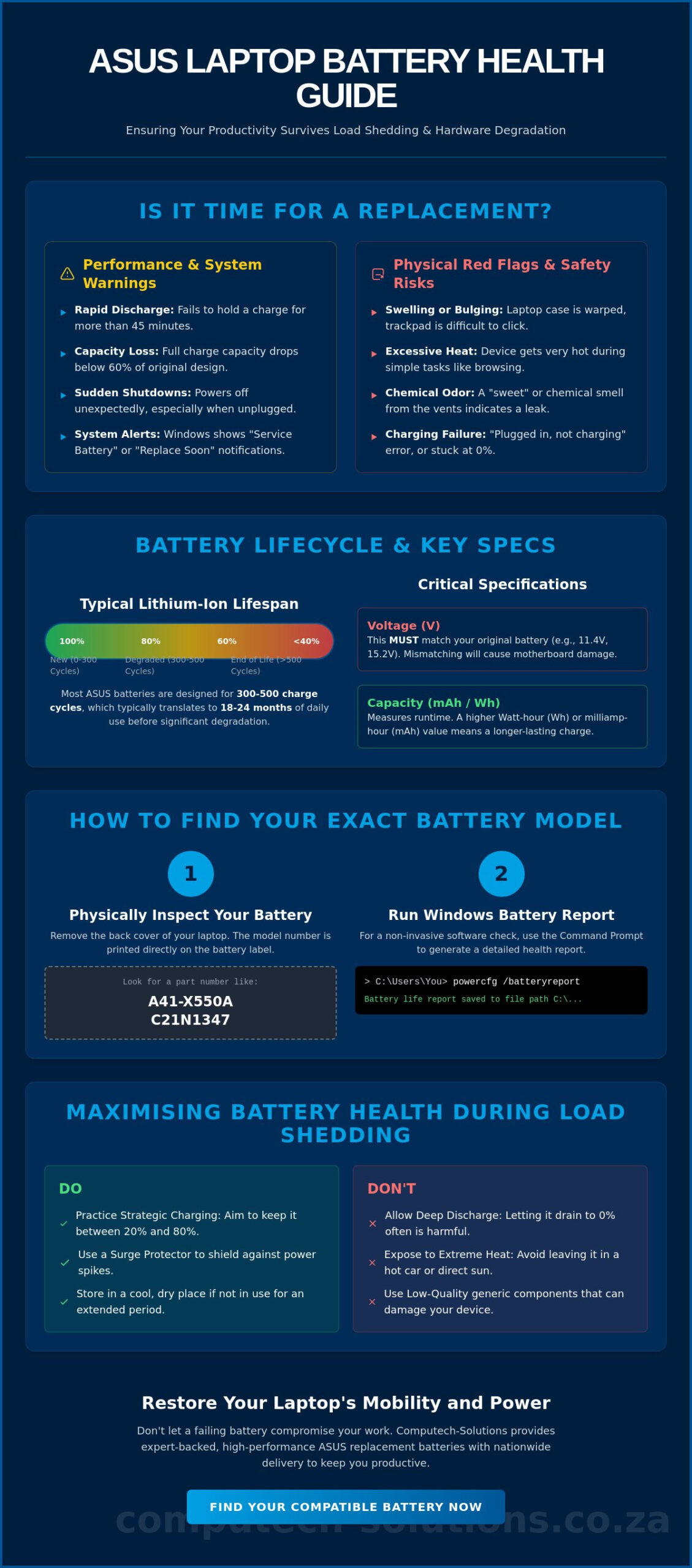
Don’t guess your battery health. You can access the Windows Battery Report by typing “powercfg /batteryreport” into your command prompt. This diagnostic tool compares your original design capacity against your current full charge capacity. If your full charge capacity has dropped 40% below the original specification, your productivity is at risk. Look for “Service Battery” or “Replace Soon” alerts in the Windows system tray. These aren’t suggestions; they’re technical confirmations of hardware failure. Sudden shutdowns when the charger is disconnected indicate that the battery can no longer provide the consistent 11.4V or 15.4V required to power the ASUS motherboard.
Physical Red Flags and Safety Risks
Physical degradation is more than a performance issue; it’s a safety hazard. Lithium-ion cells can swell due to gas buildup from age or excessive heat exposure. You might notice your trackpad becoming difficult to click or the laptop casing beginning to separate near the keyboard. This swelling can permanently warp your ASUS chassis, leading to repair costs far exceeding a simple battery swap. If your laptop feels excessively hot during low-impact tasks like web browsing, the internal resistance has likely reached dangerous levels. You should never ignore a “sweet” or chemical smell coming from the cooling vents. This indicates a breached cell and requires immediate professional intervention to avoid fire risks.
The “Plugged in, not charging” message is often the final warning for South African users. While sometimes caused by a faulty power adapter, it frequently points to a dead cell within the asus laptop battery assembly. If your battery percentage remains stuck at 0% despite hours of charging, the internal controller has likely tripped a safety fuse to prevent overheating. Replacing the unit at this stage is the only way to restore your device’s mobility and protect your internal components from erratic power delivery. Proactive replacement ensures your business remains operational during the next scheduled power outage.
Understanding ASUS Battery Specifications and Lifecycles
Most lithium-ion cells found in a modern asus laptop battery are engineered to endure between 300 and 500 discharge cycles before their chemistry begins to degrade. For the average South African professional using a device for eight hours daily, this threshold is typically reached within 18 to 24 months. Once the battery surpasses this cycle count, its ability to maintain a stable voltage drops, often leading to sudden shutdowns even when the indicator shows 20% remaining power.
The Chemistry of Your Power Source
Lithium-ion technology relies on the movement of ions between the cathode and anode. This process isn’t perfectly efficient; every charge and discharge causes microscopic physical changes to the internal components. Heavy users who run demanding applications like AutoCAD or the Adobe Creative Suite often see their total capacity drop to 80% after just 12 months of use. A battery cycle is one full discharge and recharge totaling 100%.
When selecting a replacement, you’ll encounter standard and high-capacity options. Standard units match the original factory specifications exactly, while high-capacity alternatives utilize denser cells to provide longer runtimes. While high-capacity versions offer more mobile freedom, they often carry a slightly larger physical profile that can affect internal airflow if not fitted correctly by a professional diagnostic service.
Voltage and Watt-Hour Compatibility
Matching the voltage of your replacement unit is a non-negotiable safety requirement. ASUS laptops typically operate on specific ranges such as 11.4V, 14.8V, or 15.2V. Installing a 15.2V battery into a system designed for 11.4V will cause immediate, irreparable damage to the motherboard’s power rails. You can find these details on the technical label located on the underside of the battery or printed directly on the casing of internal models.
- Voltage (V): The electrical pressure required to power the components.
- Watt-hours (Wh): The measurement of the total energy the battery can store; higher Wh ratings mean longer runtimes.
- Milliampere-hours (mAh): A measurement of electric charge over time, indicating the capacity of the asus laptop battery.
South Africa’s climate plays a significant role in battery longevity. In provinces like Limpopo or KwaZulu-Natal, where summer temperatures frequently exceed 30°C, the chemical aging process accelerates. High ambient heat increases internal resistance, which forces the battery to work harder and generate even more heat. To combat this, ASUS provides the Battery Health Charging software. This tool allows users to cap the maximum charge at 60% or 80%, which significantly reduces the stress on the lithium cells when the laptop is constantly plugged into a wall outlet during loadshedding cycles.
How to Find the Correct ASUS Battery Model for Your Laptop
Finding the right asus laptop battery isn’t as simple as knowing you own a ZenBook or a VivoBook. ASUS frequently produces multiple hardware revisions under a single marketing name. This means two laptops that look identical on the outside might require completely different internal power components. You need to identify your specific model and part number to avoid purchasing a component that doesn’t fit or lacks the correct voltage for your motherboard.
The most reliable digital method involves the Windows System Information tool. Press the Windows key, type “msinfo32,” and press enter. Look for the “System Model” field. This provides a precise identifier, such as “UX430UAR” instead of just “ZenBook 14.” This specific string is what technicians use to ensure 100% compatibility with South African hardware standards. If the laptop won’t power on, you can find this same information in the BIOS by tapping the F2 key during the initial startup sequence.
Physical verification remains the gold standard for accuracy. Before finalizing any purchase, you should compare the physical connector shape of your current battery with the replacement unit. Subtle design shifts in 2024 and 2025 models mean some cables are oriented differently even if they share similar specs. A quick visual check prevents the frustration of technical downtime and the logistical hassle of returns.
Locating the Model and Part Number
Flip your device over to find the manufacturer’s sticker on the bottom casing. You’re looking for the “Model” or “MKT Name” printed in small text. If the sticker is worn or missing, the part number is printed directly on the original battery casing inside the chassis. Look for alphanumeric codes like A31N1519, C21N1347, or B31N1726. These unique identifiers are the most accurate way to search the Computech-Solutions online store for a guaranteed match. Using these codes eliminates the guesswork often associated with third-party components.
Common ASUS Battery Series Compatibility
ASUS divides its hardware into distinct series including ROG, TUF Gaming, and the X-series. Compatibility is rarely universal across these groups. A 2023 ROG Strix G15 might use a 90Wh battery, while a different sub-model from the same year requires a 56Wh version. You must cross-reference the voltage (V) and Watt-hour (Wh) ratings found on your original unit. Using an incorrect voltage can cause permanent damage to your laptop’s charging circuit. Our team acts as a trusted advisor to help you navigate these specifications, ensuring your replacement supports your specific business or gaming requirements without risk.
Maximising Battery Health During Load Shedding
Operating a portable workstation under the constant threat of Stage 4 or Stage 6 load shedding requires a proactive hardware strategy. Your asus laptop battery is a chemical component that degrades faster when subjected to extreme cycles. To maintain operational efficiency, you must treat your power supply as a finite resource. Strategic charging involves topping up your device to 100% at least 90 minutes before a scheduled outage. This ensures the cells are stable before you switch to DC power. If you wait until the last minute, the rapid heat buildup from “fast charging” combined with the immediate high-drain usage when the grid drops can stress the internal lithium-ion structure.
The most significant threat to your hardware is deep discharge. Allowing your battery to hit 0% frequently is a primary cause of premature cell failure. When a battery stays at 0% during a long four-hour power cut, it can enter a “deep sleep” state where the charging circuit can no longer revive it. Data from energy researchers in 2025 indicates that consistent deep discharging reduces total cycle life by up to 45% over a single calendar year. You should aim to keep your charge level between 20% and 80% whenever possible to ensure the chemistry remains stable.
Load Shedding Survival Tactics
You need to adjust your Windows power settings to provide a safety buffer. Set your “Low Battery” notification to 20% and your “Critical Battery” action to “Hibernate” at 10%. This prevents the laptop from cutting out abruptly and damaging the file system. Always switch to “Battery Saver” mode the moment the lights go out. A vital step many South Africans overlook is physically unplugging the charger from the wall once the power fails. When the grid returns, the initial voltage surge can bypass basic surge protectors and damage the sensitive charging logic on your motherboard.
Software Optimisation for Runtime
Extending your mobile minutes requires aggressive management of background processes. Close high-drain applications like Chrome tabs or cloud sync tools that poll for data constantly. Reducing screen brightness to 50% can add up to 45 minutes of runtime. You should also disable RGB keyboard lighting and unplug unnecessary USB peripherals like external mouse receivers or flash drives. Use the “ASUS Battery Health Charging” app to set a maximum charge limit of 80%. This “Balanced Mode” is ideal for users who keep their laptops plugged in between load shedding blocks, as it prevents the battery from sitting at a high-stress 100% state for extended periods.
If your device is struggling to last through a standard two-hour outage, it may be time for a professional assessment. Our team provides comprehensive power diagnostics to keep your business operational. Contact Computech Solutions for expert IT support and battery health checks.
Why Choose Computech-Solutions for Your ASUS Replacement
Selecting a high-quality asus laptop battery requires more than just finding a matching part number. It demands a partnership with a local specialist that understands the technical nuances of portable power. Computech-Solutions serves as a dedicated IT partner for South African businesses and individuals, providing technical expertise that generic retailers cannot match. We focus on delivering components that meet or exceed original equipment manufacturer (OEM) specifications, ensuring your hardware remains stable during critical professional tasks.
Our role as a trusted advisor means we prioritize hardware longevity. We recognize that South African users face unique challenges, such as frequent power fluctuations that can degrade internal cells prematurely. By sourcing batteries with superior chemical stability, we help you maintain productivity without the constant fear of sudden shutdowns or capacity loss. We bridge the gap between technical complexity and operational efficiency.
Nationwide Reliability and Expert Support
Our Pretoria-based technical team provides a centralized hub of expertise for customers across all nine provinces. Whether you’re managing a fleet of laptops in Sandton or a single device in George, you receive the same level of professional guidance. We’ve streamlined our logistics to ensure 24 to 48-hour delivery windows to major metropolitan areas, minimizing the time your team spends tethered to a wall socket. This national reach ensures that expert support is never out of range.
Security and confidence are built into our service model through clear warranty and return policies. We eliminate the stress of hardware procurement by standing behind every component we sell. Beyond just the asus laptop battery, we act as a one-stop-shop for your entire mobile infrastructure. Our inventory includes high-spec chargers and replacement LCD panels, allowing you to consolidate your IT maintenance with a single, reliable vendor. This end-to-end support model simplifies your procurement process and ensures component compatibility across your entire device.
The Computech-Solutions Quality Guarantee
Quality assurance is the foundation of our inventory management. We vet every replacement battery for safety, discharge consistency, and total milliampere-hour (mAh) capacity. This rigorous testing prevents the common pitfalls of low-grade cells, such as overheating or rapid degradation. While many large retail chains stop stocking parts for models older than three years, we maintain a deep inventory for legacy ASUS machines. This commitment allows you to extend the lifecycle of your IT assets by 24 to 36 months, significantly improving your return on investment.
We don’t believe in jargon-heavy filler. We focus on the practical business outcome: a laptop that stays powered when you need it most. Our team is ready to assist with model identification and installation advice to ensure your upgrade is seamless. Don’t let a failing cell compromise your mobility or data security.
Restore Your ASUS Mobility and Performance
Maintaining peak productivity in 2026 requires a proactive approach to your hardware health. You’ve learned how to identify the early warning signs of power degradation and how to navigate the technical specifications required for a high-quality asus laptop battery replacement. These insights are vital for protecting your device against the wear caused by South Africa’s ongoing load shedding cycles that stress internal components. Computech Solutions serves as your authoritative partner by removing the complexity from the procurement process. Our expert technical support team is based right here in South Africa, providing the reassurance you need when selecting from our wide range of replacements for all ASUS models. We ensure your business stays operational with national delivery to your door, regardless of your province. You don’t have to settle for a laptop that’s permanently tethered to a wall socket. Secure your ASUS laptop battery replacement from Computech-Solutions for reliable nationwide delivery. We’re here to ensure your technology remains as mobile and efficient as your business demands.
Frequently Asked Questions
How much does an ASUS laptop battery cost in South Africa in 2026?
An ASUS laptop battery in South Africa typically costs between R850 and R2,400 depending on your specific model and its capacity requirements. Entry-level VivoBook batteries sit at the lower end of this price spectrum. High-performance components for ROG or ZenBook Pro series command higher prices due to their advanced cell density and specialized power management hardware.
Is it better to buy a genuine ASUS battery or a compatible replacement?
A genuine asus laptop battery is the superior choice because it’s designed to integrate perfectly with your device’s firmware and safety protocols. While compatible third-party alternatives often cost 30% less, they frequently lack the thermal sensors found in original parts. We recommend genuine units to protect your motherboard from voltage spikes and maintain your existing hardware warranty.
Can I replace my ASUS laptop battery myself if it’s internal?
You can replace an internal battery if you have a precision screwdriver set and follow strict anti-static procedures. Most ASUS chassis require a Philips #00 or Torx T5 bit to access the internal compartment. It’s vital to note that 15% of DIY attempts result in damaged ribbon cables. Our technicians provide professional installation to ensure your internal components remain safe and functional.
Why is my ASUS laptop battery draining so fast during load shedding?
Rapid drainage during load shedding usually occurs because your system remains in high-performance mode while disconnected from the grid. When the power cuts, your laptop’s power draw can increase by 40% if background updates and high screen brightness are active. You can mitigate this by switching to “Power Efficiency” mode and reducing your screen refresh rate from 144Hz to 60Hz.
How long should a new ASUS replacement battery last on a full charge?
A new asus laptop battery should provide between 4 and 10 hours of runtime based on your specific model’s hardware. Productivity-focused ZenBooks often reach the higher end of this range during standard office tasks. Gaming models generally provide 3 to 5 hours of moderate use. These figures reflect 2026 lithium-polymer standards which balance high energy density with long-term cell stability.
Will using a higher capacity battery damage my ASUS laptop?
Using a battery with a higher milliampere-hour (mAh) or Watt-hour (Wh) rating won’t damage your laptop as long as the voltage is identical. High-capacity cells simply provide a larger fuel tank for your device, allowing for longer sessions between charges. You must ensure the output voltage stays within a 0.5V tolerance of the original factory specifications to avoid stressing the internal power regulators.
What should I do with my old ASUS laptop battery after replacement?
You must take your old battery to a certified e-waste collection point to comply with South African environmental laws. Lithium-ion cells contain chemicals that are hazardous if they’re sent to standard landfills. Retailers like Makro or specialized recyclers like Desco offer dedicated bins where these components are processed safely to recover valuable metals and prevent soil contamination.
