
Your Lenovo ThinkPad L380 suddenly cuts to black in the middle of a Stage 4 load shedding block, even though your battery icon claimed you had 30% remaining. This sudden loss of power is a clear signal that your 01av483 battery has reached the end of its functional life. Relying on a failing component during South Africa’s frequent power outages isn’t just inconvenient; it’s a direct risk to your productivity and your data. At Computech-Solutions, we understand the hesitation that comes with choosing a replacement, especially when you’re faced with a confusing list of part numbers like L17L3P53 or SB10K97625.
You deserve a seamless transition back to full mobility without the fear of hardware incompatibility. This guide provides the precise 11.1V, 45.5Wh technical specifications you need to verify your purchase with confidence. We’ll show you how to confirm compatibility for your ThinkPad L380 or Yoga series and explain our streamlined nationwide delivery process. By the end of this article, you’ll know exactly how to secure a reliable 3-cell Li-Poly replacement for R1079.00 and restore your laptop’s performance today.
Key Takeaways
- Identify the exact 11.1V and 45.5Wh technical specifications required to ensure your new 01av483 battery is fully compatible with ThinkPad L380 and L390 models.
- Understand why Grade A cells and integrated safety chips are critical for protecting your laptop’s motherboard from voltage fluctuations and overheating.
- Follow a simplified installation guide that covers everything from the tools you need to safely removing the back cover of your Lenovo device.
- Learn the essential calibration steps to take immediately after installation to maximize your new battery’s lifespan and ensure accurate power reporting.
- Discover how to leverage professional technical support and nationwide delivery to restore your laptop’s mobility without the stress of compatibility errors.
Understanding the 01AV483 Lenovo ThinkPad Battery
The 01AV483 is a specialized internal Lithium-Polymer (Li-Poly) battery engineered specifically for the Lenovo ThinkPad L380, L380 Yoga, L390, and L390 Yoga series. This specific part number is more than just a label; it’s a technical guarantee that the physical dimensions, screw hole placements, and multi-pin connector will align perfectly with your laptop’s internal architecture. Using the precise 01av483 replacement ensures that your device maintains its slim profile and thermal efficiency. In the South African business environment, where professionals must navigate unpredictable power schedules, this battery serves as an essential tool for maintaining operational continuity during load shedding.
Key Identification Features
Recognizing the correct battery requires a quick inspection of the internal hardware. The 01AV483 features a slim, black casing with a specific multi-pin connector that slides into the motherboard’s power port. You will typically find the part number 01AV483 or its equivalent 041AV481 printed clearly on the original manufacturer’s label. As a 3-cell 45.5Wh power solution, it is designed to handle the high-performance requirements of 2026 software and multitasking. This unit leverages lithium-ion battery technology in a polymer form factor, which allows for a thinner design compared to older laptop models while providing stable voltage output.
Why Batteries Fail in the South African Climate
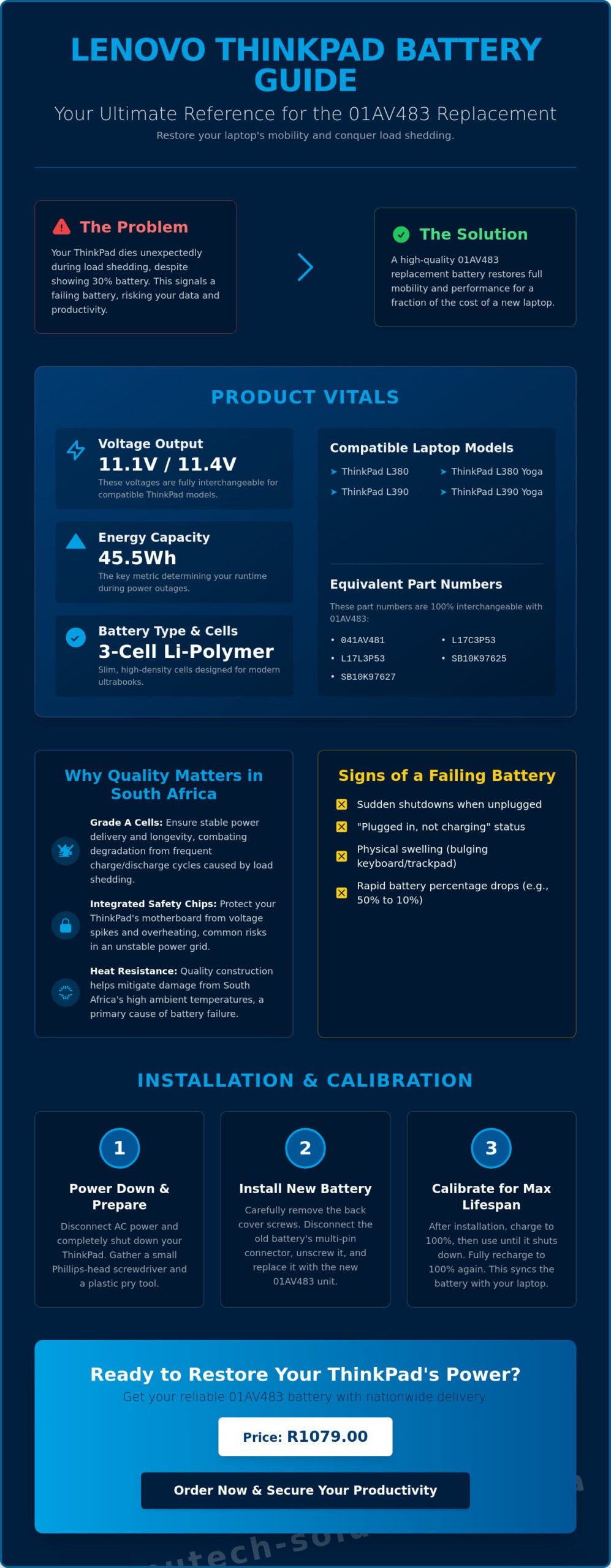
Environmental factors and local infrastructure challenges play a major role in battery degradation. South Africa’s high ambient temperatures can lead to internal heat buildup, which is the primary enemy of chemical energy storage. When combined with frequent deep discharge cycles during daily load shedding, the internal chemistry of the 01av483 begins to break down. Common signs of failure include a “Plugged in, not charging” status, sudden power cuts when the charger is removed, or physical swelling that puts pressure on the trackpad. Choosing to replace a failing battery is a proactive business decision that prevents motherboard damage and extends the usable life of your ThinkPad by several years, making it a far more economical choice than a full system upgrade. Replacing the internal battery restores your machine’s mobile runtime for a fraction of the price of a new ThinkPad, ensuring you remain productive regardless of the local power grid’s status.
Technical Specifications and Compatibility Map
Precision is vital when sourcing a replacement 01av483 battery. The core specifications feature an 11.1V or 11.4V output. While some third-party listings create confusion by suggesting these voltages are incompatible, they’re actually interchangeable for this specific ThinkPad architecture. The unit provides a 4100mAh capacity, delivering a total energy density of 45.5Wh. This Watt-hour rating is the most critical metric for your daily workflow. It determines exactly how long your L380 can stay powered during a two-hour load shedding block without needing a charger.
Lithium-Polymer (Li-Poly) chemistry is the standard for these slim Ultrabook designs. Unlike traditional cylindrical cells, Li-Poly can be molded into thin, flat shapes that fit the compact chassis of a Yoga model. However, high energy density requires high-quality manufacturing. Using uncertified cells carries risks, as highlighted by the official safety warning on lithium-ion batteries regarding improper cell handling and potential fire hazards. Choosing a battery with integrated safety chips ensures your motherboard is protected from voltage spikes.
To ensure a 100% match, check the “Type” number on the bottom of your laptop. For instance, an L380 Yoga might be labeled as Type 20M7 or 20M8. Verifying this number before you buy prevents the frustration of a connector that won’t seat or a battery that the BIOS refuses to recognize. If you’re unsure about your specific hardware version, you can consult our technical team for a compatibility verification to confirm you’ve selected the right part.
Equivalent Part Number Reference
Lenovo often assigns multiple part numbers to the same physical battery to manage different regional suppliers. You might see your original battery labeled as 041AV481, L17C3P53, L17L3P53, SB10K97625, or SB10K97627. These are all functional equivalents to the 01av483. The internal multi-pin connector orientation remains identical across these aliases, ensuring the power delivery to the motherboard is consistent and safe. Don’t be concerned if your replacement has a different sticker than the original, as long as one of these cross-reference numbers is present.
Model Compatibility List
- ThinkPad L380: Type 20M5, 20M6
- ThinkPad L380 Yoga: Type 20M7, 20M8
- ThinkPad L390: Type 20NR, 20NS
- ThinkPad L390 Yoga: Type 20NT, 20NU
- ThinkPad S2 Yoga: 2018 model series
Why Quality Replacements Matter in South Africa
South African power instability places unique pressure on laptop hardware that users in more stable regions rarely encounter. Frequent load shedding means your battery isn’t just a backup; it’s a primary power source that must endure rapid charge and discharge cycles daily. A low-quality 01av483 replacement often lacks the chemical stability to handle this intense usage. Budget alternatives frequently use Grade B or C cells that degrade within months, leaving you stranded during a four-hour power block. At Computech-Solutions, we adhere to a “one-stop-shop” philosophy that prioritizes Grade A cells and integrated safety chips. This approach ensures you aren’t just buying a part, but securing the long-term health of your professional equipment.
Choosing a specialist over a general marketplace protects your investment from the risks of “too cheap” components. Substandard batteries often skip essential voltage regulation hardware to reduce manufacturing costs. This omission can lead to overheating, which may warp the internal chassis or cause permanent motherboard failure. Our professional standard focuses on providing components that mirror the original manufacturer’s reliability. By choosing a high-quality 01av483, you’re investing in a component designed to handle the specific electrical environment of South Africa, where surge protection and thermal management are non-negotiable requirements for business continuity.
Safety Features to Look For
A premium 01av483 unit includes sophisticated protection circuits designed to prevent catastrophic failure. These include overcharge and over-discharge protection, which keep the cells within a safe operational window. Thermal sensors are also critical; they monitor temperatures during fast-charging phases. If heat levels exceed safe thresholds, the circuit interrupts the power flow to protect your ThinkPad’s delicate internal architecture. Additionally, short-circuit protection adds a final layer of defense, shielding your system from sudden electrical surges that can occur when the power returns after a blackout.
Performance Expectations
A new 45.5Wh battery should provide between 4 to 6 hours of runtime under standard office workloads in 2026. Beyond just uptime, a high-quality battery prevents CPU power throttling. When a battery can’t provide stable voltage, the system slows down the processor to compensate, causing noticeable lag in demanding applications. A fresh, reliable replacement ensures your laptop operates at its full potential. Every unit we provide at Computech-Solutions is backed by a local South African warranty. This gives you peace of mind and immediate support, avoiding the complications of dealing with international sellers if a technical issue arises.
How to Install and Calibrate Your New 01AV483 Battery
Replacing an internal component like the 01av483 requires a methodical approach to protect your ThinkPad’s motherboard. Start by clearing a clean, flat workspace. You’ll need a small Phillips screwdriver, typically a #0 or #00 size, to handle the base screws. Static electricity is a silent threat to laptop circuits; always ground yourself by touching a metal object or using an anti-static mat before touching internal parts. This preparation ensures that your DIY replacement remains a cost-effective success rather than a technical disaster.
The ThinkPad L380 and L390 series use captive screws on the bottom panel. This means the screws won’t fall out of the plastic cover once loosened, which is a helpful design feature for avoiding lost hardware. Once the screws are loose, use a plastic pry tool or a guitar pick to gently separate the clips around the edges. Avoid using metal tools for prying, as they will scratch the chassis or cause electrical shorts. Professional results depend on using the right tools for the job.
Step-by-Step Installation Guide
- Ensure the laptop is completely powered down and the AC adapter is removed.
- Turn the laptop over and loosen the nine captive screws on the base cover.
- Carefully lift the base cover from the rear hinge side.
- Locate the battery and remove the mounting screws holding it in place.
- Gently pull the battery connector toward the battery to disconnect it. Do not pull the wires themselves.
- Place the new 01av483 into the bay and align the connector.
You must double-check that the multi-pin connector is fully seated and level before you replace the base cover screws. If the connector is slightly tilted, the laptop may fail to boot or report a “battery not detected” error.
Initial Calibration and Care
Once your new hardware is installed, you need to sync the Battery Management System (BMS). Charge the laptop to 100% without interruption. Once full, disconnect the charger and use the laptop until it reaches about 5% or shuts down. This full cycle allows the Windows power manager and Lenovo Vantage software to accurately gauge the new cell’s capacity. For the best long-term results, try to keep your charge level between 20% and 80% during daily use. High heat is the primary cause of premature wear, so ensure your laptop’s vents remain clear during heavy workloads. If you’re ready to restore your device’s runtime, you can order your replacement Lenovo battery here to receive a high-quality unit with nationwide delivery.
Ordering Your 01AV483 Battery from Computech-Solutions
Securing a reliable 01av483 battery shouldn’t be a gamble. At Computech-Solutions, we’ve streamlined the procurement process to ensure South African professionals can restore their ThinkPad mobility without technical friction. Our Pretoria-based warehouse maintains stock levels that allow for rapid dispatch, minimizing the downtime your business faces during power outages. We provide more than just a component; we offer the technical assurance that your hardware investment is protected by a local partner who understands the specific demands of the South African IT landscape.
Our expert technical support team is available to help you verify compatibility before you finalize your purchase. If you’re unsure whether your specific ThinkPad Type number matches the 01av483, we can provide immediate clarification to prevent the hassle of ordering the wrong part. We offer a secure online checkout with multiple payment options, including credit card gateways and direct EFT. For businesses and individuals looking to optimize their budget, we provide a 3% discount for payments made via cash or EFT, bringing the price to R1079.00 for this essential upgrade.
Nationwide Shipping and Returns
We facilitate fast dispatch to major hubs including Johannesburg, Cape Town, and Durban, as well as outlying areas across all nine provinces. For major centers, a standard delivery fee of R115.00 applies, ensuring your battery arrives via a trusted courier service. Once your order leaves our Pretoria warehouse, you’ll receive tracking details to monitor its journey to your doorstep. We stand behind the quality of our hardware with a hassle-free return policy. If the part doesn’t meet the technical expectations discussed or if you encounter any manufacturing defects, our local team is ready to resolve the issue without the delays associated with international marketplaces.
The Computech Advantage
Computech-Solutions serves as a comprehensive one-stop-shop for the South African business community. Beyond the 01av483, we stock a full range of Lenovo-compatible hardware, including laptop chargers, adapters, and LCD replacement panels. This end-to-end support model means you can maintain your entire fleet of ThinkPads through a single, reliable vendor. We only provide tested, Grade A replacement hardware designed to meet or exceed original performance standards. By choosing a local specialist, you ensure that your technical requirements are met with sophisticated capabilities and approachable service. Don’t let a failing battery compromise your productivity during the next power cycle. Order your 01AV483 replacement battery today and experience the reliability of professional-grade IT support.
Restore Your ThinkPad’s Mobility Today
Restoring your laptop’s performance shouldn’t be a source of technical stress. By matching the precise 11.1V and 45.5Wh specifications, you ensure your device remains a reliable tool during South Africa’s unpredictable power shifts. You now have the technical knowledge to identify the 01av483 battery and the step-by-step guidance to install it safely. Choosing high-quality Grade A cells is the most effective way to safeguard your motherboard from the thermal stress caused by frequent load shedding cycles. It’s a simple upgrade that prevents long-term hardware damage and restores your machine to its original factory runtime.
Computech Solutions is your trusted partner for professional-grade hardware. We provide expert technical support to verify your compatibility and offer secure online payment options for your peace of mind. Every purchase is backed by a 12-month warranty and includes reliable nationwide South African shipping directly to your door. Don’t let a failing battery limit your productivity or tether you to a wall socket any longer. Buy the 01AV483 Replacement Battery Now and get back to work with complete confidence. Your ThinkPad is ready for its next challenge.
Frequently Asked Questions
Is the 01AV483 battery compatible with the ThinkPad L390?
Yes, the 01av483 battery is fully compatible with the ThinkPad L390 series. This includes both the standard L390 (Types 20NR, 20NS) and the L390 Yoga (Types 20NT, 20NU). The battery shares the same physical dimensions and internal multi-pin connector required for these 2019 hardware releases, ensuring a perfect fit and stable power delivery.
What is the difference between 01AV483 and L17L3P53?
There is no functional difference between these two part numbers. Lenovo utilizes multiple identifiers, including 01av483, L17L3P53, and L17C3P53, to manage different regional suppliers for the same 45.5Wh component. Both units utilize identical 3-cell Lithium-Polymer chemistry and voltage ratings, making them completely interchangeable for your ThinkPad L380 or L390 system.
Can I replace the internal battery myself or do I need a technician?
You can replace the internal battery yourself with a small Phillips #0 screwdriver. The process requires loosening nine captive screws on the base cover and carefully disconnecting the battery’s power cable from the motherboard. While a technician is not mandatory, you must ground yourself to prevent static discharge from damaging sensitive internal circuits during the installation.
How long does the 01AV483 battery last on a full charge?
A new 45.5Wh battery typically provides between 4 and 6 hours of runtime under standard office workloads. Your specific duration will vary based on screen brightness levels and the number of active applications. For most South African professionals, this capacity provides enough power to work through a standard two-hour load shedding block without needing a wall socket.
Does this battery come with a warranty in South Africa?
Yes, we provide a 12-month warranty on all replacement batteries sold to our South African clients. This local warranty covers manufacturing defects and premature capacity failure, offering you a reliable point of contact for technical support. It provides significantly better protection than international marketplaces, where return logistics and warranty claims are often difficult to manage.
Why is my new battery not charging to 100%?
This issue is usually caused by the “Battery Charge Threshold” setting within the Lenovo Vantage software. If your battery stops charging at 80%, the software is likely limiting the charge to extend the battery’s overall lifespan. You can disable this feature in the power settings or perform a full calibration cycle to sync the new cells with the Windows power manager.
How long does nationwide shipping take for laptop batteries?
Nationwide shipping typically takes 1 to 3 business days for major metropolitan hubs like Johannesburg, Cape Town, and Durban. Deliveries to outlying or rural areas may require an additional 48 hours. We dispatch all orders from our Pretoria warehouse using tracked courier services, ensuring you can monitor your package from our door to yours.
Is it safe to use a generic replacement battery for my Lenovo?
It is safe to use a replacement battery as long as it features Grade A cells and integrated safety circuitry. High-quality replacements include protection against overcharging, short-circuiting, and overheating. Choosing a professional-grade unit protects your motherboard from the electrical instability that often occurs when power is restored after a blackout, whereas low-quality alternatives may lack these essential safeguards.
