
Swapping your laptop’s low-resolution panel for a crisp 4K display isn’t just a matter of finding a screen that fits the plastic frame; it’s a precise hardware calculation. Many professionals ask, can you upgrade a laptop screen resolution without replacing the entire machine? You’ve likely felt the eye strain of low pixel density or the frustration of limited screen real estate when multitasking. It’s a common bottleneck that impacts your daily productivity and operational efficiency.
This technical guide provides a clear path forward by identifying the exact requirements for a successful display transition in 2026. You’ll learn how to navigate the complexities of eDP signal lanes, connector pin configurations, and BIOS firmware restrictions. We examine the essential compatibility factors that ensure your new panel works perfectly, while showing you how to source reliable laptop LCD replacement panels within the South African market. By the end of this article, you’ll have the technical confidence to determine if a high-definition upgrade is a viable solution for your hardware.
Key Takeaways
- Discover the definitive answer to can you upgrade a laptop screen resolution by evaluating your device’s eDP signal lanes and connector configuration.
- Distinguish between 30-pin and 40-pin eDP interfaces to ensure your new display is compatible with your laptop’s internal data bandwidth.
- Execute three essential physical compatibility checks, including mounting bracket placement and connector positioning, to prevent installation failures.
- Learn the safe preparation protocols, such as internal battery management, required to protect your motherboard during a high-definition panel replacement.
- Find out why sourcing laptop LCD replacement panels from a reputable South African retailer provides superior protection against shipping damage and technical errors.
Can You Upgrade Your Laptop Screen Resolution? The Short Answer
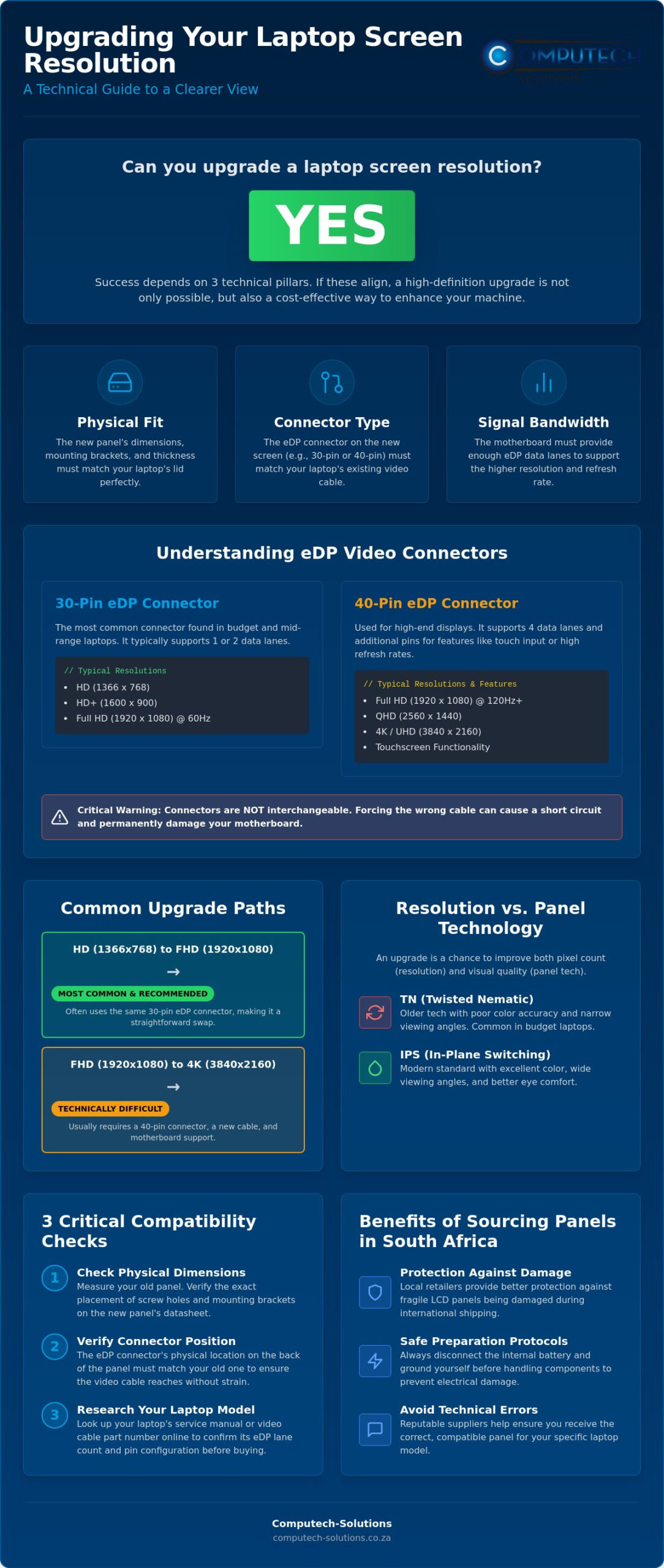
The short answer is yes. For many modern laptops, you can successfully increase your display’s pixel count by replacing the existing hardware. A resolution upgrade is defined as a panel swap that maintains internal interface compatibility while increasing the density of pixels on the screen. While most users assume the motherboard or GPU will block the change, these hardware limitations are rare in devices manufactured within the last decade. Instead, the success of your project depends on three specific technical pillars: physical fit, connector type, and signal bandwidth.
Modern laptops utilize the Embedded DisplayPort (eDP) interface, which is an internal version of the DisplayPort (DP) standard. This connection handles the data flow between your motherboard and the screen. If your current cable and motherboard support the necessary data lanes, a higher-resolution panel will function correctly. The physical fit involves the outer dimensions of the glass and the specific location of the mounting brackets. The connector type refers to the pin count on the eDP cable, and signal bandwidth is determined by the number of data lanes the motherboard provides. If any of these three pillars don’t align, the screen will either fail to fit the lid or fail to display an image.
Resolution vs. Panel Type: What Are You Actually Upgrading?
It’s helpful to distinguish between resolution and panel technology. Resolution refers strictly to the pixel count, such as moving from 1366×768 (HD) to 1920×1080 (Full HD). Panel technology describes how those pixels are displayed. Many older budget laptops use Twisted Nematic (TN) panels, which suffer from poor color accuracy and narrow viewing angles. When you ask, can you upgrade a laptop screen resolution, you’re often also seeking a better visual experience. Upgrading to an In-Plane Switching (IPS) panel at the same time as increasing resolution provides better eye comfort and significantly more screen real estate for multitasking.
Common Upgrade Paths (e.g., HD to FHD)
The most successful and cost-effective upgrade path is moving from an HD (1366×768) panel to a Full HD (1920×1080) display. This jump is popular because many manufacturers use the same 30-pin eDP connector for both resolutions, making the hardware transition straightforward. However, moving from Full HD to 4K is technically difficult. High-resolution 4K panels often require 40-pin connectors and additional data lanes that your existing video cable or motherboard might not provide. Before purchasing a laptop LCD replacement panel, you must evaluate if the cost of the parts aligns with the value of the laptop. For relatively modern mid-range laptops, a screen upgrade is a professional way to achieve premium display quality without the cost of a new system.
Understanding the Hardware: eDP Lanes and Connector Pins
eDP (Embedded DisplayPort) is the modern industry standard for internal video connections. Unlike older LVDS systems, eDP uses high-speed data lanes to transmit video signals. The number of lanes determines the maximum resolution and refresh rate your laptop can handle. A standard 1-lane eDP cable provides enough bandwidth for 1366×768 or basic 1080p at 60Hz. However, it cannot support high-refresh-rate gaming panels or resolutions beyond Full HD. This bandwidth bottleneck is the primary reason why some upgrades fail. When asking can you upgrade a laptop screen resolution, you must first verify if your motherboard provides enough lanes, as you’ll be capped at specific data speeds regardless of the panel’s potential.
The 30-Pin vs. 40-Pin Connector Debate
Identifying your connector is a vital step in performing critical compatibility checks. Most standard laptops use a 30-pin connector for standard resolutions. If you’re moving from HD to Full HD, your existing 30-pin cable is usually sufficient. 40-pin connectors are typically reserved for specialized hardware like touchscreens, 4K displays, or QHD panels with high refresh rates. These connectors are not interchangeable. Forcing a 30-pin cable into a 40-pin socket can cause a short circuit that permanently damages the motherboard. You can often identify your pin count by looking up your specific model’s video cable part number online before you begin the disassembly. This research prevents the frustration of buying an incompatible panel.
GPU and BIOS: The Software Gatekeepers
Your GPU and BIOS act as the final gatekeepers for your display. While most modern integrated graphics from Intel or AMD easily handle 1080p or 4K, older chips have hard limits on their output resolution. You can test your GPU’s capability by connecting your laptop to a high-resolution external monitor. If the external display hits 4K, the GPU can technically handle the internal upgrade. BIOS whitelisting is another factor, where manufacturers like HP or Lenovo restrict the hardware to specific part numbers. If you need assistance identifying the correct part for your machine, you can source verified laptop LCD replacement panels from a specialist to ensure compatibility. This approach eliminates the guesswork and ensures your hardware investment delivers the expected performance.
3 Critical Compatibility Checks Before Buying a Replacement Panel
Before sourcing hardware, you must verify three physical and electrical constraints. Even if two panels share the same diagonal size, their mounting systems and internal layouts often differ. The first check involves the physical dimensions and mounting bracket locations. Some laptop lids use top and bottom brackets, while others use side-mounted screws or adhesive bracketless designs. If the mounting points don’t align exactly with your laptop’s internal frame, the panel will not sit securely. This misalignment can lead to screen cracking or bezel damage over time.
- Bracket Orientation: Confirm if your current screen uses top and bottom tabs or side mounts.
- Connector Position: Check if the video input is on the bottom-left or bottom-right of the panel’s rear.
- Cable Bandwidth: Ensure your eDP cable has enough lanes for the target resolution.
The second check focuses on the connector position on the back of the panel. Laptop video cables are typically cut to a precise length with very little slack. If your original screen has a connector on the bottom-right and your replacement has one on the left, the cable will not reach. Finally, you must confirm the video cable bandwidth. While a 2-lane eDP cable handles common display resolutions like 1080p, you generally need a 4-lane cable for 4K or high-refresh gaming displays. When clients ask can you upgrade a laptop screen resolution, we emphasize that the cable is often the hidden limiting factor that prevents a successful swap.
Deciphering Panel Model Numbers
Your laptop’s model name is not enough to guarantee a match. You need the exact panel model number found on the sticker on the back of the LCD. If you don’t want to disassemble the machine yet, use diagnostic software like HWinfo or AIDA64 to pull the Monitor ID or Model Name. These strings, such as B156HTN for AU Optronics or LP156WF6 for LG, tell you the exact specifications of the glass. Manufacturers often discontinue specific panels, but professional suppliers can provide fully compatible alternatives that match the electrical and physical footprint of the original without compromising performance.
The Video Cable (LVDS vs. eDP)
Laptops manufactured before 2014 might use the obsolete LVDS standard instead of eDP. LVDS uses a wider, bulkier connector and does not support modern high-resolution upgrades. Transitioning from LVDS to eDP is not possible without a motherboard replacement. For eDP systems, the risk of technical disruption is highest during the cable seating process. If the connector is even slightly crooked when you apply power, you risk shorting the backlight circuit on the motherboard. Always disconnect all power sources before touching the video cable to ensure a stable, risk-free installation.
Step-by-Step: How to Prepare for a Screen Resolution Upgrade
Preparing for the physical swap requires more than just technical knowledge; it demands a disciplined workflow to protect your investment. Once you’ve confirmed that the answer to can you upgrade a laptop screen resolution is a definitive yes for your specific model, you can begin the disassembly process. This procedure is delicate. It requires patience and a controlled environment to avoid static discharge or mechanical stress on the new panel. Following a structured approach ensures that you don’t overlook critical safety steps that could lead to hardware failure.
Step 1: Power down the device and disconnect the internal battery. This is the most critical safety measure. Most modern laptops require you to remove the bottom cover to unplug the battery connector from the motherboard. Simply turning off the laptop is not enough. Residual power can still blow the backlight fuse on the motherboard during the panel swap. Step 2: Remove the screen bezel carefully. Use plastic pry tools to release the clips around the edge of the display. Start from the top center and work your way around. If you feel significant resistance, check for hidden screws behind rubber bumpers.
Step 3: Unscrew the panel and record the connector orientation. Once the bezel is off, remove the screws holding the LCD in place. Lay the screen forward onto the keyboard, ideally resting on a soft cloth. Use your phone to take a photo of exactly how the eDP cable is taped and seated. Step 4: Test the new panel before reassembling. Connect the new screen and secure the eDP latch. Plug in the battery and boot the laptop. If the image is clear and the resolution is correct in your operating system settings, you can proceed with the final bezel reattachment.
Essential Tools for a Successful Swap
A successful installation relies on precision. You’ll need a high-quality screwdriver set, specifically PH00 or PH0 bits, to handle the small internal screws without stripping them. Plastic spudgers are essential for prying the bezel without leaving permanent marks on the plastic casing. An anti-static wrist strap provides an extra layer of protection for the motherboard’s sensitive circuits. If your bezel was held on by adhesive rather than clips, have thin double-sided adhesive tape ready for the final reassembly to ensure a flush fit.
Safety First: Avoiding Motherboard Damage
When considering can you upgrade a laptop screen resolution, the physical installation is where most operational risks occur. The “No Power” rule is non-negotiable. eDP connectors are extremely sensitive to short circuits. Even a tiny misalignment while power is present can lead to a permanent motherboard failure. Handle the gold-plated pins on the video cable with extreme care, as oils from your fingers can interfere with the high-speed data signal. If the screen remains black on the first boot, power down immediately. Disconnect the battery and reseat the eDP cable, ensuring it’s perfectly level and fully inserted into the socket. To ensure you have the highest quality components for this delicate task, you can source laptop LCD replacement panels that meet rigorous technical standards.
Finding High-Quality Replacement LCD Panels in South Africa
Securing the right hardware is the final hurdle once you determine that can you upgrade a laptop screen resolution on your specific device. Importing fragile glass panels from overseas carries significant operational risks. International shipping often involves multiple handling points, which increases the likelihood of receiving a cracked or dead-on-arrival (DOA) unit. By choosing a local South African retailer, you eliminate these logistical headaches. You ensure that your components arrive in pristine condition through reliable national delivery channels that understand the delicate nature of electronic parts.
Why National Sourcing Matters
Buying locally provides a safety net that international marketplaces cannot match. If compatibility issues arise or if a panel has a pixel defect, a South African return policy is much easier to navigate than a cross-border dispute. We provide professional support for a wide range of brands, including Acer, Dell, HP, and Lenovo replacement parts. This localized approach ensures that technical disruptions are resolved quickly. You gain the confidence of working with a partner who understands the specific hardware configurations common in the local market, ensuring your upgrade remains a growth-oriented investment rather than a technical burden.
Consulting the Experts Before You Buy
Hardware specifications can be deceptive. Even if you’ve researched the question of can you upgrade a laptop screen resolution, a second opinion from a technical expert prevents costly procurement mistakes. Our team helps you verify your laptop model compatibility by matching your serial number or existing panel part number to the correct high-resolution replacement. This precision ensures that the eDP lanes and connector positions align perfectly with your motherboard’s output before you commit to the purchase. You can browse our range of Laptop LCD Replacement Panels today to find the definitive, total solution for your display upgrade needs.
Transform Your Visual Experience Today
Mastering your laptop’s display potential requires a balance of technical verification and precise installation. You’ve learned that the answer to can you upgrade a laptop screen resolution depends on matching your eDP signal lanes and ensuring physical alignment with mounting brackets. By following the “No Power” safety rule and verifying your panel model number, you can eliminate the operational risks that often deter users from pursuing these high-definition upgrades. It’s a technical transition that delivers immediate, practical business outcomes.
Don’t let a low-density screen limit your productivity or cause unnecessary eye strain. We provide the expert technical support you need to verify compatibility across all major brands, including Acer, Dell, HP, and Lenovo. With our nationwide delivery across South Africa, you can safely source the exact hardware required for your project. Find the Perfect Replacement LCD Panel for Your Laptop Upgrade and start enjoying a sharper, more efficient workspace. Your hardware is ready for its next evolution.
Frequently Asked Questions
Will upgrading my screen resolution void my warranty?
Yes, replacing your internal display panel will almost certainly void your manufacturer’s warranty. Most brands consider opening the chassis and swapping proprietary components like the LCD to be an unauthorized modification. If your device is still under a service contract, it’s advisable to wait until the coverage period expires before performing a hardware swap. Always check your specific warranty terms to understand the risks involved with DIY repairs.
Does a higher-resolution screen use more battery life?
Yes, driving a higher number of pixels requires more power from your graphics processor. High-resolution panels often have a higher pixel density, which can require more backlight intensity to maintain the same brightness levels as a lower-resolution screen. Depending on the panel technology and your brightness settings, you might experience a 10% to 20% reduction in total battery runtime after performing the upgrade.
Can I upgrade a non-touch screen to a touch screen?
This is technically difficult and rarely successful as a simple panel swap. Touchscreens require a dedicated digitizer connection and additional data pins on the motherboard that standard non-touch models don’t possess. Even if the physical dimensions match, the motherboard firmware and internal cabling are usually incompatible. It’s more efficient to buy a dedicated touchscreen laptop than to attempt this specific hardware conversion.
Why is my screen still showing the old resolution after the upgrade?
You probably need to manually update your display settings in your operating system. Windows or macOS may retain the previous resolution profile to ensure a stable boot. Right-click your desktop and navigate to the display settings to select the new native resolution from the dropdown menu. If the higher resolution isn’t an available option, your eDP cable might lack the necessary data lanes to support the new panel’s bandwidth requirements.
Can I put a 4K screen in a laptop that came with 1080p?
This depends on whether your motherboard and video cable support four eDP data lanes. Most laptops built for 1080p use a 30-pin connector with only two data lanes, which is insufficient for 4K. When users ask can you upgrade a laptop screen resolution to 4K, the answer is usually no unless the laptop was originally designed to offer a 4K configuration as a factory option. You’ll likely need to replace the video cable and ensure the motherboard supports the higher pin count.
What is the difference between IPS and TN panels during an upgrade?
IPS panels provide significantly better color accuracy and wider viewing angles than TN panels. TN technology is often found in budget laptops and suffers from color shifting when you view the screen from an angle. Since many IPS and TN panels share the same 30-pin eDP interface, this is a very popular upgrade. Swapping to an IPS panel at a higher resolution provides a total visual overhaul that improves both clarity and professional color reproduction.
Do I need to install new drivers for a higher-resolution screen?
Dedicated drivers for the LCD panel itself are not required. Your operating system uses the Extended Display Identification Data (EDID) stored on the screen’s logic board to identify the supported resolutions and refresh rates automatically. You should, however, ensure your Intel, AMD, or NVIDIA graphics drivers are updated to the latest version. This ensures your GPU can correctly manage the scaling and performance requirements of the new high-density display.
How much does a replacement laptop screen cost in South Africa?
Pricing for replacement panels depends on the size, resolution, and technology of the screen. Standard 14 inch or 15.6 inch non-touch panels typically cost between R1,500 and R2,500. If you’re looking for specialized hardware like 4K OLED or high-end touchscreen displays, prices can range from R2,500 to over R5,500. When determining if can you upgrade a laptop screen resolution is a cost-effective choice, compare these part costs against the price of a new machine with similar display specs.
