
Plugging a modern monitor into an old office PC should be simple, yet thousands of users fail because they treat the cable as a two-way street. You likely have a reliable legacy desktop that still performs perfectly, but your new display only accepts digital inputs. It’s frustrating to deal with flickering screens or the silence of a missing audio feed when you just want to get back to work. Finding the right vga to hdmi adapter is the only way to bridge this technical divide without replacing your entire hardware stack.
This guide will help you navigate the complexities of signal conversion to ensure a seamless 1080p connection for your South African home or office. You’ll learn how to identify active adapters that handle power requirements correctly and how to integrate audio support for a complete media experience. We’ll break down the essential features you need for a stable connection, moving from common compatibility pitfalls to the streamlined solutions that keep your legacy systems operational in 2026.
Key Takeaways
- Understand why a vga to hdmi adapter is a unidirectional device that won’t work in reverse, preventing a common and costly buying error.
- Learn to identify active adapters that require USB power and 3.5mm audio cables to ensure high-definition video and sound transmission.
- Master the step-by-step setup process to eliminate flickering and resolution issues when connecting legacy desktops to new displays.
- Discover how utilizing specialized hardware can extend the operational life of your current office equipment without requiring expensive system upgrades.
- Gain confidence in your purchase by learning what to look for in professional-grade components designed for the South African market.
What is a VGA to HDMI Adapter and How Does it Work?
A vga to hdmi adapter is an active hardware component designed to bridge the gap between two fundamentally different signaling standards. While it might look like a simple cable, it performs a complex real-time translation. It takes the analog signals from a VGA connector and converts them into a high-definition digital stream. This process requires an internal chipset. Without this active processing, your modern monitor simply won’t recognize the incoming data because it lacks the hardware to interpret analog waves.
For South African businesses and homeowners, this device is a strategic tool for legacy integration. It allows you to keep reliable desktop towers or older laptops in service while upgrading to modern, energy-efficient LED displays. Instead of replacing a perfectly functional PC, you simply adapt its output to meet the requirements of 2026 display standards. It’s a cost-effective solution that prioritizes operational efficiency over unnecessary hardware turnover.
Analog vs. Digital: Why Conversion Matters
The core challenge lies in the nature of the signal. VGA is an older standard that transmits video as varying electrical voltages. This analog format is highly susceptible to interference and signal degradation over long distances. In contrast, HDMI is a digital standard that uses a complex “handshake” to transmit binary code. Because these two languages are incompatible, a passive cable cannot work. An active vga to hdmi adapter must be used to sample the analog wave and rebuild it as a digital packet that the display can understand. This conversion is why these adapters often require a dedicated power source, usually via a small USB cable, to run the internal processor.
Directionality: VGA (Source) to HDMI (Display)
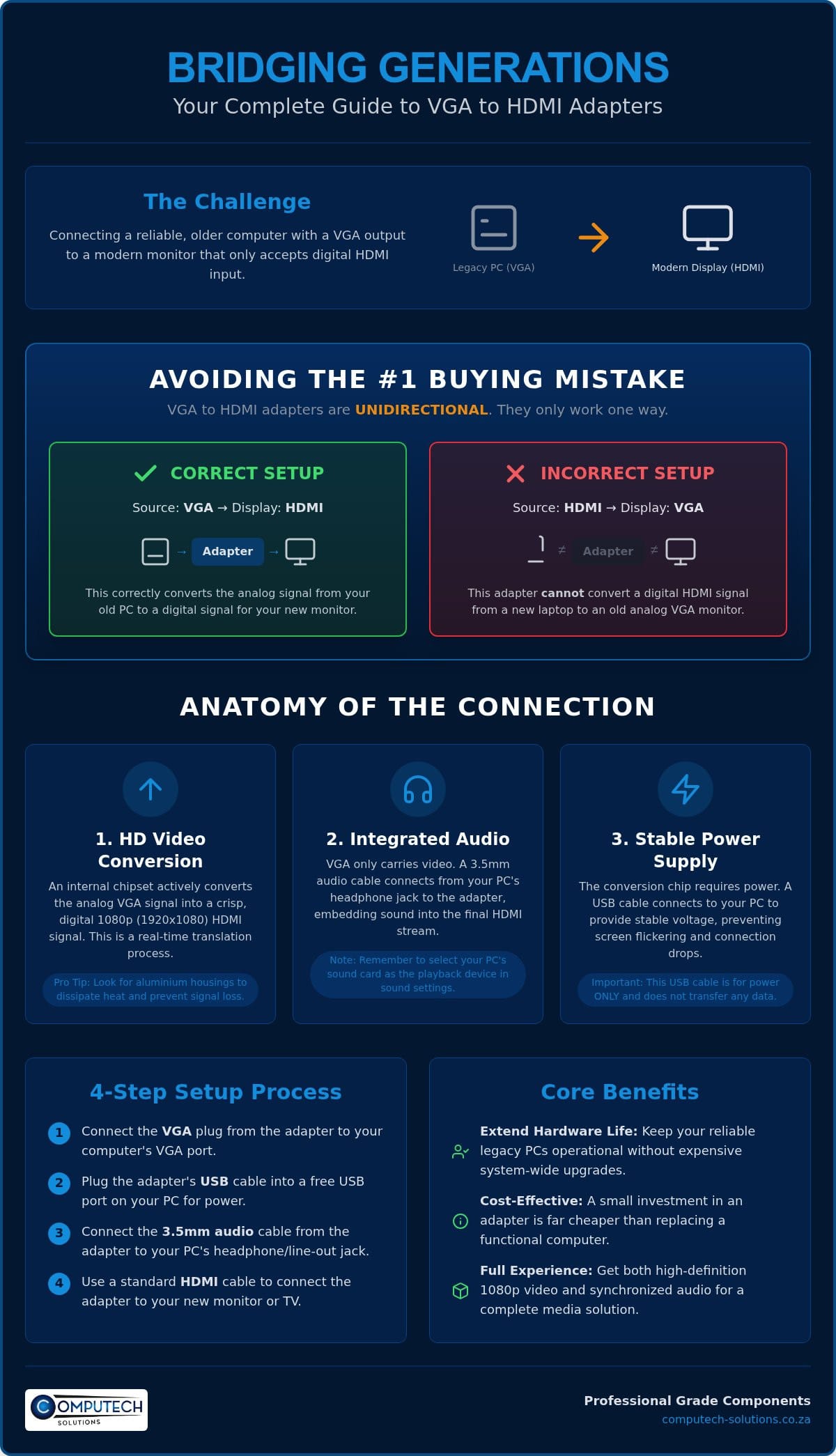
Signal direction is the most critical factor to understand before making a purchase. These adapters are unidirectional; they only work in one specific direction. You must identify your source and your display correctly to avoid the most common buying mistake in the market.
- The Source (Input): This is the device generating the image. Examples include a legacy desktop PC, an older laptop, or a CCTV DVR that only has a 15-pin VGA port.
- The Display (Output): This is where the image appears. Examples include a modern Smart TV, a 4K monitor, or a digital projector with HDMI ports.
If you attempt to use this specific adapter to connect a modern HDMI laptop to an old VGA monitor, it won’t function. The internal chip is hardwired to translate from analog to digital, not the other way around. Always verify that your computer has the VGA port and your screen has the HDMI port before finalizing your setup.
Technical Specifications: Resolution, Audio, and Power
Selecting the right hardware requires looking beyond the price tag. Most users aim for the 1080p (1920×1080) resolution benchmark. This resolution provides crisp text and clear video for both office productivity and home entertainment. High-quality vga to hdmi adapter models often feature aluminium housings. This choice isn’t just aesthetic. Aluminium acts as a heat sink for the internal conversion chipset, preventing the overheating that leads to signal degradation in cheaper plastic alternatives. Reliable heat dissipation is essential for maintaining a stable connection during long work shifts or extended media sessions, and you can learn more about how Adage Components manufactures the high-quality resistors and capacitors that ensure such hardware reliability.
Solving the ‘No Audio’ Problem
VGA ports only transmit video data. To get sound through your TV or monitor speakers, the adapter must bridge this gap. Most units include a 3.5mm AUX input designed to receive sound from your computer’s headphone or line-out jack. Once connected, the adapter merges the audio and video into the final HDMI output. You might need to adjust your software settings to ensure the sound flows correctly. In Windows, right-click the speaker icon and ensure your primary sound card is selected as the playback device. Since the PC sees the connection as an analog 3.5mm jack, selecting the correct output path is vital for integrated audio support.
Powering Your Adapter via USB
A flickering screen is often a sign of insufficient voltage. While some VGA ports provide a small amount of power, it’s rarely enough to sustain an active digital conversion chip. Most reliable adapters feature a dedicated USB power port. Connecting this to a standard USB port on your PC provides the necessary energy to keep the signal stable. This USB cable is for power only and does not carry any data. If you’re struggling with connectivity or need specialized hardware, sourcing high-quality laptop chargers and adapters from a trusted partner can resolve these technical disruptions.
Reliability depends on these technical nuances. Choosing a device with integrated audio and external power support eliminates the stress of technical troubleshooting. It ensures that your legacy hardware remains a productive asset in a modern digital environment. By focusing on these specifications, you avoid the common pitfalls of low-quality video and missing audio, resulting in a professional and reliable connection. To further enhance your multimedia setup with premium sound or projection, visit SoundXcel.
VGA to HDMI vs. HDMI to VGA: Avoiding the #1 Buying Mistake
The most frequent hurdle for South African buyers is identifying the correct signal direction. It’s easy to assume that a cable or converter works bi-directionally, but in the digital age, this isn’t the case. A vga to hdmi adapter is designed for a specific workflow where the source device is analog and the display is digital. Choosing the wrong direction results in a total signal failure. You won’t just experience poor quality; you’ll see a blank screen and face the frustration of technical disruptions and return shipping costs.
Visual identification is your first line of defense. A standard vga to hdmi adapter typically features a male 15-pin VGA connector on one end and a female HDMI port on the other. This design allows you to plug the adapter directly into the back of your legacy computer. Conversely, an HDMI to VGA converter usually has a male HDMI plug and a female VGA port. Because the internal chipsets are hardwired for a single conversion path, these two devices are never interchangeable. Understanding your hardware’s output is the key to a reliable, long-term connection.
When to Choose VGA to HDMI
This configuration is essential when your source device is older than your display. It’s the primary solution for reviving a legacy office desktop to work within a modern workspace. You’ll also need this adapter if you’re connecting an older laptop to a modern digital projector for a presentation. Security professionals often use this tool to integrate legacy DVR systems into a central HDMI monitoring station, allowing for high-definition oversight without replacing expensive recording hardware.
When to Choose HDMI to VGA
You should select the reverse option only when your source is modern but your screen is old. This scenario occurs when you want to use a new MacBook or a modern laptop with an old VGA monitor sitting in storage. It’s also the correct choice for connecting a modern gaming console to a legacy computer screen. The conversion chipset in these devices performs a digital-to-analog translation, which is the exact opposite of what a VGA to HDMI unit does. Always verify your ports before finalizing your purchase to ensure operational efficiency.
By correctly identifying your needs, you protect your business from unnecessary downtime. Whether you’re upgrading a single workstation or an entire office, the distinction between these two adapters is the difference between a seamless setup and a failed connection. Focus on the source of your video signal to make the right choice the first time.
Setup Guide and Troubleshooting Common Connection Issues
Establishing a stable link between legacy hardware and modern displays requires a specific sequence of operations. You should always connect the vga to hdmi adapter to your source PC first. Once the VGA connection is secure, plug in the USB power cable to activate the internal conversion chipset. Finally, connect the HDMI cable to your monitor or TV. This order ensures the adapter is fully powered and ready to process the analog signal before the digital handshake with the display begins. Tightening the VGA thumb screws is a simple but vital step; loose pins are the primary cause of color tinting and signal dropouts.
Fixing ‘No Signal’ and Flickering Screens
If your screen remains black or flickers intermittently, the issue usually stems from insufficient power. Ensure the USB cable is plugged into a high-output port on your PC or a dedicated wall adapter. Some older USB 2.0 ports don’t provide the amperage required for active digital conversion. You should also verify that the HDMI cable is seated firmly. If the problem persists, test the setup with a different HDMI cable to isolate whether the fault lies with the adapter or the secondary wiring. Maintaining your hardware by keeping ports free of dust ensures long-term signal stability and prevents operational risks.
Resolution Matching for Older PCs
A common frustration is the ‘Out of Range’ error, which occurs when the PC outputs a resolution or refresh rate that the monitor cannot support. You must set your desktop resolution to match the native capabilities of your screen, typically 1920×1080 for modern displays. If you can’t see the screen to change settings, boot your PC into Safe Mode to reset the display output. Stick to a 60Hz refresh rate; while some legacy cards support 75Hz, many signal converters struggle with the higher timing, leading to a loss of sync. Matching these specifications is essential for a seamless 1080p experience.
Technical disruptions shouldn’t halt your productivity. If you find that your existing hardware is beyond repair or requires professional-grade replacements, you can find a reliable vga to hdmi adapter and other essential peripherals through our specialized IT catalog. Focusing on high-quality components reduces the stress of troubleshooting and keeps your legacy systems running efficiently in any modern office environment.
Why Source Your VGA to HDMI Adapter from Computech-Solutions?
Choosing the right vga to hdmi adapter is only half the battle. Reliability depends on sourcing hardware that’s been vetted for the specific demands of the South African business environment. Computech-Solutions positions itself as a definitive partner for entities looking to maintain operational continuity without the prohibitive costs of full system overhauls. We don’t just sell components; we provide a total solution that bridges the gap between your legacy infrastructure and modern display standards.
Our commitment to comprehensive service means every peripheral in our catalog meets professional-grade standards. Whether you’re a small business owner in Johannesburg or a home user in Cape Town, you gain access to hardware that has been tested for compatibility and long-term stability. This focus on reliability alleviates the stress of technical disruptions, allowing you to focus on growth rather than troubleshooting hardware failures. We prioritize your business outcomes by ensuring technical features translate into practical efficiency.
Nationwide Reliability Across South Africa
Operational risks increase when hardware fails unexpectedly. We mitigate these risks by offering nationwide delivery across South Africa, ensuring that urgent office repairs don’t lead to extended downtime. Our secure online checkout and reliable order tracking systems provide the transparency you need for efficient procurement. We’ve built our reputation on being a trusted partner for both home users and corporate clients who require consistent, high-quality IT components delivered directly to their door. Our logistics network is designed to move quickly, moving your project from a connectivity challenge to a streamlined solution.
Expert Support for Your Technical Setup
Technical specifications can be confusing, especially when dealing with legacy desktops and newer digital monitors. Our technicians understand the nuances of signal conversion and are available to provide guidance on your specific setup. Whether you need a vga to hdmi adapter for an old workstation or are looking for replacement batteries for Acer, Dell, or HP laptops, we offer the expertise required to make an informed decision. This specialized support ensures you select the correct part for your specific brand and model every time, reducing the risk of buying incompatible hardware.
Beyond simple adapters, we provide a full suite of hardware including desktop computers, laptops, and specialized LCD replacement panels. Our all-encompassing service model means you can source everything from laptop chargers to high-performance batteries in one place, backed by experts who understand the South African market. Browse our range of high-quality VGA to HDMI adapters at Computech-Solutions to secure a reliable, long-term connection for your office today.
Maximize Your Legacy Hardware with Reliable Connectivity
Bridging the gap between analog systems and digital displays doesn’t have to be a source of technical stress. By prioritizing signal directionality and ensuring your hardware includes active conversion chipsets for power and audio, you protect your office from unnecessary downtime. A high-quality vga to hdmi adapter is a strategic investment that extends the lifespan of your reliable legacy desktops while maintaining the crisp 1080p performance required for modern professional environments. It’s about making your existing equipment work harder for you without the need for a full hardware replacement.
Computech-Solutions provides the specialized hardware and expertise needed to navigate these technical transitions with confidence. Our team offers expert technical support to ensure compatibility across all major hardware brands, helping you avoid the common pitfalls of flickering screens or missing audio. With nationwide delivery across South Africa, you can restore your workstations quickly and efficiently using market-tested components. Get the stability your business deserves with a partner that understands your technical requirements from the ground up.
Order your high-performance VGA to HDMI adapter from Computech-Solutions today and ensure your hardware remains a productive asset for years to come. Your transition to modern displays is just one reliable connection away.
Frequently Asked Questions
Can a VGA to HDMI adapter work in reverse?
No, these adapters are strictly unidirectional. They are designed to convert an analog VGA signal from a computer into a digital HDMI signal for a display. If you need to connect a modern HDMI laptop to an old VGA monitor, you require an HDMI to VGA converter instead. Attempting to use the wrong direction will result in zero signal transmission and potential technical disruptions.
Does a VGA to HDMI adapter support 4K resolution?
Standard VGA to HDMI adapters typically don’t support 4K resolution. The VGA interface is an older analog standard that is technically limited to lower resolutions, with 1080p (1920×1080) being the reliable industry benchmark for these converters. While some high-end active adapters claim 4K upscaling, the original analog source usually lacks the detail required for a true high-definition 4K experience.
Why does my VGA to HDMI adapter have a USB cable attached to it?
The USB cable provides the external power necessary for the active conversion chipset inside the unit. Converting an analog signal to a digital one is a processor-intensive task that the VGA port itself cannot power. Connecting this cable to a powered USB port on your PC ensures a stable, flicker-free image and prevents the signal from dropping out during critical operations.
How do I get sound when using a VGA to HDMI adapter?
You get sound by connecting the 3.5mm audio jack included with the adapter to your computer’s headphone or line-out port. Because VGA is a video-only standard, the adapter must physically capture the audio signal separately to merge it into the HDMI output. Once connected, your monitor or TV will receive both video and sound through the single HDMI cable for a complete media experience.
Will this adapter work for my gaming console like a PS5 or Xbox?
No, this specific vga to hdmi adapter won’t work for modern gaming consoles like the PS5 or Xbox Series X. These consoles output a digital HDMI signal, while this adapter is designed to receive an analog VGA input from an older source. To connect a new console to an old VGA monitor, you would need to source an HDMI to VGA converter instead.
Do I need to install any drivers for a VGA to HDMI adapter to work?
You don’t need to install any drivers or software for these adapters to function correctly. Most professional-grade units are designed as plug-and-play devices that your hardware recognizes immediately upon connection. The conversion happens entirely within the adapter’s internal hardware. This makes it a streamlined solution for users who want to avoid complex software configurations and get back to work quickly.
Can I use this adapter to connect a second monitor to my laptop?
Yes, you can use this adapter to connect a second monitor if your laptop has a built-in VGA port. This is a common solution for professionals who want to expand their workspace using a modern HDMI display alongside their existing laptop screen. It allows for efficient multitasking and improved operational efficiency without requiring a laptop upgrade or multiple digital outputs.
What is the maximum cable length I can use with a VGA to HDMI converter?
For optimal signal stability, you should keep the VGA cable length under 5 to 10 meters. Analog signals degrade quickly over long distances, which can lead to ghosting or a loss of image clarity. Once the signal is converted to HDMI, you can typically use an HDMI cable up to 15 meters without significant issues. Shorter connections always provide the most reliable and stable performance.
