
Imagine your Dell Latitude cutting out mid-presentation because a three-year-old battery finally gave up during a scheduled power outage. It’s a common frustration for professionals across the country who rely on their hardware to maintain productivity through every challenge. You shouldn’t have to wait weeks for international shipping or risk your device’s safety with unverified components that might not even fit. Finding reliable dell computer parts south africa shouldn’t feel like a gamble with your professional uptime.
We understand that choosing the right replacement part is about more than just a model number; it’s about restoring your operational efficiency quickly and affordably. This guide shows you exactly how to source the correct Dell components with nationwide delivery and expert technical support. You’ll learn how to verify part compatibility, understand the impact of the latest 2026 Extended Producer Responsibility (EPR) regulations, and choose high-quality replacements that bypass the high costs of official repair centres. From batteries to LCD panels, we provide a streamlined path to getting your hardware back in peak condition via reliable national couriers.
Key Takeaways
- Learn how to efficiently source dell computer parts south africa to minimize downtime and avoid the high costs associated with official repair centres.
- Understand the technical specifications for batteries and chargers, including how to match wattage and cell counts to your specific Dell model.
- Discover the step-by-step process for using your Dell Service Tag to guarantee component compatibility before you finalize your purchase.
- Evaluate the benefits of high-quality generic replacements versus genuine parts, focusing on performance during load shedding and long-term reliability.
- Benefit from expert technical support and nationwide courier delivery to ensure your replacement hardware arrives safely anywhere in South Africa.
Sourcing Dell Computer Parts in South Africa: 2026 Market Overview
Dell’s footprint in the South African corporate and consumer sectors is substantial, particularly in tech hubs like Gauteng which accounts for approximately 44% of the national ICT market. With the South African ICT market valued at USD 43.72 billion in 2025, the volume of hardware in circulation is immense. Understanding Dell’s corporate history reveals a legacy of hardware built for longevity, yet local environmental factors often shorten that lifespan. As of 2026, many South African businesses continue to rely on legacy models that have moved past their official warranty periods. This creates a significant demand for dell computer parts south africa as users look to extend the life of their machines rather than invest in entirely new systems.
Finding reliable components locally can be difficult. Official repair centres often prioritise the latest models, leaving owners of slightly older machines with long lead times and high service fees. Independent retailers have stepped in to bridge this gap, providing a reliable source for dell computer parts south africa that meet high technical standards. This accessibility allows for faster turnaround times, which is essential for maintaining business continuity. By offering high-quality components that are stocked locally, these specialists ensure that technical disruptions don’t become long-term operational risks.
Common Dell Components Requiring Replacement
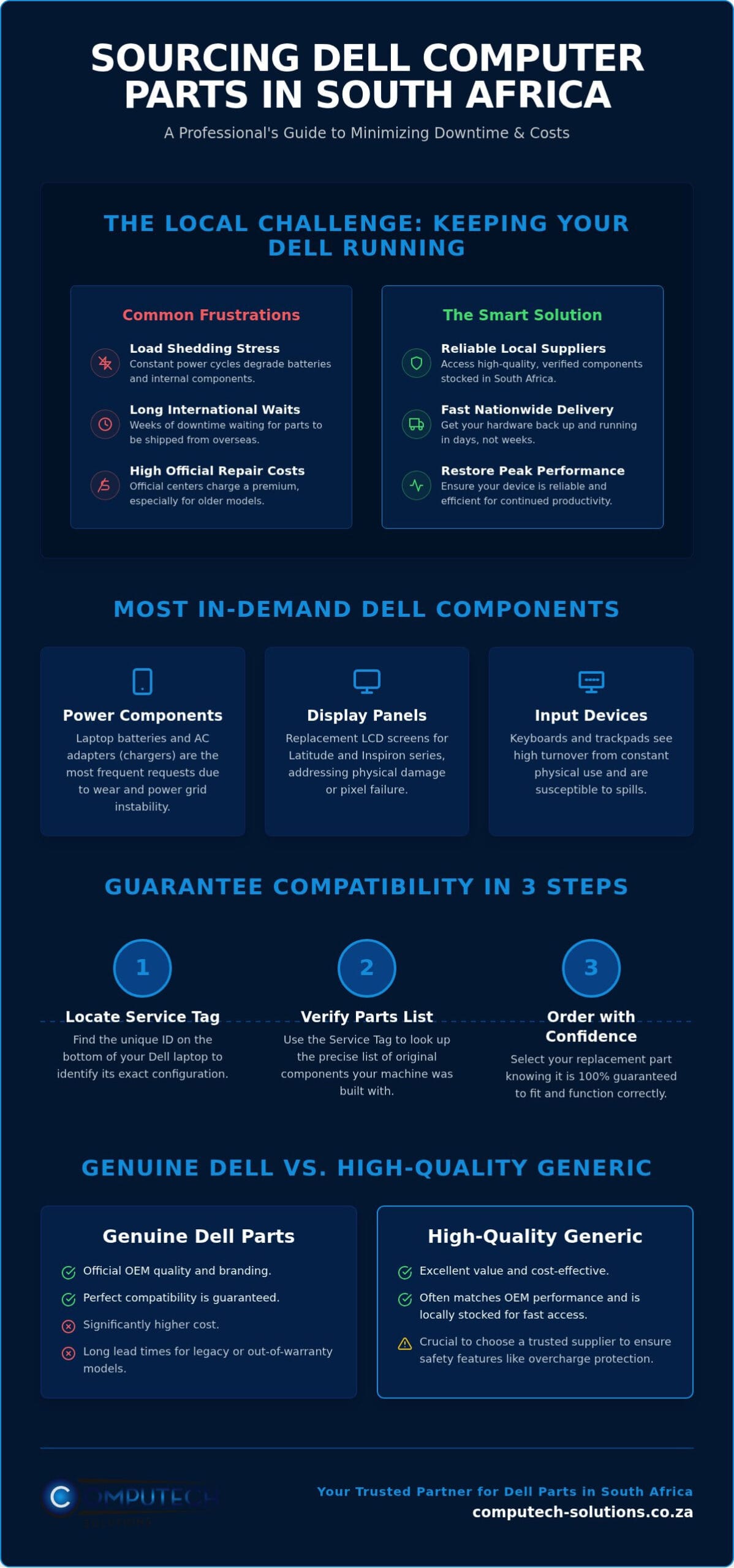
Most hardware failures in the local market are concentrated in a few specific areas. Stocking these essential components locally ensures that a broken screen or a dead battery doesn’t result in weeks of downtime. The most common requirements include:
- Power-related parts: Dell replacement laptop batteries and AC adapters (chargers) are the most frequently requested items due to natural battery degradation and cable wear.
- Display components: Laptop LCD replacement panels for the Latitude and Inspiron series often require replacement due to physical damage or pixel failure.
- Input devices: Replacement keyboards and trackpads see high turnover as they are the primary points of physical interaction and are susceptible to spills.
While these components cover standard business needs, specialized medical environments require even more precise display technology; Synergy Medical Inc. provides expert advice on selecting high-performance imaging hardware for radiology and surgery.
The Impact of Load Shedding on Dell Hardware
Load shedding remains a primary driver for hardware degradation across South Africa. Frequent power cycles and the surges that follow restoration place immense stress on internal components. Laptop batteries suffer the most; they are forced into constant discharge and recharge cycles that rapidly deplete their health. Using surge-protected laptop chargers is no longer optional; it’s a necessity for maintaining hardware integrity. Proactive part replacement is the most effective way to ensure your device remains reliable despite the unstable power grid. By replacing a degrading battery before it fails completely, you protect the rest of the system from potential voltage irregularities and ensure you can work through the next power cut.
Essential Dell Replacement Parts: Batteries, Chargers, and Screens
Maintaining a high-performance Dell ecosystem relies on precise hardware alignment. When sourcing dell computer parts south africa, you must move beyond generic descriptions and focus on specific technical metrics. This ensures your replacement components integrate seamlessly with your existing system architecture without risking electrical damage or performance bottlenecks. Whether you’re managing a fleet of Latitude notebooks or a single Inspiron workstation, technical accuracy is the foundation of a successful repair.
Selecting the Right Dell Laptop Battery
Battery capacity is measured in milliampere-hours (mAh), which directly dictates your runtime between charges. Modern Dell laptops have transitioned from external, clip-in designs to internal lithium-ion polymer cells. These internal units require specific tools for replacement but offer a slimmer profile. High-quality generic batteries have become a viable alternative in 2026, often matching the performance of original units at a lower price point. It’s vital to ensure any replacement cell includes overcharge protection and thermal sensors. As these components reach the end of their life cycle, responsible disposal is required under the National Policy for E-Waste Management. This regulation ensures that electronic components are handled through formal recycling channels to protect the local environment.
Replacing Dell LCD Panels and Screens
Identifying the correct screen requires checking the pin connector on the back of the panel. Most Dell models use either a 30-pin or a 40-pin eDP connector. Using the wrong connector will result in a blank display or potential motherboard damage. You should also consider the screen finish; matte panels reduce glare in office environments, while glossy finishes often provide better colour vibrance for creative work. While many users attempt DIY replacements, professional installation is recommended for touch-enabled screens due to the complexity of the digitizer alignment. If you’re unsure about specific compatibility for your model, you can consult our technical support team to verify the part before ordering.
Voltage and wattage requirements are equally critical when selecting laptop chargers. Dell systems are designed to communicate with the adapter; if you use a 65W charger on a machine requiring 90W or 130W, the system may throttle performance or refuse to charge the battery. For desktop users, upgrading RAM or moving from a mechanical drive to a SATA or NVMe SSD in OptiPlex units remains the most cost-effective way to boost speed. By focusing on these specific hardware standards, you can secure dell computer parts south africa that provide long-term stability and peak operational efficiency.
How to Identify the Correct Parts for Your Dell Device
Precise hardware identification is the only way to ensure your hardware investment remains protected. When sourcing dell computer parts south africa, relying on the model name alone often leads to compatibility errors. Dell frequently uses different internal components within the same model series depending on the specific production year or regional configuration. To avoid the frustration of returning incompatible components, you must utilize the specific identification tools built into your device’s ecosystem.
The Power of the Dell Service Tag
The Service Tag is a unique seven-character alphanumeric code that serves as your machine’s DNA. You’ll typically find it on a small sticker on the bottom of your laptop or the back of your OptiPlex chassis. If the sticker has worn away, you can retrieve it by pressing F2 during startup to enter the BIOS or by running the command wmic bios get serialnumber in Windows. Entering this code on the Dell Support website allows you to extract the “Original Configuration” list. This list identifies exactly which battery capacity, screen resolution, and motherboard revision your system shipped with, making it the most reliable method for identifying dell computer parts south africa that are guaranteed to fit.
Physical Verification of Component Part Numbers
While the Service Tag provides the original specs, physical verification of the component itself confirms any previous upgrades or changes. Every Dell component features a Dell Part Number (DP/N). This is usually a five-character code found on a white label, often preceded by a two-letter country code like “CN” or “KR”. For example, a battery might have a DP/N like “WD560”. Matching this exact code when ordering ensures that connector placements and mounting brackets will align perfectly with your chassis.
- Power Adapters: Check the output section of the label for Voltage (V) and Amperage (A). Multiplying these figures gives you the Wattage (W). You must match the voltage exactly to prevent motherboard damage.
- LCD Panels: The DP/N is located on the back of the panel. You must also verify the connector type, as some models use a 4.5mm barrel while newer units have transitioned to USB-C.
- RAM: Verify the speed (e.g., 3200MHz) and the generation (DDR4 vs DDR5) to ensure the module is physically compatible with your slots.
Verifying these technical details before purchase eliminates the operational risk of technical disruptions. If you’re working with a device that won’t boot, the physical DP/N remains your most reliable source of truth. Taking a clear photograph of the component label allows our technical support team to cross-reference the part and confirm compatibility with our local stock before you commit to an order.
Quality Standards: Genuine Dell vs. High-Quality Generic Replacements
Choosing between original equipment manufacturer (OEM) components and aftermarket alternatives is a critical decision for any hardware owner. Genuine parts are manufactured to Dell’s exact specifications, carrying the official branding and a premium price tag. While these provide a baseline of security, the logistical challenges of importing them into the local market often lead to extended downtime. This is why high-quality generic alternatives have gained significant traction. For those sourcing dell computer parts south africa, the objective is to find components that offer the same electrical stability and physical fit as the originals without the brand tax associated with official distribution channels.
It’s vital to distinguish between substandard fakes and high-quality generic replacements. Fakes often mimic the branding to deceive users but lack essential safety features like thermal sensors or voltage regulators. In contrast, reputable generic parts are transparent about their origin. They use Grade-A cells in batteries and high-grade capacitors in chargers. Reliable suppliers in the South African market vet these components to ensure they withstand the voltage fluctuations common on the national grid. Choosing a third-party component doesn’t mean compromising on safety, provided the part comes from a specialist who understands local power conditions.
When to Choose High-Quality Generic Batteries
If you’re maintaining a five-year-old Dell Inspiron, investing in a genuine battery might exceed the machine’s current market value. High-quality generic batteries provide a cost-effective solution for extending the life of older hardware. These units are designed to meet or exceed the original mAh ratings we discussed in earlier sections. Before purchasing, verify that the supplier offers a local warranty. This provides a safety net that international marketplace sellers cannot match. A well-manufactured generic battery will deliver comparable runtimes during load shedding, provided it utilizes high-density lithium-ion cells.
Ensuring Technical Compatibility and Safety
Safety is non-negotiable when dealing with lithium-ion technology and high-wattage power adapters. Professional-grade replacement parts include integrated circuits (ICs) that protect against overcharging, deep discharge, and short-circuiting. These protections are essential for preventing motherboard damage during sudden power restoration. Buying from a reputable South African retailer ensures you have access to technical support that can verify the specific revision of the part you need. This human element of verification is the best defense against the operational risks of incompatible hardware.
You can browse our full range of certified Dell replacement laptop batteries and chargers to find the right match for your device today.
Reliable Nationwide Delivery for Dell Hardware in South Africa
Finding the right hardware is only half the battle; getting it to your door safely is what restores your productivity. Ordering dell computer parts south africa from a local specialist ensures you aren’t navigating the complexities of international logistics, high import duties, or customs delays. By sourcing components from a domestic inventory, you reduce the time your machine sits idle. It’s a strategic move that prioritises uptime and operational stability for both individual users and corporate IT departments.
To further enhance these efficiencies, corporate teams can explore IT Expense Management and Managed Services to ensure their entire technology stack remains cost-effective and reliable.
Reliable access to dell computer parts south africa is a cornerstone of modern business continuity. Nationwide courier networks now reach every province, ensuring that whether you’re in the industrial hubs of Gauteng or the more remote regions of the Eastern Cape, your hardware arrives securely. This reach is vital for maintaining a consistent standard of equipment across decentralised teams. When you order from a specialist, you’re tapping into a logistics chain designed specifically for the safe transport of delicate electronics.
Fragile components like LCD replacement panels and lithium-ion batteries require specialized handling and packaging. We use reinforced boxing and anti-static materials to protect sensitive electronics from physical impact and electrical discharge during transit. Computech-Solutions streamlines the procurement process by maintaining a localized inventory of high-demand components, allowing for a much faster response than international suppliers can offer. This professional approach to logistics ensures that the technical features of the part you ordered are preserved from the warehouse to your desk.
Efficient Order Fulfillment and Shipping
Delivery timelines are optimized based on your location. Major centres like Johannesburg, Cape Town, and Durban typically benefit from streamlined courier routes, while outlying or rural areas may require slightly more transit time. Every order includes a tracking number, allowing you to monitor your hardware’s progress in real time. If a component doesn’t meet the technical specifications required due to a fitment error, our clear returns and exchange policies provide a structured path to resolving the issue without unnecessary stress.
Why Technical Support Matters for Online Orders
Professional technical support is the ultimate safeguard against ordering the wrong component. Consulting with an expert before you finalize your purchase ensures that the part number, voltage, and physical connector match your specific Dell model perfectly. This level of functional service is what distinguishes a specialized retailer from a general marketplace. It’s about more than just a transaction; it’s about providing a definitive, total solution that keeps your technology running. Order your Dell replacement parts from Computech-Solutions today to experience a seamless, expert-led procurement process.
Secure Your Hardware Uptime Today
Maintaining high-performance hardware in the 2026 landscape requires a proactive approach to technical health. By utilizing the Dell Service Tag for precise identification and choosing high-quality generic components that meet local safety standards, you can extend your device’s lifespan significantly. This strategy effectively bypasses the long lead times of international shipping and the excessive costs of official repair centres. Sourcing reliable dell computer parts south africa is a straightforward process when you partner with a specialized provider that understands the unique demands of the local power grid.
We are specialists in Dell replacement batteries and LCD panels, offering the expert technical support you need to verify every component before purchase. Our commitment to professional, functional service ensures your hardware investment is protected with reliable nationwide delivery across South Africa. Find Your Dell Replacement Parts at Computech-Solutions and restore your machine to peak operational efficiency today. Your technology should work as hard as you do, and the right component makes all the difference.
Frequently Asked Questions
How do I know if a replacement battery is compatible with my Dell laptop?
You verify compatibility by matching the Dell Part Number (DP/N) found on your original battery label. This five-character code ensures the connector and mounting points align perfectly with your chassis. You should also cross-reference the voltage and milliampere-hour (mAh) rating. While the Service Tag provides the original factory specs, the physical DP/N remains the most accurate way to confirm which dell computer parts south africa you need for a successful replacement.
Where can I find the Dell Service Tag on my computer?
The Dell Service Tag is a seven-character alphanumeric code located on a sticker on the bottom of your laptop or the rear of your desktop tower. If the sticker is unreadable, you can find it by pressing the F2 key during the startup sequence to enter the BIOS menu. Alternatively, typing “wmic bios get serialnumber” into the Windows command prompt will display the tag instantly on your screen for easy reference.
Can I use a higher wattage charger for my Dell laptop?
You can safely use a higher wattage charger, as your laptop will only draw the specific amount of power it requires to operate and charge. For example, a 90W adapter can replace a 65W unit without risk. However, you must never use a charger with a lower wattage than your system requires. This will result in slow charging, reduced performance, or a total failure to power the device under heavy workloads.
Is it safe to use a generic replacement battery for my Dell Inspiron?
High-quality generic replacement batteries are safe if they include integrated protection circuits to prevent overcharging and short circuits. These components offer a cost-effective alternative for sourcing dell computer parts south africa, particularly for out-of-warranty Inspiron or Vostro models. Buying from a reputable local specialist ensures the battery has been vetted for performance stability on the national grid. This provides the same reliability as an original unit without the associated brand premium.
Does Computech-Solutions deliver Dell parts to rural areas in South Africa?
Computech-Solutions provides comprehensive nationwide delivery to every province, including rural and outlying areas across South Africa. We utilize established national courier networks to ensure that technical components reach your location securely and efficiently. Whether you’re in a major metropolitan hub or a remote town, your hardware order is tracked from our warehouse to your door. This ensures you have access to specialized components regardless of your proximity to an urban centre.
What is the average lifespan of a Dell replacement battery under load shedding conditions?
A replacement battery typically lasts between 18 and 36 months, though frequent load shedding can accelerate this degradation. Every time your laptop is forced to run on battery power during an outage, it completes a partial discharge cycle. Over time, these cycles reduce the chemical capacity of the lithium-ion cells. To maximize lifespan, try to keep the battery between 20% and 80% charge and use a surge-protected charger when the power returns.
How can I tell if my Dell screen needs a 30-pin or 40-pin replacement?
You can identify the pin count by inspecting the video connector on the back of your physical LCD panel. Most standard HD and Full HD screens utilize a 30-pin eDP connector, while high-resolution 4K or touch-enabled panels often require a 40-pin connection. Because these connectors are not interchangeable, removing the screen to verify the physical pin layout or the DP/N is the only definitive way to ensure you order the correct replacement.
What should I do if my Dell charger is getting extremely hot during use?
If your charger becomes too hot to touch, you should disconnect it immediately and check for signs of physical damage or fraying. While adapters naturally generate heat during operation, extreme temperatures often indicate an internal short or an incorrect wattage match for your laptop’s power requirements. Using a damaged or underpowered charger can lead to motherboard failure. Replacing it with a correctly rated unit is essential for maintaining the electrical safety of your hardware.
