
You’re mid-way through a critical work deadline when your screen suddenly dims and the charging light refuses to flicker on. Finding a replacement asus laptop charger in South Africa shouldn’t feel like a technical gamble, yet the confusion over 4.0mm versus 4.5mm or 5.5mm pin sizes often leads to unnecessary downtime. We understand that your laptop is the engine of your daily productivity. You shouldn’t have to fear that an incorrect voltage choice might permanently damage your motherboard or that a subpar adapter will degrade your battery health over time.
This guide provides the technical clarity you need to master ASUS power specifications with absolute confidence. While South Africa’s power grid has shown significant stability in 2026 with over 455 consecutive days without load shedding, internal hardware protection remains a primary priority for any professional. You’ll learn how to match voltage and amperage perfectly to ensure your device remains safe and high-performing. We will examine the essential safety standards like SANS 62368-1 and explain how to secure a 100% compatible solution with fast nationwide delivery to get your workstation back to full capacity immediately.
Key Takeaways
- Learn the “Golden Rule” of voltage matching and why your replacement must strictly adhere to your laptop’s specific power rating to prevent hardware failure.
- Identify the exact physical fit for your device by distinguishing between standard DC barrel tips and modern USB-C connectors, including critical “pin” vs “no-pin” variations.
- Discover how to select a high-performance asus laptop charger that includes essential Over Voltage (OVP) and Over Current (OCP) protection for long-term battery health.
- Understand how high-quality replacement adapters serve as your first line of defense against power surges and how to secure reliable nationwide delivery across South Africa.
- Access expert technical support to verify your model compatibility before you buy, ensuring you receive a definitive solution for your specific ASUS series.
Understanding ASUS Power Adapter Specifications: Voltage, Amperage, and Wattage
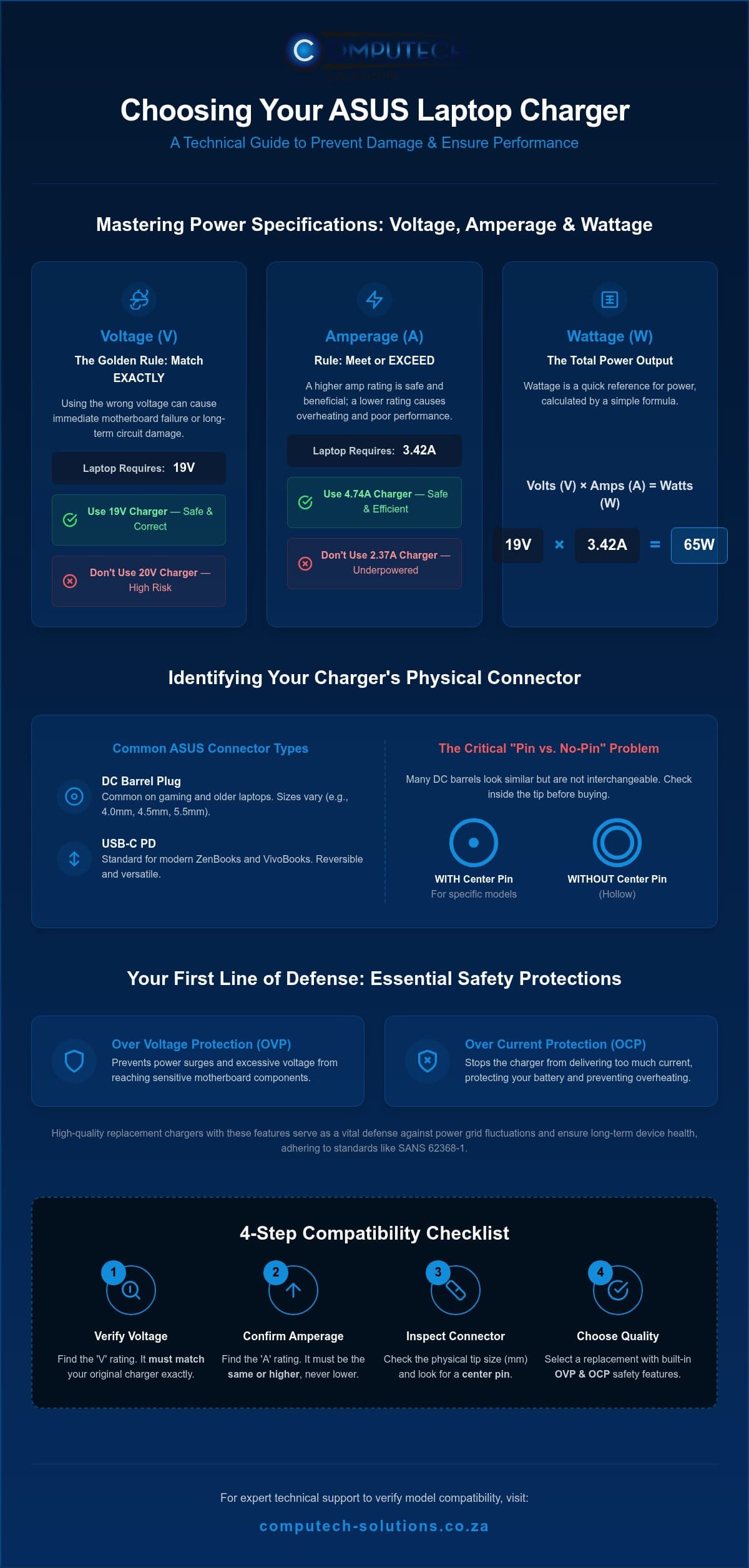
Selecting a replacement asus laptop charger requires more than just matching the brand name. You must verify the electrical output to ensure the hardware remains stable and the battery charges efficiently. These specifications are usually found on a sticker located on the underside of your laptop or printed directly onto your original power adapter. Look for the “Input” section on your laptop chassis or the “Output” section on the charger itself. The relationship between these numbers follows a simple mathematical equation: Volts (V) x Amps (A) = Watts (W). If your laptop requires 19V and 3.42A, you need a 65W charger. Understanding how these three variables interact is the only way to avoid buying a component that could potentially damage your system.
Matching Voltage for Component Safety
Voltage represents the electrical pressure delivered to your laptop. It’s the most critical specification to get right. ASUS typically uses standards of 19V, 19.5V, or 20V depending on the specific model series. You must follow the “Golden Rule” here: the voltage of your new asus laptop charger must match your original exactly. While some components have small tolerances, even a 1V difference can lead to immediate motherboard failure or long-term circuit degradation. If your laptop label specifies a 19V input, don’t attempt to use a 20V adapter. This precision ensures that sensitive internal regulators don’t overheat or blow under excessive pressure.
Understanding Amperage and Wattage Overhead
Amperage refers to the electrical current or “flow” that the charger can provide. Unlike voltage, amperage functions on a “pull” basis. Your laptop will only draw the amount of current it needs to operate and charge the battery. This means using a charger with a higher amperage rating than your original is perfectly safe and often beneficial. For example, using a 90W (4.74A) charger on a laptop that originally came with a 65W (3.42A) unit won’t cause any harm. The charger will simply run cooler because it isn’t working at its maximum capacity.
Under-powering your device is where the risk lies. If you use a 45W charger on a high-performance ROG or TUF gaming laptop that requires 180W or 240W, you’ll encounter several issues:
- The battery may not charge at all while the laptop is in use.
- The power adapter will likely overheat as it struggles to meet the demand.
- System performance will be throttled, leading to lag during intensive tasks.
- The charger’s lifespan will be significantly shortened due to constant thermal stress.
High-performance gaming models require substantial wattage overhead to power dedicated graphics cards and advanced cooling systems. Always ensure your replacement meets or exceeds the original amperage to maintain peak operational efficiency.
Identifying Your ASUS Charger Connector: From DC Tips to USB-C
Confirming the electrical specifications is only half the battle. The physical connector must seat perfectly in your laptop’s charging port to prevent arcing or port damage. ASUS has transitioned through several connector standards over the last decade, moving from large legacy barrels to the ultra-slim USB-C Power Delivery (PD) ports found on modern ZenBook and VivoBook models. Understanding these physical differences is essential because many asus laptop charger variants share identical voltage ratings but use incompatible tips.
The most frequent point of confusion for South African buyers is the “pin” problem. Some ASUS connectors are hollow, while others contain a delicate centre needle or sensing pin. If you attempt to force a hollow connector onto a port designed for a pin-based charger, you will likely snap the internal charging post. Conversely, a pin-based charger will not fit into a hollow port. Always look inside the tip of your old adapter to see if a needle is present before ordering a replacement.
The DC Barrel Guide: Measuring Without a Ruler
Most users don’t have digital calipers to measure millimetres. You can identify your connector by using visual benchmarks and model series history. The 4.0mm x 1.35mm tip is roughly the thickness of a standard matchstick and is the most common size for mid-range ZenBooks and newer VivoBooks. If your charger has a distinctive blue plastic ring at the very end of the metal tip, it’s likely the 4.5mm x 3.0mm “blue tip” variant, which almost always features a centre pin.
Older ASUS X-series and K-series laptops typically use the 5.5mm x 2.5mm “large tip” connector. This barrel is noticeably thicker, similar to the width of a standard pencil. If you find yourself struggling to distinguish between these sizes, you can chat with our technical support team for a definitive model match based on your laptop’s serial number.
USB-C and Universal Charging Standards
Modern premium ASUS laptops have adopted USB-C Power Delivery. This standard simplifies life by allowing one charger to power multiple devices. However, not every USB-C port on an ASUS laptop supports charging. Look for a small lightning bolt icon (Thunderbolt) or a battery icon next to the port. If the port is only marked with a “D” or a standard USB logo, it’s likely a data-only port and won’t accept power from an asus laptop charger. For these modern systems, ensure your replacement supports the required wattage, as a standard mobile phone USB-C cable will not provide enough current to power a laptop under load.
Genuine vs. High-Quality Replacement Chargers: Making an Informed Choice
Choosing an asus laptop charger often presents a choice between expensive Original Equipment Manufacturer (OEM) units and more affordable alternatives. While OEM chargers are the baseline for quality, high-quality generic replacements provide a superior price-to-performance ratio for South African users. The distinction lies in the internal engineering. A professional-grade replacement prioritizes heat dissipation through optimized thermal pads and robust housing, ensuring the adapter runs cooler during intensive gaming or rendering sessions. Physical build quality is equally important; look for reinforced strain relief at the connector and thicker copper wiring within the cable to prevent internal fraying over time.
What Makes a ‘High-Quality’ Replacement?
Technical reliability starts with internal circuitry. High-quality replacements utilize premium capacitors that maintain a steady power flow, preventing the micro-fluctuations that damage sensitive laptop components. These units adhere to international certification standards like CE and RoHS. In South Africa, reputable suppliers ensure compliance with local safety regulations like SANS 62368-1, which covers the safety of IT equipment. Beyond the components, purchasing from a specialist retailer secures expert technical support and a functional warranty. This provides a safety net that generic marketplace sellers often lack, ensuring you receive a definitive solution for your hardware needs.
Risks of Low-Grade Generic Adapters
The dangers of bargain chargers extend beyond slow charging. Poorly shielded generic adapters often produce significant electromagnetic interference (EMI). This interference manifests as “ghost touches” on your touchpad, where the cursor jumps or clicks erratically without input. You might also notice screen flickering or a high-pitched coil whine coming from the adapter itself. These are clear signs of an unstable power supply that lacks the necessary filtering to protect your laptop.
The long-term risk to your hardware is even more severe. Low-grade chargers often lack Over Voltage Protection (OVP) and Over Current Protection (OCP), leaving your motherboard vulnerable to sudden power spikes. Inconsistent current delivery also accelerates the degradation of your laptop battery’s cycle life, leading to reduced runtime and eventual battery failure. By choosing a high-quality asus laptop charger, you protect your investment from these operational risks and ensure your device remains productive throughout its intended lifespan.
Protecting Your Investment: Managing Load Shedding and Power Surges
South Africa’s electrical grid has shown remarkable stability in 2026, with over 455 consecutive days without load shedding as of August. However, grid maintenance and localized outages still occur, and the moment power returns is when your hardware faces its greatest risk. Your asus laptop charger acts as the primary barrier between the national grid and your laptop’s sensitive internal components. It’s designed to be a sacrificial component; it’s much safer and more affordable to replace a damaged power brick than a fried motherboard. Understanding how to manage these electrical transitions is essential for maintaining your device’s operational lifespan.
Surge Protection and Load Shedding Recovery
When electricity is restored after an outage, a massive “inrush” of current often precedes the steady flow of power. This surge can exceed the standard 230V limit, putting immense pressure on the adapter’s internal capacitors. High-quality replacements feature integrated Over Voltage Protection (OVP) to intercept these spikes. To add an extra layer of security, we recommend using a SANS-compliant surge-protected multi-plug for your workstation. If you notice your power brick is bulging, discoloured, or emitting a burnt plastic smell after a power restoration, it has likely intercepted a surge and must be replaced immediately to avoid fire risks.
We also advise unplugging your laptop from the wall during electrical storms or planned maintenance. Even the best surge protection can be overwhelmed by a direct lightning strike or severe grid instability. If you’re unsure if your current adapter survived a recent power event, you can contact our technical team for a diagnostic consultation to ensure your hardware remains safe.
Cable Management for Longevity
Most asus laptop charger failures don’t happen inside the brick; they happen at the joints where the cable meets the connector. Tight bends and “cable memory” from wrapping the wire too firmly cause the internal copper strands to fray and eventually snap. This leads to intermittent charging or dangerous arcing. To extend the life of your cable, always wrap it in loose, natural circles rather than winding it tightly around the adapter block.
Heat also plays a significant role in cable degradation. Constant high temperatures during intensive use can make the outer PVC jacket brittle over time, leading to cracks that expose the internal wiring. Ensure your power brick is placed in a well-ventilated area, never tucked under a pillow or behind a heavy curtain. By maintaining a cool operating environment and avoiding sharp bends near the connector tip, you ensure that your replacement adapter remains a reliable partner for years to come.
How to Order Your Replacement ASUS Charger for Nationwide Delivery
Ordering a replacement asus laptop charger shouldn’t be a process of trial and error. We’ve streamlined our digital platform to ensure that South African professionals and students can find the exact power solution they need without technical guesswork. By using the integrated search bar on our website, you can enter your specific laptop model or the part number found on your original adapter. This direct matching system eliminates the risk of purchasing a component with the wrong pin size or voltage, protecting your hardware from the operational risks discussed in previous sections.
Our system is built for rhythmic efficiency. Once you identify your required part, our secure checkout process offers various payment options to protect your financial data. We provide comprehensive order tracking for every shipment, giving you peace of mind as your replacement moves through our logistics network. This professional approach ensures a streamlined transaction from the moment you identify a failure to the second your workstation returns to full capacity.
Verifying Your Model Before You Buy
Before finalizing your order, it’s vital to confirm your laptop’s specific sub-series. While many devices look identical, an ASUS VivoBook S15 S533 may require a different wattage than a standard VivoBook 15. You can find your model name printed on the sticker at the bottom of your laptop chassis or by checking the original packaging. If the sticker has worn away, you can find the information in your Windows System Settings under “About.”
Our commitment to accuracy includes providing expert technical support for every client. If you have any doubt about which asus laptop charger fits your device, our team is available to perform a quick compatibility check. This proactive verification ensures that the component you receive is a definitive, total solution for your specific hardware, preventing the frustration of returns and extended downtime during critical deadlines.
Seamless Nationwide Delivery Across SA
We understand that a broken charger often halts business operations or academic progress. That’s why we maintain a robust logistics network designed for speed and reliability. We provide nationwide delivery across all South African provinces, ensuring that even clients in remote areas receive the same high-quality service as those in major metropolitan hubs. Our specialized components are stocked and ready for dispatch to get you back online as quickly as possible.
When your order arrives, you’ll find a complete charging solution ready for immediate use. Every package contains the high-quality replacement power adapter along with the correct South African three-pin power cord. This all-encompassing service model means you won’t need to source additional cables elsewhere. We focus on providing a reliable partner for your technical needs, ensuring your laptop remains a high-performance tool for your growth and operational efficiency.
Browse our range of ASUS Laptop Chargers
Secure Your Professional Productivity Today
Mastering your device’s power requirements is the most effective way to prevent hardware failure and maintain long-term battery health. By matching exact voltage specifications and verifying connector dimensions, you eliminate the operational risks associated with incompatible power supplies. High-quality replacement adapters provide the necessary surge protection and heat dissipation to safeguard your motherboard against South Africa’s localized grid instability and sudden voltage spikes.
Don’t let a broken power brick stall your professional or academic progress. Our team provides expert technical support for model matching to ensure you receive a 100% compatible asus laptop charger for your specific VivoBook, ZenBook, or ROG series. With reliable nationwide delivery across South Africa, your replacement arrives with the correct power cord to restore your operational efficiency immediately.
Find Your Compatible ASUS Laptop Charger Now
You can move forward with the confidence that your hardware is powered by a reliable partner committed to your technical success and growth.
Frequently Asked Questions
Can I use a higher wattage charger for my ASUS laptop?
Yes, it’s safe to use a higher wattage charger because the laptop only draws the current it needs. For example, using a 90W charger on a 65W laptop is perfectly fine. The higher wattage unit will often run cooler because it isn’t operating at its maximum limit. You must ensure the voltage matches your original exactly. Incorrect voltage will cause permanent damage to your internal hardware components.
How do I find the specific model number of my ASUS laptop?
You can find your ASUS model number on the sticker located on the bottom of the laptop chassis. If the label is worn, check the original packaging or look in the Windows “About your PC” settings menu. Another reliable method is to enter the BIOS by pressing F2 during startup. Identifying the specific sub-series, such as the ZenBook UX430, is essential for selecting the correct asus laptop charger for your device.
Why is my ASUS laptop charger getting extremely hot during use?
Extreme heat usually indicates that the charger is working at its maximum capacity or struggling with poor ventilation. If you use a 45W adapter for a high-performance gaming laptop that requires 90W, the unit will overheat. Ensure the brick is placed on a hard, flat surface and away from carpets or blankets. If the heat is accompanied by a burnt plastic smell or discolouration, stop using the adapter immediately to prevent potential fire risks.
Will a universal laptop charger work safely with an ASUS laptop?
Universal chargers are generally not recommended because they often lack the precise voltage regulation required for sensitive ASUS hardware. While they offer multiple tips, the internal circuitry might not provide the exact 19V or 19.5V needed. This instability can lead to “ghost touches” on your touchpad or long-term battery degradation. It’s always safer to choose a high-quality replacement specifically engineered for your model to ensure total compatibility and operational safety.
Does load shedding damage my laptop charger even if it’s not plugged in?
Load shedding cannot damage your charger if it isn’t plugged into a wall socket. The risk occurs when the power returns while the charger is connected. The sudden inrush of current can create a voltage spike that overwhelms the adapter’s internal protection. To safeguard your asus laptop charger, always unplug it from the wall during an outage and wait for the power grid to stabilize before reconnecting your workstation to the grid.
What is the difference between a 4.0mm and 4.5mm ASUS charger tip?
The primary difference is the physical diameter and the presence of a centre pin. The 4.0mm tip is a hollow barrel commonly used in slim ZenBooks. The 4.5mm “blue tip” variant is slightly thicker and almost always contains a delicate needle-like pin in the centre. These are not interchangeable. Forcing the wrong size into your port will cause physical damage to the charging socket and the internal motherboard connections.
Is it safe to leave my ASUS charger plugged in all day?
It’s safe to leave your charger plugged in because modern ASUS laptops feature intelligent charging circuits that stop drawing power once the battery reaches 100%. However, constant heat from being connected to the grid can slowly degrade the adapter’s internal capacitors over several years. For optimal longevity and safety during South African power fluctuations, we suggest disconnecting the charger when you’ve finished your work for the day to protect your hardware components.
How can I tell if my ASUS charger or my battery is the problem?
Try to power the laptop with the battery removed while the charger is plugged in. If the laptop runs perfectly, the battery is likely the issue. If the device won’t turn on or the charging light doesn’t flicker when you wiggle the cable, the charger or the DC port is usually the culprit. Check for visible fraying near the connector or a loose fit in the charging socket to confirm where the failure lies.
