
Did you know that 18% of users experience poor performance simply because they treat their vga to hdmi adapter as a basic cable rather than an active signal processor? It’s a common frustration to connect a legacy laptop only to be met with a flickering screen or a complete lack of audio. You’ve likely felt the irritation of purchasing hardware that only works in one direction or fails to produce the quality your modern 1080p monitor requires. Bridging the gap between reliable older workstations and digital displays shouldn’t be a gamble with your productivity.
We understand that maintaining operational efficiency requires hardware that works the first time without technical disruptions. This guide ensures you master the technical nuances of analog to digital conversion so you can secure a seamless connection with crisp video and integrated audio. We’ll examine the specific requirements for external USB power, the necessity of 3.5mm audio inputs, and how to select a durable solution built to handle South African power conditions. By the end of this article, you’ll have a clear understanding of the setup process and the confidence to integrate your legacy devices into a modern professional ecosystem using specialised technical insights.
Key Takeaways
- Understand the critical role of active chipsets in converting aging analog signals to modern digital standards.
- Identify why a vga to hdmi adapter requires dedicated USB power and 3.5mm audio integration to prevent signal drop-outs.
- Master the “source to display” rule to ensure your hardware investment works in the correct direction.
- Access a verified setup sequence that eliminates common issues like screen flickering and image distortion.
- Learn how high-quality, specialised components provide a durable solution that withstands South African electrical fluctuations.
Understanding the VGA to HDMI Conversion Process
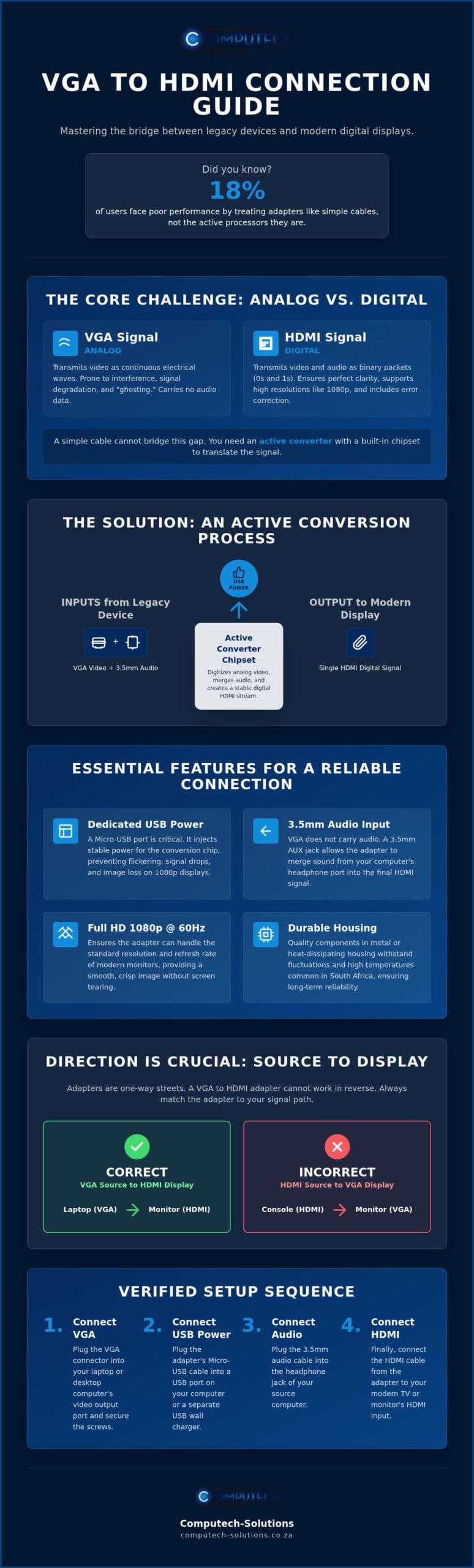
The transition from legacy hardware to modern displays isn’t a simple physical connection; it’s a sophisticated electronic translation. The traditional VGA connector represents an aging analog standard that sends visual information through continuous electrical waves. In contrast, HDMI is a modern digital standard that transmits data in binary packets. Because these two languages are fundamentally incompatible, a standard “pass-through” cable cannot bridge the gap. An active vga to hdmi adapter is required to act as a bridge between these disparate eras. Active signal conversion is the process of digitising analog data in real-time. Without this active processing, your modern monitor won’t receive a signal it can interpret.
Analog vs. Digital: Why the Gap Exists
The technical gap exists because of how information is packaged and transmitted. VGA signals rely on fluctuating voltages to determine colour and brightness. This analog method is susceptible to interference and is limited by the physical hardware’s ability to maintain signal integrity over distance. Modern digital displays operate on a binary system of ones and zeros, which allows for much higher data density and built-in error correction. While a VGA signal might suffer from “ghosting” or loss of clarity at higher resolutions, HDMI comfortably handles 1080p and beyond. Modern TVs are designed to ignore raw analog signals through their HDMI ports to maintain high performance, meaning they require the signal to be pre-processed into a digital format they can “read” instantly.
The Role of the Internal Conversion Chip
The heart of any reliable vga to hdmi adapter is its internal conversion chipset. This chip requires a dedicated power source, usually provided via a micro USB cable, to perform the complex mathematical calculations needed to translate analog waves into digital bits. High-quality chips are essential for South African users who require stable performance across various hardware configurations. A premium chipset reduces input lag and prevents screen tearing by synchronising the refresh rates of the legacy source and the modern display. These specialised chips also ensure colour accuracy remains consistent throughout the conversion. Cheap, unpowered alternatives often fail because they lack the processing power to maintain a stable 1080p signal, leading to the flickering and image loss that plagues many home and office setups. Choosing an adapter with a robust internal processor is a foundational step in a comprehensive hardware strategy.
Essential Features for a Reliable Connection
Reliability in a professional environment depends on more than just basic connectivity. A high-quality vga to hdmi adapter must support a resolution of 1080p Full HD at 60Hz to match the refresh rates of modern office monitors. Beyond resolution, the physical build is vital. In the South African climate, hardware often faces high ambient temperatures. Adapters with aluminium housing offer a significant advantage by dissipating heat more efficiently than plastic alternatives. This prevents the internal conversion chip from overheating or failing during extended use, ensuring your hardware remains a stable part of your long-term IT strategy.
Solving the Audio Dilemma
Standard VGA ports are fundamentally incapable of transmitting sound. This often leads to the frustration of a perfect image paired with total silence. Professional-grade VGA-to-HDMI Converters include a 3.5mm AUX jack as a standard feature. This allows the hardware to merge the analog audio from your source device into the digital HDMI signal. Once you’ve plugged the audio cable into your computer’s headphone jack, you might need to adjust your system settings. Ensure your sound output is directed to the analog jack to allow the adapter to broadcast audio through your HDMI-connected display. This creates a unified multimedia experience without the need for external computer speakers.
Why Power Injection Matters
Power management is the most overlooked aspect of signal conversion. Many legacy VGA ports provide insufficient “bus power” to sustain an active chipset. This lack of energy results in flickering screens or intermittent signal loss, especially on modern 1080p displays. High-quality adapters feature a Micro-USB port for external power injection. This dedicated voltage ensures the conversion process remains stable even when the source computer’s port is underpowered. Avoid passive cables that lack this feature. They’re prone to failure because they cannot provide the energy required for real-time signal digitisation. If you need help choosing a reliable power-injected solution, chat with our specialists for personalised hardware advice.
Directionality: VGA to HDMI vs. HDMI to VGA
One of the most common mistakes in hardware procurement is assuming that signal conversion is reversible. It’s not. A vga to hdmi adapter is a unidirectional tool designed for a specific data path. This limitation exists because the internal circuitry is hardwired to process information in one direction only. Buying the wrong cable doesn’t just result in a blank screen; it leads to operational downtime and unnecessary logistical costs. In a business environment where efficiency is paramount, understanding the “Source to Display” rule is the most effective way to avoid these errors. Getting the directionality right the first time ensures your legacy hardware integrates seamlessly with modern infrastructure without the need for troubleshooting.
The Source to Display Framework
To choose the correct hardware, you must first identify the “Source” and the “Display”. The Source is the device generating the video signal, such as an older desktop or a legacy laptop. The Display is the device receiving that signal, typically a modern LED monitor or a television. If your computer has a VGA port and your screen has an HDMI port, you must use a vga to hdmi adapter. Reversing this setup with an HDMI-to-VGA converter will not work because the chipset cannot process the digital-to-analog transition required for that specific signal path. Always trace the signal from the computer to the screen to confirm your requirements.
Technical Differences in Chipsets
The reason these devices aren’t interchangeable lies in the semiconductor design. A VGA to HDMI unit uses an Analog-to-Digital Converter (ADC) to translate continuous waves into binary data. Conversely, an HDMI to VGA unit uses a Digital-to-Analog Converter (DAC). These chips are fundamentally different and cannot perform the opposite function. Many institutions that maintain diverse hardware fleets rely on VGA to HDMI adapters to keep their legacy equipment functional in modern environments. Before you finalise your order, physically inspect your ports. Note whether you need male or female connectors. Most adapters feature a male VGA plug to fit into your PC and a female HDMI port for your existing HDMI cable. Taking thirty seconds to verify this prevents the frustration of returning items. Given the costs associated with national shipping across South Africa, ensuring you have the correct specialised component is a critical part of a cost-effective hardware strategy.
Step-by-Step Setup and Troubleshooting Guide
Successful integration of legacy hardware depends on following a systematic installation process. Before you begin, inspect your VGA ports for dust or bent pins. Physical obstructions often cause signal degradation or total failure. Ensure your HDMI cable is rated for at least 1080p to match the output of your vga to hdmi adapter. A secure physical connection is the foundation of a stable digital signal. Taking a few moments to clean the contacts with compressed air can prevent intermittent connectivity issues later.
The Proper Connection Sequence
- Step 1: Insert the VGA male connector into your computer port and tighten the thumb screws securely. A loose connection here is a primary cause of colour tinting or ghosting on the screen.
- Step 2: Connect the 3.5mm audio cable to the computer headphone or line-out jack. This step is vital because the VGA standard only handles visual data.
- Step 3: Plug the USB power cable into a spare USB port on your PC or a dedicated wall adapter. This provides the voltage required for the active chipset to perform the digital conversion.
- Step 4: Connect the HDMI cable from the adapter output port to your modern display.
Once the physical setup is complete, you might need to adjust your software settings. If your monitor displays an “Out of Range” error, the source device is likely sending a resolution or refresh rate higher than the display can handle. Navigate to your display settings and manually set the output to 1920×1080 at 60Hz. This alignment ensures the digital handshake between devices remains consistent and prevents unnecessary flickering.
Troubleshooting Common Display Issues
If the image appears blurry or stretched, check that you’ve selected the monitor’s native resolution in your operating system. Screen flickering is almost always a power-related issue. Ensure the USB power cable is plugged into a high-output port. Avoid using unpowered USB hubs which may starve the converter chip of necessary voltage. If you experience audio lag or static, verify your sound drivers are up to date. Sometimes, simply switching the audio output device in your system tray to the correct jack resolves the conflict. If you encounter persistent technical disruptions during your setup, get specialised technical support from our hardware experts to resolve the issue quickly.
Ensuring Reliability: Why Quality Components Matter
Investing in a vga to hdmi adapter is often viewed as a minor hardware purchase, yet low-quality components can compromise your entire IT infrastructure. Cheap, unpowered converters frequently lack the sophisticated voltage regulation necessary to safeguard sensitive motherboards during South African electrical fluctuations. When a converter fails due to poor internal shielding, it doesn’t just cut the video signal; it can cause electrical feedback that damages the ports of your desktop computers or laptops. Adopting a total solution mindset means prioritising hardware that offers stable performance and integrated protection for your primary business assets. Choosing professional-grade components ensures that your legacy hardware remains an asset rather than a liability.
Longevity and Heat Management
Heat is the primary enemy of active signal processing. While plastic models are common in the consumer market, aluminium housing is essential for preventing the internal chipset from thermal throttling. This is particularly relevant in warmer climates where hardware is under constant operational stress. Aluminium acts as a heat sink, drawing warmth away from the chip to maintain a consistent 1080p signal. Additionally, gold-plated connectors offer superior resistance to corrosion and oxidation. This is a vital feature for businesses operating in humid coastal regions where salt air can quickly degrade standard metal contacts. These specialised components, combined with reinforced strain relief at the cable ends, ensure the adapter survives the physical rigours of a busy office environment where cables are frequently adjusted or moved.
The Computech-Solutions Advantage
Selecting the right vga to hdmi adapter is only half the battle. The true value lies in partnering with a specialised IT retailer that understands the national landscape. Computech-Solutions provides the expert technical support that generic marketplace sellers often lack, ensuring your hardware integration is handled with professional precision. We focus on providing reliable components that have been vetted for the specific needs of South African users. Our nationwide delivery service ensures that even remote businesses have access to high-quality replacement parts and hardware without delay. Whether you’re upgrading a single workstation or an entire corporate fleet, our team is ready to provide the specialist guidance required to bridge the gap between legacy systems and modern digital displays. We don’t just sell parts; we provide a comprehensive hardware strategy designed for growth and operational efficiency. For businesses looking to extend this level of technical integration to their physical premises, you can learn more about professional security and communication system planning.
Connecting legacy hardware to modern displays doesn’t have to be a source of technical frustration. By prioritising active signal conversion and verifying the “Source to Display” rule, you ensure your workstations remain productive. Remember that a reliable vga to hdmi adapter requires dedicated power and audio integration to function correctly in a professional environment. These specialised components are essential for maintaining signal integrity and preventing operational downtime across your infrastructure.
Computech-Solutions has specialised in reliable IT components since 2018, providing the stability your business needs to thrive. We offer expert technical support for hardware integration to ensure your setup works perfectly the first time. With our nationwide delivery across South Africa, you can access high-quality hardware regardless of your location. Don’t let aging ports limit your growth or result in flickering displays and silent multimedia sessions.
Browse our range of high-quality VGA to HDMI adapters for nationwide delivery and secure your hardware strategy today. We’re ready to help you bridge the gap between analog and digital standards with professional confidence.
Frequently Asked Questions
Do I need a separate power source for my VGA to HDMI adapter?
Yes, most active adapters require a dedicated Micro-USB power source to function reliably. VGA ports on older computers rarely provide enough bus power for the internal conversion chip to process high-definition signals. Connecting the included USB cable to your PC or a wall adapter ensures signal stability and prevents the screen from flickering or losing connection during critical operations. This external voltage is essential for maintaining a consistent 1080p output.
Will a VGA to HDMI adapter work with my gaming console?
No, this specific hardware will not work for that setup. Gaming consoles like the PlayStation 5 or Xbox Series X output a digital HDMI signal, while older monitors use analog VGA. To connect a console to a VGA screen, you require an HDMI-to-VGA converter instead. Always remember that signal conversion is a one-way street determined by the source device’s output port. Using the incorrect directionality will result in a total lack of signal.
Why is there no sound coming from my monitor when using the adapter?
VGA ports do not transmit audio data, so you must use a separate connection to hear sound. Most high-quality units include a 3.5mm audio jack for this purpose. You need to connect this jack to your computer’s headphone port using a standard AUX cable. Additionally, check your operating system’s sound settings to ensure the output is directed to the analog jack rather than the digital HDMI stream that the computer cannot natively send.
Can I use this adapter to connect my HDMI laptop to a VGA projector?
You cannot use a vga to hdmi adapter for this purpose because signal conversion is unidirectional. These devices are designed to convert an analog VGA signal into a digital HDMI signal only. If your laptop has an HDMI port and your projector has a VGA port, you must purchase an HDMI-to-VGA converter. Attempting to use the wrong directionality will result in no signal being transmitted to the display device regardless of cable quality.
What is the maximum resolution supported by these adapters?
Standard professional adapters support a maximum resolution of 1080p (Full HD) at a 60Hz refresh rate. While some legacy VGA hardware can technically output various resolutions, the conversion process is optimised for 1920×1080 to ensure compatibility with modern LED monitors and televisions. High-quality chipsets maintain this resolution without the input lag or screen tearing often seen in cheaper, unpowered alternatives. This ensures your visual data remains crisp and professional across all display types.
Is there a difference between a converter and an adapter in this context?
Yes, there is a technical distinction between the two terms. A simple adapter usually changes the physical shape of a plug without altering the signal. However, because VGA is analog and HDMI is digital, these devices are actually active converters. They contain an internal chipset that digitises the video data in real-time. In common retail language, the terms are often used interchangeably, but “active converter” is the technically accurate description for any device performing this translation.
Does the length of the HDMI cable affect the conversion quality?
Cable length can impact performance if it exceeds 10 metres without a signal booster. For standard office or home setups using a 1.5m to 3m HDMI cable, there is no noticeable loss in quality. However, using a high-quality vga to hdmi adapter with a shielded HDMI cable is recommended to prevent interference. This is especially important in South African business environments where multiple hardware components may be clustered together, creating potential electromagnetic noise.
Will this adapter cause any lag during video calls or gaming?
High-quality active converters introduce negligible latency that is usually unnoticeable during standard video calls or casual gaming. Cheaper, poorly manufactured chips can cause significant input lag or frame drops that disrupt communication. If you require real-time responsiveness for professional video conferencing, ensure your adapter is powered via USB to provide the internal processor with the energy needed for rapid signal translation. This ensures your video stream remains smooth and synchronised with your audio.
