
Did you know that in 90% of cases, it’s significantly more affordable to repair your laptop screen than to replace the entire machine? When a display flickers after a load shedding power surge or a crack appears during transit, the prospect of a R20,000 bill for a new device is a major stressor. We recognize that securing a laptop screen replacement south africa often feels like a technical gamble, particularly when you’re navigating the complexities of pin counts and mounting brackets while trying to avoid the high costs of official brand centers.
You need a stable, professional partner to help you restore your hardware’s operational efficiency without the risk of ordering incompatible parts. This guide offers the expert technical clarity required to identify your specific LCD or LED panel, ensuring you understand the critical differences between 30-pin and 40-pin eDP connectors. We’ll provide a streamlined path to sourcing the correct hardware and explain how to utilize technical verification to guarantee compatibility. By the end of this article, you’ll have a clear strategy for minimizing downtime through fast nationwide delivery and expert part matching.
Key Takeaways
- Learn to distinguish between physical screen damage and internal GPU failures using the external monitor test to avoid unnecessary hardware purchases.
- Master the technical specifications of 30-pin and 40-pin eDP connectors to ensure your laptop screen replacement south africa is fully compatible.
- Locate the manufacturer part number on the back of your LCD panel to guarantee an exact hardware match rather than relying on laptop model names alone.
- Identify the specific tools and anti-static precautions required for a safe installation to prevent motherboard damage or broken bezel clips.
- Understand how to leverage expert technical verification and secure nationwide delivery to minimize device downtime and operational disruptions.
Identifying the Problem: Does Your Laptop Screen Need Replacing?
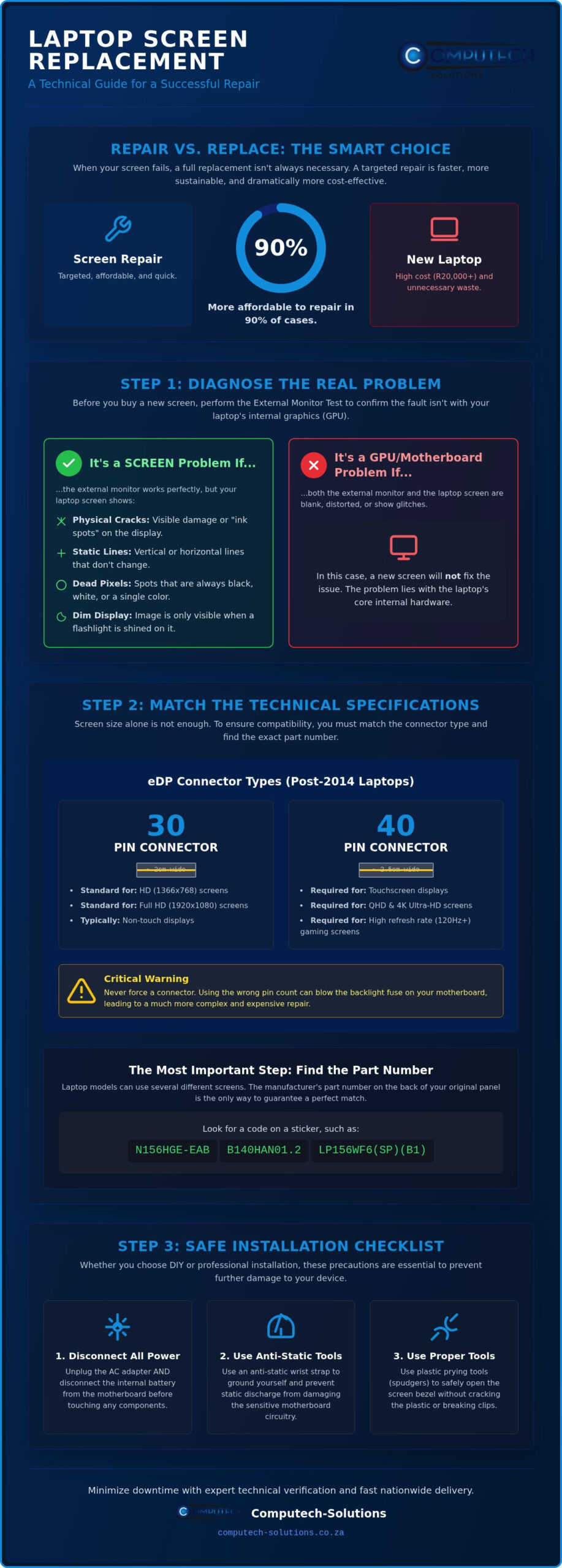
Before committing to a laptop screen replacement south africa, you must verify if the panel itself is the root cause of the failure. A blank screen doesn’t always indicate a broken display; it could point to a faulty motherboard or a corrupted graphics driver. Systematically ruling out these variables ensures you don’t spend money on a part that won’t fix the underlying issue.
Performing an “External Monitor Test” is the most effective way to rule out motherboard or GPU issues. Connect your laptop to a television or desktop monitor using an HDMI or VGA cable. If the external display shows your desktop without glitches, the internal components are healthy. This means the fault is confined to your LCD panel or the ribbon cable connecting it to the board. If both screens are blank or distorted, the problem likely lies with your laptop’s internal hardware rather than the display.
South African users face unique challenges due to inconsistent power supply. Load shedding doesn’t just disrupt your work; the power surges that occur when the grid comes back online can damage the delicate circuitry of your screen. These surges often target the backlight or the timing controller, leading to a screen that remains black even though the laptop’s power lights are on. Common symptoms that the panel itself is failing include:
- Vertical or horizontal lines that remain static when you move the laptop lid.
- Single dead pixels that stay a constant color regardless of what is on the screen.
- Dim displays where the image is only visible if you shine a flashlight directly onto the glass.
Flickering and Dim Screens
Flickering is frequently caused by a failing backlight or a damaged eDP cable near the hinge. While modern LED backlights are generally more durable than older CCFL technology, they remain highly vulnerable to voltage damage from power instability. If your screen is exceptionally dim, check your power management settings and display drivers first. If software isn’t the culprit, the internal hardware has likely suffered a failure that requires a full panel swap to restore visibility.
The Impact of Physical Cracks
Physical damage is the most common reason for a laptop screen replacement south africa. Even a minor impact can compromise liquid-crystal display (LCD) technology, causing the internal layers to bleed. These “ink spots” will expand over time as the laptop lid is opened and closed, creating pressure on the glass. Because the glass is thin, these cracks also pose a risk of shedding tiny debris into the internal cooling fans or onto the keyboard surface, potentially leading to secondary hardware failures.
Technical Specifications: Understanding Pin Counts and Resolutions
Many buyers assume that if a replacement screen is the same size as their original, it’ll work perfectly. This is a common misconception that leads to wasted time and shipping costs. For a successful laptop screen replacement south africa, you must match the electronic connector type, the resolution, and the physical thickness of the panel.
Decoding the Connector Type
The connector is the bridge between your motherboard and the panel. Most laptops manufactured after 2014 use the eDP (Embedded DisplayPort) standard. You’ll typically encounter two types: 30-pin and 40-pin. A 30-pin connector is the standard for most non-touch HD and Full HD screens. It measures approximately 2cm in width. A 40-pin connector is wider, roughly 2.5cm, and is required for touchscreens or ultra-high-resolution 4K displays. Don’t try to force a cable into the wrong slot. Doing so can blow the backlight fuse on your motherboard, turning a simple screen swap into a costly electrical repair. If you’re unsure which connector your device uses, you can chat with a technical expert to verify your part before ordering.
Resolution and Refresh Rates
Resolution isn’t just about image quality; it’s about data bandwidth. A standard 1366×768 (HD) cable might only have a single data lane. Upgrading to a 1920×1080 (Full HD) panel often requires a dual-lane cable. If your laptop originally shipped with an HD screen, the internal cable might not support the higher pixel density. Similarly, high-refresh-rate gaming screens (120Hz or 144Hz) require specific 40-pin hardware support to handle the massive amount of data being processed every second. Always stick to your original resolution unless you’ve confirmed your cable and motherboard support an upgrade.
Physical dimensions also play a vital role. “Standard” panels are thicker and usually feature screw holes on the sides. “Slim” panels are significantly thinner and often use mounting brackets on the top and bottom. If you buy a standard panel for a slim laptop, the bezel won’t close. Finally, consider the finish. Matte screens have an anti-glare coating, which is ideal for South African office environments with bright overhead lighting. Glossy screens offer more vibrant colors but reflect light easily. Most finishes are interchangeable, so you can choose the one that best suits your work environment.
The Identification Checklist: Finding the Exact Replacement Panel
Relying on the laptop model number alone is a common pitfall that often leads to ordering the wrong hardware. Manufacturers frequently use multiple screen suppliers for a single model range, meaning two identical laptops could require different internal panels. For a successful laptop screen replacement south africa, you must look beyond the brand sticker and identify the specific component specifications. Start by checking the base of your laptop or looking under the battery for the full model suffix, but treat this only as a secondary reference point.
Where to Find the Manufacturer Part Number
The “Golden Rule” of screen matching is to find the manufacturer part number located on a sticker on the back of the LCD panel. To access this, you’ll need to safely remove the plastic bezel using a thin pry tool to avoid snapping the delicate plastic clips. Once the screen is exposed, look for a code that typically starts with a manufacturer prefix:
- LTN: Manufactured by Samsung
- LP: Manufactured by LG Philips
- B: Manufactured by AU Optronics
- N: Manufactured by Innolux or ChiMei
- HB: Manufactured by BOE
The manufacturer part number is significantly more reliable than the laptop model because it explicitly defines the resolution, pin count, and physical dimensions of the panel.
Matching the Mounting Style
Physical mounting has evolved alongside laptop design, moving from bulky frames to sleek, bracketless assemblies. Older “Standard” panels usually feature side brackets that screw directly into the lid hinges. Modern “Slim” panels often use top and bottom tabs or “Side Brackets” for mounting. However, many of the latest ultrabooks use bracketless designs where the screen is secured entirely with heavy-duty adhesive strips. If your replacement panel has tabs but your laptop lid housing doesn’t have the corresponding screw holes, the bezel won’t close properly. Ensure the mounting style on your new part matches your existing hardware exactly.
Finally, you must verify the position of the connector. Most eDP connectors are located at the bottom of the panel, but their horizontal position varies between “Bottom Left” and “Bottom Right” when looking at the back of the screen. Since internal display cables are cut to precise lengths with no slack, a connector positioned on the wrong side will make the screen unusable. Double-checking these technical details before you finalize your laptop screen replacement south africa purchase prevents the frustration of technical delays and ensures a seamless repair process.
DIY vs. Professional Installation in the South African Context
To perform a successful laptop screen replacement south africa, you need specialized equipment. A standard household toolkit won’t suffice. You require precision screwdrivers, typically PH0 or PH00, and plastic pry tools to avoid scarring the laptop’s casing. Static electricity is a silent killer of modern electronics. Work on a non-conductive surface, such as a wooden table or an anti-static mat, to prevent electrostatic discharge from frying the sensitive timing controller on your new LCD panel.
The most vital step in any screen repair is disconnecting the power. This doesn’t just mean unplugging the AC adapter. You must open the chassis and disconnect the internal battery before touching the eDP cable. If there’s residual current in the motherboard, plugging in a new screen can instantly short the backlight circuit. Once you’ve seated the cable, always test the panel by powering on the laptop before snapping the bezel back into place. This saves significant time if you need to reseat a loose connector.
Risks of the DIY Approach
DIY repairs offer cost savings but carry high technical risks. The eDP cable connector is fragile. Applying force at the wrong angle can bend pins or tear the ribbon. Improper handling often leads to “pressure spots,” which are permanent white blotches caused by squeezing the panel too hard during installation. You should also consider your warranty status. Most South African retailers and manufacturers view opening the chassis as a breach of warranty terms. This could leave you without support for future motherboard or battery failures.
Protecting Your Investment from Power Surges
This technical risk isn’t limited to laptops; mobile devices are equally susceptible to damage during amateur repair attempts. If you have also experienced a cracked display on your handset, seeking a professional iPhone screen repair near me ensures that your smartphone is restored using the correct precision tools and anti-static precautions, protecting your investment from secondary hardware failures.
In South Africa, the display’s lifespan is often shortened by grid instability. Frequent load shedding cycles create voltage spikes that can degrade the screen’s backlight LEDs over time. Using a high-quality laptop charger is your first line of defense. It provides a stable voltage floor that protects internal components. Complement this with a dedicated surge protector at your wall outlet. If you notice your new screen flickering during power transitions, it may indicate that your motherboard’s power rail has been compromised. This requires professional diagnostic attention.
If you’re hesitant about the technical risks of installation, contact our technical support team for guidance on finding a professional repair partner or verifying your part before purchase.
Why Source Your Laptop Screen from Computech-Solutions?
Selecting a reliable partner for your laptop screen replacement south africa is critical to ensuring your device remains operational for the long term. We position ourselves as a sophisticated expert in the IT hardware sector, offering a comprehensive service model that goes beyond simple product sales. Our focus is on providing a total solution that includes technical verification, specialized logistics, and high-quality hardware for brands like Acer, Dell, HP, Lenovo, and Apple MacBooks. By choosing a dedicated specialist, you alleviate the risks associated with hardware incompatibility and shipping damage.
Our inventory includes both generic and brand-name panels, selected for their stability and performance. We understand that technical features must translate into practical business outcomes, which is why we prioritize panels that meet or exceed original equipment manufacturer (OEM) specifications. This commitment to quality ensures that your replacement screen integrates perfectly with your existing motherboard and video cable assembly, maintaining the growth and efficiency of your digital operations.
Reliable Nationwide Logistics
Shipping fragile LCD panels across South Africa requires more than just standard courier services. We’ve developed a secure, fragile-safe packaging system designed to withstand the rigors of national transit. Every panel is encased in multi-layered protective materials and rigid outer casing to ensure it arrives at your door intact. We provide rhythmic efficiency in our delivery process, offering fast turnaround times to minimize your downtime. You can track your order from our central warehouse to any corner of the country, giving you the confidence that your hardware will arrive safely and on schedule.
Technical Support via WhatsApp
The most significant challenge in hardware procurement is ensuring part compatibility before the transaction is finalized. We offer direct access to technicians who understand the unique hardware needs of the South African market. By utilizing our WhatsApp support, you can send a photo of your original part number for an instant compatibility check. This proactive approach eliminates the stress of ordering the wrong pin count or mounting style. Our team can also help you evaluate your device’s overall health, perhaps matching your new screen with a replacement battery for a total hardware refresh. This streamlined communication ensures you receive a definitive solution tailored to your specific laptop model without unnecessary technical delays.
Secure Your Hardware Future with Expert Support
Navigating a laptop screen replacement south africa doesn’t have to be a technical gamble. You now have the essential checklist required to identify your specific LCD panel using manufacturer part numbers rather than relying on broad brand names. By verifying your connector pin count and mounting style before you finalize your purchase, you eliminate the risk of operational downtime and the frustration of costly returns.
Computech-Solutions stands as your reliable partner throughout this restoration process. We provide expert hardware compatibility support and specialized nationwide delivery to ensure your fragile components arrive safely at your door, regardless of your location. As specialists in major laptop brands including Dell, HP, Acer, and Lenovo, we offer the authoritative guidance required to restore your device’s stability with confidence. Our team is ready to help you translate technical specifications into a functional business outcome. Chat with a technician on WhatsApp to find your matching screen and get your laptop back to peak performance today. We look forward to helping you restore your device with precision and ease.
Frequently Asked Questions
How much does it cost to replace a laptop screen in South Africa?
The total cost for a display repair varies based on the panel’s size, resolution, and technology. Standard high-definition panels are generally the most affordable, while touchscreens and ultra-high-resolution 4K displays sit at the higher end of the market. Since brand-specific premium models like MacBooks require specialized assemblies, they often carry higher costs than generic panels for standard office laptops. You should also account for potential diagnostic fees if you use a repair center.
Can I replace my laptop screen myself?
Modern laptop displays are technically LED-backlit LCDs. The LCD (Liquid Crystal Display) is the layer that creates the image, while LEDs (Light Emitting Diodes) provide the light from behind or the edges. Older laptops used CCFL tubes for lighting, which were bulkier and less energy-efficient. LED technology is now the industry standard because it’s thinner, brighter, and more durable against the voltage fluctuations frequently experienced during South African power transitions.
How do I know if I have a 30-pin or 40-pin screen?
The most reliable method is to measure the physical width of the connector on the back of the panel. A 30-pin connector is approximately 2cm wide and is standard for most HD displays. A 40-pin connector is wider, measuring about 2.5cm, and is required for touchscreens or high-refresh-rate gaming panels. Verifying this specification is essential for a successful laptop screen replacement south africa to ensure the internal video cable fits perfectly.
Will replacing the screen delete my data?
Replacing a display panel does not affect your stored data. Your files, photos, and applications live on the SSD or hard drive, which remains untouched during a screen swap. However, you should always power down the machine and disconnect the battery before starting the repair. This precaution protects the motherboard from electrical surges that could potentially lead to secondary hardware failures or data access issues if a short circuit occurs during the process.
Can I upgrade my laptop screen to a higher resolution?
Upgrading from an HD to a Full HD panel is rarely a straightforward swap. Most laptops are built with internal video cables that only have enough data “lanes” for the original resolution. A standard HD cable often lacks the bandwidth required for a higher pixel density display. Unless you also replace the internal eDP cable and confirm motherboard compatibility, sticking to your laptop’s original manufacturer specifications is the most stable approach for long-term hardware health.
What should I do if my new laptop screen is flickering?
Flickering usually indicates a loose connection or a driver conflict. First, verify that the eDP cable is fully seated in the socket and secured with the original adhesive tape. If the hardware connection is firm, try updating your graphics drivers through the manufacturer’s website. In the context of a laptop screen replacement south africa, persistent flickering can also be a sign of a damaged power rail caused by a recent power surge during load shedding.
How long does nationwide delivery take for a replacement screen?
Delivery times depend on your specific location within the national courier network. We utilize secure, fragile-safe packaging to ensure your panel survives the transit process without pressure spots or cracks. Most orders are processed quickly to minimize your downtime, especially for business-critical hardware. You’ll receive a tracking number to monitor your shipment’s progress from our warehouse to your door, ensuring you can plan your repair schedule with confidence and accuracy.
