
Your macbook charger is a sophisticated safety device designed to protect your hardware, not just a simple power cable. It’s frustrating when an official replacement costs a significant portion of the device’s value, especially when you’re already managing the operational risks of South Africa’s frequent power surges and load shedding. You need a stable power source that safeguards your laptop’s battery health without the inflated price tag found at high-end retail stores. We understand that technical disruptions from a failing adapter can halt your productivity and threaten your professional equipment.
This 2026 guide eliminates the confusion between MagSafe connectors and USB-C wattage requirements for your MacBook Pro or Air. You’ll learn how to spot high-quality replacements that prioritize thermal management and circuit protection to prevent overheating. We provide a clear breakdown of wattage specifications and explain how to source reliable units with nationwide delivery across SA. This ensures your professional workflow remains uninterrupted by power inconsistencies or incompatible hardware, giving you total confidence in your technical setup.
Key Takeaways
- Identify the correct macbook charger for your device by understanding the evolution of MagSafe 1, 2, and 3 versus universal USB-C standards.
- Master the “Ceiling Rule” to safely match wattage requirements, ensuring your charger provides sufficient power without risking hardware degradation.
- Learn to recognize the internal safety features of high-quality replacement units that offer a cost-effective alternative to official retail accessories.
- Protect your investment from the technical disruptions caused by South Africa’s load shedding and frequent power surges.
- Locate your specific MacBook model number to guarantee compatibility when ordering replacements for delivery across South Africa.
Identifying Your MacBook Charger: MagSafe vs. USB-C
Selecting the correct macbook charger begins with a precise visual identification of the charging port. Apple has cycled through several proprietary and universal standards since 2006. Getting this wrong doesn’t just waste time; it can lead to forced operational downtime if you order the wrong part. You need to know exactly which generation your device belongs to before looking at wattage or technical specifications. This first step is critical for maintaining your workflow and ensuring hardware safety.
The MagSafe Era: 2006 to 2015 and 2021+
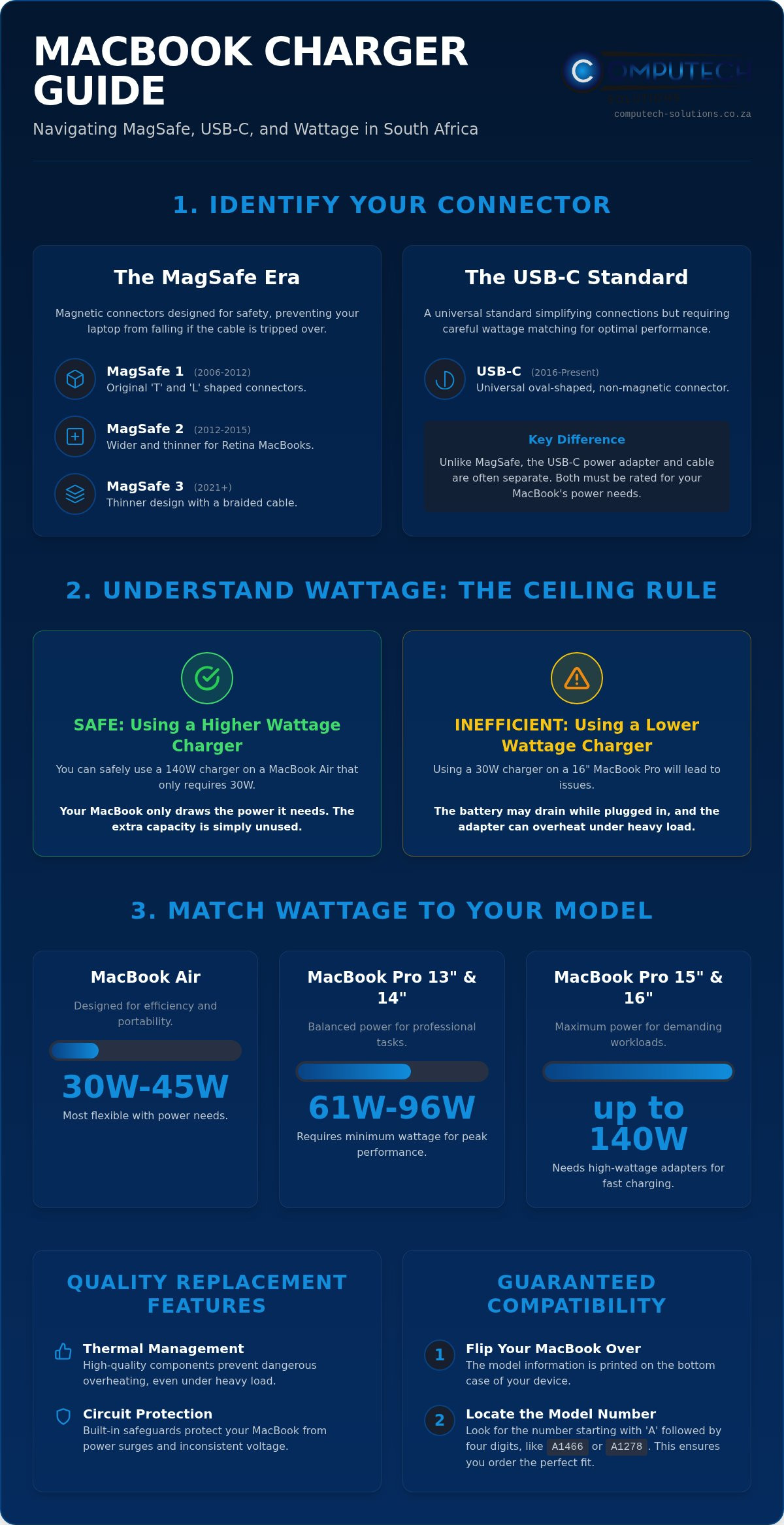
Apple’s magnetic charging system defines the user experience for most laptop owners. Understanding the history of MagSafe chargers helps clarify why a charger from 2011 won’t fit a 2014 model. The system was designed to disconnect safely if someone tripped over the cable, preventing your laptop from crashing to the floor. There are three distinct versions you should recognize:
- MagSafe 1: Featured on models from 2006 to 2012. It comes in two styles: the original “T” shape and the later “L” shape.
- MagSafe 2: Introduced in 2012 for the first Retina MacBooks. This connector is wider and thinner than the original version.
- MagSafe 3: The latest iteration found on 2021 and newer MacBook Pro and Air models. It features a thinner design and typically uses a braided cable.
A common mistake is attempting to use a MagSafe 1 charger on a MagSafe 2 port. While they look similar, the pins don’t align. If you’re unsure, look at the bottom of your laptop for the model number. It starts with an “A” followed by four digits, such as A1466 or A1278. This number is the most reliable way to guarantee a perfect fit when browsing for a macbook charger.
The USB-C Standard: 2016 to Present
In 2016, Apple moved toward the universal USB-C standard. This transition simplified technical setups by allowing one cable to charge multiple devices. However, it introduced a new layer of complexity regarding the components. Unlike the MagSafe system, the USB-C setup often separates the power adapter from the charge cable. You must ensure both parts are rated for your specific laptop’s power draw.
While any USB-C Mac can technically use any USB-C charger, performance varies based on wattage. If you use a low-power adapter on a high-end 16-inch MacBook Pro, the battery might drain even while the device is plugged in. This is why matching the wattage to your specific model is just as important as the connector type. USB-C ports are oval-shaped and non-magnetic, requiring a firm physical connection rather than the snap-on magnetic feel of MagSafe.
Wattage Requirements: 30W to 140W Explained
Understanding wattage is the most technical part of choosing a macbook charger. Think of wattage as the volume of power available to your device. A common concern among South African users is whether a higher wattage will damage a smaller laptop. The reality is governed by the “Ceiling Rule.” Your MacBook only draws the specific amount of power it needs. You can safely use a 140W adapter on a MacBook Air that only requires 30W. The laptop manages the intake, and the extra capacity simply stays in reserve.
Problems arise when you do the opposite. If you attempt to power a 16-inch MacBook Pro with a 30W Air adapter, the results are poor. Under heavy load, such as video rendering or compiling code, your laptop will consume more energy than the charger provides. This leads to the battery draining while the device is plugged in. It also causes the smaller adapter to run extremely hot as it struggles to meet the demand. To ensure you have the right specs, you should Identify your Mac’s charger requirements through official documentation or the model number on the underside of your device.
MacBook Air Power Needs
The MacBook Air is designed for efficiency. Most modern models since 2020 ship with a 30W or 35W adapter. The 35W version often features dual USB-C ports, allowing you to charge a phone simultaneously. Older MacBook Air models using MagSafe 2 typically required 45W. Because these devices have lower thermal ceilings, they are the most flexible. You can use almost any Pro-tier macbook charger with an Air without any negative operational impact.
MacBook Pro High-Performance Charging
MacBook Pro models demand significantly more “headroom” to maintain peak performance during intensive tasks. While an Air is flexible, a Pro requires specific minimums to avoid power loss. The following requirements generally apply to the Pro lineup:
- 13-inch and 14-inch models: These typically operate best with a 61W, 67W, or 96W adapter.
- 15-inch and 16-inch models: These powerhouses require at least 96W, with modern versions supporting up to 140W.
Using the 140W adapter enables fast charging, which allows you to reach 50% battery in approximately 30 minutes. If you do 3D work or high-resolution editing, using the maximum rated wattage prevents thermal throttling and ensures your battery stays at 100%. Matching these technical specs can be confusing if your original labels have worn off. If you need help verifying your specific requirements, contact our technical support team for a quick confirmation.
Official vs. High-Quality Replacement Chargers
In the South African market, the price gap between official Apple accessories and third-party alternatives is stark. Official chargers often retail for three times the price of high-quality replacements. This premium often covers the brand logo rather than a proportional increase in safety or charging speed. However, this price disparity creates a dangerous entry point for low-quality knockoffs that lack basic safety features. You don’t have to choose between an overpriced OEM unit and a fire hazard.
The Anatomy of a Safe Charger
A reliable high-quality replacement chargers must feature sophisticated internal circuitry. This includes over-voltage protection and short-circuit safeguards that prevent power spikes from reaching your laptop’s logic board. Heat dissipation is another critical factor. While any adapter generates some warmth, dangerous units lack the internal shielding and heat sinks required to keep temperatures stable. A certified replacement macbook charger is an independently tested power adapter that meets international safety standards for voltage regulation and thermal management.
Watch for warning signs of inferior hardware. Dangerous knockoffs often exhibit specific technical failures that threaten your device:
- Unusual Weight: Units that feel hollow or extremely light often lack proper copper shielding and heat sinks.
- Audible Noise: Buzzing or high-pitched whining indicates poor transformer quality and unstable power delivery.
- Inconsistent Connection: Flickering status lights suggest faulty pins or poor internal wiring.
Making an Informed Value Choice
Choosing between an OEM unit and a high-quality replacement depends on your operational requirements. For high-end professional work where downtime is not an option, some prefer the familiarity of the original brand. However, for most users, a high-quality replacement is the smarter financial move. It provides the same 30W to 140W output without the retail markup. This allows you to invest the savings back into other areas of your business or technical setup.
Where you buy matters more than the logo on the box. Computech-Solutions sources hardware that prioritizes technical stability and long-term reliability. We focus on providing a definitive solution that balances cost-efficiency with the rigorous power demands of modern Apple hardware. By choosing a specialist partner, you gain access to technical support and a macbook charger that won’t overheat or trigger power-related disruptions. This approach ensures your hardware remains protected while reducing your overall operational costs. For insights into how international experts maintain hardware standards, you can learn more about iPhone Kliniek and their specialized repair services.
South Africa’s electrical grid presents unique challenges that global tech manuals often ignore. Load shedding isn’t just an inconvenience; it’s a primary cause of hardware failure. When power returns after a scheduled outage, it often arrives with a high-voltage surge. This spike can overwhelm the internal capacitors of your macbook charger, leading to immediate failure or silent degradation of the internal circuitry. Protecting your equipment requires a proactive approach to power management that goes beyond standard usage.
Surge Protection and Load Shedding
The most effective way to protect your hardware is to unplug your charger before load shedding begins. If you aren’t home to do this, investing in high-quality surge-protected multi-plugs is mandatory. These devices act as a physical fuse, sacrificing themselves to save your expensive laptop and its adapter. Using a Uninterruptible Power Supply (UPS) provides an even higher level of protection by filtering the “dirty power” often experienced during grid switching.
At Computech-Solutions, our expertise in solar and power backup solutions informs how we select our inventory. We understand the volatility of the national grid. We source hardware that includes robust thermal protection and voltage regulation specifically to handle the inconsistent current common in South Africa. This specialized knowledge ensures that the replacements we provide are resilient enough to survive the operational risks of our local environment.
Cable Care and Longevity
Physical damage is just as common as electrical failure. Most users inadvertently destroy their cables by wrapping them too tightly around the adapter. Follow the “No-Tension” rule: always leave a small loop of slack where the cable meets the connector. Sharp 90-degree bends cause internal copper fraying, which leads to arcing and overheating. This heat can eventually melt the outer insulation, creating a fire hazard and a risk to your laptop’s logic board.
Connectivity issues are often mistaken for a dead macbook charger. If your MagSafe light flickers or fails to turn orange, use a dry toothbrush or a toothpick to gently clean the magnetic pins. Dust or metallic debris can prevent a clean circuit. You should never ignore signs of internal cable damage, such as bulging, discolouration, or exposed wiring. If your current adapter is showing signs of heat damage or physical wear, consult our technical team for a reliable replacement that meets your model’s specific requirements.
Ordering Your Replacement Charger Nationwide
Securing a replacement macbook charger requires precision to ensure total hardware compatibility. Before finalizing any purchase, you must verify your MacBook model number. You can find this small “A” followed by four digits, such as A2338 or A2141, printed on the bottom casing of your laptop. This identifier is the definitive way to match the connector type and wattage requirements discussed in previous sections. If you can’t read the print, check the “About This Mac” section in your system settings. Our technical support team is available to assist if you remain uncertain about your specific model’s needs.
The Quick Checkout Process
We have streamlined our online store to help you find the exact part you need without technical confusion. You can Browse our full range of MacBook chargers by searching for your model number or filtering by wattage. We offer secure payment gateways that protect your financial data, ensuring a safe transaction from any location in South Africa. Once your order is placed, our logistics partners manage the delivery process with rhythmic efficiency. We understand that every hour your laptop is without power represents a loss in productivity, so we prioritize fast processing for every shipment to minimize your downtime.
Why Choose Computech-Solutions?
Since 2018, we have positioned ourselves as a reliable partner for South African professionals facing technical disruptions. We don’t just sell components; we provide power solutions designed to withstand the operational risks of our local electrical grid. Our expertise in power backup and solar systems allows us to curate an inventory that meets higher standards for voltage regulation and surge resilience. This specialized focus makes us the cost-effective alternative to overpriced retail stores that often lack technical depth.
Get back to work with a reliable MacBook charger today and benefit from our nationwide delivery network that reaches every corner of South Africa. We stand by our hardware with comprehensive support, ensuring you never have to manage technical failures alone. Our goal is to provide a total solution that keeps your professional workflow stable regardless of external power challenges. By choosing a partner that understands the South African context, you ensure your MacBook receives the stable, high-quality power it requires for long-term battery health.
Securing Your Technical Workflow
Choosing the correct macbook charger is a vital step in maintaining your device’s performance and long-term health. By accurately matching your model number and wattage requirements, you eliminate the risk of battery degradation or thermal instability. You’ve learned that high-quality replacement hardware provides the same protective circuitry as official accessories, offering a stable and cost-effective solution for professionals across South Africa. Protecting your equipment from load shedding surges ensures your technical setup remains resilient against local grid volatility.
Since 2018, Computech-Solutions has specialized in providing expert technical support and reliable power components. We prioritize hardware that meets rigorous safety standards, ensuring your laptop stays protected from operational disruptions. With our nationwide shipping network, you can access professional-grade power solutions from any location in the country. Don’t let a failing adapter halt your productivity or risk your hardware’s safety. Shop Reliable MacBook Chargers with Nationwide SA Delivery today and ensure your technical infrastructure remains powered for growth.
Frequently Asked Questions
Can I use a higher wattage charger for my MacBook?
Yes, it is safe. The MacBook internal power management system only draws the energy it requires. Using a 140W adapter on a 30W Air won’t cause damage; it simply provides more headroom. This ensures your macbook charger remains cool and operates efficiently under load. It’s a standard practice for users who want a single, versatile power source for multiple Apple devices without risking hardware degradation or overcharging the battery.
Why is my MacBook charger getting so hot while charging?
Heat is a byproduct of voltage conversion, but excessive heat often indicates a struggle to meet power demands. If you use a lower wattage adapter than your laptop requires, the unit will run at maximum capacity, generating significant thermal energy. Ensure your adapter matches or exceeds your model’s required wattage. If the unit is too hot to touch, it may indicate failing internal capacitors or poor heat dissipation in low-quality hardware.
Will a non-Apple charger damage my MacBook battery?
A high-quality replacement charger won’t damage your battery if it includes proper over-voltage and short-circuit protection. The risk lies in “knockoff” units that lack voltage regulation, which can cause power spikes. We source hardware specifically designed to provide stable, filtered current. Choosing a reputable technical partner ensures your replacement macbook charger maintains the same safety standards as original accessories while protecting your laptop’s sensitive logic board from operational risks.
What is the difference between MagSafe 1 and MagSafe 2?
The primary difference is the physical shape and pin layout of the connector. MagSafe 1 features a thicker, blockier “T” or “L” shaped design used on models from 2006 to mid-2012. MagSafe 2 is thinner and wider, specifically redesigned for the Retina MacBook Pro and later Air models. These two standards are not cross-compatible without a specialized adapter, so identifying your specific connector is essential for a perfect fit and reliable power delivery.
Can I charge my MacBook Pro with a MacBook Air charger?
You can, but it is not recommended for high-performance tasks. A 30W or 45W Air charger provides significantly less power than a MacBook Pro requires. While it might charge the battery slowly when the laptop is closed, the battery may actually drain if you are editing video or compiling code. This mismatch also causes the smaller adapter to overheat as it operates beyond its intended thermal limits, potentially shortening its lifespan.
How do I find my MacBook model number to buy the right charger?
Look at the underside of your laptop for a string of text starting with the letter “A” followed by four numbers. This “A-number,” such as A2338 or A1708, is the most accurate way to verify compatibility. Alternatively, click the Apple logo in the top-left corner of your screen and select “About This Mac.” This menu displays your model name and year, which our technical support team can use to identify your requirements.
Does Computech-Solutions deliver chargers to rural areas in South Africa?
Yes, we provide nationwide delivery across South Africa, including remote and rural locations. We understand that technical disruptions can happen anywhere, so we maintain a logistics network that ensures every user has access to reliable hardware. Whether you’re in a major metro or a distant farming community, our shipping partners prioritize getting your replacement adapter to you quickly. This comprehensive service model supports professional continuity throughout the entire country.
Is it safe to leave my MacBook charger plugged in during load shedding?
It is safest to unplug your charger before load shedding begins. When the national grid switches back on, it often produces a high-voltage surge that can bypass basic internal fuses. These spikes are a leading cause of adapter failure in South Africa. If you cannot manually unplug, ensure you use a high-quality surge protector or a UPS to filter the incoming current and protect your sensitive electronics from these frequent technical disruptions.
