
Did you know that the average laptop battery begins to lose significant runtime after just 18 to 24 months of regular use? For many professionals and students in South Africa, a dell inspiron is a vital tool for daily productivity, yet the anxiety of a sudden hardware failure or a battery that won’t hold a charge during load shedding is a constant concern. It’s frustrating when you aren’t sure if your device can handle your workload or if the local power grid is slowly shortening its lifespan.
This guide provides the clarity you need to select the ideal model for your specific needs and implement a professional maintenance strategy that ensures your hardware remains reliable for years. You’ll gain a clear understanding of the 2026 lineup, including the Inspiron 15 and 16 Plus, and master power management techniques to protect your internal components. We also outline how to source high-quality replacement batteries and LCD panels with confidence, ensuring your investment stays operational regardless of technical disruptions.
Key Takeaways
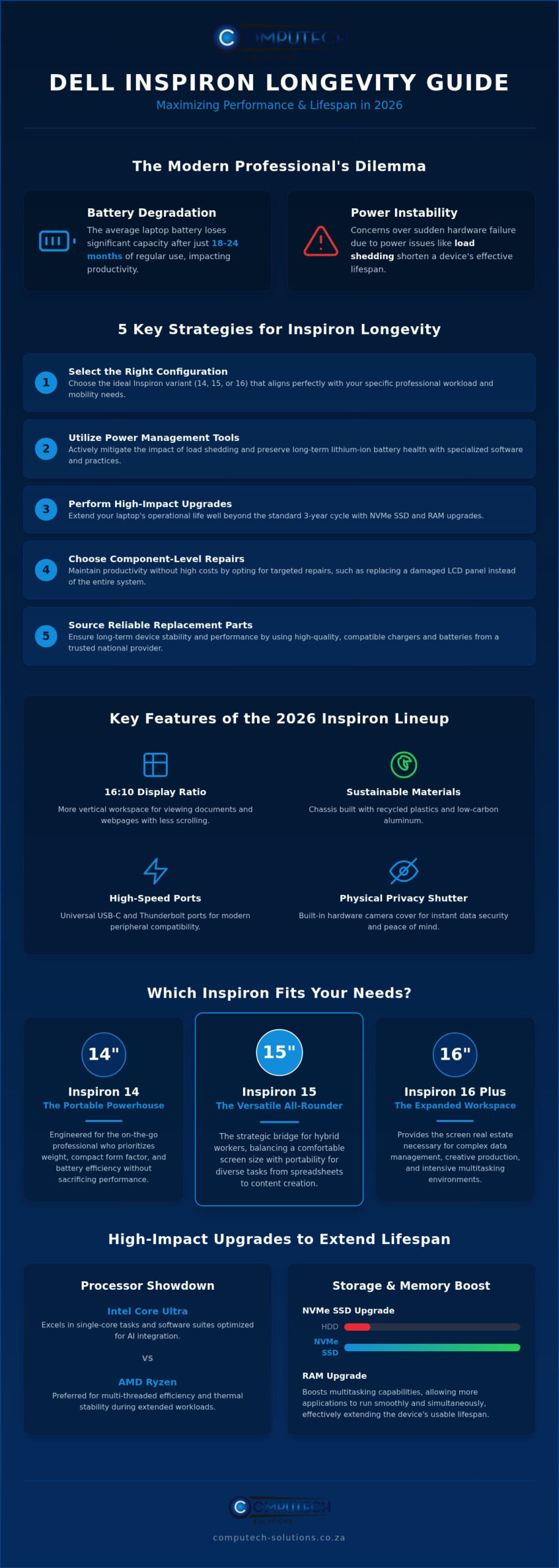
- Learn how to differentiate between the 14, 15, and 16 variants to select the hardware configuration that best aligns with your specific professional workload.
- Discover how to mitigate the impact of load shedding on your dell inspiron by utilizing specialized power management tools to preserve lithium-ion battery health.
- Identify high-impact hardware upgrades, including NVMe SSDs and RAM, that can effectively extend your laptop’s operational lifespan beyond the standard three-year cycle.
- Understand when to choose component-level repairs, such as replacing LCD panels, to maintain productivity without the high cost of a total system replacement.
- Gain insights into sourcing reliable, compatible replacement chargers and batteries from a national provider to ensure long-term device stability and performance.
Understanding the Dell Inspiron Series in the Modern Workspace
The dell inspiron serves as a strategic bridge between basic home computing and high-performance professional workstations. It’s designed for the South African hybrid worker who requires a balance of reliability and affordability. While enterprise-grade machines often carry a premium, the Inspiron lineup provides the durability needed for daily operations without the prohibitive cost. The core philosophy centers on versatility. These devices are built to handle diverse tasks, from complex spreadsheet management to creative content production, making them a stable partner for small business owners and remote professionals alike.
In 2026, the series has undergone a significant shift toward AI-integrated processors. By incorporating chips like the Intel Core Ultra, these laptops now handle background tasks and power optimization with greater autonomy. This technological leap is particularly beneficial in the South African market, where operational efficiency is vital. The hardware remains a top choice for durability because it’s engineered to withstand varied environmental stressors. Whether you’re moving between a home office and a client site, the chassis is designed to protect internal components from the physical rigors of frequent travel.
The Evolution of Inspiron: From Consumer to Prosumer
Reviewing the Dell Inspiron series history reveals a clear trajectory from budget-friendly plastic builds to sophisticated prosumer machines. Modern models frequently utilize aluminium chassis, which represent a major upgrade in build quality. This change isn’t just about aesthetics; metal shells provide superior thermal management. Keeping internal temperatures low is essential for long-term hardware health, especially in warmer climates. For comprehensive environmental temperature control and connectivity in your office, Milan Network Pty Ltd offers professional air conditioning and fibre optic infrastructure services that complement your hardware maintenance strategy. Under standard office conditions, a well-maintained dell inspiron typically offers a reliable lifespan of three to five years before hardware fatigue suggests a need for component updates.
Key Features of the 2026 Inspiron Lineup
The 2026 models introduce several refinements that prioritize user productivity and device longevity. These features are designed to meet the practical needs of modern decision-makers:
- 16:10 Display Ratio: This taller screen format provides more vertical workspace, allowing you to view more of a document or webpage without excessive scrolling.
- Sustainable Materials: Chassis designs now incorporate recycled plastics and low-carbon aluminium, aligning with global corporate sustainability goals.
- Standardized High-Speed Ports: The inclusion of universal USB-C and Thunderbolt ports ensures compatibility with a wide range of modern peripherals and docking stations.
- Physical Privacy Shutters: Built-in camera covers provide an immediate, hardware-based solution for data security during sensitive meetings.
These hardware choices reflect a commitment to functional design. By focusing on high-speed connectivity and ergonomic displays, the 2026 lineup ensures that technical features always translate into tangible business outcomes.
Comparing Dell Inspiron Models: Which One Fits Your Needs?
Selecting the right dell inspiron requires a clear understanding of your daily operational requirements. The 2026 lineup is segmented into 14, 15, and 16-inch variants, each tailored to specific professional environments. The 14-inch models are optimized for mobility, whereas the 16-inch versions provide the expanded workspace necessary for complex data management. You must also decide between the versatility of a 2-in-1 convertible and the traditional clamshell design. While the 2-in-1 offers tablet-like functionality for creative sketching or interactive presentations, the clamshell remains the reliable choice for intensive typing and standard office productivity.
Performance tiers in 2026 center on the choice between Intel Core Ultra and AMD Ryzen processors. Intel configurations excel in single-core tasks and software suites optimized for AI integration. Conversely, AMD Ryzen options are often preferred for their multi-threaded efficiency and thermal stability during extended workloads. Balancing these technical specs against your workload is key to ensuring long-term device satisfaction. If you are uncertain about hardware compatibility for your specific software, you can contact our technical support team for expert guidance.
Inspiron 14: The Portable Powerhouse
The Inspiron 14 is engineered for the on-the-go user who prioritizes weight and battery efficiency. Its compact form factor doesn’t sacrifice performance, often featuring the same high-speed ports found in larger models. The 2-in-1 versions are particularly effective for collaborative tasks, allowing users to transition quickly from a laptop to a shared display. Maintaining this device is straightforward, as it uses standardized Dell power components that are readily available nationwide, ensuring you stay productive even when traveling between sites.
Inspiron 16: The Desktop Replacement
Positioned as a desktop replacement, the Inspiron 16 caters to professionals who require maximum performance for data analysis and multi-window workflows. The larger chassis provides the physical space needed for dedicated graphics cards and advanced thermal solutions. These features prevent performance drops during heavy processing tasks by dissipating heat more effectively than smaller frames. The 16-inch screen also improves ergonomic comfort, reducing eye strain during long working hours by providing a more expansive view of complex spreadsheets and multiple application windows simultaneously.
Managing Power and Battery Longevity in South Africa
Maintaining a dell inspiron in South Africa requires a proactive approach to power management. Grid instability and frequent load shedding force hardware to cycle between battery and AC power more often than intended. This constant switching accelerates the chemical wear of lithium-ion cells. To mitigate this, users should utilize the Dell Power Manager software. By setting a maximum charge limit of 80 percent, you can significantly reduce battery degradation over time. Recognizing the signs of a failing battery is also critical. Look for rapid percentage drops, system throttling, or physical swelling of the trackpad area. When these symptoms appear, it’s essential to source high-quality Dell Replacement Laptop Batteries to maintain operational safety and performance.
The Impact of Grid Instability on Laptop Hardware
Grid instability poses a direct threat to internal charging circuits and motherboards. When power returns after an outage, voltage spikes can overwhelm standard protection. Using high-quality surge protectors and reliable AC adapters provides a necessary layer of defense for your dell inspiron. Understanding your device’s usage is also key. In 2026 lithium-ion technology, a battery cycle is defined as one full discharge and recharge totaling 100 percent of its capacity, regardless of whether it was completed in one sitting or multiple smaller sessions. Tracking this helps you plan for the 18 to 24 month window where most users notice a significant decline in runtime.
Choosing High-Quality Dell Replacement Laptop Batteries
When the original unit fails, the market for replacements is often flooded with generic cells that lack safety certifications. High-grade replacement batteries use premium cells that match the original’s discharge rates. Correct voltage matching is vital; even a minor discrepancy can cause long-term motherboard damage or lead to unpredictable shutdowns. Choosing components that meet strict technical standards ensures the stability of your system. We prioritize providing reliable replacement batteries with nationwide delivery across South Africa, ensuring your hardware remains a stable tool for your professional tasks. Expert technical support is also available to help you confirm hardware compatibility before purchase.
Essential Upgrades and Repairs to Extend Your Inspiron’s Life
The decision to replace a dell inspiron older than three years often depends on whether the core chassis and processor can still meet your operational demands. In many cases, the system remains viable, but performance is throttled by aging storage or insufficient memory. Choosing to repair or upgrade rather than replace is a sustainable strategy that maximizes the value of your initial investment. This approach is particularly relevant in South Africa, where the rising cost of new hardware makes component-level maintenance a more fiscally responsible choice. By targeting specific bottlenecks, you can restore a device to its peak performance levels without the disruption of migrating to an entirely new system. This strategy also reduces e-waste, aligning with modern corporate responsibility standards, a philosophy shared by international IT equipment leaders like Doper-Tech d.o.o. who champion the use of refurbished devices.
Upgrading to a high-speed NVMe SSD is the most effective way to rejuvenate an older dell inspiron. These drives offer significantly faster data transfer rates compared to older SATA-based storage, resulting in near-instant boot times and faster application loading. In 2026, software environments and AI-integrated productivity tools require higher memory thresholds to function efficiently. Moving from 8GB to 16GB or 32GB of RAM ensures that your system can handle complex multitasking and data-heavy applications without lag. Most Inspiron models feature accessible bottom panels with standard screws, making these hardware swaps straightforward for users who prefer a hands-on approach to maintenance. Ensuring that the RAM modules match the motherboard’s clock speed is essential for system stability.
Screen and Keyboard Replacements
Accidental damage to a display doesn’t have to mean the end of your laptop’s lifecycle. We provide high-quality Laptop LCD Replacement Panels that restore visual clarity and touch functionality to your device. It’s vital to identify the exact part number, resolution, and pin configuration for your specific model to ensure a perfect fit. Similarly, replacing a worn keyboard is a practical solution for heavy typists who notice unresponsive keys or faded lettering. Using professional-grade replacement components ensures that the tactile feedback and reliability of your input devices remain consistent over several more years of use. Sourcing these parts from a reliable national provider guarantees that the hardware meets the original equipment standards for durability and performance.
If you’re unsure which internal components are compatible with your specific generation, you can chat with our technical support team for an immediate compatibility check.
Why Sourcing Quality Dell Parts and Hardware Matters
Sourcing components from a specialized South African retailer is a strategic decision that directly impacts the longevity of your hardware. While generic marketplace options might seem accessible, they often lack the rigorous quality control required for stable operation. For a dell inspiron, using the correct Dell Replacement Laptop Batteries and chargers is non-negotiable. Substandard power components can cause erratic system behavior or permanent motherboard damage. A dedicated partner provides the technical excellence needed to maintain operational stability; this ensures your device remains a reliable asset throughout its lifecycle.
Technical features must always link to practical business outcomes. When you invest in high-grade replacement parts, you aren’t just fixing a machine; you’re securing your ability to work without interruption. Expert technical support is particularly valuable when selecting replacement chargers. Matching the exact wattage and tip size prevents port wear and ensures the internal charging circuit isn’t stressed by inconsistent power delivery. This level of detail is what separates a temporary fix from a long-term hardware solution.
Expert Support for Your Hardware Journey
Navigating the technical specifications of modern laptops can be complex. Professional advice is essential to prevent the purchase of incompatible batteries, screens, or adapters. Computech-Solutions serves as a reliable partner by providing total hardware solutions across the country. Our team helps you identify the exact technical requirements for your specific dell inspiron model, moving you from a reactive repair mindset to a proactive maintenance strategy. This expert backing alleviates the stress of technical disruptions, allowing you to focus on your core professional tasks without the fear of sudden hardware failure.
Reliable Nationwide Delivery for All Dell Components
Efficiency is critical when a hardware failure threatens your productivity. We understand that getting critical parts delivered anywhere in South Africa is a priority for business continuity. Our logistics network ensures that whether you need Laptop LCD Replacement Panels or high-performance chargers, you receive them promptly. This reliable service provides peace of mind, knowing that expert support and high-quality components are always within reach. By choosing a provider that specializes in the South African IT landscape, you gain a definitive solution for all your hardware needs.
Explore our range of Dell replacement parts and laptops to ensure your hardware continues to perform at its peak and stays protected against the risks of technical downtime.
Securing Your Hardware Investment for the Long Term
A proactive approach to hardware maintenance transforms your dell inspiron from a standard consumer device into a durable professional asset. By selecting the correct model for your workload and implementing strategic power management, you can effectively navigate the challenges of grid instability. Upgrading internal components like NVMe SSDs and RAM further ensures that your system remains compatible with the evolving demands of 2026 software. These small, targeted investments in high-quality hardware prevent the high cost and disruption of frequent system replacements.
We remain your reliable partner in South Africa, offering a comprehensive range of replacement batteries and chargers with nationwide delivery. Our expert technical support is always available to ensure you find the perfect match for your specific hardware needs. Whether you’re upgrading storage or replacing a worn battery, we provide the stability your workspace requires. Take the next step in protecting your operational efficiency today. Browse our Dell Replacement Batteries and Hardware to keep your device running at peak performance. Your productivity is a priority; we have the technical excellence to support it.
Frequently Asked Questions
How long should a Dell Inspiron battery last before needing replacement?
A typical dell inspiron battery maintains peak performance for approximately 18 to 24 months of regular use. After this period, chemical degradation usually results in a noticeable reduction in runtime. Factors like ambient temperature and charging habits influence this timeline. If your device frequently shuts down or fails to hold a charge during load shedding, it is time to consider a high-quality replacement to restore your laptop’s mobility and operational stability.
Can I upgrade the RAM on my Dell Inspiron laptop?
Most models in the lineup allow for RAM upgrades, though some ultra-thin versions use soldered memory that cannot be changed. You can usually access the memory slots by removing the bottom panel of the chassis. Increasing your RAM from 8GB to 16GB or 32GB is a cost-effective way to handle the more demanding software environments of 2026. We recommend checking your specific model’s service tag to confirm the maximum supported capacity before purchasing new modules.
What is the difference between a Dell Inspiron and a Dell Latitude?
The primary difference lies in their target audience and build specifications. The Inspiron series is designed for home users and prosumers, offering a balance of performance and value. In contrast, the Latitude series is built for enterprise environments, featuring enhanced security protocols and more rugged chassis materials for corporate fleet management. While both are reliable, the dell inspiron is often preferred by small business owners and hybrid workers for its versatility and modern design features.
How do I find the correct replacement charger for my Dell Inspiron?
To find the correct charger, you must match the wattage, voltage, and physical connector size to your original power adapter. This information is typically printed on the label of the original brick or on the bottom of the laptop. Using an incorrect charger can lead to slow charging or motherboard damage. Our technical support team can help you verify compatibility by using your model number to ensure you receive a reliable replacement that meets original specifications.
Is it worth replacing the screen on a Dell Inspiron or should I buy a new one?
Replacing the screen is usually a much more economical choice than purchasing a new laptop, especially for devices less than four years old. We provide high-quality Laptop LCD Replacement Panels that can restore your device to full functionality for a fraction of the cost of a new system. If the rest of your hardware is performing well, a screen replacement extends the life of your investment and prevents the disruption of migrating your data to a new machine.
How does load shedding affect my Dell laptop’s battery health?
Load shedding forces your laptop to cycle through its battery capacity more frequently, which accelerates the wear on lithium-ion cells. Each time the battery discharges and recharges, it counts toward its total cycle life. Frequent power instability can also lead to deep discharge states that are harmful to battery health. Using the Dell Power Manager to limit the maximum charge to 80 percent can help mitigate this wear and preserve the long-term health of your internal components.
Are replacement batteries from Computech-Solutions compatible with all Dell models?
We stock a comprehensive range of replacement batteries designed for a wide variety of Dell models, including the Inspiron, Latitude, and XPS series. Every battery is selected to match the original voltage and capacity requirements to ensure safe and stable operation. Because Dell uses many different battery shapes and connectors, we provide expert technical support to help you confirm the exact part number for your specific device before shipping it nationwide across South Africa.
What should I do if my Dell Inspiron is overheating?
If your device is overheating, start by ensuring the air vents are clear of dust and the laptop is used on a hard, flat surface. You can use compressed air to clean the internal fans. If the problem persists, it might be necessary to replace the thermal paste or check if a failing battery is generating excess heat. Overheating can lead to system throttling and hardware damage, so addressing it early through cleaning or professional hardware maintenance is vital.
