
Imagine you’re finishing a high-stakes report during a scheduled load reduction window in Gauteng when your laptop suddenly cuts to black. Even with the national grid stabilizing, localized power cuts still threaten your productivity if your hardware isn’t up to the task. For Dell Latitude E7240 or E7250 users, a failing 0gvh35 battery often turns a portable powerhouse into a desktop-bound liability. We understand that finding a reliable replacement is stressful, especially when you’re faced with conflicting part numbers and the fear of damaging your device with a low-quality import.
This comprehensive guide provides the technical clarity you need to restore your laptop’s performance. You’ll learn how to verify the 0gvh35 specifications against your original unit and distinguish it from similar variants like the VGP3G. We’ve simplified the identification process so you can buy with confidence. By the end of this article, you’ll know exactly how to secure a high-grade replacement from a trusted South African supplier that offers nationwide delivery, ensuring your mobile office stays operational no matter the local power status.
Key Takeaways
- Identify the correct 0gvh35 battery for your Dell Latitude by verifying the specific Type designation and laptop model compatibility.
- Compare technical specifications like mAh and Wh ratings to choose between 3-cell and 4-cell configurations based on your specific performance requirements.
- Safeguard your laptop against the operational risks of localized load reduction by investing in high-quality cells designed for frequent discharge cycles.
- Follow a safe, step-by-step installation process to replace your battery efficiently using standard tools and professional safety protocols.
- Ensure long-term reliability by sourcing your Dell Replacement Laptop Batteries from a local expert offering nationwide delivery and technical guidance.
What is the 0GVH35 Battery and Which Laptops Use It?
The 0gvh35 is a specialized power component designed for Dell’s ultra-portable business laptops. It utilizes modern lithium-ion battery technology to provide a stable charge while maintaining a slim profile. Dell assigns these alphanumeric identifiers to manage their global inventory and ensure technicians match the exact engineering specifications required for a specific motherboard. Whether your unit is configured as a 3-cell or 4-cell variant, the part number ensures the safety circuits align with the laptop’s power management system. Though it typically offers a capacity between 36Wh and 39Wh, its primary role is serving as a reliable energy reservoir for the Latitude 12 7000 series.
Identifying Your Dell Battery Part Number
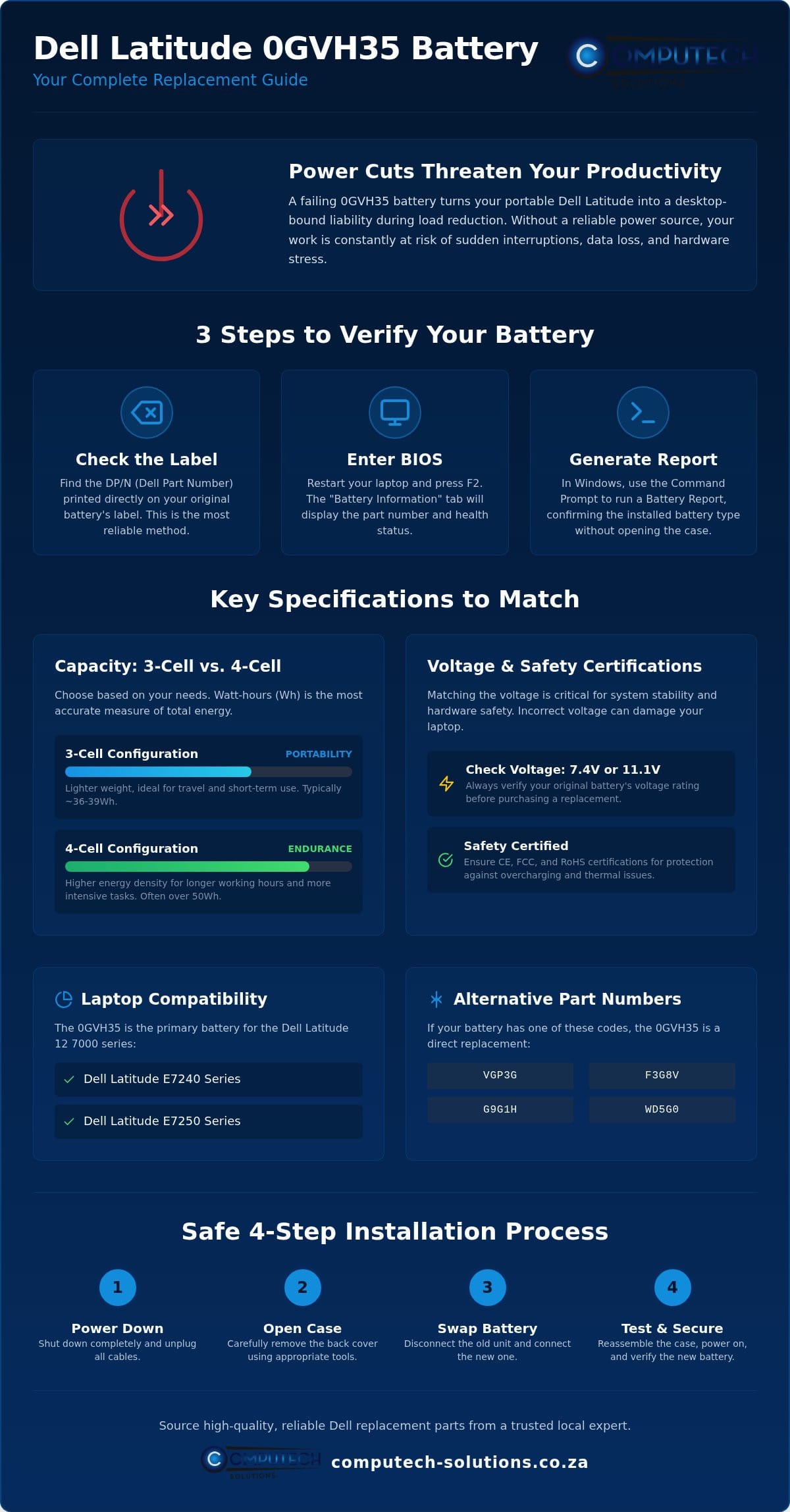
Finding your specific part number is the first step toward a successful repair. You’ll find the DP/N (Dell Part Number) printed directly on the battery’s label, usually located next to a square QR code. If the laptop still powers on, you don’t need to open the casing immediately. Restart your device and tap F2 to enter the BIOS; the “Battery Information” tab will display the health and type of the installed unit. Windows users can also generate a Battery Report via the Command Prompt to confirm if they have a 0gvh35 or a similar variant like the WD5G0. This verification step is vital because external similarities can be deceiving in the world of laptop hardware. While these parts often share the same physical dimensions, verifying the internal identifier prevents configuration errors that could lead to charging failures.
The Role of the 0GVH35 in the Latitude E7240 and E7250
The Dell Latitude E7240 and E7250 models are engineered for mobility, featuring 12.5-inch displays that demand a compact yet efficient power source. This specific battery type strikes a balance between weight and runtime, allowing these machines to remain thin enough for travel without sacrificing professional performance. A critical technical detail involves the voltage rating. These laptops can ship with different screen resolutions or processor tiers that require either a 7.4V/7.7V or an 11.1V configuration. Installing the wrong voltage variant can lead to system instability or hardware damage. We always recommend checking your original battery’s voltage before finalizing your purchase to ensure full compatibility with your specific Latitude motherboard. This ensures your device operates within its designed thermal and electrical parameters, extending the lifespan of your internal components.
Technical Specifications and Compatibility Matrix
The 0gvh35 replacement battery is engineered to meet or exceed the original equipment manufacturer (OEM) standards. Success in installation depends on matching three primary technical pillars: voltage, capacity, and physical connector alignment. Most 0gvh35 units operate at either 7.4V or 11.1V, depending on whether they use a 3-cell or 4-cell configuration. A 3-cell unit is typically lighter, favoring portability, while the 4-cell variant offers a higher energy density for longer working hours.
Safety is a non-negotiable requirement for high-performance lithium-ion cells. Each unit should carry CE, FCC, and RoHS certifications to guarantee it has passed rigorous testing for overcharging and thermal stability. These certifications protect your hardware from the dangers of counterfeit batteries, which often omit critical protection circuits to save on manufacturing costs. If you need assistance identifying the correct voltage for your specific build, contact our technical support experts for a quick consultation.
Full Compatibility List
The 0gvh35 is the primary battery type for the 12-inch Latitude business series. It is fully compatible with the following laptops:
- Dell Latitude E7240 Series
- Dell Latitude E7250 Series
You might also see this battery listed under alternative part numbers. Dell often uses multiple codes for identical parts to manage regional inventory. Common cross-reference numbers include VGP3G, F3G8V, G9G1H, and WD5G0. If your current battery shows any of these codes, the 0gvh35 is a direct drop-in replacement. Always verify the connector type matches the 10-pin interface found in these Latitude models before attempting installation.
Understanding Capacity: mAh vs Watt-Hours
Capacity is often the most misunderstood specification in laptop power. While many retailers focus on milliamp-hours (mAh), Watt-hours (Wh) provide a more accurate representation of the actual energy stored. This is because Wh accounts for the battery’s voltage. A standard 45Wh 0gvh35 battery typically provides between three to five hours of runtime, depending on your screen brightness and CPU load.
When comparing options, remember that a higher mAh rating doesn’t always mean a better battery. Higher mAh ratings must be paired with the correct voltage to be safe for your laptop’s motherboard. Using a battery with an incorrect voltage rating can cause permanent damage to the charging controller or the motherboard itself. Always prioritize matching the voltage of your original battery over chasing the highest possible mAh figure to ensure long-term device health.
Why Battery Quality Matters During Load Shedding
The 0gvh35 battery serves as the primary defense against operational downtime. In South Africa, even with the national grid showing improved stability, localized load reduction during peak hours (05:00-09:00 and 17:00-22:00) remains a reality for many professionals. Frequent discharge cycles place immense thermal and chemical stress on lithium-ion cells. High-quality replacement cells maintain their internal resistance levels for longer, preventing the sudden capacity drops that plague inferior products. Beyond mere runtime, a stable battery protects your motherboard from voltage spikes and irregular power delivery. Replacing a degraded battery for a fraction of the cost of a new Dell Latitude is a strategic financial decision that extends your hardware’s lifecycle and reduces electronic waste, which has been banned from South African landfills since August 2021.
Mitigating the Impact of Power Instability
A reliable 0gvh35 provides a critical buffer when the lights go out unexpectedly. High-grade replacement batteries feature sophisticated charging circuits that manage the transition from AC to DC power without system hitches. To maximize your runtime during a power outage, we recommend reducing screen brightness to 50% and closing power-hungry background applications. These small adjustments, paired with a healthy battery, can provide the extra hour needed to save your work and shut down safely. Consistent performance during these windows ensures your professional output isn’t compromised by infrastructure challenges.
Avoiding Low-Quality “Grey Market” Imports
Unverified “grey market” batteries carry significant operational risks. Cheaply manufactured cells often lack the internal safety sensors required to prevent swelling, overheating, or short circuits. A swollen battery doesn’t just fail; it can physically warp your laptop’s chassis or crack the trackpad. Sourcing your Dell Replacement Laptop Batteries from a South African retailer ensures you receive a product backed by a local warranty. This is far superior to international imports where returns are often impossible or prohibitively expensive. Computech-Solutions is committed to providing tested, reliable generic replacements that meet stringent safety standards. We focus on delivering power solutions that South African business users can depend on for daily stability. Choosing a locally supported product means you have access to expert technical support whenever you need to verify compatibility or troubleshoot performance.
How to Safely Replace Your Dell Latitude Battery
Replacing the 0gvh35 battery is a straightforward process that requires minimal technical experience, but it demands strict adherence to safety protocols. Before you begin, ensure you have a clean, flat workspace and a small Phillips #0 or #00 screwdriver. Static electricity can damage internal components, so working on an anti-static mat or touching a grounded metal object before starting is a wise precaution. Safety starts with power management. You must shut down your laptop completely through the operating system rather than using sleep or hibernate modes. Once the device is off, disconnect the AC adapter and any peripheral devices to eliminate the risk of short circuits during the installation.
Proper disposal of your old lithium-ion unit is just as important as the installation itself. In South Africa, e-waste regulations have banned laptop batteries from landfills since August 23, 2021. You’re legally and environmentally responsible for ensuring the old battery reaches a certified recycling point. Many local retailers and municipal drop-off zones provide dedicated bins for electronic waste. If you’re unsure where to find a local collection point, chat with our technical team for guidance on responsible disposal and selecting your replacement hardware.
Step-by-Step Installation Walkthrough
The Latitude E7240 and E7250 differ slightly in their chassis design. The E7240 typically features an external battery with a sliding latch system. To replace it, simply slide the latch to the unlock position and lift the old unit out. The Latitude E7250 often uses an internal configuration. For this model, follow these steps:
- Loosen the captive screws securing the bottom base cover.
- Gently pry the cover off to reveal the internal components.
- Remove the screws holding the battery in place and carefully disconnect the cable from the motherboard.
- Align the new 0gvh35 connector with the motherboard port, ensuring a firm, flush connection.
- Secure the battery with the original screws and snap the base cover back into position.
Calibrating Your New Battery
Calibration is essential to “teach” your laptop’s power management system the true capacity of the new cells. Once the 0gvh35 is installed, plug in your charger and allow the battery to reach 100% without interruption. Leave it on the charger for an additional two hours after it hits full capacity. Next, disconnect the power and use the laptop until it reaches approximately 5% to 10% charge. Don’t let it drop to 0%, as deep discharge can stress new lithium cells. Finally, charge it back to 100%. This cycle synchronizes the battery controller with the Windows battery meter for accurate runtime reporting. It’s also a good time to check for BIOS updates from Dell, which often include improvements for battery charging algorithms and system stability.
Sourcing Reliable Dell Parts in South Africa
Sourcing technical components from international marketplaces often introduces unnecessary operational risks. South African professionals frequently encounter hidden customs duties and delivery delays that can stretch beyond four weeks. When you purchase a 0gvh35 through a local specialist, you eliminate these variables. We provide immediate access to expert technical support, which is critical if your laptop requires a BIOS update or driver adjustment to recognize new hardware. A local warranty is a tangible asset; it ensures that any technical discrepancies are resolved within days rather than months. This proximity transforms a simple purchase into a reliable partnership for your business continuity.
Local procurement also allows for a more rigorous verification of hardware standards. International “grey market” sellers often provide generic descriptions that don’t account for the specific voltage requirements of the Latitude E7240 or E7250. By choosing a specialized provider within South Africa, you gain the assurance that the battery cells are tested for stability and safety. This reduces the risk of hardware damage and ensures that your mobile workstation remains a productive tool rather than a liability during critical project deadlines.
Computech-Solutions: Your Partner in Laptop Longevity
Our specialization in Dell Replacement Laptop Batteries allows us to maintain a standard of quality that generic exporters often overlook. We understand that South African users require hardware that can withstand the thermal stress of repeated charging cycles during peak demand periods. Every 0gvh35 in our inventory undergoes verification to ensure it aligns with the high-performance requirements of the Latitude series. Our commitment to being a definitive provider means we also stock Laptop Chargers, adapters, and LCD panels. By providing a total hardware solution, we help decision-makers streamline their procurement and minimize the downtime caused by technical disruptions.
Ordering Your Replacement Online
Our digital storefront prioritizes functional clarity, allowing you to finalize your order without navigating unnecessary filler. We’ve integrated secure payment options that are fully optimized for the South African banking environment, providing a safe and efficient checkout experience. Once your transaction is complete, our logistics partners facilitate nationwide delivery to ensure your hardware arrives promptly at your office or residence. This streamlined approach removes the stress of sourcing specialized parts. To secure your device’s operational efficiency, view our 0GVH35 stock and order today for a reliable, locally supported power solution.
Restore Your Professional Mobility and Performance
Restoring your Dell Latitude’s mobility doesn’t have to be a technical hurdle. By verifying your specific voltage requirements and matching the 0gvh35 part number to your E7240 or E7250 model, you ensure your hardware remains a reliable professional tool. High-quality cells provide the necessary buffer against localized power instability, protecting your internal components from the risks associated with sudden shutdowns.
Choosing a local specialist over risky international imports guarantees you receive a product designed for performance. We specialize in high-quality generic replacements and provide expert technical support to assist with any installation or recognition queries. With our nationwide delivery across South Africa, you can restore your laptop’s longevity without the stress of customs delays or unverified hardware. Order Your 0GVH35 Replacement Battery Now to secure your operational stability. We look forward to helping you maintain your productivity.
Frequently Asked Questions
Is the 0GVH35 battery compatible with the Dell Latitude E7250?
Yes, the 0gvh35 battery is fully compatible with the Dell Latitude E7250. This model, along with the E7240, was specifically designed to use this 3-cell or 4-cell configuration. Before purchasing, you should verify the voltage of your original unit, as these laptops can support different internal builds. Our technical support team can help you confirm your exact motherboard requirements to ensure a perfect fit and safe operation for your device.
How long does a replacement 0GVH35 battery typically last?
A high-quality 0gvh35 replacement battery typically lasts between two to three years, or approximately 300 to 500 full discharge cycles. Actual longevity depends on your usage patterns and thermal environment. Frequent exposure to high heat or allowing the battery to drain to 0% regularly will shorten its lifespan. By following proper calibration steps and managing your power settings effectively, you can maximize the health and runtime of your new lithium-ion cells.
Can I use an 11.1V battery if my original was 7.4V?
You shouldn’t use an 11.1V battery if your original unit was rated for 7.4V. Mixing voltage ratings can cause permanent damage to your laptop’s charging controller or motherboard components. While the physical dimensions of the 0gvh35 might look identical across different versions, the electrical specifications must match your system’s design. Always check the “Type” or “Voltage” printed on your original battery casing before installing a replacement to ensure total hardware safety.
Why is my Dell laptop saying “Battery Not Recognized” after replacement?
This error often occurs due to an outdated BIOS or a poor connection between the battery and the motherboard. To resolve this, try performing a “flea power” drain by disconnecting the battery and holding the power button for 15 seconds. You should also check for BIOS updates on the official support site. If the system still fails to recognize the 0gvh35, our expert technical support is available to help you troubleshoot the communication issues.
Do you offer nationwide delivery for Dell batteries in South Africa?
Yes, we provide reliable nationwide delivery across South Africa for all our Dell Replacement Laptop Batteries. Once you finalize your order through our secure online checkout, our logistics partners ensure your hardware reaches your door promptly. Whether you’re located in a major hub or a more remote area, we prioritize efficient shipping to minimize your downtime. This service model ensures that professionals across the country have access to high-quality power solutions.
What is the difference between an original Dell battery and a generic replacement?
An original Dell battery is manufactured by the brand, while a generic replacement is a third-party unit designed to meet the same technical standards. High-quality generic 0gvh35 batteries offer a cost-effective alternative without sacrificing safety or capacity. We specialize in sourcing generic replacements that feature premium cells and integrated protection circuits. This ensures you receive a reliable power source that performs consistently during load reduction periods while providing significant savings compared to OEM parts.
How can I extend the life of my new laptop battery during load shedding?
To extend your battery life during power instability, minimize the number of full discharge cycles. Use Windows “Power Saver” mode and reduce screen brightness when running on battery power. Heat is the primary enemy of lithium-ion technology, so ensure your laptop has proper ventilation. Since e-waste has been banned from South African landfills since 2021, maintaining your battery health is also an environmentally responsible practice that reduces the frequency of hardware disposal.
What tools do I need to replace the battery in a Latitude E7240?
Replacing the battery in a Latitude E7240 is exceptionally simple because it uses an external latch system. You don’t actually need any tools to remove the primary battery; you just slide the spring-loaded latch to the unlock position. However, if you’re performing a deeper internal service or replacing a secondary internal component, a small Phillips #0 or #00 screwdriver is usually the only tool required. Always ensure the laptop is fully powered down before beginning.
