
Imagine you’re mid-way through a critical business proposal when the scheduled load shedding hits, and your Dell Latitude shuts down instantly despite being plugged into a surge protector. This sudden loss of power isn’t just a nuisance; it’s a risk to your hardware and your productivity. Finding a reliable 0w0j85 replacement battery in South Africa often feels like a gamble between overpriced OEMs and suspicious generics that might fail within weeks. You need a solution that restores your mobility and protects your device from the instability of the national grid.
We understand the frustration of a workstation that’s tethered to a wall socket. It’s exhausting to constantly worry if your battery will hold a charge long enough to finish a meeting or if a new part will even fit your specific Latitude model. This technical guide simplifies the process by breaking down the exact specifications of the replacement battery. We’ll show you how to verify compatibility, what performance levels to expect, and how to secure a high-quality component with fast nationwide delivery. By the end of this article, you’ll have the confidence to restore your laptop to its full 3 to 5 hour runtime.
Key Takeaways
- Learn why verifying the specific Dell Part Number (DP/N) is the only reliable way to ensure hardware compatibility for your Latitude workstation.
- Understand the critical voltage differences between 11.1V and 11.4V 0w0j85 variants to protect your laptop’s internal circuitry from damage.
- Confirm compatibility for primary models like the Latitude E7440 and E7450, as well as secondary supported variations in the series.
- Discover maintenance strategies to protect your battery from deep discharge and degradation during frequent South African load shedding cycles.
- Find out how to leverage expert technical support and nationwide delivery to secure a high-quality replacement without the risks of international marketplaces.
Understanding the 0W0J85 Dell Latitude Replacement Battery
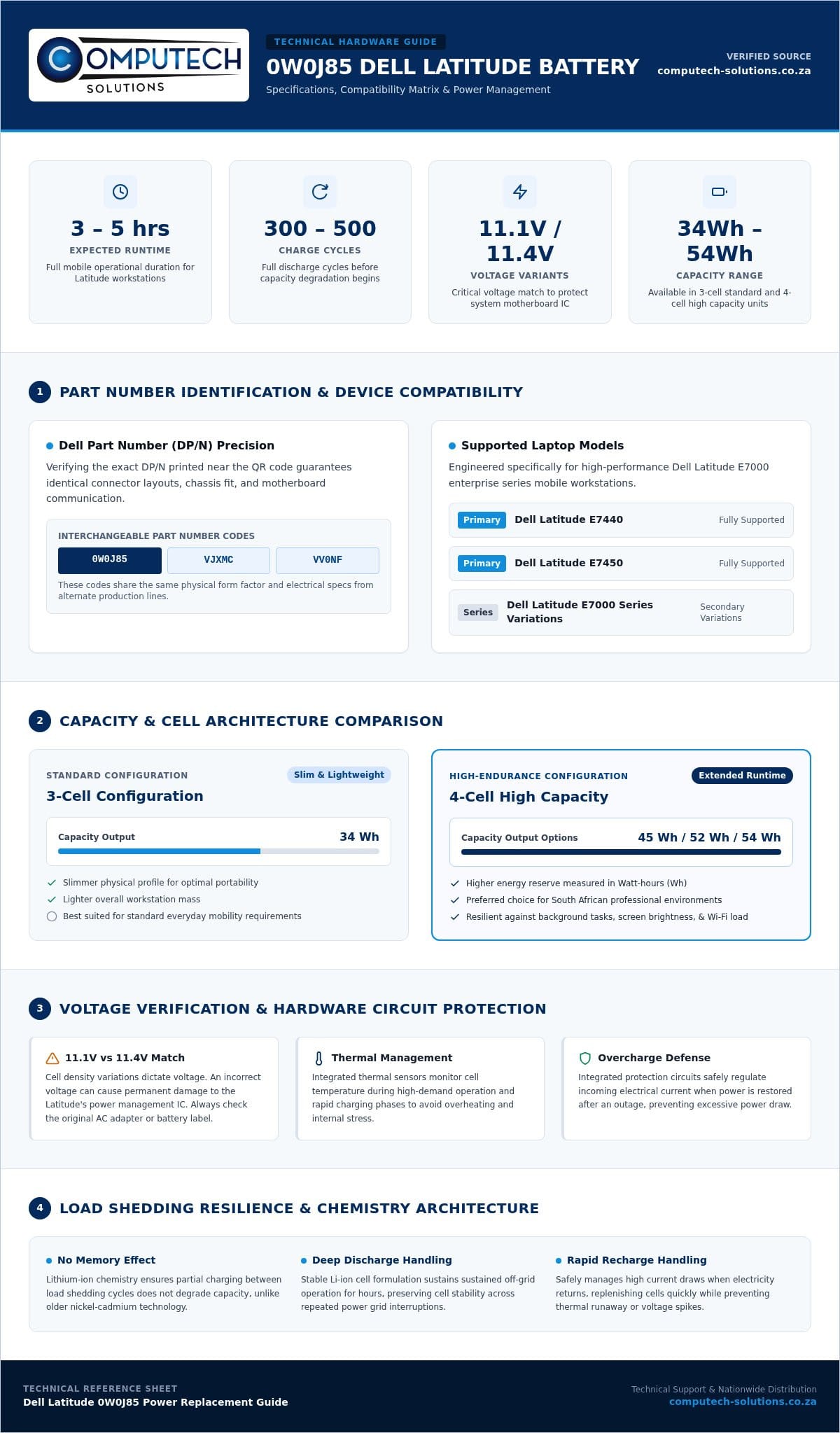
The 0W0J85 is a Lithium-ion replacement battery designed for specific Dell Latitude laptops. This component serves as the primary power source for the high-performance Dell Latitude E7000 series, including the popular E7440 and E7450 models. While many users attempt to source replacements using their laptop’s model name, the 0w0j85 part number provides a significantly higher level of precision. Relying on a Dell Part Number (DP/N) is the most effective way to ensure the battery fits the internal chassis perfectly and communicates correctly with the motherboard’s power management system. This precision is especially important for business users in South Africa who require their devices to switch to battery power instantly during sudden outages.
The Anatomy of a Dell Part Number (DP/N)
You can usually find this specific code printed on the original battery’s label, often located near the QR code. Dell uses these alphanumeric identifiers to track specific hardware revisions and manufacturing batches. It’s common to find that this part is interchangeable with other codes such as VJXMC or VV0NF. These codes often represent the same physical form factor and electrical specifications; they simply originate from different manufacturing lines. Verifying this code before you purchase a replacement helps you avoid the common mistake of buying a part that looks similar but features a different connector layout or screw placement.
Lithium-Ion Technology in Modern Laptops
Modern mobile computing relies heavily on lithium-ion battery technology because of its high energy density and lightweight properties. This chemistry allows the 0w0j85 to provide consistent power without the “memory effect” that plagued older nickel-cadmium batteries. A high-quality replacement manages charge cycles efficiently, typically offering between 300 and 500 full discharge cycles before capacity begins to degrade. In the South African context, where power fluctuations and load shedding are frequent, the battery’s ability to handle deep discharge cycles is vital. Using a battery built with stable Li-ion cells ensures your Latitude remains a reliable tool for professional tasks, even when you’re disconnected from the grid for several hours. This stability is a cornerstone of operational efficiency for remote workers and corporate professionals alike.
Technical Specifications: 0W0J85 Voltage, Capacity, and Cells
Precision is vital when replacing internal components. While the previous section highlighted the importance of the part number, understanding the electrical profile of the 0w0j85 ensures your Dell Latitude operates within its designed safety margins. Every high-quality replacement must integrate overcharge protection and thermal management sensors. These safety features prevent the battery from overheating during rapid charge cycles, which is especially common when power returns after a load shedding session and the system draws maximum current to replenish the cells.
Voltage Matching for System Stability
Voltage is the most critical specification to verify before installation. Using a battery with incorrect voltage can cause permanent damage to the Latitude’s power management IC, leading to expensive motherboard repairs or total system failure. You can verify your requirements by checking the output voltage listed on your current Dell AC adapter or the label of your original battery. The 0W0J85 typically operates at 11.1V or 11.4V depending on cell density. While these numbers are close, they aren’t always interchangeable. If you’re unsure which variant your specific E7440 requires, you can contact our technical support team via WhatsApp for a quick compatibility check.
Capacity and Run-Time Expectations
Capacity is measured in Watt-hours (Wh) or Milliampere-hours (mAh). While mAh tells you the total charge the cells can hold, Wh is a more accurate reflection of actual energy delivery. The 0w0j85 is commonly available in 34Wh, 45Wh, or 54Wh configurations. A 34Wh unit is typically a 3-cell battery, offering a slimmer profile and lighter weight, whereas a 52Wh or 54Wh “High Capacity” 4-cell version provides longer endurance at the cost of a slight increase in mass. In a professional environment, factors like screen brightness, background processes, and Wi-Fi usage will drain these reserves faster than the manufacturer’s idle benchmarks suggest.
A 4-cell configuration is generally preferred for South African professionals. The extra capacity provides a necessary buffer during Stage 4 or Stage 6 load shedding, where you might need to stretch your runtime across multiple hours of outages. High-quality replacements use Grade-A cells that maintain their capacity longer, ensuring that “High Capacity” remains a functional reality rather than just a marketing label. Combined with efficient thermal sensors, these specifications create a stable power environment that protects your hardware while keeping you productive in the field.
Compatibility Guide: Does the 0W0J85 Fit Your Laptop?
Identifying the correct battery for a Dell Latitude is often the most stressful part of the repair process. The 0w0j85 is the primary power solution for the Dell Latitude E7440 and E7450 series. These 14-inch ultrabooks require a specific internal footprint that this battery provides. Additionally, several variations of the Latitude E7240 and E7250 also utilize this part number, although checking your specific chassis is essential. Beyond just fitting inside the case, the battery must align perfectly with the proprietary Dell connector and the integrated screw-mount positions. The connector on the 0W0J85 is a multi-pin interface designed to handle both power delivery and data communication. If the mounting holes or the pin layout differ even slightly, the battery won’t function or could damage the motherboard.
After installation, you might find that the system doesn’t immediately recognize the new cells. Updating your system BIOS to the latest version is a critical step in the replacement process. Dell often releases firmware updates that improve battery communication protocols and charging efficiency. If your laptop boots but shows a “Battery not identified” error, a BIOS flash usually resolves the handshake issue between the hardware and the software. This ensures the charging circuit knows exactly how to handle the new 0w0j85 unit without triggering false safety alerts.
Step-by-Step Compatibility Check
To ensure a perfect match, follow these steps before placing your order:
- Step 1: Shutdown your Latitude and disconnect the AC adapter.
- Step 2: Remove the base cover by loosening the captive screws or sliding the battery release latch, depending on your specific model.
- Step 3: Locate the white label on your original battery and compare the DP/N code to 0W0J85.
Alternative Part Numbers for 0W0J85
Dell’s supply chain often uses multiple identifiers for the same physical part. You might find that your original battery is labeled as 3RNFD, VJXMC, or G95J5. In most cases, these are electrically and physically identical to the 0W0J85. These cross-references exist because Dell sources components from various manufacturers to maintain stock levels. If your current battery shows any of these codes, the 0W0J85 will serve as a direct, high-performance replacement. Buying locally in South Africa means you avoid the complications of returning an incompatible part to an overseas warehouse. To be certain about your specific configuration, you can verify your part number compatibility with our technical team before we ship your order.
Load Shedding Resilience: Maintaining Your Battery in South Africa
The South African power landscape presents unique challenges for laptop hardware. Frequent load shedding cycles force the 0w0j85 to discharge and recharge multiple times a day. This constant chemical activity increases internal heat and accelerates the degradation of the lithium-ion cells. One of the most significant risks during extended outages is “Deep Discharge.” If your Latitude reaches 0% and remains uncharged for several hours, the battery’s internal protection circuit might trip. This is a safety measure to prevent fire, but it often results in a battery that refuses to accept a charge once power returns.
Monitoring your hardware health is essential for maintaining professional productivity. You can track this in real-time using the Windows Power Battery Report. By running the “powercfg /batteryreport” command in your terminal, you get a detailed breakdown of the cycle count and the current capacity relative to the original factory specs. This data allows you to anticipate when a replacement is necessary before a total failure occurs. If you notice your runtime dropping significantly between load shedding stages, chat with our experts on WhatsApp to discuss a high-performance replacement.
Protecting Hardware from Power Surges
Preserving the lifespan of your 0w0j85 requires more than just good charging habits. When power is restored after an outage, the resulting voltage spike can damage the charging circuitry or the battery cells themselves. Using a high-quality replacement charger with integrated surge protection is a vital line of defense. You should also watch for physical signs of stress, such as battery swelling. If the underside of your Latitude looks warped or the trackpad becomes difficult to click, the battery has likely off-gassed due to erratic power supply and must be replaced immediately to avoid damaging the motherboard.
Optimising Battery Life for 2-Hour Outages
To ensure your workstation survives a standard two-hour load shedding slot, you need to manage your power plan effectively. Reducing screen brightness to 50% and closing non-essential background applications can extend your runtime significantly. A key technical tip for longevity is to keep your battery charge between 20% and 80%. Lithium-ion batteries experience the most chemical stress at the extreme ends of their capacity. By avoiding a full 100% charge and never letting the level drop below 20%, you can significantly extend the total number of usable cycles your replacement provides.
Ordering Your 0W0J85 Battery for Nationwide Delivery
Sourcing a replacement 0w0j85 from international marketplaces often introduces unnecessary operational risks, including long shipping delays and hidden customs duties. Choosing a local specialist like Computech-Solutions ensures you receive a high-quality component specifically tested for performance in the South African environment. We offer nationwide delivery that covers both major economic hubs and outlying areas, ensuring your Latitude is back in service quickly. Most deliveries to regional centers are completed within a few business days, while remote locations may take slightly longer. This streamlined logistics model minimizes your downtime and eliminates the anxiety of tracking a package across borders.
Our commitment to your business continuity extends beyond the sale. Every IT component we supply is backed by a professional warranty and return policy, providing the stability you need when investing in hardware. If you encounter any technical hurdles during the installation process, our team is available to provide expert guidance. We understand that a battery isn’t just a part; it’s a critical tool for maintaining productivity during power disruptions. By partnering with a local entity, you gain access to immediate technical support and a reliable supply chain that understands the specific demands of the local power grid.
Secure Online Procurement and Support
Purchasing your hardware through our secure online store is designed to be a direct and functional experience. We prioritize clarity in our listings, ensuring you have all the technical data needed to make an informed decision. Our local expertise in Dell systems allows us to verify that every 0w0j85 unit meets the required electrical standards before it leaves our facility. If you’re managing a fleet of laptops or simply need to confirm current stock levels, we’re ready to assist. Ready to restore your laptop? Chat with us on WhatsApp for pricing and availability.
What to Do After Your Battery Arrives
Once your new battery is delivered, proper initial handling is vital for long-term health. We recommend a full calibration cycle: install the battery, charge it to 100% without interruption, and then allow it to discharge to about 10% before charging it again. This process helps the laptop’s power management software accurately gauge the new cell capacity. It’s also a perfect time to inspect your laptop charger. Ensure your adapter is functioning correctly, as a faulty charger can quickly degrade a new battery.
Responsible disposal is the final step in the replacement process. In South Africa, lithium-ion batteries should never be thrown into standard waste bins due to their chemical composition. You should take your old Dell battery to a certified e-waste recycling center. Many major retailers and municipal drop-off points now offer dedicated bins for electronic waste, ensuring that the materials are processed safely and don’t contribute to environmental degradation. Following these steps ensures your new hardware performs at its peak while you maintain a sustainable approach to IT management.
Restore Your Dell Latitude’s Mobile Performance
Restoring your Dell Latitude to its original runtime requires more than just a generic replacement. You’ve learned that verifying the 0w0j85 part number is the only way to guarantee a perfect fit and electrical compatibility with your E7440 or E7450 motherboard. By prioritizing specialized hardware and following technical maintenance tips, like keeping your charge between 20% and 80%, you can significantly extend your device’s lifespan despite the challenges of frequent load shedding cycles. Relying on local expertise ensures you receive a product that’s designed to handle the specific demands of the South African power grid.
Don’t let power instability dictate your productivity. We provide specialized Dell replacement hardware with the added security of expert technical support. Our team is ready to assist you with DP/N verification to ensure you receive the correct component the first time. Take the next step toward a reliable mobile workstation today. Order your 0W0J85 Battery via WhatsApp for fast Nationwide Delivery. You’ll enjoy the peace of mind that comes with professional-grade components and efficient shipping across South Africa. Get back to work with confidence and stay powered through any outage.
Frequently Asked Questions
How long should a new Dell 0W0J85 battery last on a single charge?
A new 0w0j85 battery typically provides between three and five hours of runtime on a single charge. This duration depends on whether you’ve installed the 34Wh version or the higher capacity 54Wh variant. Your actual usage patterns, such as screen brightness levels and the number of active background applications, will also influence performance. High-performance Latitude models require consistent power delivery to maintain efficiency during demanding professional tasks.
Is the 0W0J85 battery compatible with the Dell Latitude E7440?
Yes, the 0w0j85 is the primary battery part number for the Dell Latitude E7440 and E7450 series. It’s specifically designed to fit the internal footprint and connector layout of these 14-inch ultrabooks. Because Dell often utilizes multiple part numbers for the same model, we recommend verifying your original battery label to ensure a perfect match. This precision prevents compatibility issues and protects your laptop’s internal circuitry from damage.
Can I replace my Dell Latitude battery myself or do I need a technician?
You can certainly replace the battery yourself as it’s designed to be a user-serviceable part. For most Latitude models, this involves either sliding a release latch or removing a few screws from the base cover to access the internal compartment. You don’t need advanced technical training to complete the installation. However, if you feel unsure about the process, our technical support team can provide guidance to ensure a safe and successful replacement.
What is the difference between an original Dell battery and a high-quality replacement?
Original Dell batteries are manufactured by the OEM, while high-quality replacements are built by third-party specialists using Grade-A lithium-ion cells. A premium replacement provides the same voltage and safety features, such as overcharge protection, at a more accessible price point. We focus on supplying replacements that meet strict technical standards, ensuring they provide reliable power during load shedding without the premium cost associated with brand-name labels.
Why is my laptop not charging even after installing a new 0W0J85 battery?
If your laptop doesn’t charge after installation, it’s often due to a BIOS handshake issue or a faulty AC adapter. Dell systems sometimes require a BIOS update to recognize and communicate with new hardware correctly. You should also check if your charger provides the correct wattage for your specific Latitude model. If the system still fails to charge, try a power reset by disconnecting all power sources and holding the power button.
Does Computech-Solutions offer nationwide delivery for laptop batteries?
Computech-Solutions provides nationwide delivery for all laptop batteries across South Africa. We understand that your business can’t afford long delays, so we’ve optimized our logistics to reach both major centers and outlying areas efficiently. You can track your order from our facility directly to your doorstep. This local shipping model is much faster and more reliable than ordering from international marketplaces that often face significant customs delays and extra fees.
How does load shedding affect my new laptop battery life?
Frequent power cuts force your battery through more charge and discharge cycles than usual, which naturally shortens its total lifespan. Load shedding also increases the risk of deep discharge, where the battery level drops so low that the protection circuit prevents it from recharging. To mitigate this, we recommend keeping your laptop plugged into a surge protector when the power returns to shield the new cells from sudden voltage spikes.
What warranty is provided with the 0W0J85 replacement battery?
Every replacement battery we supply comes with a professional warranty to protect your investment. This coverage ensures that you’re protected against manufacturing defects or premature cell failure. We take pride in our hardware reliability and offer a straightforward return policy for all IT components. This commitment to quality provides the stability your business needs to stay operational despite the technical disruptions common in the local South African power environment.
