
An original label doesn’t automatically mean better charging, and a generic label doesn’t automatically mean poor performance. The real test of generic vs original laptop charger performance is whether the charger is compatible, well-built and able to deliver stable power to your laptop.
It’s sensible to be cautious. A connector that looks right may not fit correctly, and a charger with the wrong electrical specifications can cause charging problems. Price can add to the uncertainty, especially when you’re deciding whether an original charger’s higher cost is justified.
This guide compares original and generic laptop chargers by compatibility, charging performance, safety and value. You’ll learn how to check voltage, current and wattage, confirm the connector type, and understand why some laptops may not recognise a replacement charger. You’ll also see what to look for in build quality, rather than relying on the label alone. If you’re unsure which charger suits your laptop, model-specific technical support can help you check compatibility before choosing.
Key Takeaways
- Labels alone don’t determine generic vs original laptop charger performance. Compatibility and build quality matter.
- Compare the charger’s voltage, current and wattage with your laptop’s requirements before choosing a replacement.
- Check the connector. For USB-C models, confirm the laptop supports charging through that port and the charger meets its power needs.
- Review product documentation and compatibility details instead of assuming an original charger is always the better choice.
- If model-specific compatibility is unclear, technical support can help you assess suitable laptop chargers and adapters.
Generic vs Original Laptop Chargers: What Does Performance Mean?
In the generic vs original laptop charger performance comparison, the label is only a starting point. An original charger is associated with the laptop’s manufacturer, while a generic charger is made by a third party as an alternative. Neither label alone tells you how quickly a laptop will charge, how reliably power will be delivered, or whether the charger suits a particular model.
Charger compatibility means the charger’s electrical output and connector meet the laptop’s requirements; charger brand describes who supplied or made it. These are related, but they aren’t interchangeable. A correctly matched charger converts mains electricity into the direct current a laptop uses. For background on this function and common adapter configurations, see this overview of the AC adapter.
Performance also depends on the laptop and battery. The laptop manages how much power it accepts and may limit charging under certain conditions. Battery age and condition affect how well it holds a charge, while demanding tasks can use power as it arrives. A slow charge or short battery life therefore doesn’t automatically mean the charger is at fault.
What does an original laptop charger mean?
An original charger is supplied under the laptop manufacturer’s brand or through its authorised supply chain. That association can make it easier to match a replacement to a laptop, but you still need to check its specifications and connector. Manufacturers may use different chargers across models, so a charger that is original for one laptop isn’t automatically suitable for another.
What does generic laptop charger mean?
“Generic” describes a third-party category, not one consistent level of quality. Some alternatives may be suitable when their documented electrical output and connector match the laptop; others may lack clear information. Don’t assume every generic charger is unsafe or that all generic chargers perform equally. Check the documentation against your laptop’s requirements before use.
To compare chargers, ask whether the charger is a documented match, not simply whether it carries the laptop brand. A brand-associated charger may simplify identification, while a well-documented third-party alternative may also be appropriate. In either case, verify the model, electrical requirements and connector instead of judging performance by the label.
How Charger Specifications Affect Laptop Charging Performance
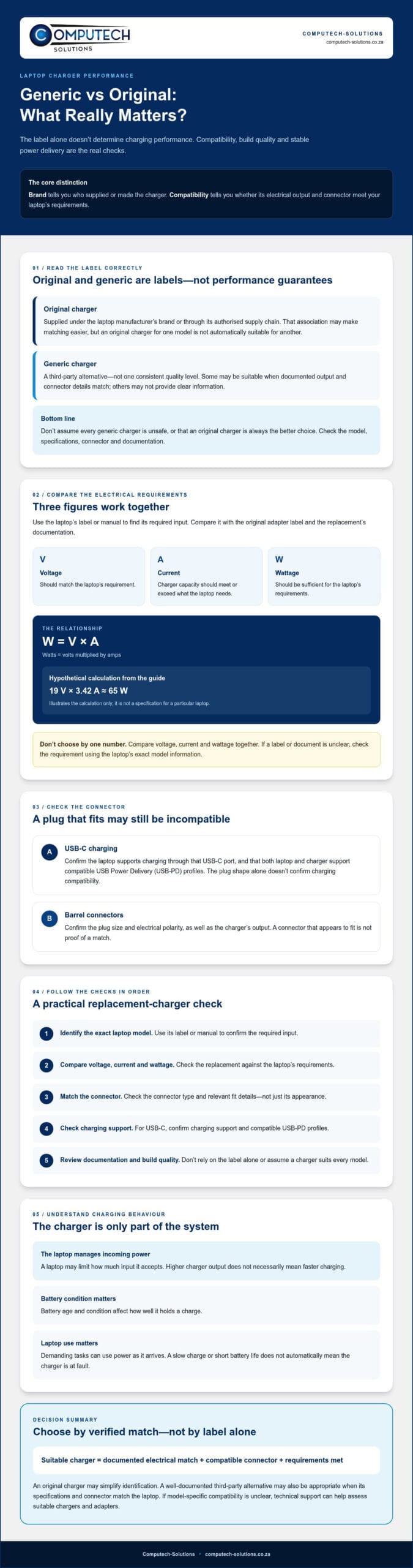
A charger’s output must suit the laptop’s input requirements. Voltage, current and wattage work together: wattage in watts equals voltage in volts multiplied by current in amps (W = V × A). For example, a hypothetical 19 V charger rated at 3.42 A provides about 65 W. This illustrates the calculation only; it isn’t a specification for a particular laptop.
Check the laptop’s label or manual for its required input, then compare it with the output printed on the original adapter and the replacement’s documentation. Voltage should match the laptop’s requirement, and the charger’s current capacity should meet or exceed what the laptop needs. Its wattage should also be sufficient. A mismatch can affect charging or suitability, so don’t choose by connector shape or wattage alone.
Voltage, current, and wattage: the numbers to compare
Think of voltage as the required electrical level and current as the available flow at that level. A charger with adequate current capacity doesn’t force all that current into the laptop; the laptop draws power according to its needs. However, it can limit how much input it accepts. A higher-output charger therefore won’t necessarily make charging faster. Charging behaviour can vary with the laptop’s limits and use.
Compare all three figures, not just the largest number on the adapter. If the label or documentation is unclear, use the laptop’s exact model information to check the requirement before buying.
USB-C Power Delivery and barrel connectors
A USB-C plug’s shape alone doesn’t confirm that it can charge a particular laptop. The laptop and charger must both support USB-C charging and compatible USB Power Delivery (USB-PD) profiles. If either device doesn’t support the required power arrangement, the connection may not deliver the expected output. Check the laptop documentation and charger specifications rather than assuming every USB-C adapter is interchangeable.
Barrel connectors need careful matching too. Confirm the plug’s size and electrical polarity, as well as the charger’s output. A connector that appears to fit isn’t proof of compatibility.
Electrical matching is only part of the decision. Clear documentation and evidence of responsible product testing also matter. Counterfeit chargers aren’t the same as all third-party chargers, but a reported safety test of counterfeit chargers highlights why it’s wise to avoid products with questionable claims or missing details.
For a model-specific check, you can ask about charger compatibility using your laptop’s model details and the output information from its original adapter.
Generic vs Original Laptop Charger: A Practical Performance Comparison
For generic vs original laptop charger performance, compare evidence you can verify rather than relying on branding or price. An original charger may be easier to match using manufacturer and part information. A third-party charger can also be suitable if its specifications, connector and product documentation fit the exact laptop. Neither category guarantees better charging speed or lifespan on its own.
| What to compare | Original charger | Generic charger |
|---|---|---|
| Compatibility | Manufacturer and part details may make model matching more direct, but confirm the specific laptop requirements. | Suitability depends on documented output and connector compatibility for the exact laptop. |
| Charging behaviour | Brand association doesn’t guarantee faster charging; the laptop’s needs and limits still apply. | A compatible charger may deliver appropriate power, but output claims must match the laptop’s requirements. |
| Construction information | Check the product’s documentation and markings rather than assuming build quality from branding. | Look for clear specifications and credible information about construction and safety. UL discusses relevant safety certification standards for charging cables; verify a mark or claim for the specific product. |
| Support and documentation | Manufacturer or part details may help identify the intended application. | Assess whether the seller provides clear compatibility information and useful support. |
Where original chargers may offer practical advantages
An original replacement can simplify identification when you have the laptop’s model number or the part number from its existing adapter. Its documentation may make the intended model range and connector easier to confirm. These are practical matching advantages, not proof of superior speed, service life or safety. Check the output details even if the branding appears correct, since original chargers can differ between laptop models.
When a generic replacement may be a sensible option
A generic charger is worth considering when its electrical specifications and connector are documented and match the exact laptop. Don’t treat “generic” as a quality rating: the label alone can’t confirm construction or reliability. Review the product information and ask for clarification if details are missing. If you’re uncertain, give your laptop model and existing adapter information to a technical support provider before selecting a replacement.
Price and branding can guide what you investigate, but neither settles the comparison. Base your decision on verifiable compatibility, clear documentation and accessible support. That gives you a more dependable basis for choosing between an original replacement and a suitable third-party alternative.
How to Check Whether a Replacement Laptop Charger Is Suitable
A careful check can prevent a connector mismatch or unsuitable power output. Follow this sequence before choosing a replacement: identify the exact laptop model, find its required input, confirm the connector, then compare the charger’s documentation with those details. This makes the generic vs original laptop charger performance decision about verified fit, not guesswork.
Read the laptop label and identify its exact model
Look for the model number and input information on the laptop’s underside, near its regulatory label, or in the user manual. If the label is worn or the input details aren’t shown there, check the manufacturer’s documentation for the exact model. A family name alone may cover several versions with different power requirements or connectors, so record the full model identifier where possible.
Next, compare the laptop’s stated input with the output printed on the original adapter. Check that the voltage matches and that the charger’s current capacity and wattage meet the laptop’s requirements. If the figures are missing, difficult to read or inconsistent, pause rather than estimating.
Inspect charger specifications and warning signs
Confirm the connector type and size against the laptop’s charging port, and check the plug and cable for damage. Don’t use a charger with cracked casing, exposed or frayed cable, bent parts, or a connector that feels loose or unstable. A plug that appears to fit isn’t enough to prove electrical compatibility.
For USB-C charging, confirm that the laptop supports charging through that port and that the charger supports the power delivery profile the laptop requires. USB-C is a connector format, not a guarantee that every charger and laptop will work together. With a barrel connector, verify the correct size and polarity as well as the electrical output.
Review the charger’s documentation for clear output specifications and legible manufacturer or supplier information. Treat unexplained performance claims, conflicting figures or missing details as reasons to stop and seek advice. Don’t rely on price or a familiar-looking label as a substitute for evidence.
- Model: Match the full laptop model, not just the brand or product family.
- Input and output: Compare the laptop’s stated requirements with the charger label and documentation.
- Connector: Confirm the type and fit. For barrel connectors, check polarity too.
- Condition: Avoid damaged cables, casing or unstable plugs.
If you’re unsure how to interpret the model or adapter specifications, ask technical support to check charger compatibility before selecting a replacement.
Choosing an Original or Generic Charger: A Confident Next Step
The best choice isn’t determined by the word “original” or “generic.” For generic vs original laptop charger performance, what matters is whether the replacement is documented as suitable for your exact laptop and whether you can confirm its connector, electrical requirements and product information. An original charger may make model matching more straightforward when its part details are available. A verified third-party option may also be appropriate if its compatibility is clearly supported.
Before purchasing, compare the complete information for the laptop and charger, not brand or price alone. Check the laptop manufacturer’s requirements and pause if specifications conflict or essential details are missing. Choose only when you’re confident the charger is an appropriate match, not merely that its plug looks familiar.
Use your needs to make the final comparison
If you know the laptop’s exact model and can identify a matching original part, that route may simplify selection. If considering a generic alternative, look for clear documentation that addresses the model’s electrical requirements and connector. In either case, assess the available support and verify the manufacturer’s requirements before buying. If you can’t establish a complete match, don’t guess based on a family name or appearance.
Get help confirming a laptop charger match
Computech-Solutions offers technical support for model-specific compatibility questions. To make the check more useful, have the laptop’s make and exact model ready, along with the output details from the existing charger if available. Support can help assess whether a charger is compatible. Confirm product availability before selecting a specific replacement.
Share those details to ask about a suitable laptop charger or adapter. Ask about charger compatibility.
Choose a Charger Match You Can Rely On
The decision between an original and generic charger doesn’t come down to branding alone. The key lesson from generic vs original laptop charger performance is to choose based on your laptop’s verified requirements, a suitable connector and clear product information. An original may simplify matching, while a documented third-party option may also be appropriate.
If you’re still unsure, don’t guess. Keep your laptop’s exact model and existing adapter details handy so compatibility can be checked against the manufacturer’s requirements. Computech-Solutions offers technical support for model-specific questions and sells laptop chargers and adapters, with nationwide delivery across South Africa. Confirm product availability for your requirements.
Ask Computech-Solutions for help checking charger compatibility. With the right details and a careful match, you can choose a replacement with greater confidence and get back to using your laptop.
Frequently Asked Questions
Is a generic laptop charger as good as an original?
Either type may work well if it’s correctly matched to the laptop, but the brand alone doesn’t establish performance. In the generic vs original laptop charger performance comparison, check voltage, current capacity, wattage, connector fit and any required USB-C Power Delivery support. Review the charger’s documentation and build quality too. An original may simplify model matching, while a well-documented generic charger may also be suitable. Don’t assume every charger in either category performs alike.
Can a generic charger damage my laptop?
An unsuitable or defective charger may create risk, but the generic label alone doesn’t prove that a charger is unsafe. Before use, compare its output with the laptop’s documented input and confirm the connector is correct. Don’t use a charger with a damaged cable or casing, or a loose or unstable connector. If specifications are missing or conflict with the laptop requirements, stop and seek technical advice rather than guessing.
How do I know if a laptop charger is compatible?
Start by identifying the laptop’s exact model and checking its documented power input. Compare the charger’s voltage, current capacity and wattage with those requirements, then confirm the connector type and fit. For a USB-C laptop, verify that the port supports charging and that the charger supports an appropriate Power Delivery profile. A plug that fits physically isn’t enough to establish compatibility. Check manufacturer documentation if any detail is unclear.
Will a higher-wattage charger charge my laptop faster?
Not necessarily. A higher wattage rating doesn’t automatically increase charging speed because the laptop, charger and supported charging protocol all affect how much power is accepted. A suitable charger can provide the power the laptop requests, but the laptop may limit its input. Follow the manufacturer’s specifications instead of choosing by wattage alone. Charging behaviour can also vary with the laptop’s workload and battery condition, so speed isn’t a simple measure of charger quality.
Can I use a USB-C charger with any USB-C laptop?
No. A USB-C connector doesn’t guarantee that a laptop supports charging through that port. Check the laptop documentation for USB-C charging support and the required Power Delivery capabilities, then confirm the charger can provide a suitable profile. Other USB-C ports may support different functions, so don’t judge by shape alone. If you can’t confirm the laptop’s requirements or the charger’s output, ask a qualified support provider before buying.
Why is my replacement laptop charger charging slowly?
Slow charging can have several causes, including insufficient charger output, an unsupported charging protocol, a damaged cable or connector, or the laptop limiting the power it accepts. Compare the charger specifications with the laptop’s requirements and inspect the cable and plug for visible damage. Battery condition and laptop workload can also affect observed charging. Charging speed alone can’t identify the cause, so seek technical help if checks don’t clarify the issue.
Should I buy an original charger or a generic replacement?
Choose the option with confirmed compatibility, clear specifications, a suitable connector, reliable product documentation and accessible support. An original charger may make model matching more straightforward, while a generic replacement can be considered if its details are verified for your exact laptop. Check the manufacturer’s requirements before purchasing, and don’t rely on brand or price alone. If you’re unsure, Computech-Solutions offers technical support for model-specific charger compatibility questions.
