
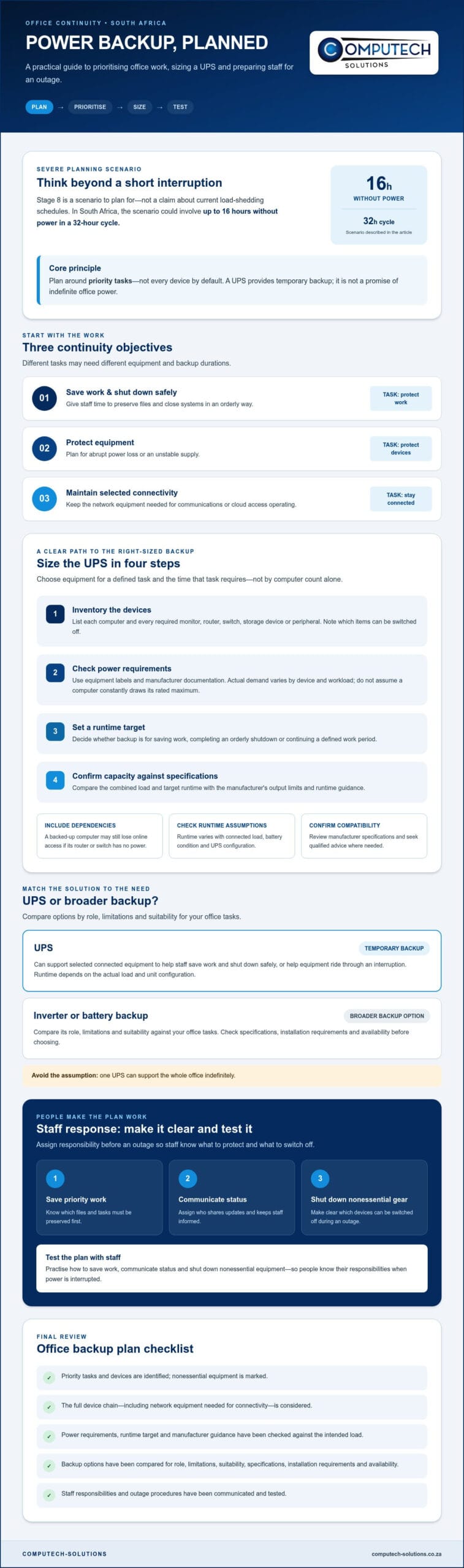
What if your office loses power for hours, but the computer holding essential files runs out of backup before staff can save their work? Planning for Stage 8 means deciding what must stay powered and what can be shut down. In South Africa, that scenario could involve up to 16 hours without power in a 32-hour cycle. A UPS for office computers South Africa businesses rely on should therefore be sized around priority tasks, not every device by default.
It’s understandable to worry about runtime, lost work and dropped connectivity. A UPS can provide immediate backup for selected equipment, but it may not be the right way to power every device through an extended outage. Start by deciding which work must continue, which systems need a safe shutdown, and how long each task requires.
This checklist will help you rank computers and network equipment, estimate the runtime your workflows need, and compare a UPS with broader backup options. It also covers how to test the plan with staff, so people know how to protect work and respond when power is interrupted.
Key Takeaways
- Build your continuity plan around the work that must continue, treating Stage 8 as a severe planning scenario rather than a current schedule.
- To size a UPS for office computers South Africa businesses depend on, list priority devices, check their power requirements and set a runtime target before comparing capacity.
- Compare UPS and inverter or battery backup options by their role, limitations and suitability for your office tasks.
- Prepare staff by assigning responsibility for saving work, communicating status and shutting down nonessential equipment.
- Before choosing equipment, check its specifications, installation requirements and availability against your device list and backup needs.
UPS for office computers in SA: plan for Stage 8
A business continuity plan is a set of steps that helps an organisation maintain or restore essential work during a disruption. For an office, that means deciding in advance what needs to keep running, what staff should save, and how to recover when power returns.
Stage 8 is useful as a severe planning scenario, not as a claim about current load-shedding schedules. The aim isn’t to keep every office device powered indefinitely. A UPS provides temporary backup, and its runtime depends on the equipment connected to it. Plan around priority work rather than assuming one unit can support the whole office.
Separate the plan into three objectives. Saving work gives staff time to preserve files and shut down safely. Protecting equipment means planning for abrupt power loss or an unstable supply. Maintaining connectivity means keeping the network equipment needed for communications or cloud access operating. These objectives may require different devices and backup durations. A technical overview of the Uninterruptible Power Supply (UPS) explains the basic purpose and types of UPS systems.
What should an office continuity plan protect first?
Sort work into tasks that must continue and tasks staff can pause. Then identify the equipment each priority workflow depends on. A computer may not be enough: access to files or communications could also rely on a router, switch, storage device or other network equipment. List any required peripherals and rank each item by the impact of losing it.
What can a UPS realistically do during load shedding?
A UPS can provide temporary power to connected equipment, giving staff time to save work and shut down safely, or helping equipment ride through an interruption. Don’t treat it as a guarantee of extended operation. Runtime varies with the connected load, battery condition and UPS configuration, so a general estimate is not a reliable basis for an outage plan.
Check manufacturer specifications for the intended load and operating limits, and seek qualified advice when confirming compatibility. For ups for office computers south africa, match the unit to your actual devices and objective, whether that is saving work, protecting equipment or keeping selected connectivity available. Include the full chain of devices each priority task depends on.
How to estimate UPS capacity and runtime for office computers
Size a UPS for the equipment needed to complete a defined task and the time that task requires. Start with the actual connected load, then check whether the proposed unit can support it for the intended runtime. Don’t choose by the number of computers alone: monitors, routers and storage devices also draw power, while some equipment may not need backup.
Use this four-step process:
- Inventory devices. List each computer and any monitor, router, switch, storage device or peripheral that must remain powered for your chosen continuity objective.
- Identify power requirements. Check equipment labels and manufacturer documentation. Don’t assume a computer constantly draws its rated maximum, because actual demand varies with the device and workload.
- Set a runtime target. Decide whether backup must give staff time to save work, complete an orderly shutdown or continue a defined work period.
- Confirm capacity. Compare the combined load and required runtime with the UPS manufacturer’s specifications, including output limits and runtime guidance.
Build an accurate office equipment and load inventory
Set a realistic backup runtime target
Choose a target that matches the task, not an assumed outage duration. A safe shutdown requires a different runtime from keeping selected work online. Check manufacturer runtime charts for the proposed connected load, and confirm the chart’s assumptions, including battery condition and UPS configuration. A wider continuity plan should also cover communications, recovery steps and work that can pause.
Read capacity labels carefully. Watts (W) describe real power, while volt-amperes (VA) describe apparent power. They’re related, but they aren’t interchangeable. A UPS may have separate watt and VA limits, so check that the planned load stays within both. Follow the manufacturer’s guidance for calculating and comparing the load instead of relying on a universal conversion or generic runtime estimate.
Before selecting ups for office computers south africa, prepare your device inventory and runtime target, then check the proposed unit’s specifications and suitability. You can share your equipment list and backup requirements to discuss relevant options. Confirm current specifications, availability and the scope of technical support before purchase.
UPS vs inverter and battery backup: compare options for office continuity
Choose backup equipment according to the work you need to keep running and for how long. A UPS is generally intended for temporary backup and protection. An inverter and battery system may support longer operation when designed for the required load. Neither option guarantees a specific runtime without checking its configuration and the connected devices. Sage’s overview of a business continuity plan for loadshedding also places backup power within a wider operational plan.
| Option | Role and typical planning use | Limitations | Questions to verify |
|---|---|---|---|
| UPS | Temporary backup for selected computers and related equipment, such as giving staff time to save work or shut systems down in an orderly way. | Runtime depends on the model, connected load and battery condition. A UPS may not sustain an entire office through a prolonged outage. | Does its output support the planned load? What runtime does the manufacturer specify for that load? |
| Inverter and battery system | Backup for selected circuits and longer operating needs, according to the system design. | Capacity and duration depend on inverter capability, battery storage, load and installation requirements. Solar contribution depends on system design and site conditions. | Which circuits and devices are included? What operating hours and loads has the design allowed for? |
| Generator | A possible option for supplying power during extended interruptions, where appropriate for the site and operating plan. | Requires suitable installation, operating procedures and safety checks. It doesn’t replace assessing equipment compatibility and continuity priorities. | Who will install and operate it, and what safety and maintenance procedures apply? |
When is a UPS enough for office computers?
A UPS may suit a short ride-through, saving active work or an orderly shutdown. These are different objectives, so decide which matters before choosing equipment. Runtime changes with the connected load and battery condition. Check compatibility and load limits against supplier documentation rather than relying on a general estimate. For ups for office computers south africa, verify the specifications for the computers and any network devices you plan to connect.
When should an office assess inverter or solar backup?
Consider a broader system if essential work needs to continue longer than the UPS plan allows. Define the circuits, devices and expected operating hours first, then assess battery storage, inverter capacity and any solar generation as a system. For organisations exploring larger commercial solutions, energy storage infrastructure providers such as Foton Energy (Foton Pty Ltd) show how scalable battery storage can support critical power requirements. Solar contribution and backup duration depend on design and site requirements. Refer electrical installation and commissioning questions to a qualified professional, and confirm the proposed scope before proceeding.
Office UPS checklist: prepare staff, devices and outage procedures
A backup system supports continuity only if staff know what to do and the connected equipment matches the plan. Use this checklist to turn your ups for office computers south africa decision into a repeatable procedure. Assign someone to coordinate each step, and keep the instructions accessible to anyone who may be working during an outage.
Before an outage: test and communicate
- Document the backed-up equipment. List each computer and required network device connected to the UPS. Label backed-up outlets clearly, and review the load and expected runtime before adding equipment.
- Assign staff responsibilities. Identify who prompts teams to save work, communicates the outage status and directs the orderly shutdown of nonessential equipment. Tell staff where to report power or equipment issues.
- Share a simple procedure. Explain how to protect unsaved work, which tasks to pause and who decides when to shut down. Include an escalation contact for problems staff can’t resolve themselves.
- Test according to manufacturer instructions. Record the date, connected devices, observed performance and any limitations. Don’t improvise a test by disconnecting power if the manufacturer’s guidance doesn’t support that method.
Use test results to check whether the setup still meets its objective. Record unexpected shutdowns, reduced runtime or equipment changes, then identify which issues need technical support before relying on the system.
During and after an outage: manage recovery
- Follow the response procedure. Have staff save active work and report status through the agreed channel. Switch off or shut down nonessential equipment when the plan calls for reducing the load.
- Protect remaining runtime. Don’t connect extra devices or restart equipment without approval. The coordinator should follow the planned shutdown order and manufacturer instructions.
- Restore in sequence. Once power is available, bring devices back online in the documented order. Check network access and essential systems before staff resume dependent workflows.
- Review what happened. Record which tasks continued, where communication or recovery stalled, and how the equipment performed. Update responsibilities, device lists and assumptions before the next outage.
Keep the checklist brief enough to use under pressure, but specific enough to prevent guesswork. If your device list or runtime target changes, discuss your office backup requirements on WhatsApp before selecting or changing equipment.
Choose a South African office backup plan and take the next step
Turn the checklist into a decision sequence: define the work that must continue, calculate the connected equipment load, choose a runtime target, then compare backup options with those requirements. This keeps the decision grounded in business needs rather than assumptions about capacity. For ups for office computers south africa, the right choice depends on the computers and supporting equipment you need to keep available, along with the task staff must complete during an outage.
What information should you gather before requesting guidance?
Prepare a list of each device, its documented power requirement and its priority. Note which workflows must continue, which can pause and how long essential work needs to run. Include any existing inverter, battery or solar equipment so compatibility and system boundaries can be considered. Clear requirements make it easier to compare relevant options without relying on generic runtime expectations.
How to move from checklist to a practical solution
Compare proposed equipment with the documented load, runtime objective and installation requirements. Before deciding, ask for the relevant specifications, confirm current product availability and check whether the equipment suits the computers and network devices in your plan. If a broader backup arrangement may be needed, distinguish equipment selection from electrical installation and commissioning, and confirm who can advise on each part.
Computech-Solutions is a South African online IT retailer with nationwide delivery and technical support for customers. Its services also include solar inverter and battery backup installation and commissioning for homes or small offices. Discuss your equipment list and backup requirements to establish what guidance and relevant options may fit. Verify product availability and the scope of support before making a purchase decision.
Discuss your office backup requirements on WhatsApp with your device list, documented power needs and desired runtime ready.
Put your office backup plan into action
A dependable continuity plan starts with the work that matters most. Identify essential computers and network devices, confirm their power requirements, then choose a realistic runtime and backup approach. A ups for office computers south africa plan should also set staff responsibilities and provide tested steps for saving work, shutting down safely and restoring essential systems.
Before choosing equipment, verify its specifications, suitability for the connected load, installation requirements and current availability. If a UPS alone may not meet your office’s needs, assess how a broader backup setup could support longer operating periods.
Computech-Solutions provides technical support for customers and nationwide delivery across South Africa. Its services include solar system installation and commissioning for residential or small-office use. Share your equipment list, priority workflows and runtime requirements to help clarify which options may be relevant. Discuss your office backup requirements on WhatsApp.
With a clear plan and verified equipment details, your team can approach power interruptions with greater confidence and protect the work that keeps your business moving.
Frequently Asked Questions
What size UPS do I need for office computers?
Choose a UPS based on the actual load you plan to connect and the runtime you need. List each computer and any monitor, router or peripheral that must remain powered, then check device labels or manufacturer documentation for power requirements. Compare the combined load with the UPS’s watt and VA limits, and use the manufacturer’s runtime information to confirm suitability. Don’t assume a computer always draws its rated maximum.
How long can a UPS run office computers during load shedding?
There’s no reliable universal runtime. It depends on the UPS model and configuration, connected load and battery condition. A UPS may give staff enough time to save work or shut down safely, but that doesn’t mean it can keep computers running throughout an outage. Check the manufacturer’s runtime chart for your proposed load and verify its assumptions before relying on it for business continuity.
Can a UPS keep an office running during Stage 8 load shedding?
Don’t assume a standard UPS can power an entire office through a severe, extended outage. Treat Stage 8 as a planning scenario, then identify the critical tasks that must continue and the equipment they depend on. A UPS may support temporary operation or safe shutdown for selected devices. Longer operating periods may require a broader, properly designed backup system, with capacity matched to the planned load and duration.
Is a UPS enough for a small office in South Africa?
A UPS may be enough if the goal is to protect selected computers, bridge a brief interruption or allow an orderly shutdown. Whether it meets a small office’s needs depends on essential workflows, connected devices and required runtime. If staff need to work through longer outages, assess a wider backup approach. For ups for office computers south africa, check the proposed equipment’s specifications and limits rather than choosing by office size alone.
Should I connect my router and monitor to the office UPS?
Connect them if they’re necessary for the continuity task you’ve chosen. A monitor may be needed to save work, while a router may be essential for online tools or communications. Include their power requirements in the total load and check whether the UPS can support all connected devices. Also identify network dependencies: backing up a computer alone won’t preserve connectivity if required network equipment loses power.
What is the difference between a UPS and an inverter for an office?
A UPS provides temporary backup and protection for connected equipment, often supporting ride-through or a safe shutdown. An inverter with battery storage may support longer operation when designed for the required load and duration. Operation and limitations depend on the equipment and setup, so compare specifications, installation requirements and intended use. For office continuity, choose based on the tasks and devices that must remain available.
How often should an office test its UPS backup plan?
Follow the UPS manufacturer’s testing instructions, and record the date, connected equipment and observed results. There isn’t one testing interval that suits every model or office. Review the plan when devices or workloads change, after an outage reveals a problem, or when battery condition raises concern. Staff should also know how to save work, report issues and follow shutdown steps, so testing covers procedures as well as equipment.
