
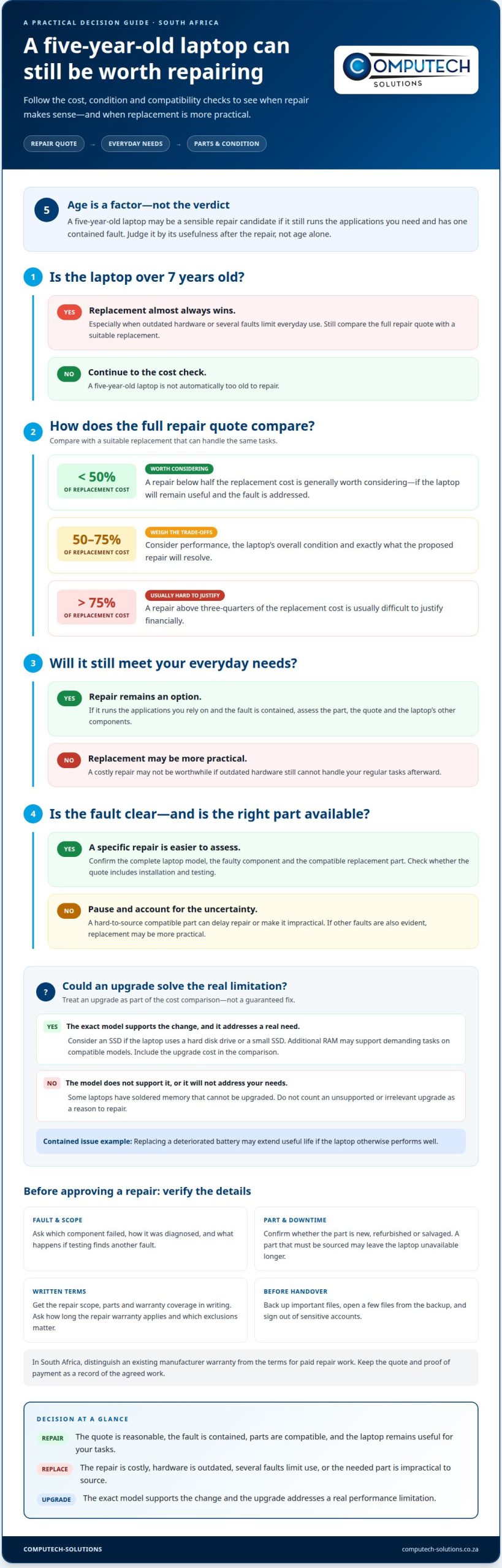
A five-year-old laptop isn’t automatically too old to repair. If you’re deciding whether it is worth repairing a 5-year-old laptop in SA, compare the repair cost with a similar replacement: a repair below half the replacement cost is generally worth considering, while one above 75% is usually difficult to justify financially.
It’s reasonable to worry that one repair could be followed by another, or that a replacement part may be difficult to source. The laptop’s overall condition matters, as does whether it still runs the software and applications you rely on. A battery replacement may make sense if the laptop otherwise performs well. A major fault in outdated hardware may make replacement the more practical option.
This guide weighs repair costs, parts availability, the risk of later failures and the difference between software and hardware problems. You’ll find a practical way to compare repair and replacement, including when an upgrade could extend a laptop’s useful life and when putting money into an older machine is unlikely to pay off.
Key Takeaways
- Compare the full repair quote with the cost of a suitable replacement, then weigh whether the laptop will still meet your everyday needs.
- Consider parts availability and the condition of other components, since a repair may not address separate faults that emerge later.
- Ask for a clear breakdown of the fault, parts and labour so you can understand what the proposed repair covers.
- Judge the laptop’s age alongside its software support and performance, rather than treating age alone as the deciding factor.
- Explore RAM or SSD upgrades only when the specific laptop model supports them and the upgrade would improve its practical usefulness.
Should I repair or replace my old laptop?
Whether it’s worth repairing a five-year-old laptop in SA depends on the fault, repair quote and how well the laptop still meets your needs. Compare the proposed work with the cost of a replacement that can handle the same tasks. Age matters, but it doesn’t decide the outcome on its own.
Repair and replacement costs
Compare the complete repair quote with the cost of a comparable replacement. A repair below 50% of the replacement cost is generally worth considering; above 75%, it’s usually difficult to justify financially. Between those points, weigh performance, the laptop’s condition and what the repair will resolve. Before handing it over, back up important files, open a few files from the backup, and sign out of sensitive accounts.
When replacement is preferable
Replacement may make more sense when a costly repair would leave you with outdated hardware that can’t handle your regular tasks. For laptops over 7 years old, replacement almost always wins. A five-year-old computer could still be a sensible repair candidate if it runs the applications you need and has one contained fault. Consider whether the repaired laptop will remain useful for your actual workload.
Consumer rights and repair warranties
In South Africa, distinguish any existing manufacturer warranty from the terms for paid repair work. Read the applicable terms and get the repair scope, parts and warranty coverage in writing before approving the work. Ask what the repair warranty covers, how long it applies and which exclusions matter. Keep the quote and proof of payment as a record of the agreed work.
RAM and SSD upgrades
A RAM or SSD upgrade can make an older laptop more useful, but the exact model determines what’s possible. Some laptops have soldered memory that can’t be upgraded. An SSD may help if the laptop uses a hard disk drive or a small SSD, while additional RAM can support demanding tasks on compatible models. Include upgrade costs in your comparison and check whether the changes address your actual performance needs.
| Option | Cost comparison | Performance and risk |
|---|---|---|
| Repair | Compare the full quote with a suitable replacement. | Consider it when the fault is contained and performance remains useful. |
| Replace | Weigh the replacement cost against the repair total. | Prefer it when outdated hardware or several faults limit everyday use. |
| Upgrade | Add upgrade work to any required repair. | Choose it only if the model supports it and it addresses a real limitation. |
Replacing a deteriorated battery may extend a laptop’s useful life if it otherwise performs well. To decide whether it’s worth repairing a five-year-old laptop in SA, consider all the work required and how useful the laptop will be afterward, not just the cost of its first repair. Choose the option that best supports the tasks you rely on.
How parts availability and later failures affect repair decisions
A successful repair depends on more than identifying the fault: the replacement part must fit the laptop’s exact model. A five-year-old computer may use a component that’s harder to source than a common battery or charger. If a compatible part is unavailable, repair may take longer or become impractical. Factor that risk into your decision alongside the quote.
Start with the full model number, not just the brand. Two Lenovo laptops, for example, can use different keyboards, batteries or display panels. Compatibility can also depend on the laptop’s configuration and component revision. A quote based on the wrong model may omit the right part or need revision after diagnosis.
Ask the repairer to identify the faulty component and the replacement part in the proposed work. Find out whether the part is new, refurbished or salvaged, and whether the quote includes installation and testing. These details help distinguish a component-specific repair from a temporary workaround. For example, replacing a charger won’t resolve an underlying motherboard fault.
- Match the part: Record the complete laptop model and compare it with the part specification.
- Clarify the fault: Ask which component failed and how the diagnosis supports that conclusion.
- Understand the scope: Confirm which part and labour the quote covers, and what happens if testing finds another fault.
- Consider downtime: A part that must be sourced may leave the laptop unavailable longer than an in-stock component.
A repaired laptop can develop a separate fault later, especially if another ageing component remains untouched. That doesn’t mean every repair leads to another failure. It means you should consider the laptop’s overall condition, not just the part currently causing trouble. A failing battery alongside damaged USB ports, for example, means there are two issues to assess.
The Lenovo IdeaPad 100s illustrates this sequence: its battery failed around a month after its USB ports were repaired. The first repair addressed the ports, but it couldn’t prevent a separate battery failure. Use that example as a reminder to ask whether other symptoms point to independent faults, rather than assuming the first repair caused the next one.
Before approving work, weigh part compatibility, the repair scope, other faults and how long you can manage without the laptop. If the correct component is difficult to obtain and other failures are evident, replacement may be more practical. If one available part addresses a clear fault and the rest of the laptop remains dependable, repair can still make sense.
For a more informed decision, discuss the laptop’s model, fault and parts considerations before settling on repair or replacement.
Getting repair-shop quotes
When comparing laptop repair services in South Africa, request an itemised written quote and a clear diagnosis before approving work. Check that the business identifies itself, explains the proposed repair and provides a record of your device and the agreed terms.
A useful quote links the reported symptom to a specific fault. For example, “laptop won’t charge” describes a symptom, while “damaged DC jack” identifies a possible repair target. Ask what tests support the diagnosis and whether the quote covers parts, labour, installation and post-repair testing. This makes it easier to compare quotes on more than the total alone.
Request quotes for the same work scope. One repairer might propose replacing a keyboard, while another includes diagnostic work or additional components. Those totals aren’t directly comparable. Ask for the suspected fault, proposed part, labour and any extra charges, and whether you’ll approve additional work before it begins.
- Diagnosis: Ask for the fault and the evidence behind it, such as a failed charging test.
- Parts: Request the part description and whether it is new, refurbished or salvaged.
- Labour: Confirm what installation and testing the labour charge includes.
- Changes: Agree that the shop will get your approval before adding work or costs.
- Collection: Ask what records you’ll receive and what happens to replaced parts.
Before handing over a laptop, record its condition and accessories. Note visible damage, include only the charger needed for diagnosis, and request a written receipt identifying the device. Back up important files and remove sensitive information where practical. If the repair requires account access, discuss a temporary account or diagnostic method rather than sharing your usual password.
Be cautious if you’re pressured to approve work immediately, given a firm total with a vague diagnosis, or asked to pay without a written record. These signs don’t prove misconduct, but they make the terms harder to assess. Pause and request the scope and charges in writing before agreeing. Don’t approve work based only on a verbal estimate that leaves additional work open-ended.
Compare each quote using the same criteria: whether it addresses the actual fault, what parts and labour it includes, how additional work is approved, and what repair warranty applies. Ask for the warranty terms in writing, including covered work and exclusions. A lower total may cover less, so check the itemised details before choosing.
Keep the quote, receipt and messages together. If the laptop comes back with the same symptom, these records show what was diagnosed and what work was agreed. A clear paper trail supports a practical decision and helps prevent misunderstandings about the work approved.
Laptop age and repair decisions
A five-year-old laptop sits between two useful age guides. Laptops under 5 years old are usually worth repairing, while replacement almost always wins for laptops over 7 years old. At five years, age alone doesn’t decide the outcome. The laptop’s performance, software support, fault and likely usefulness after repair carry more weight.
Use the laptop’s age as a prompt to assess the whole machine. A five-year-old laptop with one clear fault and performance that still suits your tasks may be worth repairing. Its age matters less if it struggles with everyday applications, has several faults or can’t run the software you need. Compare what it can do now with what you’ll need it to do after repair.
Software support can change the decision even when the hardware works. Windows 10 updates ended in October 2025, and an out-of-support Windows 10 machine creates a security liability. A laptop running an older operating system, such as Windows 7, also needs a software-support assessment. A hardware repair won’t resolve the risks of relying on unsupported software.
Separate a repairable fault from broader obsolescence. A failed keyboard, battery or screen can leave the laptop’s processor and other components useful. But if it also fails to meet your basic performance needs, repairing one component may keep it running without making it suitable for your work. Consider the tasks it must handle, from browsing and documents to specialist applications.
Use these age-related checks before deciding:
- Under 5 years: Repair is usually worth considering, especially when the laptop still meets your needs.
- At 5 years: Judge its software support, performance, overall condition and repair scope together.
- Over 7 years: Replacement almost always wins, particularly if the laptop has outdated hardware.
- Any age: Don’t treat a single replaced component as proof that the full device is dependable.
Those guides aren’t a substitute for assessing the individual laptop. A five-year-old device may be a better repair candidate than a newer one with serious damage or unsuitable specifications. Conversely, a well-maintained laptop may still fall short if unsupported software or limited performance prevents safe, practical use.
For a five-year-old laptop, make the decision in this order: check whether its operating system remains supported, assess whether its performance suits your tasks, then weigh the proposed repair against the device’s condition. Repair makes most sense when the laptop will remain useful once the fault is fixed. Replacement is more compelling when outdated software, weak performance or broader hardware problems also affect it.
Can upgrading a laptop’s RAM or SSD make it worth repairing?
A RAM or SSD upgrade can extend an older laptop’s usefulness when memory or storage is its main limitation. The model determines whether either upgrade is possible. Before treating an upgrade as a repair solution, identify the exact model and check whether its memory can be changed and which storage it supports.
RAM and storage address different problems. More RAM can help a compatible laptop handle memory-demanding tasks, while an SSD can replace a hard disk drive or a small existing SSD. Neither upgrade fixes a failing screen, damaged motherboard or unsupported operating system. Match the upgrade to the performance bottleneck, then assess whether the rest of the laptop still meets your needs.
Some laptops have soldered memory, so their RAM can’t be upgraded. Model-specific compatibility is essential: an upgrade that works for one laptop may not work for another. Check whether the device uses a hard disk drive or a small SSD, and whether its design allows a replacement. These details determine whether an upgrade could address the slowdown.
- Consider RAM when memory limits affect your usual workload and the laptop supports a memory upgrade.
- Consider an SSD when the laptop uses a hard disk drive or small SSD and storage performance is a constraint.
- Skip the upgrade if the laptop’s memory is soldered or its main fault is unrelated to RAM or storage.
- Compare the outcome with replacement, including software support and the laptop’s remaining condition.
An SSD swap and clean operating-system installation are recommended for certain laptops from 2016-2021 that have a hard disk drive or small SSD. This work takes under 2 hours and can keep an older laptop going for another 3 years. Those figures describe the upgrade approach, not a guarantee for every model or condition.
A practical example is an HP Pavilion with a failed 500GB hard drive. Replacing it with a 240GB SSD restored storage function, but reduced capacity. That trade-off matters: confirm that the replacement drive can hold the files and applications you need. An SSD can improve responsiveness, but it won’t provide the same storage space automatically.
Include the upgrade and any required operating-system installation in your repair comparison. If the laptop has an unsupported operating system, additional memory or faster storage won’t restore software support. An upgrade is most useful when it resolves a specific performance limit and the laptop remains suitable for everyday tasks afterward.
Discuss RAM and SSD upgrade options for your laptop before deciding whether to repair or replace it.
Computech-Solutions: Laptops
Computech-Solutions sells laptops and replacement laptop batteries, including Acer, Apple and Dell models. If your assessment points towards replacing the laptop or its ageing battery, these are options to consider.
If the laptop still performs well but its battery has deteriorated, a compatible replacement battery may extend its useful life. If outdated hardware or broader faults make replacement more practical, compare available laptops with the applications and tasks you rely on. The right choice depends on whether a battery replacement or a new device better suits your needs.
Contact Computech-Solutions to explore its laptop and replacement battery options.
Choose the next step that fits your laptop
Whether it’s worth repairing a five-year-old laptop in South Africa depends on what you need it to do next. Base your decision on the role it plays in your work or daily routine, not just the effort already spent keeping it running. A practical choice should leave you with a laptop that handles the tasks that matter.
If a battery is the main concern, Computech-Solutions sells ASUS replacement laptop batteries. If the laptop no longer suits your needs, consider whether a suitable replacement laptop is the better next step. The aim is to spend on an option that supports your everyday use, rather than a change that doesn’t solve the underlying problem.
Use your repair assessment to decide which path makes sense, then take that next step with confidence. Contact Computech-Solutions to discuss laptop and battery options.
Frequently Asked Questions
How do I know when it’s time to buy a new laptop?
Replace your laptop when it can’t reliably handle the tasks you depend on, even after a suitable repair or upgrade. Repeated crashes during work, insufficient storage for essential applications or software that no longer runs properly can make continued use impractical. Also consider whether replacement parts are obtainable and whether the device can support the operating system and applications you need.
Refurbishing older devices?
Refurbishing an older laptop can make sense when its core components still work and a targeted change addresses the main limitation. Replacing a worn battery or moving from a hard disk drive to an SSD, for example, may restore practical use. Before refurbishing, list the work required and consider whether the result will support your tasks. Cosmetic repairs alone won’t improve slow performance or software compatibility.
What should I do with a broken laptop?
Protect your data first: if the laptop still starts, copy important files to separate storage and sign out of your accounts. If it won’t power on, avoid repeatedly forcing a restart when there are signs of liquid damage or unusual heat. Remove personal storage only if you can do so safely. If the laptop can’t be repaired economically, don’t put it in standard household waste.
When Should You Actually Upgrade?
Upgrade when a specific, replaceable component limits tasks you still expect the laptop to handle. An SSD may improve slow file access on a laptop using a hard disk drive, while additional RAM may help a compatible model with memory-heavy work. Confirm the exact model supports the upgrade. If the processor, operating system or another core limitation remains, an upgrade may not solve the problem.
What is the average cost to repair a five-year-old laptop in South Africa?
There isn’t one useful average repair cost for every five-year-old laptop because the total depends on the fault and model. A battery replacement differs from a motherboard repair, and a hard-to-source component can affect the quote. Request a written breakdown of diagnosis, parts and labour. Compare the proposed work with the laptop’s condition and the tasks it must handle after repair.
How much do common laptop repairs cost in South Africa, including screen, battery, keyboard, and motherboard repairs?
Screen, battery, keyboard and motherboard repairs don’t have one standard cost. The laptop model, compatible part, fault details and labour all affect the total. A cracked screen, for example, may require a specific LCD panel, while a keyboard fault involves a different part and installation process. Request an itemised quote for the exact model and fault before comparing repair options.
What does a replacement laptop with similar specifications cost in South Africa?
The price of a suitable replacement depends on the specifications your work requires, including processor, memory, storage and display. Start with the applications you use, not just the old laptop’s model name. Identify the capabilities you need, then compare suitable replacement listings with the repair quote. Computech-Solutions sells laptops, so replacement is an option if repair no longer suits your needs.
How do you compare laptop repair cost with the price of a replacement laptop?
Compare the full repair quote with the cost of a replacement that can perform the same tasks. Include any required upgrades, accessories or software in the replacement calculation, and check whether the repair quote covers testing and all proposed work. Then consider how useful the laptop will be after repair. A lower repair total may still be poor value if the device remains too slow or incompatible with essential applications.
