


Description
Specifications
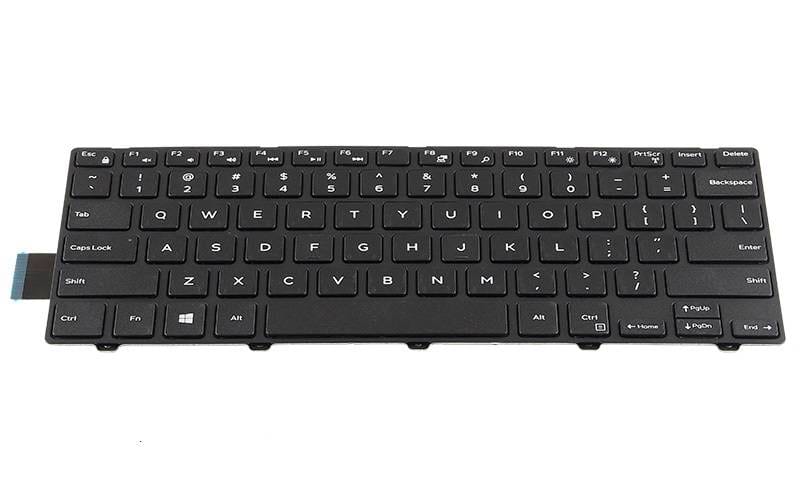
Language layout English (US),
Colour Black,
with Backlit Keys no,
with Track Point no
Dell Inspiron 14 3443 3441 3442 3451 3452 keyboard
Compatible Part Numbers
Dell
- 0FDKH0
- 50X15
- 51CHY
- PK1313P4A00
- PK1313P2A09
- V147125AS
- AEAM7R00010
- SN8233
- SG-63411-XUA
- NRC3Y
Compatible Devices
Dell
- Inspiron 14 3443
- Inspiron 14 (3443)
- Inspiron 14-3443
- Inspiron 3443
- Inspiron 14 3441
- Inspiron 14 (3441)
- Inspiron 14-3441
- Inspiron 3441
- Inspiron 14 3442
- Inspiron 14 (3442)
- Inspiron 14-3442
- Inspiron 3442
- Inspiron 14 3451
- Inspiron 14 (3451)
- Inspiron 14-3451
- Inspiron 3451
- Inspiron 14 3452
- Inspiron 14 (3452)
- Inspiron 14-3452
- Inspiron 3452
- Latitude 3480
- nspiron 5459
- Latitude 3450
- Vostro 14 3459
- Vostro 14 (3459)
- Vostro 14-3459
- Vostro 3459
- Inspiron 14 3458
- Inspiron 3458
- Inspiron 14 3446
- Inspiron 3446
- Inspiron 14 3448
- Inspiron 3448
- Inspiron 5459
- Inspiron 5447
Tips for Choosing and Fitting a Replacement Keyboard
Match the details above to your old keyboard: the layout, whether it has backlit keys and whether it has a pointing stick in the middle of the keys. The model sticker under your laptop is the quickest way to confirm the fit, and we are happy to check it for you before you order.
Before you start, switch the laptop off and disconnect the battery, and take photos as you go so reassembly is easy. Handle the ribbon cable gently: lift the connector latch before removing the cable, and make sure the new cable is fully seated and the latch closed before you put the laptop back together.

Reviews
There are no reviews yet.