

Description
Specifications
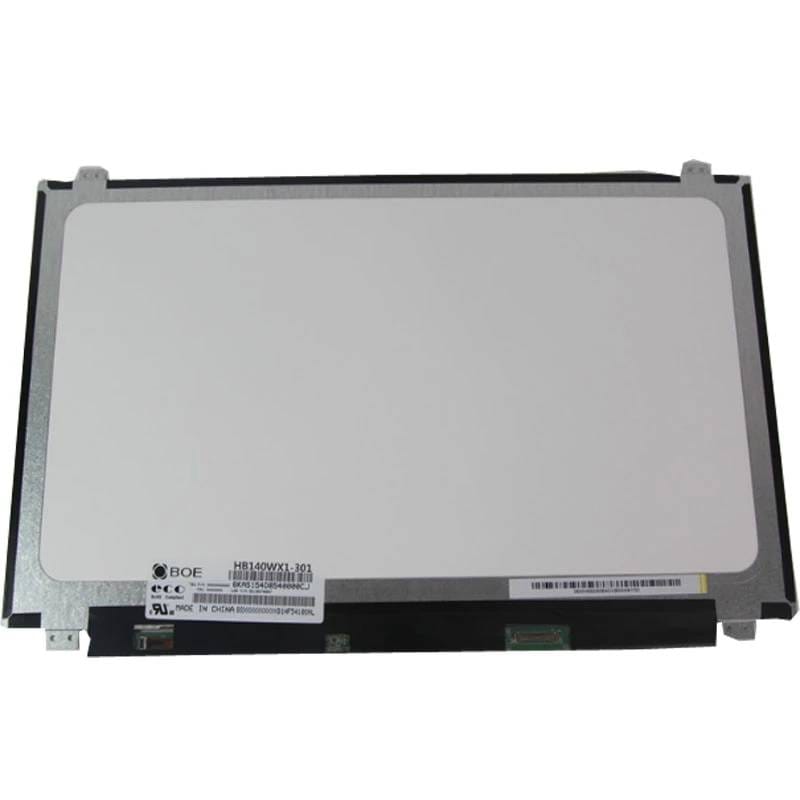
Size – 14.0″
Pixels – 1366X768
Resolution – WXGA
Surface Finish* – Glossy
Connector – 30-Pin (eDP)
Connector Position – Bottom-Right
Profile – Slim
Backlight Type – LED
Stock Code – 140AH
This screen has mounting holes on top and bottom sides
Compatible Part Numbers
- B140XTN02.1
- B140XTN03.2
- B140XTN02.4
- B140XTN03.4
- B140XTN02.A
- B140XTN03.3
- B140XTN03.9
- B140XTN02.D
- B140XTN02.E
- B140XTN02.9
- B140XTN02.6
- G140XTN01.0
- LP140WHU(TP)(A1)
- LP140WHU-TPA1
- LP140WH2(TP)(T1)
- LP140WH2-TPT1
- LP140WH2-TPS1
- LP140WH2(TP)(S1)
- LP140WH8(TP)(G1)
- LP140WH8-TPG1
- LP140WH8(TP)(D2)
- LP140WH2(TP)(SH)
- LP140WH8(TP)(D1)
- LP140WH8(TP)(C1)
- LP140WH8(TP)(E1)
- LP140WHU(TP)(B2)
- LP140WHU(TP)(H1)
- LP140WH8(TP)(A1)
- LP140WHU(TP)(D1)
- LP140WHU-TPD1
- LP140WH8-TPC1
- LTN140AT31-401
- LTN140AT30
- LTN140AT35
- N140BGE-EB3 Rev.C1
- N140BGE-EB3 Rev.C2
- N140BGE-EA3
- N140BGE-EA2
- N140BGE-E43
- N140BGE-E33
- N140BGA-EB3 Rev.C2
- N140BGE-LA3 Rev.C1
- N140BGA-EA3
- N140BGA-EB3 Rev.C1
- HB140WX1-401
- HB140WX1-301
- NT140WHM-N31
- NT140WHM-N41
- NT140WHM-N41 V.8
- M140NWR4
- 5D10G39241
- 5D10H13021
- MHFP8
- NT140WHM-N41 V8.0
- NT140WHM-N41 V8.1
- NT140WHM-N44
- W92HV
- 6WM60
- 01EN020
- 04X0390
- 0KFC4D
- 916357-002
- JVYC6
- DP36C
- L23210-001
- S-LED140-1366R30
- S-140-30CWLED1366R
- 5D10K81464
- JH0CN
- L23210-00
- XAZ140PB42D1636-A00
- HB140WX1-301 V4.0
- HB140WX1-411
- M140NWR6 R0
- 04X0434
- 0C00328
- 04X5880
- 00HM081
- HB140WX1-601
- QT140WHM-N44
- MB140AN01-7
- QV139WHM-N81
- LCM140BE0010A
- H210H(HX)T45-W30-12-ZYS
- IdeaPad 110-14IBR
- IdeaPad 300-14ibr Type 80M2
- IdeaPad 100S-14IBR Type 90R9
- Latitude 3460
- Vostro 14-5459
- Vostro 5459
- Latitude 5480
- Latitude 5488
- Swiftbook L1430
- 14-bs020ni
- Z140C
- Proline V14
Compatible Devices
- IdeaPad S130-14IGM Type 81J2
- ThinkPad T450 Type 20W0
- Montenero-C
- BL.9UEEP.304
Tips for Matching and Fitting a Replacement Laptop Screen
The part number on the label on the back of your old screen is the surest match: any part number listed above will fit. If you can’t read the label, compare the size, resolution, connector (number of pins and where the socket sits), mounting brackets and surface finish with the details above, and check whether your current screen is a touch screen. Send us the part number or your laptop model and we’ll confirm the fit before you order.
When fitting, switch the laptop off and disconnect the battery first. Lift the connector tape gently, keep fingers off the panel surface, and test the new screen before you clip the bezel back on.