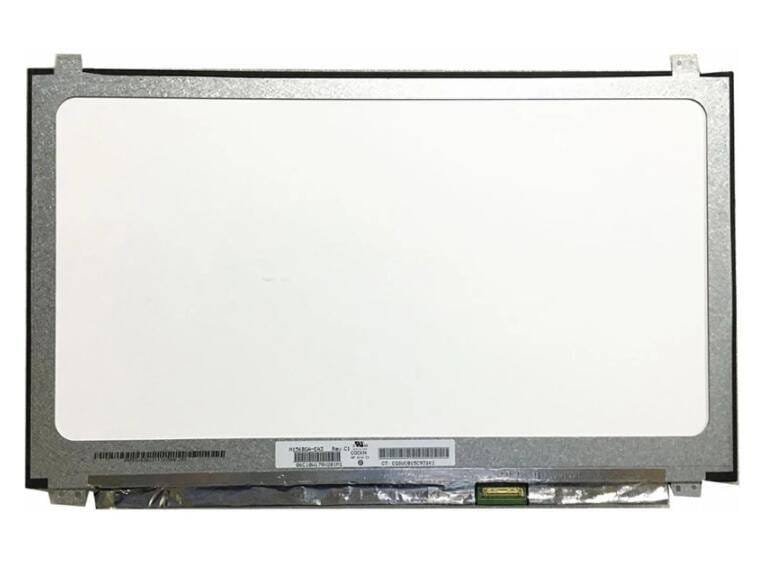



Description
Specifications
Size – 15.6″
Pixels – 1366X768
Resolution – WXGA
Surface Finish* – Matte
Connector – 30-Pin (eDP)
Connector Position – Bottom-Right
Profile – Slim
Backlight Type – LED
Stock Code – 156AS
Compatible Part Numbers
- NT156WHM-N45 V8.1
- N156BGA-EA3 Rev.C1
- N156BGA-EA3 REV.C2
- 5D10P54289
- 5D10M42874
Note:
This screen is narrower and thinner than 156AJ at 350.66mm (Width) and 3.2mm (Thickness)
When quoting this screen for N156BGA-EA3 Rev.C1, please make sure the original screen
have mounting brackets/holes on top and bottom
Tips for Matching and Fitting a Replacement Laptop Screen
The part number on the label on the back of your old screen is the surest match: any part number listed above will fit. If you can’t read the label, compare the size, resolution, connector (number of pins and where the socket sits), mounting brackets and surface finish with the details above, and check whether your current screen is a touch screen. Send us the part number or your laptop model and we’ll confirm the fit before you order.
When fitting, switch the laptop off and disconnect the battery first. Lift the connector tape gently, keep fingers off the panel surface, and test the new screen before you clip the bezel back on.