
What happens to your productivity when a Stage 4 load shedding schedule hits and your Dell laptop fails to hold its charge for even ten minutes? For many professionals in South Africa, a degraded battery isn’t just a minor annoyance; it’s a direct threat to operational efficiency. If you’ve noticed your system shutting down unexpectedly or struggling to stay powered without a charger, it’s time to consider a replacement 01vx1h battery. Finding the right part can feel overwhelming when you’re faced with technical labels and various part numbers.
You likely already know that a reliable power source is the backbone of mobile work, yet the fear of buying a low-quality component that might damage your motherboard is a valid concern. We’ll help you resolve this by confirming exactly which models use the 01vx1h and why it’s often listed interchangeably with the YRDD6 model number. This guide covers everything from technical specifications to installation steps and maintenance tips designed to extend your battery’s lifespan. By the end of this article, you’ll have the confidence to choose a high-quality replacement that keeps your Dell Inspiron or Vostro running through every power outage.
Key Takeaways
- Confirm your part number by identifying that the 01vx1h is functionally identical to the YRDD6 and VM732 models.
- Check the full compatibility list for Dell Inspiron 14 and 15 series laptops to ensure a seamless hardware match.
- Understand the 11.4V and 42Wh specifications required to keep your device operational during power disruptions.
- Prepare for a safe DIY installation by securing a small Phillips screwdriver and a plastic pry tool.
- Adopt specific charging habits that shield your lithium-ion cells from the damage caused by frequent load shedding.
What is the 01VX1H Dell Laptop Battery?
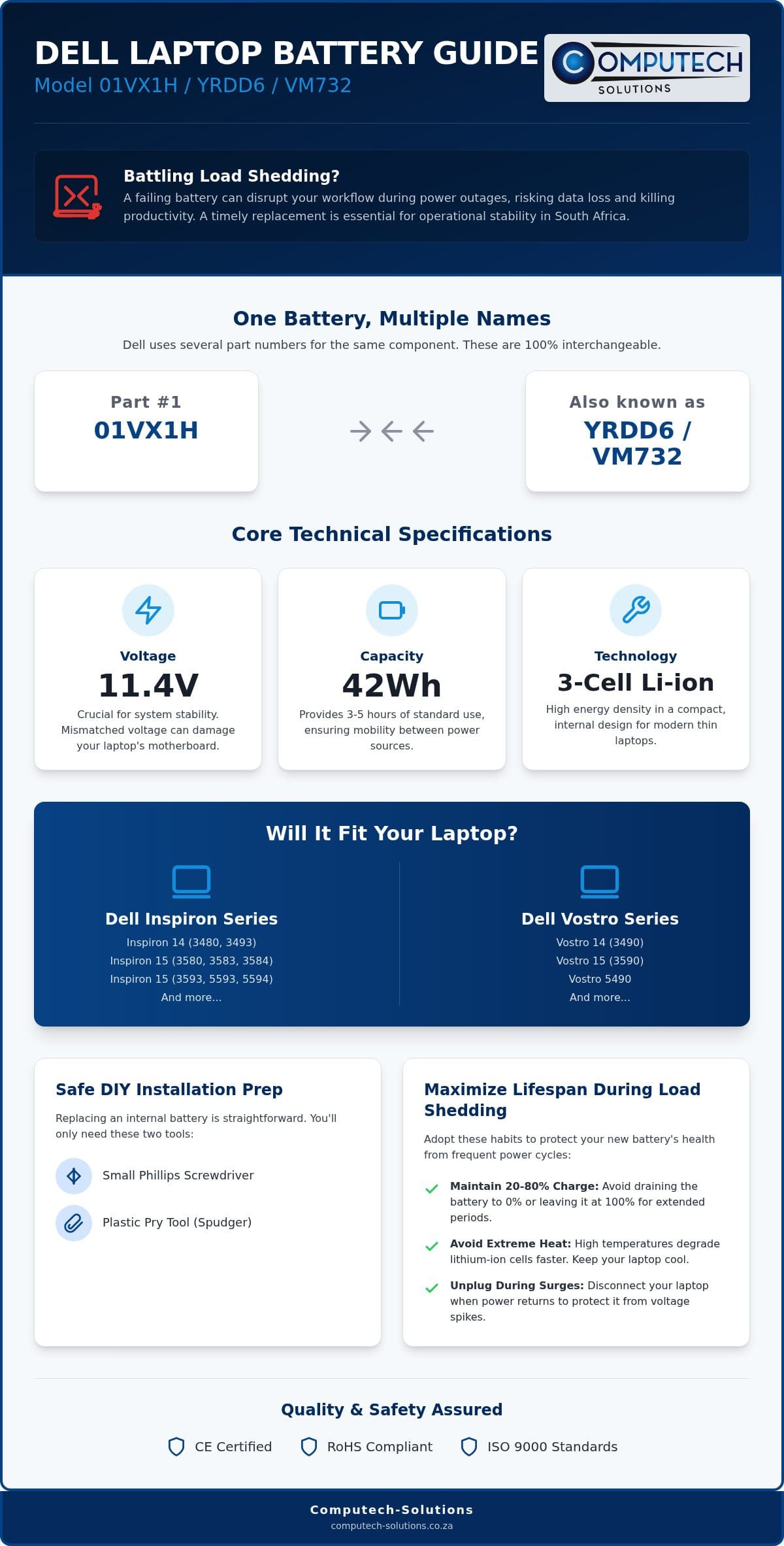
The 01vx1h is a specific Manufacturer Part Number (MPN) assigned by Dell to a high-performance power cell. It’s a 3-cell, 11.4V component with a 42Wh capacity. This battery serves as the primary power source for a wide range of Dell Inspiron 14 and 15 series laptops, providing the energy needed to maintain productivity when you’re away from a wall outlet. Because it uses Lithium-ion battery technology, it offers a high energy density in a compact frame. This technology is preferred for its ability to hold a charge over many cycles, though it requires specific care to maintain its health in high-heat environments. For South African users, this battery is especially critical. With the frequent transitions between grid power and battery backup, the internal chemistry must be robust enough to handle daily power cycles without failing prematurely.
Understanding Part Number Cross-Compatibility
Dell frequently uses multiple identification codes for the same hardware component. This often causes confusion when you’re trying to source a replacement. The 01vx1h is functionally identical and interchangeable with part numbers YRDD6 and VM732. These codes all refer to the same physical dimensions and electrical connectors. To verify your current part, look at the label on your existing battery. You’ll usually find the alphanumeric code near the Dell logo or the QR code. If your label says YRDD6, a replacement will fit and function perfectly in your system without any modification. Understanding this cross-compatibility ensures you don’t waste time searching for a specific code when an identical alternative is readily available.
The Role of Internal Batteries in Modern Laptops
Modern Dell laptops have shifted away from the bulky, removable batteries of the past. The 01vx1h is an internal battery, meaning it’s secured within the laptop chassis rather than being accessible from the outside. This design allows for thinner, lighter laptop profiles but changes how you approach a replacement. You’ll need to remove the base cover of your laptop to access the battery. While this requires a bit more effort than older models, it’s a straightforward process that ensures a more secure connection. These internal units also feature integrated Battery Management Systems (BMS). The BMS monitors voltage and temperature, acting as a critical safety layer that prevents overcharging and protects your motherboard from electrical surges during power transitions. A failing battery doesn’t just reduce your mobile time; it can lead to sudden system shutdowns that risk data corruption, making timely replacement essential for operational stability.
Technical Specifications of the 01VX1H Battery
The 01vx1h battery is engineered with specific electrical parameters that must align perfectly with your laptop’s power management system. Operating as a 3-cell Lithium-ion unit, it features a 11.4V voltage rating and a 42Wh capacity. These figures define the operational limits of your hardware. Using a battery with mismatched specifications can lead to erratic system behavior or permanent hardware failure. The physical layout is designed for a precise fit within the internal bay, featuring a multi-pin connector that slides directly into the motherboard’s battery port.
Voltage and Capacity: Why Accuracy Matters
Voltage regulation is the most critical factor when selecting a replacement. A battery with a higher voltage than your original can overwhelm the delicate circuits on the motherboard, while lower voltage often results in the system failing to boot or charging inconsistently. The 11.4V standard serves as the required threshold for Dell Inspiron 5593 models. Because these systems are designed for high efficiency, even a slight variance in voltage can trigger safety shut-offs.
Capacity is measured in Watt-hours (Wh), which indicates the total energy the 01vx1h can store. A 42Wh rating typically provides enough power for 3 to 5 hours of standard office work, such as word processing or web browsing. Real-world usage in South Africa often involves high-performance tasks or maximum screen brightness during load shedding, which may deplete these reserves faster. Ensuring your replacement meets this 42Wh standard guarantees you maintain the mobility your Inspiron was designed for without needing to stay tethered to a wall socket.
Safety Standards and Certifications
Reliability in a replacement battery comes from the manufacturing standards used during production. High-quality generic batteries should adhere to ISO 9000 factory standards, ensuring consistent quality across every unit produced. Beyond basic manufacturing, look for specific safety certifications including CE, RoHS, and UL1642. These certifications confirm that the cells have undergone rigorous testing for fire safety and environmental compliance. They’re essential for protecting your investment against electrical faults.
Modern 01vx1h replacements incorporate sophisticated protection mechanisms within the Battery Management System (BMS). These safeguards include:
- Overcharge protection to prevent cell swelling and chassis damage.
- Thermal runaway safeguards that shut down the battery if it exceeds safe temperatures.
- Short-circuit protection to shield the motherboard from sudden electrical surges.
Computech-Solutions prioritizes high-quality generic cells that meet these stringent global standards. This commitment ensures that your replacement provides the same level of safety and stability as the original component. If you’re unsure about the specific technical requirements for your device, you can contact our technical support team for expert guidance on selecting the correct part.
Full Compatibility List: Will the 01VX1H Fit Your Laptop?
Identifying the correct hardware is the first step toward restoring your laptop’s mobility. While the 01vx1h is a versatile component, it’s designed for specific motherboard configurations within the Dell ecosystem. Using the Dell SupportAssist tool is a fast way to verify your system model. Run the application and check the “System Information” tab to confirm your laptop belongs to the families listed below. If your device isn’t listed, checking the physical sticker on your current battery remains the most reliable method for validation.
The 01vx1h battery is compatible with a broad range of models, including:
- Dell Inspiron 14 Series: 5480, 5481, 5482, 5485, 5491, and 5493.
- Dell Inspiron 15 Series: 3501, 3502, 3505, 3582, 3583, 3584, 3590, 3593, 3595, 5582, 5585, 5590, 5591, 5593, 5594, 5598, and 7586.
- Dell Inspiron 17 Series: 3793.
- Dell Vostro Series: 3491, 5481, 5490, 5581, and 5590.
- Dell Latitude Series: 3310 2-in-1 models.
Inspiron 15 5000 Series Focus
The Inspiron 3593 and 5593 models are common workhorses in South African offices and homes. These machines rely on the 01vx1h for their slim, portable design. Before purchasing, verify the visual cues. The battery should be a compact rectangle with a specific 3-cell layout. If your current unit is a long, narrow strip, it’s likely a different part number. These 5000 series models are particularly sensitive to battery health, as they often manage high-resolution displays that draw significant power during load shedding periods.
Cross-Referencing with Dell Chargers
A new battery requires a healthy power adapter to perform correctly. If your 01vx1h doesn’t charge, the fault might lie with your charger rather than the cells. Most compatible laptops require either a 45W or 65W Dell charger. Using an underpowered adapter can lead to “plugged in, not charging” errors and may eventually damage the new battery. We recommend checking your charger’s wattage on the rear label. If you need assistance selecting a compatible power solution, you can reach out for expert technical support to ensure your entire power chain is efficient and reliable.
How to Replace the 01VX1H Internal Battery Safely
Replacing an internal component like the 01vx1h battery requires a methodical approach to protect your laptop’s delicate circuitry. You’ll need a small Phillips screwdriver and a plastic pry tool. Before you begin, ensure you’re working on a flat, well-lit, and non-conductive surface. Static electricity can damage your motherboard; it’s best to touch a grounded metal object before handling internal parts. If you’re unsure about the process, remember that taking your time is the best way to avoid physical damage to the chassis or the internal connectors.
Safety Precautions for Internal Components
It’s necessary to discharge the laptop battery to below 25% before starting the replacement to minimize the risk of thermal events if the cell is accidentally damaged. Handling Lithium-ion cells requires care; you must never puncture or bend the protective casing. Once you’ve powered down and removed the base cover screws, use your pry tool to gently release the plastic clips. The first and most critical action inside the machine is to disconnect the battery cable from the motherboard. This cuts all power and prevents short circuits while you swap the old unit for the new 01vx1h.
Post-Installation: Calibrating Your New Battery
Calibration is essential for ensuring your laptop accurately reports its remaining runtime. We recommend a full “Charge-Discharge-Charge” cycle for every new replacement. Charge the battery to 100% and leave it on the charger for at least two hours. Disconnect the power and use the device until it reaches the low-battery shutdown point. Finally, charge it back to 100% without interruption. This process synchronizes the battery’s internal controller with the Windows power management system, preventing sudden percentage drops during use.
If you encounter a “Plugged in, not charging” error after installation, it’s usually a software handshake issue. Updating your BIOS through the Dell website can help the system recognize the new hardware ID. You can also try uninstalling the battery driver in Device Manager and restarting the laptop to force a fresh detection. If these steps don’t resolve the issue, contact our technical support team for real-time guidance. Our experts can help you troubleshoot the connection or verify the software settings to ensure your new battery performs at its peak capacity.
Maximizing Battery Life During Load Shedding
In South Africa, load shedding creates a cycle of deep discharges that can prematurely age your 01vx1h battery. Lithium-ion cells are sensitive to heat and frequent power cycles. When the grid drops multiple times a day, your laptop is forced to rely on its internal reserves more often than intended. This constant stress reduces the total number of charge cycles available over the component’s life. A reliable battery acts as your first line of defense for data safety. It prevents sudden shutdowns that lead to unsaved work or corrupted system files during an unexpected power cut. You can further reduce strain on the 01vx1h by adjusting Windows power management settings. Lowering screen brightness and enabling “Battery Saver” mode during outages reduces the discharge rate, which helps keep the internal temperature low and preserves the chemistry of the cells.
Surviving the South African Power Grid
Managing your battery health requires a strategic approach to charging. Experts recommend keeping your charge level between 20% and 80% whenever possible. This “sweet spot” minimizes chemical stress on the cells and can significantly extend the longevity of your 01vx1h. When power returns after load shedding, be wary of power surges. These electrical spikes can damage both your charger and the internal battery management system. We suggest using a surge protector or unplugging your laptop during the scheduled outage and only reconnecting it once the grid has stabilized. Computech-Solutions supports national customers by providing hardware built to withstand these challenging local conditions.
Ordering Your Replacement in South Africa
We understand that a failing battery isn’t just a technical issue; it’s a disruption to your business or studies. Our nationwide delivery service ensures that critical IT components reach you wherever you are in the country. You don’t have to guess which part fits your machine. Our technical support team is available to help you confirm part numbers like the 01vx1h or its equivalents before you commit to a purchase. This expert guidance eliminates the risk of ordering the wrong component and ensures your Dell laptop returns to full operational efficiency quickly. Our focus is on providing a definitive, total solution that keeps your hardware running despite the challenges of the national power grid.
Don’t let power instability halt your progress. Order your high-quality 01VX1H replacement battery from Computech-Solutions today and secure your mobile productivity.
Restore Your Dell Laptop Power Today
Restoring your Dell laptop to its original performance is a straightforward process once you understand the specific technical requirements. By identifying the 01vx1h as the correct part for your Inspiron or Vostro model, you’ve already mitigated the risk of hardware mismatch. Remember that following the calibration steps and maintaining your battery between 20% and 80% will significantly extend its lifespan, especially under the strain of frequent power cycles. High-performance replacement cells don’t just provide power; they serve as a safeguard for your motherboard’s long-term integrity.
We offer high-performance replacement cells with nationwide South African delivery and expert technical support for all Dell models. If you need assistance verifying your hardware or part numbers, you can consult our technical experts via WhatsApp to find the definitive solution for your device. Don’t let a failing battery limit your operational efficiency when a reliable, high-quality replacement is readily available to keep you productive during every power outage.
Frequently Asked Questions
Is the 01VX1H battery compatible with the Dell Inspiron 3593?
Yes, the 01vx1h battery is fully compatible with the Dell Inspiron 3593 series. This model requires the 11.4V, 42Wh 3-cell configuration that this specific part provides. It fits perfectly into the internal battery bay and uses the standard multi-pin connector found in the 3000 and 5000 series families. You should always verify the part number on your original battery label to ensure a precise hardware match before you finalize your purchase.
What is the difference between an original Dell battery and a generic 01VX1H?
An original Dell battery is manufactured by the OEM, while a high-quality generic replacement uses equivalent Lithium-ion cells designed to meet the same electrical specifications. Generic versions from reliable retailers provide a cost-effective alternative without sacrificing safety or performance. These replacements adhere to ISO 9000 standards and include integrated protection circuits to prevent overcharging. Choosing a reputable source ensures you receive a battery that functions identically to the original manufacturer component.
How long does the 01VX1H battery typically last on a single charge?
You can typically expect between 3 to 5 hours of runtime on a single charge with the 42Wh 01vx1h battery. This duration varies based on your laptop’s screen brightness, background applications, and the intensity of your tasks. High-demand activities like video editing will deplete the charge faster than standard office work. Using Windows power-saving features during load shedding can help you maximize these hours when grid power is completely unavailable.
Can I replace the internal 01VX1H battery myself?
Yes, replacing the internal battery is a manageable task for most users with basic technical skills. You’ll need a small Phillips screwdriver and a plastic pry tool to remove the laptop’s base cover. It’s crucial to disconnect the battery cable from the motherboard before removing the old unit to prevent electrical shorts. If you follow a step-by-step guide and handle the internal components with care, you can complete the installation in about 15 minutes.
Why is my Dell laptop saying “Battery Not Recognized” after replacement?
This error often occurs due to a software handshake issue between the new hardware and the BIOS. To resolve this, try updating your system BIOS to the latest version available on the Dell support site. You can also uninstall the “Microsoft ACPI-Compliant Control Method Battery” driver in Device Manager and restart your laptop. If the message persists, double-check that the internal cable is firmly seated in the motherboard’s battery port and isn’t loose.
Does Computech-Solutions deliver batteries nationwide in South Africa?
Yes, Computech-Solutions provides nationwide delivery for all laptop batteries and chargers across South Africa. We understand the urgency of restoring your laptop’s power, especially during frequent load shedding cycles. Our logistics network ensures that your replacement part reaches you safely, whether you’re located in a major hub or a more remote area. Every order is tracked to provide you with peace of mind from the moment of dispatch until it reaches your door.
What is the warranty on a replacement 01VX1H battery?
Our replacement batteries typically come with a comprehensive warranty that covers manufacturing defects and performance issues. This ensures that your investment is protected against premature failure or capacity loss. While specific warranty periods can vary, we prioritize providing high-quality cells that meet stringent safety standards. For the most accurate details regarding the current warranty term for your specific battery model, we recommend confirming the details at the time of purchase or contacting our technical support.
How does load shedding affect my laptop battery health?
Load shedding forces your laptop into frequent deep discharge cycles, which can accelerate the chemical aging of Lithium-ion cells. Each time the battery drops to zero, it uses up one of its limited charge cycles. Additionally, power surges that occur when the grid returns can damage the battery’s internal management system. To protect your hardware, it’s best to keep your charge between 20% and 80% and use a surge-protected plug for your laptop charger.
