
What if your Dell laptop’s sudden shutdowns aren’t a sign of a failing motherboard, but simply a cry for a high-quality 031tpt replacement battery? It’s incredibly frustrating when your mobile workstation becomes permanently tethered to a wall socket because the original power cell has reached its end-of-life cycle. You need to restore that portable freedom without paying the inflated prices often associated with original branded components, yet the uncertainty surrounding the safety of generic alternatives is a genuine operational risk. Many professionals worry that a cheaper part might fail prematurely or, worse, compromise their expensive hardware.
We understand that reliability is non-negotiable for your daily productivity. This comprehensive guide will help you identify the precise replacement for your Dell Latitude 5300 or 5310 series and restore your device’s portable performance through a detailed technical breakdown. You’ll learn how to balance cell quality with local technical support to ensure your investment is protected. We’ll examine specific compatibility standards, safety certifications, and how to secure fast nationwide delivery across South Africa to get your mobile operations back on track with confidence.
Key Takeaways
- Confirm compatibility for Dell Latitude 5300 and 5310 models to ensure the replacement part integrates seamlessly with your hardware.
- Verify the 7.6V voltage and capacity specifications required to restore your laptop’s original portable runtime and system stability.
- Evaluate the performance benefits of a high-quality generic 031tpt battery as a reliable, cost-effective alternative to expensive branded components.
- Master the basic installation and calibration process using standard tools to ensure your new power cell operates at peak efficiency from day one.
- Access expert technical support and fast nationwide delivery to resolve power issues quickly across all South African provinces.
031TPT Battery Compatibility: Is This the Right Part for Your Dell?
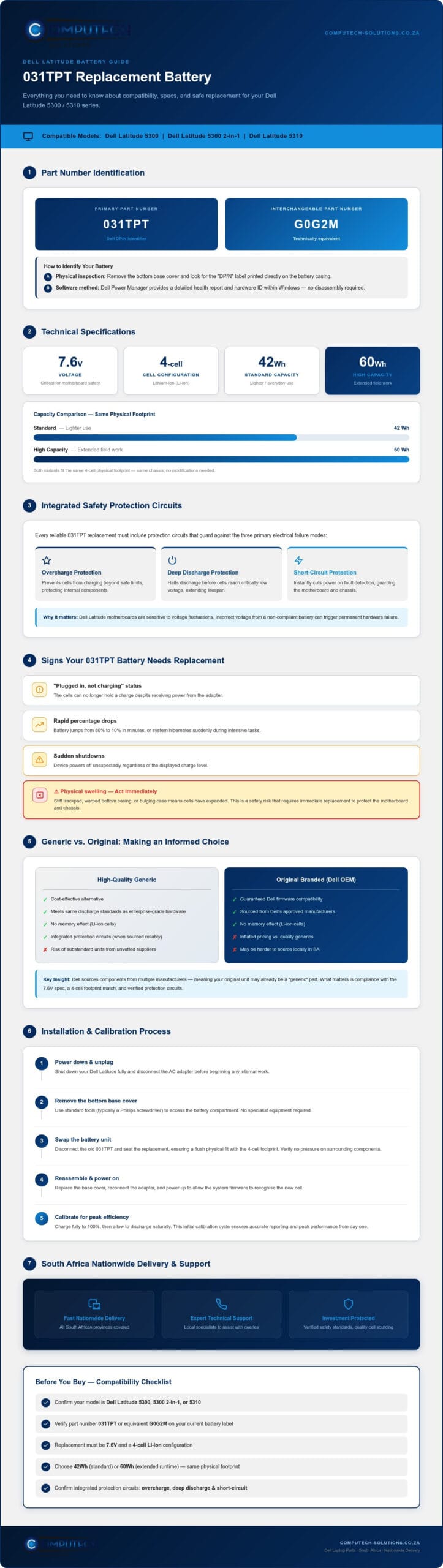
The 031tpt is a specific internal part number designated by Dell to identify a high-performance power source for its professional Latitude range. Unlike universal external chargers, internal batteries require precise matching to ensure electrical safety and physical fit. This particular model is the primary power solution for the Dell Latitude 5300, the 5300 2-in-1, and the Dell Latitude 5310. Because Dell often sources components from multiple manufacturers, you might see interchangeable part numbers such as G0G2M on your original unit. These are technically equivalent and designed to meet the same rigorous discharge standards required for enterprise-grade hardware.
How to Identify Your Dell Battery Model
Identifying your hardware correctly prevents the frustration of ordering the wrong part and facing unnecessary downtime. The most reliable method is a physical inspection. You’ll need to remove the bottom base cover of your Latitude to see the label printed directly on the battery casing. Look for the “DP/N” (Dell Part Number) followed by a sequence that includes 031tpt. If you prefer a non-invasive approach, the Dell Power Manager software provides a detailed health report and identifies the installed hardware ID within the Windows environment. Technically, the 031tpt is a 4-cell lithium-ion battery designed to integrate with Dell’s sophisticated power management firmware. Understanding lithium-ion battery technology is helpful because it explains why these components eventually degrade and require replacement to maintain your laptop’s mobility and performance.
Common Signs Your 031TPT Battery Needs Replacement
Operational disruptions often start subtly before leading to total hardware failure. A common indicator is the “Plugged in, not charging” status in your system tray; this suggests the cells can no longer hold a charge despite receiving power. You might also notice rapid percentage drops where the laptop jumps from 80% to 10% in minutes, or sudden system hibernations during intensive tasks. A more serious sign is physical swelling. If your trackpad feels stiff or the bottom casing appears warped, the internal cells have likely expanded. This is a safety risk that requires immediate attention to protect the rest of your internal components. Replacing the unit early ensures you don’t risk damage to the motherboard or chassis.
Technical Specifications of the 031TPT Replacement
The technical profile of the 031tpt battery is engineered to meet the specific power draw of high-end Latitude processors. Standard units operate at 7.6V, a critical specification that ensures electrical harmony with the laptop’s internal voltage regulators. You’ll typically find this part in two capacity variants: a 42Wh version for lighter use and a 60Wh high-capacity version for extended field work. Both configurations utilize high-density Lithium-ion (Li-ion) cells. These cells are preferred because they offer a superior energy-to-weight ratio and don’t suffer from the “memory effect” found in older technologies. Safety remains the primary priority. Every reliable replacement must include integrated protection circuits to prevent overcharging, deep discharge, and short-circuiting. These safety layers act as a final defense against operational risks, ensuring your hardware remains protected even during power surges or heavy usage.
Watt-Hours (Wh) vs. Milliampere-Hours (mAh)
Understanding energy storage measurements is key to making informed electronics purchasing decisions. While many generic batteries are marketed using mAh (milliampere-hours), Dell uses Wh (watt-hours) to describe total energy capacity. A 60Wh 031tpt battery provides more runtime than a 42Wh unit because it holds more total energy, even though the physical dimensions often remain identical. This allows you to upgrade your laptop’s endurance without needing a larger chassis or specialized covers. It’s a practical way to boost productivity. Always verify that the replacement matches the physical footprint of your original 4-cell unit to ensure a flush fit during installation. A mismatch here can lead to pressure on the internal components or a bulging case.
Voltage Regulation and Motherboard Safety
Precision voltage regulation is what separates a professional replacement from a dangerous counterfeit. Dell Latitude motherboards are sensitive to fluctuations. If a battery delivers even slightly incorrect voltage, it can trigger permanent hardware failure or cause the system to throttle performance. Quality replacements feature internal circuit boards that communicate directly with the Dell BIOS. This handshake confirms the battery’s health and allows the system to manage charging cycles effectively. It prevents the “unrecognized battery” errors that plague lower-quality imports. If you’re unsure which capacity fits your specific workflow, you can chat with our technical team for expert part identification. These specialized boards ensure that your replacement functions exactly like the factory component, maintaining the long-term stability of your mobile workstation. This technical alignment is essential for South African professionals who rely on their laptops for consistent performance throughout the workday.
Generic vs. Original 031TPT: Making an Informed Choice
Choosing between an Original Equipment Manufacturer (OEM) battery and a generic alternative is a common dilemma for South African laptop users. The price gap is significant. Branded Dell batteries often carry a premium price tag that reflects marketing and logistics rather than just cell quality. In contrast, high-quality generics offer a path to restore performance without a heavy financial burden. While runtimes and longevity were once a concern with third-party parts, modern Grade-A cells provide nearly identical performance to factory units. You can expect a reliable 031tpt replacement to maintain its capacity through hundreds of charge cycles, provided the internal chemistry is managed by a high-quality controller board.
Warranty considerations are particularly important within the local market. South African consumers often find that claiming a warranty on an OEM part can be a bureaucratic hurdle if the laptop is no longer under a service contract. A reputable local supplier provides a more direct line of support. This ensures that you aren’t just buying a component; you’re securing a guarantee of operational uptime. Longevity isn’t just about the cells; it’s about the local technical support that stands behind the product if a technical disruption occurs.
Why High-Quality Generics are the Smart Choice
For laptops that have moved past their original manufacturer warranty period, investing in high-quality generics is the most cost-effective strategy. It doesn’t make financial sense to pay a large percentage of the device’s current market value just for a branded sticker. Computech-Solutions applies rigorous testing to every generic 031tpt replacement to ensure it meets strict discharge and safety standards. Availability is another major factor. While OEM parts for specific Latitude models can face long lead times due to international shipping delays, premium generics are typically held in local stock. This allows for faster nationwide delivery to keep your business running without interruption.
What to Avoid When Shopping for Laptop Batteries
The market is unfortunately flooded with low-quality “knock-offs” that compromise on safety to reach a lower price point. You should avoid sellers offering suspiciously low prices, as these units often contain recycled or sub-standard cells that pose a fire risk. A lack of a clear return policy or technical support is a major red flag; if a seller won’t stand by their product, you shouldn’t trust it with your hardware. Always check that the replacement includes the correct connector cable for the 031tpt. Some inferior models require you to reuse your old cable or feature flimsy wiring that can lead to intermittent power issues or motherboard damage. Stick to verified partners who offer transparent specifications and localized support.
How to Install and Calibrate Your New 031TPT Battery
Replacing an internal battery might seem daunting, but the modular design of the Dell Latitude 5300 and 5310 makes it a straightforward task for most users. Before you begin, ensure you have a small Phillips head screwdriver (typically a #00) or a Torx T5, as screw types can vary between specific sub-models. Safety is paramount when handling internal electronics. Always power down the laptop completely and disconnect the AC adapter. To prevent electrostatic discharge (ESD) from damaging the motherboard, touch a grounded metal object or wear an anti-static wrist strap before touching any internal components. This simple precaution alleviates the risk of technical disruptions during the hardware swap.
Step-by-Step Installation Guide
Start by placing your laptop upside down on a soft, non-static surface. Loosen the screws securing the base cover; on many Latitude models, these are captive screws that won’t fall out of the plastic housing. Use a plastic pry tool or a guitar pick to gently release the clips around the edges of the cover. Once the internals are exposed, the 031tpt battery is easily accessible. Locate the battery cable connector on the motherboard and pull it straight out using the pull tab. Remove the screws holding the old battery in place, lift it out, and position your new 031tpt into the bay. Ensure the screw holes align perfectly before securing the new unit and reconnecting the power cable firmly. Snap the base cover back into place and tighten the screws to finish the physical installation.
Calibrating Your New Battery for Peak Performance
Calibration is a critical step that ensures the Windows operating system accurately reports the remaining charge. After installing the new hardware, plug in your charger and allow the battery to reach 100% without interruption. Once fully charged, keep the laptop plugged in for an additional two hours to saturate the cells. Afterward, disconnect the power and use the laptop until the battery level drops to approximately 5%. Don’t let it reach a total 0% discharge, as this can stress the chemical structure of the Lithium-ion cells. Finally, charge it back to 100% again. This cycle syncs the battery’s internal controller with the laptop’s BIOS. To maintain longevity, try to keep your charge level between 20% and 80% during daily use. If you encounter any resistance during the physical swap or have questions about the connector orientation, you can get technical assistance via WhatsApp. This professional support ensures you don’t risk damaging your motherboard during the process.
Order Your 031TPT Battery with Nationwide Delivery
Secure your 031tpt replacement from a supplier that understands the unique demands of the South African IT landscape. We focus on providing a total hardware solution that extends beyond just individual power cells. Our inventory includes Dell replacement laptop batteries, compatible laptop chargers, and even LCD replacement panels for various Latitude models. This comprehensive approach means you can source all necessary components from a single, reliable partner. Our streamlined procurement process ensures that every part meets strict performance benchmarks before it reaches your door. We provide fast nationwide delivery to all provinces, ensuring that your operational downtime is kept to an absolute minimum.
Why South African Professionals Trust Computech-Solutions
Reliability is the cornerstone of our service model. In an environment where power disruptions and load shedding are frequent, having a dependable battery is a necessity for business continuity. We’ve built a proven track record by specializing in Dell replacement components that offer stability and longevity. Our batteries undergo rigorous testing to ensure they communicate correctly with your system BIOS. This prevents the technical disruptions often caused by unverified imports. We position ourselves as your local partner, offering a level of accountability and technical depth that international marketplaces simply cannot match. You can trust our hardware to perform even when the grid fails.
Contact Our Technical Team for Assistance
Identifying the correct part number is often a complex task given the variety of Dell sub-models. If you’re unsure if the 031tpt is the exact fit for your specific laptop configuration, our experts are available to provide direct assistance. We don’t just sell parts; we provide technical guidance to ensure your hardware investment is protected. You can access expert advice before you commit to a purchase, significantly reducing the risk of ordering incorrect components. Our team is ready to help you verify compatibility and answer any questions regarding installation or calibration. This personalized support ensures your mobile workstation is restored to its full capacity without delay.
Chat with our experts on WhatsApp to confirm your 031TPT battery compatibility.
Restore Your Dell’s Portable Performance Today
Restoring your Dell Latitude’s mobility doesn’t have to be a costly or complicated endeavor. By choosing a high-quality 031tpt replacement, you ensure that your device remains a reliable tool for your professional needs. We’ve explored how matching technical specifications like the 7.6V standard and performing proper calibration can significantly extend your hardware’s operational lifespan. Moving away from the stress of unexpected shutdowns allows you to focus on your business goals without technical interruptions.
Our team provides a total solution that combines expert technical support with fast nationwide South African delivery. We prioritize high-quality generic parts that offer the same stability as original components at a more accessible price point. Don’t let a failing battery tether you to a desk any longer. Order your 031TPT replacement battery via WhatsApp now and experience the confidence of working with a dedicated IT hardware partner. We’re here to help you get back to peak productivity.
Frequently Asked Questions
Is the 031TPT battery compatible with the Dell Latitude 5300?
Yes, it’s the primary part number for the Latitude 5300 series. It also fits the 5300 2-in-1 and the newer Latitude 5310 models. Using the correct 031tpt battery ensures that the laptop’s internal power management system communicates effectively with the hardware. This prevents performance throttling and ensures the device remains stable during intensive tasks or while running on battery power during load shedding. It’s a direct fit for these specific professional workstations.
How long does a 031TPT replacement battery typically last?
A high-quality replacement typically lasts between 300 and 500 full charge cycles before you notice a significant drop in capacity. For most professional users in South Africa, this translates to roughly two to three years of daily use. To maximize longevity, you should avoid letting the charge drop below 10% frequently. Maintaining a charge between 20% and 80% helps preserve the chemical health of the internal lithium-ion cells over time.
Can I replace the 031TPT battery myself or do I need a technician?
You can replace the battery yourself if you have basic technical confidence and the correct tools. The Dell Latitude 5300 and 5310 models feature an internal design that requires removing the bottom base cover with a Phillips or Torx screwdriver. While the process is straightforward, you must handle the internal connector with care. If you feel uncertain about the physical installation, consulting a professional technician can prevent accidental damage to the motherboard.
What is the warranty on replacement Dell batteries in South Africa?
Warranty periods for replacement batteries in the South African market usually range from six to twelve months depending on the specific supplier and part grade. This warranty covers manufacturing defects and premature cell failure but doesn’t typically include natural capacity loss from regular use. It’s vital to purchase from a local partner who offers clear return policies. This ensures you have direct support if any technical disruptions occur with your new hardware.
Why is my Dell laptop saying the battery is not recognized?
This error often occurs when the laptop’s BIOS cannot verify the internal circuit board of the battery. It’s a common issue with low-quality generic parts that lack the necessary communication firmware. To resolve this, ensure the battery cable is firmly seated on the motherboard. If the error persists, you might need to update your BIOS or replace the unit with a high-quality 031tpt part that is specifically engineered for Dell’s handshake protocols.
How long does nationwide delivery take for laptop parts?
Nationwide delivery across South Africa generally takes between two and five business days depending on your specific location. Major metropolitan hubs often receive orders faster, while outlying areas may take slightly longer. Computech-Solutions prioritizes efficient logistics to ensure your IT hardware arrives safely and promptly. This reliable service model helps businesses minimize downtime and maintain productivity even when a critical component like a battery or charger fails unexpectedly.
Do I need to charge the new battery for 24 hours before use?
Modern lithium-ion batteries don’t require a 24-hour initial charge like older nickel-based technologies. You should charge the battery to 100% and then allow it to discharge to about 5% once to calibrate the system. This single cycle helps the Windows power manager accurately report the remaining runtime. After this initial calibration, you can use the laptop normally. Avoid leaving the device plugged in constantly to prevent heat-related degradation of the cells.
Does Computech-Solutions sell the 031TPT battery cable separately?
We primarily focus on the sale of complete replacement batteries and chargers rather than individual internal ribbon cables. Most replacement batteries are designed to use the existing cable already inside your Dell Latitude. If your original cable is physically damaged, you should contact our technical support team via WhatsApp. We can help you verify if a specialized solution is available or guide you toward the correct hardware for your specific repair needs.
