
What if your laptop’s declining performance isn’t a sign of age, but a power delivery failure that’s entirely reversible? For many users across the country, a failing cell turns a portable workstation into a desktop, which is a significant liability during critical load shedding windows. Securing a high-quality acer laptop battery replacement south africa shouldn’t be a technical gamble filled with confusion over voltage and mAh specifications. You need a solution that restores mobility while ensuring your hardware remains safe from the risks of incorrect components.
We understand the frustration of a device that shuts down unexpectedly when you need it most. This guide provides a clear path to identify, select, and safely install the correct replacement for your specific Acer model. You’ll learn how to match technical specs with confidence and ensure you’re compliant with the 2026 e-waste regulations regarding the disposal of your old hardware. We’re previewing the exact steps to choose a cost-effective, reliable battery that keeps your work and studies moving forward without technical disruptions.
Key Takeaways
- Identify physical and software indicators like battery swelling or “Service Battery” warnings to prevent unexpected shutdowns during load shedding.
- Learn how to navigate the technical landscape of an acer laptop battery replacement south africa by matching specific model codes and voltage requirements.
- Understand the distinction between OEM parts and high-quality compatible alternatives to secure a cost-effective solution without compromising device safety.
- Master the safe installation process using anti-static measures and the essential “first charge” calibration ritual to extend your new battery’s lifespan.
- Discover how to access expert technical support and reliable nationwide delivery to restore your laptop’s portability anywhere in the country.
Recognising the Signs: When to Replace Your Acer Laptop Battery
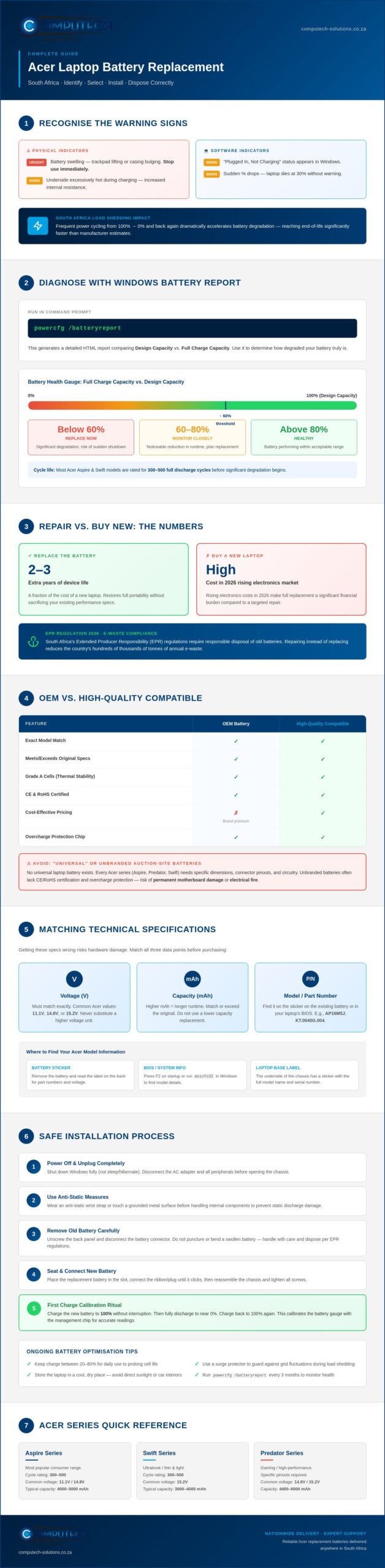
Identifying the right time for an acer laptop battery replacement south africa is essential for maintaining your device’s health and your own productivity. Physical symptoms are often the most urgent indicators. If your laptop’s underside feels excessively hot during a standard charge, the internal cells are likely struggling with increased internal resistance. Even more critical is battery swelling. If you notice your trackpad lifting or the laptop casing bulging, you must stop using the device immediately. Swelling is a sign of gas buildup that can lead to permanent hardware failure or safety risks.
Software indicators provide a more subtle warning before a total failure occurs. You might see the “Plugged In, Not Charging” status or experience sudden percentage drops where the laptop dies at 30% without warning. In South Africa, these issues are often accelerated by frequent load shedding. Constant cycling from 100% to zero and back again puts immense strain on the hardware. Every time the grid goes down, your battery works harder, reaching its end-of-life significantly faster than the manufacturer intended.
Using Windows Diagnostic Tools
Windows provides built-in tools to help you move beyond guesswork. By typing powercfg /batteryreport into your Command Prompt, you can generate a detailed analysis of your hardware’s health. This report compares the “Design Capacity” against the “Full Charge Capacity”. If the latter is less than 60% of the original design, a replacement is usually necessary. Gaining a deeper technical perspective through understanding lithium-ion batteries helps you interpret these cycle counts. Most Acer Aspire or Swift models are rated for 300 to 500 full discharge cycles before they begin to degrade significantly.
The Cost-Benefit of Replacement vs. New Purchase
With the rising cost of electronics in 2026, choosing a repair over a replacement offers a high return on investment. Replacing a failing battery can extend the functional life of a high-performing Acer laptop by another two to three years for a fraction of the cost of a new machine. Beyond the financial savings, repairing your hardware aligns with South Africa’s mandatory Extended Producer Responsibility (EPR) regulations. Keeping your existing laptop in service reduces the hundreds of thousands of tonnes of e-waste the country generates annually, making it both a fiscally and environmentally responsible choice.
Choosing the Right Replacement: Original vs. High-Quality Compatible Batteries
When searching for an acer laptop battery replacement south africa, you’ll encounter two primary categories: Original Equipment Manufacturer (OEM) parts and high-quality compatible alternatives. OEM batteries are produced by the same factories that built your laptop, ensuring a perfect match but often at a premium price. High-quality compatible batteries, on the other hand, are designed by specialized third-party manufacturers to meet or exceed the original specifications. These parts provide a cost-effective way to restore your device’s mobility without the “brand tax” associated with official stores.
You must avoid the myth of the “universal” laptop battery. No such component exists. Every Acer series, from the Aspire to the Predator, requires specific physical dimensions, connector pinouts, and internal circuitry. Attempting to force a near-match can lead to permanent motherboard damage or localized electrical fires. Reliability in the South African climate demands components with superior thermal stability. High-quality replacements utilize Grade A cells that maintain their structural integrity even during the high-heat cycles common in our summer months. To ensure your old hardware is managed responsibly, always follow the EPA guidelines on battery disposal when you finalize your upgrade.
The Importance of Safety Certifications
Safety shouldn’t be a secondary thought when selecting power components. Legitimate replacement batteries carry CE and RoHS certifications. These markings aren’t just labels; they signify that the product has passed rigorous testing for overcharge protection and the absence of hazardous materials. Unbranded, ultra-cheap batteries found on auction sites often lack these protections. Without a dedicated control chip to manage voltage, these inferior cells can expand rapidly or fail during a standard charge cycle, posing a direct risk to your home and hardware.
Warranty and Support Considerations
A local South African warranty is your most valuable asset when purchasing replacement hardware. International “grey” imports might seem cheaper initially, but they leave you with no recourse if the component is dead on arrival or fails within three months. Choosing a supplier that offers local technical support ensures you can resolve compatibility queries quickly. If you’re ready to restore your laptop’s performance, exploring a specialised range of Acer replacement batteries provides the peace of mind that comes with expert-vetted hardware and local accountability.
Technical Specifications: Matching Voltage and Capacity for Your Acer Model
Matching technical specifications is the most critical step in an acer laptop battery replacement south africa. While your laptop model number, such as Acer Aspire 5, provides a general starting point, it isn’t specific enough for precise hardware procurement. Acer frequently utilizes different battery configurations within the same model series depending on the production year or specific regional hardware variations. Understanding these nuances ensures you don’t end up with a component that physically fits but electrically fails.
The physical footprint and connector types vary significantly across the Acer ecosystem. A battery for an Acer Nitro gaming laptop is designed for high-current discharge and usually features a different pin configuration than a battery meant for the power-efficient Swift series. Before placing an order, you must verify that the connector placement on the replacement matches your original hardware exactly. Even a millimetre of deviation can prevent the battery from seating correctly, leading to intermittent power issues or charging failures.
Locating Your Battery Model Number
To find the definitive identifier for your hardware, you must examine the battery itself. For older models with external batteries, you can simply slide the release latches. For modern, slimline devices like the Swift or Nitro series, you’ll need to remove the back panel using a precision screwdriver. Look for an alphanumeric code, often preceded by “Model No.” or “Type”. Common examples include codes like AS10D31, AL12A32, or AP13B3K. The battery code is the most accurate way to ensure compatibility. This specific part number tells the supplier exactly which connector type and physical footprint your chassis requires.
Voltage vs. Amp-Hours: A Simple Guide
Voltage is a non-negotiable specification that dictates the electrical safety of your device. You’ll typically see Acer batteries rated at 10.8V (sometimes 11.1V) or 14.4V (sometimes 14.8V). While small variances like 10.8V versus 11.1V are generally compatible, you cannot swap a 10.8V battery for a 14.8V version. Using the wrong voltage can overwhelm the regulators on your motherboard, causing permanent damage to the internal circuitry.
Capacity is measured in Milliamp-hours (mAh) or Watt-hours (Wh). This represents your “fuel tank” size. A higher mAh rating doesn’t increase your laptop’s processing speed, but it does provide more runtime during load shedding.
- 4-Cell Batteries: These are lighter and more compact, typically found in ultra-portable models where weight is a priority.
- 6-Cell or 9-Cell Batteries: These are physically larger and heavier, offering extended runtime for high-performance Predator or Nitro rigs.
By verifying the model code, voltage, and physical dimensions, you eliminate the risk of purchasing an incorrect component and ensure your laptop remains a reliable tool for work and study.
Safe Installation and Battery Optimisation for South African Users
Completing a successful acer laptop battery replacement south africa requires more than just the correct part; it demands a precise installation and calibration process. Before you begin, prepare a dedicated workspace on a flat, non-conductive surface. Static electricity can instantly destroy sensitive motherboard components. While an anti-static wrist strap is the professional choice, you can mitigate risk by frequently touching a grounded metal object. Most modern Acer chassis require a Philips #0 or #00 precision screwdriver. Avoid using makeshift tools, as stripped screw heads can turn a simple battery swap into a permanent hardware lockout.
New lithium-ion cells require a specific “first charge” ritual to ensure the internal battery management system (BMS) communicates accurately with Windows. Once you’ve installed the battery, charge the laptop to 100% and leave it on the AC adapter for at least two hours. Afterward, unplug the device and use it normally until the battery level drops to approximately 5%. Do not let it hit 0%. Finally, charge it back to 100% without interruption. This calibration cycle syncs the hardware with your software, preventing the “sudden shutdown” issues that often plague uncalibrated replacements.
Step-by-Step Installation Guide
Safety is the primary concern during any internal hardware upgrade. Start by powering down the laptop completely and disconnecting the AC adapter. If your Acer model has an internal battery, remove the base screws and gently pry the panel open using a plastic spudger. Locate the battery connector and pull it straight out of its socket; never pull on the wires themselves, as the delicate ribbons are easily damaged. Once the old unit is removed, secure the new acer laptop battery replacement south africa into the cradle. Ensure all screws are firm but not overtightened to prevent internal rattling or accidental disconnection during transport.
Optimising for Load Shedding
South Africa’s frequent power outages require a strategic approach to battery health. Deeply discharging your battery to 0% during load shedding causes chemical stress that shortens its lifespan. Configure your Windows Power Plans to trigger “Battery Saver” mode at 20% to give yourself a safety buffer. Additionally, always use a high-quality surge protector. When the grid returns after an outage, the resulting voltage spike can damage your laptop charger or the internal charging circuitry of your new battery. If you won’t be using your laptop for more than a week, store it with the battery at roughly 50% charge in a cool, dry place.
To ensure you have the correct hardware for a successful upgrade, browse our range of Acer replacement laptop batteries designed for South African conditions.
Reliable Acer Replacement Solutions Delivered Nationwide by Computech-Solutions
Finding an acer laptop battery replacement south africa doesn’t need to be a logistical hurdle. At Computech-Solutions, we’ve developed a streamlined supply chain that bridges the gap between technical necessity and operational efficiency. We specialize in high-quality generic replacements that serve as a reliable alternative to expensive official stores. Our inventory covers the full spectrum of Acer hardware. Whether you’re powering an entry-level Aspire or a high-performance Predator gaming rig, you receive a component that meets rigorous safety and performance standards.
Our Pretoria-based operation serves as the national hub for laptop power solutions. We understand that your productivity depends on rapid turnaround times, especially when load shedding makes every hour of battery life critical. By maintaining a deep stock of Acer-compatible hardware, we minimize the downtime associated with failing cells. Every battery in our range is selected for its reliability and thermal stability. This provides a definitive solution for South African users who require consistent performance in diverse environmental conditions.
Ordering Your Battery Online
We’ve designed our digital storefront to eliminate the confusion often associated with technical hardware. You can use our integrated search tool to filter by your specific Acer battery code, such as the AS10D31 or AL12A32 mentioned earlier in this guide. This precision ensures that the part arriving at your door is an exact electrical and physical match for your chassis. If your specific model isn’t immediately visible, our procurement team can often source rare or specialized components to keep your legacy hardware in service.
Secure checkout options and nationwide shipping provide a frictionless experience from selection to delivery. We partner with reliable courier services to reach every province. This ensures that professional-grade hardware is accessible to students, professionals, and businesses across South Africa. This commitment to accessibility is a core part of our mission to reduce e-waste by extending the life of existing technology through effective repair rather than replacement.
Comprehensive Tech Support
Technical specifications can be intimidating, but you don’t have to navigate them alone. Our “Total Solution” approach includes direct access to expert technical support. If you’re unsure about voltage tolerances or connector types, our team is available to perform a compatibility check before you finalize your purchase. This proactive support prevents the frustration of incorrect orders and ensures your acer laptop battery replacement south africa is a successful upgrade on the first attempt.
We position ourselves as a specialized partner in your digital longevity. By combining expert-vetted hardware with localized support and rapid delivery, we provide the stability you need to work and study without the fear of power failure. Find the perfect replacement battery for your Acer laptop today and restore your device’s portability with confidence.
Future-Proof Your Acer Hardware
Securing an acer laptop battery replacement south africa is the most effective way to protect your workflow from the unpredictability of the national power grid. By focusing on precise model matching and selecting components with Grade A cells, you’ll ensure that your device remains a reliable tool for years to come. We’ve explored how to identify failing symptoms early and the critical importance of matching voltage to protect your motherboard from permanent electrical damage. These steps are essential for any user looking to maintain productivity during extended load shedding periods.
Our team provides expert technical support to guarantee compatibility before you finalize your purchase. With nationwide shipping across all provinces, we ensure that high-quality power solutions are accessible regardless of your location in South Africa. We’re committed to helping you maintain operational efficiency with hardware you can trust. Don’t let a failing battery limit your potential or tether you to a wall socket. Take the step to restore your laptop’s mobility today.
Browse our full range of Acer Replacement Batteries with nationwide South African delivery
Frequently Asked Questions
How much does an Acer laptop battery replacement cost in South Africa?
Market prices for replacement batteries vary based on the specific cell count and capacity of your model. In the South African retail landscape, entry-level 3-cell or 4-cell batteries often start around R500, while high-capacity 6-cell or 9-cell versions can exceed R700. These compatible options provide a cost-effective alternative to official manufacturer parts while maintaining the performance standards required for modern work and study environments.
Is it safe to use a compatible (non-original) battery in my Acer laptop?
Yes, it’s safe if you source the component from a reputable supplier that utilizes Grade A cells and maintains CE and RoHS safety certifications. High-quality compatible units include internal control chips designed to manage voltage and prevent overcharging. Selecting a verified acer laptop battery replacement south africa ensures that your device remains protected from the electrical risks associated with unbranded, low-quality alternatives.
How do I know which battery is compatible with my Acer Aspire?
You must identify the specific battery model code printed on the hardware casing, as the laptop model name alone isn’t specific enough. Look for alphanumeric identifiers like AS10D31 or AL12A32. This code is the only definitive way to ensure that the physical dimensions, connector pinouts, and voltage requirements match your specific chassis configuration exactly, preventing any installation or charging issues.
How long should a new Acer replacement battery last on a single charge?
A new replacement battery typically provides between two and five hours of runtime, depending on the Milliamp-hour (mAh) rating and your device’s power settings. While ultra-portable models focus on efficiency, high-performance gaming rigs consume power more rapidly. You can maximize this duration by performing a full calibration cycle immediately after installation and adjusting your Windows power plans to favor energy efficiency.
Can I replace my Acer laptop battery myself if it is internal?
Most users can complete a DIY replacement with a precision screwdriver and a plastic spudger tool. Modern Acer laptops require you to remove the bottom panel and carefully disconnect a delicate ribbon cable from the motherboard. While the process is straightforward, you must observe anti-static precautions and handle the internal connectors gently to avoid damaging the sensitive hardware during the swap.
What happens if I use a battery with the wrong voltage?
Using a battery with an incorrect voltage can lead to permanent motherboard failure or localized electrical fires. While small variances like 10.8V versus 11.1V are generally compatible, you cannot substitute a 14.8V battery for a 10.8V model. The excessive voltage can overwhelm the internal regulators on your laptop’s circuit board, causing immediate and often irreversible damage to the hardware.
How does load shedding affect my new laptop battery?
Frequent load shedding forces your hardware through more charge cycles, which naturally accelerates the chemical degradation of the cells. Letting your battery drop to 0% during an outage causes significant stress that shortens its total lifespan. To protect your acer laptop battery replacement south africa, we recommend using surge protectors and enabling battery saver mode at 20% to maintain a healthy power buffer.
Where can I buy a reliable Acer laptop battery with nationwide delivery?
Computech-Solutions provides a comprehensive range of Acer-compatible batteries with nationwide delivery across all South African provinces. Our Pretoria-based operation specializes in Grade A hardware and offers expert technical support to help you verify your model code before purchase. This ensures a seamless transaction and a reliable power solution that restores your laptop’s portability anywhere in the country.
