
Imagine you are finishing a critical report when the power cuts, and your laptop shuts down instantly despite being “fully charged” just moments ago. It is a common frustration for professionals across the country who rely on their hardware to bridge the gap during load shedding. If your device only functions while plugged in, it’s time to prioritize an asus laptop battery replacement south africa to restore your operational mobility. You deserve a machine that stays powered when you need it most, rather than a desktop-bound unit that fails at the first sign of a grid disruption.
Identifying the correct hardware doesn’t have to be a technical hurdle. This guide provides a definitive roadmap to sourcing high-quality components designed for South African conditions. You’ll learn how to pinpoint your specific battery model and navigate the 2026 e-waste regulations that now strictly ban these components from landfills. We’ll show you how to restore your laptop’s portability while ensuring your old hardware is recycled through proper channels, keeping your workflow efficient and compliant. By the end of this article, you will have the knowledge to select a reliable power solution and extend its lifespan for years to come.
Key Takeaways
- Identify your specific hardware requirements by differentiating between laptop model names and internal battery part numbers.
- Spot the early warning signs of degradation, from rapid capacity drops to the “Plugged in, Not Charging” status message.
- Navigate the market for a high-quality asus laptop battery replacement south africa by prioritizing safety features like overcharge and short-circuit protection.
- Prepare for a successful installation with a clear understanding of the tools and safety protocols needed for both internal and external battery types.
- Learn how to prolong the life of your new component and ensure compliance with national e-waste regulations for the disposal of your old unit.
5 Clear Signs Your ASUS Laptop Needs a Battery Replacement
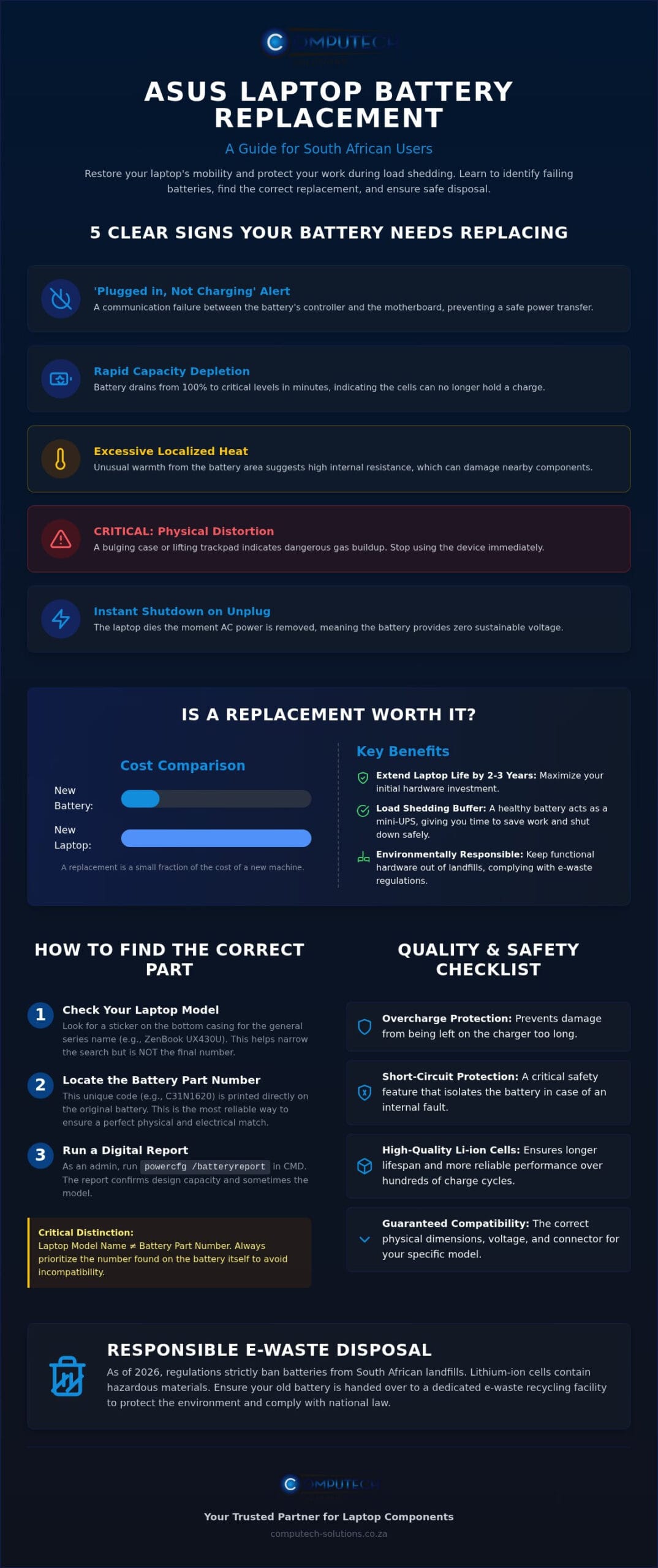
Recognizing the early symptoms of hardware failure prevents unexpected downtime. While software tools provide basic diagnostics, physical and behavioral indicators often tell a more complete story. If you’ve noticed your device behaving more like a desktop than a portable workstation, it’s a clear indicator that an asus laptop battery replacement south africa is necessary to restore your mobility. Waiting too long can lead to hardware damage or total system failure during critical tasks.
- The ‘Plugged in, Not Charging’ Alert: This Windows taskbar message usually indicates a communication failure between the motherboard and the battery’s internal controller. It means the system detects the hardware but cannot safely transfer power to the cells.
- Rapid Capacity Depletion: If your percentage drops from 100% to 20% in thirty minutes while merely browsing the web, the cells have lost their ability to hold a charge. This is a standard sign of chemical exhaustion.
- Localized Heat: Excessive warmth near the battery compartment during standard use suggests internal resistance is rising. This heat can eventually warp the motherboard or damage sensitive internal components.
- Physical Chassis Distortion: A lifting trackpad or a bulging bottom casing is a critical safety warning. This indicates the battery has physically expanded due to gas buildup. You should stop using the device immediately if you see this.
- Instant Shutdown: If your laptop dies the moment you pull the power cable, the battery is no longer capable of providing a sustained voltage to the system.
The ‘Load Shedding’ Effect on Battery Longevity
The South African power grid presents a unique challenge for hardware. Frequent deep discharges caused by load shedding accelerate the chemical aging of a Lithium-ion (Li-ion) battery. When these cells are repeatedly drained to zero, they lose their capacity faster than they would in more stable power environments. A healthy battery acts as a critical buffer, or a “mini-UPS,” providing enough time to save work and shut down safely during a sudden outage. Without this protection, you risk permanent data loss or operating system corruption.
Is it Worth Replacing the Battery in 2026?
Deciding whether to invest in a repair or buy a new machine is a common dilemma for many users. In 2026, the cost of a replacement battery is a small fraction of the price of a new ASUS ZenBook or ROG gaming unit. Choosing an asus laptop battery replacement south africa is an environmentally responsible decision that keeps functional hardware out of landfills. A high-quality replacement can extend your laptop’s operational life by another 2 to 3 years. This allows you to maximize the return on your initial investment without the high cost of a total system upgrade.
Finding the Correct ASUS Battery Model Number in South Africa
Finding the correct hardware is the most critical step in the asus laptop battery replacement south africa process. Many users make the mistake of searching only by the laptop’s marketing name, such as “ASUS ZenBook” or “VivoBook.” However, ASUS frequently releases different hardware configurations within the same series. Relying solely on the model name can lead to purchasing a part with the wrong physical dimensions or connector pins, resulting in unnecessary returns and downtime.
To ensure a perfect fit, you need the specific battery part number. This is a unique alphanumeric code typically found on the battery itself or within system reports. If you’re unsure which code to use, our team of specialists at Computech-Solutions can assist with model identification to ensure you receive the correct component for your specific device.
Step-by-Step Identification Process
Locating the correct specifications requires a methodical approach. Start with these three methods to verify your hardware requirements:
- Step 1: External Inspection. Turn your laptop over and look for a small sticker on the bottom casing. Look for the “Model” line. While this isn’t the battery part number, it helps narrow down the series.
- Step 2: Digital Diagnostics. In Windows, type “cmd” in the search bar, right-click to run as Administrator, and type powercfg /batteryreport. Open the generated file to see the “Chemistry” and “Design Capacity” along with the manufacturer name.
- Step 3: Internal Verification. For modern laptops with internal batteries, you must safely remove the back cover. The part number is printed directly on the battery label, often in a larger font than the surrounding text.
Decoding ASUS Battery Labels
Once you have the battery in hand, you’ll see several technical ratings. ASUS battery part numbers often begin with specific prefixes like A32, C21, or B31. These prefixes designate the family of the battery and are essential for finding a compatible match in the South African market.
Pay close attention to the Voltage (V) and Capacity (Wh or mAh) ratings. While capacity can sometimes vary (a 4-cell battery might have more Wh than a 3-cell version of the same shape), the voltage must match your original unit exactly. A laptop designed for an 11.4V battery should not be paired with a 15V unit. Finally, verify the connector type. Some ASUS models use a ribbon cable, while others use a hard-plastic pin connector. Ensuring these match your motherboard pins is the final step in a successful asus laptop battery replacement south africa project.
Replacement Options: Performance, Quality, and Safety
Selecting a battery involves more than finding a matching part number. In the South African market, you’ll encounter a wide range of options, from expensive OEM parts to suspiciously cheap generics. For a successful asus laptop battery replacement south africa, you must balance cost with technical safety. High-quality replacement batteries bridge this gap by using Grade-A lithium-ion cells. These cells offer consistent runtimes similar to the original hardware without the premium brand markup, ensuring your laptop remains a reliable tool during power disruptions.
Safety isn’t optional. Cheap, unbranded batteries often skip essential protection circuits to reduce manufacturing costs. A reliable replacement must include overcharge, over-discharge, and short-circuit protection. These features prevent the battery from overheating or catching fire during the frequent power surges common in South Africa. Investing in a unit with these safeguards protects your laptop’s internal motherboard and your personal safety. High-quality cells also maintain their capacity for more charge cycles, making them a better long-term investment than budget alternatives that fail within months.
Evaluating Battery Capacity (Wh vs. mAh)
Capacity ratings can be confusing when comparing different products. Many sellers advertise high mAh (milliampere-hours) to make their batteries seem superior. However, mAh only tells part of the story. If the voltage differs, a higher mAh might not actually provide more power to your system. Watt-hours represent the true measure of total energy capacity. To estimate your runtime, divide the battery’s Watt-hours by your laptop’s average power draw. This calculation provides a realistic expectation of how many hours of work you can complete before needing a recharge.
Why Local Support Matters for Warranty
Importing a battery directly from an overseas marketplace might seem cheaper initially, but it’s often a costly mistake. Direct imports lack local recourse if the part arrives dead or fails shortly after installation. Computech-Solutions provides a stable alternative by offering local technical support and rigorous quality checks for every unit. Choosing a local provider ensures you receive a component compatible with South African electrical standards. You also gain the benefit of nationwide delivery with local tracking, ensuring your asus laptop battery replacement south africa arrives safely and functions as promised from day one.
Step-by-Step Guide to ASUS Battery Installation and Maintenance
Once you’ve secured your asus laptop battery replacement south africa, the final phase is the physical installation. Proper technique ensures your new hardware integrates seamlessly with the system’s power management firmware. While the process is manageable for most users, it requires a methodical approach and the right tools to avoid damaging sensitive internal components. You’ll generally need a precision toolkit containing small Phillips (#0 or #00) or Torx (T5) drivers, depending on your specific laptop model.
Before starting, prioritize static safety. Touch a grounded metal object to discharge any static electricity from your body, as a small spark can permanentely damage the motherboard. Older ASUS models often feature external clip-in units that require no tools; you simply slide a locking switch to release the old unit. However, most modern ZenBook or ROG laptops use internal screw-in units. For these, you must carefully remove the bottom casing to access the hardware.
Calibration is a critical final step for any new installation. After fitting the battery, charge it to 100% without interruption. Once full, allow the laptop to drain until it reaches approximately 5% before charging it back to full capacity. This cycle synchronizes the battery’s internal controller with Windows, ensuring your remaining runtime is reported accurately. If you encounter any difficulty during the identification or installation process, consult the experts at Computech-Solutions for professional hardware guidance.
Internal Battery Replacement Tips
The connector pins on ASUS motherboards are extremely delicate. When you reach the internal connector, pull the battery ribbon cable straight out of its socket rather than wiggling it from side to side. Never use metal screwdrivers or knives to pry the battery loose. Puncturing the casing of a lithium-ion cell is dangerous and can lead to a fire. Ensure all internal screws are replaced and tightened firmly; missing screws can cause the laptop casing to flex, which eventually puts pressure on the new battery cells.
How to Make Your New ASUS Battery Last Longer
Heat is the primary enemy of battery chemistry, especially in the South African climate. Using a cooling pad during intensive tasks like gaming or video editing preserves the internal cells. You should also utilize the ASUS Battery Health Charging software to manage your charge cycles. If your laptop stays plugged in most of the day, set the software to limit the maximum charge to 80%. Avoiding the extremes of 0% and 100% significantly reduces chemical wear and extends the operational life of your hardware.
Finally, remember that South African law prohibits disposing of old batteries in general waste. Since August 2021, e-waste has been banned from landfills. Take your old unit to a licensed e-waste drop-off point at retailers like Woolworths or Pick ‘n Pay to ensure it’s recycled in compliance with national environmental regulations.
Reliable ASUS Replacement Batteries from Computech-Solutions
Computech-Solutions understands that your laptop is the backbone of your professional and personal life. We specialize in providing a comprehensive asus laptop battery replacement south africa solution that prioritizes long-term reliability over short-term savings. Our inventory covers an extensive range of hardware, including specialized components for the ZenBook, VivoBook, ROG, and TUF Gaming series. Every battery in our catalog undergoes rigorous quality control to ensure it meets South African electrical standards, protecting your device from the voltage fluctuations common in the local grid.
We eliminate the stress of logistics with nationwide delivery across South Africa. Each order is shipped in secure, anti-static packaging to prevent transit damage, ensuring your hardware arrives in perfect operational condition. Our team provides expert technical support for model identification, helping you verify that the part you order is the exact match for your specific motherboard configuration. This professional oversight reduces the risk of compatibility errors and gets your machine back to peak performance quickly. By choosing a local specialist, you bypass the risks associated with unverified international sellers.
Ordering Your ASUS Battery Online
Our digital storefront is designed for technical accuracy and user efficiency. You can easily find the correct component by using our search-by-model or part number functionality, which targets the specific prefixes we discussed earlier in this guide. We offer secure payment options and transparent shipping rates, so you know exactly what to expect at checkout. Every purchase is backed by a local South African warranty and support structure. This gives you immediate recourse and peace of mind that international marketplaces simply cannot provide. If you aren’t sure which unit fits your device, our sales team is available to confirm the specifications before you finalize your order.
Beyond Batteries: Total Laptop Support
Restoring your laptop’s mobility often requires more than just a new cell. To ensure optimal performance, consider matching your new battery with one of our high-quality Laptop Chargers. Using an aged or damaged adapter can negatively impact the lifespan of your new battery chemistry. We also provide a full suite of hardware solutions, including Laptop LCD Replacement Panels and other critical components, to keep your machine in top condition. Whether you’re looking to fix a specific issue or perform a strategic upgrade, we offer a definitive, total solution for your asus laptop battery replacement south africa needs.
Browse ASUS Replacement Batteries at Computech-Solutions
Restore Your Operational Mobility
Maintaining a functional laptop shouldn’t be a source of technical stress. By prioritizing high-quality, safety-tested components over unverified budget alternatives, you protect your hardware from the operational risks of South Africa’s unique power environment. We have explored how to identify your specific battery part number and the essential steps for a successful installation that maximizes your machine’s potential. An asus laptop battery replacement south africa is a strategic choice that preserves your hardware investment while ensuring you remain productive during unexpected power disruptions.
Computech-Solutions is your reliable partner for this transition, offering specialist ASUS technical support and nationwide South African delivery. Our commitment to providing a total solution means you receive components that meet rigorous safety standards, delivered directly to your door with secure packaging. Don’t let a failing battery dictate your workflow or limit your mobility any longer. You can regain the freedom of a truly portable workstation with the confidence that your new hardware is built to last.
Restore your laptop’s mobility with a premium ASUS replacement battery today and experience the stability of a professionally sourced power solution.
Frequently Asked Questions
How much does an ASUS laptop battery replacement cost in South Africa?
The cost for an asus laptop battery replacement south africa depends primarily on the specific model and series of your device. High-performance gaming units like the ROG series or premium ZenBooks generally require more expensive, high-capacity cells compared to entry-level VivoBook models. You should always verify your specific part number to ensure you receive an accurate quote for a component that matches your system’s original specifications.
Can I replace my internal ASUS battery myself, or do I need a professional?
You can replace an internal battery yourself if you have the correct precision tools and follow basic safety protocols. Most modern units require a Phillips or Torx screwdriver to remove the bottom casing and a careful hand to disconnect the delicate ribbon cable. If you aren’t comfortable working with internal electronics or fear damaging the motherboard pins, seeking professional technical support is a safer alternative to preserve your hardware.
How do I check my ASUS battery health in Windows 11?
You can generate a detailed health report by using the Command Prompt tool. Right-click the Start button, select Terminal (Admin), and type powercfg /batteryreport before pressing Enter. This command creates an HTML file that compares your battery’s original design capacity against its current full-charge capacity. Additionally, the MyASUS app provides a built-in diagnostic interface that can quickly flag hardware failures or significant degradation.
Is it safe to use a non-genuine battery in my ASUS laptop?
It’s safe to use a replacement battery as long as it’s sourced from a reputable provider that guarantees high-quality lithium-ion cells. The most important factor is the presence of integrated safety features like overcharge and short-circuit protection. While unbranded “grey market” units often skip these circuits to lower costs, a professionally sourced asus laptop battery replacement south africa provides the same stability and safety as the original hardware.
How long should a new ASUS laptop battery last on a single charge?
A new battery typically provides between 3 and 8 hours of runtime depending on your laptop’s power draw and current tasks. Ultra-portable ZenBooks are designed for efficiency and often reach the higher end of that range during web browsing. In contrast, ROG gaming laptops consume significantly more power and may only last 1 to 3 hours under heavy load. Your screen brightness and background applications also play a major role in total runtime.
Where can I recycle my old laptop battery in South Africa?
You should dispose of your old battery at licensed e-waste collection points located at major retailers like Woolworths or Pick ‘n Pay. South African law has strictly banned electronics and batteries from landfills since August 2021 under the National Environmental Management: Waste Act. These dedicated bins ensure that your old lithium-ion cells are safely transported to specialized facilities for recycling in compliance with the latest Extended Producer Responsibility (EPR) Regulations.
Does load shedding damage my laptop battery?
Load shedding damages your battery by forcing frequent deep discharge cycles that accelerate chemical aging. When the power cuts and the battery drains to 0% repeatedly, the internal cells lose their ability to hold a charge much faster than they would in a stable environment. Keeping your laptop plugged into a surge protector and maintaining a healthy charge level during outages helps mitigate this wear and preserves the life of your hardware.
How do I find my ASUS laptop’s specific model name?
You can find the model name on a small sticker located on the bottom of your laptop’s chassis. If the sticker is worn or missing, press the Windows Key + R, type msinfo32, and hit Enter to open the System Information window. Look for the “System Model” line in the summary tab. This name is essential for cross-referencing compatible parts and ensuring your new battery fits the physical dimensions of your specific device.
