
Searching for a replacement screen based solely on your laptop model name is the fastest way to order the wrong part. Technical specifications often vary within the same series, which makes precision the only way to avoid compatibility issues. We understand that a broken display creates immediate operational risks for your work, especially when official repair centers quote high costs and long lead times. This 2026 guide streamlines the asus laptop screen replacement south africa process, ensuring you find a high-quality panel without the stress of technical errors.
You’ll discover how to identify the specific internal part number required for your device and where to source reliable components with nationwide delivery. We provide a clear path to restoring your laptop’s functionality by focusing on technical accuracy and efficient sourcing strategies. From distinguishing between standard IPS panels and premium OLED options to finding expert technical support, this guide covers everything you need to get back to work quickly.
Key Takeaways
- Learn how to differentiate between a faulty video cable and actual panel failure to ensure you only replace necessary hardware.
- Understand why matching the internal manufacturer part number is the only reliable method for a successful asus laptop screen replacement south africa.
- Identify the compatibility constraints of 2026 display technologies, including why you typically cannot swap standard LCD panels for OLED versions.
- Evaluate essential supplier criteria such as dead pixel policies and warranty terms to protect your investment in sensitive electronic components.
- Discover how to utilize expert technical support and nationwide shipping to minimize operational downtime and restore your device’s functionality.
Understanding ASUS Laptop Screen Damage and Replacement Options
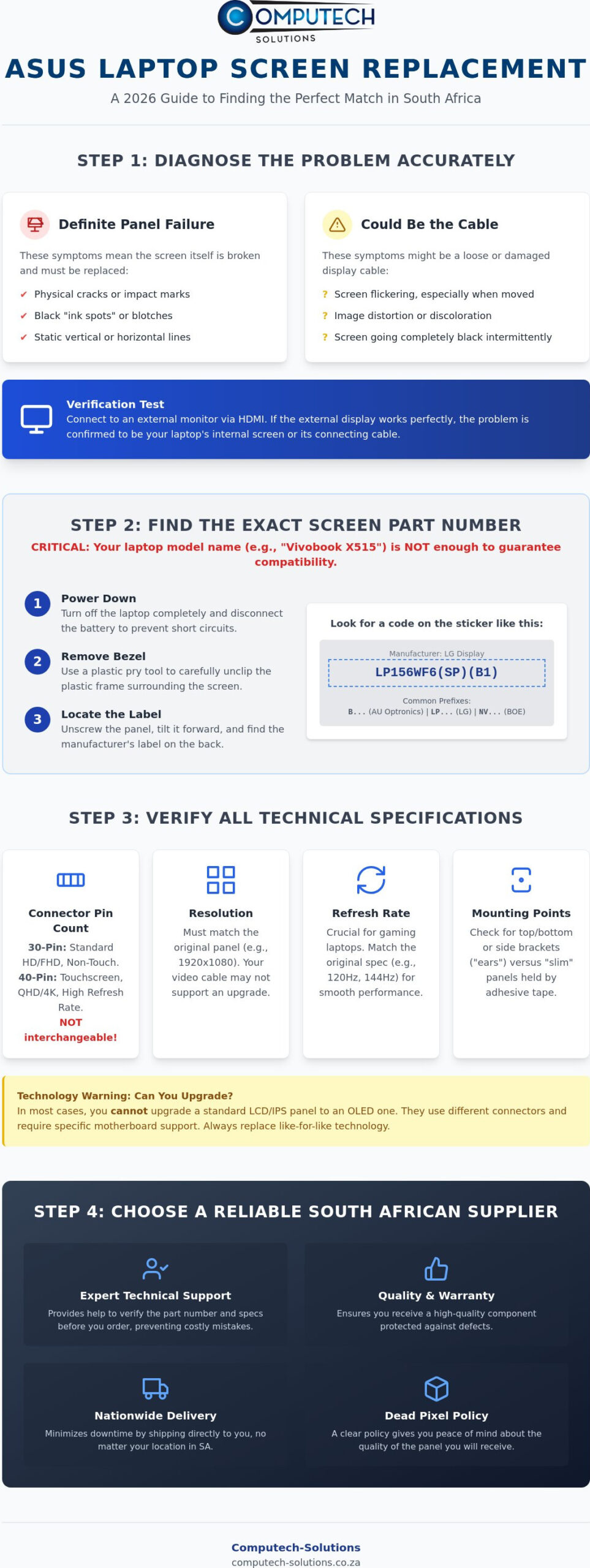
Identifying a hardware failure early prevents unnecessary software troubleshooting and potential data loss. ASUS laptops often exhibit specific symptoms when the display subsystem begins to fail. Vertical lines that remain static regardless of the application usually indicate a failure in the LCD panel’s internal driver ICs. Flickering might suggest a loose or damaged Embedded DisplayPort (EDP) cable, while physical cracks or “ink spots” are definitive indicators that you need an asus laptop screen replacement south africa. In 2026, the cost of high-end computing hardware remains a significant investment. Replacing a single panel is a more sustainable financial decision than decommissioning a high-performance machine. By opting for a high-quality replacement, you extend the operational lifespan of your device and maintain its resale value.
When to Replace vs. When to Repair
Physical cracks in the glass or the underlying liquid crystal layer cannot be repaired. They require a total panel swap to restore functionality. Before committing to a purchase, verify that the issue isn’t software-related. Connect your laptop to an external monitor via HDMI or USB-C. If the external display is clear, the problem lies within your laptop’s physical hardware. For older Zenbook or ROG models, a panel replacement is almost always the more efficient route. These chassis are built for long-term professional use, and a new screen can make the device feel like a modern upgrade. A deeper understanding display technologies helps you decide if your current panel type is still the optimal choice for your specific professional requirements.
The South African Market for Laptop Parts
The local market has matured to provide specialized support for popular ranges like the Vivobook, TUF Gaming, and Zenbook series. Sourcing your asus laptop screen replacement south africa from a reputable local retailer ensures you receive a part compatible with regional SKUs. Local suppliers offer the distinct advantage of nationwide delivery, which is critical for users in remote provinces who cannot access physical repair hubs in major metros. This accessibility ensures that technical disruptions don’t lead to extended business downtime. Reliable South African retailers also provide the necessary technical support to verify that the panel you order matches the electronic requirements of your specific ASUS motherboard revision.
How to Identify the Correct ASUS Replacement LCD Panel
Relying on your laptop’s model name alone often leads to ordering the wrong component. ASUS frequently uses different screen panels within the same model series, such as the Vivobook X515, depending on the specific regional configuration or manufacture date. Successfully sourcing an asus laptop screen replacement south africa requires you to identify the specific hardware currently installed in your machine. While software tools can sometimes read display IDs, the only definitive way to ensure compatibility is to inspect the label on the back of the physical LCD panel itself.
Finding the Part Number (Model Code)
To access the part number, you’ll need to carefully remove the plastic bezel surrounding the screen. Start by powering down the device and disconnecting the battery. Use a thin plastic pry tool to gently release the clips holding the bezel in place. Once the panel is unscrewed and tilted forward, you’ll see a sticker containing the manufacturer’s code. Common manufacturers include AU Optronics (starting with B), LG Display (starting with LP), and BOE (starting with NV). The global shift toward a consumer right to repair has encouraged more users to perform their own maintenance, but this step remains the most critical for technical accuracy.
Beyond the part number, you must verify the interface type. Modern ASUS laptops typically use either a 30-pin or a 40-pin Embedded DisplayPort (EDP) connector. A 30-pin connector is standard for most Full HD non-touch displays, while 40-pin interfaces are reserved for touchscreens, high-refresh-rate gaming panels, or 4K resolutions. These connectors are not interchangeable. You should also check the physical mounting points. Some panels are “slim” designs held by adhesive strips, while others use metal brackets or “ears” located at the top and bottom or sides of the frame.
Verifying Technical Specifications
Matching the original resolution is vital because the internal video cable is often rated only for the specific bandwidth of the factory-installed screen. If your ASUS TUF or ROG laptop features a 120Hz or 144Hz refresh rate, replacing it with a standard 60Hz panel will result in a degraded user experience or potential display errors. You should also consider the surface finish. While you can technically swap a glossy panel for a matte (anti-glare) version if all other specs match, sticking to the original finish ensures the visual output remains consistent with your professional needs. If you feel uncertain about these technical variables, you can consult expert technical support to ensure part compatibility before finalizing your purchase.
LCD vs. LED vs. OLED: Choosing the Right Panel for Your ASUS
By 2026, ASUS has solidified its position as a leader in display technology, particularly through its widespread adoption of OLED in the Zenbook and Vivobook Pro lines. However, when you’re looking for an asus laptop screen replacement south africa, you must understand that these technologies aren’t always interchangeable. Most laptops are built around a specific signal protocol and power delivery system. While an OLED panel offers superior contrast and faster response times, you generally cannot install one in a laptop originally equipped with a standard LED-backlit LCD. The motherboard’s display controller and the physical connector bandwidth are fundamentally different. Choosing the correct panel type ensures your device maintains its intended battery efficiency and visual performance. Repairing your current device with a compatible panel is also a responsible choice that helps reduce the environmental impact of e-waste globally.
IPS and TN Panels: The Workhorse Options
IPS (In-Plane Switching) panels have become the industry standard for professional work due to their 178-degree viewing angles and superior color reproduction. In contrast, older or budget-oriented Vivobook models might still utilize TN (Twisted Nematic) panels. TN panels are more affordable but suffer from “color shifting” when viewed from the side. If your laptop uses a standard 30-pin EDP connector, you can often upgrade a TN panel to an IPS version during your asus laptop screen replacement south africa. This upgrade significantly improves the user experience for content creators and office professionals without requiring a full hardware replacement. It’s a cost-effective way to modernize a budget machine’s visual output.
OLED Replacement Considerations
OLED replacement requires extreme care during the physical installation process. These panels lack the rigid backlight assembly found in traditional LCDs, making them thinner but significantly more susceptible to pressure damage or cracking during handling. High-end Zenbook Pro models often feature these displays, which require specific 40-pin high-bandwidth connectors to support their high resolutions and color depths. When sourcing a replacement, you must verify that the panel matches the original’s peak brightness and color gamut specifications. Using a lower-quality generic OLED can lead to premature burn-in or flickering issues. Always prioritize panels that meet the electronic standards of your ASUS hardware to maintain the professional-grade output you expect from your device.
Buying a Replacement Screen in South Africa: What to Look For
Sourcing an asus laptop screen replacement south africa requires more than just finding the lowest price. Fragile electronic components like LCD panels are highly susceptible to damage during transit and manufacturing defects. You need a supplier that offers a robust local warranty and a clear return policy. While international marketplaces might seem cheaper, they often involve long import delays and lack technical support if the part arrives dead on arrival. Local sourcing ensures that if a component doesn’t meet your expectations, the resolution process is handled within your own time zone and legal jurisdiction.
Industry standards typically categorize panels by “Grade.” Grade A+ panels are the gold standard because they are guaranteed to have zero dead pixels. Many budget suppliers follow standard ISO policies that allow for up to three dead pixels before a unit is considered faulty. Always verify the specific dead pixel policy of your South African retailer before completing your purchase to ensure your visual experience isn’t compromised by a permanent bright or dark spot. High-quality panels also undergo rigorous testing to ensure the backlight consistency and color accuracy match the original factory specifications of your ASUS device.
Evaluating Supplier Reliability
Choosing a supplier with South African-based stock is essential for minimizing downtime. Local stock means you avoid the complexities of customs and international shipping risks. Reliability also extends to technical support. A trustworthy retailer won’t just sell you a part; they’ll help you verify compatibility based on the manufacturer codes identified in earlier sections. Packaging quality is another critical factor. Look for suppliers who use reinforced, double-walled boxes and anti-static materials to protect the panel from the rigors of local courier handling across the country.
Price vs. Quality
It’s tempting to opt for the cheapest option on unverified marketplaces, but these often turn out to be Grade B panels with minor cosmetic flaws or higher failure rates. Grade A+ panels provide the stability and longevity required for professional use. You should ensure that the quoted price includes a local warranty for peace of mind. Investing in a high-quality panel from a specialized provider prevents the frustration of repetitive repairs and ensures your ASUS laptop performs to its original factory standards. For a reliable experience, you can buy ASUS replacement screens with nationwide delivery and expert support to ensure your repair is successful the first time.
Get High-Quality ASUS Replacement Screens from Computech-Solutions
Computech-Solutions operates as a specialized online retailer dedicated to resolving technical disruptions with high-performance hardware. Our extensive inventory includes Laptop LCD Replacement Panels compatible with every major ASUS series, from the professional Zenbook Pro to the rugged TUF Gaming models. When you require an asus laptop screen replacement south africa, our platform provides a centralized hub for sourcing verified components that meet strict quality standards. We understand that technical downtime translates to lost productivity. Our operational model prioritizes speed and technical accuracy to get your device back into service as quickly as possible.
Our expert technical support team bridges the gap between complex hardware requirements and successful installation. As established in previous sections, matching the manufacturer part number is non-negotiable for electronic compatibility. We provide direct assistance to help you verify these codes before you finalize your order. This reduces the risk of purchasing incompatible panels that could lead to further delays. This authoritative support serves both individual DIY users looking to avoid high brand repair costs and independent repair shops that require a steady, reliable supply of Grade A+ components for their clients.
Why South Africans Trust Computech-Solutions
Reliability in the South African tech sector depends on consistent stock availability and logistical efficiency. We maintain a robust inventory of panels in our Pretoria-based facility. This allows for a streamlined online checkout process that moves your order from our warehouse to your door without unnecessary friction. This local presence eliminates the uncertainties of international shipping and customs delays. Our commitment to high-quality hardware means we focus on sourcing panels that offer the same brightness, contrast, and color fidelity as your original ASUS display. By providing a total solution that includes technical verification and protective packaging, we ensure your hardware investment isn’t compromised during the process.
Ready to Restore Your ASUS Laptop?
Minimizing downtime starts with accurate part sourcing and rapid logistics. Our nationwide delivery service reaches every province in South Africa. This ensures that even remote users have access to premium display components when they need them most. If you’ve identified your internal part number or need assistance confirming technical specifications like refresh rates and connector pins, our team is ready to assist. You can reach our technical desk at (+27) 87 822 1284 or via email at info@computech-solutions.co.za for expert guidance. This professional support ensures your asus laptop screen replacement south africa project is completed without technical errors. To begin your repair journey immediately, browse our full range of Laptop LCD Replacement Panels and secure the correct part for your device today.
Restore Your ASUS Laptop’s Visual Performance Today
Successfully navigating an asus laptop screen replacement south africa requires technical precision and reliable sourcing. You now understand that matching the manufacturer’s part number on the panel itself is the only way to guarantee a perfect fit. Whether you’re upgrading a standard display or replacing a specialized high-refresh gaming panel, verifying the connector pins and physical dimensions prevents costly installation errors. By choosing a local partner, you gain access to expert technical support and secure packaging that protects your hardware during transit.
Professional results are within reach when you have the right components. Browse our range of ASUS Replacement Laptop LCD Panels for nationwide delivery and benefit from high-quality hardware backed by specialized expertise. Don’t let a cracked or flickering display disrupt your operations any longer. With the correct part and our technical guidance, you’ll have your device back to factory standards in no time.
Frequently Asked Questions
Can I replace my ASUS laptop screen myself?
You can replace the screen yourself if you have the correct tools and follow a technical guide. Most ASUS models require only a small Phillips screwdriver and a plastic pry tool to release the bezel. While DIY repair saves on labor costs, it requires careful handling of delicate EDP cables. If you are uncomfortable with internal hardware, consulting a professional technician is the safer alternative to avoid accidental damage.
How much does an ASUS laptop screen replacement cost in South Africa?
The total cost depends on your specific laptop model and the panel technology required. Standard 15.6 inch LED panels are generally more affordable than specialized 4K or OLED displays found in the Zenbook Pro series. You should check current market rates for your specific part number to get an accurate estimate. Choosing to buy the part directly for an asus laptop screen replacement south africa often reduces the total expense compared to official brand repairs.
Will a replacement screen affect my ASUS warranty?
Performing a self-repair or using a third-party replacement panel typically voids the manufacturer’s warranty on the display assembly. If your device is still within its initial warranty period, you should verify the terms with ASUS before opening the chassis. For out of warranty devices, using high-quality replacement hardware is a standard practice to extend the machine’s operational life without the high cost of official service centers.
How do I know if my ASUS laptop screen is 30-pin or 40-pin?
You can verify the pin count by inspecting the video connector on the back of your original LCD panel. A 30-pin connector is approximately 2cm wide and is standard for non-touch Full HD screens. A 40-pin connector is wider, roughly 2.5cm, and is required for touchscreens, 4K displays, or high-refresh-rate gaming panels. Matching this interface is critical for the screen to function with your motherboard’s video output.
Does Computech-Solutions deliver laptop screens to my area?
We provide reliable nationwide delivery to all provinces and major metros across South Africa. Whether you are located in a central business district or a remote area, our courier partners ensure your hardware arrives securely. We use specialized protective packaging to mitigate the risks of transit damage. You can verify the current shipping turnaround times for your specific location during the online checkout process on our website.
What is the difference between a matte and a glossy ASUS screen?
Matte screens feature an anti-glare coating that diffuses light, making them ideal for office environments with overhead lighting. Glossy screens offer more vibrant colors and higher contrast but are highly reflective in bright conditions. Most ASUS professional laptops ship with matte displays to reduce eye strain. You can usually choose either finish during your asus laptop screen replacement south africa as long as the technical specifications like resolution and pin count match.
Can I upgrade my ASUS screen resolution during replacement?
Upgrading resolution, such as moving from HD to Full HD, is only possible if your internal video cable and motherboard support the higher bandwidth. Many budget ASUS models use a single-lane EDP cable that only supports the factory-installed resolution. Attempting to install a higher-resolution panel without upgrading the cable often results in a blank screen or distorted images. Always consult technical support to check your specific motherboard revision before attempting a resolution upgrade.
What should I do if my replacement screen arrives damaged?
You must inspect the package immediately upon delivery and report any visible damage to the courier and the supplier. Take clear photographs of the damaged packaging and the physical panel to facilitate a rapid replacement process. Reliable South African suppliers maintain clear transit insurance policies to protect your investment. Reporting issues within 24 hours of receipt ensures that the claim is processed efficiently under the shipping warranty terms provided by the retailer.
