
The lowest-priced graphics card isn’t automatically the best value. It may struggle with the games you play or fail to fit your PC. Choosing the best budget graphics card for 1080p gaming 2026 means balancing gaming performance, graphics memory and features with your power supply, case and processor. Similar model names and long specification lists can make that decision harder than it needs to be.
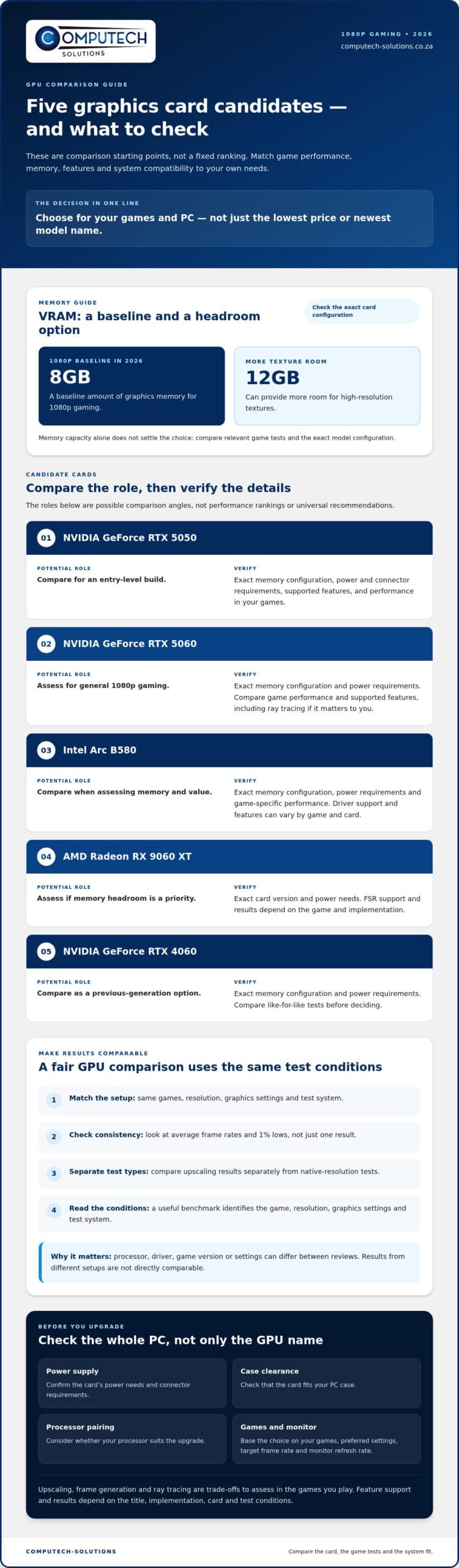
This shortlist explains what to compare and how to match a graphics card to your games, settings and upgrade plans. In 2026, 8GB of VRAM is a baseline for 1080p, while 12GB can provide more room for high-resolution textures. The right balance still depends on what you play and which performance trade-offs you’re willing to make.
We’ll consider options including the NVIDIA GeForce RTX 5050 and RTX 5060, Intel Arc B580, AMD Radeon RX 9060 XT and discounted RTX 4060. Treat them as candidates to compare, not a fixed ranking or a universal recommendation. Before upgrading, check practical details such as case clearance, power requirements and processor pairing so your choice suits the rest of your PC.
Key Takeaways
- The best budget graphics card for 1080p gaming 2026 depends on your games, preferred settings and target frame rate, not just the lowest price.
- Compare cards by their gaming role, memory, power needs and trade-offs rather than relying on model names or a single benchmark.
- Match your GPU choice to your monitor’s refresh rate and check that your power supply, case and processor suit the upgrade.
- When comparing South African listings, check that you’re comparing the same card model and review the seller terms and warranty documentation.
- Use a clear upgrade plan, from game requirements to system compatibility. Computech-Solutions is a South African retailer offering computer hardware and technical support.
What makes a budget graphics card good for 1080p gaming in 2026?
A budget 1080p graphics card isn’t simply the cheapest card you can buy. It should deliver suitable performance in your games, work with your existing PC and leave enough headroom for your needs. The best budget graphics card for 1080p gaming 2026 depends on your frame-rate target, preferred settings and upgrade plans, not just its place in a product range.
Performance varies by game. Competitive titles may run smoothly on a wider range of hardware, while visually demanding single-player releases can put more pressure on a GPU, especially at high settings or with ray tracing enabled. Average frame rate gives you a general picture of performance. 1% lows show how much it dips during slower moments. If dips happen often, gameplay may feel less consistent even when the average frame rate looks acceptable.
Graphics settings give you room to make practical adjustments. Lowering demanding options such as shadows or effects may improve performance without requiring you to reduce every visual setting. Ray tracing can add realistic lighting, but it also increases the graphics workload. Decide which visual features matter to you, then compare cards under similar test conditions. A useful benchmark identifies the game, resolution, graphics settings and test system. Results from different setups aren’t directly comparable.
What performance should you expect at 1080p?
Set expectations by separating competitive gaming from demanding releases, then consider your monitor’s refresh rate and the frame rate you want to sustain. Don’t assume one benchmark predicts performance in every game. Look for tests that disclose their settings and hardware, and consider both average frame rates and 1% lows. If a card falls short of your target, lowering selected settings may be a better trade-off than paying for performance you don’t need.
Which specifications matter beyond the model name?
A GPU generation indicates its design family, but a newer label alone doesn’t guarantee a faster card. Video memory stores graphics data. In 2026, 8GB is a baseline for 1080p, while 12GB can provide more room for high-resolution textures. Memory bandwidth affects how quickly data moves, and power draw matters when checking system compatibility. Specifications help narrow your options, but game tests show how a card performs in practice. Upscaling and frame generation may help in supported games, though results depend on the title and implementation.
A graphics card combines a processor and memory to handle visual workloads. For a broader overview of its components and role, see What is a Graphics Card? Use that foundation to assess your whole PC, not just the GPU name, before planning an upgrade.
How to compare budget 1080p graphics cards without being misled
Compare cards using the same games, resolution, graphics settings and test system. Results may differ between reviews if the processor, driver, game version or settings change. Look at average frame rates and 1% lows, and separate upscaling results from tests at native resolution. The table below suggests possible comparison roles, not a measured performance ranking. Check each model’s current specifications and relevant game tests before making a decision.
| Candidate | Potential gaming role | Memory | Power and trade-offs |
|---|---|---|---|
| NVIDIA GeForce RTX 5050 | Candidate to compare for an entry-level build | Check the exact card configuration | Check the card’s power and connector requirements, then compare supported features and performance in your games. |
| NVIDIA GeForce RTX 5060 | Candidate to assess for general 1080p gaming | Check the exact card configuration | Verify the exact model’s power requirements. Compare supported features and game performance, including ray tracing where relevant to you. |
| Intel Arc B580 | Candidate to compare when assessing memory and value | Check the exact card configuration | Review power requirements and game-specific performance. Driver support and features can vary by game and card. |
| AMD Radeon RX 9060 XT | Candidate to assess if memory headroom is a priority | Check the exact card configuration | Verify the specific version’s power needs. FSR support and results depend on the game and implementation. |
| NVIDIA GeForce RTX 4060 | Previous-generation candidate to compare with other options | Check the exact card configuration | Check the exact card’s power requirements and compare like-for-like tests before deciding. |
These roles are starting points, not universal brand verdicts. NVIDIA’s DLSS, AMD’s FSR and Intel’s software features have different levels of support across games and card generations. For additional context on how reviewers assess graphics cards, see PCMag’s graphics card recommendations, then check whether any cited test matches your target resolution and settings.
How do AMD Radeon, Intel Arc, and Nvidia GeForce options differ?
Judge each GPU by comparable tests in the games you play, useful features in those titles and compatibility with your power supply. Driver support can affect performance and stability. Upscaling or frame generation only helps when a game supports the relevant feature. No brand is best for every build. The practical choice is the card whose verified strengths match your games and PC.
Which trade-offs matter most for a tight budget?
Decide what matters most to you: image quality, consistent frame rates, memory capacity or lower power demands. Reducing ray tracing or selected texture settings may be a sensible compromise if it improves playability. Compare performance in your games, consistency at your preferred settings, memory for your plans and power compatibility with your system. That gives you a more useful basis for choosing than a headline specification alone.
For a practical conversation about planning a compatible PC upgrade, discuss your PC upgrade requirements.
Which budget graphics card fits your games, monitor, and PC?
Start with the games you play most, then match a graphics card to your monitor and the rest of your system. A competitive player aiming for a high refresh rate has different priorities from someone who prefers detailed visuals in demanding single-player games. The best budget graphics card for 1080p gaming 2026 is one that meets your needs without requiring an avoidable overhaul of your PC.
What should competitive gamers prioritise?
Prioritise consistent performance in your own games, especially if you want to make use of a high-refresh-rate monitor. Compare tests for the specific titles you play, with resolution, settings and test hardware clearly stated. Don’t assume a particular card will deliver a specific frame rate unless you have comparable results for that game and system. Lowering effects or shadows can help balance smoothness and image quality.
Which card suits mixed-use or visually demanding games?
If you play a mix of competitive and story-driven games, compare candidates across several titles rather than choosing from one headline result. The Intel Arc B580 and AMD Radeon RX 9060 XT are options to investigate if you’re interested in memory headroom. NVIDIA GeForce RTX 5050 and RTX 5060 are alternatives to assess for their supported features. Treat these as comparison starting points, not performance guarantees. Check each model’s current specifications and game benchmarks before deciding.
How should you check GPU and PC compatibility?
Check the exact card dimensions against the case’s available length, height and slot space. Confirm its required power connectors and compare its power needs with the power-supply maker’s current recommendation. Make sure the motherboard has a suitable graphics-card slot too. Processor pairing depends on the game, settings and target frame rate. A CPU limitation in one workload doesn’t automatically mean you need to replace the processor.
Before choosing, work through these checks:
- Monitor: Note its resolution and refresh rate, then set a realistic performance target.
- Games: Identify the titles and graphics settings that matter most to you.
- Case and power: Compare the exact card’s measurements, connectors and power guidance with your PC.
- Processor: Look for relevant tests using a similar CPU and game workload.
- Evidence: Use benchmarks that disclose the game version, resolution, settings and test system, and state whether upscaling or frame generation is enabled.
This process helps separate a suitable upgrade from a card that looks appealing on paper but doesn’t fit your setup or priorities.
How to assess a budget GPU purchase in South Africa
Online listings can change, and cards with similar names may differ in dimensions, cooling, connectors or memory. Before choosing the best budget graphics card for 1080p gaming 2026, compare the exact card with your needs and existing PC. Review the listing details, stock status and warranty conditions when you’re ready to purchase, as these can change.
What should you check on a graphics-card listing?
Start with the full GPU model and the specific board-partner version. Compare its memory configuration, physical dimensions, required power connectors and power guidance with the manufacturer’s specifications. Read the seller’s return and warranty terms for that exact listing, and keep the relevant documentation. Use manufacturer specifications as your reference for technical details. Seller descriptions summarise the offer, while user reviews may offer context but can refer to a different card revision or system.
For a fair comparison, make sure listings describe the same GPU and memory configuration. Check what is included and whether the model details match across the product title, specification list and documentation. Don’t base a decision on a similar product name alone.
How can you avoid spending on the wrong upgrade?
Work through these checks in order:
- Set your target: List the games you play, your display resolution and the graphics settings you prefer.
- Choose a performance goal: Consider your monitor’s refresh rate and the level of smoothness you want, using relevant game benchmarks as a guide.
- Check your PC: Compare the card’s dimensions with the case, confirm the motherboard slot and power connectors, and check the power supply against the card maker’s current recommendations.
- Review the exact listing: Match the model and specifications, then read the seller’s terms and warranty documentation.
- Review current details: Recheck listing information and stock status before you buy.
This approach can help you avoid paying for features you won’t use or choosing a card that requires other changes to your setup. Computech-Solutions is a South African computer-hardware retailer offering technical support. For a focused discussion about your PC requirements, share your components and upgrade goals.
Discuss your PC upgrade and compatibility needs
Plan your 1080p gaming upgrade with Computech-Solutions
A sound GPU decision follows a clear sequence: start with the games you play, set a realistic performance target, check your PC’s compatibility, compare suitable candidates and review the exact purchase details. That process is more useful than picking a card by its model name alone. It also helps you work out whether a graphics card upgrade is enough or another part of your system needs attention.
Computech-Solutions is a South African IT and computer-hardware retailer with technical support. For a practical hardware discussion, share details of your current setup and what you want to improve. Your components, game preferences and budget priorities give the conversation a useful starting point without assuming one GPU or configuration suits every player.
What details help you plan a compatible upgrade?
Include your processor model, power-supply capacity and available power connectors, case model or internal clearance, and monitor resolution and refresh rate. List the games you play most, along with your preferred graphics settings and target level of smoothness. Mention any constraints too, such as limited case space, a power supply you plan to keep or a preference to avoid replacing other components.
These details connect a shortlist to your actual PC. They help assess whether a card can physically fit, whether the power supply meets its requirements and whether your processor is a reasonable match for your games and target. The more specific your setup information, the more focused the hardware discussion can be.
What is the next step after choosing a shortlist?
Before deciding, compare the exact card specifications with the manufacturer’s current information. Review independent benchmarks that match your games, resolution and settings, and note the test system and whether upscaling or frame generation was enabled. Finally, compare like-for-like listings and read the seller terms and warranty documentation for the exact model. Details can change, so use current information rather than relying on an older comparison.
The best budget graphics card for 1080p gaming 2026 is the one that fits your games and upgrade plan while working with your PC. A clear list of your components, gaming priorities and constraints makes the next step more manageable.
Discuss your 1080p PC upgrade with Computech-Solutions
Make your next 1080p upgrade with confidence
The best budget graphics card for 1080p gaming 2026 is the one that suits the games you play and works with your PC. Set your performance target first, then compare cards using relevant benchmarks and check the exact model’s dimensions, power requirements and purchase terms. A balanced upgrade can help you avoid paying for performance or features that don’t match your setup.
Computech-Solutions is a South African IT equipment and computer-hardware retailer offering nationwide delivery and technical support. A useful upgrade discussion starts with your current processor, power supply, case, monitor and gaming priorities. Those details help frame compatibility and clarify what you want your next system to do.
Ready to plan your setup? Discuss your PC upgrade with Computech-Solutions and take the next step with a clearer view of your requirements. With the right information and a considered shortlist, you can move forward confidently.
Frequently Asked Questions
Is a budget graphics card enough for 1080p gaming in 2026?
Yes, a budget graphics card can be suitable for 1080p gaming, depending on the games, settings and frame-rate target. Competitive games may be less demanding than graphically intensive new releases, which can require lower settings for smoother play. There’s no universal performance level to expect from every card. Before buying, check benchmarks for the exact GPU and games, making sure the resolution, settings and test system are clearly stated.
Which graphics card is best for budget 1080p gaming in 2026?
There isn’t a definitive winner without comparing current candidates and independent benchmarks. To find the best budget graphics card for 1080p gaming 2026 for your setup, compare performance in your games, memory capacity, power requirements and supported features. Review current listing details and seller terms as well. Match the card to your PC and priorities rather than choosing by brand preference or a single benchmark result.
Can a budget graphics card run modern games at 1080p?
Many graphics cards can run games at 1080p, but performance and visual quality vary by card and title. Game optimisation, GPU generation and settings all influence results. Demanding releases may require adjustments to options such as shadows, effects or textures. Ray tracing adds another performance consideration, so compare it separately from standard rendering. Check benchmarks for demanding games at stated settings instead of assuming every modern title will run equally well.
How much graphics memory do you need for 1080p gaming?
There’s no memory capacity that guarantees good performance in every 1080p game. Requirements vary with the title, texture quality and software updates, and a GPU’s processing ability matters too. Check current game requirements and tests using the settings you plan to play at. Compare memory capacity alongside GPU performance, memory bandwidth and system compatibility. More memory alone doesn’t ensure a faster or more suitable graphics card.
Will my power supply work with a new graphics card?
It depends on the specific graphics card, your power supply’s capacity and connectors, and the rest of your PC. Read the card maker’s current power recommendations, then check the label or documentation for your power supply. Confirm that the required connectors match and that your full system configuration is supported. Don’t rely on a universal wattage rule or connector appearance alone. Assess the exact card and power supply before buying.
Should you upgrade your graphics card or processor first for 1080p gaming?
The right upgrade depends on your current components and the games you play. A GPU limitation may become clear when graphics settings strongly affect performance, while a processor limitation can be more apparent in CPU-heavy games or when targeting high frame rates. One benchmark isn’t conclusive. Review game-specific results alongside resolution and settings, and compare performance with your existing system before deciding which component, if any, needs replacing.
What should you check before buying a used graphics card?
Confirm the exact model, memory configuration and physical condition, then assess whether the card operates properly under load. Review the seller’s terms and any warranty documentation, and don’t assume coverage remains valid. A model name alone can’t establish condition or value. Compare the used card with current alternatives using relevant benchmarks and system requirements. Avoid assurances about remaining lifespan unless they’re supported by clear documentation.
