
With the South African Rand depreciating 12% against the US Dollar since late 2023, is it still possible to find a high-performance machine that doesn’t cost a fortune? Many students realize too late that the cheapest option often leads to sluggish multitasking and expensive repair bills. Finding the best budget laptops for students in South Africa requires looking past the sticker price to find genuine value in 2026. You deserve a device that handles Chrome, Teams, and Word simultaneously while offering the battery resilience needed for local load reduction schedules.
We understand that a laptop is a critical investment in your academic future. This guide provides a definitive look at the most reliable, high-performance budget laptops currently available in the local market. We’ll explore why 16GB of RAM is the new standard, which models offer the best 9-hour battery life, and how to maintain your device using accessible laptop chargers and replacement components to maximize its lifespan.
Key Takeaways
- Define the R7,000 to R12,000 price bracket as the optimal range for value in the current South African economy.
- Learn why 16GB of RAM is now the essential baseline for preventing system lag and ensuring your machine remains relevant until graduation.
- Pinpoint the best budget laptops for students in South Africa by comparing the durability and technical specifications of leading Acer and ASUS models.
- Gain the technical knowledge to keep your machine running through extended power outages and load reduction periods.
- Understand the financial benefits of maintaining your investment through high-quality replacement batteries and LCD panels instead of frequent hardware upgrades.
The 2026 Student Standard: What “Budget” Actually Means Now
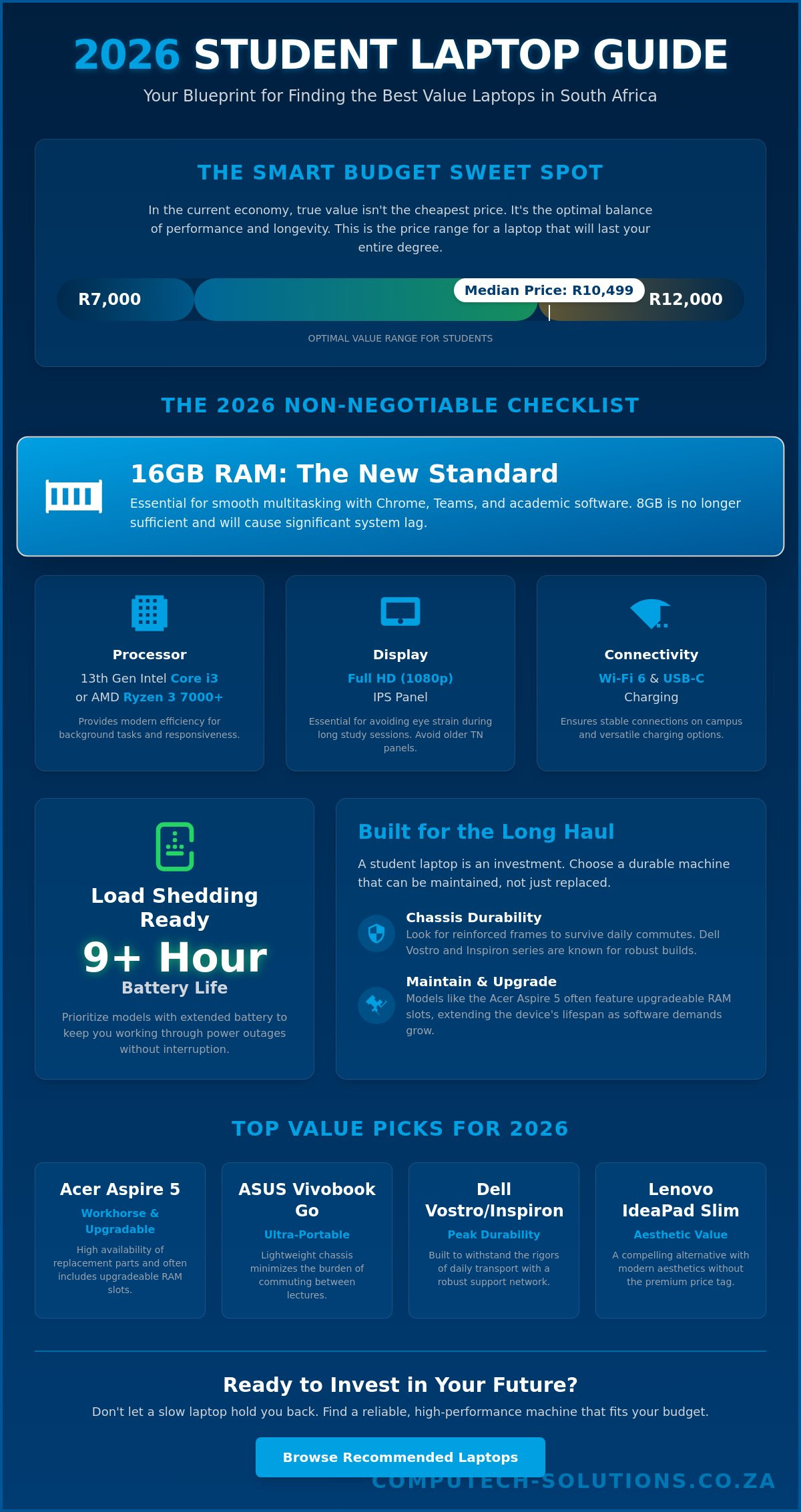
In the current South African economy, the definition of a budget device has shifted significantly. While entry-level machines exist at lower price points, the core budget range for reliable academic work now falls between R7,000 and R12,000. With the median transaction price for a laptop sitting at R10,499 as of March 2026, students must be strategic. Finding the best budget laptops for students in South Africa isn’t about chasing the lowest price; it’s about securing a machine that survives a four-year degree without becoming a paperweight by semester two.
Understanding the internal architecture of modern laptops is essential for making an informed choice. In 2026, 16GB of RAM has moved from a luxury to a non-negotiable floor. Modern academic software and web browsers have become resource-intensive. A machine with only 8GB will struggle with multiple Chrome tabs, Microsoft Teams, and research software running simultaneously. Additionally, the industry has transitioned from SATA SSDs to Gen4 NVMe drives as the standard for entry-level speed. This shift ensures that boot times and file transfers remain near-instant, preventing the performance bottlenecks common in older hardware.
Build quality often takes a backseat to processor speed in marketing, yet chassis durability is often more critical for campus life. A slightly faster CPU won’t help if the hinges snap or the casing cracks during a commute between lectures. We prioritize models with reinforced frames and reliable internal layouts. This focus on physical integrity ensures that if a component like an LCD panel or a battery eventually requires replacement, the rest of the machine remains structurally sound for years to come.
The Minimum Spec Checklist for 2026
- Processor: Don’t settle for less than a 13th Gen Intel Core i3 or a Ryzen 3 7000 series. These chips provide the necessary efficiency for modern background tasks.
- Display: A Full HD (1080p) IPS panel is essential. Avoid older TN panels which cause eye strain during late-night study sessions due to poor viewing angles and low contrast.
- Connectivity: Wi-Fi 6 ensures stable connections in crowded university halls. USB-C charging is also vital; it allows you to use a wider range of laptop chargers and power banks.
Software Requirements vs. Hardware Capability
Windows 11 and modern AI-integrated browsers consume more system resources than their predecessors. Engineering students running CAD software will need to lean toward the R12,000 end of the budget for better thermal management. Humanities students might prioritize portability, but they still require the 16GB RAM standard for intensive research and writing. Investing slightly above the bare minimum today prevents the need for a total hardware replacement in two years. It’s a calculated strategy that views the best budget laptops for students in South Africa as long-term operational assets rather than disposable tools.
Top Budget Laptop Picks for South African Students in 2026
Selecting a device involves balancing immediate performance with long term reliability. In 2026, the best budget laptops for students in South Africa aren’t just defined by their internal components; they’re defined by how easily they can be maintained over a four year degree. The Acer Aspire 5 stands out as a premier workhorse due to its balanced specifications and the high availability of replacement parts. For those prioritizing mobility, the ASUS Vivobook Go offers a lightweight chassis that minimizes the physical burden of commuting between lecture halls and off campus housing.
Dell’s Vostro and Inspiron series remain the standard for durability. These machines are built to withstand the rigors of daily transport; they also benefit from a robust local support network. Meanwhile, the Lenovo IdeaPad Slim series provides a compelling value alternative for students who need modern aesthetics without a premium price tag. When managing your device, remember that managing laptops during load shedding or load reduction requires a focus on battery health and surge protection. If your current machine is struggling to keep up, upgrading to one of these reliable laptops can prevent academic disruption.
Detailed Model Breakdown
The Acer Aspire 5 is particularly noteworthy because it often includes upgradeable RAM slots. This feature allows you to start with 8GB and move to 16GB as your software requirements grow. The HP 250 and 255 G10 models are favored by humanities students for their superior keyboard tactile feedback, which is essential for high volume essay writing. For those who value peace of mind, the Dell Inspiron 15 offers excellent local warranty support, ensuring that technical issues are resolved quickly through South African service centers.
Quick Comparison: Specs at a Glance
- Battery Capacity: Look for models with at least a 41WHr to 50WHr rating. The ASUS Vivobook Go often leads in this category, providing enough runtime to survive a standard load reduction block during peak hours.
- Port Selection: The Acer Aspire 5 and HP 250 series continue to offer full sized HDMI ports and SD card slots. This eliminates the need for expensive USB-C dongles when connecting to campus projectors or transferring media.
- Weight: The ASUS Vivobook Go typically weighs under 1.5kg, while the Dell Inspiron 15 and Acer Aspire 5 sit closer to 1.7kg. This difference is noticeable when walking across large campuses like Wits or UCT.
In 2026, the best budget laptops for students in South Africa must provide more than just a screen and a keyboard. They need to serve as a stable platform for your entire academic journey. By choosing a model with a proven track record for part availability, you ensure that simple issues like a worn out battery or a cracked LCD panel don’t result in a total loss of your investment.
Performance vs. Price: Evaluating CPU, RAM, and Storage
Don’t fall for the price tag on entry-level Celeron or Pentium machines. While these processors appear affordable, they represent a significant performance trap in 2026. These chips struggle to manage the background processes required by modern security software and cloud-based learning platforms. The best budget laptops for students in South Africa balance raw speed with long-term efficiency by utilizing mid-tier architectures that don’t choke under a standard academic workload.
RAM configuration is another critical factor that separates a temporary fix from a long-term solution. Many ultra-slim budget models now feature soldered memory, which means you cannot upgrade it later. If a machine has 8GB of soldered RAM, it will likely be obsolete before you finish your degree. We recommend looking for models with at least one open SODIMM slot. This flexibility allows you to increase your capacity as software demands grow, ensuring your investment remains viable for several years.
Storage technology has also moved beyond simple capacity. A 256GB SSD is the absolute minimum for basic file storage, but 512GB is the current sweet spot for students handling research datasets or media projects. Integrated graphics in these budget units, such as Intel UHD or AMD Radeon, are now capable enough for light photo editing and Canva designs. However, they aren’t built for high-end video rendering. If your coursework involves heavy 4K editing, you’ll need to look toward the upper end of the budget spectrum to avoid thermal throttling.
CPU Battle: Intel vs. AMD in the Budget Space
- Core i3-N305 vs. Ryzen 3 7320U: The Intel i3-N305 offers impressive 8-core efficiency for multitasking, while the Ryzen 3 7320U often provides better integrated graphics performance for light creative work.
- “U” Series Processors: Most budget laptops use “U” series chips designed for ultra-low power consumption. This maximizes battery life during lectures but limits the machine’s ability to handle sustained heavy processing.
- Thermal Management: Budget chassis often have smaller cooling systems. Choosing an efficient processor prevents the laptop from running hot during intensive exams or long study sessions.
The SSD Advantage
NVMe storage is now a non-negotiable standard. It’s significantly faster than the eMMC storage found in sub-R5,000 machines. Using eMMC is a mistake; it results in sluggish boot times and delayed app responsiveness that will frustrate your daily workflow. For students with large research datasets, it’s more cost-effective to buy a laptop with a fast 512GB internal NVMe drive and supplement it with external storage rather than paying a massive premium for a 1TB internal upgrade. The best budget laptops for students in South Africa prioritize this balance of internal speed and external flexibility.
The Load Shedding Factor: Battery Life and Power Management
As of May 2026, South Africa has experienced over 372 days without national load shedding. This milestone represents a significant stabilization of the grid; however, students in high-density areas like Gauteng still face “load reduction” during peak hours. These localized outages typically occur between 05:00 and 09:00 or 17:00 and 22:00. Consequently, the best budget laptops for students in South Africa must possess a battery capable of sustaining at least four to five hours of continuous use. While a manufacturer might advertise a ten-hour runtime, real-world academic use with active Wi-Fi and high screen brightness often reduces this by 40%.
To maximize your uptime during a power cut, you should enable the “Battery Saver” mode in Windows 11 to trigger automatically at 30%. This setting restricts background synchronization and lowers the display refresh rate. Modern budget machines increasingly support USB-C Power Delivery (PD). This feature is essential because it allows you to charge your device using a high-capacity power bank. If your current power solution is failing, it’s often more cost-effective to invest in reliable laptop chargers or a replacement battery rather than a new machine.
Power Solutions for Students
If you plan to use a power bank, ensure it offers at least 65W output. Lower wattage banks designed for phones won’t provide enough current to charge a laptop while it’s in use. For students in off-campus housing, a small portable solar panel can provide a trickle charge during the day, though this is rarely a primary power source. Most importantly, always use a high-quality surge protector. When the grid restores power after a load reduction period, voltage spikes can cause catastrophic motherboard failure. A surge protector is a small investment that prevents a total loss of your hardware.
Maintaining Battery Health
Heat is the primary enemy of lithium-ion batteries in the South African climate. Ambient temperatures often exceed 30 degrees Celsius, and using a laptop on a soft surface like a bed blocks essential ventilation. This thermal stress accelerates the chemical degradation of the cells. To ensure your battery percentage remains accurate, perform a full calibration once every three months by letting the battery drain to 5% before charging it to 100% without interruption. For daily use, follow the 20-80 rule: keep your charge between 20% and 80% to significantly extend the total lifecycle of your replacement laptop batteries.
Selecting the best budget laptops for students in South Africa requires a focus on these power realities. By combining a machine with a strong native battery life and the right external power accessories, you can ensure your studies remain uninterrupted regardless of local grid instability.
Maximizing Your Investment: Maintenance and Spare Parts
Viewing a laptop as a disposable item is a significant financial mistake. In 2026, the best budget laptops for students in South Africa are designed with modularity in mind. This allows you to extend the operational life of your machine well beyond the standard two-year warranty period. Replacing a degraded battery or a cracked screen is a fraction of the cost of purchasing a new device, which currently averages over R10,499. By focusing on maintenance, you ensure your academic tools remain reliable until graduation.
Common mishaps like liquid spills or cracked screens don’t have to end your semester. Most budget models from major brands use standardized components that are easily sourced within South Africa. Instead of abandoning a machine that’s only two years old, consider the cost-benefit of a simple repair. A new battery can restore your 9-hour runtime, allowing you to handle load reduction blocks without stress. This proactive approach protects your initial investment and keeps your data exactly where you need it.
Extending Your Laptop’s Lifespan
A common issue students face is battery degradation after intensive daily use. Whether you own an HP, Dell, or Acer, finding the correct replacement battery is straightforward if you know your model number. It’s also vital to use high-quality laptop chargers. Poorly regulated adapters can cause voltage fluctuations that lead to motherboard failure. If your machine feels sluggish after three years, check if the RAM is upgradeable. Adding more memory or a larger NVMe SSD can make an older laptop feel like a modern 2026 machine again.
Sourcing Reliable Parts Nationally
Finding high-quality replacement components shouldn’t be a challenge for local students. High-quality replacement batteries offer a cost-effective solution for those who need to restore their mobility without buying a new laptop. If you experience a cracked display, sourcing 15.6-inch laptop LCD replacement panels is often simpler than expected. To keep your device in peak condition, browse high-quality replacement batteries and chargers at Computech-Solutions. These components provide a definitive solution for maintaining your hardware and ensuring the best budget laptops for students in South Africa remain functional for the duration of your studies.
Securing Your Academic Future with Smart Hardware Choices
Selecting the best budget laptops for students in South Africa involves more than comparing sticker prices. It’s about finding a machine that meets the 2026 standard of 16GB RAM and NVMe storage while remaining physically durable enough for campus life. You’ve learned that battery resilience is key during load reduction periods and that maintaining your device through component upgrades is the most sustainable financial path.
A laptop is a long-term academic asset. If your current device needs a performance boost or a new lease on life, sourcing high-quality parts is essential. We’re specialists in Acer, HP, Dell, and Lenovo replacement components; we offer national delivery across South Africa and expert technical support for hardware compatibility.
Find Reliable Laptop Batteries and Chargers for All Major Brands at Computech-Solutions to ensure your machine is ready for the semester ahead. You’re now equipped to make a choice that supports your studies and your budget.
Frequently Asked Questions
What is the best laptop for a university student on a budget in South Africa?
The Acer Aspire 5 is widely considered one of the best budget laptops for students in South Africa due to its balance of price and upgradeability. It provides the necessary ports for campus presentations and enough processing power for standard research tasks. Other strong contenders include the ASUS Vivobook Go for portability and the Dell Inspiron 15 for its robust local support network.
How much should I spend on a student laptop in 2026?
You should aim to spend between R7,000 and R12,000 to secure a machine that lasts your entire degree. While entry-level models start around R2,999, these often lack the processing power required for 2026 software. Investing in the median price range of approximately R10,500 ensures you get a 512GB SSD and a durable chassis that resists daily wear.
Is 8GB RAM enough for a student laptop in 2026?
No, 8GB of RAM is no longer the recommended standard for 2026 academic demands. Modern browsers and multitasking tools like Microsoft Teams consume significant resources; 16GB is now the baseline for smooth performance. If you buy a machine with 8GB, ensure it has an open SODIMM slot so you can upgrade the memory later to avoid frustrating system slowdowns during exams.
How long should a budget laptop battery last during load shedding?
A reliable student laptop should provide between 7 and 9 hours of real-world battery life. This duration is critical for surviving 4-hour load reduction blocks or long days on campus without access to a power outlet. Always check the watt-hour rating; a higher number generally indicates better endurance. This ensures you can find the best budget laptops for students in South Africa that handle grid instability.
Can I charge my budget laptop with a power bank?
You can charge your laptop with a power bank if the device supports USB-C Power Delivery. You’ll need a specialized power bank capable of at least 65W output to provide sufficient current. Standard phone power banks don’t work for this purpose because they lack the necessary wattage. Always verify your laptop’s charging specifications and use high-quality laptop chargers to maintain battery health.
Are refurbished laptops a good idea for students in South Africa?
Refurbished laptops are an excellent option for students looking to save between 18% and 25% on premium hardware. These machines often come with warranties and provide better build quality than new ultra-budget models. Ensure you purchase from a reputable seller that provides clear information on the battery’s remaining health. This strategy allows you to access higher-tier specifications while staying within a strict budget.
Where can I buy replacement batteries for my student laptop?
You can source high-quality replacement batteries for Acer, HP, Dell, and Lenovo models directly from specialized local retailers. We provide a comprehensive range of batteries and chargers designed to meet the specific technical requirements of your machine. This ensures your laptop maintains its mobile performance throughout your academic career, even if the original battery begins to degrade after two years of intensive use.
What happens if my laptop screen breaks during the semester?
If your screen breaks, you don’t need to replace the entire laptop. You can purchase replacement LCD panels for most budget models at a fraction of the cost of a new machine. This repair is a standard procedure that restores your device to full functionality. Sourcing the correct panel locally ensures you can continue your studies without the major financial setback of a total hardware replacement.
