
Replacing a cracked screen is almost always more sustainable and cost-effective than purchasing a brand-new machine. When a spiderweb of glass suddenly obscures your work, the immediate concern is usually the high cost of new electronics and the frustrating downtime affecting your study or business. You’re likely asking can a cracked laptop screen be repaired or if the damage has rendered your entire investment obsolete.
We recognize that technical disruptions are more than just an inconvenience; they’re a risk to your operational efficiency. This professional guide provides the clarity you need to diagnose display damage accurately and choose the most reliable path to recovery. We’ll outline the variables that dictate repair viability and show you how to find the exact laptop LCD replacement panels required for your specific model in South Africa. By the end of this article, you’ll have a definitive strategy to restore your device and return to peak productivity without the expense of a total hardware replacement.
Key Takeaways
- Understand that while glass cannot be healed, replacing the entire LCD panel is a standard and effective professional solution.
- Identify specific diagnostic signs, such as ink blots or vertical lines, to determine can a cracked laptop screen be repaired or if internal damage exists.
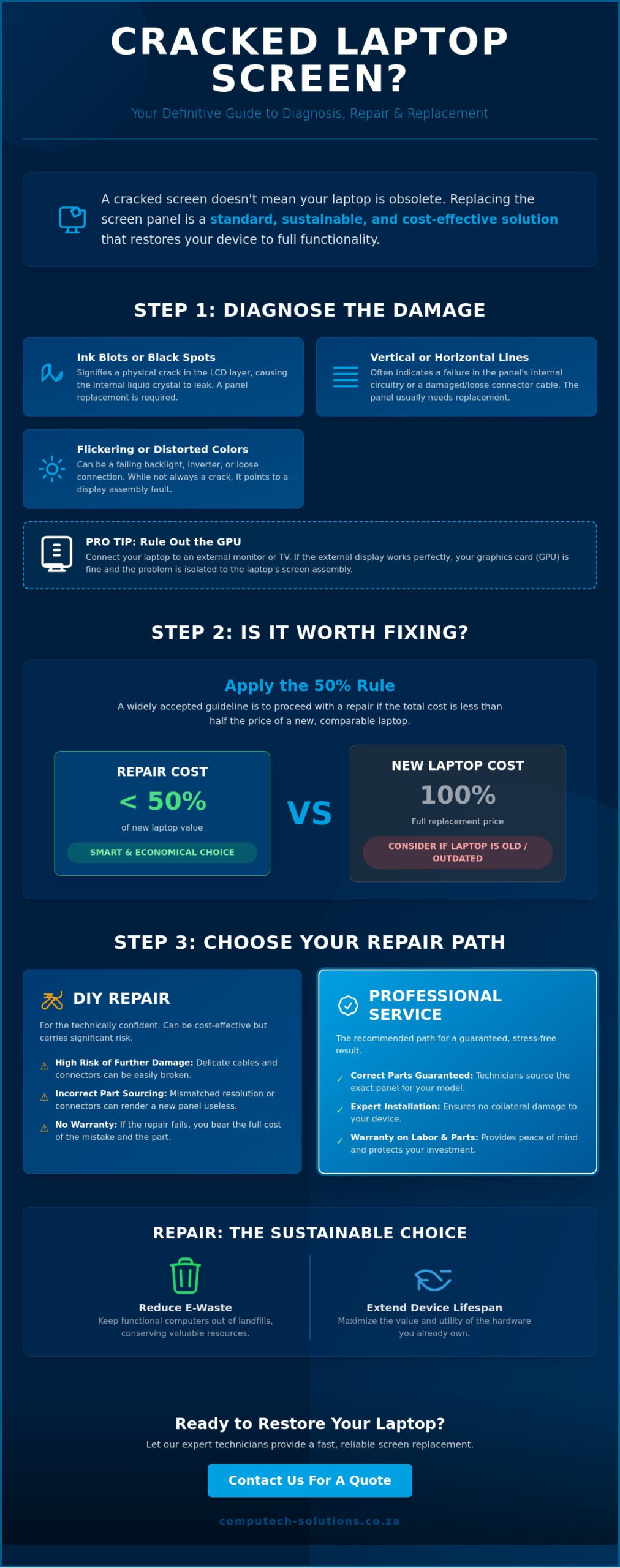
- Apply the 50 percent rule to evaluate whether a screen replacement is more cost-effective than purchasing a new device.
- Learn how to source the correct replacement part by verifying critical specs like resolution, screen size, and connector pin counts.
- Assess the technical risks of DIY installation to ensure you maintain the operational integrity of your laptop hardware.
The Definitive Answer: Can You Repair a Cracked Laptop Screen?
When a display sustains impact damage, the most urgent question is can a cracked laptop screen be repaired without replacing the entire device. Technically, the answer is no; you cannot “heal” or patch cracked glass. Once the structural integrity of the display panel is compromised, the only professional solution is a full panel replacement. Modern hardware is designed with modularity in mind. This means that while the glass itself is broken, the laptop’s internal logic, storage, and processing power remain intact.
When “Repair” Actually Means “Replacement”
There is a critical distinction between a cosmetic surface scratch and a structural crack. A scratch affects the outer coating but doesn’t disrupt the image. A crack, however, penetrates the layers of the LCD (Liquid Crystal Display). Because these layers contain fluid and precise electrical grids, physical intervention cannot restore them. Technicians don’t “fix” the crack; they perform a panel swap. This is a standard procedure for any professional service provider. It ensures the device returns to factory specifications without the risk of further bleeding or dead pixels.
The Anatomy of Your Laptop Display
To understand why a full swap is necessary, you must look at how the lid is built. The lid assembly houses the LCD panel, the backlight unit, and the bezel. Connecting these components to the motherboard is the Embedded DisplayPort (EDP) cable. This thin, high-speed cable carries the video signal and power. Understanding what a laptop is from a component perspective highlights its modular nature. Most modern units allow for the safe extraction of the damaged panel from the lid housing, provided the technician has the correct tools and replacement part.
Deciding to replace the screen is also a win for sustainability. Discarding a functional computer because of a broken display contributes to the growing global e-waste crisis. By sourcing high-quality laptop LCD replacement panels, you extend the lifecycle of your machine. This approach is significantly more environmentally friendly than purchasing a new unit. It preserves the energy and materials already invested in the motherboard, chassis, and battery. As long as the laptop’s age and performance still meet your professional requirements, asking can a cracked laptop screen be repaired usually leads to a much more cost-effective outcome than buying new hardware.
Diagnosing the Damage: Is it Just the Glass or the LCD?
Accurate diagnosis is the first step in determining if your hardware can return to service. Visual symptoms often dictate the underlying fault and help answer whether can a cracked laptop screen be repaired or if the damage is deeper. For instance, if you notice dark, spreading “ink blots” or black spots, the internal liquid crystal has leaked. This is a definitive sign of physical trauma to the LCD layer. Vertical or horizontal lines that persist regardless of the application running usually indicate a failure in the panel’s internal circuitry or the connector cable. While these visuals are jarring, they provide a clear map for the necessary hardware intervention.
A flickering display might not always stem from a physical crack. It often points to an inverter issue or a loose internal connection within the lid assembly. Ghosting, where faint “burn-in” images remain on the screen, signals a failing display panel that has lost its ability to refresh pixels efficiently. When evaluating these faults, deciding if a repair is worth it involves weighing these visual failures against the cost of a new machine. Identifying the specific failure mode ensures you don’t waste resources on unnecessary parts.
Digitiser vs. LCD: Which One Is Broken?
In modern touch-enabled devices, the display consists of two primary layers. The digitiser is the top glass layer responsible for touch input. If the glass is shattered but the image remains perfect, only the digitiser is compromised. Conversely, the LCD is the internal layer that produces the actual image. If your touch input works but the screen shows black patches or distorted colors, the LCD is the culprit. Understanding this distinction is vital when asking can a cracked laptop screen be repaired, as it determines which specific part you need to source. Sourcing the wrong component leads to unnecessary downtime and increased costs.
External Monitor Test: Ruling Out the GPU
Testing with an external monitor is a reliable way to isolate the fault. Connect your laptop to a TV or desktop monitor via an HDMI cable. If the image on the external screen is perfect, the problem is isolated to your laptop’s display. However, if the external image is also distorted or shows the same lines, the issue likely lies with the motherboard or the GPU. This simple test prevents you from purchasing a replacement part for a device with a terminal graphics chip failure. Once you’ve confirmed the screen is the only failure point, you can browse high-quality laptop LCD replacement panels to begin the restoration process and get your workstation back to peak performance.
Repair vs. Replacement: Is Your Laptop Worth Fixing?
Determining if your device warrants the investment starts with the 50 percent rule. If the total cost to resolve the issue exceeds half the price of a comparable new machine, replacement is often the more pragmatic business decision. However, the question of whether can a cracked laptop screen be repaired isn’t just about the display itself. You must evaluate the underlying hardware. A high-performance unit with a modern CPU and ample RAM often justifies a panel swap, as the core processing power remains valuable for several more years. It’s a matter of calculating the remaining lifecycle of the machine against the immediate cost of the part.
Display technology significantly influences the financial outlook. Standard HD panels are relatively inexpensive to source, while 4K resolutions or high refresh rate gaming screens carry a premium. Specialized features like OLED technology or integrated touch layers further increase the component cost. You should match the replacement part exactly to your original specifications to maintain operational standards. Investing in a quality panel ensures that your laptop’s visual output remains professional and consistent with its original design.
Calculating the Total Cost of Ownership
Calculating the total cost of ownership requires a clear-eyed look at all variables. You need to combine the price of the laptop LCD replacement panels with any technical labor fees involved if you choose professional installation. Compare this final figure against the current market price for a refurbished or new unit with similar performance benchmarks. Often, repairing a mid-range or high-end laptop is the more efficient path to restoring your workflow. It eliminates the need for time-consuming data migrations and software re-installations that come with a new device.
When Replacement is the Only Logical Choice
There are instances where a new purchase is the only logical choice. If the impact that cracked the glass also warped the hinges or shattered the lid casing, the repair becomes structurally complex. Obsolete models present another challenge. If manufacturers no longer produce compatible panels, sourcing a reliable part becomes difficult. In these cases, asking can a cracked laptop screen be repaired might lead you to conclude that moving to a newer generation of hardware provides better long-term growth and efficiency. Upgrading allows you to benefit from improved battery life and faster processing speeds found in the latest models.
DIY vs. Professional Screen Replacement: Risks and Rewards
Deciding how to handle a broken display involves balancing cost against operational risk. While we’ve established that the answer to can a cracked laptop screen be repaired is a definitive panel replacement, the method of installation is a critical choice. DIY enthusiasts often enjoy significant cost savings by eliminating technical labor fees. There’s also a sense of technical accomplishment in restoring your own hardware to factory standards. However, the risks are substantial for those without experience. You might cause static discharge that fries the motherboard, or you could accidentally damage the fragile plastic bezel during disassembly. Buying the wrong part is another common pitfall that leads to further downtime.
Professional services provide a different set of benefits rooted in stability and confidence. You receive a warranty on the labor and a guarantee that the replacement panel is fully compatible with your specific model. While the financial investment is higher, it alleviates the stress of technical disruptions and ensures the job is done right the first time. The main drawback is the potential downtime while your unit is at a service center. For professionals whose work depends on constant access to their machine, this delay is a significant factor in the decision-making process.
Essential Tools for a Successful Screen Swap
If you choose the DIY route, you must use the correct equipment to avoid cosmetic or internal damage. A precision screwdriver set is non-negotiable; most laptops require Phillips #0 or #00 bits, while some premium models use Torx T5 screws. Plastic pry tools, often called spudgers, are essential for popping the bezel clips without scratching the chassis. Finally, an anti-static wrist strap is a vital safety measure. It grounds you to prevent electrostatic discharge from damaging the sensitive internal circuitry of your device.
The #1 Golden Rule of Laptop Repair
The most important step in any screen replacement is isolating the power. You must disconnect the internal battery before touching the LCD cable. Even when a laptop is powered off, a small amount of electricity often flows to the display connector. If you plug in a new panel while the battery is connected, you risk blowing the backlight fuse on the motherboard. This results in a screen that stays dark even if the new LCD is perfect. To avoid this, open the bottom case, unplug the battery, and hold the power button for ten seconds to drain any residual energy. Once you’re ready to begin, you can browse our professional-grade laptop LCD replacement panels to find the exact match for your hardware.
Finding the Correct Replacement LCD Panel in South Africa
Sourcing the correct hardware is the final step in resolving the disruption caused by a damaged display. While you now know can a cracked laptop screen be repaired through a full panel swap, success depends on precision. The most reliable way to identify your required part is to look at the back of the original LCD panel. You’ll find a manufacturer part number, such as “LP156WHB” or “B156XTN”. This code is far more accurate than the laptop model number alone, as manufacturers often use different screen types within the same model series depending on the production year.
You must match three critical specifications: physical size, resolution, and pin count. Screens generally use either a 30-pin or 40-pin connector. Plugging a 30-pin cable into a 40-pin panel is physically impossible, so verifying this before purchase is essential. Resolution is another non-negotiable factor. If your original screen was Full HD (1920×1080), replacing it with a standard HD (1366×768) panel might cause compatibility issues with the display cable. Additionally, consider your work environment when choosing between a glossy or matte finish. Glossy screens offer vibrant colors, while matte finishes reduce glare in bright office settings.
Matching Specs for Acer, Dell, HP, and More
High-priority brands like Acer and Dell frequently vary their connector positions. You must check if your connection port is located on the bottom left or bottom right of the panel’s rear. Don’t be deterred by “generic” labels on replacement parts. Most laptop brands don’t manufacture their own screens; they source them from specialized factories. A high-quality third-party panel often provides the same performance and durability as the original equipment manufacturer (OEM) part. Verifying the mounting bracket positions is also vital for HP and Lenovo models to ensure the screen fits securely within the lid assembly.
Reliable Sourcing with Expert Support
Purchasing from a reputable South African retailer ensures you receive a part that has undergone technical verification. Local suppliers understand the specific hardware configurations prevalent in the regional market. Reliable providers offer nationwide shipping, delivering your components safely to any province. This localized support minimizes operational risks and gets your device back into service quickly. A local partner provides a grounded sense of security, knowing that technical assistance is available if you encounter issues during the identification process. If you’re ready to restore your machine, Browse our full range of Laptop LCD Replacement Panels to find a compatible solution for your hardware. This remains the most efficient path for anyone wondering can a cracked laptop screen be repaired with minimal disruption to their professional workflow.
Restore Your Device to Peak Performance
Restoring a damaged display is a strategic decision that preserves your existing hardware investment and maintains your professional workflow. We’ve established that while glass doesn’t heal, a precise panel swap is a definitive solution. Success relies on identifying the correct part number and ensuring that your resolution and pin counts match the original factory specifications. When you’re asking can a cracked laptop screen be repaired, remember that the answer is a resounding yes with the right technical approach.
Choosing a reliable partner for your components eliminates the stress of technical disruptions. As specialists in Acer, Dell, and HP replacement parts, we provide the expert technical support you need for accurate part matching. We ensure your hardware returns to service quickly with reliable nationwide delivery across South Africa. Take the first step toward a functional workstation today and Find Your Replacement Laptop LCD Panel at Computech-Solutions. You don’t have to settle for a broken display when a streamlined, professional solution is within reach.
Frequently Asked Questions
Can I still use my laptop if the screen is cracked but the image is visible?
Yes, you can continue using the device, but it’s a temporary solution with inherent risks. Cracks compromise the structural integrity of the lid assembly. Opening and closing the device puts pressure on the glass, which can lead to the internal liquid crystal leaking. You also risk cutting your fingers or damaging the keyboard when the lid is closed on glass shards.
How much does it typically cost to replace a laptop screen in South Africa?
Replacement costs in the South African market fluctuate based on your laptop’s brand and screen technology. Premium features like touch sensitivity or 4K resolution will increase the total investment significantly compared to standard HD panels. To ensure you get the best value for your hardware, you should match your part number with a local supplier who offers nationwide delivery and technical verification.
Is it cheaper to fix a laptop screen or buy a new laptop?
Repair is usually more economical for modern hardware that still performs well. If your processor and RAM meet your current operational needs, a screen replacement costs significantly less than a new machine. This approach also saves you the considerable time required for data migration and software setup on a new device, allowing you to return to your work or studies much faster.
Can I upgrade my screen resolution (e.g., HD to Full HD) during a replacement?
Resolution upgrades are sometimes possible but require careful technical verification. Your laptop’s motherboard and internal display cable must support the higher bandwidth required for a Full HD or 4K panel. If your hardware is limited to a single-channel connection, a higher-resolution screen simply won’t function. Always consult a technical expert before attempting to deviate from your original factory specifications to avoid compatibility issues.
Will a cracked screen eventually get worse if I don’t fix it?
Damage almost always worsens over time. Environmental factors like temperature changes cause the glass to expand and contract, which drives the crack further across the panel. If you’re wondering can a cracked laptop screen be repaired after the damage spreads, the process remains the same, but you risk secondary damage to the webcam or lid housing if you wait until the display fails completely.
How do I know if I need a 30-pin or a 40-pin replacement screen?
You must physically inspect the connector on your original LCD to be certain. A 30-pin connector is typically used for standard resolutions, while 40-pin connectors are required for touchscreens or high-refresh displays. Matching the part number found on the back of your panel is the most reliable way to ensure you purchase a compatible replacement for your specific machine without any guesswork.
Does insurance usually cover a cracked laptop screen?
Accidental damage is typically covered by comprehensive business or household insurance policies. However, standard manufacturer warranties usually only cover factory defects and exclude physical impact damage. You should review your specific policy documents or contact your insurance broker to confirm if your incident is covered. Most professional repair centers can provide the formal damage report required to process your insurance claim effectively.
Can I replace my laptop screen myself without any technical experience?
DIY replacement is feasible but carries significant risks for those without technical experience. Handling fragile internal cables and removing plastic bezels requires a steady hand and specialized tools. If you’re unsure about the process, seeking professional help is the best way to ensure can a cracked laptop screen be repaired without causing permanent damage to the motherboard or other sensitive internal components.
