
A sudden blackout usually doesn’t damage a healthy laptop battery. So, can load shedding damage a laptop battery? The outage itself typically just stops charging while the laptop switches to battery power. A separate power-related concern may arise when electricity returns, as a voltage surge can affect the charger or the laptop’s internal charging circuitry.
It’s understandable to worry that repeated interruptions are shortening your battery’s life, especially when your laptop’s runtime changes. But ordinary battery ageing and damage to charging components can cause different symptoms. An outage doesn’t automatically mean you need a replacement.
This guide explains what happens to your laptop during an interruption, how to reduce risks when power goes off and comes back, and how load shedding differs from local load reduction. You’ll also learn how to spot signs of battery wear, when troubleshooting may help, and when a replacement battery that matches your laptop’s requirements could be a practical option.
Key Takeaways
- Can load shedding damage a laptop battery? An interruption alone doesn’t necessarily harm a healthy battery, but persistent battery problems deserve attention.
- Learn how a laptop’s battery management system handles charging and discharging, and why interrupted charging isn’t the same as battery failure.
- Separate ordinary battery wear from possible power disturbances that may affect the charger or charging circuitry.
- Use a simple before, during and after outage checklist: save your work, conserve battery power and shut down safely if the charge runs low.
- If battery symptoms persist, troubleshoot before deciding whether a compatible replacement battery is appropriate.
Can load shedding damage a laptop battery? The short answer
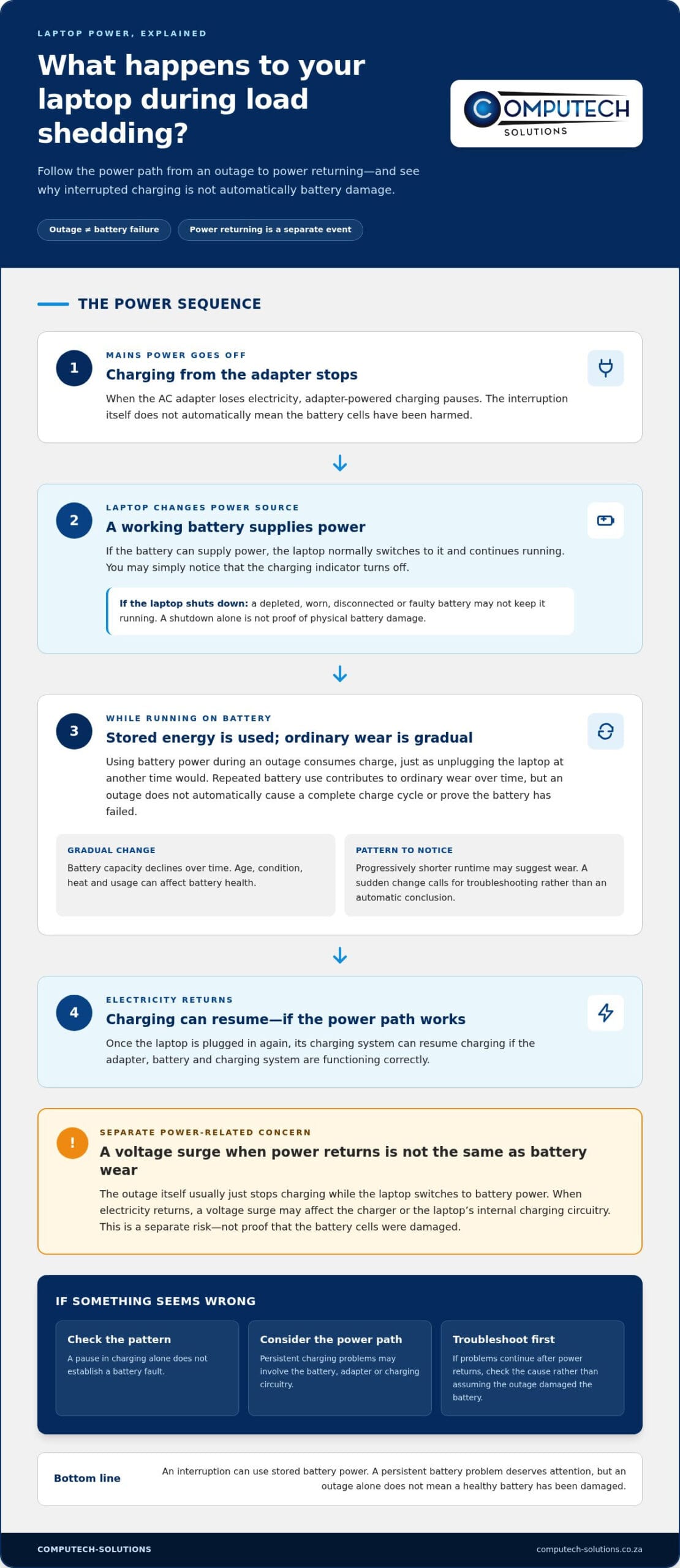
Usually, an outage alone doesn’t damage a healthy laptop battery. When the charger loses mains power, the laptop normally switches to its internal battery and continues running, provided the battery has charge and is working properly. So, can load shedding damage a laptop battery? The interruption itself is different from battery failure, although repeated battery use and electrical disturbances when power returns are separate factors to consider.
A laptop battery stores and supplies power through cells managed by the laptop’s charging system. Many laptops use a lithium-ion battery, whose condition changes gradually with use and is affected by factors such as age and heat. An outage pauses adapter-powered charging; it doesn’t automatically mean the battery cells have been harmed.
What happens to a laptop when the power goes off?
When the AC adapter stops receiving electricity, a functioning laptop draws power from its battery instead. You may notice only that the charging indicator switches off. If the battery is depleted, worn, disconnected or faulty, the laptop may shut down when mains power is lost. That sudden loss of mains power is not, by itself, proof that the battery has been physically damaged.
If the laptop switches off, unsaved work may be lost. After power returns, check whether it starts and charges normally. If problems continue, the battery, charger or charging circuitry could be involved, so don’t assume the outage has identified the cause.
Does every outage shorten battery life?
No. Using battery power during an outage consumes charge, just as unplugging the laptop at another time would. That alone isn’t evidence that the battery has failed. Once power is restored and the laptop is plugged in, its charging system can resume charging, assuming the adapter and battery are functioning correctly.
Battery capacity declines gradually over time, and the rate varies with the battery’s age, condition and use. Repeatedly running a laptop on battery means it goes through more charging and discharging, but there’s no reliable outage count that proves a battery will be damaged. A laptop that already has limited runtime may simply make its existing wear more noticeable during an interruption.
Keep three situations separate: loss of mains power, normal battery discharge while the laptop runs, and a possible electrical disturbance when supply returns. The first interrupts charging; the second uses stored energy; the third is a distinct power-related risk. If the battery’s runtime or charging behaviour changes persistently, troubleshooting is more useful than assuming load shedding alone caused the problem.
How load shedding, charging interruptions, and laptop batteries interact
A laptop’s battery and AC adapter work together to keep the computer powered, but a charging interruption isn’t the same as cell failure. The battery management system helps monitor and manage charging and discharging, while the laptop draws power from whichever source is available. Its exact protections and charging behaviour depend on the laptop and battery design.
What the battery management system does during an outage
When adapter power stops, the laptop generally draws from its battery if the battery is able to supply power. The management system tracks battery operation and works with the laptop’s charging controls as power returns. These systems vary, so don’t assume every model responds to interruptions or manages charging limits in exactly the same way. A pause in charging alone doesn’t establish that the battery has a fault.
If your laptop’s charging indicator behaves unexpectedly after an interruption, consider the battery and the adapter as possible parts of the power path. Persistent charging problems are a reason to troubleshoot, not proof of a specific cause.
Why repeated battery use is different from sudden damage
A charge cycle is the cumulative use of an amount of battery power equal to its full capacity, even if that energy is used across several partial discharges. For example, using part of the battery, recharging it, then using more later contributes to cycle use; it doesn’t mean each outage creates a complete cycle by itself.
Running on battery during an outage consumes stored energy. Once the adapter is available again, the laptop can recharge, assuming the battery, charger and charging system are functioning. This repeated use contributes to ordinary wear over time, but gradual capacity loss differs from an abrupt shutdown or a sudden inability to charge. The pattern matters: progressively shorter runtime may suggest wear, while a sudden change calls for troubleshooting rather than an automatic conclusion that the battery is damaged.
Battery condition can also be affected by age, heat and usage patterns. Battery University’s overview of the causes of battery degradation explains why lithium-ion battery health changes over time. These factors help put outage-related battery use in perspective: the interruption may prompt the laptop to use stored power, but it doesn’t by itself explain every later battery symptom.
If unusual charging behaviour continues, technical support can help you assess whether the battery or laptop charger may be involved. Get help with laptop battery concerns.
Power returning after load shedding: surge risk versus battery damage
Power going off and power returning are different events. During an outage, the laptop may use stored battery power. When electricity comes back, a possible voltage disturbance is a separate concern: depending on the event and the equipment’s design, it could affect connected devices. Neither situation automatically means the battery has been damaged.
| Situation | What it may mean |
|---|---|
| Charging interruption | The adapter stops supplying power, so the laptop may run from its battery. A pause in charging alone doesn’t indicate cell failure. |
| Battery wear | Repeated use and recharging contribute to gradual wear over time, alongside factors such as age, heat and usage patterns. |
| Possible power disturbance | An electrical event as supply returns may affect connected equipment, depending on its severity and the protection in place. |
Can a power surge damage a laptop or its charger?
A surge can affect connected electronics. The laptop’s AC adapter is part of its power path: it supplies power to the computer and supports battery charging. However, an adapter shouldn’t be assumed to prevent every surge from reaching the laptop. The outcome depends on the electrical event and the design and condition of the connected equipment.
A disturbance could affect the adapter or the laptop’s internal power or charging components. That is different from ordinary battery wear caused by use over time. Not every restoration causes a surge, and no single protective device should be treated as a guarantee against all electrical damage. If the laptop stops charging after a power event, the adapter, charging connection and laptop may all be relevant to troubleshooting.
What signs suggest a battery problem instead?
Noticeably shorter runtime, unexpected shutdowns while the laptop is unplugged, or charging that starts and stops may point to a battery issue. These symptoms can also have other explanations, including a problem with the charger or charging circuitry. They aren’t proof that load shedding caused damage.
If you’re asking, can load shedding damage a laptop battery, keep the distinction clear: normal battery discharge during an outage differs from a possible electrical disturbance when power returns. Notice whether symptoms persist and whether the laptop behaves differently on battery and adapter power. If troubleshooting indicates battery wear or failure, choose a replacement that matches the laptop and its requirements. Don’t replace the battery solely because an outage occurred.
What to do during load shedding to protect your laptop
A simple routine can protect your work and help you respond calmly to an interruption. If you’re wondering, can load shedding damage a laptop battery, focus on what you can control: save your files, manage remaining battery power and reconnect equipment carefully. These steps reduce avoidable risks, but no precaution can guarantee protection from every electrical event.
- 1. Before an outage, save your work. Save open files regularly and enable automatic saving where your software supports it. If you know an interruption is approaching, finish important tasks and close applications you don’t need.
- 2. During the outage, conserve charge. Disconnect peripherals you aren’t using, such as external drives or accessories, if extending runtime matters. Keep the laptop on a firm surface with its ventilation unobstructed, and avoid unnecessary heat. If the battery runs low, save your work and shut the laptop down safely rather than waiting for it to switch off unexpectedly.
- 3. Use power protection appropriately. A surge protector or UPS may help manage certain power disturbances, but protection depends on the device, its specifications and the electrical event. Follow the manufacturer’s instructions and don’t treat the device as a guarantee against damage. If you unplug equipment during an outage, wait a few minutes after power returns before reconnecting it.
- 4. Reconnect with care. Use the original charger or a compatible adapter that meets the laptop manufacturer’s requirements. Once connected, check that the laptop shows a normal charging indicator. Look for unusual heat, a burning smell or visible damage around the charger and connection.
- 5. Respond to warning signs. If the laptop or adapter behaves abnormally, stop using the affected equipment and get technical help. Don’t repeatedly reconnect equipment that smells burnt, appears damaged or becomes unusually hot.
Good everyday habits matter too. Keep ventilation clear during normal use, avoid exposing the laptop to unnecessary heat, and use a suitable charger. These steps support routine care without relying on brand-specific settings that may differ between models.
If charging remains unreliable or you’re unsure whether the battery or charger is involved, technical support can help you work through the symptoms. Get help with laptop power concerns.
When to troubleshoot or replace a laptop battery
A replacement isn’t automatically needed after a power interruption. If your laptop still runs for a reasonable period on battery and charges as expected, continue monitoring its behaviour. Persistent symptoms are worth investigating. Rather than assuming load shedding caused them, check the battery’s reported health, review the laptop manufacturer’s guidance and consider whether the charger or charging connection could also be involved.
When should you consider a replacement battery?
Shorter-than-usual runtime, a battery that repeatedly fails to hold charge, or unexpected shutdowns while unplugged are reasons to troubleshoot. Note when the symptoms occur and whether they continue after the laptop has been charged normally. One isolated shutdown or a temporary charging interruption doesn’t establish that the battery has failed.
If the problem persists and checks point to battery wear or failure, a replacement may be appropriate. Compatibility matters: the replacement should match the laptop’s model and requirements. A battery that appears similar may not be suitable for your particular device.
Charging irregularities can also involve the adapter, connection or laptop’s charging components. If the computer only charges intermittently, for example, don’t conclude that the battery alone is responsible. An assessment can help narrow down what needs attention before you decide on a replacement.
How to get help with a replacement battery
Computech-Solutions supplies replacement laptop batteries for Acer and other major brands, including Apple, ASUS, Dell, HP, Lenovo, Samsung, Sony and Toshiba. Technical support can help you find a suitable battery based on your laptop’s brand and model. Share those details through WhatsApp to make it easier to identify a compatible option. Support can help with selection, but symptoms alone can’t guarantee a diagnosis.
So, can load shedding damage a laptop battery? An outage by itself doesn’t mean you need a new one. Monitor ongoing performance, troubleshoot persistent problems and consider replacement when the evidence points to battery wear or failure. Get help with a laptop battery.
Keep your laptop ready for the next interruption
So, can load shedding damage a laptop battery? An outage alone doesn’t necessarily harm a healthy battery. It usually interrupts adapter-powered charging, while normal battery use, gradual wear and a possible power disturbance when electricity returns are separate factors. Save work regularly, shut down safely if charge runs low, and pay attention to persistent changes in runtime or charging behaviour.
If symptoms continue, troubleshoot before deciding on a replacement. A compatible battery should match your laptop’s make, model and requirements. Computech-Solutions supplies replacement laptop batteries for Acer and other major brands, with technical support and nationwide delivery across South Africa.
Share your laptop brand and model to get help finding a suitable option. Get help finding a compatible laptop battery. With the right information and practical precautions, you can make a considered decision and keep your laptop ready for everyday use.
Frequently Asked Questions
Can load shedding damage a laptop battery?
Usually, an outage alone doesn’t damage a healthy laptop battery. If the charger stops receiving mains power, the laptop normally switches to its battery, provided it can hold charge. The interruption pauses adapter-powered charging, but that isn’t the same as battery failure. A possible electrical disturbance when power returns is a separate risk, and persistent battery symptoms should be investigated rather than automatically blamed on load shedding.
Can a laptop stay plugged in during load shedding?
It may remain connected, but unplugging the laptop’s charger during an outage is a cautious way to disconnect it from the mains. After electricity returns, wait a few minutes before reconnecting the charger. Use the original or a compatible adapter that meets the laptop manufacturer’s guidance. A surge protector or UPS may offer protection according to its specifications, but no device should be treated as preventing every possible electrical disturbance.
Can power surges when electricity returns damage a laptop?
An electrical surge can potentially affect connected equipment, including a laptop charger or the laptop’s internal power components. However, not every power restoration causes a surge, and the outcome depends on the electrical event and the equipment. This risk is distinct from normal battery discharge during an outage. If the laptop or charger behaves abnormally after power returns, stop using damaged or unusually hot equipment and get technical help.
Should I shut down my laptop during load shedding?
Not necessarily, if the battery has enough charge and you need to continue working. Save your files regularly and enable automatic saving where available. If the battery is running low, save your work and shut down safely before the laptop loses power. Disconnecting unnecessary peripherals can help conserve charge. If you don’t need to use the laptop, shutting it down also avoids draining the battery during the interruption.
Does using a laptop battery during an outage reduce its lifespan?
Battery-powered use consumes stored energy, which you’ll recharge when power is available. Repeated discharge and recharge contribute to normal battery wear over time, but using the battery during an outage doesn’t prove it has been damaged. Capacity also changes with age, heat and usage patterns. A gradual reduction in runtime can be a sign of wear; a single outage or charging interruption isn’t enough to establish the cause.
How can I tell if load shedding damaged my laptop battery?
You can’t confirm the cause from symptoms alone. Noticeably shorter runtime, unexpected shutdowns while unplugged or persistent charging irregularities are reasons to investigate. Check the battery-health information available on your laptop and follow the manufacturer’s guidance. The charger, charging connection or internal circuitry may also be involved. If an issue began after an outage, that timing is useful to note, but it doesn’t prove the outage caused battery damage.
When should I replace my laptop battery?
Consider a replacement if troubleshooting points to a worn or failing battery, especially when it persistently holds little charge or the laptop shuts down unexpectedly while unplugged. Check the laptop’s battery health and guidance first, since similar symptoms can have other causes. A replacement must match your laptop’s model and requirements. Computech-Solutions supplies replacement batteries for Acer and other major brands, with technical support and nationwide delivery across South Africa.
