
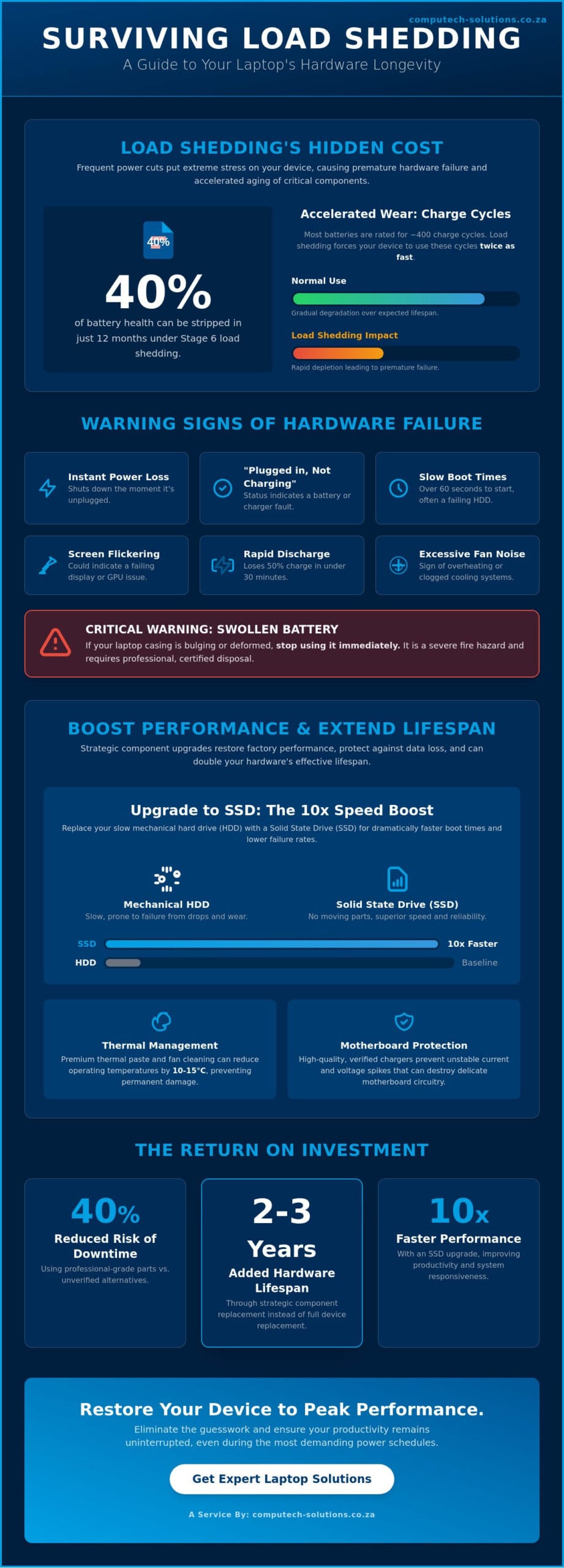
Stage 6 load shedding isn’t just an inconvenience; it’s a silent killer for your hardware that can strip 40% of your battery’s health in just twelve months. You’re probably tired of your machine losing power the moment the lights go out, or feeling overwhelmed by technical jargon when trying to find a replacement charger that won’t damage your system. It’s a common struggle for professionals across South Africa who need their tech to be as resilient as their business. We’re here to offer expert laptop solutions that eliminate the guesswork and restore your device to peak performance. You’ll learn how to accurately diagnose component failure, understand the critical difference between voltage ratings, and source reliable parts that offer a true return on investment. This guide provides a clear roadmap for maintaining and upgrading your hardware to ensure your productivity remains uninterrupted even during the most demanding power schedules. We’ve simplified the process of identifying which components require immediate attention so you can make informed decisions without the stress of technical downtime. Reliable technology is the foundation of your success.
Key Takeaways
- Understand how a holistic approach to hardware maintenance protects your device’s long-term health and prevents costly operational downtime.
- Learn to mitigate the accelerated battery wear caused by load shedding through high-capacity replacements and improved charge cycle management.
- Discover cost-effective laptop solutions that can double the lifespan of your existing business hardware through strategic component upgrades.
- Identify the specific indicators of hardware failure using professional diagnostic techniques to determine if a repair or replacement is the most viable path.
- Recognize the importance of choosing a national provider to ensure consistent technical support and component availability across all South African business hubs.
What are Laptop Solutions? Defining Modern Hardware Support
Modern laptop solutions represent a holistic strategy for maintaining hardware integrity and maximizing device lifespan. It goes beyond reactive repairs. This approach encompasses preventative maintenance, strategic component upgrades, and the precision replacement of failing modules. In South Africa, where business continuity depends on reliable technology, these solutions provide a roadmap for long-term operational efficiency. Professional-grade components form the bedrock of this strategy, ensuring that every intervention enhances the machine’s factory-standard performance.
The South African economic environment shifted significantly following the Competition Commission’s 2021 guidelines regarding the Right to Repair. These regulations empower businesses and consumers to choose independent providers for hardware support without automatically voiding warranties. This change has made high-quality laptop solutions more accessible, allowing companies to extend the life of their hardware fleets by 2 to 3 years instead of opting for costly full-device replacements. By focusing on hardware interventions, organizations can maintain peak productivity while reducing their electronic waste footprint.
Hardware vs. Software: When to Look for Physical Solutions
Distinguishing between a bloated operating system and a physical failure is vital for cost-effective maintenance. Physical symptoms often manifest as excessive fan noise, screen flickering, or a battery that loses 50% of its charge within 30 minutes. While software optimization helps, it can’t fix a mechanical failure. For instance, a system that takes over 60 seconds to boot often suffers from a failing mechanical hard drive rather than a software glitch. Hardware solutions are the replacement of physical modules to restore original factory performance. Following a comprehensive guide to computer maintenance ensures that dust accumulation and thermal degradation don’t lead to permanent motherboard damage.
The Critical Role of Quality Components in South Africa
South Africa’s unique climate presents specific challenges for mobile hardware. In regions like Gauteng, high dust levels can clog cooling systems within 12 months, while coastal humidity accelerates port corrosion. Reliable laptop solutions require components that meet stringent safety standards to protect the delicate circuitry of the motherboard. Generic parts must be vetted to prevent voltage spikes that could lead to catastrophic failure. Computech Solutions ensures every generic battery and charger passes rigorous testing protocols to match OEM specifications. Using professional-grade parts reduces the risk of technical downtime by 40% compared to unverified alternatives, providing a stable foundation for your business infrastructure.
- Motherboard Protection: High-quality chargers prevent unstable current flow.
- Thermal Management: Premium thermal paste can reduce operating temperatures by 10 to 15 degrees Celsius.
- Data Integrity: Solid State Drive (SSD) upgrades offer 10 times the speed of traditional drives with lower failure rates.
Solving Power Problems: Batteries and Chargers in the Age of Load Shedding
Load shedding isn’t just a productivity hurdle; it’s a primary cause of premature hardware failure across South Africa. Frequent transitions from AC power to battery backup accelerate the chemical aging of lithium-ion cells. Every time your laptop switches to battery during a scheduled outage, it consumes a portion of its finite charge cycles. Most modern units are rated for roughly 400 cycles before performance degrades significantly. Under Stage 6 conditions, users often deplete these cycles twice as fast as the manufacturer intended.
Implementing smart power management helps maximize battery life, but hardware wear is inevitable. You might notice your device shutting down at 20% or displaying the “plugged in, not charging” status. These are clear indicators that your current setup needs professional attention. If you see your laptop casing bulging, stop using the device immediately. Swollen batteries are a fire hazard and require safe disposal through certified laptop solutions.
Navigating Load Shedding: Battery Health and Longevity
Protect your hardware by disconnecting the charger before power returns to avoid the initial voltage spike. You can check your current capacity by running a battery health report in Windows using the “powercfg /batteryreport” command. For professionals working through 4-hour outages, upgrading to a high-capacity replacement battery provides the necessary buffer to stay online. If your runtime has dropped below 60 minutes, it’s time to consult Computech Solutions for a compatible replacement.
Charger Compatibility: Why the Right Adapter Matters
The power adapter is your laptop’s first line of defense. It must manage the safety trifecta of wattage, voltage, and amperage. While a higher amperage is generally safe, the voltage must match your laptop’s requirements exactly. Using a 19V adapter on a 14V premium ultrabook can permanently fry the motherboard. Cheap “universal” chargers often lack the sophisticated ripple filtration found in model-specific adapters. This makes your hardware vulnerable to the “dirty” power often seen when the grid stabilizes after an outage. Always verify your model number on the bottom of the chassis to ensure you get a replacement that meets OEM specifications. Investing in correct laptop solutions for power delivery prevents the R5,000 to R15,000 cost of a motherboard replacement.
Performance Upgrades: Extending the Lifecycle of Your Device
South African businesses often face a difficult choice when hardware begins to lag: invest in a new fleet or optimize current assets. With the volatility of the Rand affecting the cost of imported electronics, upgrading existing hardware is frequently the most fiscally responsible path. A business-grade laptop typically has a structural lifespan of six to seven years, yet most users feel a performance drop after three. By implementing targeted laptop solutions, companies can effectively double the useful life of their devices, delaying capital expenditure while maintaining high productivity levels.
The decision to upgrade hinges on the “50% rule.” If the cost of the upgrade is less than half the price of a comparable new unit, the ROI is usually positive. For instance, replacing a mechanical drive with a solid-state drive (SSD) and doubling the RAM can make a 2020 model perform as efficiently as a mid-range 2024 unit. This approach reduces electronic waste and ensures that hardware remains compatible with the resource-heavy software demands expected by 2026.
LCD Screen Replacements: Restoring Visual Clarity
A cracked screen or a flickering display doesn’t render a laptop obsolete. Common issues such as dead pixels, vertical lines, or backlight failure often stem from physical stress or connector wear. When troubleshooting common laptop failures, it’s vital to identify whether the issue is the panel itself or the video cable.
Choosing the correct replacement panel requires technical precision. Our technicians match specific pin counts, usually 30-pin or 40-pin connectors, and ensure resolution parity, whether it’s a standard 1366×768 or a Full HD 1920×1080 panel. We also help clients choose between matte finishes for office environments with high glare and glossy finishes for roles requiring superior colour accuracy. The replacement process involves a delicate disassembly of the bezel and hinges, a task that requires specialized tools to avoid damaging the internal Wi-Fi antennas.
SSD and Memory Upgrades for Enhanced Productivity
Transitioning from a traditional Hard Disk Drive (HDD) to an SSD is the single most impactful laptop solutions strategy for speed. HDDs rely on physical spinning platters, whereas SSDs use flash memory, resulting in boot times dropping from 90 seconds to under 15 seconds. For modern South African workflows, we recommend NVMe SSDs where compatible, as they offer data transfer speeds up to seven times faster than older SATA-based drives.
Memory requirements are also shifting. While 8GB of RAM was standard for years, the multitasking demands of 2026 software will require a minimum of 16GB for seamless operation. We perform rigorous compatibility checks to ensure your motherboard supports the specific voltage and clock speeds of DDR4 or DDR5 modules.
- DDR3/DDR3L: Found in legacy devices, usually capped at 1600MHz.
- DDR4: The current business standard, offering a balance of efficiency and speed.
- DDR5: High-performance memory for workstations and creative professionals.
Troubleshooting Guide: Identifying Common Laptop Failures
Identifying a hardware fault requires a logical process of elimination. You must determine if a failure is isolated to a single component or indicative of a systemic motherboard issue. Start with the basics by checking external connections and software drivers. If the problem persists, hardware diagnostics become necessary. Always work on a non-conductive surface and wear an anti-static wrist strap to prevent ESD (Electrostatic Discharge) damage. If your device is under a manufacturer warranty, opening the chassis might void your coverage. Consult professional laptop solutions providers if you’re uncomfortable handling internal components.
Diagnosing Battery Failure vs. Charging Port Issues
Power issues are the most frequent complaints in South African offices. Follow these three steps to isolate the cause:
- Step 1: Inspect the physical charging port. Use a flashlight to check for compressed lint or debris inside the DC jack. Use a plastic toothpick to gently clear obstructions. If the port feels loose or “wiggles” when the cable is inserted, the internal solder joints have likely failed.
- Step 2: Test the AC adapter. Use a multimeter to check the output voltage of your power brick. The reading should match the voltage printed on the adapter label, usually 19V or 20V. Alternatively, test with a known working charger of the same wattage.
- Step 3: Isolate the battery. If your laptop has a removable battery, take it out and plug in the AC adapter. If the machine boots up and runs steadily, the battery circuit is faulty. For internal batteries, software tools like BatteryReport in Windows can show if the capacity has dropped below 60 percent of its original design.
Preventive Maintenance for Business Continuity
Unexpected downtime costs South African SMEs thousands of Rands in lost productivity. Heat is the primary enemy of mobile hardware. Dust accumulation in the Western Cape or Gauteng regions can clog cooling fins within six months. Cleaning internal fans and reapplying high-quality thermal paste every 12 to 18 months can reduce operating temperatures by 10 to 15 degrees Celsius. This simple step prevents thermal throttling and extends the lifespan of the CPU and GPU.
Managing battery health requires monthly calibration. Discharge your battery to 5 percent and then charge it to 100 percent without interruption. This ensures the Windows battery meter remains accurate. Given the frequency of Stage 4 and Stage 6 load shedding, surge protection is non-negotiable. Use a dedicated surge-protected plug for your workstation. These units, which typically cost between R250 and R500, shield your laptop solutions from the high-voltage spikes that occur when the grid returns to power.
Protect your hardware investment and ensure your team stays productive with professional support. Explore our comprehensive laptop solutions to keep your business running at peak efficiency.
Choosing a National Laptop Solutions Provider in South Africa
Selecting a partner for IT hardware requires more than a simple price comparison. For South African enterprises, reliability hinges on a provider’s ability to deliver consistent laptop solutions across all nine provinces. Businesses operating in remote regions like the Northern Cape or Limpopo face unique logistical hurdles compared to those in Gauteng. A national provider bridges this gap by ensuring high-quality components reach your desk, regardless of your proximity to a major commercial hub. This accessibility prevents hardware shortages from stalling your operations and provides a level of continuity that smaller local vendors often cannot match.
The Importance of Expert Technical Support
Buying hardware online involves significant risks without technical verification. You should always consult a technician before clicking “buy” on a replacement part. Niche models like the Acer Aspire or Dell Latitude series often feature subtle variations in screen pin configurations or battery voltages. These details aren’t always clear in a standard product description. A single mismatch can lead to short circuits or extended downtime. Computech Solutions functions as a one-stop-shop for these complex needs. We provide batteries, chargers, and even solar backup systems to keep your hardware running during local power constraints. Our experts verify compatibility to ensure your investment is sound.
Nationwide Delivery and Reliable Warranty Services
Shipping fragile items like LCD screens across South Africa’s varied terrain demands specialized logistics. A reliable partner uses reinforced packaging and vetted couriers to minimize the risk of transit damage. Beyond the delivery itself, the local warranty landscape serves as the ultimate hallmark of a hardware partner. Under the South African Consumer Protection Act, you’re entitled to quality goods, but having a partner that streamlines the return process is what actually saves time. You need clear, enforceable return policies that protect your business from faulty components. This transparency builds the long-term confidence required to manage a corporate fleet effectively. We prioritize these standards to ensure your hardware remains an asset rather than a liability. It’s about providing stability in a fast-moving market.
Don’t let technical failures disrupt your business growth. Explore our full range of national laptop solutions today and experience the benefits of a professional IT partnership that covers every corner of South Africa.
Secure Your Device’s Future with Proactive Hardware Management
Maintaining your hardware isn’t just about fixing what’s broken; it’s a strategic approach to business continuity. High-quality batteries and chargers are essential tools for navigating South Africa’s persistent power challenges, particularly when Stage 6 load shedding threatens daily productivity. By prioritizing performance upgrades over total device replacement, you can extend your hardware’s functional lifecycle and maximize your initial investment. This proactive stance keeps your team efficient and your data secure.
Computech Solutions provides the comprehensive laptop solutions you need to stay operational in a demanding market. We’re specialists in replacement parts for Acer, Dell, HP, and Apple devices, ensuring your hardware meets original manufacturer standards. Our team offers expert technical support for all hardware queries, backed by a logistics network that provides nationwide delivery across South Africa. You don’t have to navigate technical failures or power interruptions alone.
Find the perfect replacement battery or charger for your laptop today and keep your business moving forward. We’re ready to help you maintain a reliable, high-performing mobile office.
Frequently Asked Questions
How do I know if my laptop battery needs to be replaced?
Your laptop needs a new battery if it fails to hold a charge for more than 60 minutes or shuts down abruptly during use. Windows users can generate a precise diagnostic report by typing ‘powercfg /batteryreport’ into the command prompt. If your current full charge capacity is 50% lower than the original design capacity, it’s time for a replacement. Physical signs like a bulging trackpad also indicate a swollen battery that requires immediate professional attention.
Can I use a higher wattage charger than what my laptop originally came with?
You can safely use a higher wattage charger as long as the voltage matches your laptop’s specific requirements. Your device only draws the power it needs, so a 90W charger works perfectly with a 65W laptop if the connector fits correctly. This provides a versatile laptop solutions approach for businesses managing mixed fleets. You should never use a charger with a lower wattage than the original, as this leads to slow charging or system instability.
Is it worth replacing a laptop screen or should I buy a new laptop?
Replacing a screen is cost-effective if your laptop is less than 3 years old and the internal hardware meets your performance needs. A professional panel replacement typically costs a fraction of a new mid-range device, which often starts around R8,000 in the South African market. If your laptop has an SSD and at least 8GB of RAM, a screen repair extends its functional lifecycle significantly without the high cost of total replacement.
Are generic replacement batteries safe for my Dell or HP laptop?
Generic batteries are safe only if they carry recognized certifications like CE or RoHS and are sourced from reputable South African suppliers. While they offer a budget-friendly alternative, poor-quality cells can leak or overheat. We recommend high-grade compatible batteries that include built-in circuit protection. These provide reliable laptop solutions that maintain 100% compatibility with Dell and HP power management software without the premium price of OEM parts.
How long does a replacement laptop battery typically last in South Africa?
A high-quality replacement battery typically lasts between 300 and 500 discharge cycles, which translates to 18 to 24 months of regular use. Factors like South Africa’s high ambient temperatures and frequent load shedding can accelerate chemical degradation. To maximize lifespan, avoid letting the charge drop below 20%. Our technical team finds that keeping a device between 40% and 80% charge can extend the battery’s functional life by up to 12 months.
What is the difference between an SSD and an HDD upgrade?
An SSD upgrade provides up to 10 times faster data access speeds compared to a traditional mechanical HDD. SSDs use flash memory with no moving parts, making them more durable for mobile professionals traveling across South Africa. Upgrading to a SATA or NVMe SSD reduces boot times from minutes to seconds. This single hardware change is the most effective way to breathe new life into an aging workstation while improving overall system responsiveness.
Do you deliver laptop parts to all provinces in South Africa?
We deliver laptop components to all nine provinces across South Africa, from Gauteng to the Western Cape. Our logistics network ensures that critical parts reach major hubs like Johannesburg, Durban, and Cape Town within 24 to 48 hours. We use tracked courier services to provide end-to-end visibility for every order. This ensures your business operations continue with minimal downtime regardless of your physical location within the country.
Can a faulty charger damage my laptop battery permanently?
A faulty charger can permanently damage your battery by delivering unstable voltage or excessive heat. Cheap, uncertified power bricks often lack surge protection, which is critical during South African power grid fluctuations. This instability causes the battery cells to degrade prematurely or swell. Using a regulated, high-quality charger protects your internal components and ensures the long-term health of your hardware investment while preventing potential safety hazards.
