
Your Dell XPS or Precision workstation is only as powerful as the energy that fuels it. When your laptop begins shutting down unexpectedly or you notice a swollen battery lifting your trackpad, the reliability of your professional setup is at risk. Finding the correct dvg8m replacement battery is the critical first step in restoring that operational stability. Even with South Africa’s power grid reaching an 82.04% Energy Availability Factor in 2026, hardware readiness for any potential disruption remains a cornerstone of business continuity.
We understand that technical specifications like the difference between 56Wh and 69Wh ratings can feel unnecessarily complex. This guide simplifies the process by verifying exact model compatibility and providing professional installation steps tailored for the local market. You’ll learn how to identify the genuine dvg8m battery, compare high-capacity alternatives like the 86Wh 69KF2, and implement maintenance routines that extend your hardware’s lifespan. We’ll move through the technical verification and installation process to ensure your laptop remains a dependable, mobile tool for your daily operations.
Key Takeaways
- Identify the core specifications of the dvg8m battery, including its 11.4V output and 56Wh capacity, to ensure it matches your Dell workstation.
- Spot critical failure symptoms like rapid power depletion or a “plugged in, not charging” status before they disrupt your professional workflow.
- Evaluate the benefits of upgrading to a higher capacity 86Wh battery and understand the physical space requirements for this modification.
- Prepare for a successful DIY replacement by gathering the correct Torx T5 and Phillips #00 tools for a secure, professional-grade installation.
- Implement specific power management strategies to protect your battery’s chemistry against the stress of frequent power cycling in South Africa.
Understanding the Dell DVG8M Battery: Specifications and Compatibility
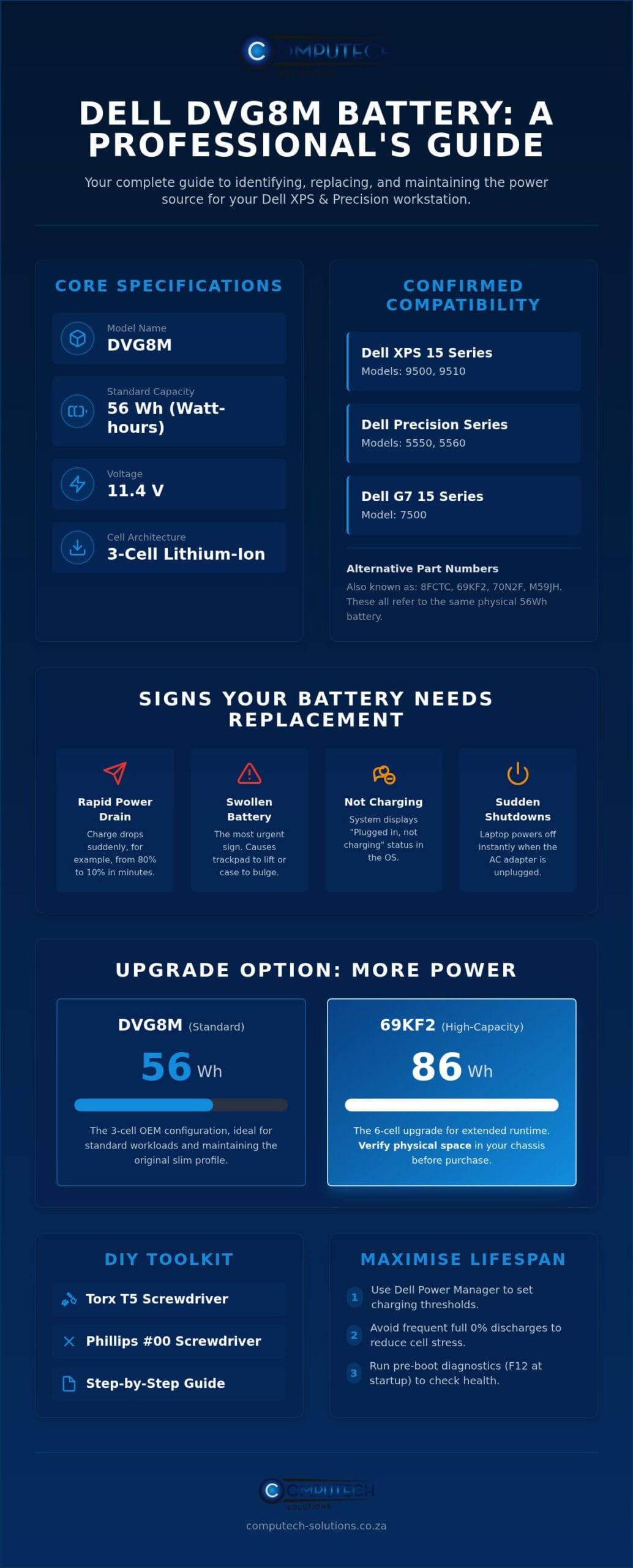
The dvg8m is a high-performance 3-cell internal power source designed specifically for Dell premium mobile workstations and high-end consumer laptops. Built using a Lithium-ion (Li-ion) battery architecture, this component balances weight and energy density to maintain the slim profiles of the XPS and Precision series. It provides a standard capacity of 56Wh, which serves as the primary energy reservoir for several professional hardware configurations.
Identifying the correct part is essential because Dell uses specific internal layouts for different hardware generations. The dvg8m is the primary battery for the following laptop families:
- Dell XPS 15: Specifically the 9500 and 9510 models.
- Dell Precision: The 5550 and 5560 mobile workstations.
- Dell G7 15: The 7500 gaming laptop series.
You might see various part numbers listed on your original component or in your system’s technical manual. This battery is frequently cross-referenced with Dell part numbers 8FCTC, 69KF2, 70N2F, and M59JH. While these numbers might vary based on the manufacturing batch or regional distribution, they all refer to the same 56Wh form factor. Ensuring you have the right part number is the first step in a successful hardware refresh.
Is the DVG8M Compatible With Your Dell Laptop?
Verifying compatibility before purchase prevents operational downtime and the frustration of returning incorrect parts. The most reliable method is to open your laptop’s base cover and locate the “Type DVG8M” label printed directly on the battery casing. This alphanumeric code is Dell’s definitive identifier. If you prefer not to open the chassis yet, you can enter your Service Tag on the Dell support website to view the original system configuration. This report will confirm if your machine shipped with the 56Wh 3-cell variant or the larger 6-cell alternative often found in higher-spec models.
DVG8M Technical Breakdown: Voltage and Watt-Hours
The technical specifications for this unit typically list a voltage range between 11.4V and 11.55V. These ratings are functionally interchangeable in modern Dell power management systems; the slight variance reflects different cell chemistry calibrations during production. A 56Wh capacity indicates the total energy the battery can deliver over one hour. For a professional user in South Africa, this capacity translates to several hours of productivity during standard office tasks, providing a vital buffer for mobile work.
Reliability depends on the quality of the internal components. High-quality replacements use Grade A cells to ensure stable power delivery and prevent the voltage fluctuations that can cause system crashes. Choosing a verified replacement ensures that the internal controller communicates correctly with your laptop BIOS. This communication provides accurate percentage readings and ensures the system follows safe charging cycles, which is critical for long-term hardware health.
Signs Your Dell XPS or Precision Needs a New DVG8M Battery
If your XPS 15 or Precision 5550 shuts down the moment you unplug the charger, the internal cells have reached the end of their functional life. Rapid percentage drops are another clear indicator. You might see the charge fall from 80% to 10% in just a few minutes. These fluctuations mean the dvg8m can no longer maintain a stable voltage under load. You may also encounter the “Plugged in, not charging” error message in Windows. This often signals a communication failure between the system’s charging circuit and the battery’s internal controller.
Using Dell Power Manager to Diagnose Your Battery
Dell provides built-in software tools to help you verify these hardware failures. Open the Dell Power Manager application to view your current battery health status. A status of “Fair” or “Poor” indicates significant capacity loss, while “Replace” is a definitive signal of failure. For a deeper technical check, restart your laptop and tap F12 to enter the pre-boot menu. Selecting “Diagnostics” will run a comprehensive hardware scan. If the test returns an error code specifically for the battery, it’s time to source a replacement. Most professional-grade batteries are rated for roughly 300 to 500 discharge cycles before chemical exhaustion begins to impact your daily productivity.
The Danger of Swollen Batteries (XPS 15 & Precision)
Physical changes to your laptop are the most urgent signs of battery failure. The dvg8m is a slim-profile component. Over time, heat or gas buildup can cause the lithium-ion cells to expand. This swelling often manifests as a trackpad that is difficult to click or a visible gap appearing in the laptop’s bottom casing. If you notice these symptoms, stop using the device immediately. A swollen battery can exert enough pressure to crack the motherboard or permanently warp the aluminum chassis of your XPS or Precision workstation.
Safety is the priority when dealing with compromised hardware. Once you remove the failing unit, you must properly recycle lithium-ion batteries at a designated South African e-waste facility to prevent environmental hazards. If you are unsure whether your trackpad issues are related to the battery or a mechanical fault, you can chat with our Computech-Solutions technical support team via WhatsApp for a quick diagnostic confirmation. Addressing these warning signs early prevents a simple battery swap from turning into a costly chassis repair.
DVG8M vs. 69KF2: Choosing the Right Capacity and Quality
Many Dell users are surprised to find two distinct battery capacities listed for their workstation. The standard dvg8m provides a 56Wh capacity, while the 69KF2 offers a significantly larger 86Wh reservoir. Selecting the right one isn’t merely a matter of wanting more power. It requires an understanding of your laptop’s physical architecture and how you use your machine daily. While the higher capacity sounds appealing, it introduces specific hardware requirements that may not suit every user’s setup.
The 86Wh variant is physically longer than the dvg8m. In systems like the Dell XPS 15 or Precision 5550, the internal space is shared between the battery and the storage bays. If your laptop currently utilizes a 2.5-inch SATA drive for extra storage, the 56Wh battery is your only option. The larger 86Wh model extends into the area occupied by that drive bay. Weight is another practical consideration. The 56Wh unit keeps your laptop at its lightest possible configuration, which is ideal for professionals who are constantly on the move. Gamers and video editors, however, often find the extra weight of the 86Wh battery a fair trade for the extended runtime during intensive tasks.
Can You Upgrade Your Battery Capacity?
Checking your chassis layout is the only way to confirm if an upgrade is possible. If your system was configured from the factory with only M.2 NVMe SSDs, you likely have the empty space required for the larger 86Wh unit. This trade-off between storage capacity and battery life is a common decision point for mobile users. Compatibility depends on your internal configuration.
Quality Tiers: OEM vs. High-Quality Replacements
The South African market is often saturated with budget replacements that use sub-standard cells. These generic units lack the sophisticated control boards found in high-quality replacements, leading to poor thermal management and rapid degradation. Computech-Solutions focuses on high-grade replacement cells because they provide the stability required for professional workloads. A reliable battery should come with a 12-month warranty, offering peace of mind that the component will survive hundreds of charge cycles. Implementing proper Laptop Battery Conditioning and Maintenance ensures that your investment continues to power your workstation through long meetings or travel days without unexpected failures.
Step-by-Step Guide: How to Replace the DVG8M Battery
Replacing the dvg8m in your high-end Dell laptop is a manageable task if you have the correct tools and follow a structured sequence. You’ll need a Torx T5 screwdriver for the external base screws and a Phillips #00 for the internal battery mounts. Before starting, ensure your laptop is completely powered down and the AC adapter is disconnected. To prevent electrostatic discharge (ESD) from damaging sensitive internal components, touch a grounded metal object or wear an anti-static wrist strap. This simple precaution protects the delicate circuitry of your Precision or XPS motherboard.
Opening Your Dell Laptop Safely
The aluminum chassis of the XPS 15 and Precision 5550 requires a gentle approach to avoid cosmetic damage. Remove the visible Torx T5 screws from the perimeter of the base cover. Some models feature a central flap or hide screws under the long rubber feet; check these areas carefully before prying. Use a plastic prying tool or a non-conductive pick to separate the clips holding the base. Work your way around the edges slowly. Organising your screws in a small tray or magnetic mat is essential. These screws often vary in length, and putting a long screw into a short hole can puncture the palm rest or damage internal components.
Installing the New DVG8M and First Boot
Once the base is removed, locate the battery connector. This cable is delicate. Pull it straight out of its socket rather than angling it to avoid bending the pins. Unscrew the internal Phillips #00 screws securing the old unit and lift it out. Align your new dvg8m with the screw mounts, ensuring it sits flush against the chassis. Reconnect the cable firmly. After reassembling the base, perform the “First Charge” ritual. Plug in your charger and let the battery reach 100% without interruption. This initial cycle helps the system’s firmware calibrate for accurate percentage reporting in Windows, ensuring your runtime estimates are reliable.
Professional Support via WhatsApp
Taking apart a premium workstation can be intimidating if you haven’t performed a hardware swap before. If you encounter a stubborn screw or feel unsure about seating the connector, expert advice is available. You can get expert help with your battery replacement on WhatsApp to ensure your hardware remains protected during the process. If you find yourself stuck, don’t force any components; chat with our technical support team for a quick diagnostic confirmation or installation tip.
Maximising DVG8M Lifespan During Load Shedding in South Africa
South Africa’s power grid has shown significant improvement, with the Energy Availability Factor (EAF) reaching 82.04% in July 2026. While there hasn’t been load shedding since May 2025, maintaining your dvg8m battery’s health remains a critical priority for professional readiness. Frequent power cycling, even during occasional maintenance outages, stresses Lithium-ion chemistry. When a battery is forced to discharge and recharge rapidly, it generates internal heat that accelerates chemical degradation. Protecting your hardware from these cycles ensures that your XPS or Precision workstation remains a reliable mobile tool for years to come.
Surge protection is another essential factor in preserving your charging circuit. When the grid returns after an outage, voltage spikes can damage the delicate controller inside the dvg8m. Using a high-quality surge protector or an Uninterruptible Power Supply (UPS) safeguards the battery from these fluctuations. Additionally, you should avoid the habit of keeping your laptop plugged into a charger 24/7 at 100% capacity. Constant full charge creates high-voltage stress on the cells, which can lead to the swelling issues often seen in premium Dell models.
Smart Charging Habits for Power Outages
You can use the Dell Power Manager utility to implement sophisticated charging thresholds. Setting your system to start charging at 50% and stop at 80% effectively puts the battery in “AC Desktop” mode, which significantly reduces wear. It’s also vital to avoid deep discharges. “Preventing your battery from dropping below 10% is the single best way to ensure it survives 500+ cycles.” If you allow the cells to hit a 0% state of charge, the internal protection circuit may trigger a permanent “fail-safe” mode, effectively bricking the component to prevent a fire hazard.
Nationwide Delivery and Technical Support from Computech-Solutions
Operating a professional workstation in South Africa requires a partner that understands local infrastructure challenges. Computech-Solutions provides high-grade replacement batteries with nationwide delivery to ensure you aren’t left without power. Buying from a local specialist means you benefit from a clear return policy and verified stock levels, avoiding the risks associated with unverified international imports. If you need to confirm which variant fits your specific chassis, order your DVG8M battery and get nationwide delivery today. Our team is available via WhatsApp to provide the technical confirmation you need before making a purchase.
Restoring Your Dell Laptop’s Professional Mobility
Restoring the mobility of your Dell XPS or Precision workstation is a straightforward process when you have the correct technical data. By verifying your system’s internal layout and choosing between the standard 56Wh dvg8m or the high-capacity 86Wh alternative, you ensure your hardware remains a reliable professional asset. Proper installation and the implementation of smart charging thresholds will further safeguard your investment against the unique electrical challenges found in South Africa. These steps transform a failing machine back into a dependable tool for your daily business operations.
We provide high-quality replacement cells backed by a comprehensive warranty to give you absolute confidence in your hardware’s stability. Our specialists offer expert technical support for Dell laptops to help you navigate any compatibility or installation questions that arise during the process. You can order your Dell DVG8M battery via WhatsApp for nationwide delivery across South Africa today. Don’t let a failing battery compromise your professional productivity. Take the final step now to return your laptop to its peak operational performance.
Frequently Asked Questions
Is the DVG8M battery compatible with the Dell XPS 15 9500?
Yes, the dvg8m is fully compatible with the Dell XPS 15 9500. It serves as the standard 3-cell, 56Wh internal battery for this specific model. While it fits perfectly, you should always verify your internal layout. Some 9500 configurations use a larger 6-cell battery that occupies the space where a 2.5-inch drive would normally sit. Check your current battery’s Type number before ordering to ensure a perfect match.
How long should a new DVG8M battery last on a single charge?
A new dvg8m battery typically provides between 4 and 7 hours of runtime on a single charge. This duration depends heavily on your screen brightness, background applications, and the intensity of your professional tasks. High-demand software like video editors will drain the capacity faster than standard web browsing. Maintaining healthy power settings in Windows helps you achieve the upper end of this range during your daily mobile operations.
Can I replace my Dell laptop battery myself?
You can replace the battery yourself if you have the correct precision tools. The process requires a Torx T5 screwdriver for the base and a Phillips #00 for the internal mounts. It’s a straightforward hardware swap that involves removing the base cover and disconnecting a single cable. If you follow the safety steps regarding static discharge and careful screw management, you can complete the installation in about fifteen minutes.
What is the difference between 56Wh and 86Wh Dell batteries?
The primary difference lies in physical size and energy capacity. The 56Wh version is shorter, leaving space for an internal 2.5-inch SATA hard drive or SSD. The 86Wh variant is longer and offers roughly 50% more runtime, but it requires you to remove that storage bay. You must choose based on whether you prioritize extra storage space or maximum unplugged hours for your mobile workstation.
Why is my Dell laptop saying “Battery Not Detected” after replacement?
This error usually indicates a loose connection or a firmware mismatch. First, shut down the laptop and ensure the battery cable is seated firmly and straight in its socket. If the connection is secure but the error persists, you may need to update your system BIOS. Modern Dell systems occasionally require a BIOS refresh to recognize the communication protocol of a new high-quality replacement battery.
Does load shedding damage my laptop battery?
Frequent power outages can stress your battery through increased discharge cycles and potential voltage surges. While the cells themselves handle discharging well, the sudden loss of power and subsequent surge when electricity returns can impact the charging circuit. Using a surge protector and avoiding deep discharges below 10% are the best ways to protect your hardware’s lifespan during periods of grid instability in South Africa.
Where can I buy a reliable DVG8M replacement in South Africa?
You can purchase a high-quality dvg8m replacement directly from Computech-Solutions. We specialize in Dell power components and provide nationwide delivery across South Africa. Every unit we supply features Grade A cells and is backed by professional technical support via WhatsApp. This ensures you receive a reliable local alternative to risky unverified imports, keeping your professional workstation powered and ready for any task.
