
A cracked display doesn’t mean your Dell laptop has reached the end of its life; it is often just one component away from performing like new again. Finding a reliable dell laptop screen replacement south africa shouldn’t feel like a gamble against high manufacturer costs or questionable third-party parts. You’re likely frustrated by the steep quotes from official service centers and worried that a DIY fix might lead to compatibility issues or extended downtime. It’s stressful to see a high-performance machine sitting idle because of a damaged panel when you have critical deadlines to meet.
We understand that you need a definitive solution that balances quality with cost-efficiency. This guide will show you how to accurately identify your specific model and source a professional-grade LCD replacement panel that restores your screen’s clarity for a fraction of the cost of a new machine. We will also walk you through the technical steps of the replacement process and explain how South Africa’s 2026 e-waste regulations affect your repair. You will learn how to secure reliable nationwide delivery and leverage your rights under the Consumer Protection Act to ensure a successful, long-term restoration of your hardware.
Key Takeaways
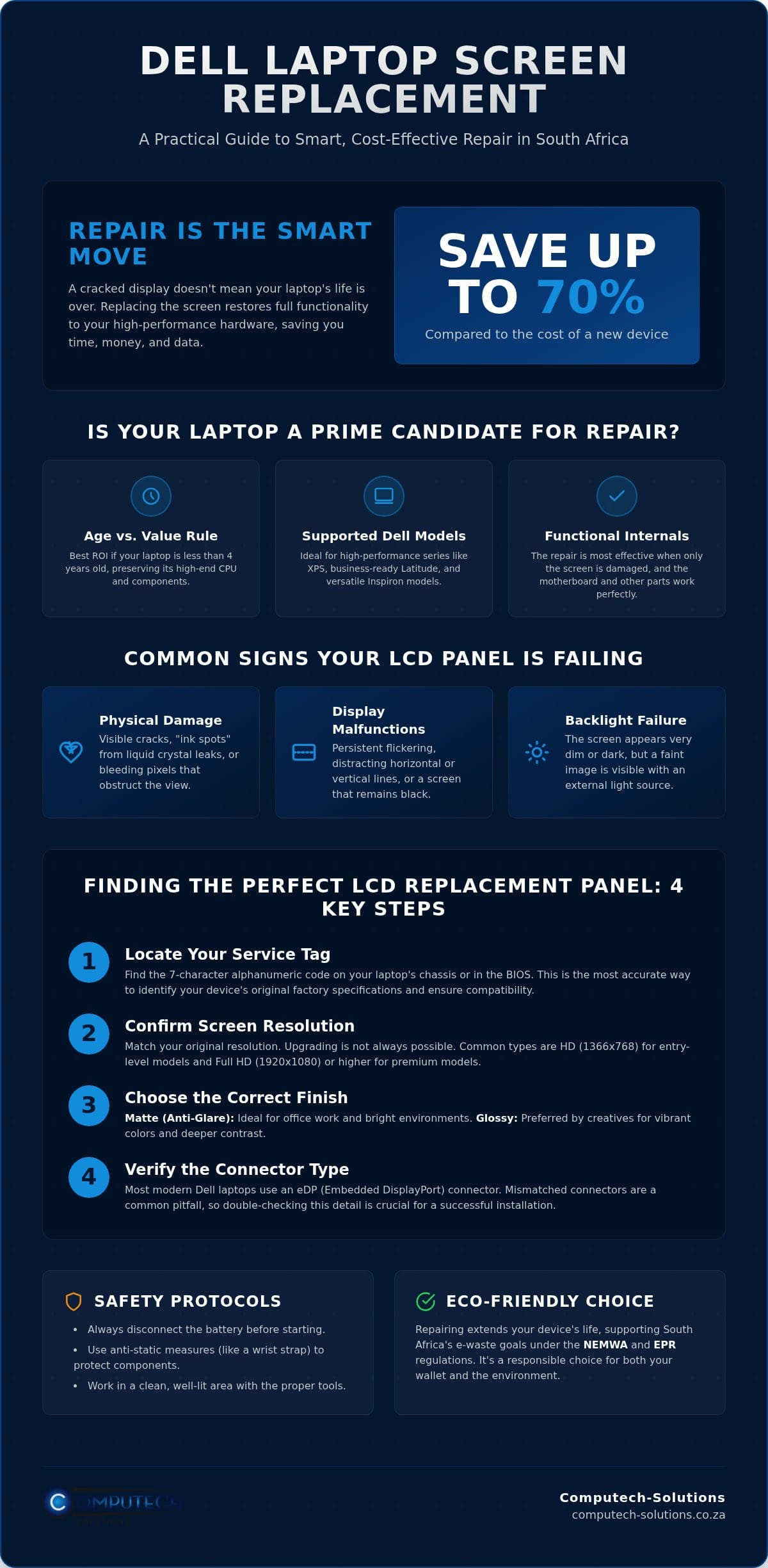
- Learn why replacing your Dell laptop screen is a high-ROI maintenance task that can save you up to 70% compared to purchasing a new device.
- Master the technical process of using your Service Tag to find a compatible dell laptop screen replacement south africa with the correct resolution and connector type.
- Apply the “Age vs. Value” rule to determine if your Inspiron, Latitude, or XPS model is a prime candidate for a professional LCD panel upgrade.
- Identify the essential tools and safety protocols, such as battery disconnection and anti-static measures, required to perform a secure hardware replacement.
- Discover how to leverage specialized technical support and reliable nationwide delivery from a dedicated South African supplier to ensure hardware compatibility.
Why Replacing Your Dell Laptop Screen is the Smartest Move in 2026
A cracked display on your Dell laptop doesn’t signal the end of your device’s lifecycle. Whether you use a high-performance XPS, a business-ready Latitude, or a versatile Inspiron, the internal hardware remains perfectly functional despite a damaged exterior. Opting for a dell laptop screen replacement south africa is a strategic maintenance choice that prioritizes hardware longevity over unnecessary upgrades. Modern Dell machines are specifically engineered with modularity in mind; this design philosophy ensures that the display assembly can be detached and replaced without compromising the motherboard or your stored data.
Choosing repair over replacement offers a significant financial advantage. In 2026, the cost of a new high-spec laptop continues to rise due to global supply chain shifts and local currency fluctuations. By replacing only the faulty LCD panel, you can save up to 70% of the cost associated with purchasing a brand-new machine. This approach keeps your existing software configurations, licenses, and personal files exactly where they are, which is why professional services like We Fix PC Laptop emphasize repair as the most efficient way to eliminate the downtime of setting up a new system from scratch.
Environmental responsibility has also become a legal and ethical priority in South Africa. Under the National Environmental Management: Waste Act (NEMWA) and current Extended Producer Responsibility (EPR) regulations, reducing e-waste is essential. Repairing your hardware directly supports these sustainability goals by keeping functional electronics out of landfills. It’s a practical way to extend the utility of your investment while adhering to the country’s shifting environmental standards.
Common Signs Your Dell LCD Panel is Failing
- Physical damage: This includes visible cracks, “ink spots” where the liquid crystals have leaked, or bleeding pixels that obscure your view.
- Display malfunctions: You might notice persistent flickering, horizontal or vertical lines, or total blackouts even when the laptop is powered on.
- Backlight failure: The screen appears dark, but you can still see a faint image when you shine a bright external light directly onto the panel.
The Economic Advantage of Hardware Maintenance
An LCD Replacement Panel is the core display component responsible for rendering visual data through liquid crystal technology. By understanding laptop components, it becomes clear that the screen is an independent module rather than a permanent fixture of the chassis. Investing in a new panel is far more logical than buying a new laptop, especially if your current machine is less than four years old or features a high-end CPU. This targeted repair preserves the high-value internal components that still have years of service life remaining, ensuring you get the maximum return on your original purchase.
Finding the Perfect LCD Replacement Panel for Your Dell Model
Identifying the correct component is the most vital step in a successful dell laptop screen replacement south africa. Dell simplifies this process by assigning a unique Service Tag to every machine. You should locate this seven-character alphanumeric code on the bottom of your chassis or within the BIOS settings. By using this tag, you can verify the original factory specifications, which is essential because the same model series, such as the Dell Inspiron 15, can ship with several different display configurations. If you are uncertain about compatibility, consulting a specialist for Laptop LCD Replacement Panels ensures you receive the correct part for your specific SKU.
Resolution is the next critical factor to confirm. Most budget or entry-level Dell laptops utilize HD (1366×768) panels, while professional Latitude or XPS models typically feature Full HD (1920×1080) or 4K displays. You cannot simply “upgrade” to a higher resolution without ensuring your internal video cable supports the increased bandwidth. Additionally, you must choose between a matte (anti-glare) or glossy (vibrant colour) finish. Matte screens are preferable for office environments with heavy overhead lighting, whereas glossy screens are favoured by creative professionals for their superior contrast and colour depth.
The most common technical pitfall involves the connector interface. Modern Dell laptops use Embedded DisplayPort (eDP) connectors, which generally come in 30-pin or 40-pin variants. A 30-pin connector is standard for non-touch Full HD screens, while 40-pin connectors are reserved for touchscreens or high-resolution QHD and 4K panels. The growing conversation around right-to-repair in South Africa highlights the importance of consumers being able to identify and source these technical components independently. Using the wrong pin count will result in a physical mismatch that could potentially damage the motherboard.
Technical Specifications to Verify Before Purchase
Beyond resolution, you must check the physical mounting style of your current panel. Some Dell screens use side-mounted brackets, while others are held in place by top and bottom tabs or even strong adhesive strips. It is also crucial to note that touchscreen and non-touch panels are not interchangeable. Touchscreens often involve a fused digitizer and glass assembly that requires a completely different bezel and cable setup compared to standard LCDs.
The Role of eDP (Embedded DisplayPort) Technology
eDP technology has replaced older LVDS standards to provide faster refresh rates and lower power consumption. When sourcing your panel, confirm the connector location on the back of the screen, it is usually positioned on the bottom right or bottom left when viewed from the rear. Ensuring the cable aligns perfectly prevents tension on the delicate connector pins and eliminates the risk of electrical short-circuits during the installation process.
Cost-Benefit Analysis: Screen Repair vs. Buying a New Dell Laptop
Deciding whether to invest in a dell laptop screen replacement south africa requires a logical evaluation of your hardware’s remaining lifecycle. The “Age vs. Value” rule is a reliable framework for South African users. If your Dell machine is less than four years old and features a high-specification CPU, repairing the display is almost always the superior financial choice. You’re essentially restoring a high-performance tool for a fraction of its replacement cost. Conversely, for legacy models where the cost of a new panel exceeds 50% of the device’s current second-hand market value, you might consider decommissioning the unit. Most modern Dell laptops, however, fall into the repairable category because their internal components remain relevant for several years.
Buying a new laptop involves hidden expenses that go beyond the sticker price. You must account for the hours spent on data migration, the potential need for new software licenses, and the general setup time required to reach peak productivity. In a market where right-to-repair rules for electronics remain limited, taking control of your own hardware maintenance is a proactive way to avoid these peripheral costs. Repairing your current machine is a targeted solution that bypasses the administrative burden of migrating to an entirely new system.
Investment Protection for High-End Dell Models
Dell XPS and Precision workstations represent a significant capital investment. These machines are built for professional durability, often outlasting their display panels by a wide margin. Using professional-grade LCD panels ensures that creative and technical workflows, which rely on colour accuracy and high resolution, remain uninterrupted. Additionally, the frequent load shedding in South Africa places immense stress on charging circuits and batteries, but the core processing components often remain robust. Repairing the screen allows you to maximize the utility of these high-tier machines without the massive outlay of a full replacement.
The Risks of Low-Quality Generic Replacements
Not all screens are equal. Opting for a generic part might seem budget-friendly, but poor-quality panels often suffer from low brightness and inaccurate colour reproduction. These deficiencies cause significant eye strain during long working hours and can even drain your battery faster due to inefficient backlighting. Sourcing your component from a reputable South African supplier ensures you receive a panel that matches original specifications. It’s vital to verify that your new LCD panel includes a solid warranty to protect against manufacturing defects, providing the stability you need for long-term use.
How to Safely Replace Your Dell Laptop Screen: A Practical Guide
Executing a dell laptop screen replacement south africa requires a methodical approach and a clean workspace to avoid introducing dust or static to the internal components. While professional technical manuals can often seem dense, the physical replacement is a straightforward hardware task if you have the correct tools. You will need a set of precision screwdrivers, typically Philips #0 or #00, several plastic pry tools to safely separate the bezel from the lid, and an anti-static wrist strap to ground yourself. Avoid using metal tools for prying, as these will permanently scratch the plastic chassis or damage the delicate antenna wires housed within the display assembly.
Preparation is the most critical phase of the repair. You must shut down the laptop and disconnect the AC adapter before beginning. If your Dell model has an external battery, remove it immediately. For modern models with internal batteries, you must unscrew the base cover and physically disconnect the battery connector from the motherboard. After the power source is removed, hold the power button down for thirty seconds. This step drains residual electricity from the capacitors, which is essential to prevent a short circuit when you touch the video cable. Once the power is fully discharged, use your pry tool to gently unclip the bezel, starting from the top edge and moving slowly toward the hinges.
Safety First: Protecting Your Motherboard
Handling the new panel requires care; always hold it by the edges and never apply pressure to the center of the glass. When you align the new screen, you will need to reconnect the eDP cable. The eDP locking latch must be fully engaged and secured with adhesive tape to prevent the video signal from flickering or disconnecting during laptop movement. If this connection is even slightly loose, the screen may fail to initialize or display distorted colours. Before snapping the bezel back into place, temporarily reconnect the battery and power on the device to test the display. This saves you from having to disassemble the unit again if the cable requires adjustment.
Troubleshooting Post-Installation Issues
If the screen remains black after you press the power button, don’t panic. This usually indicates that the eDP cable isn’t seated perfectly in the socket. Power down, drain the residual power again, and reseat the connector. For displays that appear very dim, verify the backlight connection, which is integrated into the main eDP cable on most modern Dell panels. Once the hardware is confirmed working, you may need to adjust your display settings in Windows to ensure the operating system recognizes the native resolution and refresh rate of the new hardware. If you are ready to begin your repair, you can source your high-quality LCD replacement panel from a specialist who provides expert technical support for hardware compatibility.
Sourcing Quality Laptop LCD Replacement Panels in South Africa
Sourcing a reliable dell laptop screen replacement south africa requires a partner who understands the logistical challenges of the local market. While local repair shops might offer convenience, they often lack the specialized inventory required for high-end Dell sub-series. A national supplier provides a broader range of parts, ensuring you get a panel that matches your original display’s refresh rate and colour gamut exactly. This model eliminates the “middle-man” delays that often plague smaller workshops; it gives you direct access to professional-grade components without unnecessary markup.
We recognize the anxiety associated with shipping fragile electronics across long distances. Every LCD panel is encased in multi-layered, shock-absorbent packaging designed to withstand the rigours of transit. This meticulous approach ensures your component arrives in pristine condition, ready for immediate installation. If you are unsure about the specific technical requirements of your device, our technical support team provides the expert guidance needed to verify hardware compatibility before you commit to a purchase. This proactive support helps prevent the frustration of receiving a part that doesn’t fit your specific chassis.
Nationwide Delivery: From Major Hubs to Rural Areas
Our commitment to hardware accessibility extends across all nine provinces. We serve the busy economic hubs of Gauteng and the Western Cape, but we also ensure reliable delivery to more remote rural areas in the Eastern Cape and Limpopo. Our courier partners provide end-to-end tracking, giving you total visibility of your order from the moment it leaves our warehouse until it reaches your door. This national reach ensures that high-quality hardware is accessible to every South African, regardless of their proximity to a major city. Specialist support remains a priority, helping you navigate the nuances of your Dell Service Tag to ensure the part you receive is the definitive match for your machine.
The Computech-Solutions Advantage
Computech-Solutions positions itself as an authoritative leader in laptop hardware and power solutions. Our inventory isn’t limited to a few common sizes; we maintain a comprehensive range of Laptop LCD Replacement Panels for all major brands, with a particular focus on the Dell ecosystem. This specialized focus allows us to provide a level of technical insight that general electronics retailers simply cannot match. You don’t have to settle for a malfunctioning display when a streamlined solution is available nationwide. Browse our range of Dell Replacement Screens to restore your laptop’s functionality with confidence.
Restore Your Dell Performance Today
Choosing to repair rather than replace your hardware is a decisive step toward maintaining operational efficiency while minimizing unnecessary capital expenditure. You now have the technical framework to identify the correct eDP interface and safely execute a dell laptop screen replacement south africa. By prioritizing high-quality LCD panels over generic alternatives, you ensure that your Inspiron, Latitude, or XPS continues to deliver the professional visual standards your work requires. This approach doesn’t just save money; it extends the lifecycle of a high-performance machine that still has years of productive service to offer.
Computech-Solutions is ready to support your repair journey with Nationwide South African Delivery and Expert Technical Support tailored to your specific hardware needs. As Specialists in Dell Replacement Hardware, we provide the reliable components you need to eliminate downtime and restore your laptop’s clarity. Shop High-Quality Dell Laptop LCD Replacement Panels Now and take the first step toward a fully restored display. Your machine is too valuable to leave sidelined when a professional-grade fix is just a delivery away.
Frequently Asked Questions
How do I find the correct screen model for my Dell laptop?
You can identify the specific display component by using the seven-character Dell Service Tag located on the bottom of your chassis. Alternatively, you can find the exact part number on the label at the rear of the original LCD panel. These identifiers are essential for matching technical specifications like resolution and connector placement. If you can’t locate these numbers, our technical support team is available to help you verify compatibility before you finalize your order.
Can I upgrade my Dell screen from HD to Full HD during replacement?
Upgrading your display resolution is technically possible but depends entirely on your internal video cable’s bandwidth and motherboard support. Most standard HD screens use a 30-pin eDP cable that may not carry the data required for a Full HD or 4K panel. You must verify if your specific model series was originally offered with higher resolution options to ensure the internal circuitry can handle the increased data load without flickering.
Is it difficult to replace a Dell laptop screen myself?
Replacing the screen is a manageable task for users with basic technical skills and the correct precision tools. The process generally involves removing the bezel, unscrewing the panel, and carefully reseating the eDP connector. While it requires patience and a steady hand to avoid damaging delicate plastic clips, most Dell models feature a modular design that facilitates straightforward component swaps for a successful dell laptop screen replacement south africa.
How long does delivery take for laptop screens within South Africa?
Delivery lead times are determined by your proximity to our central distribution hubs. Most urban centers receive their orders within two to three business days, while outlying or rural regions may require additional transit time. We utilize dedicated courier services that specialize in handling fragile electronics to ensure your hardware reaches you safely and within a predictable timeframe, keeping you updated with end-to-end tracking from checkout to arrival.
What is the average price of a Dell laptop screen replacement in 2026?
The cost of a replacement display is primarily determined by the specific technology and resolution required for your machine. Standard non-touch panels for business laptops are generally the most cost-effective, while high-resolution 4K or touchscreen assemblies for premium series require a higher investment. You should consider the age and specifications of your machine to determine if the component cost aligns with your long-term hardware maintenance budget and operational needs.
Does replacing the screen myself void my Dell warranty?
Performing a DIY repair typically voids the manufacturer’s warranty on the display assembly and related internal components. However, the Consumer Protection Act in South Africa provides a six-month implied warranty on the quality of the new parts you purchase. If your laptop is already outside its initial manufacturer warranty period, a self-repair is the most efficient way to restore functionality without the high labor fees associated with official service centers.
What should I do if my new screen arrives damaged?
You must inspect your package immediately upon delivery and report any visible damage to the courier and our support team. If the LCD panel is cracked or malfunctioning due to transit, take clear photographs of the packaging and the component right away. We prioritize the safe delivery of fragile hardware and will initiate a replacement process according to our specialized return protocols for transit-related damage to ensure you aren’t left with faulty hardware.
Are these replacement panels original Dell parts or high-quality generics?
We supply professional-grade LCD panels produced by the same global manufacturers that Dell uses for their original factory builds. These components meet all original specifications for brightness, colour gamut, and refresh rates. By sourcing your dell laptop screen replacement south africa from a specialist, you receive a reliable part that maintains the visual integrity of your device without the high markup of branded packaging, ensuring your machine performs exactly as it did before the damage.
