
Buying a backup unit purely for battery runtime is a dangerous gamble; runtime won’t protect your hardware if the unit trips the moment your graphics card hits an unexpected transient spike. Learning how to choose a UPS for a gaming PC starts with matching your power supply’s internal topology and peak power draw rather than simply counting minutes of reserve charge.
Every gamer knows that sinking feeling when the lights flicker mid-match, leaving you terrified of corrupted save files or fried components. Sorting through technical jargon like Volt-Amps, wattage ratings, and simulated sine waves can quickly become overwhelming, especially when trying to protect an expensive rig against persistent grid instability. You deserve complete confidence that your hardware remains shielded against sudden blackouts and fluctuating voltages.
This 2026 buyer’s guide provides everything you need to size, select, and deploy the ideal uninterruptible power supply for your setup. We examine how to calculate your exact wattage requirements, clarify why pure sine wave power is mandatory for modern Active PFC units, and outline how line-interactive topology provides stable, continuous power protection nationwide.
Key Takeaways
- Standard surge protectors cannot shield hardware from sudden brownouts, making an uninterruptible power supply essential for long-term component survival.
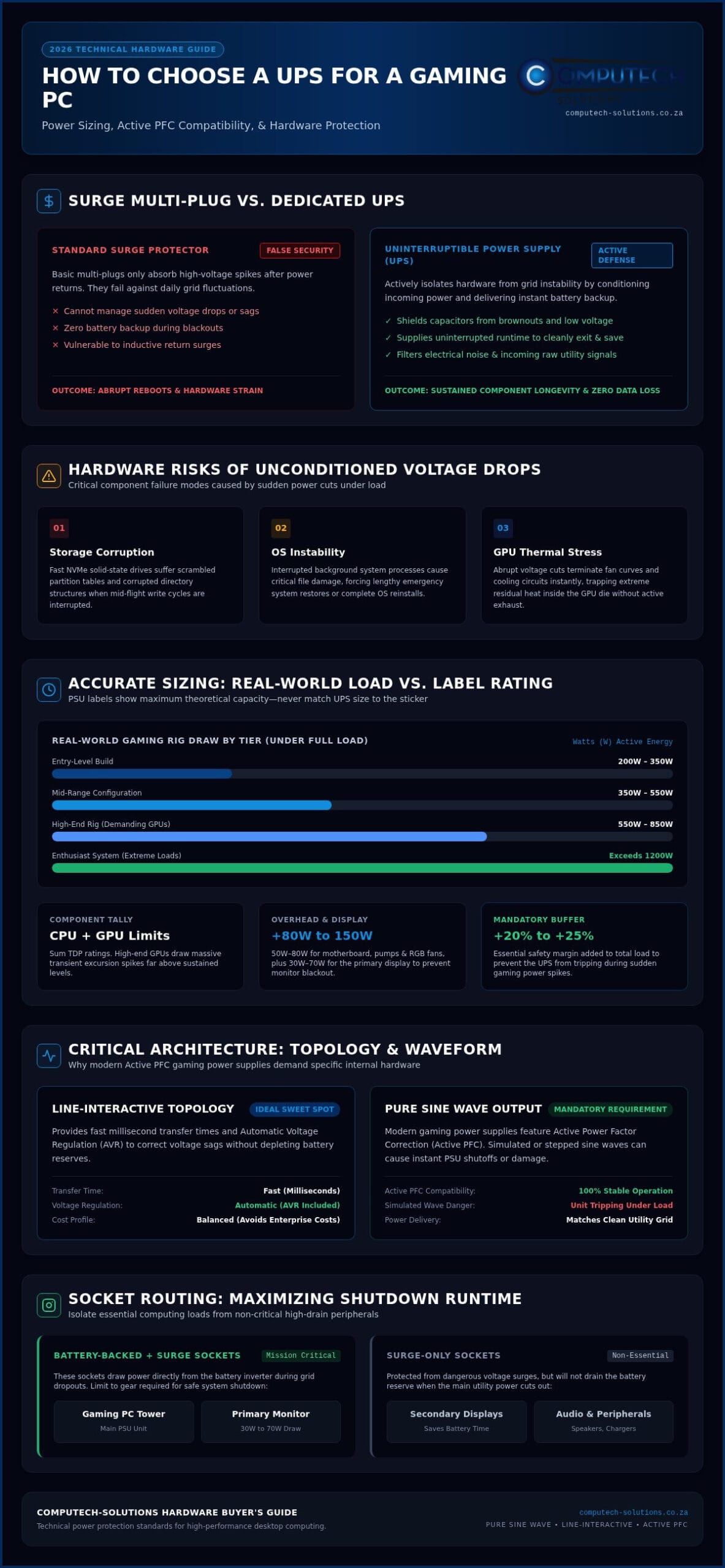
- Size your unit by calculating total real-world wattage under load and adding a 20% to 25% safety margin to accommodate transient spikes.
- Line-interactive topology offers the ideal sweet spot for gaming, delivering fast transfer times and automatic voltage regulation without enterprise-grade costs.
- Mastering how to choose a UPS for a gaming PC requires prioritizing pure sine wave delivery to ensure stable operation with modern Active PFC power supplies.
- Isolating essential hardware on battery-backed sockets while relegating non-critical peripherals to surge-only ports maximizes shutdown runtime during power cuts.
Why Your Gaming Rig Requires Dedicated UPS Protection
Plugging an expensive gaming setup into a basic surge multi-plug offers a false sense of security. While basic strips absorb sudden voltage spikes, they cannot manage voltage drops, dirty power, or outright blackouts. An Uninterruptible Power Supply (UPS) actively isolates your hardware from raw grid instability by conditioning incoming electrical signals and delivering continuous battery backup during power failures. Modern gaming hardware demands stable, uninterrupted energy, making dedicated battery backup essential for any high-performance build.
Understanding how to choose a UPS for a gaming PC starts with recognizing the severe hardware risks caused by sudden drops in voltage. An unconditioned shutdown doesn’t just disrupt a competitive match; it can corrupt files, stress internal capacitors, and permanently damage modern solid-state storage. Reliable backup systems eliminate these operational risks by granting you the time needed to safely save your work and power down.
The Reality of Grid Instability and Dirty Power
Persistent brownouts and utility fluctuations place severe strain on desktop computers across the country. Repeated sags in line voltage force internal power supply unit (PSU) capacitors to run hotter, degrading them prematurely. In extreme cases, starving components of required voltage forces sudden reboots during heavy gaming sessions. Worse yet, when utility power suddenly returns after a blackout, high-voltage inductive surges often rush down the line, easily overwhelming ordinary surge protectors.
Protecting High-End GPUs and Sensitive Solid-State Drives
High-end graphics cards experience volatile current swings, frequently shifting from low idle states to hundreds of watts in milliseconds. Power supplies require stable input voltage to regulate these dramatic swings effectively. When power cuts out unexpectedly during heavy write operations, the consequences are immediate:
- Storage corruption: Fast NVMe drives can suffer scrambled partition tables and corrupted directory structures when mid-flight write cycles get interrupted.
- Operating system instability: Interrupted system processes often cause critical file damage, forcing lengthy system restores or complete OS reinstalls.
- GPU component stress: Abrupt voltage drops cut fan curves and thermal control circuits instantly, trapping residual heat inside the GPU die without active exhaust cooling.
A properly rated backup unit bridges these volatile electrical gaps. By stepping in within milliseconds, it gives you a crucial window to exit applications cleanly. Taking the time to evaluate how to choose a UPS for a gaming PC ensures your high-end desktop hardware remains fully protected from harsh electrical environments.
Calculating Wattage and VA Ratings for Your Gaming PC
Sizing a backup system incorrectly can leave you unprotected right when you need power the most. Many gamers glance at their power supply’s rated wattage, pick an identical number off a store shelf, and assume they are covered. That approach ignores electrical realities. Truly mastering how to choose a UPS for a gaming PC requires calculating both real power in watts and apparent power in volt-amps, while leaving room for peak gaming loads.
Step 1: Determine Component Draw and Power Spikes
- Processor and graphics card: Sum your CPU and GPU thermal design power (TDP) or known power limits. Enthusiast GPUs can exhibit brief transient excursion spikes well above their sustained limits.
- Platform overhead: Allocate roughly 50W to 80W for your motherboard, liquid cooling pumps, RGB accessories, and fans.
- Display monitors: Include your primary monitor, which typically pulls between 30W and 70W, ensuring you don’t lose your display when the lights cut out.
Step 2: Understand the Difference Between Watts and VA
Watts (W) represent real power, which is the actual electrical energy converted into processing power and heat. Volt-Amps (VA) represent apparent power, which combines real energy with reactive power lost to circuit resistance. Modern computer power supplies feature Active Power Factor Correction (Active PFC) to align real and apparent power, but the backup unit itself must support both limits. If your PC demands 600W and your UPS maxes out at 550W, the unit will instantly fault into overload during a power cut, shutting down your desktop immediately even if its VA capacity hasn’t been reached.
Step 3: Apply the Headroom Formula for Reliable Operation
Never run a backup unit at 100% capacity. Always apply a 20% to 25% safety buffer to accommodate sudden gaming surges and future component upgrades:
Target Wattage = Total Sustained Load (W) × 1.25
For example, a mid-range system and monitor drawing 480W total requires a UPS rated for at least 600W. Because consumer units often feature power factors between 0.6 and 0.8, that 600W load typically necessitates a 1000VA unit. If you need assistance matching complex configurations, connect with our hardware specialists via WhatsApp sizing assistance to verify your rig calculations before ordering.
UPS Topologies Compared: Standby vs Line-Interactive vs Online
The internal architecture of a backup unit dictates how quickly it responds to grid anomalies, how cleanly it shapes power, and how long its battery survives. Understanding topology is central when researching how to choose a UPS for a gaming PC, because high-draw systems cannot tolerate sluggish power transitions. Choosing the wrong topology means your PC might crash before the battery inverter even wakes up.
Standby Systems: Budget Utility with Severe Trade-Offs
Standby units route utility power directly to your components until a blackout is detected. At that moment, a mechanical relay switches the load to the battery. This transfer takes between four and twelve milliseconds. While adequate for basic low-power office hardware, that transition delay frequently exceeds the hold-up time of modern gaming power supplies under load, triggering an instant system reboot. Standby units also lack active voltage conditioning, leaving hardware exposed to continuous voltage sags.
Line-Interactive with Automatic Voltage Regulation (AVR)
Line-interactive systems represent the sweet spot for modern desktop gaming rigs. Equipped with an autotransformer, these units actively regulate voltage drops and spikes through Automatic Voltage Regulation (AVR) without depleting internal battery reserves. Transfer times drop to just two to four milliseconds, preventing switch-mode power supplies from losing rail stability. By smoothing out frequent voltage sags without battery drain, line-interactive units preserve battery health against regular utility instability while maintaining near-silent operation in living spaces.
Online Double-Conversion: Total Isolation for Enthusiast Hardware
Online double-conversion systems eliminate transfer times entirely. They continuously convert incoming AC power into DC to charge the internal bus, then regenerate a brand-new, perfectly regulated AC sine wave for your PC. Because the load runs off the inverter around the clock, mains fluctuations and inductive surges never touch your hardware. However, this double-conversion process generates continuous heat, requiring cooling fans that run constantly. That audible fan noise makes online units best suited for soundproofed rooms or high-end enthusiast workstations where mission-critical stability is non-negotiable.
Knowing these architectural distinctions is vital when deciding how to choose a UPS for a gaming PC that can reliably withstand demanding real-world conditions.
Critical Features: Pure Sine Wave, Active PFC, and Runtime
Selecting the correct capacity and topology is only half the battle. If your unit outputs the wrong electrical waveform, your modern gaming rig may still shut down the second utility power drops. Knowing how to choose a UPS for a gaming PC demands a close look at inverter waveform compatibility, realistic runtime expectations, and automated system communication.
Pure Sine Wave vs Simulated Waveforms with Active PFC
Modern gaming power supplies rely on Active Power Factor Correction (Active PFC) circuits to maximize electrical efficiency. These circuits expect a smooth, continuous AC sine wave identical to clean grid power. Budget backup units often produce a simulated (stepped approximation) sine wave, which delivers blocky, square electrical pulses. When an Active PFC supply encounters this chopped waveform during an outage, the circuitry interprets the sudden voltage drop as a total loss of power or severe distortion. The result is often an emergency safety shutdown, defeating the entire purpose of the battery unit. Over time, running high-performance electronics on simulated waveforms introduces severe harmonic distortion, generating excess heat that degrades internal capacitors prematurely.
Targeting Practical Runtime: Safe Shutdown vs Continued Gaming
Be realistic about what desktop battery backup is designed to achieve. Sizing a consumer unit to sustain an hour of high-load gaming requires massive, expensive battery banks that generate substantial heat. Instead, prioritize a controlled exit window:
- Safe shutdown buffer (5-10 minutes): This window lets you reach a checkpoint, close background applications, and let cooling fans dissipate residual heat from your CPU and graphics card.
- Sustained offline gaming (30+ minutes): Maintaining full rendering loads demands enterprise-grade battery capacity or dedicated secondary power packs.
- Battery serviceability: Most sealed lead-acid (SLA) batteries last three to five years. Look for units that support hot-swappable replacements so you can refresh the cell without discarding the entire chassis.
Software Integration and Graceful System Shutdown
You won’t always be sitting at your desk when utility power fails. Intelligent units include USB data ports that link directly to your operating system. Power management software monitors remaining battery percentages, allowing you to configure automatic actions such as saving active files, triggering system hibernation, or executing clean Windows shutdowns before reserves drop to zero. If you need tailored guidance on matching pure sine wave hardware to your rig, chat directly with our team on WhatsApp for expert recommendations tailored to your configuration.
Deployment, Proper Cable Routing, and System Maintenance
Selecting the right hardware is only step one. Whether upgrading your setup with innovative devices from High Tech or assembling a custom PC, installing and maintaining your equipment properly ensures it performs as intended when utility power drops. Knowing how to choose a UPS for a gaming PC involves understanding physical deployment, socket assignment, and ongoing maintenance just as much as deciphering technical specifications.
Connecting Your Battlestation Correctly
The rear panel of a typical backup unit splits into two distinct banks: battery-plus-surge sockets and surge-only sockets. Confusing these two groups leads to immediate shutdowns during an outage.
- Battery-backed outlets: Connect only your desktop computer tower and primary monitor here. If you rely on an external optical network terminal (ONT) or router near your desk, plug that in as well to prevent dropped connections.
- Surge-only outlets: Route secondary displays, powered studio monitors, LED desk strips, and phone chargers here. These devices receive solid surge filtration without sapping precious battery capacity.
- High-draw equipment to avoid: Never plug laser printers, space heaters, or desk vacuums into a UPS. Their heating elements draw massive initial current pulses that trip internal circuit breakers instantly. Daisy-chaining external multi-plug extension cords into the UPS output can also degrade ground fault detection.
Thermal Management and Long-Term Battery Health
Heat degrades battery cells faster than regular charge-discharge cycles. Position the UPS chassis upright on a hard floor or dedicated shelf, keeping it clear of thick carpeting that blocks intake vents. Ensure your gaming rig’s warm exhaust fans blow away from the backup unit’s air vents rather than straight into them. Elevated ambient temperatures accelerate internal chemical breakdown, cutting the standard three to five-year lifespan of sealed lead-acid cells in half. Run the unit’s built-in self-test routine every six months to verify that the battery still holds load under simulated failure conditions.
Complete Power Security with Computech-Solutions
Equipping your desktop with the right electrical armor eliminates downtime and shields your high-end graphics hardware against unstable line conditions. We supply a comprehensive national catalog of brand-name desktop computers and hardware configurations engineered to handle demanding power requirements. Our specialists help you size the ideal configuration to ensure complete operational stability across South Africa. If you are ready to secure your setup, connect immediately via WhatsApp to order your power backup with fast national delivery.
Secure Your Gaming Battlestation Against Power Disruptions
Navigating grid volatility doesn’t have to put your expensive rig at risk. Mastering how to choose a UPS for a gaming PC comes down to three core rules: calculate real-world wattage with a 25% safety buffer, insist on pure sine wave line-interactive topology for Active PFC hardware, and reserve battery ports strictly for your tower and primary display. These steps ensure seamless transitions and eliminate the stress of corrupted storage or abrupt hardware shutoffs.
Computech-Solutions delivers complete power stability through an extensive national catalog of computer components and dedicated power backup systems. Our specialized technical support helps you navigate demanding power requirements and severe grid instability, backed by comprehensive technical consultation and nationwide delivery across South Africa. Don’t leave your high-end graphics card and custom desktop build to chance. Chat with our technical team on WhatsApp for expert UPS advice and protect your gaming investments today.
Frequently Asked Questions
Can a simulated sine wave UPS damage my gaming PC power supply?
Yes, simulated sine wave units can harm modern power supplies equipped with Active PFC circuitry. Stepped wave approximations cause electrical phase stress, resulting in severe capacitor hum and excessive internal heat generation. In many cases, the power supply’s supervisory circuit mistakes this distorted waveform for zero incoming voltage, triggering an instant protective shutdown right when you need emergency battery power most.
How many watts should my gaming UPS have for an RTX 4080 or 4090 rig?
Your backup unit should deliver at least 850W to 1000W of sustained real power capacity. An enthusiast setup featuring an RTX 4080 or RTX 4090 alongside a high-draw processor can easily pull 600W to 750W from the wall during intense rendering scenes. Adding our recommended 25% safety headroom prevents sudden transient excursion spikes from instantly overloading the battery inverter during gameplay.
How long will a 1500VA UPS keep my gaming computer running during an outage?
A typical 1500VA unit provides approximately three to seven minutes of runtime under a heavy 500W to 700W gaming load. If the system drops to idle or simple desktop tasks drawing 150W, runtime extends up to twenty minutes. When researching how to choose a UPS for a gaming PC, remember that desktop units are intended to facilitate a safe, controlled shutdown rather than prolonged gaming sessions.
Should I plug my gaming monitor into the UPS battery backup outlet?
Yes, your primary monitor must connect to a battery-backed receptacle on the unit. If your display shuts off instantly when utility power drops, you won’t be able to see open dialogues, save active games, or execute a graceful Windows shutdown. Plug secondary or tertiary monitors into surge-only sockets to conserve emergency battery capacity for your tower and primary screen.
Can I plug a multi-plug power strip into the back of a UPS?
Connecting a multi-plug power strip to a UPS output is strongly discouraged by electrical safety standards. Extension boards increase internal ground resistance, degrade surge dissipation efficiency, and introduce severe overload risks if auxiliary accessories get plugged in accidentally. For optimal safety, connect all essential computing hardware directly into the designated rear sockets of your uninterruptible power supply.
How often do I need to replace the internal battery in my desktop UPS?
Internal sealed lead-acid batteries generally require replacement every three to five years under normal operating conditions. Frequent power shedding cycles, persistent grid fluctuations, and elevated ambient room temperatures can shorten this lifespan to roughly two years. When learning how to choose a UPS for a gaming PC, look for models with easily accessible, user-replaceable battery compartments to extend total service life.
Why does my UPS make a clicking sound during heavy gaming sessions?
The clicking noise is the mechanical relay engaging inside your line-interactive UPS to regulate incoming grid voltage. When utility voltage drops or surges beyond safe operating margins, Automatic Voltage Regulation (AVR) switches autotransformer taps to normalize the power without draining the battery. Hearing this sound confirms that your backup unit is actively shielding your desktop components from severe grid instability.
