
A PSU’s rated wattage describes the power it can deliver to your mining components, while wall draw is higher because some energy is lost during conversion. For mining power supplies in South Africa, compare both figures alongside the efficiency rating: at 80% efficiency, a PSU drawing 1,000 watts from the wall delivers 800 watts to the computer. The difference matters when you’re estimating a rig’s actual power use and choosing a suitable supply.
It’s easy to assume a PSU’s label tells you how much electricity the whole rig will use. It doesn’t. The rating, efficiency and combined demands of the GPUs and other components all affect the calculation.
This guide explains how to read PSU efficiency ratings and distinguish wall power draw from power delivered to components. You’ll also learn how to estimate a rig’s requirements, allow a practical capacity margin and compare supplies against your setup’s demands.
Key Takeaways
- Use a PSU’s efficiency rating to understand the relationship between electricity drawn from the wall and power reaching your components.
- Estimate total rig demand from GPU power needs, then account for the motherboard, processor and other peripherals.
- Apply a capacity margin to your maximum power estimate so the PSU is sized for the rig’s overall load.
- When using two PSUs, keep each GPU and its connected risers on the same supply, and use suitable PCI-e connectors.
- Compare supplies by rated capacity and efficiency together; wattage alone doesn’t show the full power picture.
PSU efficiency ratings
- First, separate a PSU’s capacity from its efficiency rating. Capacity describes the power the unit can deliver to components; efficiency describes how much input power becomes usable output. When comparing mining power supplies in South Africa, treat these as separate specifications. A high wattage figure alone doesn’t tell you how much power the rig will draw from the wall.
- Use the efficiency percentage as a conversion ratio. Divide the power delivered to the computer by the power drawn from the wall, then express the result as a percentage. At 80% efficiency, a PSU drawing 1,000 watts from the wall delivers 800 watts to the computer. The remaining 200 watts are lost during conversion, rather than reaching components as usable power.
- Keep the direction of that calculation clear when comparing specifications. A PSU rated for a given output doesn’t draw that same amount from the wall unless conversion is fully efficient. For example, the 80% case shows that 1,000 watts of wall input produces 800 watts of computer output. Use the input figure for electricity-use estimates and the output figure for component requirements.
- Read the rating as a measure of conversion, not a guarantee of a particular electricity bill or mining result. Actual wall draw depends on the power the installed components demand and how the PSU converts that input. An efficiency percentage helps explain the difference between those values, but it doesn’t replace the separate task of estimating the rig’s maximum component load.
- Compare candidate PSUs on the same basis. First identify each unit’s rated output, then assess its efficiency rating. Don’t compare one supply’s wall-input figure with another’s component-output rating. That mismatch can make a lower-capacity model appear suitable when it cannot deliver the power the rig needs.
- Apply the calculation to a realistic operating example before choosing a unit. If the components need 800 watts, an 80%-efficient PSU must draw 1,000 watts from the wall to deliver that output. This example isolates conversion losses; it doesn’t include extra capacity for the rig. Treat the efficiency calculation and capacity selection as related, but distinct, decisions.
- Record the values for each PSU under consideration: efficiency percentage, rated output and expected rig demand. For instance, write down “80% efficiency” beside the input and output figures in the 1,000-watt example. This simple comparison keeps wall consumption separate from component power and makes the assumptions visible when you review a mining build.
- Use efficiency ratings to compare energy conversion, then assess wattage and connector layout separately. A PSU may have a useful efficiency rating yet still lack the output capacity or PCI-e connections a particular GPU setup requires. The rating answers one question: how much input becomes usable output? Your component list answers another: how much power and which connections must the PSU provide?
Power drawn from the wall versus power delivered to components
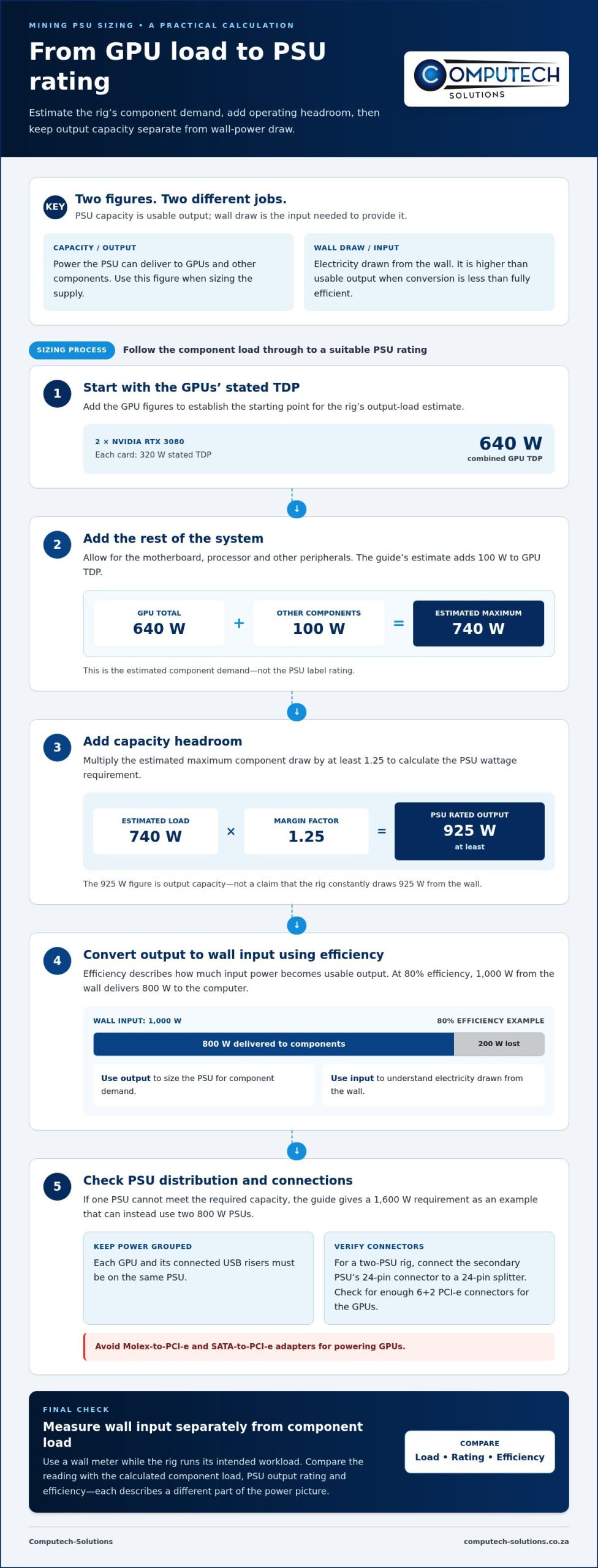
- Estimate demand from the components, not the wall reading. A PSU delivers output power to GPUs, the motherboard, processor and peripherals. The wall supplies the input power that the PSU converts. Some input is lost during conversion, so wall draw exceeds the power delivered. Keep these figures separate: this helps you size the supply for the components and understand the rig’s electricity demand. A wall meter measures input, while component specifications describe required output. Neither figure replaces the other.
- Add the GPUs’ stated thermal design power to establish a starting point. An NVIDIA RTX 3080 has a stated TDP of 320 watts. Two RTX 3080 GPUs therefore have a combined stated TDP of 640 watts. TDP is not the entire rig estimate, because the motherboard, processor and peripherals also consume power. Use GPU TDP to begin the calculation, then include the rest of the system. This creates a more useful output-load estimate than adding GPU figures alone.
- Include a practical allowance for the remaining components. The guide’s method adds 100 watts to GPU TDP for the motherboard, processor and other peripherals. For two RTX 3080 cards, add that allowance to 640 watts, producing an estimated maximum draw of 740 watts. Treat this as the rig’s estimated demand, not the PSU’s required label rating. Separate the load estimate from the capacity decision, because the supply needs operating headroom above the estimated maximum.
- Multiply the estimated maximum draw by at least 1.25 when calculating PSU wattage. With the two-card example, 740 watts multiplied by 1.25 gives 925 watts. Select a PSU rated for at least 925 watts for that estimate. This margin connects the component-load calculation to a usable supply rating. It doesn’t mean the rig constantly draws 925 watts from the wall. The PSU rating concerns available output capacity; actual input depends on component demand and conversion efficiency.
- Plan the distribution if one supply cannot meet the required capacity. A rig needing a 1,600-watt PSU can instead use two 800-watt PSUs, according to the guide. Keep each GPU and its connected USB risers on the same PSU. For a two-PSU rig, connect the secondary PSU’s 24-pin connector to a 24-pin splitter. Check that the supplies provide enough 6+2 PCI-e connectors for the GPUs. Don’t power GPUs through Molex-to-PCI-e or SATA-to-PCI-e adapters.
- Use a wall-power reading to compare actual input with the calculated component load. Record the reading while the rig runs its intended workload, then compare it with the PSU’s output rating and efficiency. A difference between input and delivered output reflects conversion losses; it isn’t extra power reaching the GPUs. If the reading exceeds expectations, review the component load, PSU efficiency and connections together. For help relating a rig’s requirements to suitable hardware, discuss your mining power requirements.
Record the wall input alongside your component-load estimate, and note the conditions under which you took the measurement. Treat it as an observation of electricity entering the complete rig, not as a replacement for the output figure used to choose PSU capacity. If the reading differs from your estimate, review the component list, assumed load and supply assignments before changing the capacity calculation. Keep the two measures in separate notes so you don’t mistake a wall measurement for power delivered to components.
When using multiple PSUs in a mining rig, power each GPU and its connected USB risers from the same PSU. Keep that assignment clear when recording the rig’s input reading, so you can compare the measured total with the same configuration used for the component estimate. If you change which supply serves a GPU, update your notes before comparing the next wall reading with the earlier one. This makes the comparison more useful without treating input power as the PSU’s output rating. Base the capacity decision on estimated component demand and headroom; use the meter reading to describe the rig’s actual input under the measured conditions. Keeping those roles distinct helps identify assumptions to review without confusing a change in measured input with a change in available PSU capacity.
Computech-Solutions: Acer Replacement Laptop Batteries
Computech-Solutions supplies Acer replacement laptop batteries for users whose Acer laptop needs a replacement battery. This is a different need from choosing a PSU for a mining rig, but reliable computer hardware matters across your setup. The business also supplies replacement batteries for Apple, ASUS and Dell laptops. Choose a battery that matches the laptop brand, rather than treating a laptop battery as a substitute for a desktop PSU. For mining hardware decisions, use the power-demand calculations above; for a laptop battery replacement, choose the relevant brand-specific option. Browse Computech-Solutions’ laptop battery offerings.
Make your next power decision with confidence
Before changing a mining setup, include the power estimate in your build plan rather than treating it as an afterthought. Component choices, future upgrades and equipment connections can all affect whether a supply remains suitable. Keep your assumptions with your hardware notes so you can reassess the setup when its configuration changes. This gives you a clearer basis for comparing mining power supplies in South Africa and planning your next step.
For guidance on your PSU decision, contact Computech-Solutions for PSU advice. Share the components you’re planning around and the power requirements you’ve calculated to help focus the conversation. A measured approach makes it easier to move forward with a setup that matches your operational needs. Take the next step when you’re ready.
