
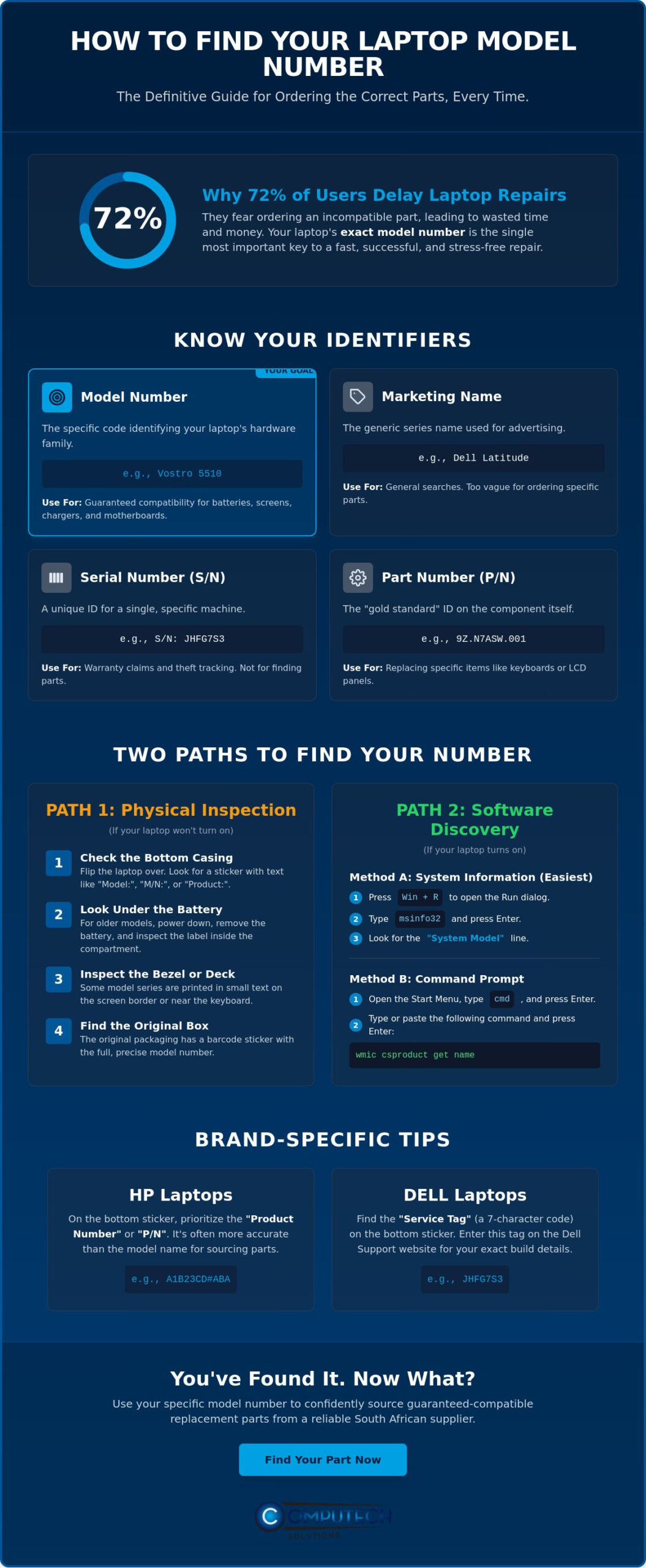
Did you know that 72% of users delay essential laptop repairs because they’re worried about the high costs or the risk of making a mistake? Ordering a replacement battery or screen only to find it doesn’t fit is a frustrating waste of time and capital. Knowing how to find your laptop model number for parts is the single most important step in ensuring your hardware remains operational without unnecessary downtime. Whether you’re dealing with a worn-out sticker or a machine that won’t boot, pinpointing that specific alphanumeric string is the only way to guarantee compatibility.
It’s understandable to feel overwhelmed when faced with a confusing list of serial numbers, part numbers, and product IDs. You need a definitive solution that eliminates the guesswork and gets your device back to peak performance. This 2026 guide provides the exact physical and digital methods required to identify your laptop’s identity with total confidence. We’ll walk through built-in system tools like msinfo32, discuss how to navigate unreadable labels, and show you how to distinguish your model number from a serial number so you can source the right components from a reliable South African supplier.
Key Takeaways
- Distinguish between generic marketing names and the specific alphanumeric model strings required for precise hardware matching.
- Identify your device’s identity using redundant physical and digital methods, ensuring you can retrieve data even if labels are damaged.
- Learn how to find your laptop model number for parts using built-in Windows diagnostic tools like System Information and Command Prompt.
- Navigate manufacturer-specific quirks, such as HP Product Numbers and Dell Service Tags, to find the exact specifications for replacement batteries or screens.
- Secure the correct components from a local South African supplier to reduce shipping times and guarantee part compatibility for your specific machine.
Why Your Laptop Model Number is Critical for Part Compatibility
A laptop model number is a specific alphanumeric code that serves as the definitive identifier for a device’s internal hardware configuration. While consumers often identify their machines by marketing names such as “Dell Latitude” or “HP Pavilion,” these labels are insufficient for technical repairs. Manufacturers within the major laptop brands often use the same chassis design for dozens of different internal configurations. If you rely solely on the brand name, you risk ordering a replacement part that looks identical but is electronically incompatible. Knowing how to find your laptop model number for parts ensures you receive a component designed for your specific motherboard revision.
The danger of “near-miss” parts is a significant concern for DIY repairs. Two laptops in the same series might use different battery voltages or vary in the number of pins on an LCD connector. Installing a 14.4V battery into a system designed for 11.1V can lead to catastrophic hardware failure. In South Africa, the importance of precise part matching is amplified by frequent power surges associated with load shedding. These electrical fluctuations often necessitate the replacement of laptop chargers or internal power components. Using the wrong specifications during these repairs can leave your device vulnerable to further damage when the grid stabilizes. Understanding how to find your laptop model number for parts is the first line of defense against these operational risks.
Model Number vs. Serial Number: Knowing the Difference
Precision is vital when identifying hardware. A Serial Number (S/N) is a unique identifier assigned to one specific unit, primarily used for tracking warranty status or theft recovery. In contrast, the Model Number identifies the entire production line and its shared hardware specifications. You shouldn’t use the S/N alone when searching for generic replacement batteries; doing so often returns zero results or incorrect listings. Always prioritize the model string to find compatible hardware across a broader inventory.
When to Search for a Part Number (P/N) Instead
Sometimes, the model number isn’t enough, particularly for components like LCD replacement panels or keyboards. In these cases, the Part Number (P/N) found directly on the failing component is the “gold standard.” For example, the underside of a keyboard or the back of a screen will feature a label with a specific P/N that accounts for regional layouts or specific backlight types. Computech-Solutions utilizes both the Model and Part numbers to verify stock, providing a double-layer of certainty that your replacement part will function perfectly upon installation. This comprehensive approach eliminates the stress of technical disruptions and ensures a streamlined repair process.
Physical Methods: Where to Look on Your Laptop Casing
The most direct way to identify your hardware is through the physical labels attached to the chassis. Most manufacturers place a regulatory sticker on the base of the machine, which contains the specific alphanumeric string needed for repairs. When inspecting the bottom panel, look for text preceded by “Model:” or “M/N:”. This string is often grouped with regulatory symbols and power specifications. For those using enterprise hardware, this official Dell guide provides an excellent visual reference for how these labels appear across different laptop generations. Understanding how to find your laptop model number for parts physically is often the fastest solution when the device won’t power on.
If the bottom panel is blank, the information may be hidden within the battery compartment. This is common on older Acer, Toshiba, or removable-battery HP models. You’ll need to safely power down the unit and slide the release latches to remove the battery. Inside the bay, a small white or silver label usually lists the precise sub-model string. Additionally, check the keyboard deck. Manufacturers sometimes print the model name in small, discreet text near the power button or along the screen bezel. While these are sometimes just marketing names, they often include the specific series number required for a successful hardware match.
Your original purchase records are another reliable source of truth. If you still have the retail box, the model number is typically located on a barcode sticker on the side or back. For South African users, the tax invoice issued at the time of purchase is an invaluable document. Professional retailers include the full technical model string on the invoice for warranty and insurance purposes. If you’re struggling to match these details to a specific component, you can consult with the team at Computech-Solutions to verify compatibility before making a purchase.
Reading Worn or Faded Stickers
Physical labels often degrade over time due to heat and friction. If the text is faded, use a smartphone camera to take a high-resolution photo and zoom in; the digital sensor often picks up contrast that the human eye misses. You can also use angle-lighting by shining a flashlight across the surface at a low angle to reveal laser-etched characters on modern aluminium chassis. Many newer Lenovo and HP models now include a small QR code on the label that, when scanned, takes you directly to a digital spec sheet for that specific unit.
Checking Under the “Hood”
Safety is the priority when performing a physical inspection. Always disconnect the charger and, if possible, remove the external battery before looking for internal labels. Some devices place a “Regulatory Label” on the underside of a magnetic trim piece or hidden behind a small service door. However, you should never remove internal screws or open the main chassis just to find a label. Doing so can void your warranty and risks damaging sensitive internal components. Knowing how to find your laptop model number for parts should never involve invasive disassembly if the sticker isn’t immediately accessible.
Digital Discovery: Finding Model Details via Software
Physical labels are often the first casualty of daily hardware use. When stickers are unreadable, scratched, or missing, the operating system provides a definitive digital record. Accessing this data directly from the firmware is the most reliable way to confirm your hardware specifications. While 2026 professionals often use advanced diagnostic tools like HWiNFO or AIDA64 for deep diagnostics, built-in Windows tools remain the gold standard for quick identification. Knowing how to find your laptop model number for parts through software eliminates the risk of misreading small, faded print and ensures you have the exact alphanumeric string for your order.
Step-by-Step: The Windows System Information Tool
The System Information tool, known as msinfo32, is the quickest way to get a comprehensive hardware summary. To access it, press the Windows key + R, type “msinfo32” into the Run dialog box, and hit Enter. A window will appear with a detailed list of your computer’s internals. Look for the “System Model” field in the right-hand pane. This line contains the specific model identifier you need for sourcing parts. To share this with a technician, simply highlight the “System Model” line, press Ctrl+C to copy the text, and paste it directly into your email enquiry or support ticket.
Using the Command Prompt (The Pro Method)
If the standard Windows interface is slow or unresponsive, the Command Prompt offers a direct line to the motherboard’s BIOS data. Search for “cmd” in the Start menu, right-click the icon, and select “Run as administrator.” Once the window opens, type the command wmic csproduct get name and press Enter. The system will instantly return the precise model name assigned by the manufacturer. This method is particularly useful for white-label or custom-built laptops where standard marketing labels might be absent. It’s a professional technique that ensures you’re pulling data from the hardware level rather than relying on potentially outdated software tags.
For machines that fail to boot into Windows, the BIOS or UEFI menu serves as the final source of truth. By tapping a specific key (usually F2, F10, or Del) during the initial startup splash screen, you can enter the firmware settings. The model number is typically displayed on the “Main” or “Information” tab. This is essential for identifying devices with corrupted operating systems. If you’re working on a MacBook, the process is equally streamlined. Click the Apple icon in the top-left corner, select “About This Mac,” and you’ll see the model name and year. While Apple users often rely on serial numbers, knowing how to find your laptop model number for parts helps in identifying the correct replacement batteries or LCD panels across different production cycles.
Brand-Specific Quirks: Acer, Dell, HP, and Lenovo
While standard identification methods are effective, major manufacturers often implement proprietary naming conventions that supersede generic labels. Understanding these brand-specific quirks is essential for navigating the repair market. Manufacturers like Dell and HP use unique identifiers that act as a “DNA” for your specific machine, providing a level of detail that a standard marketing name cannot match. Knowing how to find your laptop model number for parts within these specific ecosystems ensures you don’t accidentally order a component intended for a different regional variant or hardware revision.
Dell Service Tags and Express Service Codes
Dell utilizes a highly efficient 7-character alphanumeric identifier known as a Service Tag. You’ll typically find this on a small sticker on the bottom of a Dell Inspiron, Latitude, or XPS chassis. This tag is the ultimate source of truth for your device. It allows technicians to pull the original factory “build sheet,” which is vital for identifying internal specifications. For example, the Service Tag helps Computech-Solutions identify the exact charger wattage and connector type required for your specific motherboard. If the sticker is unreadable, the Dell SupportAssist tool can automatically retrieve this code, providing a streamlined path to identifying your hardware without manual data entry.
HP Product Numbers vs. Model Names
Relying on a marketing name like “HP 15” or “HP Pavilion” is a common pitfall. These names represent broad categories that include hundreds of different internal configurations. To secure the correct hardware, you must locate the specific Product Number (often labeled as P/N or SKU). This code frequently ends in a regional suffix like #ABA. You can usually find this on a label inside the battery compartment or on the bottom casing. If your machine is functional, use the HP-specific keyboard shortcut: press Fn + Esc. This instantly opens a System Information window that displays the exact product string needed for an accurate hardware match.
Acer and Apple also have unique identification requirements. Acer uses an 11 or 12-digit SNID (Serial Number Identification) found on a white sticker. This code is often more useful than the serial number when using the Acer support portal to verify driver or hardware compatibility. Apple users should look for the “Model Identifier” (such as MacBookPro15,1) found in the “About This Mac” menu. This identifier is far more precise for sourcing replacement batteries than the generic “A-number” laser-etched on the bottom of the case. If you’re struggling to decode these brand-specific strings, contact Computech-Solutions for expert part verification to ensure your replacement hardware is a perfect match.
Sourcing the Correct Replacement Parts in South Africa
Identifying the correct hardware is a significant milestone, but the repair process is only complete once the component is installed and operational. Sourcing your hardware from a local South African supplier eliminates the logistical risks associated with international shipping and customs delays. When you choose a domestic partner, you benefit from a streamlined supply chain that prioritizes uptime and operational efficiency. Knowing how to find your laptop model number for parts allows you to communicate effectively with local experts who understand the specific requirements of the South African market. This local approach ensures that your technical features are always matched to the correct components, reducing the risk of costly returns.
Finding Your Part on Computech-Solutions
Navigating the inventory at computech-solutions.co.za is a straightforward process designed for efficiency. You can input the model number you identified directly into the search bar for an immediate list of compatible hardware. Our platform is organized by category, making it simple to browse for Acer, HP, Dell, and Lenovo replacement batteries. If your search results are inconclusive or if you’re dealing with a rare sub-model, our Pretoria-based experts are available for manual verification. This high-touch service model ensures that technical features are always linked to practical business outcomes, giving you total confidence before you commit to a purchase. We provide nationwide delivery, ensuring your laptop is back online quickly regardless of your location in South Africa.
Ensuring Quality and Reliability
The quality of your replacement hardware is paramount, especially when managing the impact of South Africa’s power instability. High-quality replacement batteries and chargers are engineered to provide stable power delivery, protecting your motherboard from the fluctuations often associated with the national grid. Our laptop LCD replacement panels are also a preferred choice for local repairs due to their rigorous quality standards. Before completing your order, perform a final check by matching the voltage and connector type of the new part against your original component. This definitive verification step is the hallmark of a professional repair. It ensures your device returns to peak performance without further technical disruptions. Using the model number you just found, you can verify these specs with our team to guarantee a perfect fit.
Restore Your Device with Absolute Technical Certainty
Accurate hardware identification is the foundation of any successful repair. By mastering both physical inspections and digital diagnostic tools, you eliminate the risk of ordering incompatible components that lead to costly operational downtime. You now possess the definitive expertise on how to find your laptop model number for parts using redundant methods that function even when labels are unreadable or the operating system is inaccessible. This knowledge ensures that every hardware upgrade or replacement is a precise match for your specific machine.
Sourcing these components from a reliable local partner is the final step in maintaining your device’s peak performance. Computech-Solutions provides a comprehensive solution for South African users, specializing in Acer, Dell, and HP replacement batteries. With expert technical support based in Pretoria and efficient nationwide delivery, you can resolve technical disruptions with total confidence. Find the perfect replacement part for your laptop model today and restore your device to its full operational capacity. Don’t let a hardware failure stall your growth; the correct solution is now within your reach.
Frequently Asked Questions
Where can I find my laptop model number if the sticker is missing?
You can retrieve the model number through the Windows System Information tool (msinfo32) or by using the Command Prompt. If the operating system is not accessible, the BIOS/UEFI menu provides a permanent digital record that won’t wear away like a physical label. These digital methods are the most reliable alternatives when regulatory stickers are missing, damaged, or unreadable due to friction.
Is the Serial Number the same as the Model Number?
The Serial Number (S/N) is a unique identifier for your specific unit, while the Model Number identifies the hardware configuration shared by an entire production line. For ordering parts, the model number is the primary requirement for a successful match. Using the S/N for part searches often results in zero hits because it’s too specific for most hardware inventory databases.
How do I find my laptop model number if the screen is broken?
Connect your laptop to an external monitor or television using an HDMI or DisplayPort cable to view the system information digitally. If the device cannot output a signal, consult your original retail packaging or the South African tax invoice from your purchase. These documents frequently list the full technical model string required for sourcing a replacement LCD panel or other internal components.
What is a Dell Service Tag and how do I use it to find parts?
A Dell Service Tag is a 7-character alphanumeric code that identifies your machine’s unique factory configuration. You can enter this code on the Dell support site or provide it to a specialist supplier like Computech-Solutions to pull a detailed build sheet. This ensures you receive the exact charger wattage or battery type intended for your specific motherboard revision without any guesswork.
Can I find my laptop model number in the BIOS?
The BIOS or UEFI menu displays the definitive hardware model identifier retrieved directly from the motherboard’s firmware. You can access this interface by tapping the F2, F10, or Del key during the initial startup splash screen. Look for the ‘System Information’ or ‘Main’ tab to find the precise model string before the operating system even loads, which is ideal for non-booting devices.
Does the model number tell me which charger I need?
The model number is the primary reference used to determine the correct voltage, amperage, and connector type for your device. Knowing how to find your laptop model number for parts allows you to cross-reference manufacturer databases to find a compatible charger. This prevents electrical damage caused by using an adapter with incorrect power specifications or a poorly fitting connector pin.
How do I find my MacBook model number for a new battery?
Navigate to the Apple menu in the top-left corner and select ‘About This Mac’ to find the ‘Model Identifier’ string. Examples include MacBookPro16,1 or MacBookAir9,1. This identifier is significantly more accurate for sourcing replacement batteries than the generic ‘A-number’ laser-etched on the bottom of the chassis, as that number often covers multiple hardware generations with different internal connectors.
Why are there two different model numbers on my HP laptop?
HP laptops typically display a broad marketing name alongside a more specific Product Number. While the marketing name identifies the general series, the Product Number is the essential string for identifying exact internal components. Understanding how to find your laptop model number for parts on an HP device requires prioritizing this alphanumeric Product Number to ensure absolute compatibility with your specific regional variant.
