
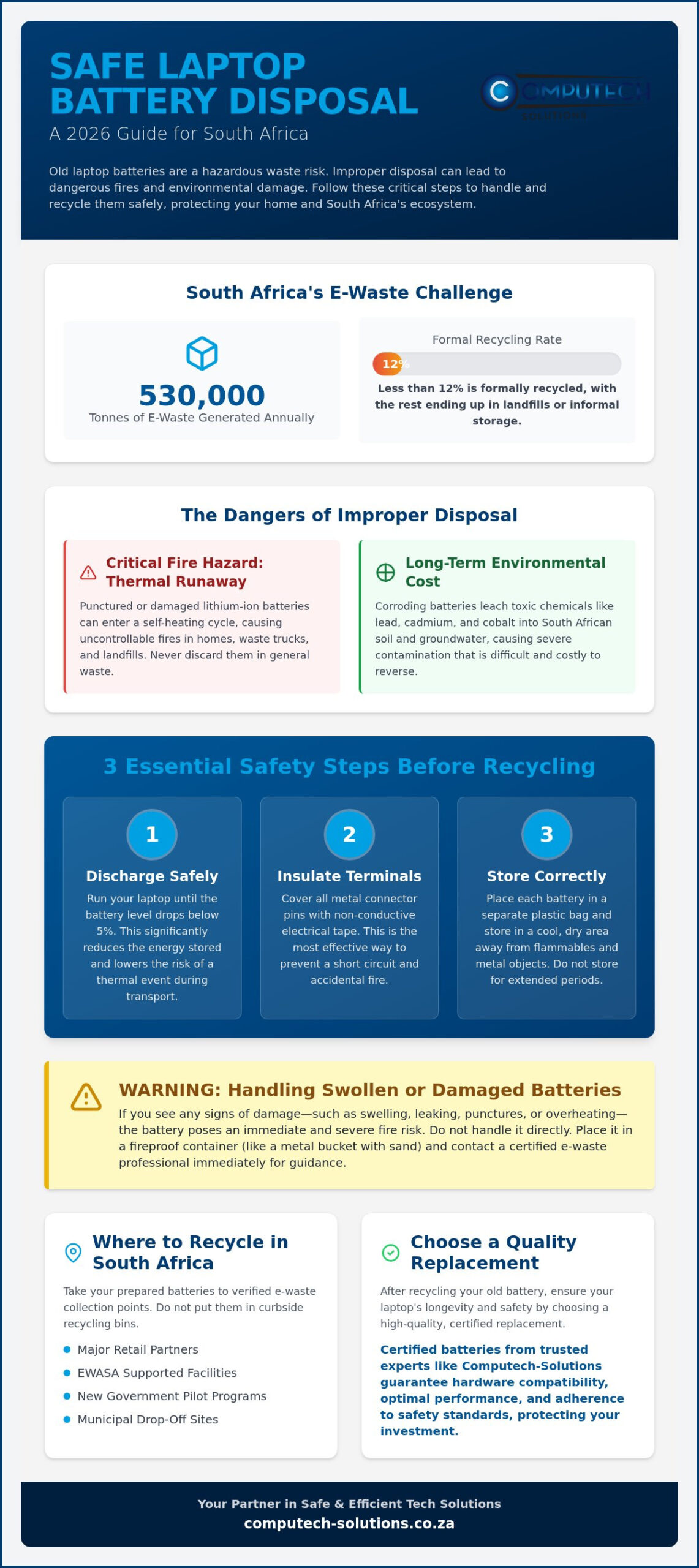
Did you know that South Africa generates up to 530,000 tonnes of e-waste every year, but less than 12% is formally recycled? Most of this waste sits in drawers or ends up in landfills, where lithium-ion components pose a significant fire hazard. If you’re holding onto a dead device because you’re unsure how to safely dispose of old laptop batteries, you aren’t alone. The fear of a thermal event or confusion over local waste laws often leads to dangerous clutter.
We understand the stress of managing technical risks while trying to stay environmentally responsible. This 2026 guide provides the exact safety steps required to prepare and handle your batteries to protect your home and the South African landscape. You’ll learn about the new government pilot programs paying for e-waste, the strictly enforced Extended Producer Responsibility (EPR) regulations, and how to source a high-quality replacement battery for your specific laptop model. We provide a comprehensive look at national recycling points and the technical protocols that keep your operations running efficiently and safely.
Key Takeaways
- Understand the critical risks of “Thermal Runaway” and why lithium-ion batteries require specialized handling to prevent landfill fires.
- Master the essential preparation steps for how to safely dispose of old laptop batteries, including proper terminal insulation and discharge protocols.
- Learn to recognize the warning signs of damaged or swollen batteries to mitigate immediate fire risks in your home or office.
- Locate verified 2026 e-waste collection points across South Africa, including major retail partners and EWASA supported facilities.
- Identify the benefits of certified replacement batteries from experts like Computech-Solutions to ensure your hardware remains efficient and safe.
The Dangers of Improper Laptop Battery Disposal
Lithium-ion (Li-ion) batteries are the standard for modern portable power, but their chemical composition makes them a high-risk category of hazardous waste. These batteries rely on reactive materials like lithium, cobalt, and liquid electrolytes to store energy. While safe during normal use, they become unstable when damaged, overheated, or discarded incorrectly. Understanding the dangers of improper battery disposal is vital for anyone managing hardware at home or in a professional office. In South Africa, the National Environmental Management: Waste Act (NEMWA) has shifted the responsibility of e-waste management onto both producers and consumers, making it a legal and ethical requirement to keep these components out of general landfills.
Why the General Waste Bin is Not an Option
Standard municipal bins are destined for waste trucks that use heavy-duty hydraulic compaction. If a lithium-ion battery is caught in this mechanism, the casing can easily puncture, leading to an immediate chemical fire. This poses a severe risk to waste collectors and municipal infrastructure. When a battery is breached, it often enters a state where internal temperatures spike uncontrollably. Thermal runaway is a self-heating cycle that causes fires. If you’re researching how to safely dispose of old laptop batteries, the first rule is to never let them enter the standard waste stream where physical damage is likely.
The Environmental Cost of E-Waste
Beyond the immediate fire risk, the long-term environmental damage of e-waste is staggering. When batteries sit in a landfill, they eventually corrode, allowing toxic chemicals like lead and cadmium to leach into South African soil and groundwater. This contamination is difficult and expensive to reverse. However, choosing to recycle your old tech supports a growing circular economy. Expert recycling facilities can extract and reuse valuable metals such as nickel and copper, reducing the environmental strain of raw material mining. South Africa currently generates between 360,000 and 530,000 tonnes of e-waste annually, yet only a small fraction is formally processed. By learning how to safely dispose of old laptop batteries, you help increase these recycling rates and protect the local ecosystem for future generations.
Preparation Checklist: How to Safely Handle Old Batteries
Before you head to a recycling center, you must prepare the hardware to eliminate any residual electrical risk. To safely handle old batteries, start by discharging the device. Run your laptop until the battery level drops below 5%. Low energy levels significantly reduce the chance of a “thermal event” during transport. Once discharged, remove the battery if your model allows it. If the battery is internal and the casing is sealed, don’t attempt to pry it out; instead, prepare the entire device for recycling according to the manufacturer’s guidelines. This initial step is a cornerstone of how to safely dispose of old laptop batteries because it stabilizes the chemical components inside the cell.
Taping the Terminals Correctly
Preventing a short circuit is your primary objective. Even a “dead” battery often retains enough charge to spark if the metal terminals touch other conductive surfaces. Use non-conductive tape, preferably high-quality electrical tape, to cover the connector pins. Standard packing tape is acceptable if electrical tape isn’t available, but avoid any metallic or conductive tapes. Ensure the tape is secure and covers all exposed metal contacts. This simple step is the most effective way to prevent accidental fires during the collection and sorting process.
Short-Term Storage Safety
Proper storage is critical if you aren’t heading to a drop-off point immediately. Never store old batteries in metal tins or drawers with loose change, paperclips, or keys. These metal objects can bridge the terminals and cause a short circuit. Place each battery in its own clear plastic bag for an extra layer of insulation. Store these bags in a cool, dry area away from direct sunlight and flammable materials like curtains or paper. While you are learning how to safely dispose of old laptop batteries, remember that these units shouldn’t sit in your home for months. Aim to drop them off at a certified facility within a few weeks of removal to minimize risk. Keeping them in a stable environment between 15 and 25 degrees Celsius is ideal for maintaining safety during this waiting period.
Once your old power cell is secured and ready for recycling, you’ll need a reliable replacement to restore your machine’s mobility. Investing in specialized replacement laptop batteries from a trusted partner ensures your hardware remains safe and operational. High-quality cells are designed with built-in protection circuits to prevent the very issues that lead to early disposal.
Handling Swollen or Damaged Laptop Batteries
When considering how to safely dispose of old laptop batteries that have physically failed, you must treat the situation as a chemical emergency. A swollen battery is not just a technical failure; it’s a sign that the internal cells have undergone a chemical reaction that produced gas, which is now trapped under pressure. You can recognize these signs early by looking for a bulging laptop case, a “popped” trackpad that no longer clicks, or a keyboard that is lifting from the chassis. In some cases, you might notice a sweet, metallic, or vinegar-like smell, which indicates that the battery is “off-gassing” and the protective seal has been compromised.
If you identify any of these symptoms, take immediate action. Disconnect the device from its power source and shut it down. Do not attempt to charge a swollen battery, as the heat generated during charging can trigger a fire. Properly identifying a compromised unit is the first stage in understanding how to safely dispose of old laptop batteries that pose an immediate threat. For those in South Africa, identifying the nearest specialized facility through the official resources on Where to Recycle Laptop Batteries in South Africa ensures the hazardous unit is handled by professionals equipped for chemical fires.
The “Do Not” List for Swollen Cells
There are several dangerous myths regarding battery repair that you must ignore. Never place a swollen battery in a freezer or submerge it in water. Thermal shock can cause the casing to crack, while lithium reacts violently with water. Similarly, you should never apply pressure to the bulge or try to “squeeze” the battery back into its original shape. A swollen battery is a pressurized fire risk that requires immediate isolation. If you must move the unit, place it in a metal bucket filled with sand or a dedicated fire-safe Li-Po bag. This provides a buffer in case the battery enters thermal runaway during transport.
Finding Professional Help for Removal
If the battery is glued or integrated into the laptop frame, don’t attempt a DIY removal. Puncturing the skin of a swollen battery with a screwdriver or pry tool can lead to an immediate flare-up. Call a professional technician who has the experience to handle compromised hardware. If you decide to remove a removable battery yourself, wear thick gloves and eye protection to guard against chemical leaks. Once the battery is out, inspect the laptop chassis for permanent damage. Swelling often warps the internal frame or snaps plastic clips, which may require a replacement panel to ensure the new battery fits securely and operates safely.
Where to Recycle Laptop Batteries in South Africa
South Africa’s waste management landscape has evolved significantly in 2026, offering more accessible options for citizens than ever before. With the strict enforcement of Extended Producer Responsibility (EPR) regulations, retailers and manufacturers are now legally mandated to facilitate the return of electronic waste. If you are researching how to safely dispose of old laptop batteries, you no longer have to seek out obscure industrial sites. However, you must avoid handing these items to informal scrap collectors. While these individuals play a role in metal recycling, they often lack the specialized equipment to handle lithium-ion cells safely, which can lead to fires in residential areas or illegal dumping of toxic internal components.
Major Retailer Drop-off Points
National retail chains have become the primary frontline for consumer e-waste collection. Most Makro, Pick n Pay, and Woolworths branches now feature dedicated e-waste bins, usually located near the entrance or the customer service desk. These bins are designed to accept small electronics, including old laptop batteries, power cables, and chargers. In Johannesburg, AST Recycling has specifically partnered with Leroy Merlin to provide specialized collection points across their four major locations. When using these bins, ensure your batteries are prepared as described in previous sections to prevent short circuits within the collection container. This network of retail points makes the process of how to safely dispose of old laptop batteries a routine part of your weekly shopping trip.
Specialized E-Waste Recyclers
For businesses or individuals with large volumes of hardware, specialized recyclers offer a more comprehensive solution. Organizations like EWaste Africa now operate over 200 public drop-off points nationwide. Additionally, as of May 2026, the South African government has launched a pilot program in regions like Mthatha that provides a financial incentive for e-waste, currently paying R4.50 per kilogram for various electronic components. When choosing a private recycler, verify their compliance with the e-Waste Association of South Africa (eWASA). Certified recyclers ensure that batteries are processed in plants capable of recovering nickel, copper, and cobalt while safely neutralizing hazardous electrolytes. Many of these professional facilities also provide certified data destruction for the laptops themselves, ensuring your sensitive information doesn’t leave the site.
Once you’ve cleared out your old hazardous waste, ensure your device stays powered by a reliable source. You can buy certified replacement laptop batteries from Computech-Solutions to guarantee that your new hardware meets the latest safety and efficiency standards in South Africa.
Replacing Your Battery: Choosing Quality and Longevity
Once you’ve mastered how to safely dispose of old laptop batteries, the focus shifts to ensuring your next power cell doesn’t become a hazardous waste item prematurely. Selecting a high-quality replacement is the most effective way to prevent the operational risks associated with battery failure. While original equipment manufacturer (OEM) batteries are excellent, they are often unavailable for older models or carry a prohibitive cost. This is where certified generic replacements provide a definitive solution. Unlike “no-name” cells found on unverified marketplaces, certified replacements from specialists like Computech-Solutions are engineered to match the exact voltage and safety specifications of your original hardware.
To find the correct match, you must identify the specific model number printed on your existing battery casing rather than just the laptop model. For Acer, HP, Dell, and ASUS laptops, this code is often a combination of letters and numbers like “J60J5” or “HS04”. Using this specific identifier ensures that the internal protection circuitry communicates correctly with your laptop’s motherboard. If you’re unsure which unit you need, our team provides expert technical support to help you browse our range of high-quality replacement batteries for all major brands, including Apple, Lenovo, and Toshiba.
The Risks of Low-Quality Replacements
Cheap, uncertified batteries are a primary cause of the swelling and fire risks that make learning how to safely dispose of old laptop batteries so necessary. These “too cheap to be true” units often use Grade-B or recycled cells that lack sophisticated Protection Circuit Boards (PCBs). A high-quality PCB prevents overcharging and manages heat during high-performance tasks. Without these safeguards, a battery can enter thermal runaway far more easily. Investing in a reliable partner for your replacement needs alleviates the stress of technical disruptions and protects your hardware investment from internal chemical damage.
Getting the Most from Your New Battery
In the South African context, load-shedding and frequent power surges pose a unique challenge to battery health. While businesses often rely on industrial experts like Ana-Digi Systems for large-scale energy optimisation and protection, individual users can extend the life of their units by avoiding 0% charges. Modern lithium-ion cells prefer shallow discharge cycles. Most manufacturers recommend keeping your battery between 20% and 80% for maximum longevity. You can use built-in software tools, such as Windows Battery Report or specialized health monitors, to track wear levels over time. By maintaining these healthy habits and using a high-quality charger, you can delay the need for disposal and ensure your mobile workstation remains efficient for years to come.
Securing Your Hardware Future Through Responsible Disposal
Managing e-waste effectively is a dual commitment to operational safety and environmental health. You now have the technical knowledge to identify compromised cells and utilize the growing network of South African recycling points. Proper terminal insulation and the use of certified drop-off bins at national retailers ensure that hazardous materials are processed without risk to municipal infrastructure. By following these protocols for how to safely dispose of old laptop batteries, you move your home or business toward a more sustainable circular economy.
Once your old hardware is recycled, it’s time to restore your machine’s peak performance with a reliable power source. Computech-Solutions provides expert technical support for all major brands, including Acer, Dell, and HP. We offer nationwide delivery across South Africa to ensure you receive your components quickly and securely. Find your high-quality replacement laptop battery today and experience the stability of professional-grade hardware. Taking these proactive steps ensures your portable office remains efficient and safe for the long term.
Frequently Asked Questions
Can I put laptop batteries in my household recycling bin?
No, you shouldn’t ever place laptop batteries in a standard household or recycling bin. These units are classified as hazardous waste because they can ignite under the pressure of waste compaction trucks. This poses a severe fire risk to municipal workers and waste infrastructure. Always take your batteries to a dedicated e-waste collection point to ensure safe handling and processing.
How do I know if my laptop battery is lithium-ion?
You can identify the battery type by looking for the “Li-ion” or “Lithium-ion” mark on the product label. Almost all modern laptops from brands like Dell, HP, and Acer use this chemistry. If the label is faded, you can cross-reference the battery model number on the manufacturer’s official support page to confirm its chemical composition before you begin the disposal process.
What should I do if my battery starts smoking or catches fire?
If a battery begins to smoke or hiss, disconnect the power source and move the device to a non-combustible surface like concrete if it’s safe to touch. Don’t use water on a lithium-ion fire as it can cause a violent reaction. Instead, use a Class D fire extinguisher or smother the unit with dry sand. Evacuate the area if the smoke becomes thick or the fire spreads.
Is it safe to keep a dead battery in my laptop while it is plugged in?
Keeping a dead battery in your laptop isn’t ideal because chemical degradation can lead to swelling over time. A swollen battery can warp your laptop’s internal frame or crack the trackpad. It’s best to remove the dead battery and run the laptop directly from the AC adapter. You can then source a high-quality replacement from a specialist provider to restore your device’s mobility safely.
Where can I find a battery recycling bin in South Africa?
Recycling bins are widely available at national retailers including Makro, Woolworths, and Pick n Pay. These stores provide clearly marked containers for small electronics and power cells near their entrances. If you’re looking for more options on how to safely dispose of old laptop batteries, the eWASA website maintains an updated list of certified collection sites across all nine provinces.
How do I store an old battery safely before I take it to a recycler?
Place the battery in a clear plastic bag and keep it in a cool, dry location away from flammable materials. It’s vital to cover the metal terminal pins with electrical tape to prevent accidental short circuits. Don’t store multiple loose batteries in the same container without individual bagging, as their terminals could touch and create a spark that leads to a fire.
Can I mail a laptop battery to a recycling centre?
You shouldn’t mail loose lithium-ion batteries through standard South African postal or courier services. Most couriers classify them as dangerous goods, requiring specialized packaging and specific declarations for transport. It’s significantly more efficient and cost-effective to use the free drop-off bins provided by retail partners or specialized e-waste recyclers in your local area rather than risking a postal safety violation.
What is the cost of recycling a laptop battery in South Africa?
Disposing of your battery is typically free at most retail and private collection points across the country. Some specialized government pilot programs launched in 2026 even offer an incentive of R4.50 per kilogram for e-waste. Understanding how to safely dispose of old laptop batteries allows you to clear out clutter without incurring fees while ensuring the hazardous materials are managed according to national environmental laws.
