
It’s 2 PM, the power grid goes offline for scheduled load shedding, and your EliteBook shuts down before you can even hit save on a critical presentation. You rely on your laptop for professional mobility, and a failing battery turns a minor power outage into a major operational risk. It’s frustrating to navigate the confusion of part numbers like CM03XL and 717375-001 while worrying about the quality of replacement units that might swell or leak. We understand that you need a reliable power source to maintain your workflow without technical disruptions.
This guide will help you master everything about the 717375-001 battery, from identifying compatible EliteBook models to restoring four to six hours of unplugged performance. You’ll learn how to ensure your part number matches perfectly and discover the best practices for maximizing lifespan during frequent power cycles. We provide a clear path to getting your hardware back to peak efficiency with a high-quality replacement delivered via national courier.
Key Takeaways
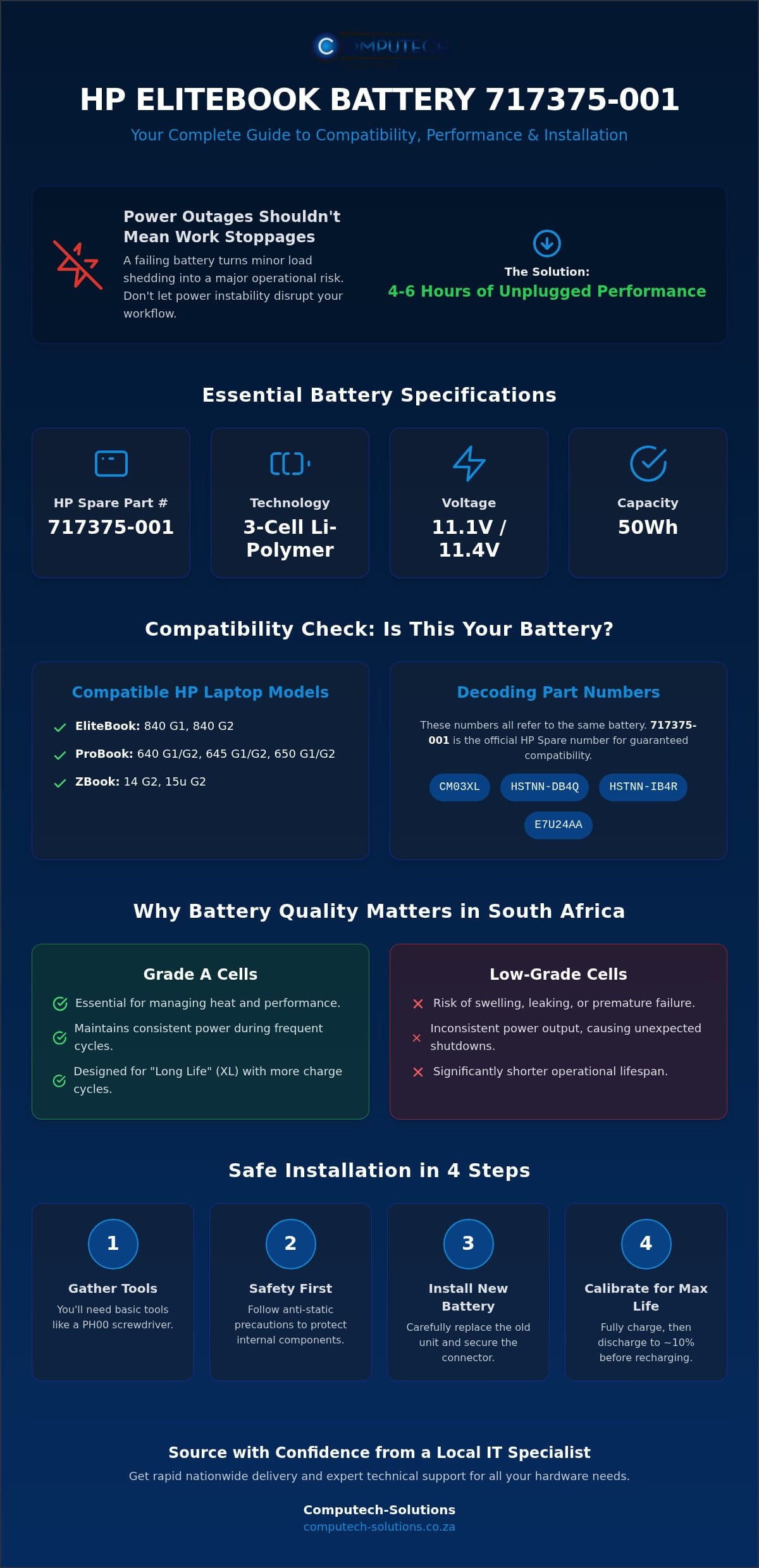
- Verify your hardware specifications, including the 11.1V or 11.4V voltage and 50Wh capacity, to ensure a perfect technical match for your HP EliteBook.
- Learn to identify the 717375-001 among common aliases like CM03XL and HSTNN-DB4Q to avoid ordering the wrong component for your specific laptop model.
- Understand why Grade A cells are essential for managing heat and maintaining consistent performance during frequent power cycles in the South African climate.
- Master the safe installation process using basic tools like a PH00 screwdriver while following critical anti-static precautions to protect your internal components.
- Discover the advantages of sourcing from a local South African IT specialist to ensure rapid nationwide delivery and expert technical support for your hardware repairs.
Understanding the HP 717375-001 Battery: Essential Compatibility and Specs
The 717375-001 serves as the primary HP spare part number for a specific generation of professional-grade laptops. It’s a 3-cell Lithium-Polymer unit that provides a balance between weight and energy density. Unlike older external batteries that clipped onto the back of a chassis, this internal design is secured with screws, reflecting HP’s move toward thinner, more durable business Ultrabooks. This model typically features a 50Wh capacity, which is optimized for the power demands of Intel Core i5 and i7 processors found in the EliteBook and ProBook series.
Modern advancements in lithium-ion battery technology allow for a flatter footprint, giving your laptop its slim profile while maintaining enough charge to survive a standard load-shedding block. When you source a replacement 717375-001, you’re investing in a 3-cell configuration designed for stability. These cells are engineered to handle the frequent charge cycles common in South Africa, where power instability often forces users to rely on battery power multiple times a day.
Which HP Laptops Use the 717375-001 Part Number?
Compatibility is the most critical factor when choosing a replacement. The 717375-001 is the designated part for several high-performance machines. You’ll find it in the EliteBook 840 G1 and G2 series, which remain popular in South African corporate environments. It also powers the ProBook 640, 645, and 650 G1 and G2 models. If you use a mobile workstation, this battery is compatible with the ZBook 14 and 15u G2 models. Always check your laptop’s baseplate or the original battery label to confirm this part number before purchasing.
Voltage and Capacity: Why Matching Specs is Non-Negotiable
You might notice that different versions of the 717375-001 list either 11.1V or 11.4V. These are generally considered safe ranges for the same motherboard, as the laptop’s internal voltage regulator handles these minor variances. However, you should never attempt to install a battery with a significantly different voltage, such as a 14.8V unit. Doing so can cause immediate, irreversible damage to your HP motherboard’s power rails.
Capacity is usually measured in Watt-hours (Wh) or milliampere-hours (mAh). While mAh tells you the total charge the cells can hold, Wh is a more accurate measure of the total energy available. A 50Wh rating ensures you have the necessary runtime to complete professional tasks during an outage. Using a lower-capacity generic unit might save money upfront, but it often results in your laptop shutting down prematurely when you need it most.
Identifying Your Replacement: 717375-001 vs. CM03XL and E7U24AA
Finding the right replacement for your laptop often feels like decoding a secret language. HP labels their hardware with multiple identifiers, including Spare Part Numbers, Regulatory Model Names, and Marketing SKUs. The 717375-001 is the official HP Spare number, which is the most accurate way to ensure technical compatibility. You’ll likely see “CM03XL” printed in large letters on the battery casing. While this is the series name, the spare number remains the gold standard for parts matching. Don’t guess when it comes to power components. Using incorrect identifiers can lead to purchasing a unit that doesn’t fit or, worse, poses a risk. Staying informed about battery safety and recalls is essential when dealing with older professional hardware.
You might also encounter codes like HSTNN-DB4Q or HSTNN-IB4R on your original unit. These are internal manufacturing codes. They all point to the same physical battery as the 717375-001. Visually, this battery is distinctive. It’s a long, slim, rectangular plate with a connector located in the center. If you see a battery that looks similar but has the connector shifted to one side, it’s likely for a different EliteBook generation. Check your original part carefully. A mismatch in the pin layout will prevent the battery from seating correctly on the motherboard.
Deciphering HP Part Numbers and Alternate Identifiers
The “XL” in the CM03XL designation stands for “Long Life”. These batteries are designed to withstand more charge cycles than a standard cell. This is a critical feature for South African professionals who cycle their batteries daily during load shedding. The E7U24AA number is a marketing part number used for retail packaging. If you aren’t sure which code to trust, run the HP Support Assistant on your laptop. It will identify the exact SKU currently installed in your system. If you’re still feeling stuck, chat with our hardware experts on WhatsApp to verify your compatibility before you buy.
How to Confirm This is the Correct Battery for Your Device
Start by looking for a small sticker on the battery labeled “HP Spare”. If it matches 717375-001, you’ve found the correct part. Next, verify the connector pins. The 717375-001 uses a specific pin layout that must align perfectly with the motherboard socket. If you’ve already removed the battery, you can also use your laptop’s serial number on the HP PartSurfer website. This tool provides an official manifest of every component shipped with your specific device. This double-verification prevents the frustration of receiving a part that looks right but doesn’t quite fit the internal screw mounts. Always verify the physical dimensions to ensure the casing can close properly.
Performance and Quality: Why Battery Grade Matters in South Africa
Selecting a replacement battery involves more than just matching a part number. The internal cell quality determines whether your laptop lasts for two years or two months. Grade A cells are the industry standard for professional hardware because they undergo rigorous testing for capacity and internal resistance. Cheap generic alternatives often use recycled or “B-grade” cells that don’t hold a consistent charge. In a professional environment, an unreliable battery isn’t just an inconvenience; it’s a risk to your data and productivity. Choosing a high-quality 717375-001 ensures your EliteBook maintains its original performance standards.
Heat management is a critical factor for South African users. Our high ambient temperatures, especially in regions like Gauteng or the Northern Cape, place immense stress on laptop internals. HP EliteBooks feature slim, compact designs with very little room for airflow around the battery. A low-quality battery generates more heat during discharge and charging cycles, which can lead to thermal throttling or hardware damage. You should always look for units with CE, FCC, and RoHS certifications. These labels confirm the battery meets international safety and environmental standards, ensuring it won’t overheat or cause a short circuit in your motherboard.
Swelling is a common failure point for Lithium-Polymer batteries in thin-chassis laptops. When poor-quality cells degrade, they can off-gas, causing the battery casing to expand. Because there’s no extra space inside an EliteBook 840, a swelling battery will push against the trackpad or bottom cover. This often results in a cracked trackpad or a warped frame. Investing in a premium replacement prevents these physical hazards and protects the structural integrity of your device.
The Impact of Load Shedding on Laptop Battery Health
Frequent power outages in South Africa have changed how we use our hardware. Load shedding forces batteries into deep discharge cycles, which is the fastest way to degrade chemical health. If your laptop drops below 10% multiple times a day, the cells lose their ability to hold a charge much sooner than expected. A high-quality 717375-001 replacement is essential because it’s designed to handle these frequent cycles. Additionally, the unstable grid returns often cause power surges. Premium batteries include better surge protection circuits to handle the “dirty” power that often follows a grid restoration.
Li-Polymer Technology: Safety and Longevity Standards
Modern 717375-001 units use Lithium-Polymer (Li-Polymer) technology, which is more stable and lightweight than older Lithium-Ion designs. These batteries feature built-in circuit protection to prevent overcharging and short circuits. By 2026 standards, a “Long Life” replacement should provide consistent output for at least 300 to 500 full charge cycles. This longevity is vital for maintaining a mobile workstation that doesn’t need to be tethered to a desk. When you choose a certified Li-Polymer unit, you’re prioritizing both the safety of your office and the long-term health of your laptop.
Step-by-Step Installation and Calibration Guide
Installing a new battery requires a clean, organized workspace. Clear your desk of clutter and ensure you have adequate lighting to see small internal screws. Static electricity can discharge from your fingertips and damage sensitive motherboard traces instantly. You should use an anti-static wrist strap or regularly touch a grounded metal object to stay safe. Before you begin, gather a PH00 Phillips screwdriver and a plastic pry tool. The pry tool is essential for opening the chassis without leaving marks or scratches on the professional finish of your HP laptop. These simple tools ensure the repair remains non-destructive.
Safety is paramount when working with internal hardware. After shutting down your laptop and unplugging the AC adapter, press and hold the power button for 15 seconds. This step discharges the internal capacitors. It significantly reduces the risk of a short circuit during the removal of the 717375-001 battery. Always handle the battery by its hard plastic edges. Avoid applying pressure to the center of the soft Li-Polymer cells, as they are sensitive to punctures or compression. Taking these precautions protects both your hands and your expensive computer equipment from accidental damage.
Safely Replacing an Internal HP EliteBook/ProBook Battery
Start by flipping the laptop over on a soft surface. EliteBook 840 G1 and G2 models often feature a tool-less sliding latch for the base cover, while ProBook models usually require removing several small Phillips screws. Once the cover is off, locate the battery connector. Use your plastic pry tool to gently lift the connector straight up from the motherboard header. Do not pull on the wires, as this could tear the motherboard socket off its solder pads. Remove the mounting screws, lift out the old unit, and seat your new 717375-001 replacement. Secure the internal screws and reconnect the cable firmly before snapping the base cover back into place.
Calibrating Your New Battery for Maximum Life
Your operating system needs to learn the capacity of the new cells to provide accurate runtime estimates. Start by charging the laptop to 100%. We recommend an initial 24-hour charge cycle to ensure the cells are fully balanced and calibrated. Next, unplug the charger and use the laptop until it reaches approximately 5% charge. Restart the device and enter the BIOS or UEFI menu by pressing F2 or F10 during startup. Run the built-in Battery Test utility to verify the health of the hardware. Finally, charge the laptop back to 100% without interruption. This calibration ensures your Windows battery meter doesn’t show sudden drops during use. You can also adjust your Windows Power Plans to “Battery Saver” mode to maximize your unplugged work sessions during load shedding.
Message our technical team on WhatsApp if you encounter any difficulties during the installation process.
Sourcing Your 717375-001 Replacement Battery in South Africa
Sourcing a 717375-001 battery shouldn’t be a gamble. While international marketplaces often show lower upfront prices, they frequently hide the true cost of importing electronics into South Africa. You’ll likely face a 15% VAT on the CIF value and unpredictable delays at customs. Choosing a local specialist means your battery has already cleared these regulatory hurdles. It’s ready for immediate dispatch. This local presence also means you have a partner who understands the specific operational risks of our power grid and the urgency of maintaining productivity during load shedding.
Buying from a specialized South African retailer provides a layer of security that global platforms can’t match. If a part doesn’t fit or fails prematurely, you don’t have to deal with expensive international return shipping or weeks of waiting. You get direct access to technical support that understands HP hardware. You can also bundle your battery with other essentials, such as HP Laptop Chargers, to ensure your entire power delivery system is refreshed and reliable. This comprehensive approach minimizes the risk of future technical disruptions.
Why Reliable Hardware Sourcing is Critical for Professionals
Professional users can’t afford the downtime caused by low-quality components. Counterfeit batteries on unverified marketplaces often lack the necessary safety certifications. These units can swell, leak, or fail to communicate with your laptop’s firmware. In South Africa, strict e-waste regulations are now in full force. The disposal of laptop batteries in landfills has been prohibited since August 23, 2021. By 2026, Extended Producer Responsibility (EPR) regulations mean that reputable importers must manage the entire lifecycle of the electronics they sell. Sourcing from a compliant local business ensures you’re following these environmental laws while protecting your hardware from substandard cells.
National Delivery and Technical Support from Computech-Solutions
Computech-Solutions specializes in HP replacement components, providing a definitive solution for business hardware needs. We use a reliable national courier network to reach major cities and regional hubs across South Africa. This ensures your repair isn’t delayed by logistical bottlenecks or international shipping queues. Our team verifies the technical compatibility of every 717375-001 battery before it leaves our facility. This expert oversight eliminates the stress of receiving an incorrect part. Whether you need to restore a single EliteBook or upgrade a fleet of ProBooks with new batteries and faster storage, we provide the stability and confidence your operations require.
Get your high-quality HP 717375-001 battery from Computech-Solutions today.
Secure Your Productivity with Professional Power Solutions
Maintaining a seamless workflow during load shedding requires a battery that won’t fail when the grid goes offline. You now have the knowledge to verify your laptop’s part number and understand why premium cell quality is vital for managing South Africa’s high ambient temperatures. A high-quality replacement doesn’t just restore your runtime; it protects your internal hardware from the risks of swelling and thermal stress. By following the correct calibration steps, you can ensure your laptop provides accurate power readings for years to come. Reliable power is the foundation of professional mobility.
We’re committed to providing the stability your business needs. Our high-quality replacement cells are engineered for longevity, and our expert technical support is always available to assist with hardware compatibility. With fast nationwide delivery across South Africa, you don’t have to wait weeks for international shipments to clear customs. We provide a definitive solution that keeps your device operational in any environment. Restore your HP laptop’s portability with a premium 717375-001 battery from Computech-Solutions.
Take control of your mobile workstation and stay productive no matter the power schedule.
Frequently Asked Questions
How long does the HP 717375-001 battery typically last on a full charge?
A healthy 50Wh battery typically provides between four and six hours of runtime under standard office usage conditions. Your actual results will vary based on screen brightness, background applications, and the intensity of your tasks. High-demand software like video editing or large spreadsheets will drain the cells faster than basic web browsing. This capacity is specifically designed to help South African professionals stay productive through a standard two-hour load-shedding window without needing a recharge.
Can I use an 11.4V battery if my original was 11.1V?
Yes, you can safely use an 11.4V battery as a replacement for an 11.1V unit. These slight voltage variances are within the standard tolerance levels of the HP motherboard’s power management system. The internal voltage regulator automatically adjusts the input to ensure stable operation. However, you must never attempt to install a battery with a significantly different voltage, such as a 14.8V unit, as this will cause immediate and irreversible hardware damage.
What is the difference between CM03XL and 717375-001?
CM03XL is the regulatory model name for the battery series, while 717375-001 is the specific HP spare part number used for inventory and ordering. They refer to the exact same physical component. While the CM03XL designation is often printed in large letters on the casing, the spare part number is the most accurate identifier for technical compatibility. Using the 717375-001 number when sourcing a replacement ensures you receive the correct 3-cell Lithium-Polymer unit for your device.
Why is my HP laptop not detecting the new replacement battery?
Non-detection is usually caused by a loose physical connection or a firmware communication error. First, verify that the battery connector is firmly seated and locked onto the motherboard header. If the connection is secure, perform a hard reset by disconnecting the power and holding the power button for 15 seconds. You may also need to update your BIOS or run the HP Support Assistant to help the operating system recognize the new hardware ID of the replacement unit.
Is it difficult to replace the 717375-001 battery yourself?
Replacing this battery is a straightforward task that most users can complete in about 15 minutes. Because it is an internal component, you’ll need basic tools like a PH00 Phillips screwdriver and a plastic pry tool to open the laptop chassis safely. Unlike older external batteries that clipped onto the outside, this unit is secured with internal screws. Following a clear guide ensures you don’t damage the motherboard connector or the delicate internal ribbons during the process.
Does load shedding damage my laptop battery permanently?
Frequent power outages cause permanent chemical degradation by forcing the battery into deep discharge cycles. Lithium-Polymer cells have a limited number of full charge-and-discharge cycles before they lose capacity. When load shedding forces your laptop to drop below 10% multiple times a week, it accelerates the aging process. Using a high-quality replacement with Grade A cells is essential in South Africa because these units are better equipped to handle the stress of frequent power fluctuations.
How do I know if my HP EliteBook battery is swollen?
A swollen battery usually shows physical signs such as a bulging trackpad, a warped bottom cover, or keys that feel stiff. You might notice your laptop no longer sits perfectly flat on a desk. If you see any physical expansion of the chassis, stop using the laptop and unplug the charger immediately. Swelling is a safety hazard caused by gas buildup inside degraded cells and can lead to permanent damage to your laptop’s internal frame or screen.
Where can I find the serial number for my HP battery in South Africa?
The serial number is located on a white sticker on the battery casing, typically near the barcode and the HP logo. If you don’t want to open the laptop, you can find this information using the HP PC Hardware Diagnostics tool. Restart your computer and press F2 repeatedly to enter the diagnostics menu. From there, select “Component Tests” and then “Power” to view the full technical manifest, including the serial number, age, and cycle count of your hardware.
