
Is your laptop’s mobility being held hostage by a battery that cannot survive a two-hour load shedding block? For many South Africans, the sudden transition to battery power during a scheduled outage often leads to an immediate system crash instead of a seamless workflow. You’ve likely realized that a failing hp hs04 battery is more than a minor inconvenience; it’s a direct threat to your professional output. It’s frustrating to deal with rapid drain or the confusion of distinguishing between HS04 and HS03 models while worrying about the safety of generic replacements.
This guide provides the definitive technical breakdown you need to restore your machine’s performance. We’ll explore the 14.8V specifications and the 2200mAh to 2800mAh capacity ranges that define high-quality cells. You’ll learn how to verify compatibility with part numbers like 807956-001 and 807957-001 to avoid costly mistakes. By the end of this article, you’ll have a clear path to securing a reliable replacement with nationwide delivery. We ensure your HP 250 G4 or Pavilion series remains operational whenever the grid goes dark, giving you the stability required to work without interruption.
Key Takeaways
- Learn how to identify the correct hp hs04 battery by matching the 14.8V voltage and 4-cell Lithium-ion configuration required for your specific HP notebook.
- Verify compatibility for the HP 240, 245, 250, and 255 series across both G4 and G5 generations to ensure a perfect physical and electronic fit.
- Recognise critical warning signs like the “Plugged in, not charging” error or sudden runtime drops that indicate your hardware requires an immediate replacement.
- Discover practical strategies to protect your new battery during load shedding, including why maintaining a charge between 20% and 80% prevents premature cell degradation.
- Secure a high-performance replacement with confidence through expert technical support and efficient nationwide delivery across South Africa.
Technical Specifications of the HP HS04 Battery
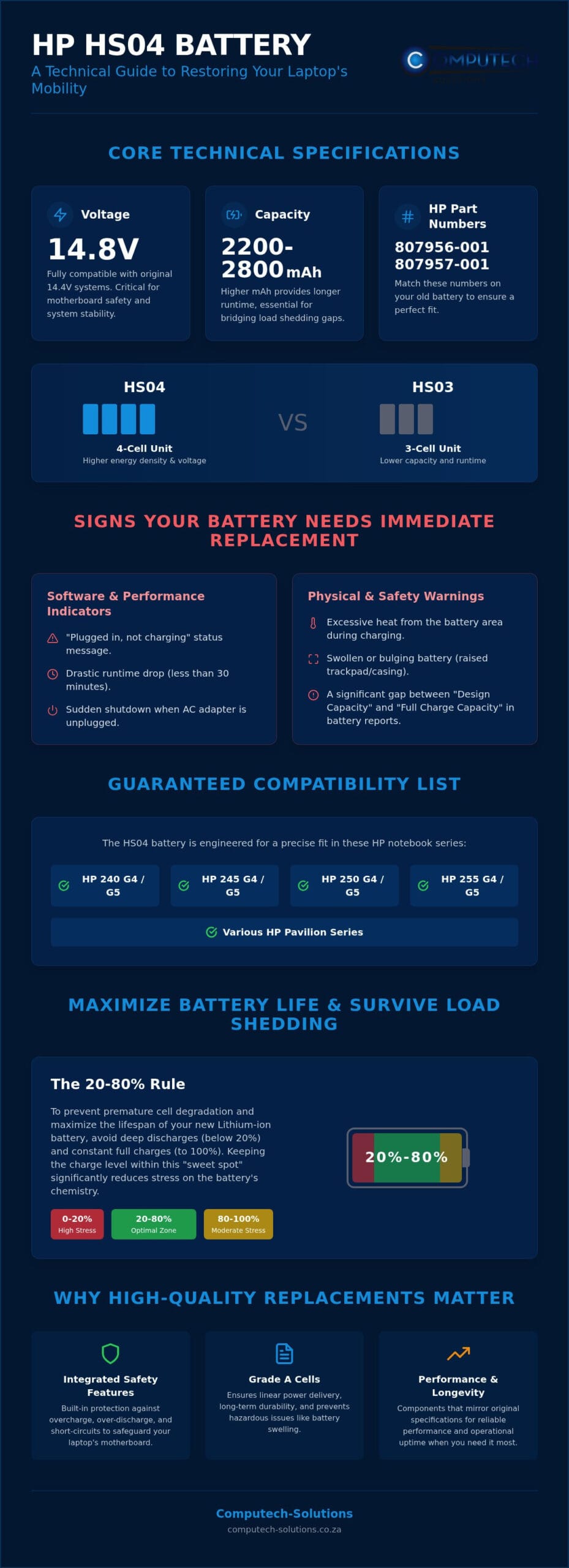
The hp hs04 battery is a high-performance 4-cell power source engineered for several popular HP notebook series. To identify this part accurately, users should locate the HP Spare part numbers 807957-001 or 807956-001 printed on the battery label. One of the most frequent technical queries we receive involves the distinction between the HS04 and the HS03 models. While they share a similar form factor, the HS04 is a 4-cell unit, while the HS03 is a 3-cell version. This difference is significant. The HS04 offers higher energy density and a more robust voltage profile, making it the preferred choice for users who require extended mobility. Choosing the 4-cell HS04 ensures your laptop has the necessary current to handle demanding applications without unexpected shutdowns.
Understanding Voltage and Capacity
Voltage precision is non-negotiable for system stability. The standard rating for an hp hs04 battery is 14.8V, which is derived from its 4-cell internal structure. This configuration is fully compatible with laptops originally using 14.4V batteries, as the internal charging controllers are designed to manage this slight variance. The underlying Lithium-ion battery technology dictates that matching these voltage levels is critical for motherboard safety, as incorrect voltage can lead to component failure or thermal events. Capacity is measured in milliampere-hours (mAh), usually falling between 2600mAh and 2800mAh for this specific model. A higher mAh rating directly translates to more “fuel” for your laptop. It’s especially vital in South Africa, where a battery with a 2800mAh capacity provides that extra margin of runtime needed to bridge the gap during a four-hour load shedding stage.
Build Quality: Genuine vs. High-Quality Replacements
The performance of a replacement battery is only as good as its internal chemistry. High-quality replacements must utilise Grade A cells to ensure linear power delivery and long-term durability. These cells are less prone to the “swelling” issues often seen in cheap, generic alternatives. Essential safety features must be integrated into the battery’s control board, including overcharge, over-discharge, and short-circuit protection. These circuits act as a final line of defence for your hardware. Computech-Solutions prioritises these technical standards because we know our clients don’t just use their laptops for leisure; they depend on them for business continuity. We source components that mirror the original manufacturer’s specifications, ensuring that every replacement we ship across South Africa meets rigorous safety and performance benchmarks. A laptop battery isn’t just a part; it’s a critical investment in your operational uptime.
Signs Your HP HS04 Battery Needs Immediate Replacement
Identifying the early warning signs of a failing hp hs04 battery prevents unexpected downtime and potential data loss during critical work sessions. The most common software indicator is the “Plugged in, not charging” status displayed in the Windows system tray. This message often suggests that while the laptop recognises the hardware, the internal cells can no longer accept or hold a charge. If your laptop runtime has plummeted to less than 30 minutes, the battery’s capacity has degraded beyond its functional limit. Sudden shutdowns are another red flag. If your machine cuts out the moment the AC adapter is removed, the battery is no longer capable of sustaining the necessary voltage for the motherboard. During load shedding, these failures become critical risks to your productivity.
Physical safety is paramount when assessing hardware health. Feel the bottom of your laptop chassis while it’s charging. If it’s excessively hot or if the trackpad feels stiff or raised, the battery might be swelling. Swollen batteries are a serious hazard and require immediate, careful removal to avoid permanent damage to the laptop casing or internal components. If you’ve noticed any of these physical changes, it’s time to consult with a technician via WhatsApp to confirm the correct replacement part for your model.
Using Windows Battery Report for Diagnostics
Windows provides a built-in tool to help you move beyond guesswork. By running the command “powercfg /batteryreport” in the Command Prompt, you can generate a detailed HTML report of your hardware’s health. Pay close attention to the “Design Capacity” versus the “Full Charge Capacity.” A significant gap between these two numbers confirms that the hp hs04 battery has lost its ability to store energy. The report also lists cycle counts. Most standard laptop batteries are rated for approximately 300 to 500 charge cycles. If your count exceeds this range, you will notice a sharp decline in reliability. If a red “X” appears over your battery icon, the system has detected a hardware failure that software calibration cannot fix.
The Impact of Age on Lithium-Ion Cells
Laptop batteries are consumable items with a finite lifespan. Chemical aging occurs naturally over time, even if the laptop remains plugged into a wall socket most of the day. In fact, constant heat from being connected to a charger 24/7 can accelerate the breakdown of the internal chemistry. While following established guidelines for battery conditioning and maintenance can help you get the most out of your hardware, it cannot stop the eventual need for a replacement. Planning your upgrade before the battery fails completely is the most effective way to ensure your business remains operational during South Africa’s frequent power outages.
Comprehensive HP HS04 Compatibility List
Accuracy in hardware selection is the foundation of a successful repair. The hp hs04 battery serves as the primary power component for several generations of HP’s essential business notebooks. Its primary compatibility includes the HP 240 G4, 245 G4, 250 G4, and 255 G4 series. These machines are ubiquitous in South African offices because of their reliability and cost-effectiveness. Compatibility also extends into the subsequent generation, covering the HP 240 G5, 245 G5, 250 G5, and 255 G5 models. Beyond the business-centric G-series, this battery also powers specific consumer laptops in the Pavilion range, specifically the 14-ac, 14-af, 15-ac, and 15-af series. Knowing which series you own is the first step toward restoring your laptop’s mobility.
Detailed Model Support Matrix
Identifying your specific G-series generation is straightforward. Most HP notebooks display this information on the regulatory label located on the bottom cover or inside the battery compartment. It’s vital to confirm the physical connector alignment before making a purchase. The HS04 features a specific pin layout that fits only into its designated slot. Users often confuse this model with the VI04 or other HP series; they’re not interchangeable. Attempting to force a different battery type can damage the delicate pins on the motherboard. While recognizing the Signs of a failing laptop battery helps you time your purchase, verifying the physical dimensions ensures the replacement fits securely without gaps. A secure fit prevents intermittent power loss if the laptop is moved during use.
Verified Spare Part Numbers
Manufacturers use multiple codes for the same component to track different production batches and regional distributions. To ensure you’re ordering the correct hp hs04 battery, cross-reference the part numbers on your original unit. Common codes include HSTNN-LB6U, HSTNN-LB6V, 807956-001, and 807957-001. You’ll usually find these numbers near the HP logo on the battery sticker, often preceded by the word “Spare.” If your label is worn or illegible, you can Verify your laptop compatibility with our experts via WhatsApp. Providing your laptop full model number, such as “HP 250 G4,” allows our technical team to confirm the exact fit. This precision eliminates the risk of ordering the wrong part and ensures your machine is back to full strength before the next power outage. It also guarantees that the replacement will communicate correctly with your HP BIOS for accurate percentage reporting.
Maximizing Battery Life During Load Shedding
Load shedding introduces a punishing cycle for laptop hardware that global maintenance guides rarely address. In South Africa, the frequency of power outages means your hp hs04 battery might undergo several discharge cycles in a single day. The most critical mistake users make is allowing the battery to hit 0%. This “Deep Discharge” state causes chemical exhaustion within the Lithium-ion cells, which can lead to a permanent loss of capacity. To preserve the health of your hardware, aim to keep the charge level between 20% and 80%. This range minimizes the stress on the battery’s internal chemistry and significantly extends the number of usable cycles.
Heat management is equally vital. High ambient temperatures, combined with the heat generated during rapid charging when power returns, can accelerate cell degradation. Always ensure your laptop is on a hard, flat surface to allow for maximum airflow. If you are struggling to maintain productivity through a single power outage, it’s likely time to order a high-performance replacement battery via WhatsApp.
Operational Efficiency During Power Outages
Maximizing your runtime requires a strategic approach to power consumption. When the grid goes down, your first action should be reducing screen brightness to the lowest comfortable level and disabling backlit keyboards. Close resource-heavy background applications like cloud sync tools or unused browser tabs that silently drain your CPU. Avoid hardware-intensive tasks such as video editing or gaming when running on backup power. A fresh hp hs04 battery is technically rated to support a standard office workflow for a full 2.5-hour load shedding slot, provided these efficiency measures are in place.
Long-Term Care for Replacement Batteries
Even high-quality replacement cells require occasional maintenance. We recommend calibrating your battery every three months by allowing it to discharge to 5% and then charging it to 100% without interruption; this resets the internal gauge for more accurate percentage reporting. If you plan to store your laptop for more than a week, leave the battery at approximately 50% charge rather than fully depleted or fully charged. Finally, never use cheap, non-regulated chargers. These “universal” adapters often lack the voltage regulation necessary to protect your new HS04 cells from power surges when the electricity is restored after an outage.
Reliable Nationwide Supply from Computech-Solutions
Securing a high-performance hp hs04 battery in the South African market requires a partner that understands both technical specifications and local operational challenges. At Computech-Solutions, we’ve positioned ourselves as a specialized IT retailer dedicated to maintaining your productivity. Every replacement battery in our inventory undergoes rigorous quality assurance to ensure it meets strict safety and performance standards. We don’t just provide a component; we offer a definitive solution that integrates seamlessly with your HP 250 G4 or Pavilion series. Our commitment to excellence extends beyond batteries to include essential hardware like laptop chargers and replacement LCD panels, ensuring your machine remains a reliable tool for your business or studies.
Streamlined National Logistics
We recognize that every hour your laptop spent tethered to a wall socket is an hour of lost mobility. To minimize this downtime, we’ve optimized our logistics network to provide fast shipping to every province in South Africa. Shipping Lithium-ion components requires specialized handling and robust packaging to prevent damage during transit. Our team ensures that every hp hs04 battery is secured according to international safety protocols before it leaves our hub. From the moment you place your order, you can track its progress from our facility directly to your door in Gauteng, the Western Cape, or even the most remote areas of the Eastern Cape. This reliable supply chain is designed specifically to support South African businesses and students who cannot afford to wait weeks for critical hardware.
Expert Technical Consultation
The complexity of modern laptop hardware often leads to confusion between similar-looking models. Our technical team acts as your professional partner in IT procurement, helping you navigate the nuances of part numbers and voltage requirements. We leverage our deep expertise in power backup solutions to ensure that your new battery is perfectly matched to your specific HP model. This consultative approach eliminates the risk of purchasing incompatible generic cells that could potentially damage your motherboard’s charging circuit. If you’re unsure about your laptop’s generation or need to confirm a spare part number, you can order your HP HS04 battery replacement today via WhatsApp. We provide the technical confirmation you need to invest with confidence, ensuring your workspace remains operational through every load shedding cycle.
Restore Your Professional Mobility Today
Your laptop is a critical asset for business continuity; it shouldn’t be sidelined by a failing power component. We’ve detailed how a high-quality hp hs04 battery provides the necessary 14.8V stability to bridge the gap during South Africa’s frequent load shedding cycles. By matching your specific G4 or G5 model with Grade A replacement cells, you eliminate the risks associated with low-quality generic hardware. Our technical team is ready to verify your spare part numbers and ensure a perfect fit for your machine before it leaves our hub.
Don’t wait for your system to crash during a vital work session. We provide expert technical support for HP hardware and reliable nationwide delivery to your door. Our streamlined process ensures you receive a durable solution that restores your laptop’s original runtime and reliability. Take control of your operational uptime and secure your hardware against the challenges of the national grid. You have the tools to stay productive whenever the power goes out.
Order Your HP HS04 Battery via WhatsApp for National Delivery
Frequently Asked Questions
How long should a new HP HS04 battery last on a full charge?
A new hp hs04 battery typically provides between 2.5 and 4 hours of runtime on a full charge. This duration depends heavily on your laptop’s power settings and the intensity of your current tasks. Standard office work like document editing uses less power than high-definition video streaming. To achieve the maximum possible runtime during load shedding, you should activate your operating system’s battery saver mode and reduce screen brightness.
What is the difference between the HP HS03 and HS04 batteries?
The primary difference lies in the internal cell count and the resulting voltage profile. The HS03 is a 3-cell battery with a lower voltage, whereas the HS04 contains 4 Lithium-ion cells delivering 14.8V. While they often share the same physical dimensions and connector type, they aren’t interchangeable. Installing an HS03 in a system designed for 14.8V will result in power instability or a failure to charge correctly.
Will an HS04 battery fit an HP 250 G5 laptop?
Yes, the HS04 is the correct replacement part for the HP 250 G5 series. This battery was designed to support multiple generations of the 250 series, including both the G4 and G5 variants. It also fits other related models like the HP 240 G5 and 255 G5. Always verify that your current battery features the 807957-001 or HSTNN-LB6V part numbers to ensure a perfect physical match for your chassis.
Why does my HP laptop say ‘Battery not detected’ after installing a new one?
This error usually indicates a communication failure between the battery’s control board and the laptop’s BIOS. First, shut down the machine and ensure the battery is seated firmly in the slot with the locking tabs engaged. If the problem persists, perform a hard reset by removing the battery and holding the power button for 15 seconds. In some cases, a BIOS update is required to recognize newer replacement cells.
Can I leave my HP laptop plugged in all the time during load shedding?
You can leave your laptop plugged in, but constant charging generates heat that degrades Lithium-ion cells over time. During load shedding, frequent power cycles can cause additional stress. It’s best to unplug the charger once the battery reaches 100% and use it until it drops to 20% before reconnecting. This practice helps maintain the chemical health of your hp hs04 battery and prevents the cells from becoming lazy or swelling.
Is it safe to use a generic replacement for the HP 807957-001 battery?
Safety depends entirely on the quality of the internal components and the protective circuitry used by the manufacturer. While many third-party batteries exist, low-quality generics often omit essential overcharge and short-circuit protection. We recommend using high-quality replacements that utilize Grade A cells. These units mirror the original specifications, ensuring your hardware remains protected from thermal events while providing a reliable power backup solution for your professional requirements.
How do I calibrate my new HP HS04 battery for the first time?
To calibrate your new battery, first charge it to 100% and keep it connected to the charger for at least two hours. Unplug the laptop and use it until the battery level drops to approximately 5%. Once reached, reconnect the charger and allow the battery to reach a full 100% charge without interruption. This process synchronizes the battery’s internal processor with the Windows power management system for accurate percentage reporting.
What is the warranty period for replacement HP batteries at Computech-Solutions?
Warranty periods for our replacement hardware are structured to provide peace of mind for our South African clients. Because we source high-quality cells, we stand behind the reliability of every unit we ship nationwide. For specific details regarding the duration and terms for your model, we recommend confirming the latest policy with our technical consultants. This ensures you have the most accurate information for your specific IT procurement requirements.
