
Imagine you’re in the middle of a critical business presentation when your screen suddenly goes black without warning. Even though national load shedding has been suspended for over 448 days, localized load reduction and aging hardware still threaten your daily productivity. Dealing with a failing hp laptop battery is more than just a minor inconvenience; it’s an operational risk that creates unnecessary stress. You’ve likely felt the frustration of confusing technical specifications and the legitimate fear that a low-quality replacement might damage your professional equipment.
It’s time to restore your mobility and ensure your laptop lasts three to five hours on a single charge. This guide provides a streamlined solution for South African users looking to identify their specific hardware requirements with total confidence. You’ll learn exactly how to locate your part number and discover professional strategies to maximize battery lifespan despite local power fluctuations. We’ll also explain how to source high-quality generic replacements that offer a cost-effective, reliable alternative to expensive original parts while maintaining full device safety.
Key Takeaways
- Learn how to identify the exact HP Spare Part Number to ensure your replacement is fully compatible with your specific hardware configuration.
- Understand why high-quality generic batteries provide a cost-effective solution for restoring your laptop’s original mobility and performance levels.
- Master the “80/20 rule” and other professional maintenance techniques to significantly extend the operational lifespan of your hp laptop battery.
- Recognize the technical warning signs that indicate your current power cell is failing and requires immediate replacement to prevent hardware damage.
- Access expert technical support and nationwide delivery to ensure you receive a reliable, professional-grade power solution anywhere in South Africa.
Signs Your HP Laptop Battery Needs Immediate Replacement
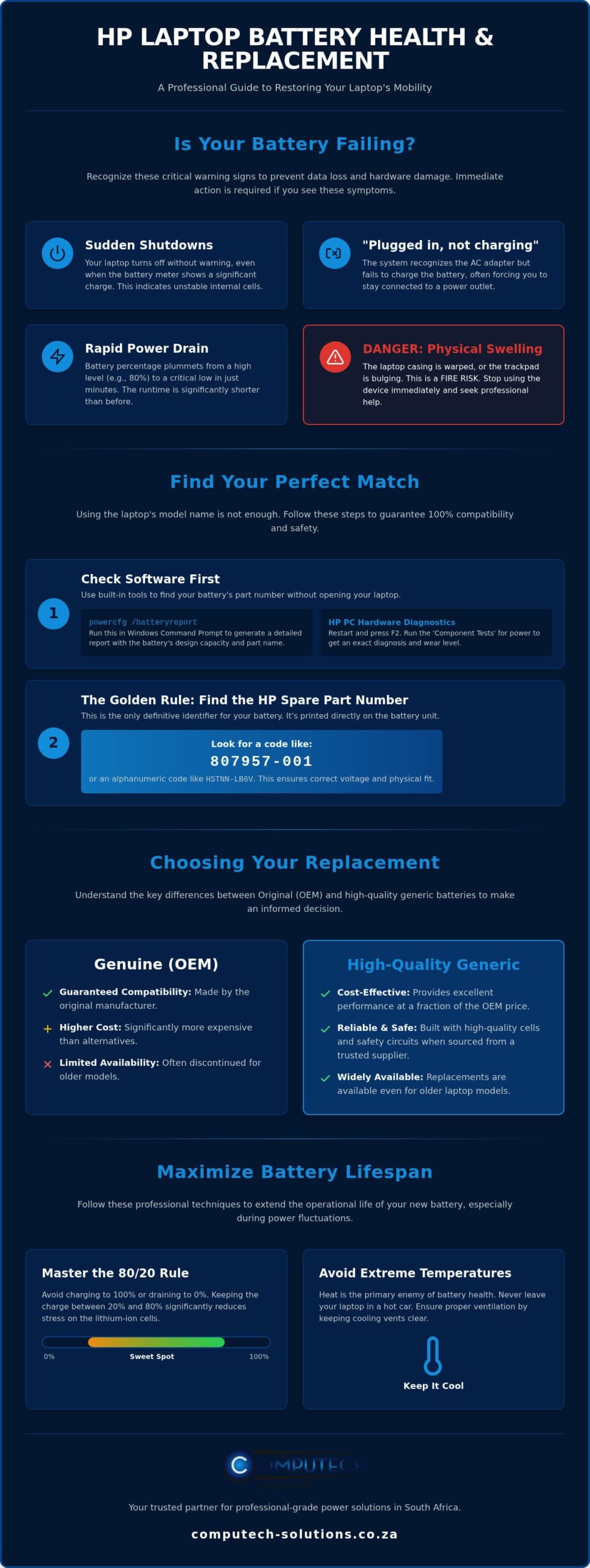
Recognizing the early symptoms of failure prevents data loss and hardware damage. Your HP laptop is designed to be a mobile workstation, but its utility vanishes when it’s tethered to a wall socket. If your device shuts down unexpectedly or the battery percentage drops from 80% to 10% in minutes, the internal cells are no longer stable. Another common indicator is the “Plugged in, not charging” message in your taskbar. This suggests a communication failure between the charging circuit and the hp laptop battery. In many cases, the laptop will only function when the AC adapter is connected, effectively turning your portable device into a desktop computer.
Software Warning Signs and System Diagnostics
Modern operating systems are proactive about monitoring hardware health. Windows often displays a “Consider replacing your battery” notification when the capacity falls below a functional threshold. To get a definitive answer, you should use the HP PC Hardware Diagnostics tool. Restart your laptop and press F2 repeatedly to enter the diagnostic menu. Select ‘Component Tests’ and then ‘Power’ to run a comprehensive battery check. This tool provides a detailed report on the “wear level” of your hardware. Understanding how lithium-ion batteries work is helpful here; as cells age, they lose the ability to hold a charge due to chemical degradation. If your wear level exceeds 40%, you’ll notice a significant decrease in runtime that usually requires a hardware replacement.
The Dangers of a Swollen Lithium-Ion Battery
Physical deformation is the most serious sign of a failing power cell. If you notice your trackpad is difficult to click or the laptop casing appears warped, stop using the device immediately. This bulging is caused by gas buildup within the battery pouch, often due to overcharging or excessive heat. Ignoring a swollen battery poses a fire risk and can permanently damage the motherboard or chassis. In South Africa, e-waste has been banned from landfills since August 2021. If you identify a swollen battery, it must be removed carefully and disposed of through a certified e-waste management scheme. Replacing the unit early protects your investment and ensures your laptop remains safe for daily use. Our technical support team can help you identify the correct replacement to resolve these physical risks before they escalate.
How to Identify the Correct HP Battery Model for Your Laptop
Matching your laptop model name, such as “HP Pavilion 15,” isn’t enough to guarantee compatibility. Manufacturers often use different internal components for various configurations within the same series. To ensure you buy the right hp laptop battery, you must focus on the technical specifications rather than the marketing name. The most critical factors are the voltage rating and the physical connector layout. You’ll typically find batteries rated at 11.1V (or 10.8V) and 14.8V (or 14.4V). These are not interchangeable. Installing a 14.8V battery into a system designed for 11.1V can cause permanent motherboard damage. You should also verify the milliampere-hour (mAh) or Watt-hour (Wh) rating, which determines how long the device runs between charges.
Finding Your Battery Details Without Removing the Cover
You can identify your hardware specs using software tools before you pick up a screwdriver. One effective method is using the Windows Command Prompt. Type “powercfg /batteryreport” and press Enter. This generates an HTML file in your user folder that lists the “Design Capacity” and the manufacturer’s part name. Alternatively, the HP Support Assistant software, which is pre-installed on most EliteBook and ProBook models, features a ‘Battery Check’ utility. This tool provides the specific part number needed for a replacement. If your laptop still has its original external markings, check the small print on the bottom sticker for the “Product ID” or “Model Number,” which helps our team cross-reference the correct part for you.
Matching Part Numbers: The Golden Rule of Replacement
The “HP Spare” number is the only definitive way to shop for a replacement. This is usually a sequence of six digits followed by a dash and three more digits, such as 807957-001. You might also see alphanumeric codes like HSTNN-LB6V. These identifiers are unique to the battery’s physical shape and electrical profile. Common series like the HS04, JC04, OA04, and VI04 are widely used across Pavilion and Envy notebooks, but even within these series, connector positions can vary. If your specific part number is no longer manufactured by the original brand, high-quality generic replacements are the standard professional solution. These modern alternatives match the original specifications exactly while offering a more accessible price point. Once you’ve secured your new part, it’s vital to properly dispose of old batteries through a local e-waste collection point. If you’re unsure which code on your battery is the spare part number, you can contact our technical support team via WhatsApp for a free compatibility check.
Genuine vs. High-Quality Replacement Batteries: A Professional Comparison
Choosing between an original manufacturer part and a third-party alternative often involves balancing immediate costs with long-term reliability. Original equipment manufacturer (OEM) batteries carry a premium price, partly due to brand licensing and marketing overheads. In contrast, high-quality replacement units are frequently 50% to 70% cheaper while offering comparable performance. The performance reality is that a battery’s runtime depends on the quality of its internal cells and its mAh (milliampere-hour) rating. If these specifications match the original hardware, your laptop will maintain its expected three to five-hour productivity window. Reputable third-party suppliers also include essential safety standards, such as overcharge and short-circuit protection, to ensure your device remains protected during power fluctuations.
When Should You Choose a High-Quality Generic Battery?
Generic parts are the most strategic choice for laptops that are more than three years old. At this stage in a device’s lifecycle, the cost of an original battery might represent a significant portion of the laptop’s total residual value. High-quality generics provide a budget-friendly solution for students and home office users who need to restore mobility without over-investing in aging hardware. These batteries are engineered to be fully compatible with HP’s internal battery management firmware, ensuring that your system accurately reports charge levels and health status without software conflicts.
What Defines a “High-Quality” Replacement Part?
The distinction between a reliable replacement and a hazardous one lies in the internal components. High-quality parts utilize Grade A cells, which are essential for maintaining stable discharge rates and a longer overall lifespan. Lower-tier batteries found on unverified marketplaces often use B-grade or recycled cells that can become a fire hazard or fail within months. At Computech-Solutions, we vet our stock specifically to ensure every hp laptop battery meets professional benchmarks for safety and longevity. This rigorous selection process allows us to provide a stable, confident solution for South African professionals who cannot afford technical disruptions. By focusing on Grade A components, we ensure that your replacement part functions as a definitive, total solution for your power needs.
Optimising HP Battery Life During Load Shedding
South African users face unique challenges due to localized load reduction and the legacy of frequent power cycles. Every time your laptop switches from AC power to its internal cells, it consumes a portion of its finite cycle life. To maximize the longevity of your hp laptop battery, you must manage its state of charge carefully. The “80/20 Rule” is a professional standard; keeping your battery between 20% and 80% reduces voltage stress on the lithium-ion cells. Constantly maintaining a 100% charge while plugged in can accelerate chemical degradation. Additionally, heat remains the primary cause of premature failure during the South African summer. Ensure your laptop has adequate ventilation, as high ambient temperatures combined with internal charging heat can permanently reduce the capacity of an hp laptop battery.
Preparing Your Laptop for Scheduled Power Outages
Planning for outages requires a proactive approach to software configuration. You can extend your runtime by enabling the Windows Power Saver mode, which throttles the CPU and limits background data usage. Reducing screen brightness to 50% or lower is the most effective way to save power immediately. You should also disable non-essential background applications and disconnect peripherals like external hard drives or RGB gaming mice. These small adjustments can add 30 to 60 minutes of critical work time when the lights go out.
Calibrating Your New Battery for Peak Performance
Proper initialization is vital when you first install a replacement. For the first three charge cycles, you should charge the battery to 100% and then allow it to discharge to approximately 10% before plugging it back in. This process helps the internal controller calibrate its capacity readings accurately. Avoid letting your battery hit 0% whenever possible, as deep discharges can damage the cells and prevent the battery from waking up. If you use a secondary solar system to power your home office, store your laptop in a cool, dry place when not in use to prevent heat-related degradation from inverter proximity. If you need assistance configuring your power settings for better efficiency, chat with our technical experts on WhatsApp for personalized advice.
Why Source Your HP Battery from Computech-Solutions?
Finding a reliable hp laptop battery shouldn’t be a gamble. At Computech-Solutions, we’ve built our reputation on providing a stable, professional-grade alternative for users across South Africa. We maintain an extensive inventory specifically tailored for the HP Pavilion, EliteBook, ProBook, and Envy series. Our specialization in high-quality generic replacements ensures that even if your original battery is discontinued or overpriced, you can restore your laptop’s operational efficiency without compromise. Every component we stock meets strict performance benchmarks, ensuring that technical features are always linked to your practical business outcomes. We position ourselves as your reliable partner, focusing on long-term stability rather than quick sales.
Nationwide Delivery and Reliable Shipping
We understand that a failing battery disrupts your workflow, which is why we prioritize rhythmic efficiency in our logistics. We offer reliable nationwide delivery to every province in South Africa, covering both urban centers and rural districts. Our team uses specialized protective packaging to ensure your hardware arrives in perfect condition, ready for immediate installation. Once your order is processed, you’ll receive a tracking number to monitor its progress from our warehouse to your doorstep in real-time. If you happen to order the incorrect part, our hassle-free return policy provides a reassuring safety net. This policy allows you to exchange it for the correct model without unnecessary stress or financial risk, ensuring you get back to work quickly.
Expert Support for Your Technical Questions
Identifying the exact part number for difficult-to-find HP models can be a complex task. Our expert technical support team is available to help you verify compatibility before you make a purchase, providing peace of mind for decision-makers. You can also use our streamlined website search by entering your “HP Spare” part number or model name to find the definitive match instantly. We focus on getting it right the first time, alleviating the risks associated with technical disruptions and operational downtime. Our sophisticated expert team remains approachable, moving quickly from identifying your hardware challenge to presenting a streamlined hp laptop battery solution. Computech-Solutions provides a definitive, total solution for South African professionals who demand consistent performance and hardware reliability.
Secure Your Professional Productivity
Restoring your device to its original performance levels is a strategic step in maintaining your daily productivity. By correctly identifying your HP Spare part number and adopting professional maintenance habits like the 80/20 rule, you ensure your hardware remains a reliable asset. A high-quality hp laptop battery provides the mobility you need to navigate local power challenges without the stress of sudden shutdowns or technical disruptions. You now have the technical knowledge to choose a cost-effective, high-grade replacement that meets professional standards.
Computech-Solutions offers a definitive solution with thousands of compatible laptop parts in stock and expert technical support specializing in HP hardware. We provide reliable nationwide South African delivery to every province, ensuring your replacement arrives safely and quickly. Don’t let a failing power cell limit your operational efficiency or risk damaging your motherboard. You can find your high-quality HP replacement battery at Computech-Solutions today and speak directly with our team to verify compatibility. Take control of your hardware performance and enjoy the confidence of a fully mobile workstation once again.
Frequently Asked Questions
How long should a replacement HP laptop battery last?
A high-quality hp laptop battery typically lasts between 300 and 500 full charge cycles. For most professional users, this equates to roughly two to three years of standard use before capacity significantly degrades. Your actual runtime depends on power settings and usage patterns. Maintaining the “80/20 rule” mentioned earlier helps you reach the upper end of this lifespan by reducing chemical stress on the lithium-ion cells during daily operation.
Will using a generic battery void my HP laptop warranty?
Using a high-quality replacement part doesn’t automatically void your entire laptop warranty in South Africa. However, if a low-quality component causes direct damage to the motherboard, that specific repair might not be covered under standard manufacturer terms. We supply professional-grade generic batteries that meet original specifications to ensure your device remains safe. It’s always best to check your specific warranty documents for any clauses regarding user-replaceable parts or third-party hardware modifications.
Can I leave my HP laptop plugged in during load shedding?
You can leave your laptop plugged in, but using a surge protector is essential to prevent damage from voltage spikes when power returns. While national load shedding has been suspended for over 448 days as of August 2026, localized load reduction still occurs. These power fluctuations can stress your hardware over time. Disconnecting the charger during an outage and reconnecting it only after the power has stabilized is a safer professional practice for maintaining your power cells.
How do I know if a battery is compatible with my specific HP Pavilion model?
Compatibility is determined by matching the “HP Spare” part number found on your original battery label. This number usually follows a format like 807957-001 or an alphanumeric code like HSTNN-LB6V. Don’t rely solely on the Pavilion model name, as internal configurations vary between different versions. You can also use the HP Support Assistant software to find your specific part number. Our technical support team is available to help you verify these details before you order.
Why is my new HP battery not charging to 100%?
This issue often stems from a lack of calibration or specific Windows power management settings. You should complete three full charge and discharge cycles to help the internal controller synchronize with the new cells. Some modern laptops also feature “Smart Charging” which limits the maximum charge to 80% to extend the battery’s overall lifespan. If the battery stops at a lower percentage, check your BIOS settings or the HP Power Manager software for active charging limits.
Is it difficult to install an internal HP laptop battery myself?
Installing an internal battery is a straightforward process that typically requires only a small Phillips or Torx screwdriver. Most HP notebooks use a series of screws to secure the bottom panel, which you can remove to access the battery connector. While many professionals perform this task themselves, you should always follow a model-specific guide to avoid damaging delicate internal ribbons. If you’re uncomfortable opening the chassis, a local technician can handle the physical installation quickly.
What is the average price of an HP laptop battery in South Africa?
Prices for an hp laptop battery in South Africa fluctuate based on the specific model and cell quality. High-quality generic alternatives are widely available and typically offer a saving of 40% to 60% compared to original parts. You’ll find the cost depends on whether your laptop requires a standard external battery or a complex internal unit. Focus on sourcing from reputable suppliers to ensure you receive professional-grade components that provide long-term reliability.
How can I check my HP battery health in Windows 11?
You can generate a comprehensive health report by using the Command Prompt in Windows 11. Type “powercfg /batteryreport” and press Enter to create an HTML file that details your battery’s design capacity versus its current full charge capacity. This report shows the cycle count and helps you identify if your runtime issues are caused by hardware degradation. Reviewing this data every few months allows you to track the wear level and plan for a replacement.
