
You’re halfway through a critical work project or study session when your screen dims and the low battery warning flashes, but your power adapter remains cold to the touch. The sudden failure of an hp laptop charger south africa professionals and students depend on creates immediate stress, especially when deadlines are non-negotiable. You’re likely concerned about the risk of buying a generic unit that might damage your battery or the confusion of choosing between blue pin and black pin connectors. It’s frustrating to face the high cost of official replacements when you need a functional solution right now.
This guide provides the technical clarity you need to identify the exact charger your HP laptop requires without overspending. You’ll learn how to verify compatibility and ensure your new hardware meets South African safety standards, including the essential NRCS Letter of Authority. We’ll walk you through the process of selecting a reliable, high-quality replacement and securing fast nationwide delivery to get your workstation back online immediately.
Key Takeaways
- Identify the specific connector type for your HP series to avoid the common “blue pin vs. black pin” confusion.
- Match voltage and wattage accurately to ensure your replacement hardware powers your device without risking internal circuitry damage.
- Evaluate the cost benefits of high-quality replacement units that offer built-in safety fuses for reliable performance in local conditions.
- Secure a compatible hp laptop charger south africa through a streamlined ordering process that includes expert technical verification and nationwide delivery.
- Implement simple protective measures to guard your new adapter against the capacitors’ stress caused by recurring grid instability.
HP Laptop Charger South Africa: Identifying the Correct Adapter
Finding the right hp laptop charger south africa users can rely on starts with moving past the brand name and looking at the hardware specifications. HP designs its power delivery systems specifically for different hardware tiers; a charger meant for a budget Pavilion might not provide the stability or wattage required for a high-end ZBook workstation. Understanding what is an AC adapter is the first step in realizing these units aren’t just cables. They are sophisticated power converters that protect your sensitive internal components from grid fluctuations.
Many South African consumers assume that if a plug fits, it’s safe to use. This “one size fits all” approach is a myth that often leads to “plugged in, not charging” errors or permanent motherboard failure. Modern HP laptops utilize Smart AC Adapter technology, which allows the laptop to communicate with the charger to verify it’s a safe power source before it begins drawing current. If the handshake fails because of an incompatible model, your battery won’t charge, even if the laptop stays powered on.
To find your specific requirements, flip your laptop over and examine the bottom casing. You’ll find the model number (like “HP ProBook 450 G8”) and the power input requirements. This data is your roadmap to a successful replacement. If the text has worn off, you can usually find these details inside the battery compartment on older models or by entering your serial number on the HP support site.
The Pin Connector Guide: Blue, Black, and USB-C
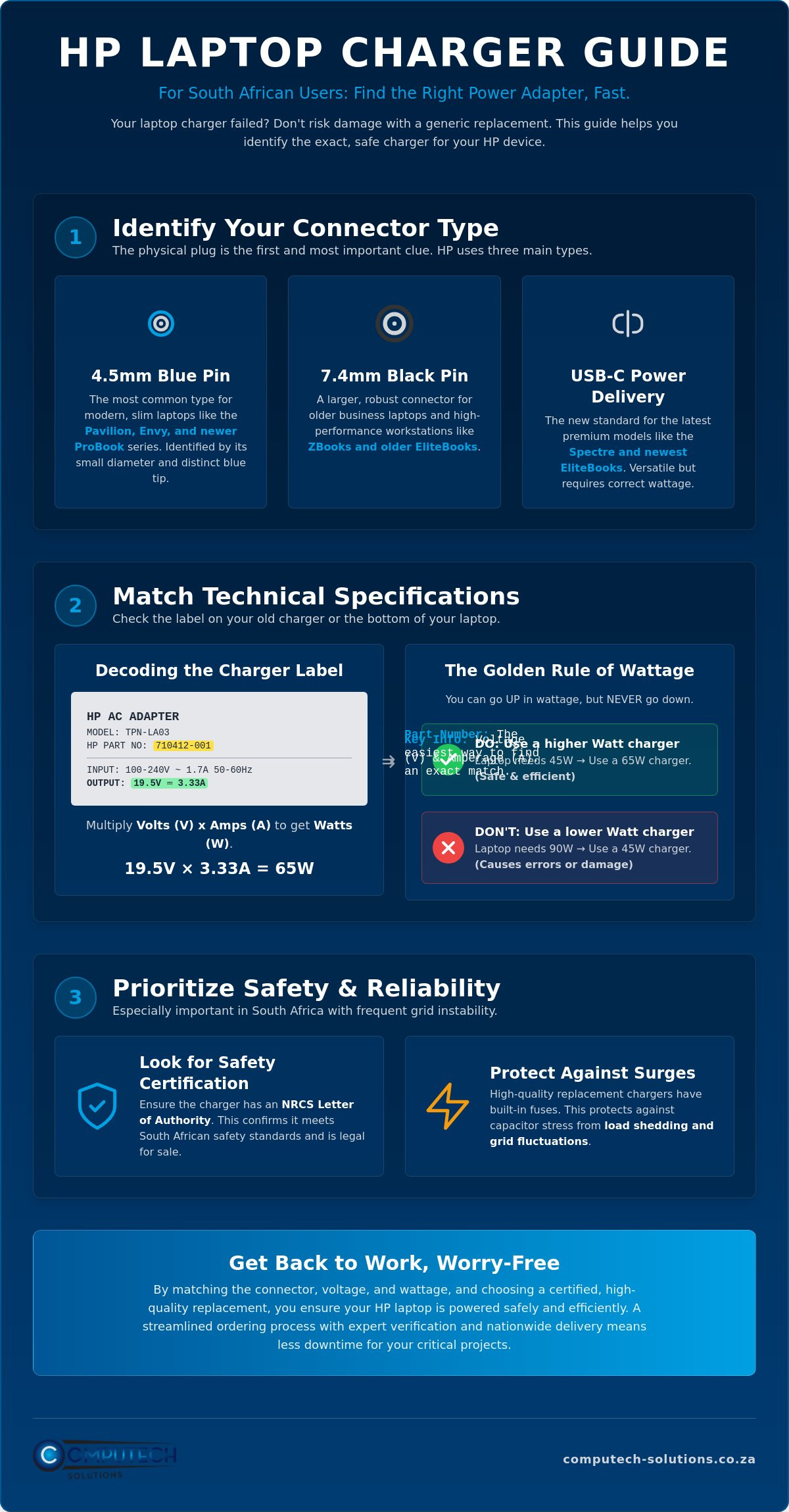
The physical connector is the most visible way to narrow down your search. HP currently uses three primary types of connectors in the South African market:
- 4.5mm Blue Pin: This is the most common connector for modern slim laptops like the Pavilion and Envy series. It’s easily identified by the small diameter and a bright blue plastic ring inside the tip.
- 7.4mm Black Pin: A larger, more robust connector found on older business laptops, high-performance ZBooks, and older EliteBook models. It features a center pin that is crucial for the “Smart” communication mentioned earlier.
- USB-C Power Delivery: Increasingly standard on the newest Spectre and premium EliteBook models. These chargers are versatile and can often power other USB-C devices, provided the wattage is high enough.
Reading the Label: What the Fine Print Means
If you still have your original power brick, the label contains everything you need to know. Look for the “Output” section, which typically displays values like 19.5V (Voltage) and 3.33A (Amperage). These numbers determine the total wattage of the unit. The most efficient way to source a replacement hp laptop charger south africa is by searching for the “HP Spare” or “Part Number” (PN) found on this label. This alphanumeric code, such as 710412-001, links directly to the exact manufacturing specifications. If your original charger is lost and you have no label to read, check the “Input” rating printed on the bottom of your laptop. It will tell you exactly what voltage and amperage the motherboard expects to receive.
Matching Technical Specifications: Wattage, Voltage, and Amps
Getting the electrical specifications right is just as vital as finding the correct plug size. When searching for a replacement hp laptop charger south africa, you’ll encounter three primary numbers: Volts (V), Amps (A), and Watts (W). These aren’t just suggestions; they are the operational boundaries of your laptop’s power management system. Choosing a unit that falls outside these parameters can lead to immediate hardware failure or long-term battery degradation.
The “Golden Rule” of laptop power is that you can always go up in wattage, but you must never go down. If your original adapter was 45W, a 65W or 90W replacement will work perfectly. However, the reverse is not true. If you attempt to power a 90W performance laptop with a 45W charger, you’ll likely encounter the “Plugged in, not charging” error. The laptop detects the insufficient power supply and disables charging to prevent the charger from overheating or failing under the strain.
Amperage represents the volume of electricity flowing to your device. As long as the voltage is correct, having a higher amperage rating on your hp laptop charger south africa replacement is actually beneficial. It provides a “buffer” that allows the charger to operate more efficiently without reaching its maximum thermal capacity. If you’re unsure about these values, you can check your laptop’s baseplate specifications with a technician to confirm the required input.
Can I Use a 90W Charger on a 45W Laptop?
Yes, you can. Your laptop is an active consumer of power; it “pulls” only the wattage it needs to run and charge the battery. Using a 90W charger on a machine designed for 45W won’t force extra power into the system. Instead, the 90W charger will run much cooler because it’s only working at half its intended capacity. This is particularly useful in South African climates where ambient temperatures can already stress electronic components. The only downside is that a 90W brick is physically larger and heavier to carry.
The Dangers of Voltage Mismatch
While wattage is flexible, voltage is absolute. Most HP laptops require exactly 19V or 19.5V. Voltage is the “pressure” of electricity that must match the laptop’s tolerance. If the voltage is too high, it can overcome the resistance of the internal circuits and blow a capacitor on the motherboard. Signs of a voltage mismatch include a trackpad that jitters or clicks on its own, or a laptop that feels excessively hot near the charging port. Always match the voltage listed on your original “Output” label or the “Input” section on the bottom of your laptop to avoid these risks.
Original vs. High-Quality Replacement Chargers
The financial decision between an original HP adapter and a third-party replacement is often the first hurdle for consumers. Original units offer guaranteed compatibility but come with a substantial price tag that reflects brand licensing rather than just raw material costs. In the South African market, the price gap can be significant, often making high-quality replacements a more pragmatic choice for out-of-warranty devices or students on a budget. However, choosing the cheaper path requires a technical eye to distinguish between a “cheap clone” and a “high-quality replacement.”
A reliable replacement hp laptop charger south africa users can trust will include internal safety components that clones omit to save costs. These include copper EMI shielding to prevent interference with your Wi-Fi signal and specific thermal fuses designed to blow before an electrical fault reaches your laptop’s motherboard. Cheap clones often feel suspiciously light and hollow because they lack these protective stages. They might power your device, but they lack the “ripple suppression” necessary to keep your battery’s chemistry stable over hundreds of charging cycles.
The common fear that using a third-party charger immediately voids your laptop’s warranty is largely a myth. Using a certified charger that matches the required voltage and wattage doesn’t automatically invalidate your coverage. Manufacturers can’t legally dictate where you buy your power supplies, provided those supplies meet the machine’s technical requirements. The risk only becomes real if a poorly manufactured, uncertified unit causes physical damage to the charging circuit. This makes the source of your hardware just as important as the specs themselves.
Evaluating Replacement Charger Safety
When you’re inspecting a potential replacement, look for CE and RoHS certifications printed on the label. These marks indicate the unit complies with international safety and environmental standards. High-quality units also feature over-voltage, over-current, and short-circuit protection. Computech-Solutions specifically sources replacement tiers designed for the South African market, ensuring the internal capacitors can handle the specific electrical environment of our local grid. This level of vetting provides the same operational stability as an original unit without the brand-name markup.
When to Insist on an Original HP Adapter
There are specific scenarios where an original HP adapter is the only viable choice. High-end ZBook workstations and gaming laptops with massive power draws often require proprietary communication between the charger and the BIOS to unlock full performance. Similarly, if you’re using a complex HP docking station that powers multiple monitors and peripherals, the original high-wattage adapter is necessary to manage the shared power load. For enterprise-level fleet management, original units provide a standardized baseline that simplifies technical support across hundreds of workstations. For organizations with broader hardware needs in the UAE, ZD Computer Trading LLC provides expert repair services for printers, plotters, and scanners to maintain overall office productivity.
Protecting Your HP Charger from Load Shedding and Surges
Operating a laptop in South Africa requires a proactive strategy to manage the unique stresses placed on power hardware. While the grid has shown signs of stabilization in 2026, the legacy of infrastructure strain remains a factor for hardware longevity. Every time the power cycles during a scheduled outage, the internal capacitors of your hp laptop charger south africa must manage a sudden state change. These components are designed to filter and smooth electrical current, but repetitive cycling eventually degrades the chemical electrolyte inside them, leading to premature failure.
The most significant threat occurs the moment the grid returns. High-voltage surges can bypass standard household breakers and hit your power adapter with a force it wasn’t designed to absorb. In many cases, the charger brick acts as a sacrificial lamb. It’s engineered to fail internally to prevent a massive surge from reaching the laptop’s motherboard. If your charger suddenly stops working after the power returns, it likely successfully protected your more expensive computer by absorbing the electrical shock itself. To ensure you have a reliable backup ready, you can browse high-quality replacement chargers designed to withstand local grid conditions.
Physical maintenance is equally important for preventing internal wire breaks. Avoid wrapping the thin DC cable tightly around the transformer brick, as this creates tension at the “strain relief” points. Over time, this tension snaps the copper strands inside the insulation, leading to intermittent power delivery or dangerous short circuits. Always coil the cable loosely in a “figure-eight” pattern to maintain the integrity of the internal shielding.
Load Shedding Best Practices for Laptop Users
Managing your power connection can double the lifespan of your adapter. Always unplug your charger from the wall socket before a scheduled power cut begins. When the grid is restored, wait at least five minutes before plugging your device back in. This allows the initial voltage spike to stabilize across the local network. Utilizing a dedicated surge protector plug for your workstation provides an additional layer of defense that can absorb smaller fluctuations before they reach the hp laptop charger south africa users rely on for daily productivity.
Signs Your Charger is Failing
Identifying a failing unit before it dies completely can save you from a missed deadline. Perform a “wiggle test” by gently moving the cable near the connector pin; if the charging light on your laptop flickers, the internal wiring is compromised. Excessive heat is another warning sign. While chargers get warm during use, a brick that is too hot to touch comfortably indicates that the internal transformer is struggling. Finally, inspect the casing for any visible bulging or a faint burnt plastic smell, which are clear indicators that the internal capacitors have reached their end of life.
Buying Your HP Laptop Charger with Nationwide Delivery
Securing a replacement hp laptop charger south africa professionals and students can rely on shouldn’t be a technical gamble. While it’s tempting to visit local flea markets or informal vendors for a quick fix, these outlets often stock unvetted hardware that lacks the necessary safety certifications. In South Africa, electronic components must have a Letter of Authority (LOA) from the National Regulator for Compulsory Specifications (NRCS). Purchasing from a reputable online retailer ensures that your adapter meets these legal safety standards, protecting your laptop from the internal component failure common with “grey market” imports.
The transition to online procurement has streamlined the way users replace failing hardware. You no longer need to spend hours driving between physical storefronts hoping they have your specific blue pin or black pin connector in stock. Modern e-commerce platforms allow for precise technical matching from the comfort of your office. This digital-first approach also provides a clear paper trail for warranties and technical support, which is often non-existent in informal trade environments. Before you finalize your order, use this quick checklist to confirm your selection:
- Voltage: Does it match your original output exactly (e.g., 19.5V)?
- Wattage: Is it equal to or higher than your original requirement?
- Connector: Have you visually confirmed the pin color and diameter?
- Certification: Does the retailer confirm NRCS or CE compliance?
The Computech-Solutions Advantage
Computech-Solutions operates as a specialized partner for South African laptop users, moving beyond simple retail to provide comprehensive technical support. Based in Pretoria, our central hub is designed for rhythmic efficiency, ensuring that every hp laptop charger south africa order is verified for compatibility before dispatch. We understand the urgency created by work deadlines, which is why we specialize in high-quality replacement hardware that has been specifically tested for the electrical conditions found in local homes and offices. This expertise eliminates the stress of receiving the wrong part and the subsequent downtime of a dead battery.
How to Order Your Replacement Today
Ordering is a streamlined process designed for speed and accuracy. You can search our database using your laptop model number or the specific HP Spare Part Number found on your original power brick. Once identified, our secure payment gateway offers multiple options tailored for South African customers, ensuring a safe transaction. We provide reliable door-to-door delivery across all nine provinces, from major metropolitan hubs to regional areas. Find your HP Laptop Charger at Computech-Solutions and restore your workstation’s productivity with hardware you can trust.
Powering Your HP Workspace with Confidence
Securing a reliable hp laptop charger south africa professionals can trust involves more than just finding a plug that fits. By matching your voltage exactly, choosing a compatible wattage, and verifying the connector pin type, you protect your device’s motherboard from permanent electrical damage. High-quality replacement chargers offer a sophisticated balance of safety and affordability, provided they include the necessary internal shielding and fuses to handle local power fluctuations. Proper maintenance and surge protection further ensure that your investment remains functional despite the unique challenges of the local grid.
Our Pretoria-based team provides the expert technical support needed to confirm your hardware compatibility before you commit to a purchase. We specialize in high-quality replacement hardware designed to withstand the specific electrical environment found in South African homes and offices. You can browse our range of HP Laptop Chargers with nationwide delivery to find a definitive solution for your power needs. Don’t let a failing adapter disrupt your productivity when a verified replacement is just a few clicks away. We look forward to helping you get back to work with a stable and secure connection.
Frequently Asked Questions
Can I use a Dell charger on my HP laptop if the pin fits?
No, you shouldn’t use a Dell charger on an HP laptop even if the connector pin fits perfectly. While the physical dimensions of the 7.4mm pin are often identical, HP and Dell utilize different proprietary communication protocols on the center identification pin. An HP laptop won’t recognize the signal from a Dell adapter, which typically results in the battery failing to charge or the laptop’s performance being throttled to its lowest setting.
Why is my HP laptop saying “AC adapter type cannot be determined”?
This error message indicates that your laptop’s BIOS cannot communicate with the Smart AC Adapter’s internal identification chip. This usually happens if the center pin in the connector is bent or if the internal communication wire has snapped due to cable strain. It can also occur when using a low-quality hp laptop charger south africa users might find from unverified vendors that lacks the necessary circuitry to complete the handshake with the motherboard.
Is it normal for the HP charger brick to get very hot during use?
It’s normal for a power adapter to feel warm, but it should never be too hot to touch comfortably for more than a few seconds. If the brick is excessively hot, it suggests the charger is working at its maximum thermal limit. This often happens when using an underpowered 45W charger on a laptop that requires 65W. If you notice a burnt plastic smell or the casing is bulging, you should replace it immediately to prevent hardware damage.
How long does delivery take for a laptop charger in South Africa?
Standard delivery times for a laptop charger across South Africa generally range from two to five business days depending on your specific province. Major metropolitan hubs like Pretoria, Johannesburg, and Cape Town typically see faster turnaround times than remote or regional areas. You should check the current shipping schedules at the time of purchase to confirm the exact transit time for your specific location and courier choice.
What is the difference between a 45W and a 65W HP charger?
The primary difference is the total power capacity and the speed at which the adapter can charge your battery. A 65W charger provides a higher volume of current than a 45W unit. While a 65W charger can safely replace a 45W unit without issue, a 45W charger might not provide enough power for a more demanding laptop. This often leads to extremely slow charging or the laptop failing to charge at all while you’re using it.
Can load shedding break my laptop charger?
Yes, load shedding can significantly damage your charger through repetitive power cycling and high-voltage surges when the grid returns. The constant cooling and heating cycles during frequent outages stress the internal solder joints and capacitors. Using a dedicated surge protector is a critical step for anyone using an hp laptop charger south africa to ensure the internal components aren’t fried by the initial voltage spike that often occurs when the power is restored.
Do replacement chargers come with the clover power cable (mains lead)?
Most replacement chargers are sold as the transformer brick unit and don’t always include the 3-pin clover (Mickey Mouse) mains cable as a standard inclusion. Since the mains cable is a separate component that rarely fails, you can usually reuse the one from your original adapter. If your original mains lead is lost or the insulation is cracked, you’ll need to ensure you add a new South African 3-pin power cord to your order.
