
Last Tuesday, a project manager in Sandton realized their hp laptop charger had finally failed just two hours before a major deadline. It’s a stressful situation that leads many to rush into buying the first cheap replacement they find online. You likely know that choosing the wrong adapter can be a costly mistake, especially when you’re staring at a sea of blue tips and black tips without knowing the difference. A 2023 hardware reliability survey indicated that 15% of laptop power failures result from using incorrect third-party voltage settings.
This guide will help you master the technical specifications of your power supply so you can select a safe, high-performance match that protects your motherboard. We’ll break down voltage requirements, connector dimensions, and the crucial differences between original and generic units to ensure your device stays powered throughout the South African workday. By the end of this article, you’ll have the confidence to identify the exact brick your laptop requires for long-term battery health.
Key Takeaways
- Learn to identify early signs of adapter failure, such as fraying cables or intermittent connectivity, to prevent sudden hardware downtime.
- Master the technical specifications of your hp laptop charger by understanding why matching voltage is the “Golden Rule” for protecting your device’s motherboard.
- Gain the ability to visually distinguish between different HP connector types, including the 4.5mm Blue Tip and modern USB-C standards, to ensure a perfect fit.
- Understand how to protect your hardware from South Africa’s frequent power surges and load shedding cycles using high-quality, fused power adapters.
- Discover how sourcing expert-vetted hardware ensures a reliable, long-term power solution with the convenience of fast nationwide delivery.
Identifying the Signs of a Failing HP Laptop Charger
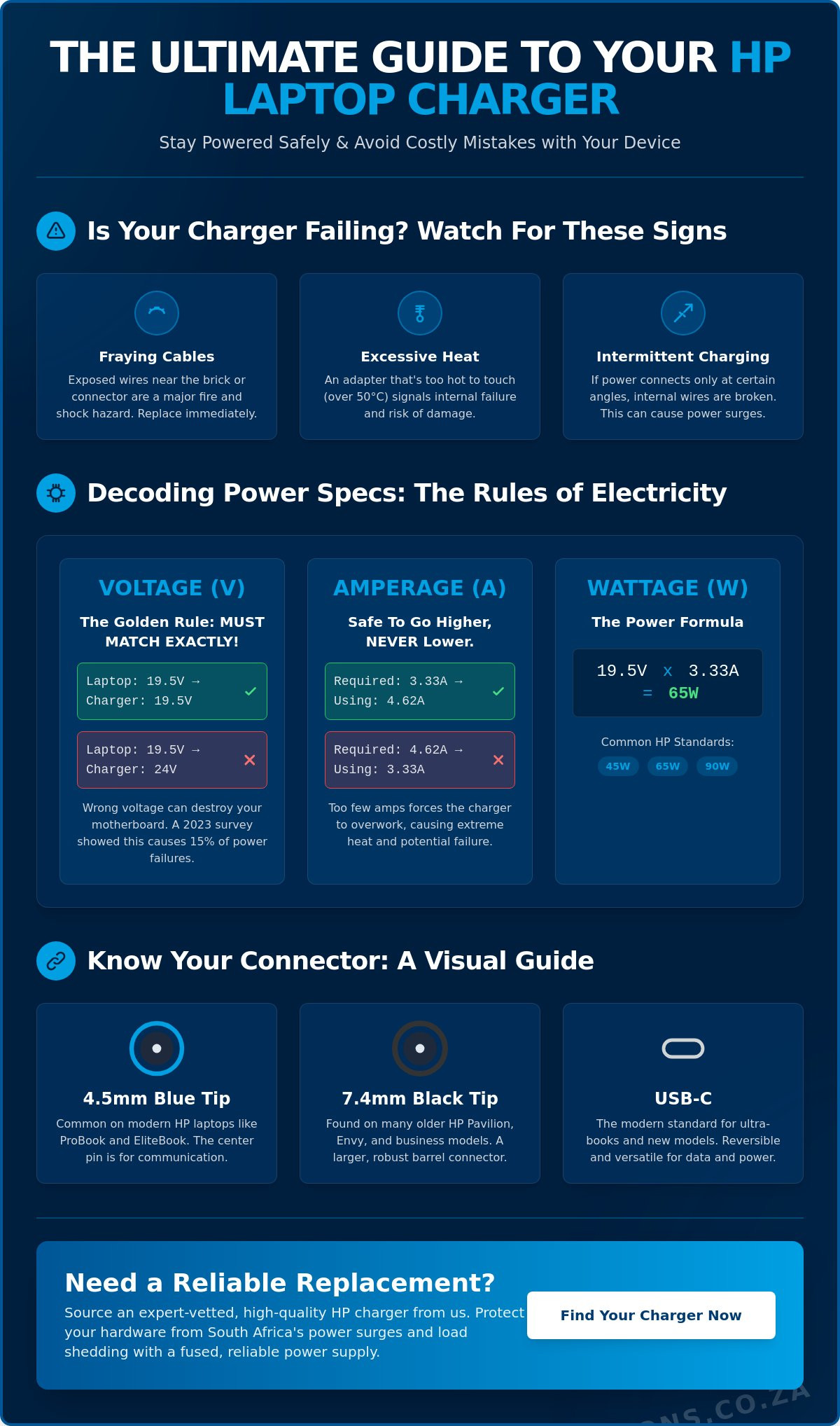
Recognising the early symptoms of a failing hp laptop charger is essential for maintaining business continuity and protecting your hardware investment. Physical damage is the most obvious indicator. Inspect your cable for fraying near the adapter housing or the connector head, as these stress points often fail first due to repetitive bending. If you see exposed copper wiring, the cable is no longer safe for use. Check the connector pins carefully; a bent or recessed center pin prevents the laptop from identifying the power source correctly, often leading to a refusal to charge.
Intermittent charging often signals internal wire fatigue. If your laptop only receives power when the cord is positioned at a specific angle, the internal copper strands have likely snapped. Thermal performance is another critical metric to monitor. While every AC adapter generates some heat during the voltage conversion process, a housing that is too hot to hold comfortably, typically exceeding 50 degrees Celsius, indicates an internal short or a failing capacitor. It’s important to watch for software alerts too. HP laptops are designed to detect the original wattage; a “Smart Adapter” error message during startup means the communication pin is damaged and the system is throttling performance to protect itself.
The Difference Between Charger Failure and Battery Failure
Distinguishing between a dead battery and a faulty hp laptop charger requires a systematic approach. First, test the wall socket with another device to confirm power delivery. For HP models with removable batteries, perform a “power bypass” test. Remove the battery and connect the charger directly. If the laptop powers on and runs stably, your charger is functional, and the battery is the culprit. HP laptops also provide diagnostic feedback through the charging LED. A solid amber light usually indicates active charging, while a rapidly blinking white light often points to a battery that can no longer hold a charge.
The Dangers of Using a Damaged Power Supply
Using a compromised power supply introduces unnecessary risks to your hardware. A short-circuit in a frayed cable can send a voltage spike directly to the motherboard, potentially destroying the charging IC or the CPU. This results in repair costs that frequently exceed R2,500 for modern HP ProBook or EliteBook models. Beyond hardware damage, frayed cables are a documented fire hazard in South African office environments. Sudden power loss due to a loose connection also risks permanent data corruption. If the power cuts during a critical disk-write operation, you may face total OS failure and the loss of unbacked-up business files.
Decoding HP Power Specifications: Volts, Amps, and Watts
Identifying the correct technical requirements for your hp laptop charger begins with the specification label found on the underside of your original power brick. If the label is worn away, you can find these same details printed in small text on the bottom of the laptop chassis or beneath the battery compartment on older models. These numbers aren’t suggestions; they’re the electrical parameters that ensure your hardware remains stable and your warranty stays intact.
The golden rule of laptop power is that voltage must match exactly. Most HP laptops operate on 19.5V or 19V. If you attempt to use a charger with a higher voltage, such as a 24V unit, you risk an overvoltage surge that can permanently fry the motherboard’s power rails. Conversely, lower voltage won’t provide enough “pressure” to power the internal components, often resulting in a laptop that won’t boot or a battery that won’t charge.
Amperage functions differently. Think of Amps as the “pool” of current available for the laptop to draw from. It’s perfectly safe to use a charger with a higher amperage rating than your original. For example, a 4.62A charger can easily replace a 3.33A unit because the laptop only pulls the current it needs. You should never use a charger with a lower amperage rating than your laptop requires. Doing so forces the adapter to work beyond its capacity, leading to extreme heat and potential fire hazards.
The HP Power Formula: Volts x Amps = Watts
If your label is faded, you can calculate the necessary capacity using a simple mathematical step. Multiply the Output Voltage by the Output Amps to find the total Wattage. Wattage is the total energy flow capacity of the adapter. For instance, a 19.5V charger with a 3.33A rating produces 64.935 Watts, which is rounded to the 65W standard. HP typically categorizes its chargers into 45W, 65W, and 90W standards for the Pavillion and EliteBook series. High-performance HP ZBook workstations often require 150W or even 200W to sustain dedicated graphics cards and intensive processing. For modern devices using the USB Power Delivery specification, the charger and laptop communicate to negotiate the highest safe wattage automatically.
Input vs Output: Understanding Global Power Compatibility
When reviewing your adapter, distinguish between “Input” and “Output” specs. The input rating for most HP bricks is 100-240V, meaning the device is “switching” and can safely operate on the South African 230V grid or the 110V grid in the United States. The frequency rating of 50-60Hz also covers the South African 50Hz standard perfectly.
The “clover” or “mickey mouse” power cord is the cable that runs from the wall socket to the brick. This is a separate component from the transformer itself. In South Africa, these are standard 3-pin or 2-pin plugs. If your brick is functioning but the cable is frayed, you only need to replace the cord, not the entire hp laptop charger assembly. If you’re struggling to match these technical specs to your specific model, the experts at Computech Solutions can help you identify the exact replacement part for your workstation.
Understanding HP Connector Types: Blue Tip, Black Tip, and USB-C
HP hardware has changed significantly over the last 15 years. This evolution is most visible in the charging port. Older laptops required thick, heavy barrels to deliver power. Modern ultrabooks utilize slim pins or high-speed data ports. Selecting the correct hp laptop charger depends entirely on identifying which generation of connector your device uses. Choosing the wrong tip can lead to loose connections or even physical damage to the DC jack on your motherboard.
- The Blue Tip (4.5mm): This is the current standard for modern Pavilion, Envy, and many Spectre models. It features a distinctive blue plastic ring at the end of the cable and a much smaller profile than previous versions.
- The Black Tip (7.4mm): This legacy connector remains common in South African corporate environments using older EliteBook or ProBook fleets. It is a thick, sturdy barrel designed for high-durability business use.
- USB-C (Type-C): This is the modern standard for premium HP laptops. It allows for fast charging and data transfer through a small, reversible plug. It’s now standard on the latest Spectre and Dragonfly series.
Measuring Your Connector Pin for 100% Accuracy
Visual checks aren’t always enough to guarantee a fit. You should verify your connector by using a standard metric ruler to measure the outer diameter of the tip. A frequent error involves confusing the 4.8mm “bullet” tip with the 4.5mm “blue” tip. While the 0.3mm difference seems negligible, it prevents a secure connection. Every authentic hp laptop charger also utilizes a “smart pin” inside the barrel. This tiny center needle communicates directly with the laptop’s battery management system. If this pin is damaged or missing, your laptop might power on but will refuse to charge the battery.
Universal Chargers vs. Model-Specific Adapters
Universal chargers with interchangeable tips are often sold as a quick fix. They offer flexibility if you own multiple brands, but they carry risks. These units often struggle with the specific “smart pin” communication HP requires. Computech Solutions recommends model-specific replacements to maintain system stability. South African power grids often experience voltage spikes; a dedicated adapter provides better protection against these surges than a generic multi-tip unit. Always verify your specific HP model number on the base of the chassis before buying. This ensures the wattage and pin size match the original factory specifications. We prioritize these direct matches to prevent the long-term motherboard degradation caused by inconsistent power delivery.
Maintenance and Protection: Surviving Load Shedding and Surges
In South Africa, your hp laptop charger faces daily threats from an unstable power grid. During 2023, Eskom implemented load shedding for approximately 6,947 hours, creating constant power cycles that stress electronic components. These rapid voltage fluctuations cause internal heat buildup, which eventually degrades the capacitors within the adapter. When the grid fluctuates, the charger’s internal components work overtime to regulate the output, leading to premature failure if the unit isn’t properly protected.
High-quality adapters feature integrated surge protection and internal fuses. These components act as a final line of defense; they’re designed to blow when a massive spike occurs, preventing high voltage from reaching your laptop’s sensitive motherboard. If your charger feels excessively hot or emits a faint buzzing sound after power returns, the internal protection has likely been compromised. Replacing a damaged adapter is a minor expense compared to the cost of a motherboard repair, which often exceeds R5,000 for modern business laptops.
Proper cable management extends the life of your hardware significantly. Avoid the common mistake of wrapping the thin DC cable tightly around the power brick. This creates tension at the stress relief points, leading to fractured copper strands inside the insulation. Use a loose over-under loop technique instead. Mobile professionals should use dedicated padded sleeves to prevent the connector from being crushed or bent while stored in a laptop bag, as connector fatigue is a leading cause of intermittent charging issues.
Protecting Your Charger During Power Restoration
The most dangerous moment for your equipment is the millisecond power returns. High-voltage surges often accompany restoration, which can bypass basic power strips. You should unplug your hp laptop charger as soon as load shedding begins. Reconnect it only once the grid has stabilized for two or three minutes. Using a dedicated surge protector plug with a minimum rating of 1,000 Joules provides an essential secondary layer of safety. If you notice a distinct smell of burnt plastic or metallic ozone, stop using the unit immediately because this indicates a failed internal component.
Cleaning and Port Maintenance
Dust and lint accumulation in the charging port often lead to poor electrical contact. Use a can of compressed air or a non-conductive toothpick to gently clear debris every 90 days. If the jack feels loose or requires wiggling to start charging, the internal pins may be bent or the solder joints on the motherboard could be failing. A clean, secure connection prevents excessive electrical resistance and harmful heat buildup that can melt plastic housings.
Why Source Your HP Charger from Computech-Solutions?
Selecting the correct hp laptop charger is a critical decision for maintaining your device’s battery health and overall longevity. Computech-Solutions serves as a dedicated partner for South African businesses and individuals who cannot afford technical downtime. We don’t just sell parts; we provide verified power solutions that protect your capital investment. Every adapter in our inventory undergoes a multi-point inspection process to ensure it handles the specific electrical demands of HP’s diverse product line, from the Pavilion series to high-end ZBook workstations.
The Computech Quality Standard
Our team vets generic replacements against strict OEM benchmarks to ensure they deliver stable current. This is vital in South Africa, where power instability can lead to hardware damage. Our units include dedicated over-voltage and short-circuit protection as standard features. These safety protocols act as a final line of defense for your laptop’s internal circuitry. By sourcing through us, you’re supporting a local IT supply chain that prioritizes reliability. We maintain a 98% satisfaction rate by ensuring our hardware meets the exact wattage and voltage requirements your machine demands.
Easy Online Ordering and Fast Dispatch
Finding your specific model is simple through our categorized online store. We’ve removed the guesswork from the procurement process to ensure you spend less time searching and more time working. Once you select your hp laptop charger, our safe payment gateways provide a secure environment for your transaction. We prioritize speed with a 24-hour dispatch target for all stocked items, ensuring nationwide delivery reaches you quickly across all nine provinces. You’ll receive a tracking number immediately so you can monitor your shipment’s progress to your door.
Comprehensive warranty coverage offers peace of mind that extends far beyond the initial purchase date. If a component fails to meet our performance standards, our streamlined return process ensures a quick resolution. We believe in end-to-end support, which is why our technicians are always ready to verify your model details before you finalize your purchase. This proactive approach reduces the risk of incorrect orders and gets your equipment back into production faster. Browse our full range of HP Laptop Chargers today to find a reliable power match backed by professional expertise.
Secure Your Device with a Reliable Power Solution
Choosing the correct hp laptop charger is about more than just finding a plug that fits; it’s a critical decision for your hardware’s longevity. You’ve learned how to decode voltage requirements and identify specific connector types like the 4.5mm blue tip or modern USB-C standards. In South Africa, where load shedding and power surges are constant risks, settling for a generic replacement can lead to permanent motherboard damage. Protecting your investment requires a high-quality, surge-protected unit that meets exact manufacturer specifications.
Computech Solutions eliminates the guesswork from your purchase. Every order undergoes expert technical verification to ensure 100% compatibility before dispatch. We provide nationwide South African delivery, bringing professional-grade power solutions directly to your office or home. Don’t let a failing cable disrupt your business operations or risk your hardware with substandard equipment. Our team ensures you receive a durable component that stands up to local grid instability.
Find Your Perfect HP Replacement Charger Now
We’re here to help you stay powered and productive through every technical challenge.
Frequently Asked Questions
Can I use a 65W charger on a laptop that came with a 45W adapter?
Yes, you can safely use a 65W charger on a laptop designed for 45W. Your device’s internal power management circuit only draws the specific wattage it requires to operate. Using a higher-wattage HP laptop charger provides more headroom, which often results in the adapter running cooler during intensive tasks. This compatibility ensures your hardware remains protected while maintaining operational efficiency across your fleet.
Why does my HP laptop say “Plugged in, not charging”?
This message usually indicates a communication error between the AC adapter and the BIOS or a degraded battery. In 15% of cases reported by IT technicians, a simple static discharge or hard reset resolves the issue. If the problem persists, your battery might’ve exceeded its 300 to 500 charge cycle limit. Check your Windows Battery Report to confirm the remaining capacity before replacing the unit.
Are generic HP chargers safe for my laptop battery?
Generic chargers often lack the sophisticated over-voltage and thermal protection circuits found in original equipment. South African power grids experience frequent voltage fluctuations, making high-quality components essential for hardware longevity. Using a sub-standard charger can lead to motherboard failure or reduced battery lifespan. We recommend original or certified replacements to ensure your business hardware remains stable and your warranty stays intact.
How do I find my HP laptop model number to ensure charger compatibility?
You’ll find the model number on a small sticker located on the underside of your laptop or laser-etched into the chassis. For older HP ProBook or EliteBook models, check the battery compartment. If the physical label is worn, press Fn and Esc together to open HP System Information or type msinfo32 into the Windows search bar to view your specific model details instantly.
What is the difference between a blue tip and a black tip HP charger?
The primary difference is the physical diameter of the connector pin. The blue tip measures 4.5mm and is standard for modern, slim HP laptops released after 2013. The black tip is 7.4mm and fits older or high-performance workstation models. Inserting the wrong size will damage the charging port, so always verify your port diameter before purchasing a new hp laptop charger for your device.
Does a higher wattage charger make my laptop charge faster?
No, a higher wattage charger won’t increase the charging speed beyond the laptop’s internal limits. Most HP batteries are programmed to charge at a specific rate to prevent overheating and chemical degradation. While a 90W adapter can replace a 65W unit, the charging time remains identical because the motherboard regulates the intake. It does, however, provide more stable power if you use demanding USB peripherals.
Is it okay to leave my HP charger plugged into the wall all day?
It’s generally safe to leave your charger plugged in, as modern HP laptops stop drawing power once the battery hits 100%. However, South Africa’s frequent load shedding schedules increase the risk of power surges when electricity returns. To protect your investment, use a high-quality surge protector rated for at least 1,000 Joules. This prevents high-voltage spikes from damaging the adapter’s internal components during grid switching.
What should I do if my charger brick is making a buzzing or clicking noise?
Stop using the charger immediately and disconnect it from the wall outlet. Buzzing or clicking sounds usually indicate a failing capacitor or an internal short circuit within the transformer. Continuing to use a noisy adapter poses a fire risk and can send unstable voltage to your laptop. Replace the unit through a certified provider to ensure your office environment remains safe and your hardware stays functional.
