
Your cracked HP display isn’t a sign that it’s time for a new computer; it’s an opportunity to restore your device at a fraction of the cost of a new unit. Many South Africans feel paralyzed when a screen fails, caught between the high price of authorized service centers and the fear of ordering an incompatible part. Finding a reliable hp laptop screen replacement south africa doesn’t have to be a technical gamble. We understand the anxiety of matching pin counts and screen sizes, especially when you’re worried about fragile components surviving a trip across the country.
You deserve a streamlined solution that removes the guesswork from hardware repairs. This 2026 guide promises to walk you through identifying your specific LCD model, sourcing a high-quality replacement, and ensuring it arrives safely at your doorstep. We’ll examine the technical specifications you need to know and provide a clear roadmap to getting your laptop back into peak operational condition without the typical stress of technical disruptions. By the end of this article, you’ll have the confidence to choose the right hardware and restore your mobile workstation’s functionality with ease.
Key Takeaways
- Learn how to distinguish between cosmetic glass damage and internal LCD failure to determine if a full panel replacement is necessary.
- Master the process of locating the specific LCD part number on your hardware to ensure your hp laptop screen replacement south africa fits perfectly without pin or size mismatches.
- Understand why A+ Grade replacement panels from leading manufacturers offer the same performance as original equipment at a significantly lower cost.
- Discover the essential tools and secure shipping protocols required to safely receive and install fragile display components anywhere in the country.
- Leverage expert technical support to verify part compatibility before you buy, eliminating the risk of ordering the wrong components.
Understanding HP Laptop Screen Damage & Replacement Options
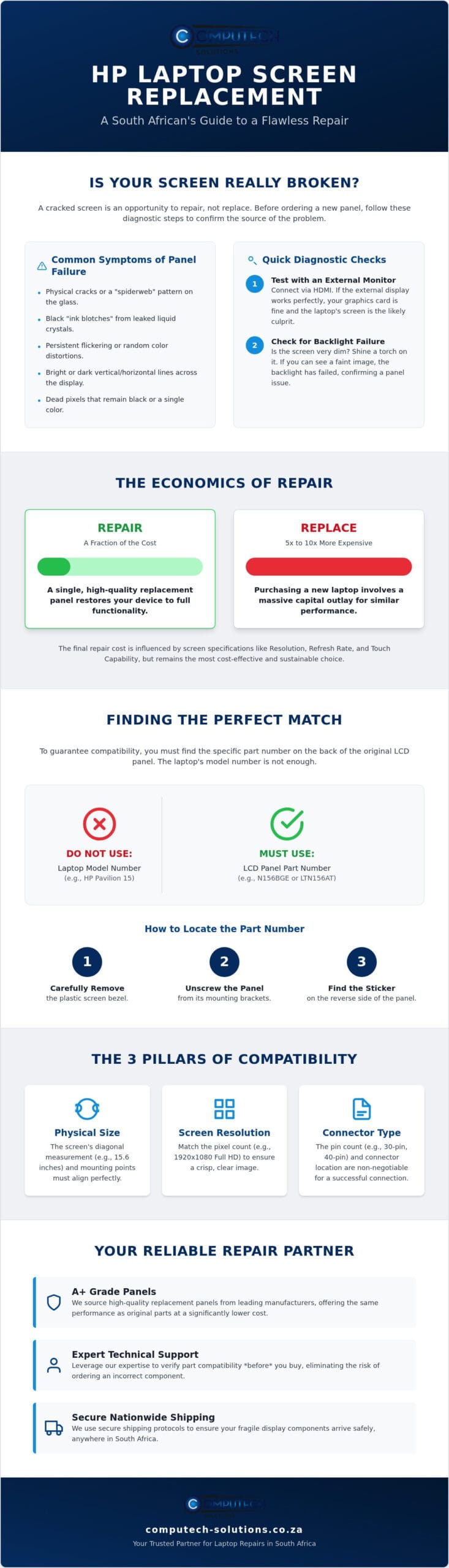
A cracked screen doesn’t always look like a spiderweb of glass. Sometimes, the damage is internal, manifesting as distorted colors or the dreaded “ink blot” effect where liquid crystals have leaked inside the panel. When you’re considering an hp laptop screen replacement south africa, identifying the specific failure mode is the first step toward a successful repair. Common symptoms like vertical lines, persistent flickering, or dead pixels usually point directly to the hardware. While these issues are frustrating, they’re rarely fatal for the machine itself. Repairing your current device is a more sustainable choice in 2026 than purchasing a brand-new unit. This is particularly true for reliable business and consumer series like the HP Pavilion, EliteBook, or ProBook, which are built to last through multiple hardware cycles.
Is Your Screen Actually Broken?
Before you order a replacement, you must confirm the screen is the actual point of failure. Connect your laptop to an external monitor or TV using an HDMI cable. If the external display looks perfect, your graphics card is healthy, and the problem lies with the internal laptop display technology. Sometimes, the issue isn’t the panel itself but a loose Embedded DisplayPort (eDP) cable that has shifted inside the hinge. If your screen is very dark but you can still see faint images when you shine a torch on it, you’re likely dealing with a backlight failure. These diagnostics ensure you don’t spend money on a new panel when a simple cable reseating might solve the problem.
The Economics of Repair in South Africa
Choosing to repair rather than replace is a strategic financial decision. A new high-end laptop can cost five to ten times more than a premium replacement panel. The total cost of an hp laptop screen replacement south africa depends on your specific hardware requirements. Factors like resolution, refresh rate, and touch capabilities significantly influence the part price. For example, a standard 1080p non-touch panel is far more affordable than a 4K OLED or a digitizer-equipped touchscreen. High-quality replacement panels have become the industry standard for out-of-warranty repairs. They provide identical performance to original parts at a fraction of the cost. By opting for a professional-grade LCD, you restore your laptop’s operational efficiency without the massive capital outlay of a new purchase.
How to Identify the Correct Replacement Screen for Your HP
A common mistake when sourcing an hp laptop screen replacement south africa is relying solely on the laptop’s model number. While your laptop might be an HP Pavilion 15, that single series can feature dozens of different screen configurations depending on the year of manufacture. Manufacturers frequently change LCD suppliers during a product’s lifecycle. This means two identical-looking laptops could have entirely different internal connectors or mounting styles. To achieve a perfect match, you must identify the specific manufacturer part number located on the back of the LCD panel itself. Codes such as “N156BGE” or “LTN156AT” provide the definitive technical blueprint for your hardware.
Locating this number requires a bit of manual effort. You’ll need to carefully remove the plastic bezel and unscrew the panel to see the sticker on the reverse side. This precision is necessary because there are currently no formal right-to-repair rules in South Africa that mandate manufacturers to simplify this process for consumers. By taking this step, you eliminate the risk of ordering a part that won’t physically fit or communicate with your motherboard. If you find the technical details overwhelming, you can view our verified Laptop LCD Replacement Panels to compare your part number against our current stock.
Compatibility is built on three specific pillars: physical size, screen resolution, and the connector type. You should also consider the finish of the panel. Matte screens feature an anti-glare coating that’s ideal for bright office environments. Glossy screens offer higher contrast and more vivid colors, making them a favorite for creative professionals. While finishes are often interchangeable, the technical specs are not. Ensuring these match perfectly is the only way to restore your device’s operational efficiency without causing further technical disruptions.
The 30-Pin vs. 40-Pin Connector Debate
The pin count on your video cable determines the data bandwidth available to the screen. Most standard High Definition (HD) and Full HD screens use a 30-pin eDP connector. If your HP laptop features a 4K resolution or a high refresh rate, it likely utilizes a 40-pin connector. You can visually identify these by measuring the width; a 30-pin connector is roughly 20mm wide. You cannot adapt a 30-pin cable to a 40-pin screen. Attempting to do so can result in permanent damage to the motherboard’s display circuit.
Screen Dimensions and Mounting Styles
Screen size is always measured diagonally. Beyond the diagonal size, you must identify if your panel is a “Slim” or “Standard” LED. Slim panels are the modern standard, measuring only a few millimeters in thickness. Mounting styles also vary significantly between HP series. Some panels use screw brackets on the top and bottom, while others have side hooks or use adhesive pull-tabs. Verifying these physical attributes ensures your hp laptop screen replacement south africa sits flush within the bezel and allows the lid to close properly.
Original vs. High-Quality Replacement Panels: Performance & Value
Understanding the manufacturing landscape is essential for any hp laptop screen replacement south africa. A common misconception is that HP manufactures its own LCD panels. In reality, HP sources these components from specialized manufacturers like LG, Samsung, BOE, and AU Optronics. When you buy a replacement, you aren’t necessarily looking for an “HP branded” part; you’re looking for a panel that meets the exact technical specifications of those original suppliers. High-quality replacement panels are often categorized as “A+ Grade.” This designation ensures the panel is brand new, free from surface scratches, and meets the highest performance standards for brightness and color accuracy.
Choosing a high-quality replacement doesn’t mean compromising on visual fidelity. If the resolution and panel type match your original hardware, the color gamut and contrast will remain consistent. However, you should always check a supplier’s dead pixel policy before finalizing your purchase. Most A+ Grade panels adhere to strict ISO standards, ensuring you won’t be distracted by tiny black or bright spots on your new display. Opting for a repair instead of a full device replacement is a powerful way to cut e-waste and grow economy by extending the lifecycle of your existing hardware. This approach supports a sustainable electronics ecosystem while saving you significant capital.
Reliability of Third-Party Replacements
High-quality third-party panels are designed to meet or exceed OEM specifications. The critical component is the controller board attached to the back of the LCD. This board translates the signals from your motherboard into the images you see. Premium replacements use high-grade chips that ensure stable communication with your system. Because there are many generic versions available, expert technical support is vital. A specialist can help you navigate the nuances of controller board compatibility to ensure your hp laptop screen replacement south africa functions flawlessly from the first boot. Reliability isn’t just about the glass; it’s about the electronics driving the pixels.
Warranty and Longevity
Reputable suppliers in the South African market typically offer a 6-month warranty on replacement screens. This coverage protects you against factory defects or premature backlight failure. There’s a persistent myth that third-party screens can damage a laptop’s motherboard. This is technically impossible if the pin count and voltage requirements are matched correctly. To ensure the longevity of your new panel, avoid putting pressure on the lid and keep the hinges tightened. A well-installed A+ Grade panel can easily last as long as the original hardware, providing years of reliable service and maintaining your device’s operational efficiency.
The Step-by-Step Guide to Screen Replacement Logistics in SA
Logistics are the bridge between identifying your technical needs and restoring your device’s operational efficiency. When you source an hp laptop screen replacement south africa, the primary concern is often the physical safety of the component during transit. Because LCD panels are incredibly thin and susceptible to pressure, the shipping process must be handled with specialized care. Whether you’re in a major hub like Johannesburg or a more remote area, understanding how these fragile parts are moved ensures you receive a functional unit ready for installation. If you’re ready to begin the repair process, you can find the correct hardware in our catalog of Laptop LCD Replacement Panels with nationwide coverage.
Success in a DIY repair starts with the right environment and tools. You don’t need a full workshop, but a few precision instruments are non-negotiable. Gather a small Phillips head screwdriver (typically size #00), a plastic prying tool or spudger, and a pair of tweezers for handling small ribbon cables. The most critical safety step happens before you touch the screen: always disconnect the internal battery. Failing to remove the power source can lead to a short circuit on the motherboard when you unplug the video cable, turning a simple screen swap into a catastrophic hardware failure.
Safe Shipping Standards for LCDs
Professional shipping for display hardware goes beyond standard bubble wrap. A “laptop-safe” package uses a double-boxing method. The LCD panel is first placed in an anti-static sleeve and secured within a rigid inner box. This inner box is then suspended within a larger outer carton filled with shock-absorbing material. When your package arrives, inspect the outer box for any punctures or crushed corners before signing. Standard lead times for nationwide delivery in South Africa typically range from 2 to 5 business days, depending on your proximity to main distribution centers. Rapid, secure transit is the standard for maintaining technical hardware integrity.
Basic DIY Installation Steps
Removing the plastic bezel is the most delicate part of the physical installation. Use your prying tool to gently release the plastic clips starting from the top center. Don’t rush this process; snapping a clip can prevent the bezel from sitting flush later. Modern HP laptops often use stretch-release adhesive strips to hold the panel in place. These must be pulled slowly and horizontally to avoid snapping the glue. Before you snap the bezel back on and tighten the final screws, perform a “post-test.” Plug in the video cable, reconnect the battery, and power on the laptop to ensure the hp laptop screen replacement south africa displays a clear image. This prevents the frustration of having to disassemble the lid again if the cable isn’t seated perfectly.
Why Computech-Solutions is Your Reliable Partner for HP Screen Replacement
Choosing a partner for your hp laptop screen replacement south africa requires more than just finding a part in a catalog. It requires technical certainty and a commitment to operational uptime. Computech-Solutions specializes in high-quality replacement hardware, positioning itself as the definitive alternative to the high costs of authorized service centers. We don’t just supply components; we provide the technical expertise necessary to ensure your repair is successful on the first attempt. Our inventory includes a comprehensive range of HP-compatible screens, from the rugged displays used in legacy ProBooks to the high-resolution panels found in the latest Spectre series.
Reliability is the core of our service model. We understand the anxiety associated with shipping fragile electronics across the country. That’s why our nationwide delivery system is built on specialized packaging standards designed to protect LCD panels from the rigors of transit. By centralizing our expertise in laptop components, we offer a streamlined solution that moves quickly from identifying your hardware challenge to delivering a tested, high-grade replacement to your door.
Expert Support for Accurate Part Matching
The most significant hurdle in hardware repair is the risk of ordering an incompatible part. Our team provides a vital safety net by helping you decode complex part numbers and pin counts before you commit to a purchase. We verify technical specifications like connector placement and mounting styles to ensure a perfect fit. This proactive approach reduces the frustration of returns and technical delays. When you source an hp laptop screen replacement south africa through us, you’re accessing a pool of specialized knowledge that prioritizes your device’s longevity and performance.
If you find yourself needing similar professional guidance for a broader range of hardware issues, you can visit SIMSIM Repairs to explore their full suite of mobile and computer repair services.
A Total Solution for Laptop Longevity
Restoring your laptop’s display is often just one part of maintaining its professional utility. We provide an all-encompassing service model that allows you to combine your screen repair with other essential hardware. If your device is aging, consider pairing your new LCD with a replacement HP battery or a high-quality charger to restore its original mobile performance. This comprehensive approach ensures your workstation remains a reliable asset for years to come. Our reputation as a trusted South African IT hardware provider is built on delivering functional, benefit-oriented outcomes for every client. Browse our HP Laptop Screen Replacements to find the exact match for your device today.
Restore Your HP Laptop’s Operational Efficiency Today
Choosing to repair rather than replace is a strategic decision that extends the lifecycle of your hardware while maintaining its professional utility. Success in an hp laptop screen replacement south africa relies on technical precision. You’ve learned that matching the specific LCD part number and pin count is the only way to ensure total compatibility. By opting for A+ Grade panels and following safe installation protocols, you can restore your device to its original performance standards without the high capital expenditure of a new unit.
Computech-Solutions stands as your dedicated partner in this process. As specialists in Laptop LCD Replacement Panels, we provide the expert technical support you need to verify compatibility before you pay. Our nationwide South African delivery ensures your fragile components arrive intact and ready for installation. Don’t let a cracked display disrupt your workflow when a streamlined solution is readily available. Find Your HP Replacement Screen at Computech-Solutions and get your laptop back in peak condition. You have the tools and the knowledge to move forward with confidence.
Frequently Asked Questions
How much does it cost to replace an HP laptop screen in South Africa?
The cost for an hp laptop screen replacement south africa depends on your panel’s specific resolution, size, and whether it has touchscreen capabilities. While a specialized 4K OLED or high-refresh-rate display requires a larger investment than a standard HD panel, the repair is always a fraction of the price of a new unit. This cost-effective approach allows you to restore your mobile workstation’s functionality without the massive capital outlay of a total device replacement.
Can I replace my HP laptop screen myself?
You can successfully replace the screen yourself if you have precision tools and follow a methodical approach. The process requires a small Phillips head screwdriver and a plastic prying tool to safely remove the bezel. It’s vital to disconnect the internal battery before you begin to prevent any electrical damage to the motherboard during the hardware swap.
Will a replacement screen affect my HP laptop warranty?
Performing your own hardware repairs typically voids the manufacturer’s original warranty if the device is still within its coverage period. However, for most users seeking an hp laptop screen replacement south africa, the device is already out of its standard one-year warranty. In these cases, independent repair is the most logical path to extending the laptop’s operational lifespan and reducing electronic waste.
What is the difference between a 30-pin and a 40-pin HP screen?
The pin count refers to the width of the video connector and its data bandwidth capacity. A 30-pin connector is the standard for most High Definition and Full HD screens found in the Pavilion or ProBook series. A 40-pin connector is required for high-resolution 4K displays or panels with integrated touch functionality. These two connector types are not interchangeable and cannot be adapted to fit each other.
How do I find the exact model number of my HP laptop screen?
You must look at the manufacturer sticker on the back of the LCD panel itself to find the correct part number. The laptop’s external model number isn’t specific enough because HP often uses different screen suppliers for the same model. Look for a technical code such as “N156BGE” or “LTN156AT” to ensure your replacement part matches the original hardware’s specifications perfectly.
How long does nationwide delivery take for laptop screens in SA?
Nationwide delivery across South Africa typically takes between 2 and 5 business days depending on your location. Fragile components like LCD panels are shipped using specialized double-boxing and anti-static wrap to ensure they arrive in perfect condition. Major centers like Johannesburg, Cape Town, and Durban often see faster turnaround times due to their proximity to logistics hubs.
Are replacement screens as good as the original HP screen?
A+ Grade replacement panels provide the same brightness, contrast, and color accuracy as the original factory part. Since HP doesn’t manufacture its own screens, they source them from specialized producers like LG, Samsung, and BOE. When you choose a high-quality replacement from these same manufacturers, you’re getting the exact same technology that was installed in your laptop when it was new.
What should I do if my replacement screen arrives damaged?
You should inspect the package for any visible punctures or crushing before you sign for the delivery. If you discover the panel is damaged after opening, take clear photographs of the packaging and the screen immediately. Contact technical support to report the transit damage before you attempt installation. Most reputable providers have clear protocols to resolve shipping issues quickly so your repair isn’t delayed.
