
Your laptop screen goes black mid-presentation, even though the battery icon claimed you had twenty minutes of life left. It’s a frustrating reality for many professionals in South Africa where power stability is critical for daily productivity. When your device dies within minutes of being unplugged, it stops being a portable tool and starts being a desktop tethered to a wall socket. A professional laptop battery replacement is the most effective way to restore your hardware’s original mobility and safeguard your work against unexpected power interruptions.
We understand that the process feels daunting when you’re faced with technical jargon like voltage requirements and complex part numbers. You shouldn’t have to worry about whether a new component will damage your motherboard or fail after just a month of use. This guide provides the technical clarity you need to master identifying and selecting the perfect power source for any major brand, including Acer, Dell, and Lenovo. We’ll walk you through the differences between battery types and show you how to find a reliable South African supplier that offers expert support and nationwide delivery. By the end of this article, you’ll have a clear roadmap to revitalise your laptop and maintain its peak performance for years to come.
Key Takeaways
- Identify the specific hardware warnings and runtime drops that signal your battery has reached its functional end of life.
- Learn how to verify part numbers and voltage levels to ensure a successful laptop battery replacement without risking electrical damage.
- Compare the benefits of OEM versus high-quality generic batteries to maximize your budget while maintaining rigorous safety standards.
- Implement specialized maintenance techniques to extend your battery’s lifespan despite the challenges of frequent power interruptions and grid instability.
- Access a streamlined sourcing process with technical support and nationwide delivery for all major laptop brands in South Africa.
Recognizing the Critical Signs for Laptop Battery Replacement
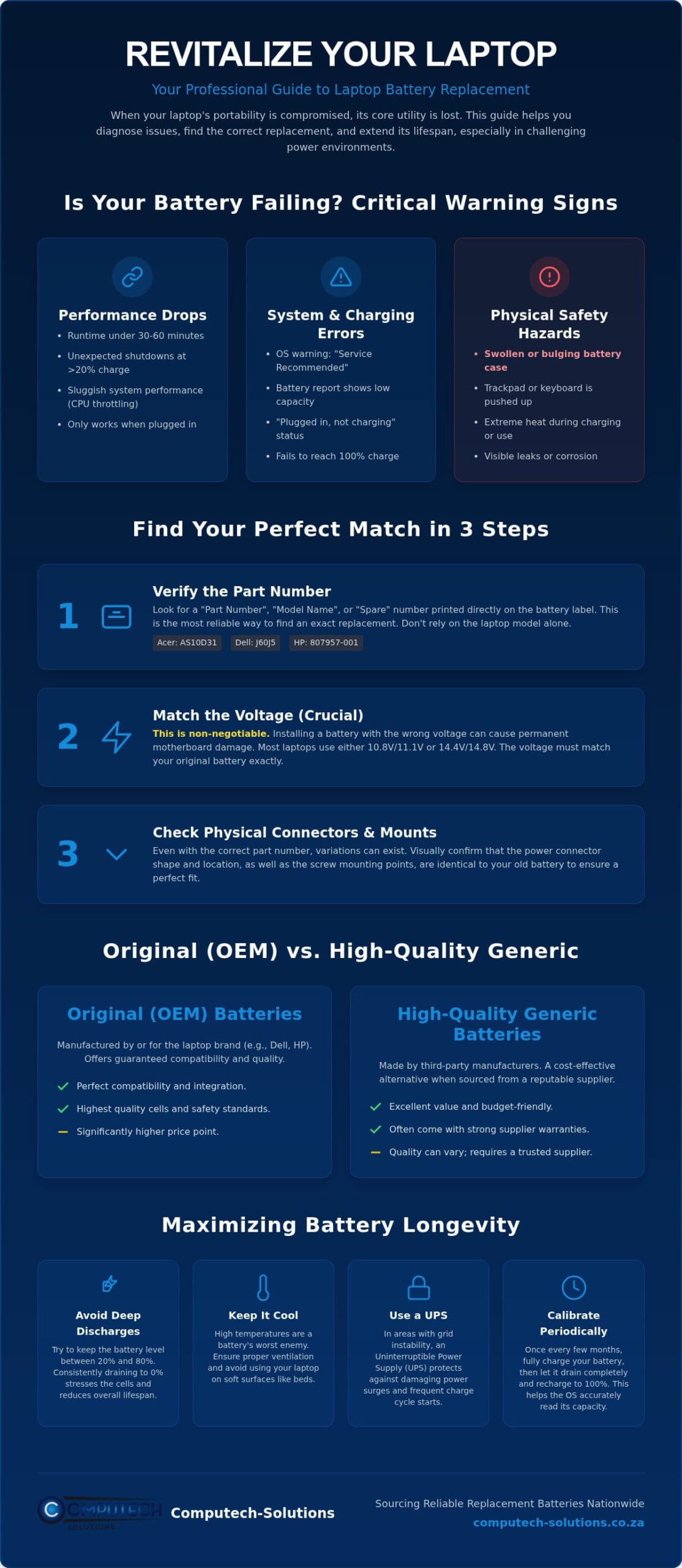
A laptop’s primary value is its portability. When that portability vanishes, the device loses its core utility. Most users first notice a problem when their unplugged runtime drops significantly. If your machine lasts less than 30 to 60 minutes, the internal cells have likely degraded beyond their functional threshold. You might also experience unexpected shutdowns where the laptop cuts out at 20% or 30% remaining charge. This happens because the battery can no longer provide a consistent voltage under load. In many cases, the laptop eventually only functions when connected to the AC power adapter, essentially becoming a desktop computer. A timely laptop battery replacement is the only way to restore the mobility you rely on for business or personal use.
Performance Indicators and System Health Warnings
Modern operating systems are designed to monitor hardware health proactively. Windows users can generate a “Battery Report” via the command prompt to compare the original design capacity against the current full charge capacity. Similarly, macOS users should check the “Battery Health” status in System Settings. If you see a “Service Recommended” or “Consider replacing your battery” warning, it’s a definitive sign of failure. A deeper understanding of lithium-ion batteries reveals that these components have a finite number of charge cycles before their chemical structure breaks down. You might also encounter “plugged in, not charging” errors. While this can sometimes be a software glitch, it often indicates the battery’s internal controller has detected a permanent failure. Interestingly, a degrading battery can even slow down your system. Some laptops throttle the CPU speed to prevent the device from drawing more power than a weak battery can safely provide, leading to sluggish performance.
Physical Red Flags and Safety Hazards
Some warning signs are physical rather than digital. A swollen battery is a serious safety hazard that requires immediate attention. You might notice your trackpad becoming difficult to click or the keyboard bulging upward. This occurs when the battery cells off-gas due to age or damage. Ignoring this deformation can lead to permanent chassis damage or even a fire. Additionally, if your laptop generates extreme heat during normal usage or while charging, the battery’s internal resistance has likely increased. This heat isn’t just uncomfortable; it accelerates the degradation of other internal components. If you observe any physical changes to the laptop’s casing, stop using the device and seek a laptop battery replacement immediately to avoid operational risks and protect your hardware investment.
How to Identify Your Specific Laptop Battery Model
Finding the correct hardware is the most technical part of the laptop battery replacement process. You shouldn’t rely solely on your laptop’s model name. Manufacturers like Dell or HP often produce multiple versions of the same model that use entirely different battery shapes or voltages. To ensure a perfect match, you must look at the battery itself or use diagnostic software to pull the internal data. This preparation prevents the frustration of receiving a part that doesn’t fit or, worse, damages your system.
Decoding Battery Part Numbers and Voltage
The most reliable identifier is the “Part Number” or “Model Name” printed directly on the battery casing. For Acer, this often looks like “AS10D31”, while Dell uses “Type” followed by a short alphanumeric code like “J60J5”. HP batteries usually list a “Spare” number. You’ll find this on a sticker on the battery’s underside if it’s external, or on the face of the unit if it’s internal. This code is the specific key you need when searching for a compatible unit.
Matching the voltage is non-negotiable. Most laptops run on either 11.1V (or 10.8V) or 14.8V (or 14.4V). Installing a 14.8V battery into a system designed for 11.1V can cause immediate, irreparable motherboard damage. While capacity, measured in Milliampere-hours (mAh) or Watt-hours (Wh), can vary without causing harm, the voltage must remain consistent with your original unit. Before you finalize your purchase, check the physical connector type and the location of the screw mounting points. Even if the technical specs match, a different connector orientation will make the battery useless. Once you’ve identified these details, you can chat with a technical expert to confirm the part is correct for your specific build.
Using Software to Identify Internal Batteries
If your laptop has an internal battery and you don’t want to open the chassis yet, software provides the necessary data. Windows users can open the Command Prompt and type powercfg /batteryreport. This generates an HTML file in your user folder that lists the “Manufacturer Name”, “Serial Number”, and “Design Capacity”. This software-first approach is ideal for preparing for a laptop battery replacement before you even pick up a screwdriver.
Third-party hardware monitors like HWiNFO offer even deeper insights into the battery’s chemistry and controller information. This data helps you source a high-quality replacement that matches the original’s communication protocols. Remember that once you successfully swap the hardware, you must properly dispose of old batteries at an accredited South African e-waste facility. This ensures you comply with the 2026 enforcement of the National Environmental Management: Waste Act, which bans all electronic waste from landfills and places strict responsibility on consumers and producers alike.
Original vs. High-Quality Generic Batteries: Making an Informed Choice
Deciding on a laptop battery replacement often involves a choice between Original Equipment Manufacturer (OEM) parts and aftermarket alternatives. While OEM batteries from brands like Apple or Dell come with the manufacturer’s seal of approval, they often carry a price tag that doesn’t align with the residual value of an older machine. High-quality generic batteries provide a strategic middle ground. They offer comparable performance and safety at a fraction of the cost, provided you source them from a specialist rather than a generic marketplace. Choosing the right path depends on your budget, the age of your device, and your performance requirements.
Understanding the Value Proposition of Replacement Batteries
Generic batteries are often the only viable way to give a second life to older laptop models that the original manufacturer no longer supports. The key difference between a reliable replacement and a poor one lies in the internal cell quality. Reputable suppliers use Grade A cells, which maintain their charge capacity over hundreds of cycles. In contrast, ultra-cheap alternatives often rely on recycled or lower-grade components that fail within months. Computech-Solutions focuses on high-capacity replacement options that meet or exceed the original runtime. This ensures your hardware remains productive during extended periods away from a power source, which is a significant advantage for mobile professionals.
Quality Standards and Safety Certifications
Safety shouldn’t be sacrificed for a lower price. A reliable generic battery must include a sophisticated Battery Management System (BMS). This internal circuit regulates the flow of electricity, providing essential protection against overcharging, deep discharge, and short circuits. When browsing for a laptop battery replacement, look for these specific indicators of quality:
- CE Marking: This indicates the product meets European health, safety, and environmental protection standards.
- RoHS Compliance: This ensures the battery is free from hazardous substances like lead or mercury, which is vital for environmental safety.
- Integrated BMS: This provides hardware-level safeguards to prevent overheating or swelling, protecting your laptop’s internal components.
Be wary of “too good to be true” deals on unverified marketplaces. If a battery is priced significantly lower than the market average, it likely lacks these critical safety features. Low-quality cells are prone to voltage sag, which can cause your laptop to shut down unexpectedly even when the software shows a 15% charge remaining. By choosing a specialist supplier with a proven track record in South Africa, you secure a warranty and technical support that unbranded sellers cannot match. This approach ensures your hardware investment is protected while restoring the full portability of your device.
Maximizing Battery Longevity in the South African Power Environment
South Africa presents a uniquely challenging environment for portable electronics. Frequent power cycles caused by load shedding or localized load reduction significantly shorten the lifespan of lithium-ion cells. Every time the power cuts and your laptop switches to battery power, it consumes a portion of its finite charge cycles. Over time, these rapid, unplanned transitions lead to chemical degradation that reduces total capacity. Beyond the cycles themselves, the primary threat to a new laptop battery replacement is the high-voltage surge that often occurs when the grid is restored.
Managing Load Shedding and Power Surges
Protecting your hardware requires a proactive approach. You should ideally unplug your charger from the wall socket as soon as a power outage begins. When the electricity returns, the initial spike can be significantly higher than standard operating voltages. This surge can damage the charging circuitry on your motherboard or the battery’s internal management system. Using a high-quality surge protector is a mandatory investment for any laptop user in South African conditions. During outages, don’t wait for the “Low Battery” warning to appear. Enable “Battery Saver” modes at 50% to reduce the depth of discharge. This small habit preserves the chemical health of the cells over hundreds of cycles.
Best Practices for Daily Battery Maintenance
Modern batteries thrive when kept between 20% and 80% charge. Constant “topping up” to 100% or allowing the device to hit 0% puts unnecessary stress on the lithium ions. If you’ve just completed a laptop battery replacement, you should calibrate the new unit to ensure the software accurately tracks its capacity. Charge it to 100%, let it run down to about 5% through normal use, and then charge it back to full without interruption. This process syncs the battery’s internal controller with your operating system’s power meter, preventing inaccurate percentage readings.
Heat management is equally critical during South African summers. High ambient temperatures increase internal resistance, causing the battery to generate more heat during charging. This creates a destructive feedback loop that can lead to cell swelling. Ensure your laptop’s vents remain clear and avoid using the device on soft surfaces that trap heat, such as blankets or cushions. If you aren’t using your laptop for several weeks, store it with the battery at roughly 50%. This “storage charge” prevents the cells from falling into a deep discharge state from which they might never recover. If you need assistance choosing a battery that can withstand these local conditions, contact our technical support team for expert guidance.
Sourcing Reliable Replacement Batteries from Computech-Solutions
Finding a reliable partner for a laptop battery replacement shouldn’t be a gamble. At Computech-Solutions, we’ve positioned ourselves as the definitive total solution provider for South African users who require high-performance hardware without the inflated costs of OEM parts. We specialize in high-quality generic replacements that undergo rigorous testing to ensure they meet the specific demands of the local power grid. Whether you’re managing a fleet of corporate devices or revitalizing a personal machine, our inventory provides the stability and longevity required for modern productivity. Our approach is grounded in technical expertise, ensuring that every component we ship is a precise match for your device’s requirements.
Our Specialized Range of Brand-Specific Batteries
Our catalog is designed to be comprehensive and brand-agnostic. While we maintain particularly high stock levels for Acer and HP replacement batteries, our specialized range extends to Apple, ASUS, Dell, Lenovo, Samsung, Sony, and Toshiba. We understand that technology evolves quickly, so we maintain support for both legacy models and modern ultrabooks. This ensures that older hardware remains functional for years longer than originally intended. Beyond power cells, we provide a full suite of IT hardware to keep your device in peak condition. If your screen is flickering or your power brick is failing, we offer laptop LCD replacement panels and laptop chargers that match the quality of our battery range. This all-encompassing service model eliminates the need to source parts from multiple vendors, saving you time and reducing operational risks.
Nationwide Delivery and Technical Support
Technical disruptions are inherently stressful, so we’ve streamlined our fulfillment process to alleviate that pressure. Our online store is built for rhythmic efficiency, allowing you to move quickly from identifying a challenge to securing a solution. We provide nationwide delivery across South Africa, ensuring that professionals in every province have access to expert-grade hardware. Once your order is placed, you’ll receive tracking information to monitor your shipment’s progress until it arrives at your door. We’ve removed the guesswork from the logistics process to ensure your downtime is kept to an absolute minimum.
Compatibility is the most common hurdle during a laptop battery replacement. To prevent technical errors, our expert technical support team is available to verify your part numbers and voltage requirements before you finalize your purchase. If you’re unsure about a specific connector or capacity, we’ll guide you to the correct choice. Our commitment to customer satisfaction includes a clear return policy and a focus on long-term hardware reliability. We don’t just sell components; we provide the technical reassurance that your laptop will remain a portable, productive asset.
Secure Your Laptop’s Future with a Professional Power Solution
A failing battery doesn’t signal the end of your hardware’s utility. By identifying the correct part numbers and matching voltage specifications, you can execute a successful laptop battery replacement that restores your device’s original mobility. We’ve detailed how technical precision and protective charging habits safeguard your hardware against the specific challenges of the South African power environment. Choosing high-quality components ensures your device remains a reliable asset for years to come.
As specialists in Acer, HP, and Dell replacements, Computech-Solutions provides the technical expertise and reliable nationwide shipping required to maintain your operational efficiency. We focus on delivering high-capacity parts equipped with essential safety systems to protect your motherboard from electrical risks. Our comprehensive service model removes the stress of technical disruptions by offering expert support for all hardware compatibility questions.
Take control of your device’s performance today. Our team is available to help you identify the perfect match for your laptop brand and ensure a streamlined delivery to your door. Browse our full range of replacement laptop batteries with nationwide delivery and restore your productivity with confidence.
Frequently Asked Questions
How long should a replacement laptop battery last?
A replacement laptop battery typically lasts between two and four years; this equates to roughly 300 to 500 full charge cycles. The actual duration depends heavily on your daily usage patterns and environmental factors. In South Africa, frequent power instability can accelerate cell degradation if the battery is regularly drained to zero. Maintaining your charge between 20% and 80% is the most effective way to reach the maximum lifespan of your new hardware.
Is it safe to use a generic laptop battery instead of the original?
It’s completely safe to use a generic battery if you source it from a specialist supplier that prioritizes Grade A cells and integrated safety features. High-quality generic options include a Battery Management System to regulate voltage and prevent overheating. These units provide a reliable, cost-effective alternative to original manufacturer parts. You should always verify that the replacement has CE and RoHS certifications to ensure it meets international safety and environmental standards.
Why is my new laptop battery not charging to 100%?
This issue usually stems from a calibration error or software settings designed to protect the hardware. Many modern laptops include smart charging features that cap the charge at 80% to prevent chemical aging of the cells. If your settings aren’t the cause, you may need to calibrate the battery. Fully charge the device, let it discharge to 5%, and then charge it back to 100% without interruption to sync the internal controller.
Can I replace my own laptop battery if it is internal?
Most internal batteries are replaceable by the user with basic technical skills and a precision screwdriver set. You’ll need to remove the bottom cover of the chassis to access the internal connectors and mounting points. If you’re unsure about the process, our technical support team can help you identify the correct part. Always power down the device and unplug the AC adapter before beginning a laptop battery replacement to avoid short circuits.
How does load shedding affect my laptop battery lifespan?
Load shedding forces your laptop into frequent discharge cycles, which consumes the finite lifespan of the lithium-ion cells much faster than normal grid use. Rapidly switching between AC power and battery power can also stress the internal management system. To protect your hardware, use a surge protector when the power returns and enable power saving modes early. This prevents the deep discharges that cause the most significant long-term chemical damage.
What is the difference between 4-cell, 6-cell, and 9-cell batteries?
The cell count indicates the number of individual energy storage packs inside the battery housing. A 9-cell battery has a larger capacity and longer runtime than a 4-cell or 6-cell version, but it’s often physically larger and heavier. Some high-capacity batteries might even protrude from the bottom or back of the laptop. Always check that the higher cell count version is physically compatible with your specific model before upgrading your power capacity.
Does a higher mAh rating mean the battery is better?
A higher Milliampere-hour rating simply means the battery stores more energy, allowing for longer unplugged runtime. It isn’t a measurement of overall quality, but rather a measurement of capacity. While a higher mAh rating is beneficial for mobile professionals, you must ensure the voltage stays the same as your original unit. Choosing a high-capacity option from a reliable supplier ensures you get more work done between charges without compromising the safety of your device.
How do I find the correct voltage for my laptop replacement battery?
You’ll find the required voltage printed on the label of your original battery, typically expressed as a value like 11.1V or 14.8V. This information is also available in the technical specifications of your laptop’s user manual. Matching this value exactly is the most important step in a laptop battery replacement. Using the wrong voltage can cause immediate motherboard failure, so always verify this spec with technical support if the label is illegible.
