
Would you spend R5,000 to save a laptop that might only last another six months? As hardware prices continue to climb, the question of whether is it worth fixing a laptop in South Africa has become a high-stakes financial decision for professionals and students alike. You’re likely weighing the frustration of a cracked screen or a failing battery against the R10,499 median price for a new machine. It’s stressful to worry about whether a repair is just throwing good money after bad or if your data will remain secure during the process.
We understand that you need a reliable device to maintain your operational efficiency without overextending your budget. This guide provides the expert-led framework you need to make an informed choice. You’ll master the 50% Rule and learn exactly when a specific component replacement can extend your device’s life by two or more years. We will examine clear Rand-based thresholds for repair versus replacement and compare them against current 2026 market conditions to ensure your tech investment remains sound.
Key Takeaways
- Apply the 50% Rule to determine if a repair cost justifies the investment or if purchasing a new machine is the more stable financial choice.
- Learn why is it worth fixing a laptop in South Africa when focusing on high-impact components like replacement batteries and LCD panels for newer models.
- Distinguish between a simple SSD performance boost and a permanent CPU bottleneck that signals the end of a device’s operational life.
- Mitigate the accelerated hardware degradation caused by load shedding through the strategic use of surge protection and high-quality chargers.
- Gain the confidence to execute your choice by identifying which repairs are safe for DIY and which require a professional service partner.
The 50% Rule: A Financial Framework for Laptop Decisions
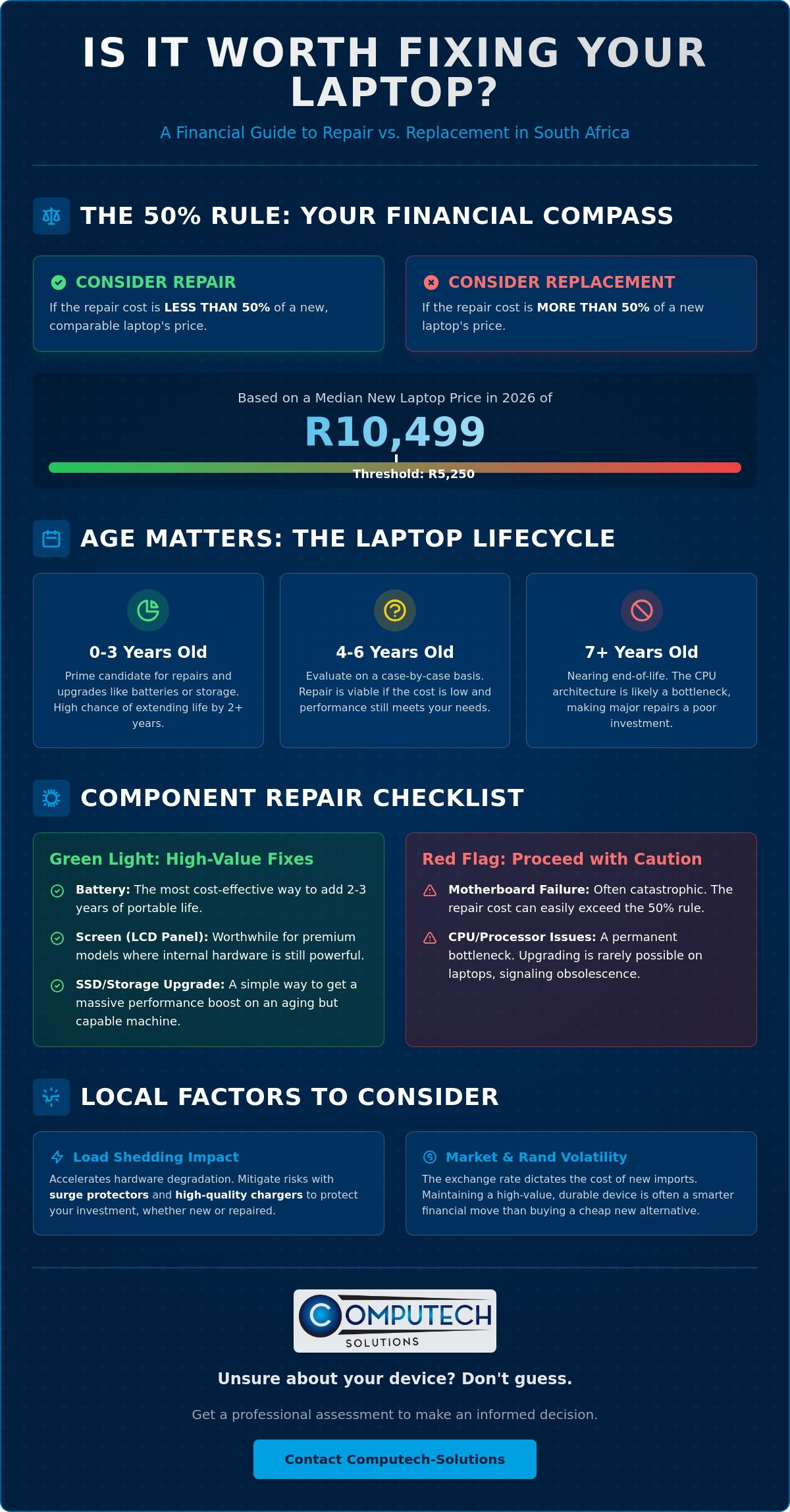
Deciding whether is it worth fixing a laptop in South Africa requires a cold, hard look at the numbers. The 50% Rule serves as our primary framework for these decisions. If the total repair quote exceeds half the price of a comparable new machine, replacement is usually the logical path. With the median transaction price for a new laptop sitting at R10,499 in 2026, any repair reaching the R5,250 mark should trigger a replacement conversation. This ensures you aren’t overinvesting in a device that has already depreciated significantly.
Age is the second critical variable in this equation. A three-year-old machine is often a prime candidate for a refresh. Components like batteries or storage drives are easily swappable, aligning with the global right to repair movement which advocates for device longevity and consumer autonomy. However, a seven-year-old unit is typically nearing its end-of-life. By this stage, the internal processor architecture cannot keep pace with 2026 software demands, effectively turning the device into e-waste regardless of how many parts you replace.
Don’t forget the “New Device Tax” when making your choice. This isn’t a government levy, but the hidden cost of migration. You’ll spend hours moving data, reinstalling software licenses, and potentially replacing peripherals that use older connection standards. If your current machine is in the shop for a week, you must also factor in the lost productivity. For a professional earning a steady hourly rate, a three-day delay can add thousands in “invisible” costs to the final repair bill.
Calculating Your Laptop’s Residual Value
High-end business series, such as Dell Latitude or HP EliteBook models, maintain their value far better than entry-level consumer units. These machines are built with durable materials and modular designs, meaning their residual value remains high even after four years of service. In the volatile South African market, where the Rand exchange rate directly dictates the cost of new imports, maintaining a high-value chassis is often smarter than buying a cheap, new plastic alternative that may fail sooner.
When the 50% Rule Fails
There are instances where the math doesn’t tell the whole story. You might rely on legacy software that isn’t compatible with the latest Windows or macOS versions. In such cases, is it worth fixing a laptop in South Africa even if the cost is high? The answer is often yes, as a R2,500 repair is a bargain compared to the cost of replacing an entire proprietary software ecosystem. In our current 2026 economy, high inflation makes fixing what you already own an act of financial resilience rather than just sentimentality.
Component Checklist: Which Laptop Parts Are Worth Replacing?
Identifying which components to target is the next step in determining if is it worth fixing a laptop in South Africa. While a motherboard failure might be catastrophic, many common issues are solved with a simple part swap. Focusing on high-impact components allows you to restore full functionality without the expense of a new device. A new battery for an Acer or Dell laptop is often the most cost-effective way to extend a machine’s lifespan. If your laptop is less than five years old, replacing the power cell provides an immediate boost to portability and reliability.
The Battery ROI: Buying 3 More Years of Portability
Signs of battery failure include physical swelling, sudden shutdowns, or the status “Plugged in, not charging.” Whether you choose an OEM component or a high-quality generic for your Lenovo or ASUS, the result is the same. You regain the freedom to work remotely without searching for a power outlet every hour. Choosing to repair also helps mitigate the growing environmental crisis detailed in the Global E-waste Monitor 2024, which highlights the urgent need for longer device lifecycles. A new battery effectively restores the “laptop” functionality to a machine that has become a desktop by force.
Screen and Panel Decisions
Laptop LCD replacement panels represent another high-value fix. A cracked screen isn’t always a reason to scrap a device, especially for premium HP or Samsung models where the internal hardware remains powerful. For many users, understanding is it worth fixing a laptop in South Africa depends on the availability of specific LCD panels. Replacing a panel is often a short procedure for a professional. In 2026, the typical cost-to-value ratio for an LCD replacement remains favorable if the total repair cost stays below 30% of the original purchase price.
Don’t overlook smaller parts that impact daily productivity. Sticky keyboards or unresponsive trackpads are low-cost fixes that significantly improve your user experience. Similarly, replacing a frayed charger is a non-negotiable safety requirement. A damaged cable can cause power surges that destroy your motherboard, turning a simple accessory issue into a total system failure. You can find high-quality laptop chargers to protect your hardware from these operational risks and ensure your device remains stable during power fluctuations.
Performance vs. Obsolescence: When Upgrades Aren’t Enough
Upgrading internal components often provides a second life to hardware, but you cannot outrun technical obsolescence. When considering is it worth fixing a laptop in South Africa, the central processing unit (CPU) is your hard limit. You can’t upgrade your way out of a 6th-generation Intel or an early Ryzen processor. These chips lack the instruction sets required for the latest operating systems and professional software suites. If your CPU is the bottleneck, the device has reached its functional ceiling regardless of other hardware swaps.
Conversely, many users mistake a slow storage drive for a dead machine. The SSD revolution has changed the math on older hardware. Swapping a mechanical hard drive for a modern Solid State Drive (SSD) can make a 2021 laptop feel like a 2026 model for a fraction of the cost of a new unit. Similarly, while 8GB of RAM was the standard for years, modern multitasking and Windows 12 requirements often demand 16GB. If your chassis allows for a RAM expansion, this is a high-yield investment. Sometimes, what looks like a terminal hardware failure is simply thermal throttling. Dust buildup and dried thermal paste cause the system to slow down to prevent overheating. A professional cleaning often restores full performance for a minimal fee.
The ‘Un-fixables’: Motherboard and GPU Failures
Motherboard and Graphics Processing Unit (GPU) issues are the most challenging repairs to justify. These often require specialized micro-soldering, which carries high labor costs that quickly challenge a golden rule for repairing laptops. Symptoms like distorted screen artifacts, “blue screens of death,” or a complete failure to power on usually indicate board-level damage. While component-level repair is possible, the risk of recurring faults makes a full board replacement or a new laptop purchase more reliable for business continuity.
Software Walls and Security Patches
Security is a non-negotiable factor when deciding is it worth fixing a laptop in South Africa. Modern online banking and corporate VPNs require hardware-level security features like TPM 2.0. If your laptop doesn’t support these protocols, it becomes a liability for sensitive transactions. Running an obsolete machine without modern firmware updates exposes you to significant operational risks. If the hardware is too old for security patches but still functional, consider repurposing it as a simple media server or a dedicated offline tool rather than investing in repairs that won’t solve the underlying software gap.
The South African Context: Load Shedding and Market Volatility
The South African electrical grid creates a unique environment for hardware maintenance that global guides often overlook. Frequent power cycles and the subsequent surges when electricity returns pose a massive risk to sensitive electronics. These surges are often more damaging than the outage itself, frequently destroying laptop chargers and motherboards. This instability accelerates hardware aging, making the question of whether is it worth fixing a laptop in South Africa highly dependent on how well you protect the machine from the grid. If your motherboard has survived these surges, a repair is often a more stable financial choice than buying a new, expensive import.
High-quality surge protection and reliable chargers are essential tools for extending a device’s lifespan in this climate. If you’ve already invested in a repair, failing to use a regulated power supply is an operational risk you cannot afford. Local availability of components also plays a major role in your decision. Sourcing parts within the country is often a faster and more reliable route than waiting for imported stock. New laptop prices in 2026 are heavily influenced by Rand volatility, making the local used and repair market increasingly attractive for those looking to avoid the high cost of new premium models.
Protecting Your Investment During Power Instability
Battery health is a primary metric for any South African user. The frequent discharge and recharge cycles caused by shifting to battery power during load shedding can degrade a cell significantly faster than standard office use. Using a generic charger that does not meet strict voltage regulations can lead to permanent motherboard damage. To maintain your device’s operational efficiency, consider sourcing certified Computech-Solutions laptop batteries that are designed to handle these demanding conditions and provide reliable backup power when the grid fails.
Local Sourcing vs. International Shipping
Buying replacement parts from a national retailer offers a significant advantage over international platforms. You avoid the “import trap” of unexpected duty fees and lengthy customs delays that can keep your machine out of commission for weeks. Local technical support ensures that you have a clear path to resolution if a part requires a warranty claim. High-quality components from a trusted source provide a better long-term ROI than unverified imports that may lack the durability required for South African conditions. If you need to restore your machine’s portability, you can purchase laptop chargers and batteries from a partner that understands the local market’s challenges.
Executing Your Choice: Sourcing Parts or Buying New
Determining is it worth fixing a laptop in South Africa ultimately leads to a choice between sourcing high-quality parts or investing in a new system. If you choose to repair, the path you take depends on your technical comfort level and the specific component involved. For many users, a DIY approach is a viable way to reduce labor costs. Replacing an external battery or a modular SSD is often a straightforward process that requires minimal tools. However, more complex interventions require a professional partner to ensure operational stability and data integrity.
While a DIY approach saves on service fees, professional intervention for internal hardware or LCD panels ensures that delicate ribbon cables and bezels remain intact. If a device has reached the end of its functional life, disposing of it correctly is your final responsibility. Modern e-waste regulations in South Africa require responsible recycling to prevent environmental damage. Before handing over a machine for scrap, ensure you’ve performed a permanent data destruction process on the storage drive. Computech-Solutions serves as a national partner for this transition, providing both the replacement parts needed for a refresh and new hardware when a replacement is the only strategic move.
Finding the Right Replacement Parts
To find a 100% compatible component, you must identify your specific laptop model number, usually found on a sticker on the bottom of the chassis. This ensures that the voltage of a new charger or the pin configuration of a battery matches your system perfectly. There’s a significant difference between cheap knock-offs found on unverified marketplaces and high-quality components sold by local specialists. While OEM parts are reliable, high-quality generic parts offer a balanced ROI, providing the durability you need without the brand tax. For those dealing with visual failures, you can source brand-specific Laptop LCD Replacement Panels to restore your display to factory standards.
Final Decision Checklist
- Repair if: The machine is under five years old, the repair cost is less than 50% of a new unit, and the issue is limited to a battery, screen, or keyboard.
- Replace if: The motherboard has failed, the CPU cannot support modern security protocols, or the repair quote exceeds R5,250 for a standard machine.
- Upgrade if: The hardware is healthy but struggles with multitasking; a simple RAM or SSD swap can often bridge the gap to 2026 performance standards.
Repairing a laptop is an act of efficiency; replacing it is an act of strategy. Both choices require a commitment to quality to ensure your productivity isn’t interrupted by recurring technical failures. Browse our range of replacement batteries and chargers to revive your laptop today and secure your device against the operational risks of the South African power grid.
Secure Your Tech Investment Today
Navigating the choice between a quick fix and a total replacement doesn’t have to be a source of operational stress. By applying the 50% Rule and focusing on high-ROI components like batteries and LCD panels, you ensure your hardware decisions are grounded in financial logic. Determining is it worth fixing a laptop in South Africa requires a partner that understands the specific challenges of our local grid and market volatility. Protecting your motherboard from load shedding surges with regulated power supplies is the most effective way to guarantee device longevity.
Whether you’re restoring a faithful workhorse or investing in a fresh start, we provide the stability your business needs. As specialists in Acer, Dell, HP, and Apple replacement batteries, we offer expert technical support based right here in South Africa. Benefit from nationwide delivery on all laptop components to minimize your downtime and keep your projects on track. Revive your device with high-quality replacement parts from Computech-Solutions and move forward with the confidence that your technology is ready for the demands of 2026. Your productivity is too valuable to leave to chance.
Frequently Asked Questions
Is it worth repairing a laptop that is over 5 years old?
Repairing a laptop older than five years depends on its processor architecture and security compatibility. If the CPU doesn’t support modern requirements like TPM 2.0, the device won’t run the latest operating systems securely. You should only invest in repairs for these older units if the cost is minimal and the machine serves a specific, non-critical purpose.
How much does it typically cost to replace a laptop screen in South Africa?
Screen replacement costs generally range from R1,500 to R10,000 depending on the panel technology. Standard non-touch displays sit at the lower end of this scale, while high-resolution OLED or MacBook panels occupy the upper tier. Always compare the repair quote against the R10,499 median price of a new machine to ensure the fix makes financial sense.
Can I replace my own laptop battery if it is ‘non-removable’?
You can replace an internal battery by removing the bottom chassis cover with the correct precision tools. Most modern designs use several small screws and a single internal connector to secure the battery. While it’s slightly more complex than older external models, it remains a manageable task for users comfortable with basic hardware maintenance.
Will a new SSD make my old laptop faster than a new one?
A new SSD won’t outperform a 2026-era processor, but it will eliminate the storage bottlenecks that make older machines feel sluggish. This upgrade provides the most noticeable speed boost for daily tasks like booting up or opening applications. If you’re questioning is it worth fixing a laptop in South Africa on a tight budget, an SSD swap is often the best solution.
What happens to my data if I decide to replace my laptop instead of repairing it?
Your data stays on the internal storage drive even if the rest of the laptop is non-functional. You can remove the drive and place it in an external enclosure to access your files from a new computer. If you plan to recycle the old chassis, ensure you’ve performed a permanent data wipe to protect your personal information.
How do I know if my laptop charger is actually the problem?
Test your device with a compatible adapter that has the same voltage and wattage ratings. If the laptop charges normally with a different unit, your original charger has likely suffered internal cable damage or a circuit failure. Look for physical signs like frayed wires, bent pins, or a burnt smell near the charging brick.
Is it better to buy a generic battery or an original brand-name one?
High-quality generic batteries provide a reliable balance between operational life and cost efficiency. While original brand-name components are a safe choice, they often come with a significant price premium that doesn’t always translate to better performance. Sourcing from a reputable local supplier ensures the generic part meets all necessary safety and voltage regulations.
Does load shedding actually damage my laptop hardware?
The primary threat from load shedding is the power surge that occurs when electricity returns to the grid. These high-voltage spikes can bypass basic internal protections and cause terminal damage to the motherboard or charging circuitry. Deciding is it worth fixing a laptop in South Africa often depends on whether these surges have affected the core system or just the external power supply.
