
Your screen goes black the second the power cuts. Even though national load shedding has been suspended for over 460 days, localized load reduction in provinces like Gauteng still leaves professionals in the dark for up to five hours at a time. If your laptop cannot survive a single meeting or commute without being tethered to a wall socket, your productivity is at the mercy of the local grid. Finding a high-quality lenovo laptop battery south africa shouldn’t feel like a gamble with your hardware’s safety.
We understand the frustration of deciphering cryptic part numbers and the legitimate fear of purchasing a low-quality component that might damage your device. You deserve a reliable power source that provides a consistent 3 to 5 hours of backup to maintain your workflow. This guide simplifies the replacement process by providing clear instructions on model identification and technical compatibility. We will show you how to secure a dependable battery through nationwide delivery and expert support; ensuring your Lenovo remains a tool for growth rather than a source of operational risk.
Key Takeaways
- Understand why matching specific Voltage and Capacity is more critical than the laptop model name to prevent motherboard damage.
- Discover how to identify a high-quality lenovo laptop battery south africa featuring Grade A cells for consistent performance during power cuts.
- Implement the 80/20 charging rule and Windows power optimizations to protect your battery from South Africa’s harsh climate and frequent power fluctuations.
- Distinguish between original parts and premium generics to ensure your replacement provides the necessary 3 to 5 hours of backup.
- Benefit from nationwide technical support and streamlined shipping to find a guaranteed hardware match for your specific Lenovo series.
Understanding Lenovo Laptop Battery Health in South Africa
A standard Lenovo lithium-ion battery is engineered for a lifespan of approximately 300 to 500 charge cycles. This technical foundation is rooted in a general understanding of lithium-ion batteries, where chemical degradation occurs every time energy moves through the cells. In a stable environment, this might equate to three years of use. However, the South African context introduces unique variables that accelerate this aging process. High ambient temperatures and erratic power supply patterns mean that securing a high-quality lenovo laptop battery south africa is essential for maintaining operational efficiency.
The “Load Shedding Trap” remains a significant threat to hardware longevity. Even with the suspension of national load shedding, localized load reduction in areas like Gauteng often results in daily power cuts lasting four to five hours. These frequent, deep discharges force the battery to its lower voltage limits. When a battery consistently drops below 10% or 20%, the internal chemistry becomes unstable, leading to a permanent loss of capacity. You might notice your laptop dying instantly at 30% or experiencing “Plugged in, not charging” errors, which indicate that the internal protection circuit has flagged a cell failure.
The Impact of Frequent Power Cycling
Constant switching between AC power and battery backup creates thermal stress. When power is restored after a load reduction block, your laptop often attempts to fast-charge the depleted cells while simultaneously running high-performance tasks. This generates intense internal heat. Heat is the primary enemy of lithium-ion technology; it speeds up the breakdown of the electrolyte solution within the cells. For remote workers, a failing battery isn’t just an inconvenience. It’s a direct risk to your professional output, as it leaves you with zero buffer during unexpected grid maintenance or infrastructure failures.
Software vs. Hardware Failure
Before assuming you need a replacement, it’s vital to distinguish between a temporary software glitch and a physical hardware failure. You can use the Lenovo Vantage application to generate a detailed battery health report. This tool identifies if the firmware requires an update or if the cells have reached their end-of-life state. Sometimes, a Windows driver conflict can cause incorrect percentage readings, but physical signs like a bulging trackpad or a hot underside usually confirm that the hardware is compromised. Battery Cycle Count is the total number of times a battery has been fully discharged and recharged. If your count exceeds 500, the internal resistance has likely increased to a point where the battery can no longer hold a stable charge, necessitating a new lenovo laptop battery south africa to restore your mobile productivity.
How to Identify the Correct Lenovo Replacement Battery
Precision is mandatory when selecting a lenovo laptop battery south africa. While many users search by the laptop model name, such as “ThinkPad T480,” this is often insufficient for a perfect match. Manufacturers frequently update internal components during a product’s lifecycle. This means two laptops with the same model name could require different battery connectors, mounting points, or voltages. Matching the Voltage (V) and Capacity (Wh) exactly is the only way to avoid catastrophic motherboard damage or permanent hardware failure. Using a battery with a higher voltage than your original can fry sensitive surface-mounted components instantly.
You must also distinguish between internal and external batteries. Removable batteries are easily swapped via external latches, often allowing for “extended” versions that protrude slightly from the casing. Internal ones require opening the chassis and carefully disconnecting delicate ribbon cables. If you’re unsure about your specific hardware configuration or which tools you need, you can chat with our technical team for immediate clarification. We specialize in matching these technical specs to ensure your machine remains stable and operational.
Step-by-Step Part Number Identification
Identifying the exact part number is the most reliable way to guarantee compatibility. Follow these steps to find your hardware’s unique signature:
- Step 1: Shut down your device and unplug all cables. Never work on a laptop that is connected to mains power.
- Step 2: Locate the battery. For internal models, you’ll need to remove the back panel screws using a precision screwdriver.
- Step 3: Look for the FRU (Field Replacement Unit) or ASM part number on the label. This code is the definitive identifier for your hardware. It’s usually a string of alphanumeric characters located near the Lenovo logo on the battery casing.
Lenovo Series Compatibility Guide
Different Lenovo series have distinct battery architectures. The ThinkPad Series (T, X, and P) often use bridge battery systems or specific internal cells designed for business durability. IdeaPad and Legion series focus on gaming and home use; these usually feature higher-capacity internal batteries to support power-hungry GPUs and high-refresh-rate screens. The Yoga series presents a unique challenge. These ultra-slim devices use specialized, thin-profile internal batteries. Because Yoga laptops are designed for portability, their batteries are often secured with adhesive or specialized brackets, requiring a steady hand during the replacement process to avoid puncturing the lithium-ion cells.
Comparing Genuine vs. High-Quality Generic Lenovo Batteries
Finding an original lenovo laptop battery south africa can be a logistical challenge. While genuine parts offer peace of mind, they’re often subject to limited stock and high import costs. This has led to a surge in the popularity of high-quality generic replacements. However, not all generics are created equal. A premium replacement uses Grade A lithium-ion cells, which provide stable voltage and consistent discharge rates. These components are vastly different from the cheap knock-offs found on unverified marketplaces, which often use recycled or sub-par cells that fail within months.
Safety remains the primary concern for any hardware upgrade. Reliable batteries must include integrated overcharge protection and thermal sensors. These features communicate with your laptop’s BIOS to prevent overheating and ensure the charging process stops once the battery reaches capacity. When you source from a reputable South African retailer, you aren’t just buying a part; you’re securing technical support and a local warranty that protects your investment. This local presence is essential for verifying that the battery matches your specific hardware requirements perfectly.
Performance Expectations
A high-quality compatible battery should provide a runtime nearly identical to the original factory component. For many older Lenovo models, these replacements offer a cost-effective way to extend the device’s life without overspending on an OEM part that might cost half the laptop’s current value. You should ensure the product adheres to international safety standards like CE and RoHS. These certifications guarantee the battery has undergone rigorous stress testing. When sourced correctly, a generic battery can easily provide the 3 to 5 hours of backup needed to maintain productivity during localized power cuts.
The Risks of “Too Cheap” Batteries
Price is often a direct indicator of internal quality. Sub-par batteries typically have lightweight casings and lack proper branding or technical specifications. These units often skip crucial voltage regulation circuits, which can lead to power surges that destroy your laptop’s charging port or motherboard. If a battery seems impossibly cheap, it likely lacks the necessary safety buffers. Access to local technical expertise is vital. If a compatibility issue occurs, a domestic partner can provide immediate assistance rather than leaving you to deal with international return shipping or unresponsive sellers.
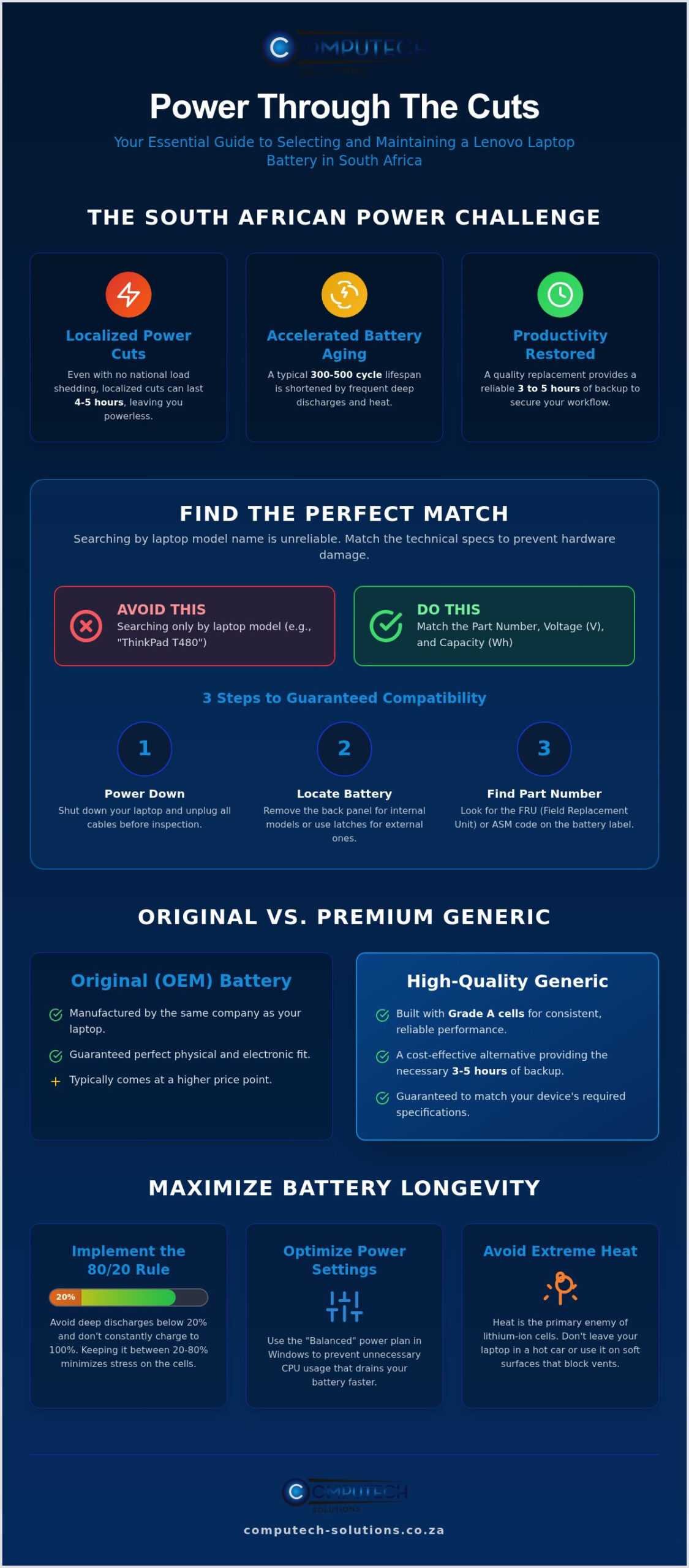
Maximising Battery Longevity During Load Shedding
Operating a lenovo laptop battery south africa requires a strategic approach to charging cycles, especially with localized load reduction sessions lasting up to five hours. The most effective way to preserve cell health is the “80/20 Rule.” Lithium-ion batteries experience the most chemical stress when they are either completely empty or entirely full. By keeping your charge level between 20% and 80%, you minimize this internal wear. Battery Threshold software limits charging to 80% to significantly extend the total lifespan of lithium cells. Enabling this feature within your system settings prevents the battery from “trickle charging” at 100%, which is a primary cause of premature capacity loss.
Thermal management is equally critical when power returns. After a long outage, your laptop will attempt to fast-charge the depleted cells. This process generates significant heat. If you use your laptop on a soft surface like a bed or couch during this time, the heat becomes trapped, baking the internal components. Always place your device on a hard, flat surface to ensure maximum airflow. This simple habit prevents the electrolyte solution inside the battery from breaking down due to excessive temperatures.
Software Tweaks for Extended Run-time
You can gain significant backup time by automating your Windows power settings. Configure your laptop to trigger “Battery Saver” mode automatically when the charge hits 30%. This mode limits background sync tasks and reduces processor power consumption. Additionally, manually lowering your screen brightness and disabling backlit keyboards can provide an extra 20 to 40 minutes of use. These small adjustments often mean the difference between finishing a project and an abrupt shutdown during the final hour of a power cut.
Physical Care and Storage
External peripherals are often overlooked sources of “vampire drain.” USB-powered mice, external hard drives, and even phone charging cables draw power directly from your laptop. Unplug these immediately when the lights go out to maximize your remaining runtime. If you need to store your laptop for an extended period, never leave the battery at 0%. Store it at approximately 50% charge in a cool, dry place to prevent the cells from falling into a deep-discharge state that could render the battery unchargeable. Using a high-quality charger is also non-negotiable. Inconsistent voltage from generic adapters can bypass internal safety regulators and damage the battery chemistry. If you’re unsure about your current hardware’s health, contact our technical support team for expert advice on maintaining your device.
Secure Your Power with Computech-Solutions
Computech-Solutions understands that a functional laptop is the backbone of your professional life. We maintain an extensive inventory of compatible batteries for every major series; including ThinkPad, IdeaPad, Legion, and Yoga. Our commitment to quality ensures that every lenovo laptop battery south africa we supply meets rigorous safety standards, providing the stability you need during localized power interruptions. By choosing a partner that prioritizes technical hardware support, you eliminate the risk of purchasing an incorrect or sub-par component that could compromise your device.
We provide more than just a product. Our team offers specialist technical assistance to help you navigate the complexities of voltage requirements and part numbers discussed earlier in this guide. This ensures you receive a guaranteed match for your specific hardware on the first attempt. Our national service model focuses on reliability and speed. We ensure that professionals across the country can restore their mobile productivity without unnecessary delays or the stress of operational disruptions.
Why Choose Our Replacement Solutions?
We bridge the gap between prohibitively expensive original parts and the unreliable, low-quality imports found on many generic marketplaces. Every battery in our range is selected for its ability to withstand South African power conditions, such as the thermal stress of rapid recharging after a load reduction block. Beyond batteries, we offer a comprehensive suite of hardware solutions. This includes laptop chargers, adapters, and replacement LCD panels. You can source all your critical IT components from a single, trusted national provider that understands your technical needs.
How to Order Your Lenovo Battery Today
Restoring your laptop’s backup power is a streamlined process through our online platform. You can browse our catalogue by laptop series or search directly using the FRU part number found on your current battery casing. Once you’ve identified the correct component, our secure checkout offers multiple payment options for your convenience. We provide tracked nationwide delivery to your door, giving you full visibility of your order from dispatch to arrival. Don’t let a failing battery dictate your work schedule or limit your mobility. Find your Lenovo laptop battery replacement here and secure the reliable power your business demands.
Restore Your Laptop’s Mobile Productivity
Securing a reliable lenovo laptop battery south africa is the most effective way to safeguard your workflow against localized load reduction and grid instability. You’ve learned that precise identification through FRU part numbers is non-negotiable for hardware safety. Additionally, adopting smarter charging habits, like the 80/20 rule, will significantly extend the lifespan of your new lithium cells. Don’t let a failing battery dictate your professional output or limit your mobility in a demanding business environment.
We provide high-quality replacement cells backed by expert technical support to ensure a perfect model match every time. Our streamlined service includes nationwide South African shipping, bringing the solution directly to your door. If you’re ready to revive your device with a dependable power source, we are here to assist with every technical detail. Browse our full range of Lenovo replacement batteries with nationwide delivery and regain the confidence to work from anywhere, regardless of the power schedule.
Frequently Asked Questions
How much does a Lenovo laptop battery cost in South Africa?
Pricing for a lenovo laptop battery south africa varies significantly based on the specific series and capacity required. High-performance gaming models in the Legion series typically require more expensive, high-wattage cells compared to standard IdeaPad units. While market rates fluctuate due to import costs and stock availability, you should always prioritize components with Grade A cells. You can browse our online catalogue to view current availability for your specific model.
Can I replace my Lenovo laptop battery myself?
Replacing a battery is a manageable task for most users, though the process depends on your laptop’s design. External batteries use simple slide latches and require no tools. Internal batteries require you to remove the back cover with a precision screwdriver and carefully detach a delicate connector. If you feel uncomfortable handling internal hardware, our technical support team can provide guidance to ensure you don’t damage sensitive motherboard components.
How do I know if my Lenovo battery is internal or external?
You can identify your battery type by inspecting the underside of your laptop. If you see sliding switches or a removable plastic block, your device uses an external battery. If the bottom casing is a single, continuous piece of plastic or metal with visible screws, the battery is internal. Most modern, slim Lenovo models, such as the Yoga and ThinkPad X1 series, utilize internal batteries to maintain their thin profiles.
Why does my Lenovo laptop say “plugged in, not charging”?
This error often indicates a communication failure between the battery’s protection circuit and the laptop’s BIOS. It can be caused by an outdated Windows driver or a physical failure within the lithium cells. Sometimes, system settings like “Battery Threshold” in Lenovo Vantage intentionally stop charging to preserve cell health. If troubleshooting software doesn’t resolve the issue, it usually signifies that the internal resistance has reached a critical level, requiring a replacement.
How long should a new Lenovo battery last during load shedding?
A new, high-quality lenovo laptop battery south africa should provide between 3 and 5 hours of runtime under standard office workloads. This is particularly important during localized load reduction blocks, which typically last for 4 to 5 hours in provinces like Gauteng. Your actual backup time will depend on screen brightness, background applications, and whether you are performing power-intensive tasks like video conferencing or data processing.
Are generic Lenovo batteries safe to use?
High-quality generic batteries are entirely safe provided they include integrated safety features like overcharge protection and thermal sensors. These premium replacements use Grade A cells that match the original manufacturer’s specifications for voltage and capacity. It’s critical to avoid unbranded, “too cheap” imports that lack these protection circuits, as they can cause permanent damage to your laptop’s internal charging regulators or motherboard.
Does a new battery come with a warranty?
Yes, all our replacement batteries are backed by a local warranty to ensure your peace of mind. This coverage protects you against manufacturing defects and premature cell failure, which is a vital safeguard when dealing with sensitive electronic components. Buying from a reputable South African partner ensures that you have access to technical support and a straightforward return process if any compatibility issues arise during the installation.
How long does nationwide delivery take for a laptop battery?
We offer reliable nationwide delivery across South Africa to ensure your hardware is restored as quickly as possible. Shipping timelines generally range from two to five business days depending on your specific location and the current logistics schedule. Every order is tracked from our dispatch point to your door, providing full visibility. You can confirm the exact delivery estimate for your area during the secure online checkout process.
