
What if the highest resolution display actually hinders your output because of the lighting in your workspace? Many professionals assume that a premium price tag guarantees visibility, yet the choice between a matte vs glossy laptop screen for work remains an environmental decision rather than an aesthetic one. You’ve likely experienced the distraction of seeing your own reflection during a high-stakes video call or the physical toll of a tension headache after hours of fighting office glare. It’s a common operational hurdle that directly impacts your focus and long-term eye health.
This guide provides the technical clarity you need to select a screen finish that protects your eyes and boosts productivity within the unique light conditions of South African offices. We’ll explore 2026’s breakthrough technologies, including Gorilla Matte Pro’s 20-lux reflection rating and Samsung’s GLINT coatings. You’ll learn how to balance the 12.6% market share of hybrid OLEDs with practical visibility requirements. Whether you’re upgrading to a new machine or considering a professional LCD panel replacement to fix your current setup, we’ll ensure your display remains a tool for growth rather than a source of disruption.
Key Takeaways
- Evaluate your specific workspace lighting to resolve the matte vs glossy laptop screen for work dilemma and eliminate debilitating glare.
- Protect your long-term eye health by understanding how screen finishes impact Computer Vision Syndrome and eye accommodation fatigue.
- Match your display finish to your specific professional workflow, balancing the need for colour precision against the requirement for high-contrast text.
- Master the specialized cleaning and maintenance protocols required to keep different screen surfaces clear and functional over time.
- Discover why a professional laptop LCD replacement panel is often the most efficient way to optimize your current machine for a new environment.
Understanding the Matte vs Glossy Dilemma for Professionals
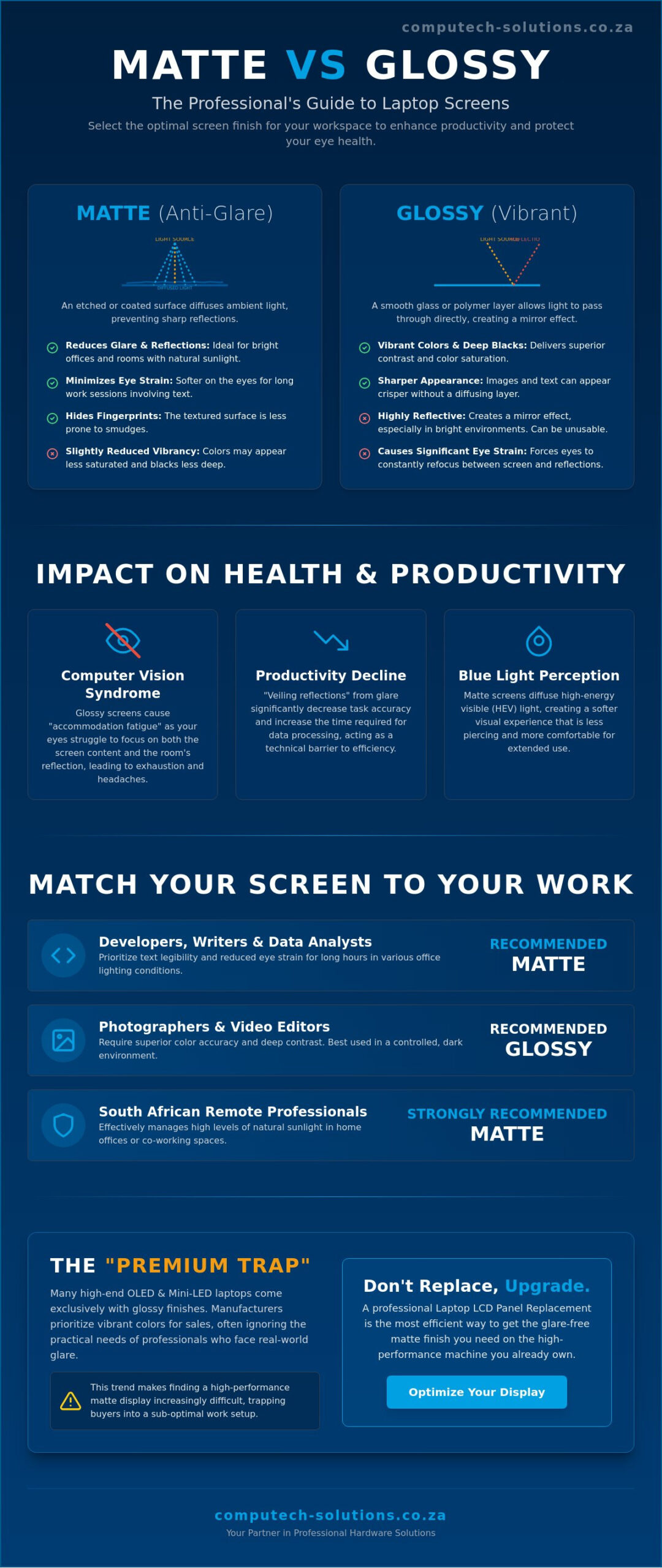
Selecting between a matte vs glossy laptop screen for work is a decision that dictates your operational efficiency throughout the business day. While it appears to be a minor aesthetic choice, the physical construction of your display determines how your eyes process data. Glossy screens utilize a smooth glass or polymer outer layer, whereas matte screens feature an etched, anti-glare coating designed to diffuse incoming light. This fundamental difference in surface physics changes how you interact with your machine in different lighting environments.
In South Africa, our high levels of natural sunlight present a unique challenge for remote professionals. Working from a home office with large windows or a bright co-working space can render a glossy screen nearly unusable. When the sun hits a smooth glass surface, it creates a mirror effect that forces your eyes to work harder to distinguish text from reflections. This isn’t just an annoyance; it’s a technical disruption that slows down your workflow and increases the time required to complete standard tasks.
There’s a distinct “premium trap” in the current hardware market. As of June 2026, the majority of high-end laptops featuring OLED and Mini-LED displays are sold exclusively with glossy finishes. Manufacturers prioritize the vibrant color saturation to attract consumers, often overlooking the practical needs of a professional who spends eight hours a day reading spreadsheets or code. This trend makes finding a high-performance matte display increasingly difficult. If you’ve purchased a high-end machine only to find the glare unbearable, professional Laptop LCD Replacement Panels offer a way to customize your hardware to suit your specific work environment without replacing the entire computer.
The Mechanics of Matte Screens
Matte displays use a chemical or mechanical etching process to create a microscopic texture on the screen surface. This texture scatters ambient light in different directions, which prevents sharp reflections from forming. While this is the corporate standard for business-grade laptops because it maintains text legibility in harsh office lighting, it can slightly reduce contrast. Some users describe this as a grainy appearance, but for data-heavy tasks, the trade-off for reduced eye strain is usually worth it. It’s a functional choice that prioritizes long-term focus over visual flair.
The Allure of Glossy Displays
Glossy display technology relies on a transparent outer layer that allows light to pass through without diffusion. This results in deeper blacks and more saturated colors, which is why photographers and video editors often prefer them. However, in a standard work environment, this glass layer acts as a mirror. If your desk is positioned under overhead LED lights, you’ll likely spend more time looking at the reflection of your office than your actual project. This constant refocusing is a primary driver of physical discomfort during the workday.
The Impact of Screen Finish on Eye Health and Productivity
Biological factors often outweigh technical specifications when you spend eight hours a day behind a computer. Computer Vision Syndrome (CVS) is a documented reality in modern offices, where poor visual ergonomics lead to blurred vision and physical exhaustion. When evaluating a matte vs glossy laptop screen for work, the primary health concern is “accommodation.” This is the process where your eyes constantly refocus to maintain clarity. Glossy screens force your eyes to track two different focal planes: the digital content on the display and the physical reflections of the room behind you. This perpetual switching is a direct cause of ocular fatigue.
Professional output suffers when visual clarity is compromised. Comprehensive research on screen glare and productivity indicates that environmental reflections significantly decrease task accuracy and increase the time required for data processing. In a sun-drenched South African workspace, a glossy screen acts as a mirror, creating “veiling reflections” that wash out text. For a professional, this isn’t just a minor annoyance; it’s a technical barrier that creates a measurable decline in daily efficiency.
The relationship between screen finish and blue light perception also affects long-term focus. Glossy panels emit light directly, which can make the high-energy visible (HEV) light feel more piercing. Matte coatings diffuse this light across the surface, providing a softer visual experience that many developers and writers find more sustainable for deep-work sessions. If you find yourself leaning closer to your machine to “see past” the glare, you’re likely suffering from the ergonomic strain that a matte vs glossy laptop screen for work can either solve or exacerbate.
Reducing Eye Fatigue in High-Light Areas
Squinting is a physical stress response to glare that frequently leads to tension headaches and neck pain. Professionals engaged in long-form data entry or coding require high-contrast, stable text that doesn’t shift as the sun moves across the office. Matte screens provide this stability by neutralizing overhead LED lights and window glare. By eliminating the need to squint, you reduce the physical load on your facial muscles, allowing for longer periods of concentration without the onset of a headache.
The Role of Screen Brightness (Nits)
Nits are the measurement of luminance that determines a screen’s effectiveness outdoors. To overcome the mirror effect of a glossy panel, you must often run your display at 100% brightness, which creates a secondary problem: rapid power consumption. During load shedding, every minute of battery life is critical. A matte screen allows you to work comfortably at lower brightness levels because it isn’t fighting reflections, effectively extending your operational time when you’re away from a charger. If your current display is causing daily discomfort, upgrading to a specialized Laptop LCD Replacement Panel can restore your focus without the need for a full hardware overhaul.
Task-Based Analysis: Matching Your Screen to Your Work
Identifying your primary workflow is the most reliable way to resolve the matte vs glossy laptop screen for work debate. High-end hardware only provides value if it supports your specific daily tasks without creating operational friction. A developer’s requirements for text clarity differ significantly from a graphic designer’s need for color depth. By analyzing your output, you can select a finish that enhances your efficiency rather than hindering it.
For the mobile professional, the “Coffee Shop Test” is the ultimate decider. In environments where you cannot control the light source, a glossy screen often fails. You’ll find yourself constantly adjusting your seating or tilting the lid to find an angle that isn’t obscured by a window or overhead lamp. Matte screens win this test every time, providing a consistent visual experience that allows you to remain productive in any location, from airport lounges to sunlit boardrooms.
If your professional toolkit includes a touchscreen, you’re likely limited to a glossy finish. The smooth surface of glass or polished polymer is technically superior for touch input and stylus precision. This is why almost all 2-in-1 convertibles and touch-enabled devices feature glossy displays. While this provides a sleek interface, it also makes fingerprints more visible, which can be a distraction during high-stakes client presentations.
Data Heavy and Administrative Tasks
Administrative professionals, accountants, and developers spend most of their day looking at high-contrast text on white backgrounds. Matte screens are the undisputed standard for these roles because they eliminate the harsh “veiling reflections” that make black text difficult to distinguish. Modern matte panels have largely eliminated the “haze” or graininess of previous generations, providing a crisp, paper-like experience that is easy on the eyes. Additionally, matte surfaces hide smudges better, ensuring your machine maintains a clean, professional appearance throughout a busy week of meetings.
Creative and Visual Professional Work
Creative professionals often accept the trade-off of reflections for the sake of color fidelity. Glossy displays provide deeper blacks and more saturated colors, which are essential when grading video or editing high-resolution photography. While sRGB and Adobe RGB coverage are the primary metrics for accuracy, the absence of a diffusing layer on glossy screens ensures you’re seeing the purest representation of the source material. Many experts use a hybrid setup: a glossy laptop for its color depth paired with a high-end matte external monitor for long-form work. If your current display doesn’t meet these professional standards, upgrading to one of our specialized Laptop LCD Replacement Panels can provide the specific visual performance your creative projects demand.
Practical Guidance for Choosing and Maintaining Your Screen
Maintaining your hardware is as critical as the initial purchase. When managing the daily use of a matte vs glossy laptop screen for work, your cleaning protocol must adapt to the surface physics of the display. Glossy screens, often protected by a reinforced glass layer, are resilient against standard microfiber wipes and allow for easier removal of skin oils. Matte screens require a more disciplined approach. Their microscopic etching can be permanently “polished” or smoothed if you use abrasive cloths or excessive pressure, resulting in uneven shiny patches that compromise the anti-glare effect. For a professional machine, these blemishes aren’t just an eyesore; they represent a permanent degradation of your workspace ergonomics.
Before committing to a specific finish, perform a light audit of your primary work environment. In 2026, we measure effectiveness by how much ambient light a screen can neutralize. For example, the latest Gorilla Matte Pro technology reflects only 20 lux from a standard LED light, while a traditional glossy display can reflect up to 60 lux. If your office light levels consistently exceed 400 lux, a glossy screen will likely create a mirror effect that disrupts your focus. Durability also plays a role in your choice. While glossy glass is harder to scratch during a daily commute, it shows every fingerprint and smudge, requiring constant maintenance to stay looking professional.
The Screen Protector Compromise
Many professionals attempt to fix a glossy screen by applying a third-party matte film. While brands like Supershieldz offer these for most 2025 and 2026 models, it’s often a compromise rather than a solution. These adhesive films can introduce a “rainbow” effect or reduce the sharpness of your text. In humid South African coastal climates, these protectors are also prone to bubbling and peeling over time. If you find the glare on your current machine intolerable, a temporary film is rarely as effective as a permanent hardware change. For a definitive solution that maintains full visual clarity, you should explore a professional Laptop LCD Replacement Panel tailored to your specific environment.
Optimising Your Workspace for Any Screen
If you’re currently working with a glossy display, environmental tweaks can mitigate some of the drawbacks. Position your desk at a 90-degree angle to windows rather than having the light source directly behind or in front of you. Professionals in high-stakes creative studios often use monitor hoods to block peripheral light, effectively creating a controlled “darkroom” for their glossy panels. Be cautious with software settings as well. While “Dark Mode” is popular for reducing blue light, it can actually make reflections more visible on glossy screens, as the dark pixels act as a perfect mirror for your office background. Switching to a light grey or neutral background can often help “mask” these distracting reflections.
Expert Solutions: LCD Panel Replacements and Upgrades
If you’ve realized your current display is a barrier to productivity, you don’t need to replace your entire computer. Many professionals believe they’re locked into their initial choice, but professional hardware modification allows you to resolve the matte vs glossy laptop screen for work debate on your own terms. Swapping a panel is a precise technical procedure that transforms a reflection-prone machine into a high-performance business tool. This approach preserves your investment in high-end processors and memory while correcting the one component that causes physical strain. It is a strategic decision that places your operational comfort at the center of your hardware strategy.
Compatibility is a primary concern for business owners and IT managers. We supply tested, high-quality replacement panels for major manufacturers including Dell, HP, Lenovo, and Acer. These components are engineered to meet the exact electrical and physical specifications of your device, ensuring a seamless transition between screen finishes. By choosing a targeted upgrade, you eliminate the operational risk of using a screen that doesn’t fit your specific South African work environment. This flexibility allows you to adapt your hardware as your workspace or job requirements evolve over time.
The Advantages of Professional Panel Swaps
Replacing a screen is significantly more cost-effective than the procurement of a completely new device. You can upgrade from a standard glossy panel to a high-definition matte version, immediately improving your ability to work in bright environments or near large windows. This process ensures your existing internal components remain in service while your visual interface receives a necessary ergonomic upgrade. Professional replacement parts include quality assurance standards that protect your operational stability. It’s a pragmatic move for businesses looking to extend the lifecycle of their current fleet while simultaneously improving employee comfort and reducing eye strain.
Your Partner for Laptop Hardware in South Africa
Computech-Solutions facilitates these hardware upgrades with technical precision and rhythmic efficiency. Identifying the correct replacement panel requires matching specific pin configurations and mounting points for your exact model to avoid technical disruptions. We offer nationwide delivery and technical support to ensure your work machine returns to peak efficiency quickly. If the glare in your office has become a daily disruption, it’s time to choose a finish that aligns with your professional requirements. Our comprehensive service model ensures you receive a total solution that addresses both technical compatibility and practical business outcomes.
Explore our range of Laptop LCD Replacement Panels to find the definitive solution for your workspace and protect your productivity for the years ahead.
Optimizing Your Visual Performance for 2026
Choosing between a matte vs glossy laptop screen for work is ultimately a decision about your specific operational environment. You now understand that while glossy panels offer vibrant color depth, matte finishes provide the anti-glare stability necessary for high-light South African offices. Prioritizing your eye health by reducing constant refocusing is the most effective way to maintain long-term productivity. It’s a strategic move that ensures your hardware works as hard as you do throughout the business day.
If your current display doesn’t align with these professional requirements, you don’t need to procure an entirely new machine. You can upgrade your workspace with high-quality Laptop LCD Replacement Panels from Computech-Solutions. We specialize in brand-name replacement parts and provide expert technical support based right here in South Africa. With our reliable nationwide delivery, you can secure a professional-grade display that protects your focus and reduces physical strain. Take control of your workspace ergonomics today to ensure your technology remains a definitive tool for growth and efficiency.
Frequently Asked Questions
Is a matte or glossy screen better for programming?
A matte screen is superior for programming because it eliminates distracting reflections during long coding sessions. It provides stable contrast for text, which reduces the frequency of eye fatigue. Developers often work in varied lighting, and a matte finish ensures visual consistency across different workspaces.
Can I clean a matte laptop screen with regular glass cleaner?
You should never use regular glass cleaner on a matte screen. These products often contain ammonia or alcohol that can permanently strip away the delicate anti-glare etching. Use a dry microfiber cloth or a specialized solution designed for delicate electronics to maintain the surface integrity and prevent shiny patches.
Why do most high-end laptops come with glossy screens?
Manufacturers prioritize glossy finishes on premium OLED and Mini-LED panels to showcase vibrant colors and deep blacks for consumer appeal. While this looks impressive in a controlled showroom, it’s often a challenge for professionals. Glossy screens help these high-end technologies reach their peak visual potential for creative media consumption.
Do matte screens make text look blurry?
Modern matte screens don’t make text look blurry. While older technology sometimes suffered from a grainy appearance, 2026 standards for high-resolution matte panels provide crisp, paper-like clarity. The choice of matte vs glossy laptop screen for work now focuses more on glare management than any perceived sacrifice in sharpness.
Can I replace my glossy laptop screen with a matte one?
You can replace a glossy laptop screen with a matte one through a professional hardware upgrade. Most Laptop LCD Replacement Panels are interchangeable as long as the connector pins and mounting points match your specific model. This is a cost-effective way to optimize a machine that is otherwise perfect but suffers from excessive glare.
How do I reduce glare on my glossy laptop screen at work?
You can reduce glare on a glossy screen by positioning your desk at a 90-degree angle to windows. Avoid having light sources directly behind you, as they create the strongest reflections. Using a monitor hood or adjusting your laptop lid’s tilt can also help block peripheral light from creating a mirror effect on your display.
Are glossy screens better for outdoor use if the brightness is high?
Glossy screens are only effective outdoors if they exceed 500 nits of brightness. Even then, you’ll still fight reflections of the sky or your surroundings that can obscure data. A matte screen is generally better for outdoor work because it diffuses the intense sunlight rather than reflecting it directly into your eyes.
Which screen finish is more resistant to scratches?
Glossy screens are typically more resistant to scratches because they often feature a reinforced glass outer layer. Matte screens use a softer etched coating that can be marred by abrasive materials or sharp objects. This makes glossy screens slightly more durable for users who travel frequently and don’t always use a protective sleeve.
