
You’re mid-deadline when the power cuts for a scheduled load shedding session, only to realize your battery won’t last twenty minutes. It’s a common frustration for professionals who rely on mobile workstations to maintain productivity through technical disruptions. When you’re forced to choose between a costly official repair and a generic alternative, the debate over an original vs replacement laptop battery often feels like a gamble with your hardware’s safety.
We understand that you need a reliable power source that doesn’t compromise your laptop’s longevity. This comprehensive 2026 guide clarifies the critical differences in performance, safety certifications, and value to help you decide if an OEM unit or a high-quality replacement battery is the right choice for your specific needs. We’ll examine technical specifications like mAh and Whr ratings while outlining how to secure a quick, dependable fix for your Acer, Dell, or HP device with nationwide delivery.
Key Takeaways
- Understand why the “original” label often refers to branding rather than the factory of origin and how this impacts your buying decision.
- Learn how to weigh the higher cost of an OEM unit against the reliability and safety of an original vs replacement laptop battery for your specific device.
- Discover the “Grade A Cell” standard and why built-in safety circuits are non-negotiable for protecting your hardware from overcharging or short circuits.
- Apply the 3-year investment rule to determine if your laptop’s age and usage patterns justify a premium brand-name battery or a high-tier replacement.
- Access specialized technical support for matching high-quality batteries to major brands like Acer, Apple, and Dell to ensure a perfect operational fit.
Understanding the Core Differences Between Original and Replacement Laptop Batteries
For professionals in South Africa, a laptop battery is more than a convenience; it’s a critical bridge through load shedding. When the power goes out, your ability to meet deadlines depends entirely on the health of your power cell. Choosing between an original vs replacement laptop battery is the first step in ensuring your business operations remain uninterrupted. This choice dictates how long you can stay productive away from a wall socket and how safely your hardware operates under load.
Most modern portable computers use Lithium-ion (Li-ion) battery technology due to its high energy density and lack of memory effect. While the label on the outside of your device might say Dell or HP, the internal cells are often produced by specialized third-party factories. The distinction between “original” and “replacement” usually comes down to who holds the warranty and which quality control standards the factory followed during production. Branding often masks the fact that multiple manufacturers may produce the same underlying hardware.
What is an OEM Battery?
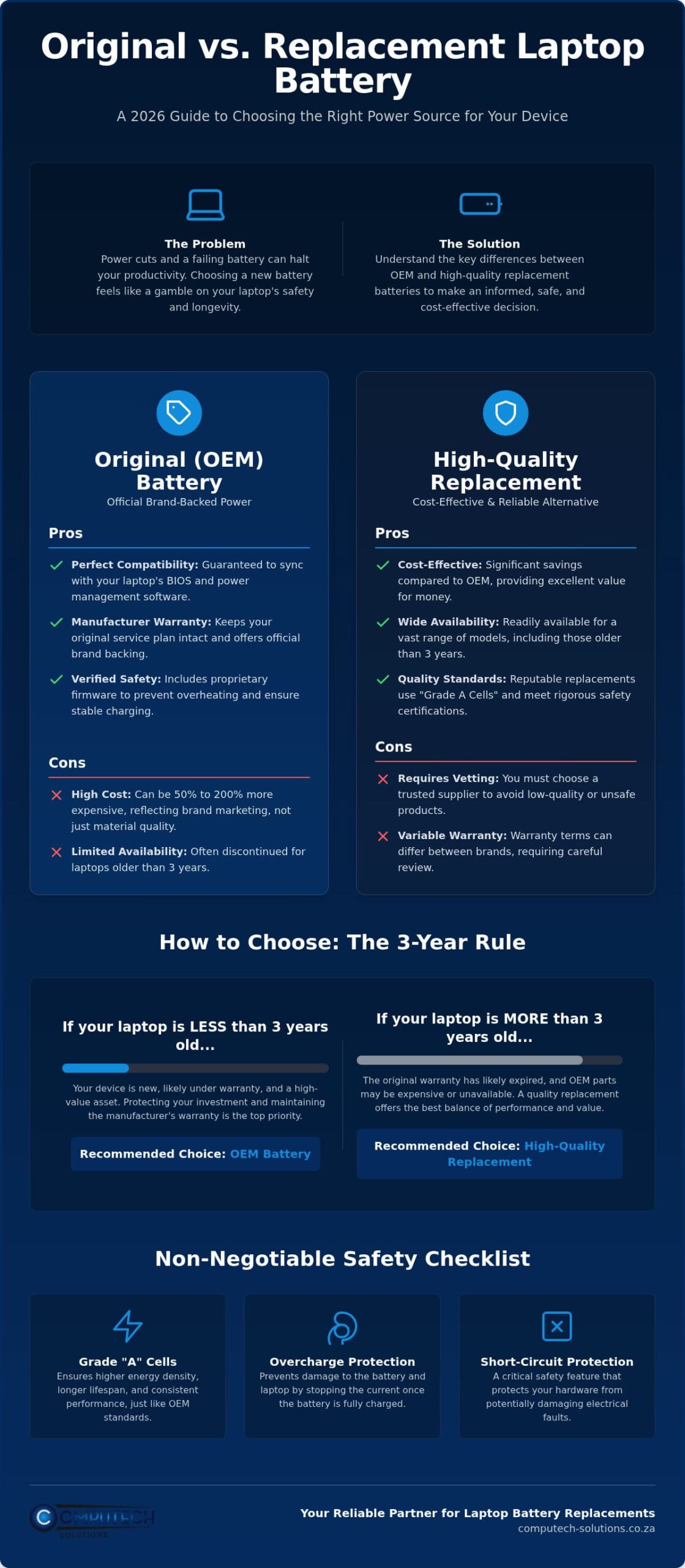
OEM stands for Original Equipment Manufacturer. These units are produced specifically for the laptop brand, such as Acer or Lenovo. They carry the official company logo and are designed to sync perfectly with your device’s BIOS and proprietary power management software. They offer total peace of mind and official brand backing. However, they also come with a premium price tag that reflects the brand’s overhead and marketing costs rather than just the raw materials used.
What is a Replacement Battery?
A replacement battery is a third-party component built to match the original’s physical and electrical specifications. These aren’t necessarily “knock-offs” or low-quality alternatives. High-tier replacements utilize the same chemical standards as OEM models but are sold under independent labels. They serve as a cost-effective alternative, especially for laptops older than three years. In many cases, a replacement is the only way to keep an older machine running when the manufacturer has stopped producing official parts. The debate over an original vs replacement laptop battery often centers on finding the right balance between cost and verified safety circuits.
The decision regarding your power source hinges on the age of your device and your specific budget. While OEMs provide a guaranteed fit, premium replacements offer a streamlined solution for those who need reliable power without the brand-name markup. We focus on providing hardware that meets rigorous safety standards, ensuring your laptop remains a stable tool for growth even when the national grid fails.
The Benefits and Drawbacks of Investing in OEM Batteries
Investing in an OEM battery is often viewed as the default choice for users who prioritize total system synergy. When evaluating an original vs replacement laptop battery, the primary benefit of the original is the certainty that the hardware meets every internal specification set by the manufacturer. These units include proprietary safety firmware that communicates directly with the motherboard. This ensures the charging logic is perfectly calibrated, which reduces the risk of overheating during intense workloads.
This technical alignment is a major part of the peace of mind factor. Official brand batteries are built to handle the specific voltage fluctuations of their host devices. For those managing high-value workstations, this level of security is often worth the premium price. It is helpful to consult a consumer safety guide for lithium-ion batteries to understand why verified safety circuits are vital for operational stability. If a component fails within the warranty period, having an official part keeps your manufacturer service plan intact without the risk of a rejected claim.
However, the branding carries a significant financial burden. In the South African market, you may pay between 50% and 200% more for a battery simply because it carries a specific logo. This isn’t always a reflection of superior chemical quality. Instead, it covers the brand’s global logistics and marketing costs. Additionally, many manufacturers stop producing original batteries for laptops older than three years. This leaves users with no official recourse when their older hardware still has years of functional life left but requires a fresh power source.
Pros of Choosing Original Equipment
OEM batteries offer a seamless fit and finish that matches your laptop chassis exactly. There’s no risk of the battery bulging or failing to click into place. You also gain access to official support channels. If the battery fails prematurely, the brand is obligated to replace it under their standard warranty terms. This level of support serves as a safety net for business users who cannot afford unexpected downtime or technical disruptions.
Cons of OEM Purchases
The most glaring drawback is the high upfront cost. This can be prohibitive when managing a fleet of devices or trying to extend the life of a budget machine. Sourcing these batteries for discontinued ranges is also notoriously difficult. Many brands prioritize parts for their newest models, which leaves older but capable machines in the lurch. High-end premium replacements often match the capacity of OEM units, so the extra cost doesn’t always buy you more run-time. If you need a cost-effective fix, you can browse our range of replacement batteries to find a compatible match for your specific model.
Evaluating High-Quality Generic Replacement Batteries: Performance and Safety
The skepticism surrounding third-party hardware often stems from a lack of technical transparency. In the debate over an original vs replacement laptop battery, many users assume that anything without a brand logo is a safety risk. This is a misconception that overlooks the rigorous manufacturing standards used by premium generic producers. Quality is determined by internal components rather than the sticker on the casing. High-tier replacements are engineered to meet or exceed the performance of their branded counterparts by utilizing the same chemical foundations.
Safety remains the primary concern for any professional. A reliable battery must include a sophisticated Battery Management System (BMS). This circuit acts as a digital sentry, monitoring voltage levels and temperature to prevent thermal runaway. Unlike “cheap fakes” found on unverified marketplaces, premium replacements feature robust overcharge and short-circuit protection. These safeguards ensure that even during the rapid charging cycles required between load shedding windows, your laptop hardware remains protected from electrical surges.
One surprising advantage of choosing a high-quality replacement is the “freshness” factor. OEM batteries for older laptop models often sit in warehouses for years before being sold. Because lithium-ion cells degrade naturally over time, even while sitting on a shelf, an aged “original” battery may have lost a significant portion of its total capacity. A newly manufactured premium replacement often provides better runtime and a longer overall lifespan simply because the chemical components are at their peak state when you receive them.
Inside a Premium Replacement Battery
The heart of a quality replacement is the Intelligent Control (IC) chip. This component manages power distribution and ensures the battery reports accurate “time remaining” data to your operating system. These units use lithium-ion cells sourced from reputable global manufacturers that supply the same raw materials used in branded electronics. Grade A cells are the industry benchmark for cycle life, offering the highest number of charge and discharge cycles before capacity begins to fade.
Common Myths About Replacement Batteries
- Myth: They will always damage your laptop’s motherboard. Fact: A battery with a verified BMS and the correct voltage rating is electrically indistinguishable from an OEM unit to your motherboard.
- Myth: They only hold half the advertised capacity. Fact: While budget fakes often lie about mAh ratings, premium replacements are tested to ensure they meet the specific Watt-hour (Whr) requirements of your device.
- Fact: Most ‘original’ cells are made by the same factories as premium replacements. Major brands like Dell or HP don’t manufacture their own cells; they buy them from specialized factories that also produce high-end generic parts.
We vet every component to ensure it meets these high standards for the South African market. By focusing on high-tier hardware for brands like Acer, Dell, and Lenovo, we provide a definitive solution that balances cost and operational safety. Our expert technical support helps you match the exact specifications required for your model, ensuring your replacement performs reliably from day one.
How to Choose: A Practical Comparison Framework for 2026
Deciding between an original vs replacement laptop battery requires a logical assessment of your device’s lifecycle and your daily operational needs. Brand loyalty shouldn’t be the only factor in your decision. Instead, we recommend using the 3-year rule as a primary benchmark. If your laptop is less than three years old, it likely still holds significant resale or trade-in value, making an OEM investment more justifiable. For devices older than this threshold, the cost of an original battery often represents a disproportionate percentage of the machine’s total remaining value.
Your specific usage patterns also dictate the level of investment required. Professional workstations used for mission-critical tasks like financial modeling or engineering require absolute stability. In these scenarios, the internal firmware synchronization of an original unit provides an extra layer of protection against unexpected shutdowns. For casual home browsing or student use, a high-quality replacement offers the same functional utility at a fraction of the price. You must balance the upfront cost against the expected remaining life of the laptop to ensure you aren’t over-investing in aging hardware.
The South African power climate adds another layer of complexity to this choice. Frequent load shedding forces batteries through rapid discharge and recharge cycles. This accelerated wear means you might find yourself replacing a power cell every 18 to 24 months rather than the standard three to five years. When cycling is this frequent, the lower cost of a premium replacement becomes a strategic advantage. It allows you to maintain mobility without the financial strain of repeated OEM purchases. If you are ready to restore your device’s mobility, you can view our replacement battery catalog to find a compatible match for your model.
When to Buy Original
- The laptop is under 12 months old and remains under the manufacturer’s official warranty.
- You are performing mission-critical work where any technical disruption results in immediate financial loss.
- The price gap between the OEM unit and a premium replacement is negligible for your specific model.
- Your corporate IT policy mandates the use of branded components for compliance or insurance reasons.
When to Choose a High-Quality Replacement
A replacement is the logical choice when your laptop is older than three years and out of its original warranty period. It is also a definitive solution when the manufacturer has discontinued the part, which is common for older Acer, Dell, or HP ranges. Choosing a high-tier generic allows you to keep a secondary device mobile or extend the life of a budget machine without overspending. This approach ensures you get the power you need while maintaining a sensible safety-to-cost ratio for your hardware.
Why Computech-Solutions Is Your Reliable Partner for Laptop Battery Replacements
Choosing between an original vs replacement laptop battery doesn’t have to be a technical headache. We provide the technical expertise needed to navigate this decision with confidence. Our focus is on supplying high-tier hardware that meets the specific demands of the South African market. We specialize in components for major brands including Acer, Apple, Dell, HP, and Lenovo. We also maintain stock for ASUS, Samsung, Sony, and Toshiba devices. This extensive range ensures that regardless of your laptop’s age or model, we have a power solution that fits your operational requirements.
Technical accuracy is the foundation of our service. Many users struggle with confusing specifications like mAh and Whr ratings. Our technical support team uses your serial number to ensure a perfect match. This prevents the frustration of ordering a part that doesn’t fit or fails to communicate with your BIOS. We only source batteries that utilize Grade A cells and integrated safety circuits. This commitment to quality means you receive a component that performs reliably during the rapid cycling caused by frequent power outages. Finding the right balance in the original vs replacement laptop battery debate is easier when you have a partner who understands the hardware specifications of your specific machine.
Our National Service Commitment
We understand that a dead battery is a significant operational risk. To minimize your downtime, we offer nationwide delivery across South Africa. Your order is shipped directly to your door or office, ensuring a quick fix for your mobile workstation. Our online ordering system is streamlined for both individual home users and large-scale business fleets. This efficient logistics model is backed by authoritative technical support. We help you verify your model before you purchase, which eliminates the risk of technical mismatches and returns.
The Total Solution for Laptop Maintenance
Our expertise extends beyond power cells. We provide a total solution for laptop maintenance, including Laptop Chargers and Laptop LCD Replacement Panels. We also supply keyboards and adapters to keep your hardware in peak condition. For South African users relying on solar and power backup systems, our high-capacity replacement batteries provide the stable bridge needed during power transitions. We ensure your laptop remains a reliable tool for growth and efficiency. View our full range of replacement laptop batteries here to restore your device’s mobility today.
Secure Your Mobile Productivity for the Years Ahead
Choosing the right power source is a strategic decision that balances your device’s lifecycle with the daily reality of South Africa’s power challenges. The choice between an original vs replacement laptop battery ultimately depends on your hardware’s age and your specific performance requirements. While OEM units provide brand-specific firmware, premium replacements offer a streamlined, cost-effective way to maintain high performance without the brand-name markup. Focus on Grade A cells and verified safety circuits to ensure your laptop remains a stable tool for growth.
We are specialists in Acer, Dell, and HP replacements, providing the technical expertise needed to match your serial number with precision. Our expert technical support is included with every purchase to alleviate the stress of technical mismatches. Combined with our nationwide South African delivery, we ensure you get back to work quickly. Browse our high-quality replacement laptop batteries to find the definitive power solution for your device today. Reliability is within reach; take the next step to secure your mobile workstation.
Frequently Asked Questions
Will a replacement battery void my laptop’s warranty?
Installing a replacement battery does not automatically void your laptop’s hardware warranty. In many regions, “Right to Repair” legislation prevents manufacturers from penalizing users for using third-party components. However, if a low-quality part causes direct damage to the motherboard, the manufacturer may refuse to cover that specific repair. It is always wise to check your specific service plan before making a change to a device that’s still under its initial 12-month coverage period.
How long should a high-quality replacement laptop battery last?
A high-quality replacement battery typically provides between 300 and 1,000 charge cycles. This generally translates to two to five years of reliable use depending on your daily workload. Because modern lithium-ion technology degrades with every discharge, frequent cycling during load shedding may shorten this window. Maintaining your battery between 20% and 80% charge can help extend its functional lifespan and ensure you get the maximum value from your investment.
Why is there such a large price difference between original and generic batteries?
The price gap is primarily driven by brand overhead and global marketing costs rather than the raw cost of the lithium-ion cells. When comparing an original vs replacement laptop battery, the OEM version includes a significant markup to cover the manufacturer’s extensive logistics and warranty infrastructure. Premium replacements bypass these corporate expenses by selling directly to specialized retailers. This allows you to access the same chemical standards and safety circuits without paying for a brand-name logo.
Can a replacement battery damage my laptop’s internal components?
A replacement battery won’t damage your internal components if it includes a verified Battery Management System (BMS). High-tier hardware is engineered with overcharge and short-circuit protection to ensure electrical stability. Risks only arise when using unverified, “budget” fakes that lack these critical safety circuits. By choosing a reputable supplier that focuses on Grade A cells, you ensure that the voltage levels remains consistent with your laptop’s specific requirements.
How can I tell if a replacement battery is of good quality?
Look for safety certifications such as UL Listed, CE marking, and RoHS compliance to verify a battery’s quality. These labels indicate the hardware has passed rigorous testing for health and environmental safety. A premium unit will also specify the use of Grade A cells and include a dedicated Intelligent Control chip. Avoid any product that lacks clear technical specifications or is sold at a price that seems unrealistically low compared to other market alternatives.
What should I do if my laptop doesn’t recognize the new replacement battery?
If your device fails to recognize a new battery, perform a full power cycle by holding the power button for thirty seconds with the battery removed. You should also check for BIOS updates from your manufacturer, as these often include fixes for battery communication issues. If the problem persists, calibrate the unit by charging it to 100% and then allowing it to drain completely. Our technical support team can assist with specific model matching if recognition errors continue.
Do you deliver laptop batteries nationwide in South Africa?
We provide nationwide delivery across South Africa to ensure you receive your hardware regardless of your location. Whether you are based in a major hub like Johannesburg or a more remote area, our logistics network handles the secure transport of lithium-ion components. This service is designed to get your mobile workstation back to full capacity quickly. Most orders are processed and dispatched with tracking information so you can monitor your delivery in real-time.
Is it better to buy a replacement battery or a new laptop?
Replacing the battery is almost always the better financial choice if your laptop is less than five years old and meets your performance needs. A new power cell can restore your device to its original mobility for a fraction of the cost of a new machine. However, if your hardware struggles with modern software or has physical damage, it might be time to upgrade. Evaluating the original vs replacement laptop battery cost against a new purchase helps maximize your hardware’s lifecycle.
